K8sGPT

The conversation about Artificial Intelligence is so predominant that it's surprising we haven't yet seen an application for Kubernetes. The K8sGPT project emerges as an initiative to unite Kubernetes and AI, aiming to analyze how this fusion can provide tangible benefits.
Although the K8sGPT project is in its early stages of development, it promises to be a revolutionary tool in the way we interact with Kubernetes, as long as the AI model is trained properly.
To learn more about the K8sGPT project, visit K8sGPT.
What's the problem?
When we face technical challenges, our usual approach is to resort to platforms like Stack Overflow or search for issues in Github repositories. We usually post our problems and examine the answers looking for the most appropriate one. However, we often share only a fraction of the problem or error, and none of these tools can be where we are - sitting in front of the computer, dealing with something complex and constantly changing.
To properly solve these problems, we need to change context, accessing logs, data in tools like Grafana, Jaeger and Kiali, or consulting team colleagues on Slack. We have access to the terminal, where we can interact with the cluster using kubectl to get more information.
However, we end up spending a lot of time copying and pasting data from one side to the other trying to solve the problem. What we really want is a tool that is by our side, with access to the data we have, to help us investigate the problem without compromising information security.
Our search is for a solution that allows us to interact with an AI capable of deeply analyzing our cluster directly from the terminal we're working in, without the need to change context. This ideal AI would be capable of:
- Identifying problems in the cluster.
- Explaining the problem.
- Fixing or proposing solutions if not able to fix.
- Suggesting improvements
Although we can dream of a perfect AI that solves all our problems, we must be realistic and understand that many issues are related to desired architecture or high-level decisions. However, even if not perfect, an AI that works with us and helps us perform tasks more efficiently would be a significant advance in the Kubernetes universe.
I was searching in CNCF and found K8sGPT and decided to analyze to see what gain will be possible.
Installation
I have a local cluster using kind already for our example. We don't have anything running in our cluster to evaluate yet, we'll just install K8sGPT and then put some wrong things for it to evaluate. In a second moment we'll try to provide more data using more metrics to see what it can do.
We can just use the K8sGPT binary which will interact with our cluster bringing results without needing anything installed in the cluster. We can also use the K8sGPT-Operator which is installed inside the cluster and will do this analysis. We can have both installed, but each has its independent configurations.
To install the binary:
sudo apt-get update
sudo apt-get install build-essential -y

curl -LO https://github.com/k8sgpt-ai/k8sgpt/releases/download/v0.3.29/k8sgpt_amd64.deb
sudo dpkg -i k8sgpt_amd64.deb

k8sgpt version
k8sgpt: 0.3.29 (5db4bc2), built at: unknown

# This step is to create auto complete in my scenario. It's not necessary if you don't use the zsh-completions plugin from Oh My ZSH
k8sgpt completion zsh > .oh-my-zsh/custom/plugins/zsh-completions/src/_k8sgpt

k8sgpt
analyze      -- This command will find problems within your Kubernetes cluster
auth         -- Authenticate with your chosen backend
cache        -- For working with the cache the results of an analysis
completion   -- Generate the autocompletion script for the specified shell
filters      -- Manage filters for analyzing Kubernetes resources
generate     -- Generate Key for your chosen backend (opens browser)
help         -- Help about any command
integration  -- Integrate another tool into K8sGPT
serve        -- Runs k8sgpt as a server
version      -- Print the version number of k8sgpt
The client will use the current context set in your kubeconfig to identify the cluster it will look for the service we'll install below.
Now let's download the K8sGPT Operator chart, make some adjustments and apply to our cluster.
# Add repo
helm repo add k8sgpt https://charts.k8sgpt.ai/
helm repo update
helm show values k8sgpt/k8sgpt-operator > values.yaml
This is the default values.yaml, but we can make some changes before starting.
serviceMonitor:
  enabled: false
  additionalLabels: {}
  # The namespace where Prometheus expects to find the serviceMonitor
  # namespace: ""
grafanaDashboard:
  enabled: false
  # The namespace where Grafana expects to find the dashboard
  # namespace: ""
  folder:
    annotation: grafana_folder
    name: ai
  label:
    key: grafana_dashboard
    value: "1"
  # create GrafanaDashboard custom resource referencing to the configMap.
  # according to https://grafana-operator.github.io/grafana-operator/docs/examples/dashboard_from_configmap/readme/
  grafanaOperator:
    enabled: false
    matchLabels:
      dashboards: "grafana"
controllerManager:
  kubeRbacProxy:
    containerSecurityContext:
      allowPrivilegeEscalation: false
      capabilities:
        drop:
        - ALL
    image:
      repository: gcr.io/kubebuilder/kube-rbac-proxy
      tag: v0.15.0
    resources:
      limits:
        cpu: 500m
        memory: 128Mi
      requests:
        cpu: 5m
        memory: 64Mi
  manager:
    sinkWebhookTimeout: 30s
    containerSecurityContext:
      allowPrivilegeEscalation: false
      capabilities:
        drop:
        - ALL
    image:
      repository: ghcr.io/k8sgpt-ai/k8sgpt-operator
      tag: v0.1.2  # x-release-please-version
    resources:
      limits:
        cpu: 500m
        memory: 128Mi
      requests:
        cpu: 10m
        memory: 64Mi
  replicas: 1
  ## Node labels for pod assignment
  ## ref: https://kubernetes.io/docs/user-guide/node-selection/
  #
  nodeSelector: {}
kubernetesClusterDomain: cluster.local
metricsService:
  ports:
  - name: https
    port: 8443
    protocol: TCP
    targetPort: https
  type: ClusterIP
Looking at the values above we can observe that K8sGPT accesses the metrics server metrics, let's ensure installation. The metric server needs to be working in the cluster.
curl -LO https://github.com/kubernetes-sigs/metrics-server/releases/latest/download/high-availability-1.21+.yaml
kubectl apply -f high-availability-1.21+.yaml
If you're having any problem because you're using kind you need to add this argument to the deployment.
      containers:
      - args:
        - --cert-dir=/tmp
        - --secure-port=10250
        - --kubelet-preferred-address-types=InternalIP,ExternalIP,Hostname
        - --kubelet-use-node-status-port
        - --metric-resolution=15s
        - --kubelet-insecure-tls # Add this
And check if it's working.
kubectl get deployments.apps -n kube-system metrics-server
NAME             READY   UP-TO-DATE   AVAILABLE   AGE
metrics-server   2/2     2            2           5m54s
We can see it also has connection with Prometheus and Grafana so let's deploy. To make it easier we'll use Prometheus-Stack which already contains the complete observability stack including these two tools configured. dashboards.
The login for grafana is user: admin and password: prom-operator.
helm repo add prometheus-community https://prometheus-community.github.io/helm-charts
helm repo update
helm install observability prometheus-community/kube-prometheus-stack -n observability --create-namespace --set prometheus.prometheusSpec.serviceMonitorSelectorNilUsesHelmValues=false

kubectl get pods -n observability
NAME                                                     READY   STATUS    RESTARTS   AGE
alertmanager-observability-kube-prometh-alertmanager-0   2/2     Running   0          4m30s
observability-grafana-7dc45dccc7-ht58h                   3/3     Running   0          4m40s
observability-kube-prometh-operator-69f7854756-hskn4     1/1     Running   0          4m40s
observability-kube-state-metrics-6bfd9996d-42pq5         1/1     Running   0          4m40s
observability-prometheus-node-exporter-d74bb             1/1     Running   0          4m40s
observability-prometheus-node-exporter-mfsvw             1/1     Running   0          4m40s
observability-prometheus-node-exporter-wlxh2             1/1     Running   0          4m40s
prometheus-observability-kube-prometh-prometheus-0       2/2     Running   0          4m30s
Now let's adjust our values.yaml to enable both features and have everything available.
serviceMonitor:
  enabled: true
grafanaDashboard:
  enabled: true
We can then deploy our K8sGPT once we have the Metric Server, Prometheus and Grafana which is everything we need to apply K8sGPT with its full potential
helm install k8sgpt k8sgpt/k8sgpt-operator -n k8sgpt-operator-system --create-namespace --values values.yaml --wait

k get deployments.apps -n k8sgpt-operator-system
NAME                                        READY   UP-TO-DATE   AVAILABLE   AGE
k8sgpt-k8sgpt-operator-controller-manager   1/1     1            1           24s
We'll use a custom resource definition created for the installation to configure K8sGPT-Operator in our cluster.
The data collected by the client needs to be processed by some backend which are also called Providers. This is a service that provides access to an AI language model. The default backend is OpenAI, but it can be changed if you want.
Since we're doing two installations at the same time, just to separate, let's generate two api keys in your OpenAI account. If you don't have an OpenAI account, create one for free. Go to the link https://platform.openai.com/api-keys and generate one api-key for the operator and another for the client and save it somewhere we'll use them soon.
Let's put the api-key for the operator in the k8sgpt-operator-system namespace which is where we have our operator running.
kubectl create secret generic k8sgpt-secret --from-literal=openai-api-key=YOUR-API-KEY-FOR-OPERATOR -n k8sgpt-operator-system

# Configuring
kubectl apply -f - << EOF
apiVersion: core.k8sgpt.ai/v1alpha1
kind: K8sGPT
metadata:
  name: k8sgpt
  namespace: k8sgpt-operator-system
spec:
  ai:
    enabled: true
    model: gpt-3.5-turbo
    backend: openai
    secret:
      name: k8sgpt-secret
      key: openai-api-key
    # anonymized: false
      language: english
  noCache: false
  version: v0.3.29
  # filters: # Filter settings and other things
  #   - Ingress
  # sink:
  #   type: slack
  #   webhook: <webhook-url>
  # extraOptions:
  #   backstage:
  #     enabled: true
EOF
The filters, sink, extraOptions and other future things would be configured using the custom resource above.
In the case of the cli it would be in ~/.config/k8sgpt/k8sgpt.yaml.
Using K8sGPT
Let's use the client a little. Until now we only have a client which is nothing more than a binary. We also need to configure a backend here. The default backend is OpenAI, but it can be changed if you want.
k8sgpt auth list
Default:
> openai
Active:
> openai
Unused:
> localai
> azureopenai
> noopai
> cohere
> amazonbedrock
> amazonsagemaker

# The command below would be help on how to generate a key for openai backend
k8sgpt generate -b openai
# Opening: https://beta.openai.com/account/api-keys to generate a key for openai
# Please copy the generated key and run `k8sgpt auth` to add it to your config file

# Since it's the default we can just type the command below and paste the api key generated previously for the client
k8sgpt auth add -b openai
Let's do the first analysis of our cluster. I prepared a test pod using a blablabla image that doesn't exist.
# Won't use AI to try to explain the problem
k8sgpt analyze --filter Pod
AI Provider: AI not used; --explain not set

0 default/test(test)
- Error: Back-off pulling image "blablabla"

# With explain we use AI to try to explain the problem
k8sgpt analyze --filter Pod --explain --language English
AI Provider: openai

# Put an image that exists
kubectl set image pod/test  test=nginx:latest
pod/test image updated

## Anonymize serves to mask sensitive data if it exists
k8sgpt analyze --filter Pod --explain --language English --anonymize
AI Provider: openai

No problems detected
K8sGPT is growing expecting many integrations. One that already exists is Trivy which is already widely used to scan security problems in images used by containers.
k8sgpt integration list
Active:
Unused:
> trivy
> aws
> prometheus

# Here we're deploying trivy alongside the k8sgpt namespace, if not passed it will go to default
k8sgpt integration activate trivy -n k8sgpt-operator-system

k get pod -n k8sgpt-operator-system
NAME                                                        READY   STATUS     RESTARTS   AGE
k8sgpt-k8sgpt-operator-controller-manager-d87f55664-rbw9s   2/2     Running    0          26m
node-collector-6c9c585b94-frmqs                             0/1     Pending    0          21s # Explained below
scan-vulnerabilityreport-57fd85d74b-tlt9r                   2/2     Running    0          11s
scan-vulnerabilityreport-644f484554-t85dh                   0/1     Init:0/1   0          10s
scan-vulnerabilityreport-6984ffc9f-xxtd6                    0/1     Init:0/1   0          9s
scan-vulnerabilityreport-757795c96c-4tzld                   3/3     Running    0          17s
scan-vulnerabilityreport-b677d9c7d-fdk42                    3/3     Running    0          13s
trivy-operator-k8sgpt-6c844cf96-wknvj                       1/1     Running    0          22s

k8sgpt integration list
Active:
> trivy
Unused:
> aws
> prometheus
The trivy-operator will try to create a pod on the control plane and if there's a taint it will be in pending state. Just to make this documentation easier and focus on AI, remove the taint from the control plane to allow this pod to proceed.
Let's also put integration with prometheus.
# Prometheus already exists and as we deployed previously
k8sgpt integration activate prometheus -n observability
Activating prometheus integration...
Found existing installation
Activated integration prometheus

k8sgpt integration list
Active:
> trivy
> prometheus
Unused:
> aws
Adding integrations more objects will appear in the filters to be analyzed.
k8sgpt filter list
Active:
> Ingress
> PersistentVolumeClaim
> ReplicaSet
> MutatingWebhookConfiguration
> Deployment
> ValidatingWebhookConfiguration
> PrometheusConfigValidate (integration) # Not default (Appears after prometheus integration)
> VulnerabilityReport (integration) # Not default (Appears after trivy integration)
> StatefulSet
> ConfigAuditReport (integration) # Not default (Appears after trivy integration)
> Service
> PrometheusConfigRelabelReport (integration) # Not default (Appears after prometheus integration)
> Node
> Pod
> CronJob
Unused:
> GatewayClass
> Gateway
> HTTPRoute
> HorizontalPodAutoScaler
> PodDisruptionBudget
> NetworkPolicy
> Log
We can add or remove these filters using the k8sgpt filter command. These are the same filters we can configure in the K8sGPT-Operator custom resource definition.
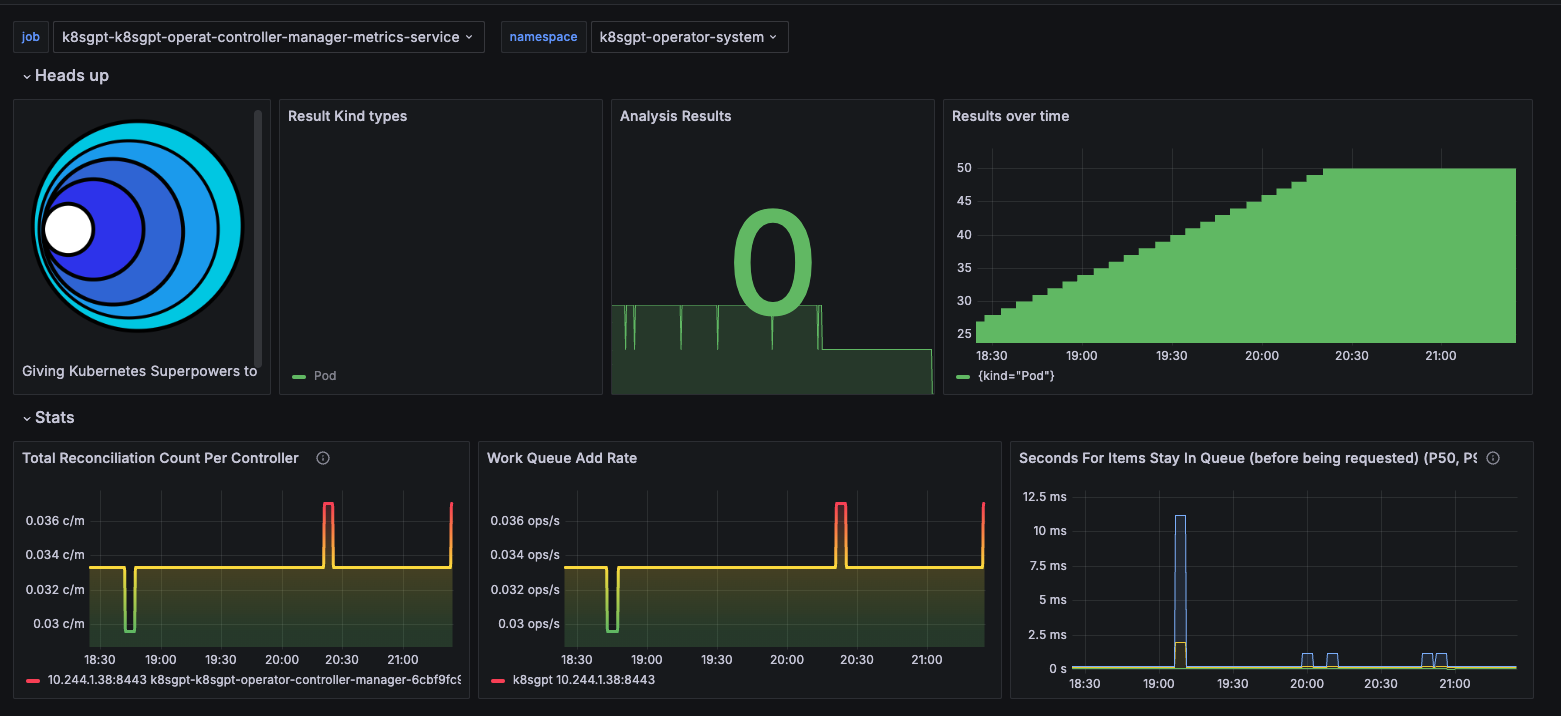
The K8sGPT-operator creates a board in grafana. This board is showing the metrics of the results over the period that were corrected. Every time the pod runs the analysis a result object is created which is a custom resource definition from k8sgpt-operator.
kubectl get results -o json -n k8sgpt-operator-system| jq .
{
  "apiVersion": "v1",
  "items": [
    {
      "apiVersion": "core.k8sgpt.ai/v1alpha1",
      "kind": "Result",
      "metadata": {
        "creationTimestamp": "2024-04-10T00:36:54Z",
        "generation": 1,
        "labels": {
          "k8sgpts.k8sgpt.ai/backend": "openai",
          "k8sgpts.k8sgpt.ai/name": "k8sgpt",
          "k8sgpts.k8sgpt.ai/namespace": "k8sgpt-operator-system"
        },
        "name": "defaulttest",
        "namespace": "k8sgpt-operator-system",
        "resourceVersion": "312762",
        "uid": "f3a5b460-d58c-4e3c-991d-9608044b6812"
      },
      "spec": {
        "backend": "openai",
        "details": "",
        "error": [
          {
            "text": "failed to pull and unpack image \"docker.io/library/blablabla:latest\": failed to resolve reference \"docker.io/library/blablabla:latest\": pull access denied, repository does not exist or may require authorization: server message: insufficient_scope: authorization failed"
          }
        ],
        "kind": "Pod",
        "name": "default/test",
        "parentObject": ""
      },
      "status": {
        "lifecycle": "historical"
      }
    }
  ],
  "kind": "List",
  "metadata": {
    "resourceVersion": ""
  }
}
Conclusion
It's a promising tool if trained correctly. I believe that in this initial phase it needs a lot of contribution to make an accurate analysis.
- Still doesn't do analysis as we'd like
- Poor documentation
- Filters still cover only the basics
- Observing that some integrations increased filters, still needs many integrations like Istio, Nginx, Cert-Manager, External-DNS, etc.