Security API
Então o endpoint está lá e qualquer um pode fazer o que quiser? Claro que não.
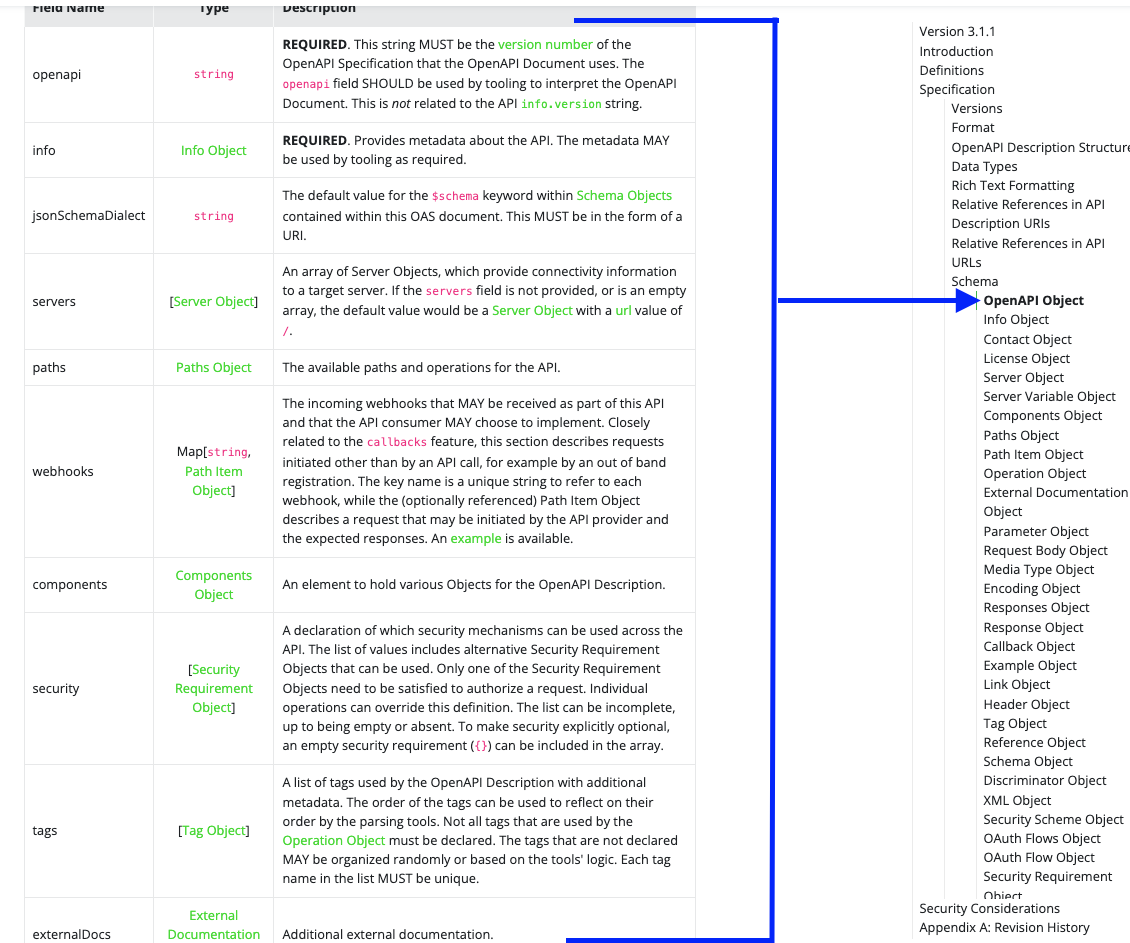
Voltando ao top level da especificação temos o security que espera uma lista de Security Requirement Object que serão usados pelas operações dentro da API. Podemos definir um escopo de cada um desses objetos em uma lista para aplicação global. É possível sobrescrever dentro de cada operação caso necessário.
As definições desses objetos ficam dentro de components em securitySchemes.
#...
security:
  - MeuApiKeyAuth: [] #Security Requirement Object para `ApiKeyAuth`, lista vazia pois não há escopos.
  - MeuOutroApiKeyAuth: []
components:
  ##...
  securitySchemes: # <<<<<<<<<<<<<<<<<<< aqui dentro
    MeuApiKeyAuth:
    #...
    MeuOutroApiKeyAuth:
    #..
  ## ...
Definir um securitySchema depende do tipo de autenticação que deseja usar. Os possíveis parâmetros utilizados aqui são:
type: REQUIRED e pode ser "apiKey", "http", "mutualTLS", "oauth2", "openIdConnect"description:nameSomente usado em quando o type for "apiKey" sendo Obrigatórioin: Somente usado em quando o type for "apiKey" e os possíveis valores são "query", "header", or "cookie" sendo Obrigatório.schemeSomente usado em quando o type for "http" sendo ObrigatóriobearerFormatSomente usado em quando o type for "http" com bearer tokenflowsSomente usado em quando o type for "oauth2" sendo ObrigatórioopenIdConnectUrlSomente usado em quando o type for "openIdConnect" sendo Obrigatório
Podemos ver que temos muitas opções dependendo do type escolhido.
Vamos ilustrar rapidinho só para ver onde cada coisa é definida.
openapi: 3.0.0
info:
#...
security: # Nível global
  - ApiKeyAuth: []

paths:
  /example:
    get:
      summary: Example endpoint
      description: Este endpoint requer uma chave de API no cabeçalho.
      # O campo abaixo sobrescreveria a segurança global, se necessário.
      # Nível local
      # security: ##
      #   - ApiKeyAuth: []
      responses:
      #...
  #...
components:
  securitySchemes:
    ApiKeyAuth:
      type: apiKey
      description: Access using an API Key
      name: X-API-KEY
      in: header
Não vamos nos aprofundar muito sobre os tipos de autenticação, mas como usá-los.
Entendendo acima o conceito vou colocar a API completa do estudo e comentar somente a parte de segurança. Esta é a api final que depois vamos usá-la para geraÇào de código.
openapi: 3.0.2
info:
  title: OpenAPI Course
  description: Specification for OpenAPI Course
  termsOfService: http://example.com/terms/
  contact:
    name: David Puziol
    url: https://devsecops.puziol.com.br
    email: [email protected]
  license:
    name: Apache 2.0
    url: https://www.apache.org/licenses/LICENSE-2.0.html
  version: "1.0"
servers:
- url: https://dev.example.com
  description: Development Server
- url: https://qa.example.com
  description: QA Server
- url: https://prod.example.com
  description: Production Server
externalDocs:
  description: Learn more about how to use the API at devsecops.puziol.com.br
  url: https://devsecops.puziol.com.br/docs/development/openapi/1.0%20-%20OpenApi

security: # Irá forçar essas duas autenticações em todos as operações de todos os endepoints.
  - BasicAuth: []
  - JwtAuthToken: []

paths:
  /v1/customers:
    get:
      summary: List of Customers
      description: Get a list of customers in the system
      operationId: listCustomersV1
      externalDocs:
        description: Learn more about how to use the API at devsecops.puziol.com.br
        url: https://devsecops.puziol.com.br/docs/development/openapi/1.0%20-%20OpenApi
      tags:
        - Customer
      security: [] # Overwrite aqui para não precisar de autenticação
      parameters:
        - $ref: "#/components/parameters/PageNumber"
        - $ref: "#/components/parameters/PageSize"
      requestBody:
        description: user to add to the system
        required: true
        content:
          text/plain:
            schema:
              type: array
              items:
                type: string
      responses:
        200:
          description: List of Customers
          content:
            application/json:
              schema:
                $ref: '#/components/schemas/CustomerPagedList'
    post:
      summary: New Customer
      description: Create a new customer
      operationId: newCustomer
      tags:
        - Customer
      requestBody:
        required: true
        content:
          application/json:
            schema:
              $ref: '#/components/schemas/Customer'
      responses:
        201:
          description: New Customer Created
          headers:
            location:
              schema:
                description: Location of the created resource
                type: string
                format: uri
        400:
          description: Bad Request
        409:
          description: Conflict

  /v1/customers/{Id}:
    get:
      summary: Get a Customer
      description: Get a single customer by its ID value
      operationId: getCustomerById
      tags:
        - Customer
      parameters:
        - $ref: '#/components/parameters/Id'
      responses:
        200:
          description: Found Customer
          content:
            application/json:
              schema:
                $ref: '#/components/schemas/Customer'
        404:
          description: Not found
    put:
      summary: Update Customer
      description: Update customer by id.
      tags:
        - Customer
      operationId: updateCustomerById
      parameters:
        - $ref: '#/components/parameters/Id'
      requestBody:
        required: true
        content:
          application/json:
            schema:
              $ref: '#/components/schemas/Customer'
      responses:
        204:
          description: Customer Updated
        400:
          description: Bad Request
        404:
          description: Not found
        409:
          description: Conflict
    delete:
      summary: Delete Customer
      description: Delete customer by id.
      tags:
        - Customer
      operationId: deleteCustomerById
      parameters:
        - $ref: '#/components/parameters/Id'
      requestBody:
        required: true
        content:
          application/json:
            schema:
              $ref: '#/components/schemas/Customer'
      responses:
        200:
          description: Customer Deleted
        404:
          description: Not found

  /v1/customers/{customerId}/orders:
    post:
      tags:
      - Order Service
      description: Place Order
      parameters:
      - name: customerId
        in: path
        description: Customer Id
        required: true
        style: simple
        explode: false
        schema:
          type: string
          format: uuid
      requestBody:
        content:
          application/json:
            schema:
              $ref: '#/components/schemas/BeerOrder'
        required: false
      responses:
        201:
          description: Order Created
          headers:
            Location:
              description: Reference to created Order
              style: simple
              explode: false
              schema:
                type: string
                format: uri
        400:
          description: Bad Reqeust
        404:
          description: Not Found
        409:
          description: Conflict
      callbacks:
        orderStatusChange:
          ${request.body#/orderStatusCallbackUrl}:
            description: Webhook for order status change notifications
            post:
              requestBody:
                content:
                  application/json:
                    schema:
                      type: object
                      properties:
                        orderId:
                          type: string
                          format: uuid
                        orderStatus:
                          type: string
              responses:
                200:
                  description: Okay

  /v1/beers:
    get:
      summary: List of beers
      description: Get a list of beers in the system
      operationId: listBeers
      tags:
        - Beer
      parameters:
        - $ref: "#/components/parameters/PageNumber"
        - $ref: "#/components/parameters/PageSize"
      responses:
        200:
          description: List of Beers
          content:
            application/json:
              schema:
                $ref: '#/components/schemas/BeerPagedList'
    post:
      summary: New Beer
      description: Create a new beer
      operationId: newBeer
      tags:
        - Beer
      requestBody:
        required: true
        content:
          application/json:
            schema:
              $ref: '#/components/schemas/Beer'
      responses:
        201:
          description: New Beer Created
          headers:
            location:
              schema:
                description: Location of the created resource
                type: string
                format: uri
        400:
          description: Bad Request
        409:
          description: Conflict

  /v1/beer/{Id}:
    get:
      summary: Get a Customer
      description: Get a single customer by its ID value
      operationId: getBeerById
      tags:
        - Beer
      parameters:
        - $ref: '#/components/parameters/Id' #porém isso irá trazer o name Id
      responses:
        200:
          description: Found Beer
          content:
            application/json:
              schema:
                $ref: '#/components/schemas/Beer'
        404:
          description: Not found
    put:
      summary: Update Beer
      description: Update beer by id.
      tags:
        - Beer
      operationId: updateBeerById
      parameters:
        - $ref: '#/components/parameters/Id'
      requestBody:
        required: true
        content:
          application/json:
            schema:
              $ref: '#/components/schemas/Beer'
      responses:
        204:
          description: Customer Updated
        400:
          description: Bad Request
        404:
          description: Not found
        409:
          description: Conflict
    delete:
      summary: Delete Beer
      description: Delete beer by id.
      tags:
        - Beer
      operationId: deleteBeerById
      parameters:
        - $ref: '#/components/parameters/Id'
      requestBody:
        required: true
        content:
          application/json:
            schema:
              $ref: '#/components/schemas/Beer'
      responses:
        200:
          description: Beer Deleted
        404:
          description: Not found

components:
  securitySchemes:
  ## Nossos dois tipos de autenticação
    BasicAuth:
      type: http
      scheme: basic
    JwtAuthToken:
      type: http
      scheme: bearer
      bearerFormat: JWT
  schemas:
    Address:
      type: object
      properties:
        line1:
          type: string
          example: 123 main
        city:
          type: string
          example: St Pete
        stateCode:
          maxLength: 2
          minLength: 2
          type: string
          description: 2 Letter State Code
          enum:
          - AL
          - AK
          - AZ
          - AR
          - CA
        zipCode:
          type: string
          example: "33701"
    Customer:
      type: object
      properties:
        id:
          type: string
          format: uuid
          readOnly: true
        firstName:
          maxLength: 100
          minLength: 2
          type: string
          example: John
        lastName:
          maxLength: 100
          minLength: 2
          type: string
          example: Thompson
        address:
          $ref: '#/components/schemas/Address'
      description: customer object
    CustomerList:
      maxItems: 100
      minItems: 1
      type: array
      description: List of Customers
      items:
        $ref: '#/components/schemas/Customer'
    CustomerPagedList:
      type: object
      properties:
        content:
          $ref: '#/components/schemas/CustomerList'
      allOf:
      - $ref: '#/components/schemas/PagedResponse'
    Brewery:
      type: object
      properties:
        name:
          type: string
        location:
          type: string
    Beer:
      type: object
      properties:
        id:
          type: string
          format: uuid
          readOnly: true
        beerName:
          type: string
        style:
          type: string
          enum:
          - ALE
          - PALE_ALE
          - IPA
          - WHEAT
          - LAGER
        price:
          type: number
          format: float
        quantityOnHand:
          type: integer
          format: int32
        brewery:
          $ref: '#/components/schemas/Brewery'
      description: Beer Object
    BeerList:
      type: array
      items:
        $ref: '#/components/schemas/Beer'
    BeerPagedList:
      type: object
      properties:
        content:
          $ref: '#/components/schemas/BeerList'
      allOf:
      - $ref: '#/components/schemas/PagedResponse'
    BeerOrder:
      required:
      - customerId
      type: object
      properties:
        id:
          type: string
          format: uuid
          nullable: true
          readOnly: true
        customerId:
          type: string
          format: uuid
        customerRef:
          type: string
          nullable: true
        beerOrderLines:
          type: array
          items:
            $ref: '#/components/schemas/BeerOrderLine'
        orderStatusCallbackUrl:
          type: string
          format: uri
    BeerOrderLine:
      required:
      - orderQuantity
      - upc
      type: object
      properties:
        id:
          type: string
          format: uuid
          nullable: true
          readOnly: true
        beerId:
          type: string
          format: uuid
          readOnly: true
        upc:
          type: string
        orderQuantity:
          maximum: 999
          minimum: 1
          type: integer
        quantityAllocated:
          type: integer
          nullable: true
          readOnly: true
    PagedResponse:
      type: object
      properties:
        pageable:
          $ref: '#/components/schemas/PagedResponse_pageable'
        totalPages:
          type: integer
          format: int32
        last:
          type: boolean
        totalElements:
          type: integer
          format: int32
        size:
          type: integer
          format: int32
        number:
          type: integer
          format: int32
        numberOfElements:
          type: integer
          format: int32
        sort:
          $ref: '#/components/schemas/PagedResponse_pageable_sort'
        first:
          type: boolean
    PagedResponse_pageable_sort:
      type: object
      properties:
        sorted:
          type: boolean
        unsorted:
          type: boolean
    PagedResponse_pageable:
      type: object
      properties:
        sort:
          $ref: '#/components/schemas/PagedResponse_pageable_sort'
        offset:
          type: integer
          format: int32
        pageNumber:
          type: integer
          format: int32
        pageSize:
          type: integer
          format: int32
        paged:
          type: boolean
        unpaged:
          type: boolean
  parameters:
    PageNumber:
      name: pageNumber
      in: query
      description: Page number
      schema:
        type: integer
        format: int32
        default: 1
    PageSize:
      name: pageSize
      in: query
      required: false # esse ja é o padrão
      schema:
        type: integer
        format: int32
    Id:
      name: Id
      in: path
      required: true # esse ja é o padrão
      description: UUID for Id
      schema:
        type: string
        format: uuid
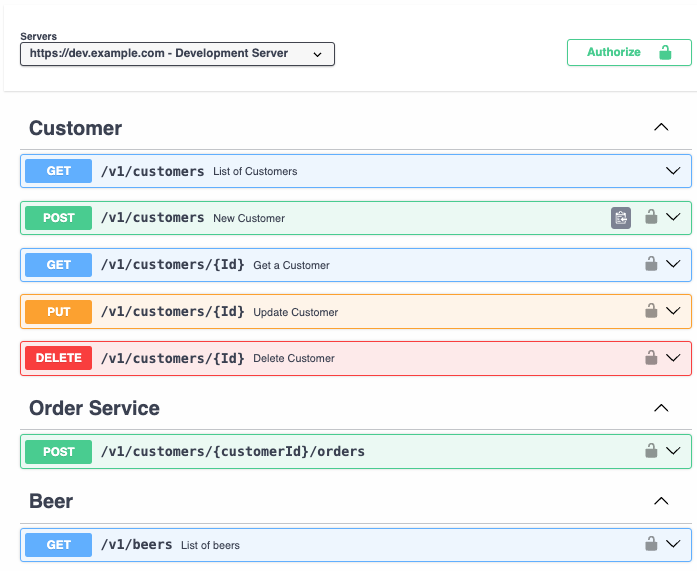
E onde clicar que possui o cadeado irá aparecer isso
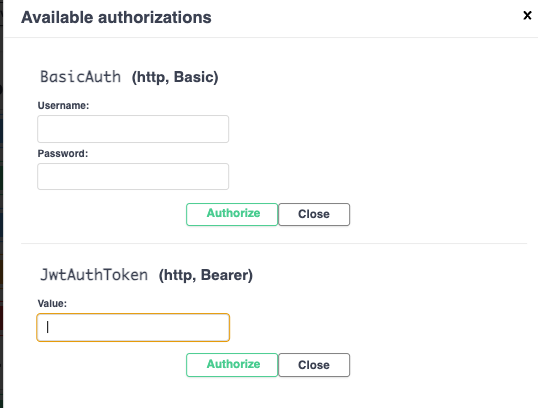
Quando aparecer logado em uma senha qualquer que você colocar nesse momento irá mostrar assim .
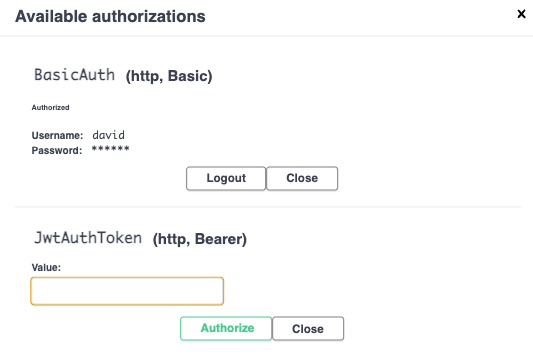
Todas as requisições irão utilizar esse login a partir de agora.