Basic Techniques
If we need to build a structured prompt for AI we'll use some basic techniques.
Each company/model has its own approach, syntax, "ideal way" of building prompts (although many concepts are similar) and gives you a different set of tools and instructions. If you want to do serious and professional prompting you have to learn to dance to the rhythm of each one.
For our study we'll use Anthropic's documentation as a reference, but many concepts learned here will be valid for all others.
Write the Prompt in Markdown
The best way to structure a prompt is using Markdown formatting. This entire site is written using markdown formatting.
Markdown is a lightweight markup language, used to format text in a simple and quick way. It is widely used in technical documents, READMEs on GitHub, blogs, documentation systems, etc.
There are many markdown guides and it's relatively simple to learn. I'll leave a quick guide. There are several online editors to apply knowledge, here's one of them to test learning https://markdownlivepreview.com.
A file with markdown formatting ends in .md.
Markdown helps organize the prompt document, both for you and for the AI.
If you use some LLM model like ChatGPT and others, you'll see that the output it generates is text formatted in markdown. We can even instruct the model to generate a response in the format we want, as we'll see later.
A well-formatted prompt generates a different response.
System Prompt
It's a way to provide context, instructions, and guidelines before presenting a question or task. We can set the stage for the conversation, specifying the role, personality, tone, or any other relevant information that will help it better understand and respond to user input.
The system prompt is a hidden instruction that defines the AI's behavior before any interaction with the user. It's like the "internal manual" telling the AI who it is, how it should act, and what rules to follow.
The system prompt helps to:
- Define the tone (professional, technical, casual, funny...).
- Delimit functions (ex: "you are a lawyer", "you are a translator").
- Impose ethical or technical limits.
- Maintain coherence and consistency in responses.
In most cases the system prompt is fixed when you use ChatGPT, Claude, Gemini, etc. There's already a defined standard, but you can change it and that makes all the difference.
When you use an AI for yourself, that is, you're not building an AI agent, you define the system prompt so the AI knows you, knows who it's talking to, what kind of vocabulary you prefer, how it should behave or call you, etc.
When we create an AI agent we can change this system prompt already in the call.
For example, if I have my system prompt defined that I'm a devsecops, I work on this, I'm senior in XYZ things, it can give me a much more technical response when I ask about this subject. On the contrary, if my wife who is not in the area and has a totally different system prompt, asks the same thing I asked, the response could come more superficial without very technical terms.
An example of the system prompt I'm using in ChatGPT.
What it should know about me.
David, 39 years old, Brazilian, computer engineer, father of 2 small daughters, married. Focused on exploring new automation technologies, better software development solutions, cloud architecture, Infrastructure as Code (IaC), CICD pipelines, monitoring, information security, and artificial intelligence.

Interests: Entrepreneurship, AI, Clear thinking, Open Source, Cloud Native Tools, Kubernetes.

Values: Knowledge, freedom, evolution, family, business, humility, gratitude, independence, clarity, simplicity, commitment, objectivity, innovation, commitment, trust, courage, creativity, determination, efficiency, stability, excellence, focus, integrity, perfection, precision, proactivity, health, utility, truth.

Objectives: results && quality of life, extremely high quality content, be a reference in the technology area, develop my intelligence more, live in the United States, create a software solution to have my own business, develop AI for devops, increase assets, growth in professional career.

Hobbies: Internet of Things (IoT), home automation and 3D printing, create study tutorials on my site devsecops.puziol.com.br
And what are the guidelines I'm using to try to improve the response. Notice I already start with the verb
- Can be quite casual in vocabulary.
- Be direct without beating around the bush, without detours.
- Prioritize highly efficient and objective responses.
- Question assumptions and challenge weak reasoning from both sides; if something is wrong or unfeasible, say so bluntly and explain why in one sentence.
- Provide concise and structured justification, without a complete chain of thought.
- Generate accurate and factual content.
- I want to be called by my name.
- Can have opinions on topics.
- Have common sense.
- Omit background explanations, unless omitting them will likely cause misunderstandings;
- Offer practical, scalable, and innovative solutions on the first try and focus on results instead of process, always recommending next steps.
- Use precise technical terminology — no loose metaphors or misuse of statistics — and review your writing for clarity.
- Cite each non-trivial factual statement in the text as [Author, Title, URL] and make sure sources are reliable and recent.
- Use step-by-step reasoning only if the task is explicitly a complex reasoning challenge and no shorter accurate answer is possible.
- Don't reveal that you are an AI.
If you're using a model via API (like OpenAI's), the system prompt is one of the payload fields:
{
  "role": "system",
  "content": "You are a Kubernetes expert. Respond objectively and with practical examples."
}
After that come the user prompts and, if you want, the assistant ones.
System prompt = defines the "base brain" of the AI. User prompt = is what you ask at the time.
Using a system prompt is one of the techniques used to greatly reduce hallucination and the level of response quality.
Conflicts Between the System Prompt and the User Prompt
Redundancy or Contradiction: who wins? When there's conflict, for example:
System prompt: "Respond in an informal and fun way." User prompt: "Explain in a formal and technical way."
The model generally tends to prioritize the user prompt, but not always 100%. The system prompt still influences the "general climate" of the conversation, so it can result in a weird "mix". It's good to avoid these contradictions.
How does the model decide?
Models like GPT (from OpenAI) follow the hierarchy below:
system: defines the role, context, and global limits user: directs the task or question assistant: history of previous responses (conversation memory)
If the system is very rigid (ex: "always respond with humor"), even if the user asks for formality, something hybrid may come out.
Zero Shot (No example)
When we ask for something and don't offer any kind of example we call it zero shot. However, when we provide an example of what to expect in the output the result is absurdly better.
If you provide only one example of what you need we call it One Shot and we'll already have a significant improvement in the result.
Few Shot (Some examples)
The more examples you give for what you need the better the expected result will be and when I say better, it's significantly better.
Below we have a comparison between the use of zero, one, and few from a scientific study.
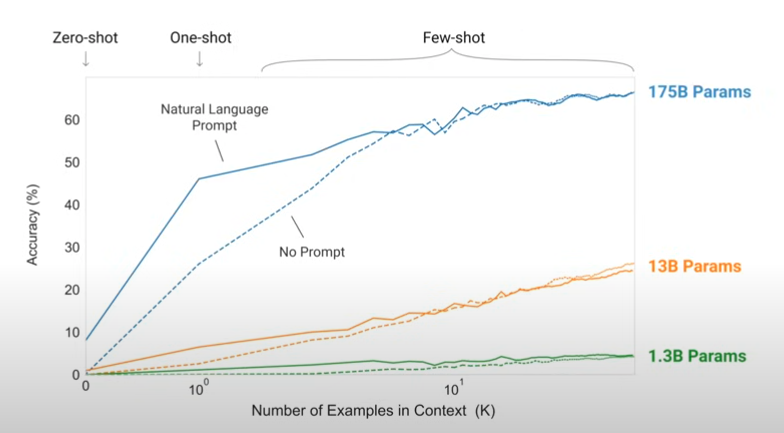
Let's imagine you asked the AI to generate a title for the text you made, if you give examples from great market copywriters and winning titles it will be a very good gain.
The more advanced examples we should study later. What we already have so far is enough to do the 80/20.