Variables, Entornos y Secrets
Vamos a explorar cómo usar variables de entorno y secrets dentro de nuestro workflow.
El repositorio de ejemplo será un poco diferente de los que usamos anteriormente que eran un sitio usando node. Este será un servidor rest api que depende de variables de entorno para funcionar. Al ejecutar el código buscará variables que están definidas en el shell para completar sus constantes. Es una forma muy común de compilar el código sin tener las variables configuradas en algún lugar fuera de la máquina local que está compilando el código.
data/database.js
// Configuran variable constantes basándose en lo que está definido en la consola
const clusterAddress = process.env.MONGODB_CLUSTER_ADDRESS;
const dbUser = process.env.MONGODB_USERNAME;
const dbPassword = process.env.MONGODB_PASSWORD;
const dbName = process.env.MONGODB_DB_NAME;

// Montar una uri para mongodb y crear un cliente con ella
const uri = `mongodb+srv://${dbUser}:${dbPassword}@${clusterAddress}/?retryWrites=true&w=majority`;
const client = new MongoClient(uri);
playwright.config.js
  use: {
    baseURL: `http://127.0.0.1:${process.env.PORT}`,
  },
Variables
Podemos declarar variables en diferentes niveles. Una variable puede declararse para un workflow completo y si la misma variable se declara en los niveles de jobs o steps será sustituida.
Si una variable se declara a nivel de workflow estará presente en todos los jobs en todos los steps. Si se declara en un job estará en todos los steps de ese job. Si se declara a nivel de step solo existirá dentro del step sin ser visible en steps subsiguientes del mismo job.
Vamos a necesitar una base de datos gratuita para mongodb. Ya crea un usuario y una contraseña y después obtén en la url de conexión la dirección.
Habilita en network access para que la base de datos sea accesible desde cualquier ip, es decir, 0.0.0.0/0.
name: Deployment
on:
  push:
    branches:
      - main
      - dev
env: # Nivel de workflow
  # La base de datos tiene el mismo nombre en todos los entornos, cambiando solo la cuenta, por ejemplo.
  MONGODB_DB_NAME: gha-demo
jobs:
  test:
    # Solo el job test tiene acceso a estas variables.
    # Crea una base de datos
    env:
      MONGODB_CLUSTER_ADDRESS: cluster0.rnritqi.mongodb.net
      MONGODB_USERNAME: davidpuziol
      MONGODB_PASSWORD: ZHUFzBKmqO2GfUfy
      PORT: 8080
    runs-on: ubuntu-latest
    steps:
      - name: Get Code
        uses: actions/checkout@v4
      - name: Cache dependencies
        uses: actions/cache@v4
        with:
          path: ~/.npm
          key: npm-deps-${{ hashFiles('**/package-lock.json') }}
      - name: Install dependencies
        run: npm ci
      # Necesitamos que el servidor esté ejecutándose antes del próximo step para hacer las pruebas. El comando espera que utilicemos un puerto. El shell en ese momento ya estará con las variables de entorno cargadas en el job completo, así que solo hay que referenciarlas directamente.
      - name: Run server
      # Referenciamos así porque estamos usando ubuntu-latest, si fuera windows sería diferente.
        run: npm start & npx wait-on http://127.0.0.1:$PORT
      - name: Run tests
        run: npm test
      - name: Output information
        run: |
          echo "MONGODB_USERNAME: $MONGODB_USERNAME"
          echo "MONGODB_USERNAME: ${{ env.MONGODB_USERNAME }}"
          echo "MONGODB_DB_NAME: $MONGODB_DB_NAME"
          echo "MONGODB_DB_NAME: ${{ env.MONGODB_DB_NAME }}"
  deploy:
    needs: test
    runs-on: ubuntu-latest
    steps:
      # No tenemos MONGODB_USERNAME en este job, así que esperamos que solo imprima MONGODB_DB_NAME que está a nivel de workflow.
      - name: Output information
        run: |
          echo "MONGODB_USERNAME: ${{ env.MONGODB_USERNAME }}"
          echo "MONGODB_DB_NAME: $MONGODB_DB_NAME"
Vamos a analizar la salida en el job test, conseguimos acceso a todo.
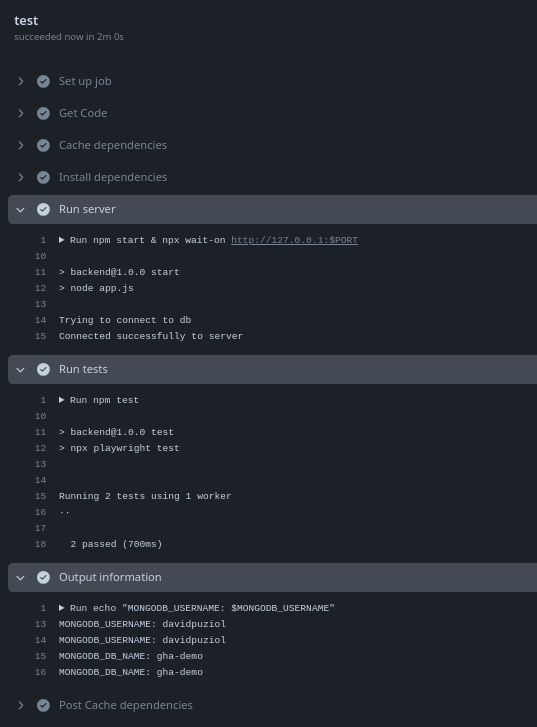
En deploy no tuvimos acceso a la variable del job test.

Existen algunas variables por defecto. Vamos a poner un último step para ver eso. Además de las vars por defecto de github tenemos otras variables de las cosas que vienen instaladas en ubuntu-latest por defecto.
  deploy:
    needs: test
    runs-on: ubuntu-latest
    steps:
      # No tenemos MONGODB_USERNAME en este job, así que esperamos que solo imprima MONGODB_DB_NAME que está a nivel de workflow.
      - name: Output information
        run: |
          echo "MONGODB_USERNAME: ${{ env.MONGODB_USERNAME }}"
          echo "MONGODB_DB_NAME: $MONGODB_DB_NAME"
      - name: Default Vars
        run: env # <<<
El log.
0s
Run env
SELENIUM_JAR_PATH=/usr/share/java/selenium-server.jar
CONDA=/usr/share/miniconda
GITHUB_WORKSPACE=/home/runner/work/gh-fifth-vars/gh-fifth-vars
JAVA_HOME_11_X64=/usr/lib/jvm/temurin-11-jdk-amd64
GITHUB_PATH=/home/runner/work/_temp/_runner_file_commands/add_path_5d7b1057-4bf5-4332-9889-b3272ae532ab
GITHUB_ACTION=__run_2
JAVA_HOME=/usr/lib/jvm/temurin-11-jdk-amd64
GITHUB_RUN_NUMBER=5 # Número de la ejecución del workflow
RUNNER_NAME=GitHub Actions 6
GRADLE_HOME=/usr/share/gradle-8.9
GITHUB_REPOSITORY_OWNER_ID=32808515
ACTIONS_RUNNER_ACTION_ARCHIVE_CACHE=/opt/actionarchivecache
XDG_CONFIG_HOME=/home/runner/.config
DOTNET_SKIP_FIRST_TIME_EXPERIENCE=1
ANT_HOME=/usr/share/ant
JAVA_HOME_8_X64=/usr/lib/jvm/temurin-8-jdk-amd64
GITHUB_TRIGGERING_ACTOR=davidpuziol # Quién disparó el evento
GITHUB_REF_TYPE=branch
HOMEBREW_CLEANUP_PERIODIC_FULL_DAYS=3650
ANDROID_NDK=/usr/local/lib/android/sdk/ndk/27.0.12077973
BOOTSTRAP_HASKELL_NONINTERACTIVE=1
***
PIPX_BIN_DIR=/opt/pipx_bin
STATS_TRP=true
STATS_BLT=true
GOROOT_1_20_X64=/opt/hostedtoolcache/go/1.20.14/x64
GITHUB_REPOSITORY_ID=838486259
DEPLOYMENT_BASEPATH=/opt/runner
GITHUB_ACTIONS=true
STATS_VMD=true
ANDROID_NDK_LATEST_HOME=/usr/local/lib/android/sdk/ndk/27.0.12077973
SYSTEMD_EXEC_PID=591
GITHUB_SHA=8e112ca8305a4077793be7aa0ae9fd49158c6f55
GITHUB_WORKFLOW_REF=davidpuziol/gh-fifth-vars/.github/workflows/deploy.yml@refs/heads/main
POWERSHELL_DISTRIBUTION_CHANNEL=GitHub-Actions-ubuntu22
RUNNER_ENVIRONMENT=github-hosted
STATS_EXTP=https://provjobdsettingscdn.blob.core.windows.net/settings/provjobdsettings-0.5.181+6/provjobd.data
DOTNET_MULTILEVEL_LOOKUP=0
GITHUB_REF=refs/heads/main
RUNNER_OS=Linux
GITHUB_REF_PROTECTED=false
HOME=/home/runner # Ya sabemos dónde irá el ~...
GITHUB_API_URL=https://api.github.com
LANG=C.UTF-8
RUNNER_TRACKING_ID=github_e1af56d0-dc5f-46f5-95ff-cfe245ecf20a
MONGODB_DB_NAME=gha-demo # Una de nuestras variables
RUNNER_ARCH=X64
GOROOT_1_21_X64=/opt/hostedtoolcache/go/1.21.12/x64
RUNNER_TEMP=/home/runner/work/_temp
GITHUB_STATE=/home/runner/work/_temp/_runner_file_commands/save_state_5d7b1057-4bf5-4332-9889-b3272ae532ab
EDGEWEBDRIVER=/usr/local/share/edge_driver
JAVA_HOME_21_X64=/usr/lib/jvm/temurin-21-jdk-amd64
GITHUB_ENV=/home/runner/work/_temp/_runner_file_commands/set_env_5d7b1057-4bf5-4332-9889-b3272ae532ab
GITHUB_EVENT_PATH=/home/runner/work/_temp/_github_workflow/event.json
INVOCATION_ID=d826e8b908d848808f920a99a6079a77
STATS_D=true
GITHUB_EVENT_NAME=push # Evento que generó el workflow
GITHUB_RUN_ID=10255229296
JAVA_HOME_17_X64=/usr/lib/jvm/temurin-17-jdk-amd64
ANDROID_NDK_HOME=/usr/local/lib/android/sdk/ndk/27.0.12077973
GITHUB_STEP_SUMMARY=/home/runner/work/_temp/_runner_file_commands/step_summary_5d7b1057-4bf5-4332-9889-b3272ae532ab
HOMEBREW_NO_AUTO_UPDATE=1
GITHUB_ACTOR=davidpuziol
NVM_DIR=/home/runner/.nvm
SGX_AESM_ADDR=1
GITHUB_RUN_ATTEMPT=1
STATS_RDCL=true
ANDROID_HOME=/usr/local/lib/android/sdk
GITHUB_GRAPHQL_URL=https://api.github.com/graphql
ACCEPT_EULA=Y
RUNNER_USER=runner
STATS_UE=true
USER=runner
GITHUB_SERVER_URL=https://github.com
STATS_V3PS=true
PIPX_HOME=/opt/pipx
GECKOWEBDRIVER=/usr/local/share/gecko_driver
STATS_EXT=true
CHROMEWEBDRIVER=/usr/local/share/chromedriver-linux64
SHLVL=1
ANDROID_SDK_ROOT=/usr/local/lib/android/sdk
VCPKG_INSTALLATION_ROOT=/usr/local/share/vcpkg
GITHUB_ACTOR_ID=32808515
RUNNER_TOOL_CACHE=/opt/hostedtoolcache
ImageVersion=20240730.2.0
DOTNET_NOLOGO=1
GITHUB_WORKFLOW_SHA=8e112ca8305a4077793be7aa0ae9fd49158c6f55
GITHUB_REF_NAME=main
GITHUB_JOB=deploy
XDG_RUNTIME_DIR=/run/user/1001
AZURE_EXTENSION_DIR=/opt/az/azcliextensions
PERFLOG_LOCATION_SETTING=RUNNER_PERFLOG
STATS_VMFE=true
GITHUB_REPOSITORY=davidpuziol/gh-fifth-vars
CHROME_BIN=/usr/bin/google-chrome
GOROOT_1_22_X64=/opt/hostedtoolcache/go/1.22.5/x64
ANDROID_NDK_ROOT=/usr/local/lib/android/sdk/ndk/27.0.12077973
GITHUB_RETENTION_DAYS=90
JOURNAL_STREAM=8:18879
RUNNER_WORKSPACE=/home/runner/work/gh-fifth-vars
LEIN_HOME=/usr/local/lib/lein
LEIN_JAR=/usr/local/lib/lein/self-installs/leiningen-2.11.2-standalone.jar
GITHUB_ACTION_REPOSITORY=
PATH=/snap/bin:/home/runner/.local/bin:/opt/pipx_bin:/home/runner/.cargo/bin:/home/runner/.config/composer/vendor/bin:/usr/local/.ghcup/bin:/home/runner/.dotnet/tools:/usr/local/sbin:/usr/local/bin:/usr/sbin:/usr/bin:/sbin:/bin:/usr/games:/usr/local/games:/snap/bin
RUNNER_PERFLOG=/home/runner/perflog
GITHUB_BASE_REF=
GHCUP_INSTALL_BASE_PREFIX=/usr/local
CI=true
SWIFT_PATH=/usr/share/swift/usr/bin
ImageOS=ubuntu22 # Ubuntu
GITHUB_REPOSITORY_OWNER=davidpuziol
GITHUB_HEAD_REF=
GITHUB_ACTION_REF=
GITHUB_WORKFLOW=Deployment # Nombre del workflow que generó este job
DEBIAN_FRONTEND=noninteractive
GITHUB_OUTPUT=/home/runner/work/_temp/_runner_file_commands/set_output_5d7b1057-4bf5-4332-9889-b3272ae532ab
AGENT_TOOLSDIRECTORY=/opt/hostedtoolcache
_=/usr/bin/env
Tener las variables con valores sensibles inyectadas en el código dentro de nuestro repositorio público todavía no es bueno. Para eso tenemos los secrets. Vamos a modificar para obtener secrets que estén definidos en el repositorio pero no en el código.
  test:
    # Se inyectarán las variables en tiempo de ejecución
    env:
      MONGODB_CLUSTER_ADDRESS: ${{ secrets.MONGODB_CLUSTER_ADDRESS}}
      MONGODB_USERNAME: ${{ secrets.MONGODB_USERNAME }}
      MONGODB_PASSWORD: ${{ secrets.MONGODB_PASSWORD}}
      PORT: 8080
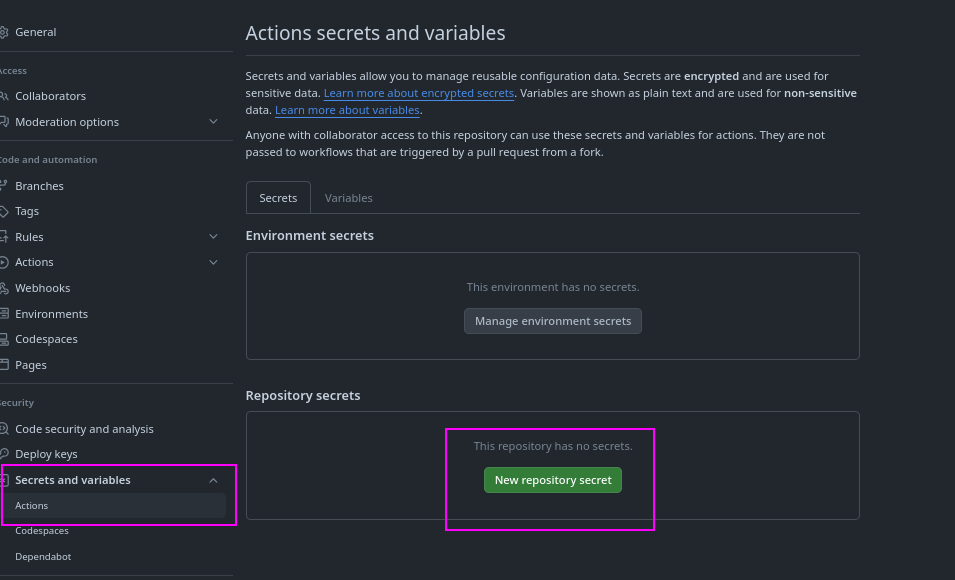
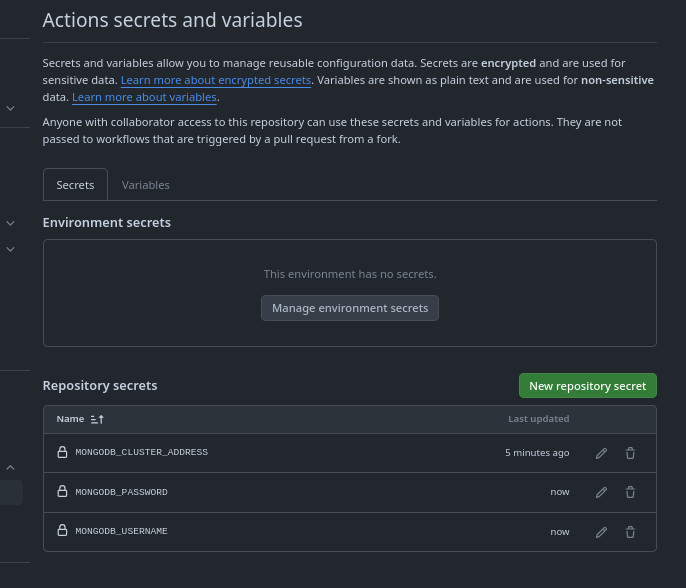
Vamos a ejecutar nuevamente sustituyendo ahora valores que nadie conoce. Algo importante de mencionar y probar es imprimir esas variables en la consola. Se dice que Github no muestra el valor aunque lo imprimas forzadamente. Vamos entonces a forzar que imprima el secret de password para probarlo.
name: Deployment
on:
  push:
    branches:
      - main
      - dev
env:
  MONGODB_DB_NAME: gha-demo
jobs:
  test:

    env:
      MONGODB_CLUSTER_ADDRESS: ${{ secrets.MONGODB_CLUSTER_ADDRESS}}
      MONGODB_USERNAME: ${{ secrets.MONGODB_USERNAME }}
      MONGODB_PASSWORD: ${{ secrets.MONGODB_PASSWORD}}
      PORT: 8080
    runs-on: ubuntu-latest
    steps:
      - name: Get Code
        uses: actions/checkout@v4
      - name: Cache dependencies
        uses: actions/cache@v4
        with:
          path: ~/.npm
          key: npm-deps-${{ hashFiles('**/package-lock.json') }}
      - name: Install dependencies
        run: npm ci

      - name: Run server
        run: npm start & npx wait-on http://127.0.0.1:$PORT
      - name: Run tests
        run: npm test
      - name: Output information # Vamos a intentar imprimir
        run: |
          echo "MONGODB_PASSWORD: ${{ secrets.MONGODB_PASSWORD}}
          echo "MONGODB_PASSWORD: $MONGODB_PASSWORD
          echo "MONGODB_PASSWORD: ${{ env.MONGODB_PASSWORD}}
  deploy:
    needs: test
    runs-on: ubuntu-latest
    steps:
      - name: Output information
        run: |
          echo "MONGODB_USERNAME: ${{ env.MONGODB_USERNAME }}"
          echo "MONGODB_DB_NAME: $MONGODB_DB_NAME"
      - name: Default Vars
        run: env
Y tenemos nuestra salida. ¡Enhorabuena GitHub!

Environment Secrets
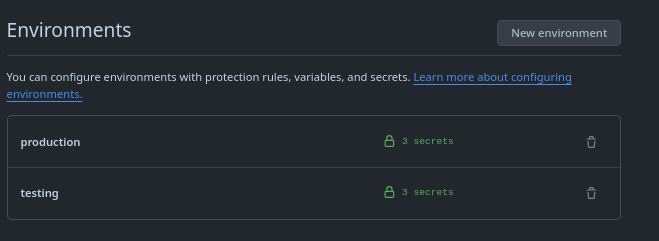
Podemos tener diferentes entornos que ejecutan el mismo código pero estas variables cambian según el entorno. En github podemos crear las variables por entorno. Por ejemplo, tengo dos entornos aquí, testing y production.
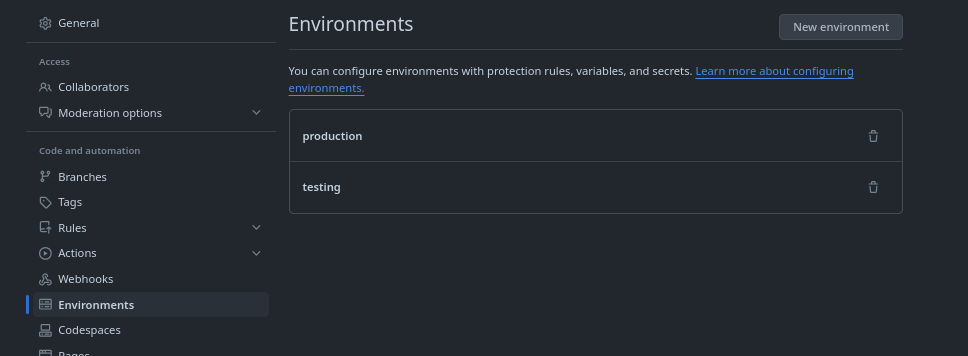
Puedo declarar las mismas variables con el mismo nombre en entornos diferentes con valores diferentes.
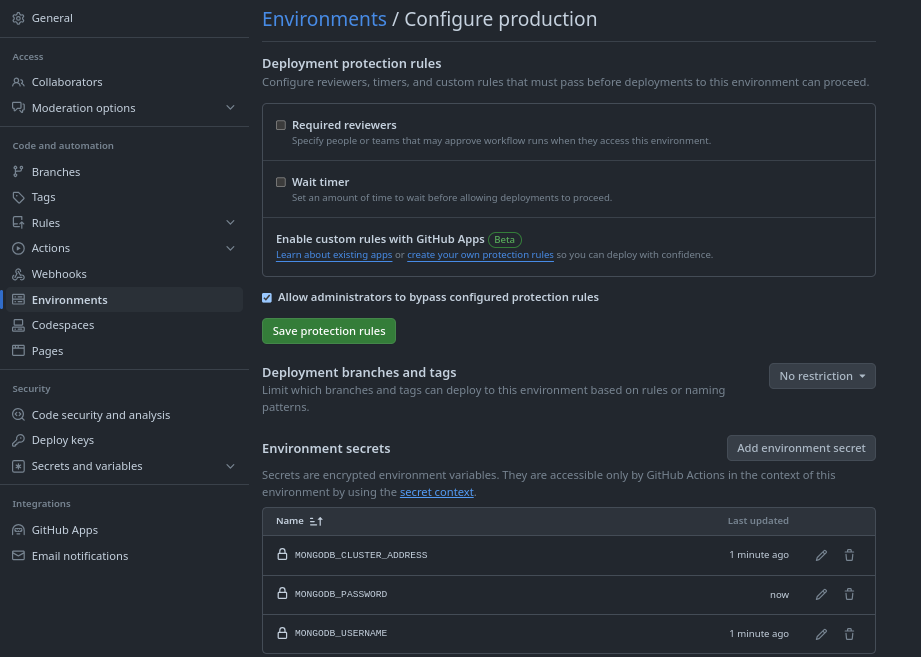
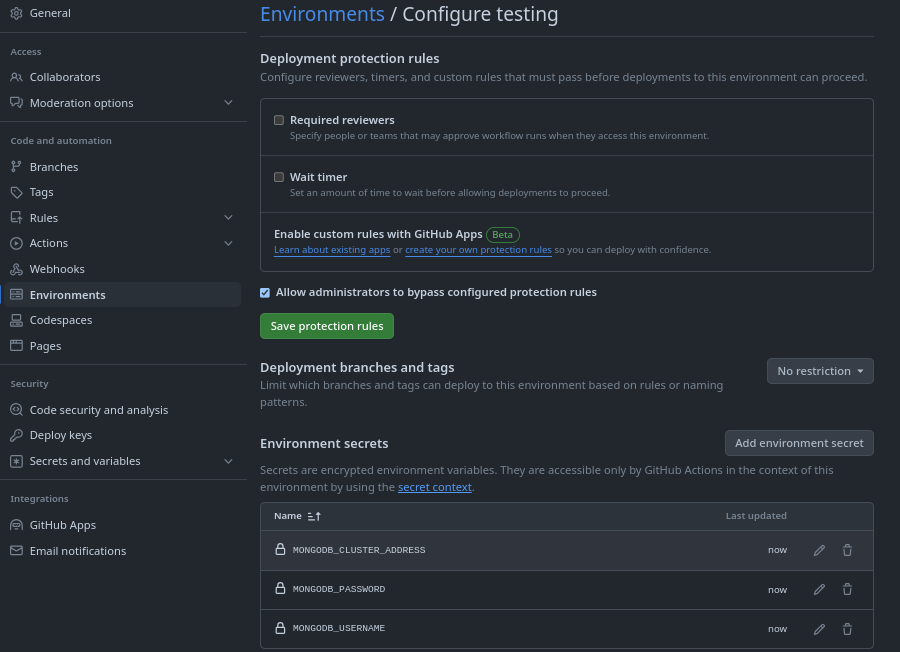
Para usar las variables en el workflow necesitamos indicar qué entorno queremos. Por ejemplo, podemos ejecutar el job de test usando el environment de testing y deploy con variables de production.
jobs:
  test:
    # Si la variable está configurada como global fuera de los environment, en este caso se usará del environment testing. Así que podemos eliminarlo inclusive.
    environment: testing
    env:
      MONGODB_CLUSTER_ADDRESS: ${{ secrets.MONGODB_CLUSTER_ADDRESS}}
      MONGODB_USERNAME: ${{ secrets.MONGODB_USERNAME }}
      MONGODB_PASSWORD: ${{ secrets.MONGODB_PASSWORD}}
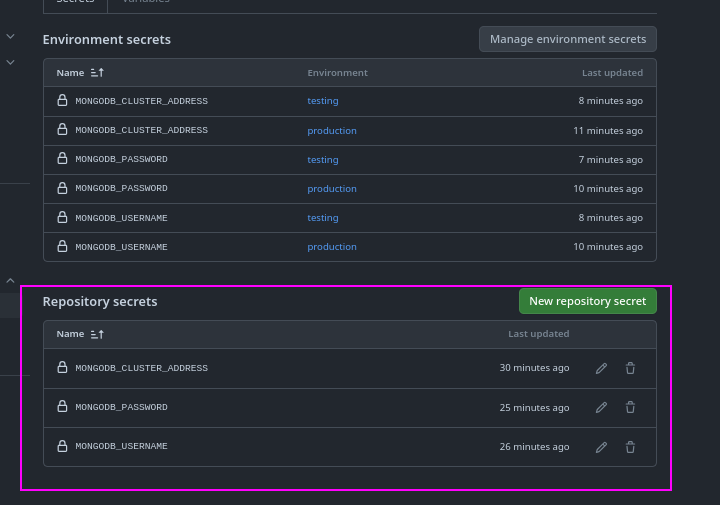
Podemos usar diferentes environments en diferentes jobs. Podemos aplicar una condición basada en branches para configurar las variables de production cuando sea en la branch main y de testing en la branch dev, pero veremos eso después.
Podemos hacer más con environments, no solo secrets. Podemos tener revisores especiales antes de iniciar el workflow.
Podemos añadir un cronómetro de espera antes de cada job antes de ser iniciado.
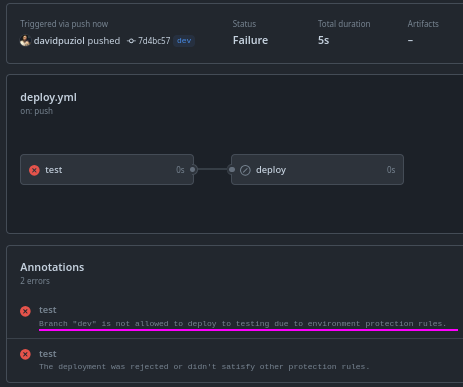
Podemos añadir algunas protecciones para determinadas branches. Un ejemplo sería que un job solo se inicie si una branch específica fue el evento que disparó el workflow.
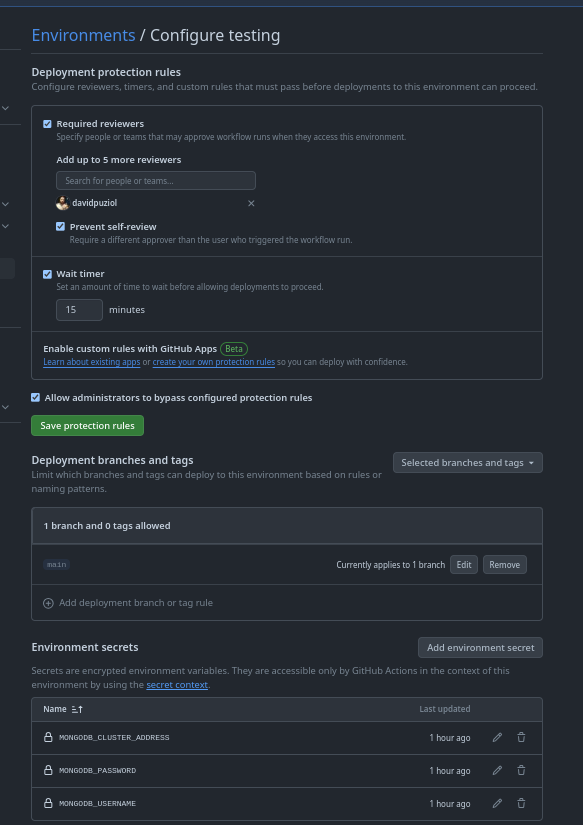
En el workflow que declaramos tenemos las siguientes branches en el push
...
on:
  push:
    branches:
      - main # Este dispararía el job test por la protección que pusimos.
      - dev # Este no dispararía el job test
jobs:
  test:
    environment: testing # <<<<<
Modificamos el workflow para usar el environment testing por ejemplo y tenemos todo funcionando.

Ahora vamos a crear una branch dev y probar.