Variables, Environments and Secrets
Let's explore how to use environment variables and secrets within our workflow.
The example repo will be a bit different from what we used before which was a website using node. This will be a REST API server that depends on environment variables to function. When running the code, it will look for variables that are defined in the shell to complete its constants. It's a very common way to build code without having variables set somewhere outside the local machine that is building the code.
data/database.js
// Sets constant variables based on what is defined in the console
const clusterAddress = process.env.MONGODB_CLUSTER_ADDRESS;
const dbUser = process.env.MONGODB_USERNAME;
const dbPassword = process.env.MONGODB_PASSWORD;
const dbName = process.env.MONGODB_DB_NAME;

// Assembles a URI for MongoDB and creates a client with it.
const uri = `mongodb+srv://${dbUser}:${dbPassword}@${clusterAddress}/?retryWrites=true&w=majority`;
const client = new MongoClient(uri);
playwright.config.js
  use: {
    baseURL: `http://127.0.0.1:${process.env.PORT}`,
  },
Variables
We can declare variables at different levels. A variable can be declared for an entire workflow and if the same variable is declared at the jobs or steps levels it will be overridden.
If a variable is declared at the workflow level, it will be present in all jobs in all steps. If declared in a job, it will be in all steps of this job. If declared at the step level, it will only exist within the step and not be visible in subsequent steps of the same job.
We'll need a free database for mongodb. Go ahead and create a user and password and then get the connection address from the URL.
Enable network access so the database can be accessed from any IP, that is, 0.0.0.0/0.
name: Deployment
on:
  push:
    branches:
      - main
      - dev
env: # Workflow level
  # The database has the same name in all environments, changing only the account, for example.
  MONGODB_DB_NAME: gha-demo
jobs:
  test:
    # Only the test job has access to these variables.
    # Create a database
    env:
      MONGODB_CLUSTER_ADDRESS: cluster0.rnritqi.mongodb.net
      MONGODB_USERNAME: davidpuziol
      MONGODB_PASSWORD: ZHUFzBKmqO2GfUfy
      PORT: 8080
    runs-on: ubuntu-latest
    steps:
      - name: Get Code
        uses: actions/checkout@v4
      - name: Cache dependencies
        uses: actions/cache@v4
        with:
          path: ~/.npm
          key: npm-deps-${{ hashFiles('**/package-lock.json') }}
      - name: Install dependencies
        run: npm ci
      # We need the server to be running before the next step to do the tests. The command expects us to use a port. The shell at this point will already have the environment variables loaded in the entire job, so just reference directly.
      - name: Run server
      # We reference like this because we're using ubuntu-latest, if it were Windows it would be different.
        run: npm start & npx wait-on http://127.0.0.1:$PORT
      - name: Run tests
        run: npm test
      - name: Output information
        run: |
          echo "MONGODB_USERNAME: $MONGODB_USERNAME"
          echo "MONGODB_USERNAME: ${{ env.MONGODB_USERNAME }}"
          echo "MONGODB_DB_NAME: $MONGODB_DB_NAME"
          echo "MONGODB_DB_NAME: ${{ env.MONGODB_DB_NAME }}"
  deploy:
    needs: test
    runs-on: ubuntu-latest
    steps:
      # We don't have MONGODB_USERNAME in this job, so we expect only MONGODB_DB_NAME to be printed which is at workflow level.
      - name: Output information
        run: |
          echo "MONGODB_USERNAME: ${{ env.MONGODB_USERNAME }}"
          echo "MONGODB_DB_NAME: $MONGODB_DB_NAME"
Let's analyze the output in the test job we have access to everything.
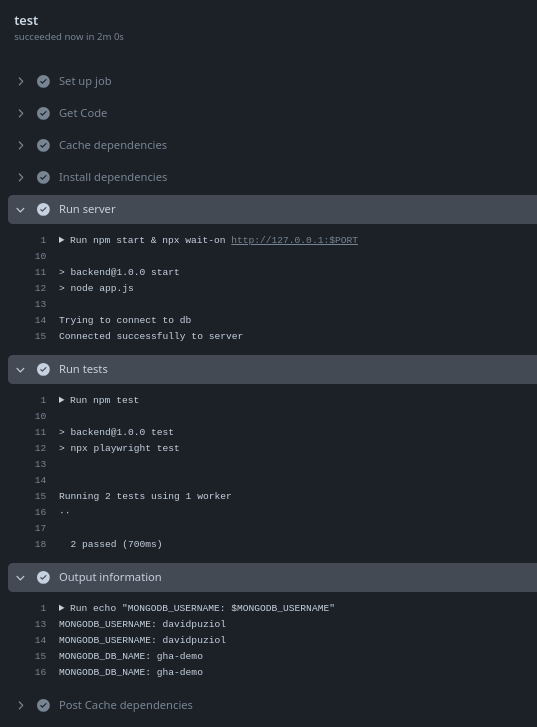
In deploy we didn't have access to the test job variable.

There are some default variables. Let's add one last step to see this. In addition to GitHub's default vars, we have other variables from things that come installed on ubuntu-latest by default.
  deploy:
    needs: test
    runs-on: ubuntu-latest
    steps:
      # We don't have MONGODB_USERNAME in this job, so we expect only MONGODB_DB_NAME to be printed which is at workflow level.
      - name: Output information
        run: |
          echo "MONGODB_USERNAME: ${{ env.MONGODB_USERNAME }}"
          echo "MONGODB_DB_NAME: $MONGODB_DB_NAME"
      - name: Default Vars
        run: env # <<<
The log.
0s
Run env
SELENIUM_JAR_PATH=/usr/share/java/selenium-server.jar
CONDA=/usr/share/miniconda
GITHUB_WORKSPACE=/home/runner/work/gh-fifth-vars/gh-fifth-vars
JAVA_HOME_11_X64=/usr/lib/jvm/temurin-11-jdk-amd64
GITHUB_PATH=/home/runner/work/_temp/_runner_file_commands/add_path_5d7b1057-4bf5-4332-9889-b3272ae532ab
GITHUB_ACTION=__run_2
JAVA_HOME=/usr/lib/jvm/temurin-11-jdk-amd64
GITHUB_RUN_NUMBER=5 # Workflow execution number
RUNNER_NAME=GitHub Actions 6
GRADLE_HOME=/usr/share/gradle-8.9
GITHUB_REPOSITORY_OWNER_ID=32808515
ACTIONS_RUNNER_ACTION_ARCHIVE_CACHE=/opt/actionarchivecache
XDG_CONFIG_HOME=/home/runner/.config
DOTNET_SKIP_FIRST_TIME_EXPERIENCE=1
ANT_HOME=/usr/share/ant
JAVA_HOME_8_X64=/usr/lib/jvm/temurin-8-jdk-amd64
GITHUB_TRIGGERING_ACTOR=davidpuziol # Who triggered the event
GITHUB_REF_TYPE=branch
HOMEBREW_CLEANUP_PERIODIC_FULL_DAYS=3650
ANDROID_NDK=/usr/local/lib/android/sdk/ndk/27.0.12077973
BOOTSTRAP_HASKELL_NONINTERACTIVE=1
***
PIPX_BIN_DIR=/opt/pipx_bin
STATS_TRP=true
STATS_BLT=true
GOROOT_1_20_X64=/opt/hostedtoolcache/go/1.20.14/x64
GITHUB_REPOSITORY_ID=838486259
DEPLOYMENT_BASEPATH=/opt/runner
GITHUB_ACTIONS=true
STATS_VMD=true
ANDROID_NDK_LATEST_HOME=/usr/local/lib/android/sdk/ndk/27.0.12077973
SYSTEMD_EXEC_PID=591
GITHUB_SHA=8e112ca8305a4077793be7aa0ae9fd49158c6f55
GITHUB_WORKFLOW_REF=davidpuziol/gh-fifth-vars/.github/workflows/deploy.yml@refs/heads/main
POWERSHELL_DISTRIBUTION_CHANNEL=GitHub-Actions-ubuntu22
RUNNER_ENVIRONMENT=github-hosted
STATS_EXTP=https://provjobdsettingscdn.blob.core.windows.net/settings/provjobdsettings-0.5.181+6/provjobd.data
DOTNET_MULTILEVEL_LOOKUP=0
GITHUB_REF=refs/heads/main
RUNNER_OS=Linux
GITHUB_REF_PROTECTED=false
HOME=/home/runner # We already know where ~ will go...
GITHUB_API_URL=https://api.github.com
LANG=C.UTF-8
RUNNER_TRACKING_ID=github_e1af56d0-dc5f-46f5-95ff-cfe245ecf20a
MONGODB_DB_NAME=gha-demo # One of our variables
RUNNER_ARCH=X64
GOROOT_1_21_X64=/opt/hostedtoolcache/go/1.21.12/x64
RUNNER_TEMP=/home/runner/work/_temp
GITHUB_STATE=/home/runner/work/_temp/_runner_file_commands/save_state_5d7b1057-4bf5-4332-9889-b3272ae532ab
EDGEWEBDRIVER=/usr/local/share/edge_driver
JAVA_HOME_21_X64=/usr/lib/jvm/temurin-21-jdk-amd64
GITHUB_ENV=/home/runner/work/_temp/_runner_file_commands/set_env_5d7b1057-4bf5-4332-9889-b3272ae532ab
GITHUB_EVENT_PATH=/home/runner/work/_temp/_github_workflow/event.json
INVOCATION_ID=d826e8b908d848808f920a99a6079a77
STATS_D=true
GITHUB_EVENT_NAME=push # Event that generated the workflow
GITHUB_RUN_ID=10255229296
JAVA_HOME_17_X64=/usr/lib/jvm/temurin-17-jdk-amd64
ANDROID_NDK_HOME=/usr/local/lib/android/sdk/ndk/27.0.12077973
GITHUB_STEP_SUMMARY=/home/runner/work/_temp/_runner_file_commands/step_summary_5d7b1057-4bf5-4332-9889-b3272ae532ab
HOMEBREW_NO_AUTO_UPDATE=1
GITHUB_ACTOR=davidpuziol
NVM_DIR=/home/runner/.nvm
SGX_AESM_ADDR=1
GITHUB_RUN_ATTEMPT=1
STATS_RDCL=true
ANDROID_HOME=/usr/local/lib/android/sdk
GITHUB_GRAPHQL_URL=https://api.github.com/graphql
ACCEPT_EULA=Y
RUNNER_USER=runner
STATS_UE=true
USER=runner
GITHUB_SERVER_URL=https://github.com
STATS_V3PS=true
PIPX_HOME=/opt/pipx
GECKOWEBDRIVER=/usr/local/share/gecko_driver
STATS_EXT=true
CHROMEWEBDRIVER=/usr/local/share/chromedriver-linux64
SHLVL=1
ANDROID_SDK_ROOT=/usr/local/lib/android/sdk
VCPKG_INSTALLATION_ROOT=/usr/local/share/vcpkg
GITHUB_ACTOR_ID=32808515
RUNNER_TOOL_CACHE=/opt/hostedtoolcache
ImageVersion=20240730.2.0
DOTNET_NOLOGO=1
GITHUB_WORKFLOW_SHA=8e112ca8305a4077793be7aa0ae9fd49158c6f55
GITHUB_REF_NAME=main
GITHUB_JOB=deploy
XDG_RUNTIME_DIR=/run/user/1001
AZURE_EXTENSION_DIR=/opt/az/azcliextensions
PERFLOG_LOCATION_SETTING=RUNNER_PERFLOG
STATS_VMFE=true
GITHUB_REPOSITORY=davidpuziol/gh-fifth-vars
CHROME_BIN=/usr/bin/google-chrome
GOROOT_1_22_X64=/opt/hostedtoolcache/go/1.22.5/x64
ANDROID_NDK_ROOT=/usr/local/lib/android/sdk/ndk/27.0.12077973
GITHUB_RETENTION_DAYS=90
JOURNAL_STREAM=8:18879
RUNNER_WORKSPACE=/home/runner/work/gh-fifth-vars
LEIN_HOME=/usr/local/lib/lein
LEIN_JAR=/usr/local/lib/lein/self-installs/leiningen-2.11.2-standalone.jar
GITHUB_ACTION_REPOSITORY=
PATH=/snap/bin:/home/runner/.local/bin:/opt/pipx_bin:/home/runner/.cargo/bin:/home/runner/.config/composer/vendor/bin:/usr/local/.ghcup/bin:/home/runner/.dotnet/tools:/usr/local/sbin:/usr/local/bin:/usr/sbin:/usr/bin:/sbin:/bin:/usr/games:/usr/local/games:/snap/bin
RUNNER_PERFLOG=/home/runner/perflog
GITHUB_BASE_REF=
GHCUP_INSTALL_BASE_PREFIX=/usr/local
CI=true
SWIFT_PATH=/usr/share/swift/usr/bin
ImageOS=ubuntu22 # Ubuntu
GITHUB_REPOSITORY_OWNER=davidpuziol
GITHUB_HEAD_REF=
GITHUB_ACTION_REF=
GITHUB_WORKFLOW=Deployment # Workflow name that generated this job
DEBIAN_FRONTEND=noninteractive
GITHUB_OUTPUT=/home/runner/work/_temp/_runner_file_commands/set_output_5d7b1057-4bf5-4332-9889-b3272ae532ab
AGENT_TOOLSDIRECTORY=/opt/hostedtoolcache
_=/usr/bin/env
Having variables with sensitive values injected into the code within our public repository is still not good. For this we have secrets. Let's change to get secrets that are defined in the repository but not in the code.
  test:
    # Variables will be injected at runtime
    env:
      MONGODB_CLUSTER_ADDRESS: ${{ secrets.MONGODB_CLUSTER_ADDRESS}}
      MONGODB_USERNAME: ${{ secrets.MONGODB_USERNAME }}
      MONGODB_PASSWORD: ${{ secrets.MONGODB_PASSWORD}}
      PORT: 8080
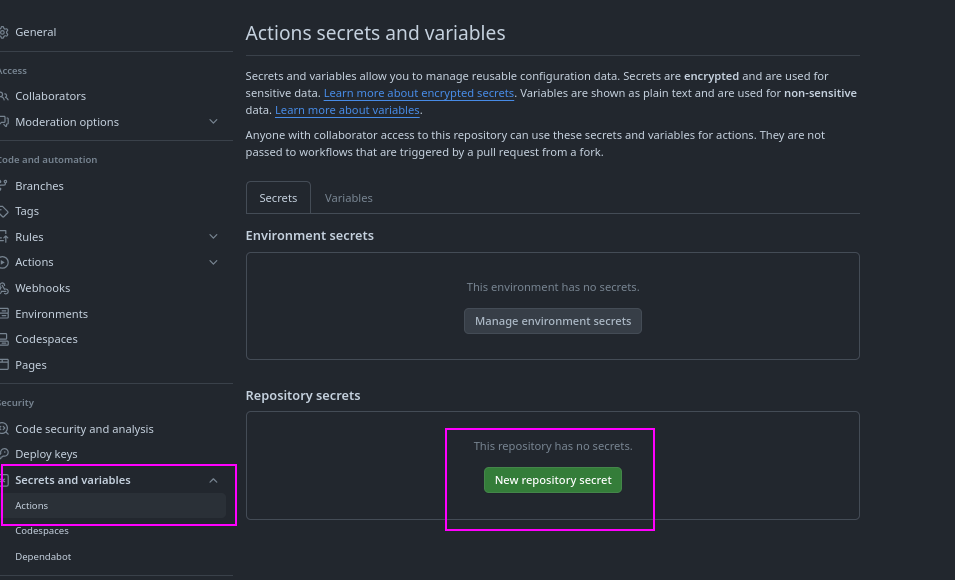
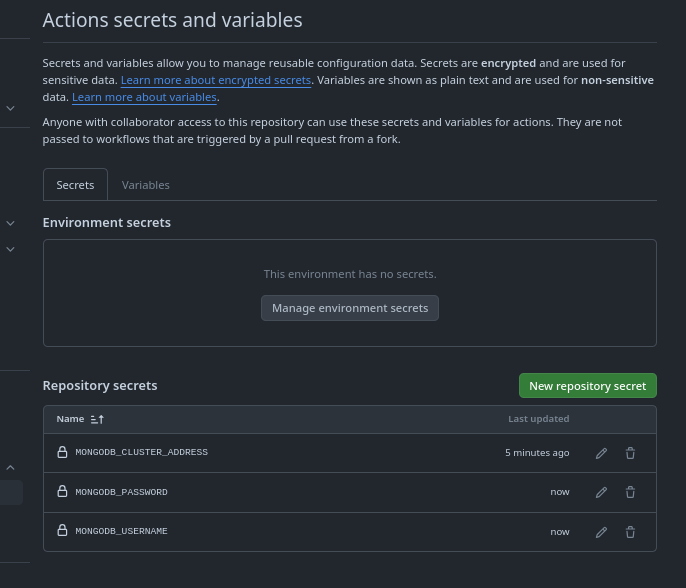
Let's run again now replacing with values that no one knows. An important thing to mention and test is printing these variables on the console. Legend has it that GitHub doesn't show the value even if you forcefully print it. So let's force it to print the password secret to test.
name: Deployment
on:
  push:
    branches:
      - main
      - dev
env:
  MONGODB_DB_NAME: gha-demo
jobs:
  test:

    env:
      MONGODB_CLUSTER_ADDRESS: ${{ secrets.MONGODB_CLUSTER_ADDRESS}}
      MONGODB_USERNAME: ${{ secrets.MONGODB_USERNAME }}
      MONGODB_PASSWORD: ${{ secrets.MONGODB_PASSWORD}}
      PORT: 8080
    runs-on: ubuntu-latest
    steps:
      - name: Get Code
        uses: actions/checkout@v4
      - name: Cache dependencies
        uses: actions/cache@v4
        with:
          path: ~/.npm
          key: npm-deps-${{ hashFiles('**/package-lock.json') }}
      - name: Install dependencies
        run: npm ci

      - name: Run server
        run: npm start & npx wait-on http://127.0.0.1:$PORT
      - name: Run tests
        run: npm test
      - name: Output information # Let's try to print
        run: |
          echo "MONGODB_PASSWORD: ${{ secrets.MONGODB_PASSWORD}}
          echo "MONGODB_PASSWORD: $MONGODB_PASSWORD
          echo "MONGODB_PASSWORD: ${{ env.MONGODB_PASSWORD}}
  deploy:
    needs: test
    runs-on: ubuntu-latest
    steps:
      - name: Output information
        run: |
          echo "MONGODB_USERNAME: ${{ env.MONGODB_USERNAME }}"
          echo "MONGODB_DB_NAME: $MONGODB_DB_NAME"
      - name: Default Vars
        run: env
And we have our output. Congratulations GitHub!

Environment Secrets
We can have different environments that run the same code but these variables change according to the environment. On GitHub we can create variables per environment. For example, I have two environments here, testing and production.
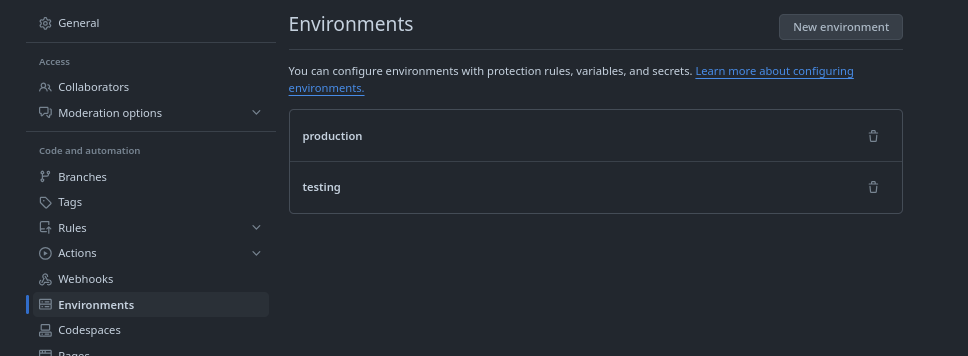
I can declare the same variables with the same name in different environments with different values.
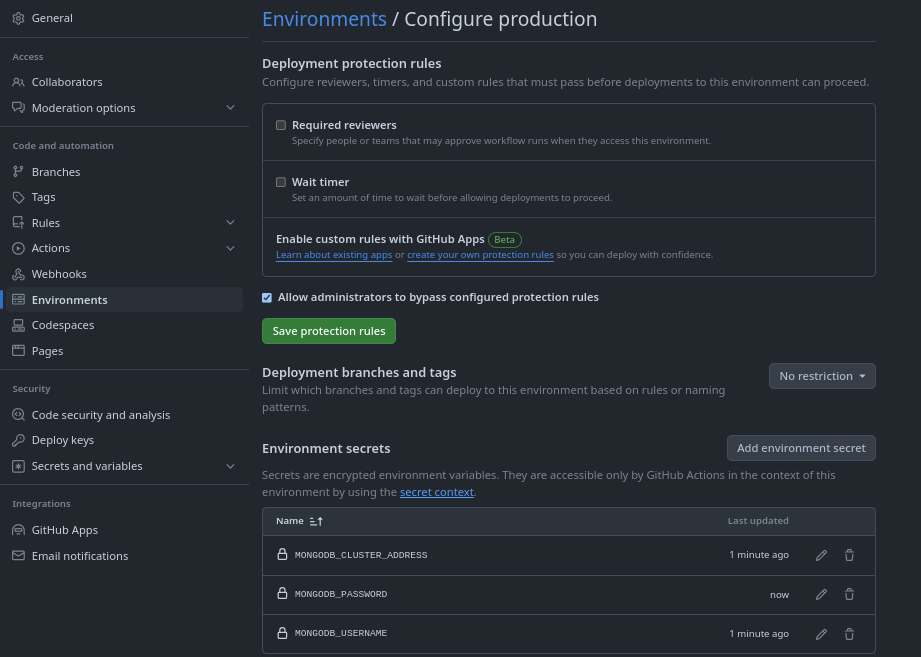
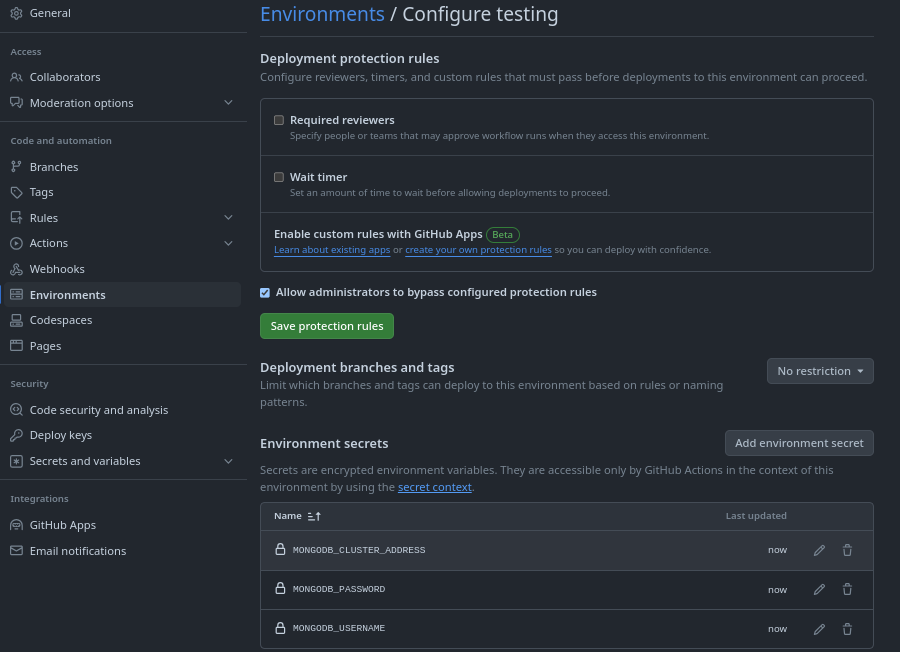
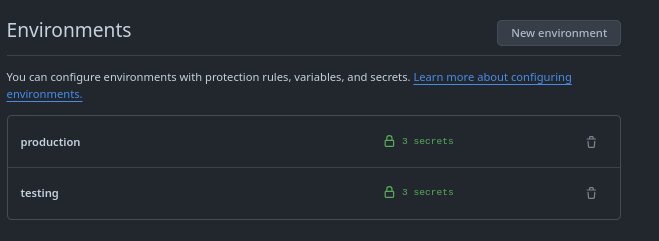
To use the variables in the workflow we need to say which environment we want. For example, we can run the test job using the testing environment and deploy with production variables.
jobs:
  test:
    # If the variable is set globally outside the environment, in this case the one from testing environment will be used. So we can even delete it.
    environment: testing
    env:
      MONGODB_CLUSTER_ADDRESS: ${{ secrets.MONGODB_CLUSTER_ADDRESS}}
      MONGODB_USERNAME: ${{ secrets.MONGODB_USERNAME }}
      MONGODB_PASSWORD: ${{ secrets.MONGODB_PASSWORD}}
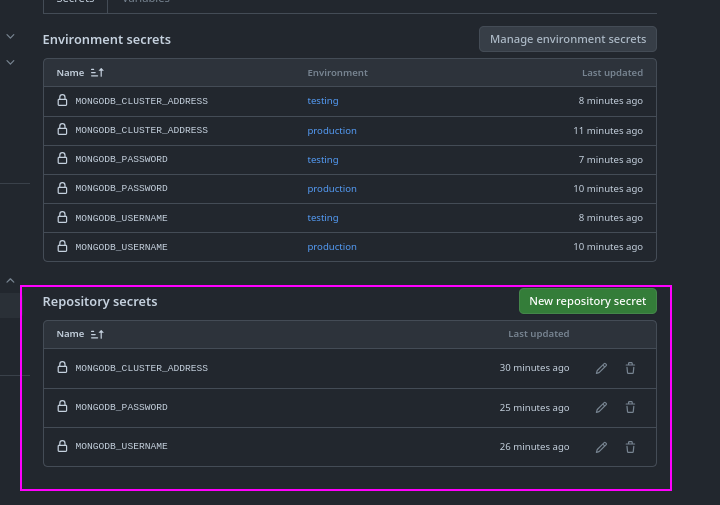
We can use different environments in different jobs. We can apply a condition based on branches to set production variables when it's on the main branch and testing on the dev branch, but we'll see that later.
We can do more with environments, not just secrets. We can have special reviewers before starting the workflow.
We can add a timer to wait before each job before it starts.
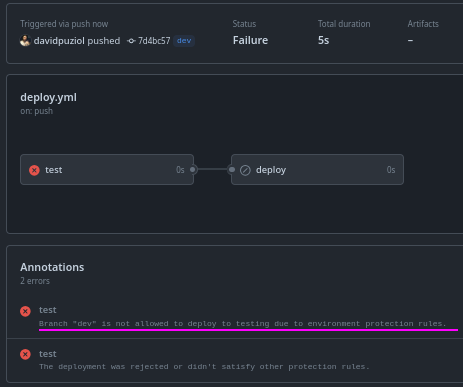
We can add some protections for certain branches. An example would be that a job would only start if a specific branch had been the event that triggered the workflow.
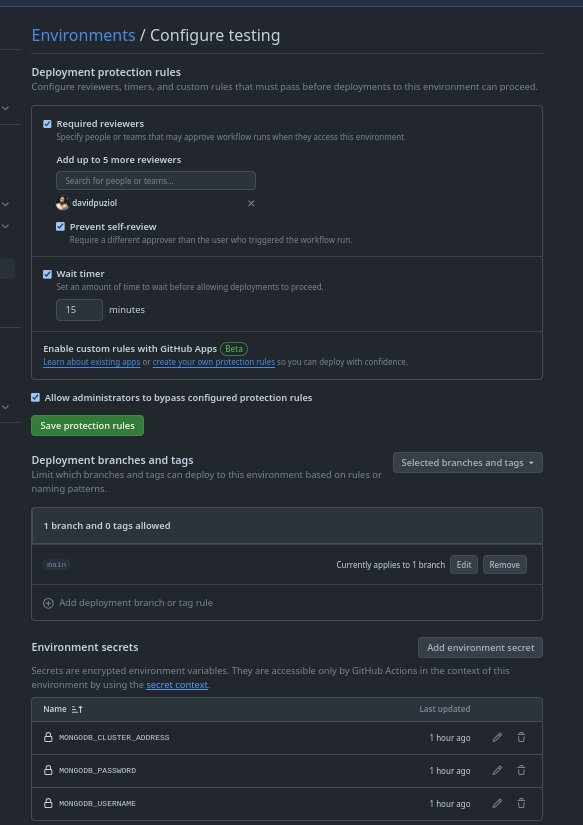
In the workflow we declared we have the following branches in push:
...
on:
  push:
    branches:
      - main # This would trigger the test job by the protection we set.
      - dev # This would not trigger the test job
jobs:
  test:
    environment: testing # <<<<<
We changed the workflow to use the testing environment for example and we have everything working.

Now let's create a dev branch and test.