Custom Actions
Most of the actions we've used are public ones created by the GitHub team or the community, we haven't created any custom action yet.
We can create an action to simplify multiple steps in our workflow all at once by creating a single action, simplifying the workflow and improving readability.
For example, we have these 2 steps in the lint, test, and build jobs that could be grouped.
      - name: Cache dependencies
        id: cache
        uses: actions/cache@v3
        with:
          path: node_modules
          key: deps-node-modules-${{ hashFiles('**/package-lock.json') }}
      - name: Install dependencies
        if: steps.cache.outputs.cache-hit != 'true'
        run: npm ci
Although there are many actions available in the GitHub marketplace, at some point we may need something that doesn't exist yet or does exist but we want to customize the behavior. It's rare, but it happens frequently :D. It's an opportunity to contribute and publish for other users to help improve the action.
There are 3 types of actions that are used the same way being called by uses but are built differently.
- JavaScript Actions
- The code is in JavaScript and whenever the action is executed it will call a
.jsfile. The execution runtime will be Node.js with its resources and packages. - Native GitHub Runtime.
- I won't cover this here, it's worth researching if you can't solve it using Docker.
- The code is in JavaScript and whenever the action is executed it will call a
- Docker Actions
- Used to develop in other languages. What matters is the action that the action will execute and this can be a container action. Inside the container, we can develop in any language because we'll be in an environment prepared for execution.
- Greater flexibility and portability.
- I won't cover this here, but it's worth researching if existing actions don't solve the problem.
- Composite Actions
- We don't develop anything, just combine multiple steps and actions to solve the problem, or summarize it.
- If you don't like to develop, this is where you'll prefer to stay.
If we want to create an action that is available for other repositories or is public, it must be in an exclusive repository.
To create an action in a specific project and accessible only to this repository, we can create it anywhere in the project, as we'll reference it using the path.
It's good practice to be inside the .github/actions folder. Every action needs to have its folder and inside this folder be the
action.ymlfile
cd project
tree .github
.github
├── actions
└── workflows
    └── deploy.yml
Let's create an action called cache-deps with the two steps we mentioned earlier inside the actions folder.
Actions are also defined in yml file. Actions don't suffer events so they don't have
on.
Although the checkout action is also part of multiple steps, we're creating an action that will only be part of this repository, requiring beforehand to be able to use the action defined locally. If an action was created in a separate repository, it would make sense to include checkout as well, being possible to reference the action through the repository URL. This is a specific case because we can't reference the project itself that we're checking out.
name: 'Get And Cache Deps'
description: 'Get dependencies via npm and cache them.'

runs:
  using: 'composite' # This is the action type
  steps:
    ## Our steps block ##
    - name: Cache dependencies
      id: cache
      uses: actions/cache@v3
      with:
        path: node_modules
        key: deps-node-modules-${{ hashFiles('**/package-lock.json') }}
    - name: Install dependencies
      if: steps.cache.outputs.cache-hit != 'true' # Also has support for conditions so we can keep
      run: npm ci
      shell: bash # When we're going to use a run command we need to define shell
    ###########################
Just to show how the folder structure looks.
tree .github
.github
├── actions # Folder
│   └── cache-deps # Folder with action name
│       └── action.yml # File that defines the action
└── workflows
    └── deploy.yml
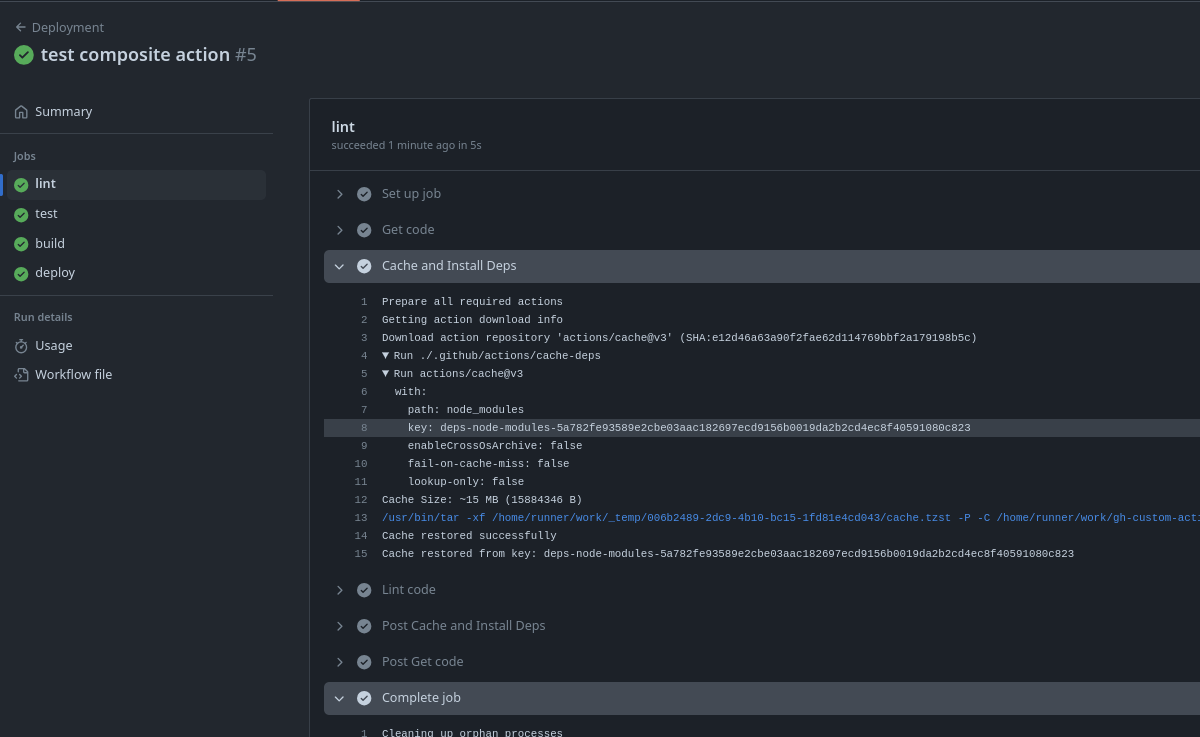
Now let's reference this action in the workflow below, I'll leave what's removed commented
name: Deployment
on:
  push:
    branches:
      - main
jobs:
  lint:
    runs-on: ubuntu-latest
    steps:
      - name: Get code
        uses: actions/checkout@v3
      # - name: Cache dependencies
      #   id: cache
      #   uses: actions/cache@v3
      #   with:
      #     path: node_modules
      #     key: deps-node-modules-${{ hashFiles('**/package-lock.json') }}
      # - name: Install dependencies
      #   if: steps.cache.outputs.cache-hit != 'true'
      #   run: npm ci
      - name: Cache and Install Deps # <<<<
        uses: ./.github/actions/cache-deps # <<<< Point to the folder containing action.yaml
      - name: Lint code
        run: npm run lint
  test:
    runs-on: ubuntu-latest
    steps:
      - name: Get code
        uses: actions/checkout@v3
      # - name: Cache dependencies
      #   id: cache
      #   uses: actions/cache@v3
      #   with:
      #     path: node_modules
      #     key: deps-node-modules-${{ hashFiles('**/package-lock.json') }}
      # - name: Install dependencies
      #   if: steps.cache.outputs.cache-hit != 'true'
      #   run: npm ci
      - name: Cache and Install Deps # <<<<
        uses: ./.github/actions/cache-deps # <<<< Point to the folder containing action.yaml
      - name: Test code
        id: run-tests
        run: npm run test
      - name: Upload test report
        if: failure() && steps.run-tests.outcome == 'failure'
        uses: actions/upload-artifact@v3
        with:
          name: test-report
          path: test.json
  build:
    needs: test
    runs-on: ubuntu-latest
    steps:
      - name: Get code
        uses: actions/checkout@v3
      # - name: Cache dependencies
      #   id: cache
      #   uses: actions/cache@v3
      #   with:
      #     path: node_modules
      #     key: deps-node-modules-${{ hashFiles('**/package-lock.json') }}
      # - name: Install dependencies
      #   if: steps.cache.outputs.cache-hit != 'true'
      #   run: npm ci
      - name: Cache and Install Deps # <<<<
        uses: ./.github/actions/cache-deps # <<<< Point to the folder containing action.yaml
      - name: Build website
        run: npm run build
      - name: Upload artifacts
        uses: actions/upload-artifact@v3
        with:
          name: dist-files
          path: dist
  deploy:
    needs: build
    runs-on: ubuntu-latest
    steps:
      - name: Get code
        uses: actions/checkout@v3
      - name: Get build artifacts
        uses: actions/download-artifact@v3
        with:
          name: dist-files
          path: ./dist
      - name: Output contents
        run: ls
      - name: Deploy site
        run: echo "Deploying..."
Streamlining the code.
name: Deployment
on:
  push:
    branches:
      - main
jobs:
  lint:
    runs-on: ubuntu-latest
    steps:
      - name: Get code
        uses: actions/checkout@v3
      - name: Cache and Install Deps
        uses: ./.github/actions/cache-deps
      - name: Lint code
        run: npm run lint
  test:
    runs-on: ubuntu-latest
    steps:
      - name: Get code
        uses: actions/checkout@v3
      - name: Cache and Install Deps
        uses: ./.github/actions/cache-deps
      - name: Test code
        id: run-tests
        run: npm run test
      - name: Upload test report
        if: failure() && steps.run-tests.outcome == 'failure'
        uses: actions/upload-artifact@v3
        with:
          name: test-report
          path: test.json
  build:
    needs: test
    runs-on: ubuntu-latest
    steps:
      - name: Get code
        uses: actions/checkout@v3
      - name: Cache and Install Deps
        uses: ./.github/actions/cache-deps
      - name: Build website
        run: npm run build
      - name: Upload artifacts
        uses: actions/upload-artifact@v3
        with:
          name: dist-files
          path: dist
  deploy:
    needs: build
    runs-on: ubuntu-latest
    steps:
      - name: Get code
        uses: actions/checkout@v3
      - name: Get build artifacts
        uses: actions/download-artifact@v3
        with:
          name: dist-files
          path: ./dist
      - name: Output contents
        run: ls
      - name: Deploy site
        run: echo "Deploying..."
Inputs and Outputs
Previously we used the with tag to pass inputs to other actions. So let's do the same thing.
Let's add an input if we should cache or not. If not passed, it will use the default value and cache normally.
name: 'Get And Cache Deps'
description: 'Get dependencies via npm and cache them.'
# Defining the variables
inputs:
  caching:
    description: 'Whether or not we will cache'
    required: false # It's not mandatory to pass the input
    default: 'true' # Default value if not passed
# Example of how another input would be...
# other-var:
#   description: 'other var'
#   required: true
#   default: 'idontknow'
runs:
  using: 'composite'
  steps:
    - name: Cache dependencies
      if: inputs.caching == 'true' # Will only cache if true
      id: cache
      uses: actions/cache@v3
      with:
        path: node_modules
        key: deps-node-modules-${{ hashFiles('**/package-lock.json') }}
    - name: Install dependencies
      if: steps.cache.outputs.cache-hit != 'true' || inputs.caching != 'true'
      run: npm ci
      shell: bash # When we're going to use a run command we need to define shell
    ###########################
We changed the condition of the install dependencies step because either it will cache when the first step executes and gives a cache-hit or if it receives input different from true. If it won't cache, then it needs to forcefully install dependencies.
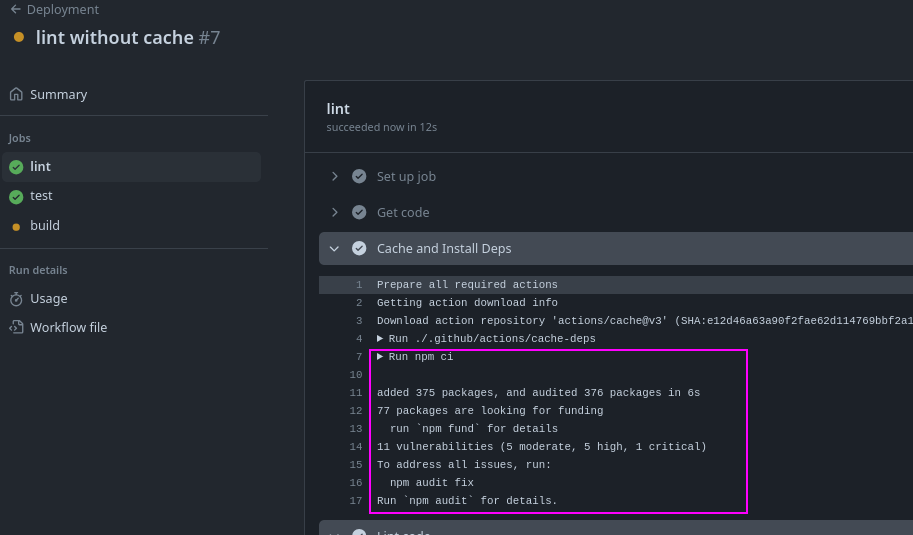
Let's change only lint to not use cache.
...
  lint:
    runs-on: ubuntu-latest
    steps:
      - name: Get code
        uses: actions/checkout@v3
      - name: Cache and Install Deps
        uses: ./.github/actions/cache-deps
        with:
          caching: 'false'
...
Let's add an output here just to illustrate how to reference things.
name: 'Get And Cache Deps'
description: 'Get dependencies via npm and cache them.'
inputs:
  caching:
    description: 'Whether or not we will cache'
    required: false
    default: 'true'
runs:
  using: 'composite'
  steps:
    - name: Cache dependencies
      id: cache
      if: ${{ inputs.caching == 'true' }}
      uses: actions/cache@v3
      with:
        path: node_modules
        key: deps-node-modules-${{ hashFiles('**/package-lock.json') }}

    - name: Install dependencies
      id: install
      if: ${{ steps.cache.outputs.cache-hit != 'true' || inputs.caching != 'true' }}
      shell: bash
      run: npm ci

    - name: Set output if cache was used
      id: fill-outputs
      shell: bash
      run: |
        if [[ "${{ steps.install.outcome }}" == "success" ]]; then
          echo "used=false" >> $GITHUB_OUTPUT
        else
          echo "used=true" >> $GITHUB_OUTPUT
        fi
  # Above we check if the previous step was successful or not.
  # If it was successful we create a variable called used with the value false because it didn't use the cache
  # If it wasn't successful then the cache was used we define false.
outputs:
  used-cache:
    description: "If cache was used"
    # We reference the used variable created in the fill-outputs step
    value: ${{ steps.fill-outputs.outputs.used }}
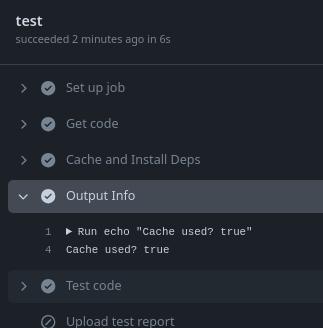
Let's add an output in lint to check.
...
  lint:
    runs-on: ubuntu-latest
    steps:
      - name: Get code
        uses: actions/checkout@v3
      - name: Cache and Install Deps
        id: cache-deps # <<<added
        uses: ./.github/actions/cache-deps
        with:
          caching: 'false'
      - name: Output Info
        run: echo "Cache used? ${{ steps.cache-deps.outputs.used-cache}}"
...
In lint that we defined not to use cache: