First Example
Now I'm going to populate the repository with more things to have a simple real code example to do more things.
To run the app just install the dependencies and execute:
❯ npm install

added 232 packages, and audited 233 packages in 5s

16 packages are looking for funding
  run `npm fund` for details

11 vulnerabilities (5 moderate, 5 high, 1 critical)

To address all issues, run:
  npm audit fix

Run `npm audit` for details.
                                                                                                                                     5s
❯ npm run dev

> [email protected] dev
> vite

  VITE v3.0.9  ready in 181 ms

  ➜  Local:   http://localhost:5173/
  ➜  Network: use --host to expose


## To test

❯ npm test

> [email protected] test
> vitest run


 RUN  v0.22.1 /home/david/gh-first-action

(node:2305122) [DEP0040] DeprecationWarning: The `punycode` module is deprecated. Please use a userland alternative instead.
(Use `node --trace-deprecation ...` to show where the warning was created)
 ✓ src/components/MainContent.test.jsx (2)

Test Files  1 passed (1)
     Tests  2 passed (2)
  Start at  16:01:00
  Duration  1.47s (transform 331ms, setup 65ms, collect 174ms, tests 80ms)
Now let's start building workflows for this code. This code already has tests so we can run them in the workflow too.
Let's talk a bit about the various types of events that can exist. This is a very useful page as it contains the information you may need for any use case you have.
-
Repository events
- push
- pull_request
- create
- fork
- issues
- issues_comment
- watch
- discussion
- Several others
-
Others
- workflow_dispatch when we run manually
- repository_dispatch when we make a specific GitHub REST API request
- schedule triggers according to a schedule
- workflow_call
These event types have their variations. For example, pull request can have variations of opened, closed, and much more.
The chosen events depend on what you need to do. In our case, we'll run the already developed tests whenever a push is executed to the repository.
In the first case, we ran commands that don't depend on our repository. In this case, we'll have to clone the repository on the runner. To gain speed, it's interesting to split jobs that depend on the same files and create conditions on steps. If we were to do it manually, we'd need to install Git on the runner, configure it, have credentials if the repo is private to clone the code. This is where actions come in, which are facilities that GitHub brings us.
Similarly, we need Node.js to be installed on the runner to run the commands to install dependencies and then test the code.
name: Test Project

on: push # We could choose even which branch we'll run on, in this case it's running on any branch

jobs: # always plural
  first-job:

    runs-on: ubuntu-latest
    steps:

      - name: Get Code # Download the code
        run: git clone ... # Continue in the explanation

      - name: Install dependencies
        run: npm install

      - name: Test Code
        run: npm run test
Node.js is already installed inside ubuntu-latest so we can run a command directly.
Action
Actions are custom or third-party apps that perform repetitive tasks. For example, cloning a repository will be practically something you'll always need to do.
Instead of using the run command which will be expecting a shell command, we use actions. Actions can be developed for something custom or distributed through an official marketplace or community.
Let's use the checkout action instead of creating a whole script to do the get code. This action is maintained by the GitHub team. The documentation shows how to use this action.
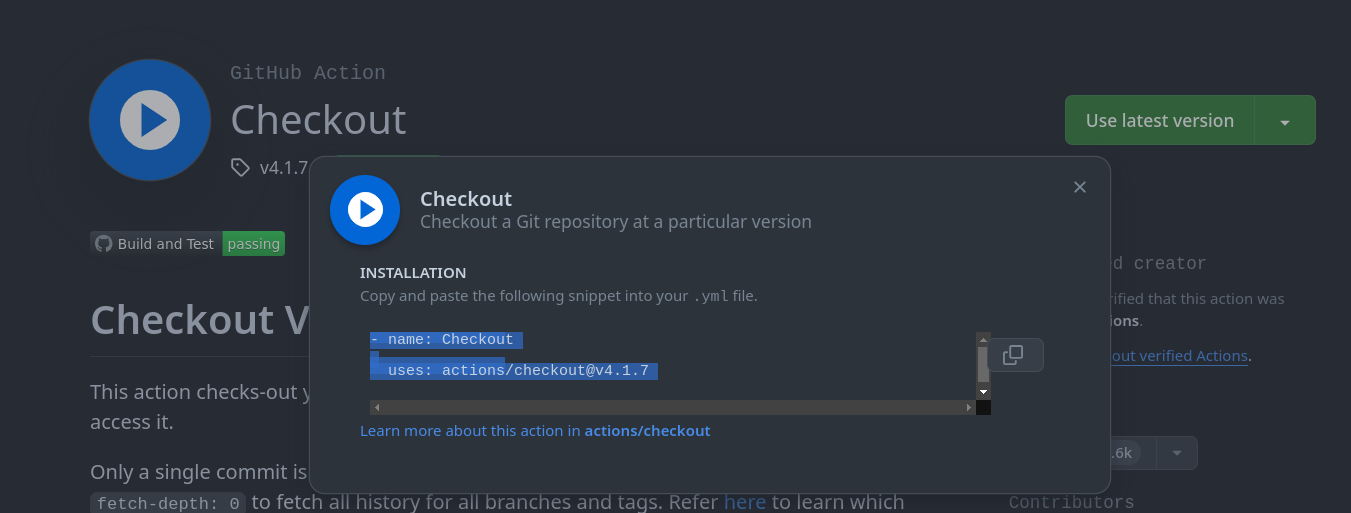
It's always good to analyze the actions of the creator and verify this.
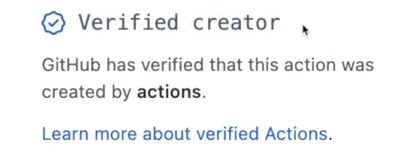
This badge can give you more confidence that this action is not doing anything malicious, after all we're talking about source code that will create your application. Later on, security and GitHub actions will be addressed and some things we should be careful about.
Create this workflow in the repository at .github/workflow in a new yaml file test.yaml.
name: Test Project

on: push # We could choose even which branch we'll run on, in this case it's running on any branch

jobs: # always plural
  Test:

    runs-on: ubuntu-latest
    steps:

      - name: Get Code # Download the code
        uses: actions/checkout@v4
        # The block below receives the necessary configurations for execution
        # I took some default parameters just to show how we could reference a value to be passed and how to point
        with:
            # No need to pass anything below, I just showed it to see how we use values that the action has access to
            repository: ${{ github.repository }} # This is the default
            token: ${{ github.token }} # This is the default

      - name: Install NodeJS
        uses: actions/setup-node@v4
        with:
          node-version: '16'

      - name: Test NodeJS Version
        run: node --version

      - name: Install dependencies
        run: npm ci # also installs dependencies but is safer than npm install

      - name: Run Tests
        run: npm test
In the ubuntu-latest image we can see what comes pre-installed, no need to install, but it's always good to guarantee the version of what you want.
Make the commit and let's see what happens when we push. Let's take advantage and put it in a new branch first
git checkout -b feature/app-tested
git add -A
git commit -m "your msg"
git push origin feature/app-tested
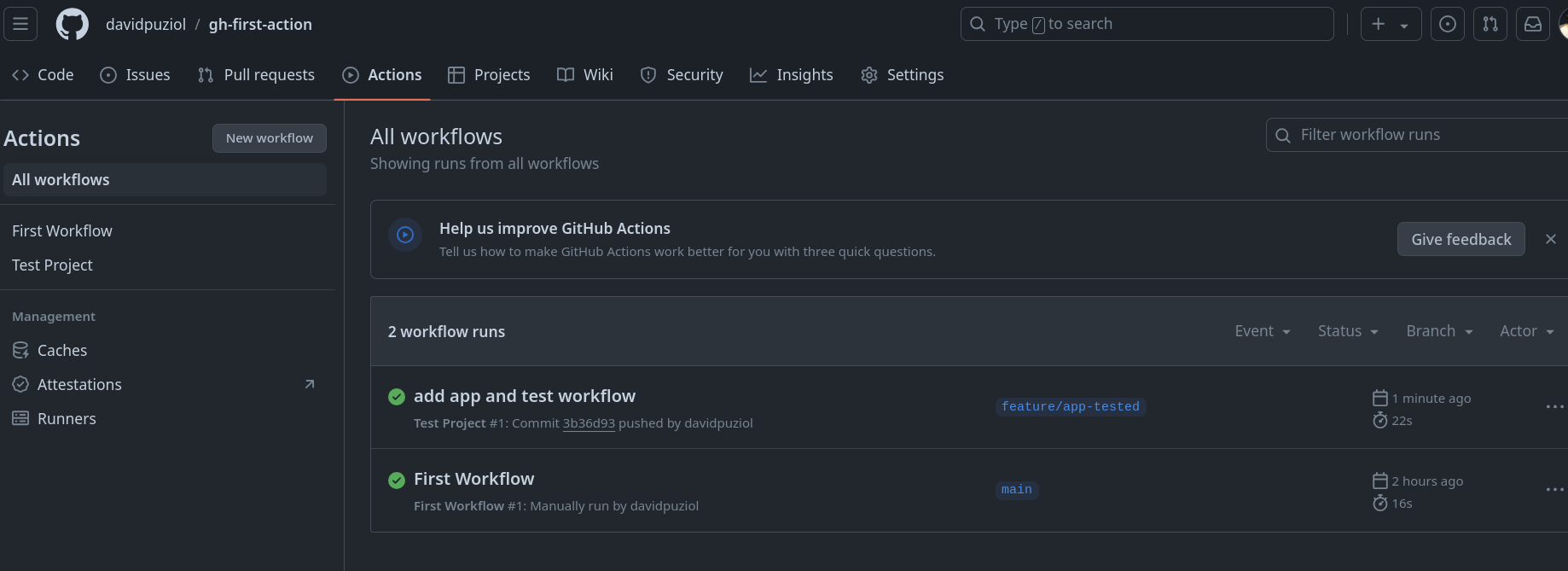
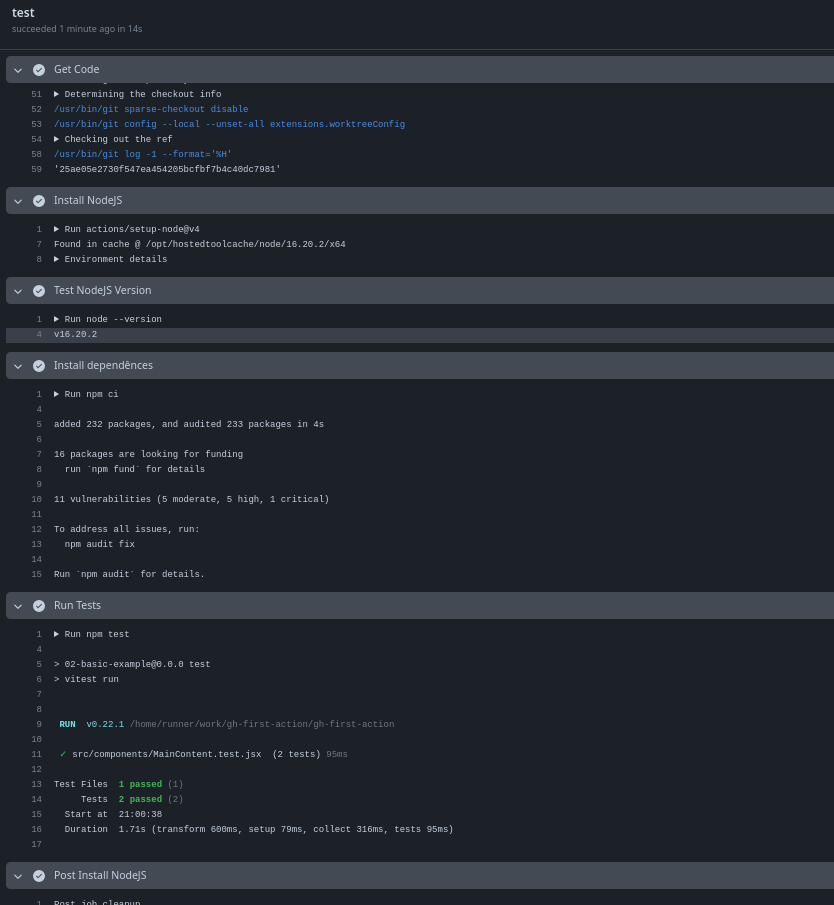
Note that our event worked because we did a push. If we merge into the main branch will we have another execution?
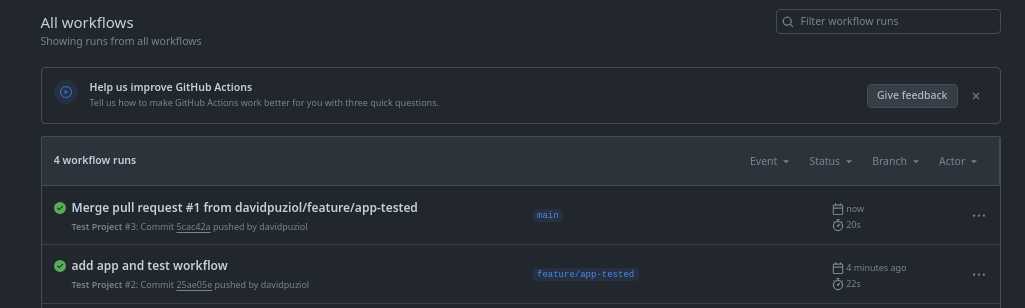
We will because it would be the same as merging the code locally and pushing.
Entered the repo is push! Knowing this we can block push for specific people, only repo owners can force a push or change to pull request.
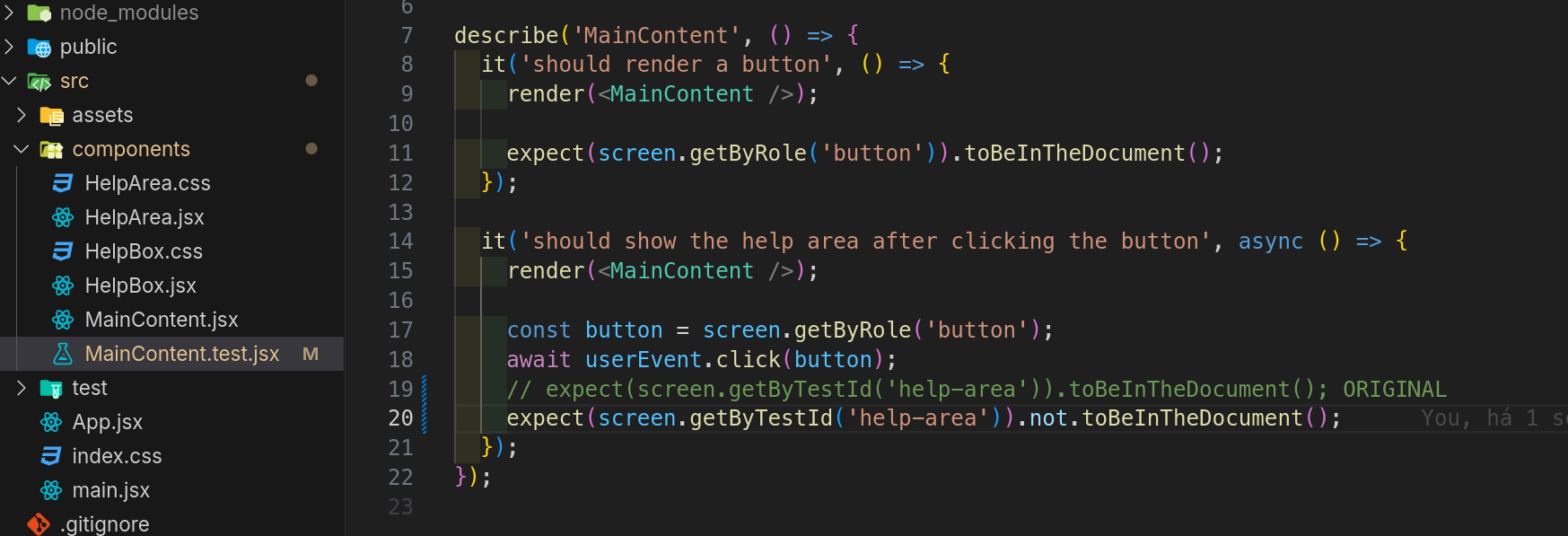
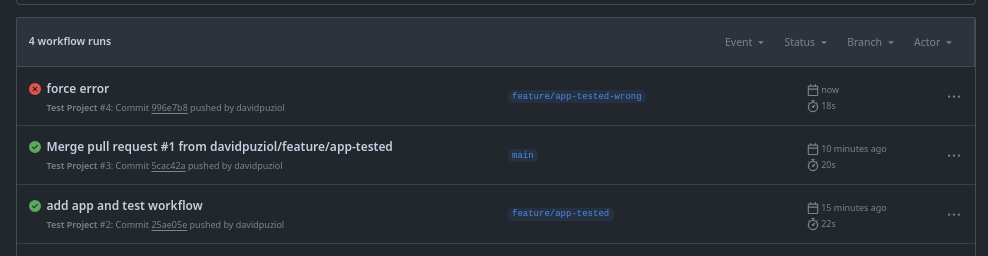
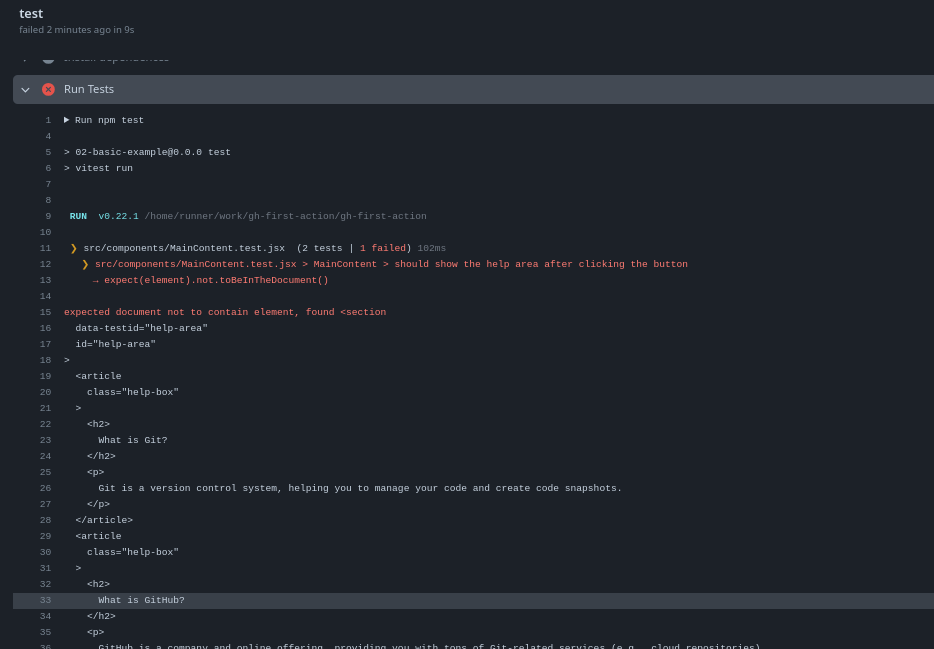
What happens if a step fails? Let's intentionally change a test and commit to the repository.
Multiple Jobs
Let's now change this workflow for deployment and add a new job (deploy), keeping the first test.
name: Deployment

on: push

jobs:
  test:

    runs-on: ubuntu-latest
    steps:

      - name: Get Code
        uses: actions/checkout@v4

      - name: Install NodeJS
        uses: actions/setup-node@v4
        with:
          node-version: '16'

      - name: Install dependencies
        run: npm ci

      - name: Run Tests
        run: npm test

  deploy:
    needs: test
    runs-on: ubuntu-latest
    steps:
    ## Note that it was necessary to get the code the same way because they are different machines
      - name: Get Code
        uses: actions/checkout@v4

      - name: Install NodeJS
        uses: actions/setup-node@v4
        with:
          node-version: '16'

      - name: Install dependencies
        run: npm ci

      - name: Build project
        run: npm run build

      - name: Deploy
        run: echo "Deploying somewhere..." # Imagine this step
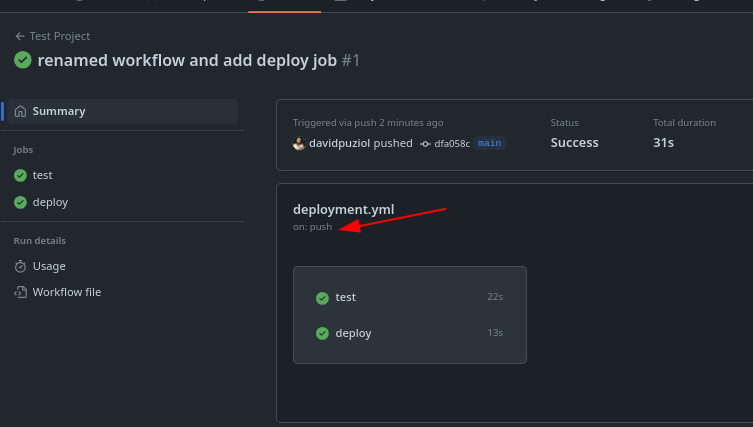
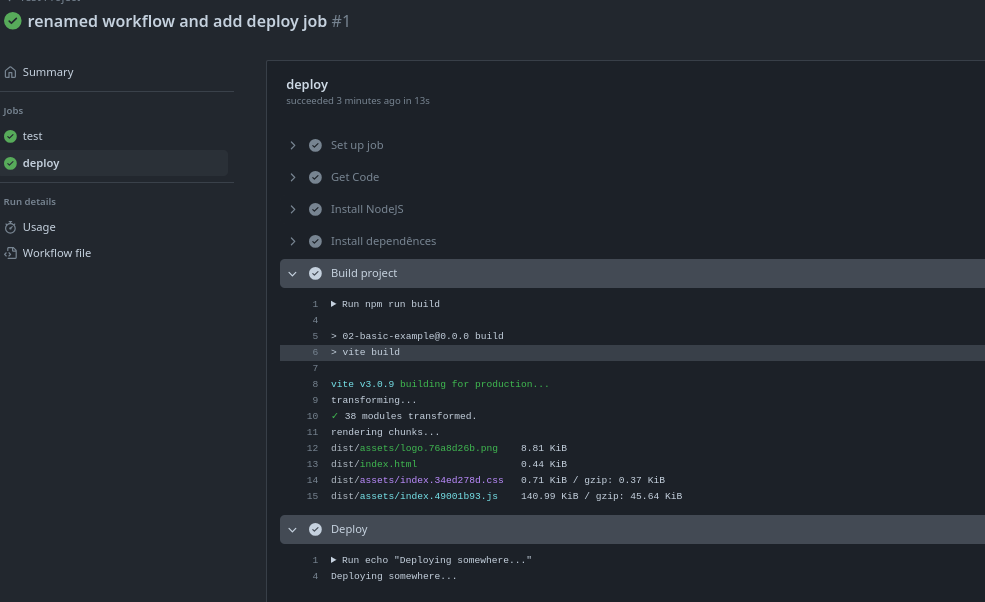
In this case the jobs ran in parallel and deploy should only happen if test succeeded.
To run one after another there are different ways but the most common is to use the needs tag which is a list of jobs that this one depends on. So let's change this part.
  deploy:
    needs: [test]
    # This list declaration method doesn't work
  # needs:
  # - test
    runs-on: ubuntu-latest
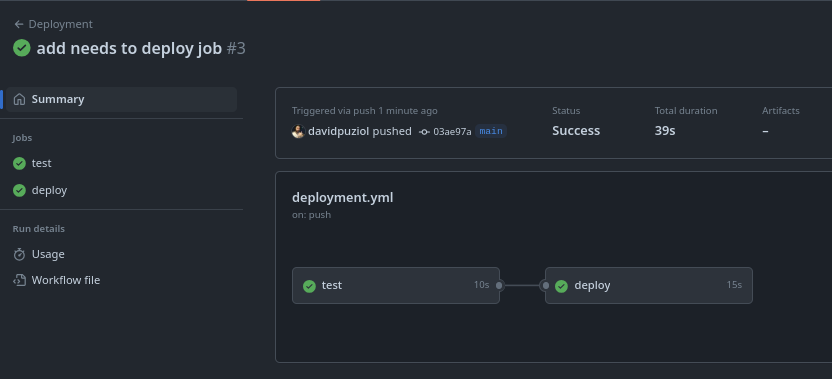
If you look at the time you'll see it also took longer since the second environment was only set up after the first finished.
Is it possible to mount all environments at once and order execution to gain speed?
We can break the test part again and test what happens.

It didn't even run the deploy as expected.
Multiple Triggers
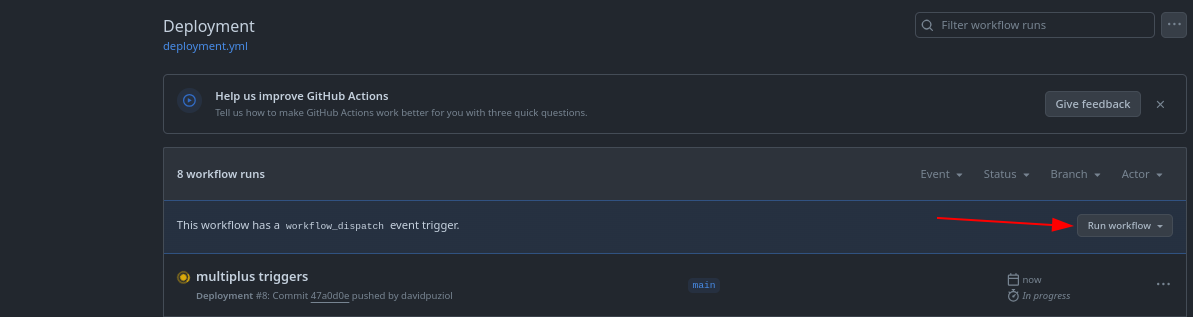
Until now we've only used 2 triggers. We can put them together.
...
on: [push, workflow_dispatch]
...
With this we enable the button to run manually.
Workflow Context
Sometimes we need to use the runners with some environment metadata.
Inside the runners we have something I call context. The context carries a series of repository information that is not actually in the code into the workflow that allows working for example with environment variables and other things.
To access this information we use a specific syntax ${{ <context> }}. We have reserved words that allow us to access these values.
We also have expressions that combine functions with contexts.
Let's build a simple pipeline to understand this. Let's use a toJSON function in an expression to convert the github context to json to see everything we have access to.
name: Output Information

on: workflow_dispatch

jobs:
  info:
    runs-on: ubuntu-latest
    steps:

      - name: Show Context
        # We want to get the entire github context and show it in json
        run: echo "${{ toJSON(github) }}"
Save this workflow and let's run it manually. Let's analyze the log and see everything we have.
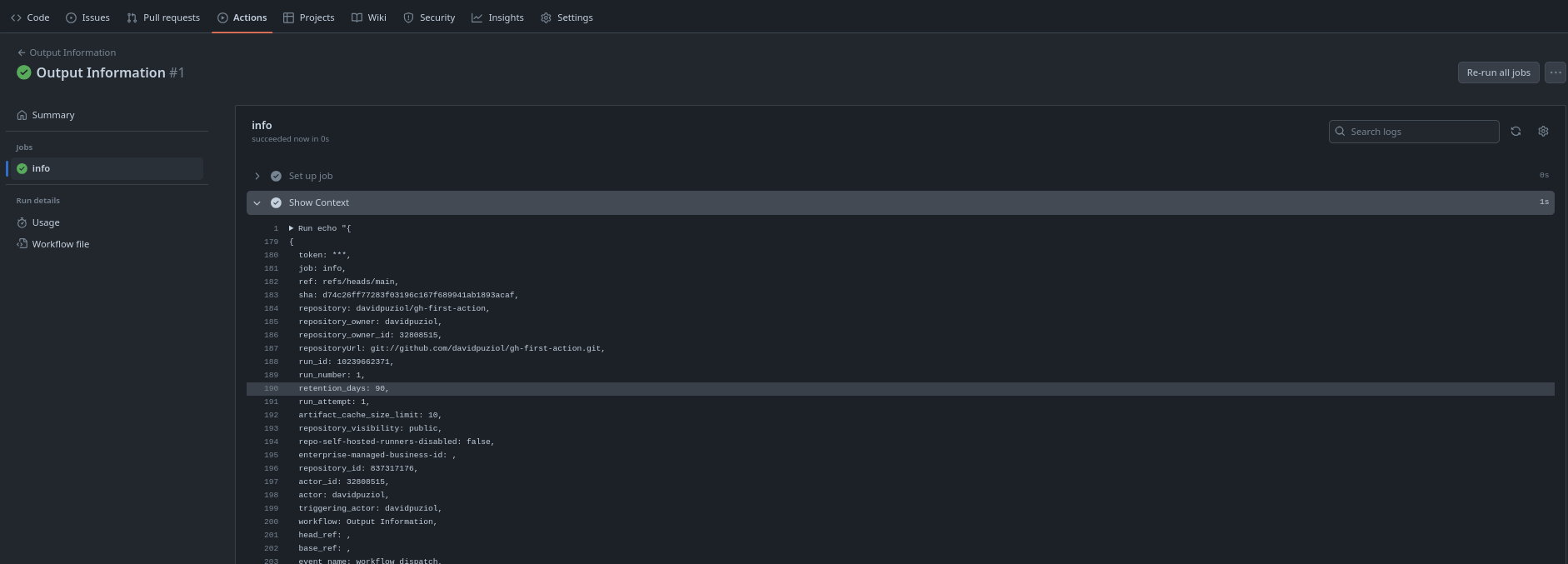
Let's go deeper into the log and observe the github context object.
For example we could access the repository owner's name using ${{ github.repository_owner}} which would bring davidpuziol. If we were to use a repository URL to clone instead of using the checkout action we could get it from ${{ github.repositoryUrl}} instead of putting the value hard-coded in the yaml.
{
  token: ***,
  job: info, // job name
  ref: refs/heads/main,
  sha: d74c26ff77283f03196c167f689941ab1893acaf,
  repository: davidpuziol/gh-first-action,
  repository_owner: davidpuziol,
  repository_owner_id: 32808515,
  repositoryUrl: git://github.com/davidpuziol/gh-first-action.git,
  run_id: 10239662371,
  run_number: 1,
  retention_days: 90,
  run_attempt: 1,
  artifact_cache_size_limit: 10,
  repository_visibility: public,
  repo-self-hosted-runners-disabled: false,
  enterprise-managed-business-id: ,
  repository_id: 837317176,
  actor_id: 32808515,
  actor: davidpuziol,
  triggering_actor: davidpuziol,
  workflow: Output Information,
  head_ref: ,
  base_ref: ,
  event_name: workflow_dispatch,
  event: {
    inputs: null,
    ref: refs/heads/main,
    repository: {
      allow_forking: true,
      archive_url: https://api.github.com/repos/davidpuziol/gh-first-action/{archive_format}{/ref},
      archived: false,
      assignees_url: https://api.github.com/repos/davidpuziol/gh-first-action/assignees{/user},
      blobs_url: https://api.github.com/repos/davidpuziol/gh-first-action/git/blobs{/sha},
      branches_url: https://api.github.com/repos/davidpuziol/gh-first-action/branches{/branch},
      clone_url: https://github.com/davidpuziol/gh-first-action.git,
      collaborators_url: https://api.github.com/repos/davidpuziol/gh-first-action/collaborators{/collaborator},
      comments_url: https://api.github.com/repos/davidpuziol/gh-first-action/comments{/number},
      commits_url: https://api.github.com/repos/davidpuziol/gh-first-action/commits{/sha},
      compare_url: https://api.github.com/repos/davidpuziol/gh-first-action/compare/{base}...{head},
      contents_url: https://api.github.com/repos/davidpuziol/gh-first-action/contents/{+path},
      contributors_url: https://api.github.com/repos/davidpuziol/gh-first-action/contributors,
      created_at: 2024-08-02T17:27:07Z,
      default_branch: main,
      deployments_url: https://api.github.com/repos/davidpuziol/gh-first-action/deployments,
      description: Github Course First Repo,
      disabled: false,
      downloads_url: https://api.github.com/repos/davidpuziol/gh-first-action/downloads,
      events_url: https://api.github.com/repos/davidpuziol/gh-first-action/events,
      fork: false,
      forks: 0,
      forks_count: 0,
      forks_url: https://api.github.com/repos/davidpuziol/gh-first-action/forks,
      full_name: davidpuziol/gh-first-action,
      git_commits_url: https://api.github.com/repos/davidpuziol/gh-first-action/git/commits{/sha},
      git_refs_url: https://api.github.com/repos/davidpuziol/gh-first-action/git/refs{/sha},
      git_tags_url: https://api.github.com/repos/davidpuziol/gh-first-action/git/tags{/sha},
      git_url: git://github.com/davidpuziol/gh-first-action.git,
      has_discussions: false,
      has_downloads: true,
      has_issues: true,
      has_pages: false,
      has_projects: true,
      has_wiki: true,
      homepage: null,
      hooks_url: https://api.github.com/repos/davidpuziol/gh-first-action/hooks,
      html_url: https://github.com/davidpuziol/gh-first-action,
      id: 837317176,
      is_template: false,
      issue_comment_url: https://api.github.com/repos/davidpuziol/gh-first-action/issues/comments{/number},
      issue_events_url: https://api.github.com/repos/davidpuziol/gh-first-action/issues/events{/number},
      issues_url: https://api.github.com/repos/davidpuziol/gh-first-action/issues{/number},
      keys_url: https://api.github.com/repos/davidpuziol/gh-first-action/keys{/key_id},
      labels_url: https://api.github.com/repos/davidpuziol/gh-first-action/labels{/name},
      language: JavaScript,
      languages_url: https://api.github.com/repos/davidpuziol/gh-first-action/languages,
      license: {
        key: mit,
        name: MIT License,
        node_id: MDc6TGljZW5zZTEz,
        spdx_id: MIT,
        url: https://api.github.com/licenses/mit
      },
      merges_url: https://api.github.com/repos/davidpuziol/gh-first-action/merges,
      milestones_url: https://api.github.com/repos/davidpuziol/gh-first-action/milestones{/number},
      mirror_url: null,
      name: gh-first-action,
      node_id: R_kgDOMehyOA,
      notifications_url: https://api.github.com/repos/davidpuziol/gh-first-action/notifications?since,
      open_issues: 0,
      open_issues_count: 0,
      owner: {
        avatar_url: https://avatars.githubusercontent.com/u/32808515?v=4,
        events_url: https://api.github.com/users/davidpuziol/events{/privacy},
        followers_url: https://api.github.com/users/davidpuziol/followers,
        following_url: https://api.github.com/users/davidpuziol/following{/other_user},
        gists_url: https://api.github.com/users/davidpuziol/gists{/gist_id},
        gravatar_id: ,
        html_url: https://github.com/davidpuziol,
        id: 32808515,
        login: davidpuziol,
        node_id: MDQ6VXNlcjMyODA4NTE1,
        organizations_url: https://api.github.com/users/davidpuziol/orgs,
        received_events_url: https://api.github.com/users/davidpuziol/received_events,
        repos_url: https://api.github.com/users/davidpuziol/repos,
        site_admin: false,
        starred_url: https://api.github.com/users/davidpuziol/starred{/owner}{/repo},
        subscriptions_url: https://api.github.com/users/davidpuziol/subscriptions,
        type: User,
        url: https://api.github.com/users/davidpuziol
      },
      private: false,
      pulls_url: https://api.github.com/repos/davidpuziol/gh-first-action/pulls{/number},
      pushed_at: 2024-08-04T22:15:52Z,
      releases_url: https://api.github.com/repos/davidpuziol/gh-first-action/releases{/id},
      size: 75,
      ssh_url: [email protected]:davidpuziol/gh-first-action.git,
      stargazers_count: 0,
      stargazers_url: https://api.github.com/repos/davidpuziol/gh-first-action/stargazers,
      statuses_url: https://api.github.com/repos/davidpuziol/gh-first-action/statuses/{sha},
      subscribers_url: https://api.github.com/repos/davidpuziol/gh-first-action/subscribers,
      subscription_url: https://api.github.com/repos/davidpuziol/gh-first-action/subscription,
      svn_url: https://github.com/davidpuziol/gh-first-action,
      tags_url: https://api.github.com/repos/davidpuziol/gh-first-action/tags,
      teams_url: https://api.github.com/repos/davidpuziol/gh-first-action/teams,
      topics: [],
      trees_url: https://api.github.com/repos/davidpuziol/gh-first-action/git/trees{/sha},
      updated_at: 2024-08-04T22:15:55Z,
      url: https://api.github.com/repos/davidpuziol/gh-first-action,
      visibility: public,
      watchers: 0,
      watchers_count: 0,
      web_commit_signoff_required: false
    },
    sender: {
      avatar_url: https://avatars.githubusercontent.com/u/32808515?v=4,
      events_url: https://api.github.com/users/davidpuziol/events{/privacy},
      followers_url: https://api.github.com/users/davidpuziol/followers,
      following_url: https://api.github.com/users/davidpuziol/following{/other_user},
      gists_url: https://api.github.com/users/davidpuziol/gists{/gist_id},
      gravatar_id: ,
      html_url: https://github.com/davidpuziol,
      id: 32808515,
      login: davidpuziol,
      node_id: MDQ6VXNlcjMyODA4NTE1,
      organizations_url: https://api.github.com/users/davidpuziol/orgs,
      received_events_url: https://api.github.com/users/davidpuziol/received_events,
      repos_url: https://api.github.com/users/davidpuziol/repos,
      site_admin: false,
      starred_url: https://api.github.com/users/davidpuziol/starred{/owner}{/repo},
      subscriptions_url: https://api.github.com/users/davidpuziol/subscriptions,
      type: User,
      url: https://api.github.com/users/davidpuziol
    },
    workflow: .github/workflows/output.yml
  },
  server_url: https://github.com,
  api_url: https://api.github.com,
  graphql_url: https://api.github.com/graphql,
  ref_name: main,
  ref_protected: false,
  ref_type: branch,
  secret_source: Actions,
  workflow_ref: davidpuziol/gh-first-action/.github/workflows/output.yml@refs/heads/main,
  workflow_sha: d74c26ff77283f03196c167f689941ab1893acaf,
  workspace: /home/runner/work/gh-first-action/gh-first-action,
  action: __run,
  event_path: /home/runner/work/_temp/_github_workflow/event.json,
  action_repository: ,
  action_ref: ,
  path: /home/runner/work/_temp/_runner_file_commands/add_path_82936500-cc74-4468-b613-268563dc2a2b,
  env: /home/runner/work/_temp/_runner_file_commands/set_env_82936500-cc74-4468-b613-268563dc2a2b,
  step_summary: /home/runner/work/_temp/_runner_file_commands/step_summary_82936500-cc74-4468-b613-268563dc2a2b,
  state: /home/runner/work/_temp/_runner_file_commands/save_state_82936500-cc74-4468-b613-268563dc2a2b,
  output: /home/runner/work/_temp/_runner_file_commands/set_output_82936500-cc74-4468-b613-268563dc2a2b
}
We'll use this idea of context a lot throughout learning. Here we have just a first contact.