Kubernetes Runners
The project maintained by GitHub itself for self-hosted runners on Kubernetes is Actions Runner Controller (ARC).
The documentation can be found here
Having our own runners available, we don't need to pay for the GitHub platform.
We can install using operator to make updating even easier.
It's necessary to have helm installed to install the operator and a Kubernetes cluster.
It's also necessary to generate an api-token in your account so the controller has access to GitHub.
The command below will install directly on the cluster that is configured in your kubectl. In this case, the arc-system namespace will be created, where the pods (our runners) will be executed.
The command below will apply the default values.yaml. If you want to change something, just download this values file and at the end of the command below add --values values.yaml.
NAMESPACE="arc-systems"
helm install arc \
    --namespace "${NAMESPACE}" \
    --create-namespace \
    oci://ghcr.io/actions/actions-runner-controller-charts/gha-runner-scale-set-controller

# Checking what we have
kubectl get all -n arc-systems
NAME                                         READY   STATUS    RESTARTS   AGE
pod/arc-gha-rs-controller-5866fb9f96-kjmkh   1/1     Running   0          73s

NAME                                    READY   UP-TO-DATE   AVAILABLE   AGE
deployment.apps/arc-gha-rs-controller   1/1     1            1           73s

NAME                                               DESIRED   CURRENT   READY   AGE
replicaset.apps/arc-gha-rs-controller-5866fb9f96   1         1         1       73s

# And we have these extra custom resources now in the cluster
kubectl get customresourcedefinitions.apiextensions.k8s.io | grep actions.github
autoscalinglisteners.actions.github.com       2024-08-07T18:12:00Z
autoscalingrunnersets.actions.github.com      2024-08-07T18:12:00Z
ephemeralrunners.actions.github.com           2024-08-07T18:12:00Z
ephemeralrunnersets.actions.github.com        2024-08-07T18:12:00Z
We just installed the controller, now let's install a specific runner set. We can have multiple runner sets, whether per account, per org, or per repository. This will be done according to the token used and the URL passed. For a test repository.
- Update the INSTALLATION_NAME. You'll use this name as the
runs-onvalue in your workflows. - Update the NAMESPACE value to where you want the runner pods to be created. I like to separate by production and development, but it's up to you, here in the example I'm keeping just one arc-runners.
- Set GITHUB_CONFIG_URL as the URL of your repository, organization, or company. This is the entity to which the runners will belong.
What we're going to create in this second command is a custom resource autoscalingrunnersets.
INSTALLATION_NAME="arc-runner-set"
NAMESPACE="arc-runners"
GITHUB_CONFIG_URL="https://github.com/davidpuziol/gh-first-action"
GITHUB_PAT="YourTOKEN"
helm install "${INSTALLATION_NAME}" \
    --namespace "${NAMESPACE}" \
    --create-namespace \
    --set githubConfigUrl="${GITHUB_CONFIG_URL}" \
    --set githubConfigSecret.github_token="${GITHUB_PAT}" \
    oci://ghcr.io/actions/actions-runner-controller-charts/gha-runner-scale-set

k get all -n arc-runners
No resources found in arc-runners namespace.

# A listener was created for the repository we're monitoring
k get pods -n arc-systems
NAME                                     READY   STATUS    RESTARTS   AGE
arc-gha-rs-controller-5866fb9f96-kjmkh   1/1     Running   0          71m
arc-runner-set-754b578d-listener         1/1     Running   0          7m40s

k get autoscalingrunnersets.actions.github.com --all-namespaces
NAMESPACE     NAME             MINIMUM RUNNERS   MAXIMUM RUNNERS   CURRENT RUNNERS   STATE   PENDING RUNNERS   RUNNING RUNNERS   FINISHED RUNNERS   DELETING RUNNERS
arc-runners   arc-runner-set
To check what helm we have installed.
helm list -A
NAME           NAMESPACE           REVISION UPDATED                                 STATUS   CHART                                 APP VERSION
arc            arc-systems         1        2024-08-07 15:12:02.710425032 -0300 -03 deployed gha-runner-scale-set-controller-0.9.3 0.9.3
arc-runner-set arc-runners         1        2024-08-07 15:45:23.268065863 -0300 -03 deployed gha-runner-scale-set-0.9.3            0.9.3
Now, take one of your repos with any workflow and change ubuntu-latest to arc-runner-set and let's test.
And we have the container being created in the arc-runners namespace different from where the controller was installed, but that's what we set.
k get pods -n arc-runners
NAME                                READY   STATUS              RESTARTS   AGE
arc-runner-set-7w4hg-runner-ngj4b   0/1     ContainerCreating   0          13s
Observe the beginning of the workflow configuring the container and we see that it's the same container being created.
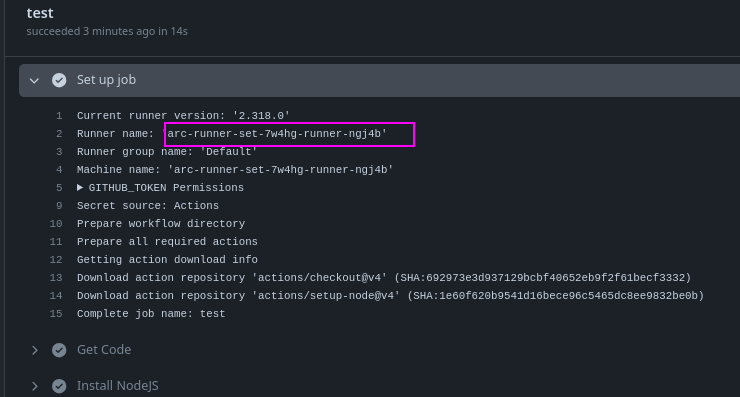
And everything working perfectly as it should.