Execution Control
So far we've been able to write pipelines that have a beginning and end and stop execution if something fails, including dependent jobs. This is the default behavior and makes sense, but sometimes we want to continue execution even if a step fails or a set of steps fail.
A classic example is when we apply a lint to see if the code is well indented. If it doesn't pass the lint it will fail, but the code is working and we could continue the execution to look for more errors during development and then fix everything.
We could add this with vulnerability analysis and then with code analysis. It could fail in all 3 stages and pass the tests, generate the build, but we don't want to deploy. From there on with the errors generated we can create new tasks for developers to fix the problems and try again.
If we have multiple environments, development, staging, and production, we don't need to execute the entire pipeline when it's for production if it comes merged from the staging branch where all possible tests were done, it would be a waste of time. We only need to deploy to the environment.
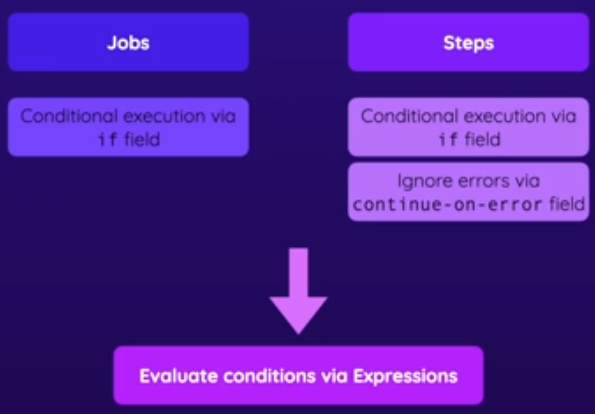
We can put conditions on jobs and steps, but only in steps can we ignore if an error occurs, a job needs to finish successfully ignoring step errors.
Expressions are used to create a condition.
Let's go back to the node application using the flow below with 4 jobs.
name: Website Deployment
on:
  push:
    branches:
      - main
jobs:
  lint:
    runs-on: ubuntu-latest
    steps:
      - name: Get code
        uses: actions/checkout@v4
      - name: Cache dependencies
        id: cache
        uses: actions/cache@v4
        with:
          path: ~/.npm
          key: deps-node-modules-${{ hashFiles('**/package-lock.json') }}
      - name: Install dependencies
        run: npm ci
      - name: Lint code
        run: npm run lint
  test:
    runs-on: ubuntu-latest
    steps:
      - name: Get code
        uses: actions/checkout@v4
      - name: Cache dependencies
        id: cache
        uses: actions/cache@v4
        with:
          path: ~/.npm
          key: deps-node-modules-${{ hashFiles('**/package-lock.json') }}
      - name: Install dependencies
        run: npm ci
      - name: Test code
        run: npm run test
      - name: Upload test report
        uses: actions/upload-artifact@v4
        with:
          name: test-report
          path: test.json
  build:
    needs: test
    runs-on: ubuntu-latest
    steps:
      - name: Get code
        uses: actions/checkout@v4
      - name: Cache dependencies
        id: cache
        uses: actions/cache@v4
        with:
          path: ~/.npm
          key: deps-node-modules-${{ hashFiles('**/package-lock.json') }}
      - name: Install dependencies
        run: npm ci
      - name: Build website
        id: build-website
        run: npm run build
      - name: Upload artifacts
        uses: actions/upload-artifact@v4
        with:
          name: dist-files
          path: dist
  deploy:
    needs: build
    runs-on: ubuntu-latest
    steps:
      - name: Get build artifacts
        uses: actions/download-artifact@v4
        with:
          name: dist-files
      - name: Output contents
        run: ls
      - name: Deploy
        run: echo "Deploying..."
We have 4 steps using cache where:
- The lint and test jobs run in parallel because they have no dependency, but they will use the same cache, will they? How if they have no dependency?
- Test is a prerequisite for build, but lint is not. Test generates a report as an artifact and also uploads this single file.
- Build is a prerequisite for deploy, after all, it downloads the artifact generated by build.
Let's add some conditions.
-
We only want to upload if the test fails for analysis. If everything goes well, we don't need it. For this, we need to take a look at the steps context.
  test:
    runs-on: ubuntu-latest
    steps:
      ...
      - name: Test code
        id: test-code # We need to create a reference for it
        run: npm run test

      - name: Upload test report
        uses: actions/upload-artifact@v4
        # We use outcome instead of conclusion because we want to do the if before applying continue-on-error to the previous step
        # if: steps.test-code.outcome == 'failure'
        # Even with the condition commented above, GitHub will continue with the default behavior that if a step fails it will stop the job
        # The special failure function solves the problem, we'll talk about it next
        if: failure() && steps.test-code.outcome == 'failure'
        with:
          name: test-report
          path: test.json
There are 4 special functions that change the default workflow behavior and must be logically added to the condition to change the default workflow behavior.
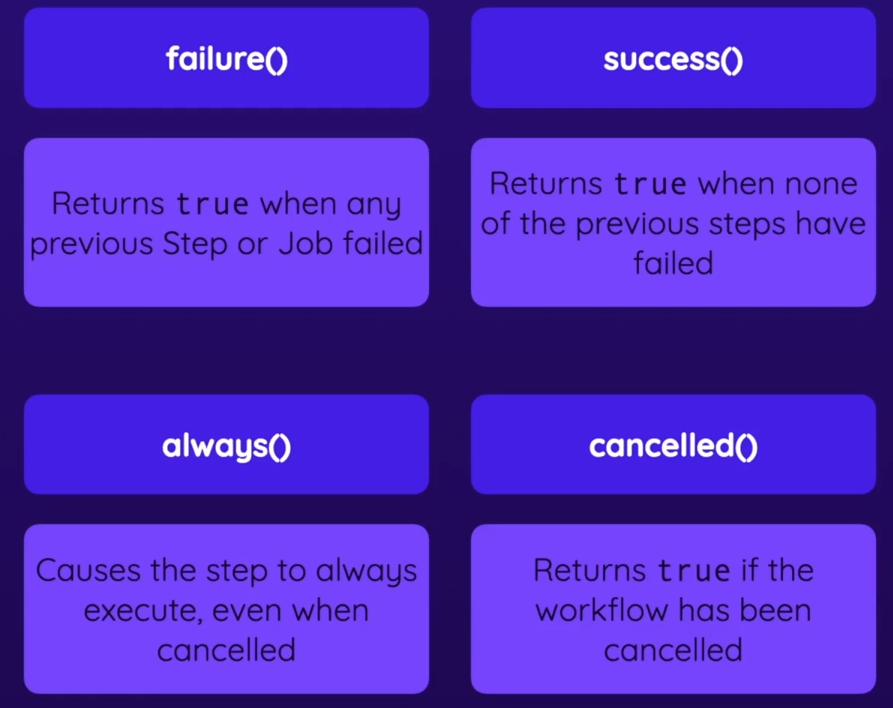
- failure() Always returns true if any previous step or job fails
- success() returns true if no previous step fails.
- always() Always returns true forcing execution even if the workflow is canceled.
- cancelled() returns true if the WORKFLOW is canceled.
When we add failure() && it will add to the logic if the step we pointed to previously failed then it returns true and will execute.
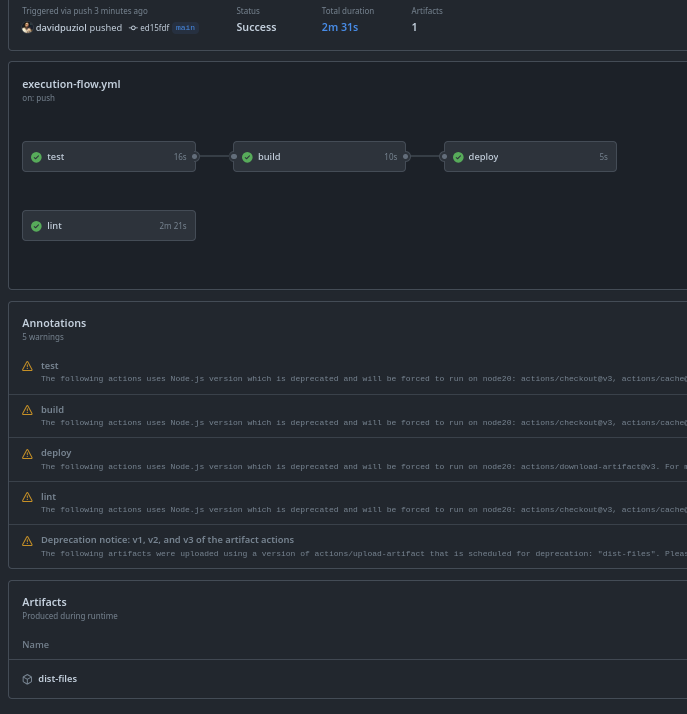
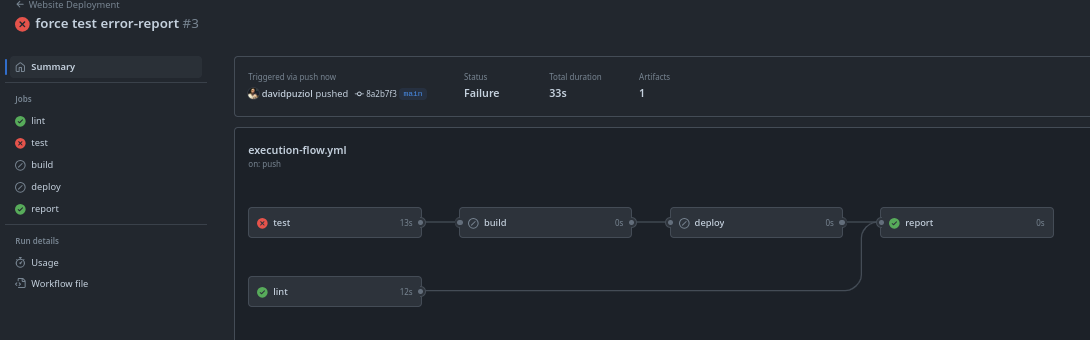
Let's execute a workflow with the test without failure and another with failure and see the report. In the first image we can observe that we don't have the test report as an artifact and everything passed normally.
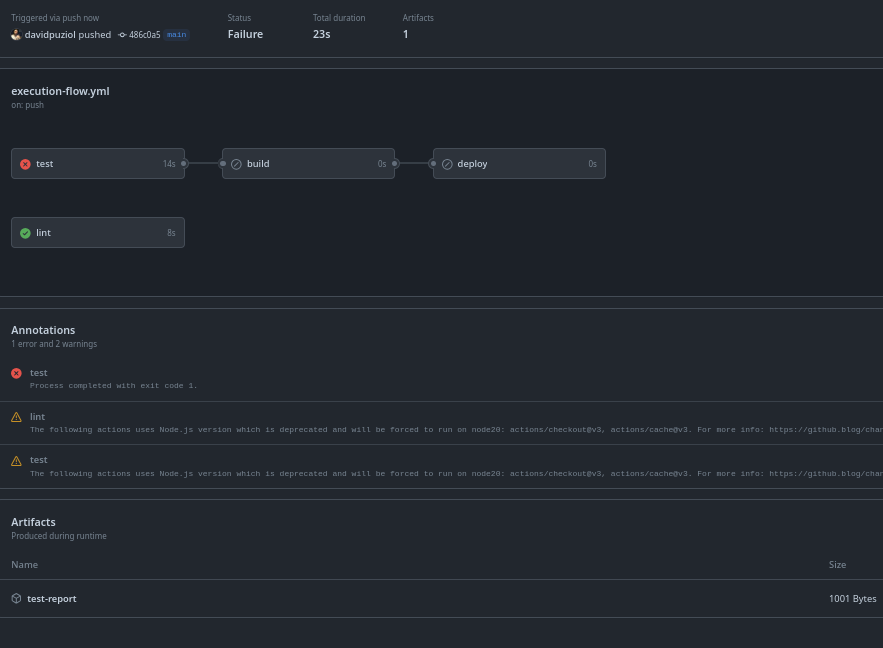
Now forcing an error in the test it didn't execute the build as expected but uploaded the test report as an artifact
If
If can also be used for jobs.
If we want to create a last job that only executes if some other job fails and we do this...
jobs:
 lint:
   ...
 test:
   ...
 build:
   needs: [test]
 deploy:
   needs: [build]
 report:
   if: failure()
   runs-on: ubuntu-latest
   steps:
     - name: Output Info
       run: |
         echo "Do something when it fails"
It will skip right away because it will run in parallel with lint and test already identifying that no one failed right at the beginning. For it to work, we would need to put the needs for lint and deploy. In the case of deploy, it has a dependency on build and test, so any that fails, deploy fails.
jobs:
 lint:
   ...
 test:
   ...
 build:
   needs: [test]
 deploy:
   needs: [build]
 report:
   needs: [lint, deploy]
   if: failure()
   runs-on: ubuntu-latest
   steps:
     - name: Output Info
       run: |
         echo "Do something when it fails, print the github context"
         echo "${{ toJSON(github) }}"
Now let's improve the cache. Instead of caching ~/.npm to gain speed in npm ci, we can cache node_modules and if the cache is restored we don't even need to execute the npm ci command to install dependencies.
In the cache action documentation we have this.

name: Website Deployment
on:
  push:
    branches:
      - main
jobs:
  lint:
    runs-on: ubuntu-latest
    steps:
      - name: Get code
        uses: actions/checkout@v4
      - name: Cache dependencies
        id: cache # To reference this step
        uses: actions/cache@v4
        with:
          path: node_modules # Changed the folder
          key: deps-node-modules-${{ hashFiles('**/package-lock.json') }}
      - name: Install dependencies
        # If it didn't match with a cache then execute
        # steps.cache.outputs.cache-hit is converted to string that's why 'true'
        # All identical blocks in subsequent jobs have been changed
        if: steps.cache.outputs.cache-hit != 'true'
        run: npm ci
      - name: Lint code
        run: npm run lint
  test:
    runs-on: ubuntu-latest
    steps:
      - name: Get code
        uses: actions/checkout@v4
      - name: Cache dependencies
        id: cache
        uses: actions/cache@v4
        with:
          path: node_modules
          key: deps-node-modules-${{ hashFiles('**/package-lock.json') }}
      - name: Install dependencies
        if: steps.cache.outputs.cache-hit != 'true'
        run: npm ci
      - name: Test code
        id: test-code
        run: npm run test
      - name: Upload test report
        uses: actions/upload-artifact@v4
        if: failure() && steps.test-code.outcome == 'failure'
        with:
          name: test-report
          path: test.json
  build:
    needs: test
    runs-on: ubuntu-latest
    steps:
      - name: Get code
        uses: actions/checkout@v4
      - name: Cache dependencies
        id: cache
        uses: actions/cache@v4
        with:
          path: node_modules
          key: deps-node-modules-${{ hashFiles('**/package-lock.json') }}
      - name: Install dependencies
        if: steps.cache.outputs.cache-hit != 'true'
        run: npm ci
      - name: Build website
        id: build-website
        run: npm run build
      - name: Upload artifacts
        uses: actions/upload-artifact@v4
        with:
          name: dist-files
          path: dist
  deploy:
    needs: build
    runs-on: ubuntu-latest
    steps:
      - name: Get build artifacts
        uses: actions/download-artifact@v4
        with:
          name: dist-files
      - name: Output contents
        run: ls
      - name: Deploy
        run: echo "Deploying..."
  report:
    needs: [lint, deploy]
    if: failure()
    runs-on: ubuntu-latest
    steps:
      - name: Output Info
        run: |
          echo "Do something when it fails, print the github context"
          echo "${{ github }}"
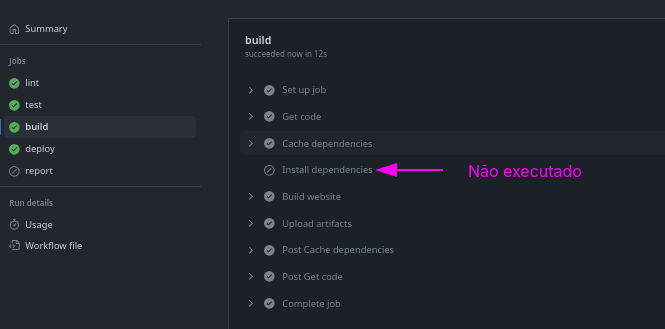
We can also observe that report was not executed, because no job failed.
Ignoring Errors with continue-on-error
Using continue-on-error simply sets a step or job as success even if it fails. If we did this here, even if the test fails, the build and deploy will be executed including the error artifact upload.
  test:
    steps:
      ...
      - name: Test code
        id: test-code
        run: npm run test
        continue-on-error: true
      - name: Upload test report
        uses: actions/upload-artifact@v4
        if: steps.test-code.outcome == 'failure'
        with:
          name: test-report
          path: test.json
      ...
Matrix
Using a matrix allows you to run a job multiple times (in parallel) with different inputs.
A good example for this scenario would be a version test battery for the same build, or compiling the same binary multiple times for different platforms.
name: Matrix Demo

on: push

jobs:
  build:
  # continue-on-error: true
    strategy:
        matrix:
            node-version: [12,14,16]
            operating-systems: [ubuntu-latest, windows-latest]
    runs-on: ${{ matrix.operating-systems}}
    steps:
      - name: Get code
        uses: actions/checkout@v4
      - name: Install NodeJS
        uses: actions/setup-node@v4
        with:
          node-version:  ${{ matrix.node-version }}
      - name: Install dependencies
        run: npm ci
      - name: Build website
        run: npm run build
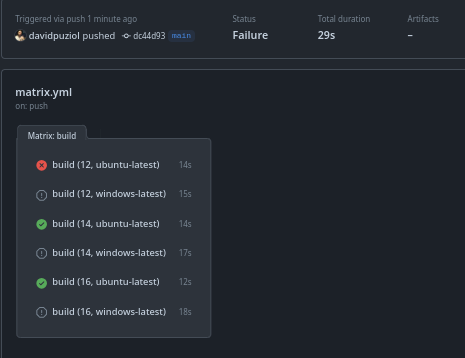
In this case, it tried all possible combinations between the values generating 6 jobs at the same time. If any of them fail, the matrix will be canceled and ignored.
If we want it to continue anyway, we can use continue-on-error and we will have this output.
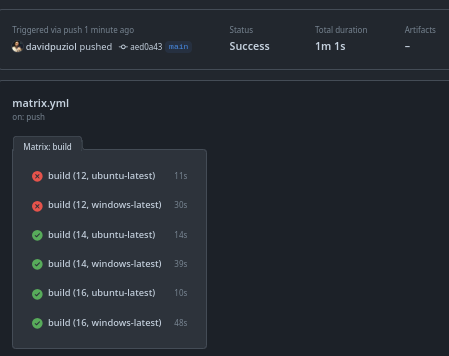

We could only have a specific combination in the case ubuntu-latest and version 18 without Windows.
...
jobs:
  build:
    strategy:
        matrix:
            # Windows with 12 14 16
            # Linux with 12 14 and 16
            node-version: [12,14,16]
            operating-systems: [ubuntu-latest, windows-latest]
            include:
                # Added to Linux 18
              - node-version: 18
                operating-systems: ubuntu-latest
                # Removed Windows 12
            exclude:
              - node-version: 12
                operating-systems: windows-latest
            # Total
            # Windows 14 16
            # Linux 12 14 16 18 # <<<<<<
...
Workflow Reuse
Actually, when using actions we are reusing a job, but we can reuse an entire workflow.
Let's create a workflow where the event is workflow_call.
.github/workflows/deploy.yaml
name: Deploy
on:
  workflow_call:
    inputs:
      artifact-name:
        description: Name of the artifact to be deployed
        required: false
        # If no input is passed, the name dist will be used, that's why required is false
        default: dist
        type: string
jobs:
  deploy:
    runs-on: ubuntu-latest
    steps:
      - name: Get build artifacts
        uses: actions/download-artifact@v4
        with:
          name: ${{ inputs.artifact-name }}
      - name: List Files
        run: ls
      - name: Deploying
        run: echo "Deploying...."
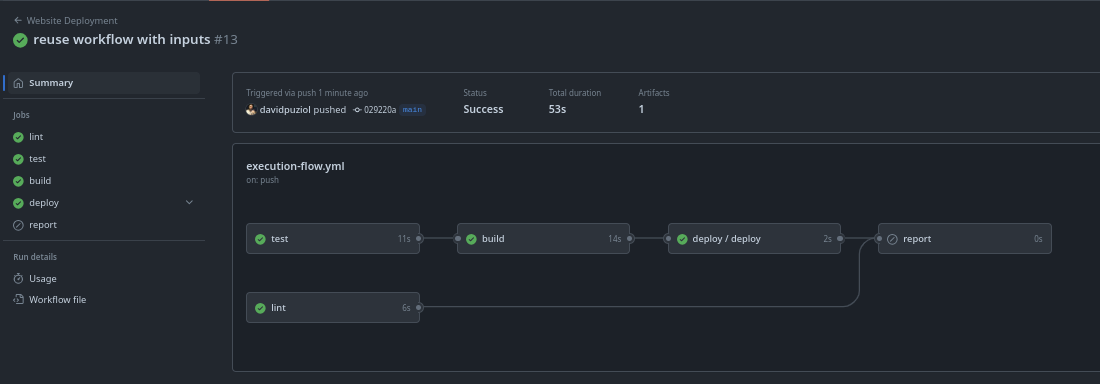
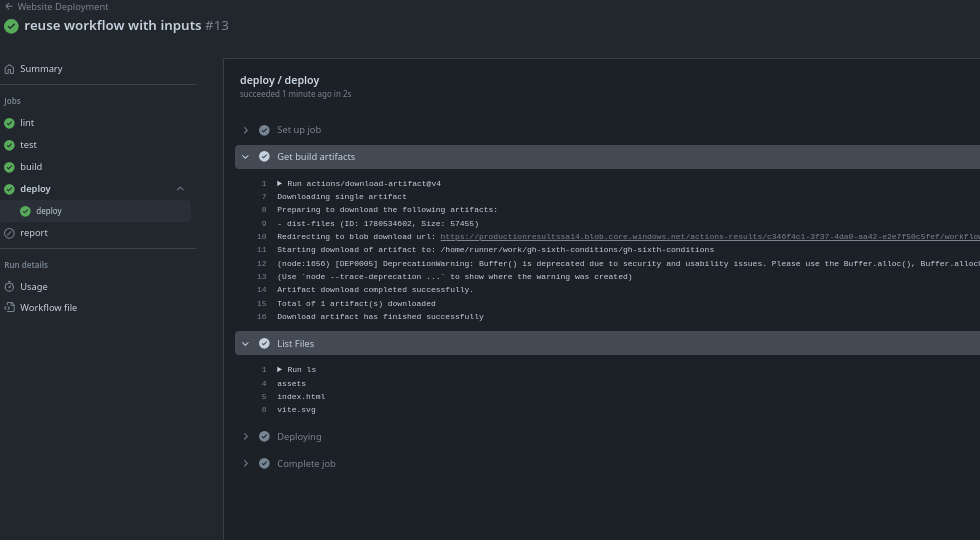
Now we can use this workflow in our main workflow by calling this workflow in the middle of the process.
name: Website Deployment
on:
  push:
    branches:
      - main
jobs:
  lint:
  ...
  test:
  ...
  build:
  ...
  deploy:
    # Note that we don't have steps because we're calling an entire workflow.
    needs: build
    uses: ./.github/workflows/deploy.yaml
    with:
      artifact-name: dist-files
  report:
  ...
It's also possible to pass secrets into reusable workflows.
Just as we have inputs, we have outputs.