Permissions and Security
Security
Script injection is about some sequence of commands being injected into the workflow from outside that can be used for malicious things.
Let's imagine that a workflow was triggered whenever a new issue happened and the issue title was used in the workflow somehow. Depending on where we inject this value and how we inject it, if the title was a string representing a command it would be executed.
Always check third-party actions and their reputation. Code reuse is both a good and bad thing at the same time. Since actions execute commands, these commands can steal your credentials.
Take care of repository access permission and avoid excessively permissive permissions. When creating a token for something, make sure it only has the permission to do what is necessary and nothing more. In a workflow that only does tests, it would be more interesting for the workflow to only have read permission.
Let's analyze this workflow.
name: Label Issue
on:
  issues:
    types:
      - opened
jobs:
  assign-label:
    runs-on: ubuntu-latest
    steps:
      - name: Assign label
        run: |
          issue_title="${{ github.event.issue.title }}"
          if [[ "$issue_title" == *"bug"* ]] then
          echo "Issue is about a bug!"
          else
          echo "Issue is not a bug
          fi"
If it has bug in the name then it will print that it's a bug otherwise it will print that it's not.
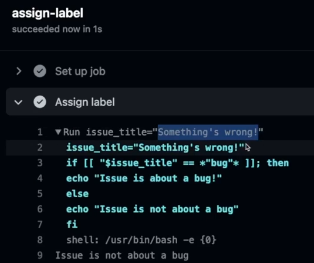
If we open an issue with the title Something's wrong we have this.
But if we open an issue with the title a";echo Got your secrets.
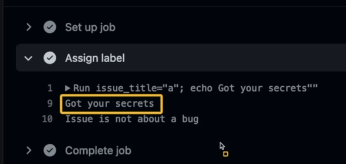
What happened was that a" closed the "$ of the first line and then the rest; echo Got your secrets was executed.
The reason this happened is that we ran this command in the runner's shell. Our code allows this. Anything inside $() inside the shell is interpreted. The code below wouldn't allow this.
name: Label Issue
on:
  issues:
    types:
      - opened
jobs:
  assign-label:
    runs-on: ubuntu-latest
    steps:
      - name: Assign label
          env:
            TITLE: ${{ github.event.issue.title }}
        run: |
          if [[ "$TITLE" == *"bug"* ]] then
          echo "Issue is about a bug!"
          else
          echo "Issue is not a bug
          fi"
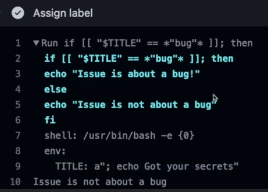
One of the ways to defend yourself and avoid using interpolations inside the code in run and whenever possible use actions instead of run.
About actions, first look for actions developed by the GitHub team, then from verified partners and only as a last resort public ones.
Try to check the action repository and review the code.
Permissions
So far we've run workflows without worrying about permissions.
Let's analyze this workflow. Every time an issue is created, it will only run if there's the word bug in the issue. We're using the GitHub API to set the bug label on this issue.
name: Set Label Issue
on:
  issues:
    types:
      - opened
jobs:
  assign-label:
    runs-on: ubuntu-latest
    steps:
      - name: Assign label
        if: contains(github.event.issue.title, 'bug')
        run: |
          curl -X POST \
          --url https://api.github.com/repos/${{ github.repository }}/issues/${{ github.event.issue.number }}/labels \
          -H 'authorization: Bearer ${{ secrets.GITHUB_TOKEN }}' \
          -H 'content-type: application/json' \
          -d '{
              "labels": ["bug"]
            }' \
          --fail
This workflow only needs permission to interact with issues but doesn't need permission for pull requests or to use the repository code.
Permissions are at the job level not at the workflow level. If we define a permission at the workflow level, all jobs will inherit this permission and can be redefined within each job.
These are the permissions we can define for a GitHub token.
permissions:
  actions: read|write|none
  attestations: read|write|none
  checks: read|write|none
  contents: read|write|none
  deployments: read|write|none
  id-token: read|write|none
  issues: read|write|none
  discussions: read|write|none
  packages: read|write|none
  pages: read|write|none
  pull-requests: read|write|none
  repository-projects: read|write|none
  security-events: read|write|none
  statuses: read|write|none
I'll put some notes directly in the example
name: Set Label Issue
on:
  issues:
    types:
      - opened
jobs:
  assign-label:
  # permissions: write-all # full permission This is the default permission.
  # permissions: read-all # full viewer permission
    permissions:
      issues: write
    # issues: read # Will have a problem with 403
    runs-on: ubuntu-latest
    steps:
      - name: Assign label
        if: contains(github.event.issue.title, 'bug')
        run: |
          curl -X POST \
          --url https://api.github.com/repos/${{ github.repository }}/issues/${{ github.event.issue.number }}/labels \
          -H 'authorization: Bearer ${{ secrets.GITHUB_TOKEN }}' \
          -H 'content-type: application/json' \
          -d '{
              "labels": ["bug"]
            }' \
          --fail
This is one more layer of protection we can use, but it can still allow script injection.
If the permission was read-only, we couldn't set a label with a denied permission code 403.
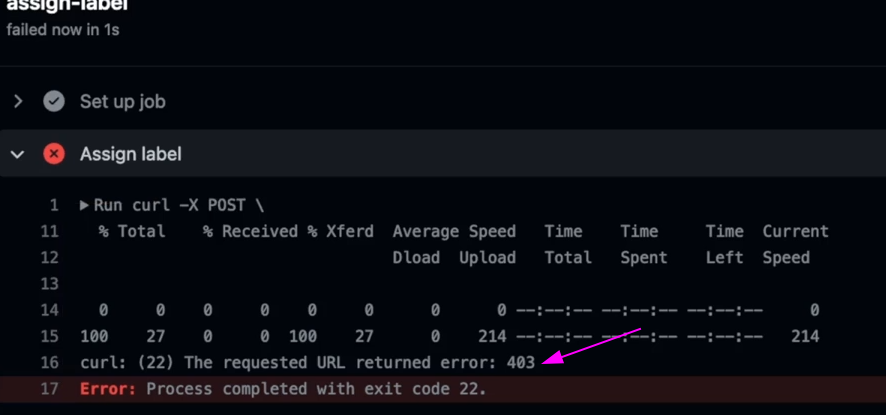
Every time a job is created, a token is generated for that job and we can access it via ${{ secrets.GITHUB_TOKEN }}.
It's possible to change the restriction from permissive to restrictive for actions in settings. This ensures that permissions for workflows need to be given correctly. It's worth checking the documentation.
I don't know if it's a good idea to let GitHub Actions create and approve pull requests unless a good gitflow is used in the repository.
It's worth taking a look at pull requests coming from forks and making them more restrictive if you're working on a public project. The default is that if you approve the first time, the next ones will be approved automatically.