Instalação do Helm
https://helm.sh/docs/intro/install/
Antigamente o Helm na versão 2 utilizava o tiller que fazia toda a parte do RBAC (permissões para o cli do Helm), mas isso foi depreciado na versão 3 e tudo passa a estar no cli helm que conversa direto com o kube-api. Esquece a versão 2 pois já será descontinuada.
| Helm V2 | Helm V3 |
|---|---|
| Tiller | 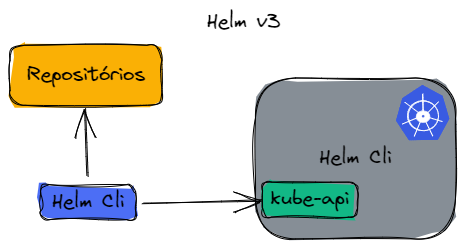 |
Utilizando o script
curl -fsSL -o get_helm.sh https://raw.githubusercontent.com/helm/helm/main/scripts/get-helm-3
chmod 700 get_helm.sh
./get_helm.sh
Utilizando o APT
# Adicionando a chave do repositório
curl https://baltocdn.com/helm/signing.asc | gpg --dearmor | sudo tee /usr/share/keyrings/helm.gpg > /dev/null
# Instalando dependências necessárias
sudo apt-get install apt-transport-https --yes
# Instalando o repositório
echo "deb [arch=$(dpkg --print-architecture) signed-by=/usr/share/keyrings/helm.gpg] https://baltocdn.com/helm/stable/debian/ all main" | sudo tee /etc/apt/sources.list.d/helm-stable-debian.list
# Instalando o Helm
sudo apt-get update
sudo apt-get install helm

helm version
Utilizando o ASDF
asdf plugin add helm
asdf install helm latest
asdf global helm latest
Para outras instalações consultar a documentação que é muito rica.
Completion
Vamos facilitar o auto complete do helm para o shell.
https://helm.sh/docs/helm/helm_completion/
A saída do comando abaixo pode ser redirecionada para o arquivo e este carregado na sessão do seu shell. Como eu uso oh-my-zsh fiz dessa maneira.
helm completion zsh > ~/.oh-my-zsh/completions/_helm
Esse comando abaixo carrega na sessão atual somente.
source <(helm completion zsh)
source <(helm completion bash)
Aqui uma lista de todos os comandos do helm.
❯ helm
completion  -- generate autocompletion scripts for the specified shell
create      -- create a new chart with the given name
dependency  -- manage a charts dependencies
env         -- helm client environment information
get         -- download extended information of a named release
help        -- Help about any command
history     -- fetch release history
install     -- install a chart
lint        -- examine a chart for possible issues
list        -- list releases
package     -- package a chart directory into a chart archive
plugin      -- install, list, or uninstall Helm plugins
pull        -- download a chart from a repository and (optionally) unpack it in local directory
push        -- push a chart to remote
registry    -- login to or logout from a registry
repo        -- add, list, remove, update, and index chart repositories
rollback    -- roll back a release to a previous revision
search      -- search for a keyword in charts
show        -- show information of a chart
status      -- display the status of the named release
template    -- locally render templates
test        -- run tests for a release
uninstall   -- uninstall a release
upgrade     -- upgrade a release
verify      -- verify that a chart at the given path has been signed and is valid
version     -- print the client version information