Helm Installation
https://helm.sh/docs/intro/install/
In the past, Helm version 2 used Tiller which handled all the RBAC (permissions for the Helm CLI), but this was deprecated in version 3 and everything is now in the Helm CLI which communicates directly with the kube-api. Forget version 2 as it will soon be discontinued.
| Helm V2 | Helm V3 |
|---|---|
| Tiller | 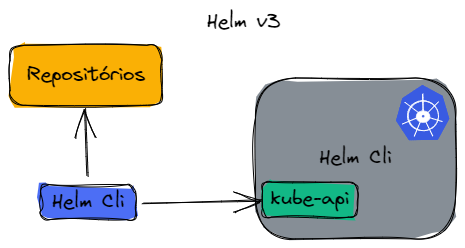 |
Using the Script
curl -fsSL -o get_helm.sh https://raw.githubusercontent.com/helm/helm/main/scripts/get-helm-3
chmod 700 get_helm.sh
./get_helm.sh
Using APT
# Adding the repository key
curl https://baltocdn.com/helm/signing.asc | gpg --dearmor | sudo tee /usr/share/keyrings/helm.gpg > /dev/null
# Installing necessary dependencies
sudo apt-get install apt-transport-https --yes
# Installing the repository
echo "deb [arch=$(dpkg --print-architecture) signed-by=/usr/share/keyrings/helm.gpg] https://baltocdn.com/helm/stable/debian/ all main" | sudo tee /etc/apt/sources.list.d/helm-stable-debian.list
# Installing Helm
sudo apt-get update
sudo apt-get install helm

helm version
Using ASDF
asdf plugin add helm
asdf install helm latest
asdf global helm latest
For other installations, consult the very rich documentation.
Completion
Let's enable auto-completion for Helm in the shell.
https://helm.sh/docs/helm/helm_completion/
The output of the command below can be redirected to a file and loaded in your shell session. Since I use oh-my-zsh, I did it this way.
helm completion zsh > ~/.oh-my-zsh/completions/_helm
This command below loads only in the current session.
source <(helm completion zsh)
source <(helm completion bash)
Here is a list of all Helm commands.
❯ helm
completion  -- generate autocompletion scripts for the specified shell
create      -- create a new chart with the given name
dependency  -- manage a charts dependencies
env         -- helm client environment information
get         -- download extended information of a named release
help        -- Help about any command
history     -- fetch release history
install     -- install a chart
lint        -- examine a chart for possible issues
list        -- list releases
package     -- package a chart directory into a chart archive
plugin      -- install, list, or uninstall Helm plugins
pull        -- download a chart from a repository and (optionally) unpack it in local directory
push        -- push a chart to remote
registry    -- login to or logout from a registry
repo        -- add, list, remove, update, and index chart repositories
rollback    -- roll back a release to a previous revision
search      -- search for a keyword in charts
show        -- show information of a chart
status      -- display the status of the named release
template    -- locally render templates
test        -- run tests for a release
uninstall   -- uninstall a release
upgrade     -- upgrade a release
verify      -- verify that a chart at the given path has been signed and is valid
version     -- print the client version information