Helm

Helm is part of CNCF and is a graduated project based on golang.
Before diving into the Helm world and discovering how it can simplify application deployment in Kubernetes, it's important to understand what's needed to get an application running in this environment.
Crucial Elements for Deployment
- Container Image: The cornerstone of any containerized application is the image itself. This may involve using a pre-existing container image or creating a custom one to meet your application's specific needs.
- .yaml Manifests: These are essential files that describe how resources like deployments, replica sets, services, ingresses, and service accounts should be created in Kubernetes.
- kubectl create: A command used to apply YAML manifests and effectively create resources within the Kubernetes cluster.
Suppose we have a system composed of multiple services, such as a REST API, a database, and a pub/sub messaging service.
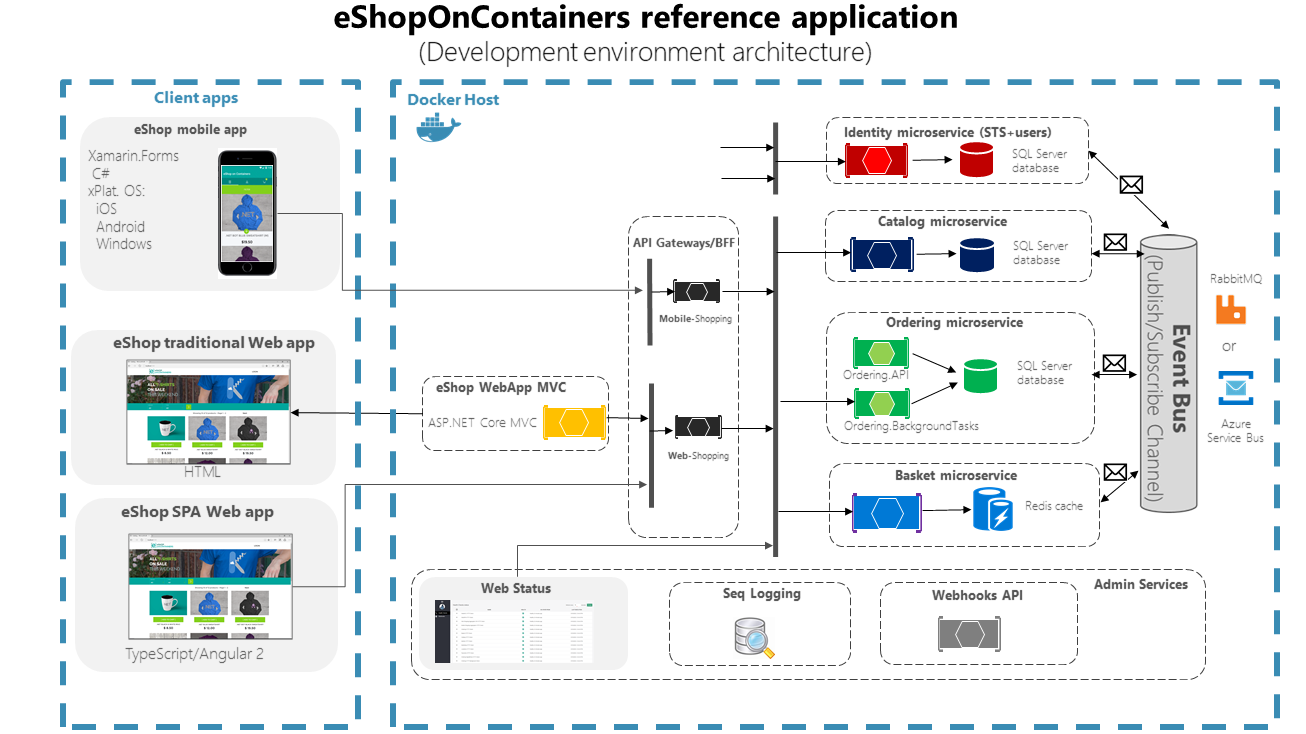
In this scenario, the complexity of microservices becomes apparent, as each one requires its own set of manifests, resulting in the generation of a variety of objects with different configurations in Kubernetes.
If the idea is to replicate this application's deployment in a different Kubernetes cluster, it will be necessary to review and possibly modify several manifests, which can make the process both laborious and error-prone.
The question then arises: how can we simplify this procedure? The answer lies in using Helm, which is a package management tool for Kubernetes.
Helm: The Kubernetes Package Manager
Just like other well-known package management tools such as apt (Debian), yum (Red Hat), and pacman (Arch Linux) that facilitate software installation, configuration, and updates on operating systems, Helm plays an analogous role in the Kubernetes ecosystem.
Helm allows the installation of complex applications in a much more accessible and pre-configured manner, minimizing the effort and potential for error involved in manually managing multiple YAML manifests.
Using the analogy with operating system package managers, Helm generally follows similar command logic. This makes the usage process intuitive for those already familiar with such tools in other contexts.
# To add a repository
helm repo add
# Search a repository
helm search repo
# Install a chart
helm install
# Update the chart
helm update
# Rollback an application
helm rollback
# Create a chart
helm create
# Check if it's installed
helm status
In summary, Helm is the perfect ally for managing applications in Kubernetes efficiently and in a standardized way, providing robust deployment that is less prone to failures.
Helm Charts and Repositories
Continuing the analogy with conventional package managers, we have that, just as these have repositories where packages are stored and cataloged to facilitate searching and installation, Helm uses a similar approach to manage what are called charts.
What Are Helm Charts?
Helm Charts are, in essence, pre-configured packages that contain a set of files and Kubernetes manifest templates. They serve as molds that expect to be complemented by specific configurations, which will define how the application should be installed and executed in the cluster. Charts contain everything necessary for consistent application deployment, including:
- Kubernetes resource templates.
- Default values that can be overridden.
- Chart metadata, such as version and description.
- Dependencies the chart may have on other charts.
Helm Repositories
To facilitate chart discovery and sharing, Helm uses repositories. Helm repositories are collections of charts hosted on a server that can be searched and installed by users. These repositories can be public, like Helm Hub, where you'll find a wide range of charts developed by the community, or private, for internal use within an organization.
When you want to use a chart, the first step is generally to add the repository containing the desired chart, using the helm repo add command. Once the repository is added to your local environment, you can search for and install charts from this repository.
Beyond simplifying publication and sharing of applications, Helm charts also promote code reuse and best practices, as the community can contribute and improve charts over time.
In conclusion, Helm charts and repositories are powerful tools that allow users and developers to manage Kubernetes applications more efficiently, maintaining organization and standardization of deployments across different environments and various applications.