Kubernetes Hard Way Proposal
The idea of the project is to get to know Kubernetes under the hood and put into practice all the knowledge acquired along the way. This will enable us to solve installation-related problems and in the future move towards tuning.
We will try to do everything the hardest and most manual way possible, isolating each component when possible. We will try to create a cluster in a hard way.
To create this environment we will need 6 machines.
3 masters 2 workers 1 load balancer (Ideally at least 2, but we'll give that a pass here)
Environment
Requirements
Have these two tools installed on your system.
There is no step-by-step for installing these tools in this project. If it's meant to be hard, you have to figure it out yourself.
- Vagrant - Version 2.4.1 or higher - We will simulate an environment locally using Vagrant to spin up our machines.
- VirtualBox Will be used by Vagrant to virtualize the machines.
Define 6 IPs on your local network that can be used. The machines will not be in NAT but in bridge mode.
See which network interface your local machine is using. Filter by your machine's IP and look for this information. In my case it's enx00e04c6810f3.
ip addr show | grep 10.0.0.105
    inet 10.0.0.105/24 brd 10.0.0.255 scope global dynamic noprefixroute enx00e04c6810f3
Create this folder structure as follows.
tree -L 2
.
├── environment # Will contain Vagrant related files
└── shared_files # Will contain all files and scripts we'll create
Create a file in the environment folder called Vagrantfile with the following content. Already adjust for the IPs you chose. Observe the comments.
# -*- mode: ruby -*-
# vi:set ft=ruby sw=2 ts=2 sts=2:
Vagrant.require_version ">= 2.4.1"

NETWORK_INTERFACE = "enx00e04c6810f3"  # Change to your network interface
NETWORK_PREFIX = "10.0.0." # Change to your network prefix

# Change the IPs below according to the IPs you set aside on your network.
# -*- mode: ruby -*-
# vi:set ft=ruby sw=2 ts=2 sts=2:

Vagrant.require_version ">= 2.4.1"

haproxy_machines = {
  "loadbalancer"   => {"memory" => "1024", "cpu" => "1", "disk" => "40", "ip" => "200", "image" => "ubuntu/jammy64"},
}

masters_machines = {
  "master1"   => {"memory" => "2048", "cpu" => "1", "disk" => "40", "ip" => "201", "image" => "ubuntu/jammy64"},
  "master2"   => {"memory" => "2048", "cpu" => "1", "disk" => "40", "ip" => "202", "image" => "ubuntu/jammy64"},
  "master3"   => {"memory" => "2048", "cpu" => "1", "disk" => "40", "ip" => "203", "image" => "ubuntu/jammy64"},
}

workers_machines = {
  "worker1"   => {"memory" => "2048", "cpu" => "1", "disk" => "40", "ip" => "207", "image" => "ubuntu/jammy64"},
  "worker2"   => {"memory" => "2048", "cpu" => "1", "disk" => "40", "ip" => "208", "image" => "ubuntu/jammy64"},
}

NETWORK_INTERFACE = "enx00e04c6810f3"
NETWORK_PREFIX = "10.0.0."

Vagrant.configure("2") do |config|

  haproxy_machines.each do |name, conf|
    config.vm.define "#{name}" do |machine|
      machine.vm.synced_folder "../shared_files", "/vagrant/shared_files"
      machine.vm.box = "#{conf["image"]}"
      machine.vm.hostname = "#{name}"
      machine.vm.network "public_network", bridge: "#{NETWORK_INTERFACE}", ip: "#{NETWORK_PREFIX}#{conf["ip"]}"
      machine.vagrant.plugins = ["vagrant-disksize"]
      machine.disksize.size = "#{conf["disk"]}GB"
      machine.vm.provider "virtualbox" do |vb|
        vb.name = "#{name}"
        vb.memory = conf["memory"]
        vb.cpus = conf["cpu"]
        vb.customize ["modifyvm", :id, "--groups", "/kubernetes", "--nicpromisc2", "allow-all"]
      end
      machine.vm.provision "shell", path: "../shared_files/update_vm.sh"
      machine.vm.provision "shell", path: "../shared_files/ssh.sh"
      machine.vm.provision "shell", path: "../shared_files/bootstrap_loadbalancer.sh"
    end
  end

  masters_machines.each do |name, conf|
    config.vm.define "#{name}" do |machine|
      machine.vm.synced_folder "../shared_files", "/vagrant/shared_files"
      machine.vm.box = "#{conf["image"]}"
      machine.vm.hostname = "#{name}"
      machine.vm.network "public_network", bridge: "#{NETWORK_INTERFACE}", ip: "#{NETWORK_PREFIX}#{conf["ip"]}"
      machine.vagrant.plugins = ["vagrant-disksize"]
      machine.disksize.size = "#{conf["disk"]}GB"
      machine.vm.provider "virtualbox" do |vb|
        vb.name = "#{name}"
        vb.memory = conf["memory"]
        vb.cpus = conf["cpu"]
        vb.customize ["modifyvm", :id, "--groups", "/kubernetes", "--nicpromisc2", "allow-all"]
      end
      machine.vm.provision "shell", path: "../shared_files/update_vm.sh"
      machine.vm.provision "shell", path: "../shared_files/ssh.sh"
      machine.vm.provision "shell", path: "../shared_files/bootstrap_nodes.sh"

      if name == "master1" # Generating all necessary files
        machine.vm.provision "shell", inline: "cd /vagrant/shared_files/ && ./1_generate_certificate_control_plane.sh"
        machine.vm.provision "shell", inline: "cd /vagrant/shared_files/ && ./2_generate_certificate_workers.sh"
        machine.vm.provision "shell", inline: "cd /vagrant/shared_files/ && ./3_generate_kubeconfigs_control_plane.sh"
        machine.vm.provision "shell", inline: "cd /vagrant/shared_files/ && ./4_generate_kubeconfigs_workers.sh"
        machine.vm.provision "shell", inline: "cd /vagrant/shared_files/ && ./5_create_encription_method.sh"
      end
      machine.vm.provision "shell", path: "../shared_files/boostratp_etcd.sh"
      machine.vm.provision "shell", path: "../shared_files/boostrap_control_plane.sh"
      if name == "master3" # Install CNI and create ClusterRoles for nodes.
        machine.vm.provision "shell", path: "../shared_files/configure_cluster.sh"
      end
    end
  end

  workers_machines.each do |name, conf|
    config.vm.define "#{name}" do |machine|
      machine.vm.synced_folder "../shared_files", "/vagrant/shared_files"
      machine.vm.box = "#{conf["image"]}"
      machine.vm.hostname = "#{name}"
      machine.vm.network "public_network", bridge: "#{NETWORK_INTERFACE}", ip: "#{NETWORK_PREFIX}#{conf["ip"]}"
      machine.vagrant.plugins = ["vagrant-disksize"]
      machine.disksize.size = "#{conf["disk"]}GB"
      machine.vm.provider "virtualbox" do |vb|
        vb.name = "#{name}"
        vb.memory = conf["memory"]
        vb.cpus = conf["cpu"]
        vb.customize ["modifyvm", :id, "--groups", "/kubernetes", "--nicpromisc2", "allow-all"]
      end
      machine.vm.provision "shell", path: "../shared_files/update_vm.sh"
      machine.vm.provision "shell", path: "../shared_files/ssh.sh"
      machine.vm.provision "shell", path: "../shared_files/bootstrap_nodes.sh"
      machine.vm.provision "shell", path: "../shared_files/boostrap_workers.sh"
    end
  end
end
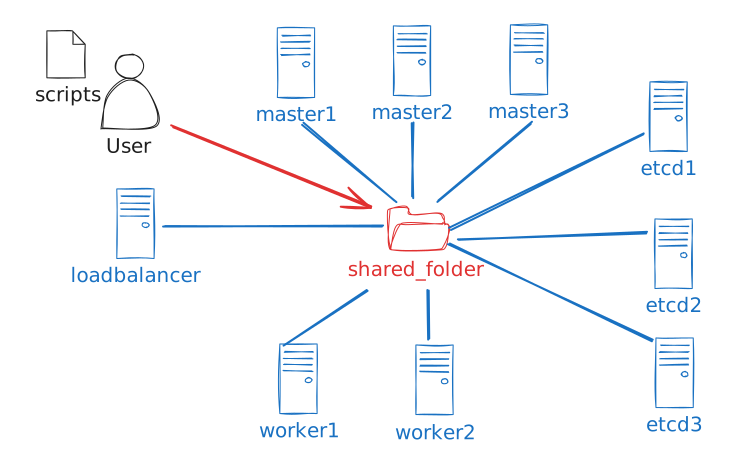
The proposal is that all our necessary files (certificates, kubeconfigs, yamls) are concentrated in a single folder to be copied to the correct places instead of using scp for everything.
We can see in the code above we have blocks that execute loops for each set of machines.
When the machine is provisioned, each line with machine.vm.provision will run some script in sequence. Not all scripts need to run on all machines. We will place the scripts inside the shared_files folder which will be mounted inside each of the created VMs.
All machines need to run an update, define hosts, and set up DNS. Let's create a script for that.
All machines need to know all machines so we'll update the hosts file. In a production environment we would have a nameserver to solve this problem, but since we don't have one, we'll define everything inside the hosts file.
Be inside the shared_files folder to execute the command below.
# Adjust the IPs according to your chosen ones
cat <<EOF >> hosts
10.0.0.200 loadbalancer
10.0.0.201 master1
10.0.0.202 master2
10.0.0.203 master3
10.0.0.207 worker1
10.0.0.208 worker2
EOF

cat <<EOF >> update_vm.sh
#!/bin/bash
echo -e "\n##### Updating the Operating System #####"
sudo apt-get update
sudo apt-get upgrade -y

echo -e "\n##### Setting /etc/hosts #####"
sudo cp /vagrant/shared_files/hosts /etc/hosts

echo -e "\n##### Changing DNS resolv to Google DNS #####"
sed -i -e 's/#DNS=/DNS=8.8.8.8/' /etc/systemd/resolved.conf
service systemd-resolved restart

echo -e "\n##### Installing Chrony #####"
sudo apt-get install chrony -y
EOF
Let's set up SSH access on all machines. We could use the key generated by Vagrant itself, but we'll refrain from that. We'll allow all machines to make SSH access to each other even if it's not necessary. It may facilitate your study.
Let's create an SSH key pair and the script that will make this key pair available to all users on all machines.
ssh-keygen -t rsa -b 4096 -f id_rsa -N ""
Since there are 3 users vagrant, ubuntu and root we'll do it for all of them. I made it very explicit here.
cat <<EOF >> ssh.sh
#!/bin/bash

echo -e "\n##### Add SSH key pair to vagrant user #####"
tee -a /home/vagrant/.ssh/authorized_keys < /vagrant/shared_files/id_rsa.pub
cp /vagrant/shared_files/id_rsa /home/vagrant/.ssh/id_rsa
chmod 400 /home/vagrant/.ssh/id_rsa

echo -e "\n##### Add SSH key pair to ubuntu user #####"
sudo tee -a /home/ubuntu/.ssh/authorized_keys < /vagrant/shared_files/id_rsa.pub
sudo cp /vagrant/shared_files/id_rsa /home/ubuntu/.ssh/id_rsa
sudo chown ubuntu:ubuntu /home/ubuntu/.ssh/id_rsa
sudo chmod 400 /home/ubuntu/.ssh/id_rsa

echo -e "\n##### Add SSH key pair to root user #####"
sudo tee -a /root/.ssh/authorized_keys < /vagrant/shared_files/id_rsa.pub
sudo cp /vagrant/shared_files/id_rsa /root/.ssh/id_rsa
sudo chown root:root /root/.ssh/id_rsa
sudo chmod 400 /root/.ssh/id_rsa
EOF