Application Failure Verification Sequence
If an application is having problems, where should we start?
Let's consider a scenario of a Web application that communicates with the database.
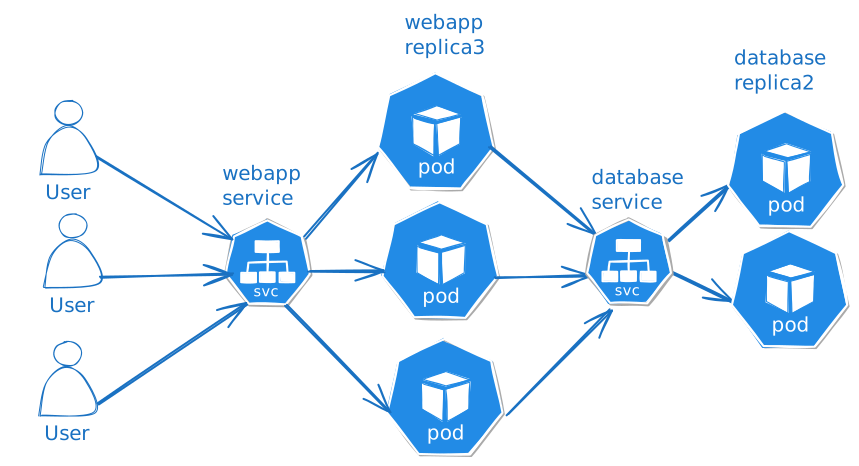
Here are some tips on how to perform a check to try to discover where a specific problem is occurring.
A good log can be of great help. However, depending on the problem, we can have an idea whether to start from the left or the right.
Everything will depend on how objects are organized in the cluster. If we have database and web application in different namespaces, different network policies, etc. But let's simplify the problem, although it's important to keep this in mind.
The ideal is to check each link shown in the image.
If a user reports problems accessing the application, where should we start?
If they reported that the problem is related to access, then let's start with the web application.
-
Test if the webapp is accessible. A great tool for this is curl. Run:
curl http://webapp-service:node-port -
Check the endpoints in the webapp service to see if they match those of the pods.
2.1. Check if the service selector matches the labels of the pods it's targeting.
-
Check the pods, logs and events of the web application pods to see if they're not being restarted.
3.1. Check using
kubectl log,kubectl get pod,kubectl describe pod, etc.3.2. Check Network Policy.
3.3. Check Init Containers if they exist.
3.4. Check commands and arguments.
3.5. Check environment variables.
3.6. Check secrets used.
3.7. Check mounted volumes and PVCs.
-
Check the database service in the same way as in step 2.
-
Check the database pod as in step 3.
This was just a quick idea, but if you're not familiar with Kubernetes, it can be difficult to know where to start.