Restrict Access to Kubernetes API
The kube-apiserver is the central component of Kubernetes that handles communication between all components. It's a reusable and extensible API, which is one of the main reasons for Kubernetes' popularity.
When we send a request to Kubernetes, we are interacting with the apiserver, which is responsible for:
- Authentication through certificates (1st level)
- Who are you?
- Authorization through roles and rolebindings (2nd level)
- Do you have permission to execute this action on this resource?
- Admission (3rd level)
- Are you violating any limit rules imposed on the cluster|namespace?
Admission Controllers perform additional checks on limits or custom customizations. We can create our own limitations with third-party tools such as OPA (Open Policy Agent).
Only if all 3 levels pass will the action be executed.
- A request can come from:
- Normal user
- Service Account
- Anonymous
- Every request must be authenticated
- OR must be treated as an anonymous user.
What can we do to improve apiserver security?
-
Don't allow anonymous access:
root@cks-master:~# curl https://localhost:6443 -k
{
  "kind": "Status",
  "apiVersion": "v1",
  "metadata": {},
  "status": "Failure",
  "message": "forbidden: User \"system:anonymous\" cannot get path \"/\"",
  "reason": "Forbidden",
  "details": {},
  "code": 403
}
# This means anonymous users are being allowed, let's change that.
# add - --anonymous-auth=false in the kube-apiserver manifest and test.

root@cks-master:~# curl https://localhost:6443 -k
{
  "kind": "Status",
  "apiVersion": "v1",
  "metadata": {},
  "status": "Failure",
  "message": "Unauthorized",
  "reason": "Unauthorized",
  "code": 401
} -
Disable insecure ports: It was possible to enable HTTP on the apiserver, but from version 1.22 onwards it's no longer possible. If we need certificates to authenticate the user, enabling Kubernetes' insecure ports will bypass authentication and authorization even though admission is still analyzed. This was only used for debugging purposes, but it's good to know.
-
Prevent pods from accessing the API: Disable the automatic mounting of service account tokens in pods, as shown previously.
-
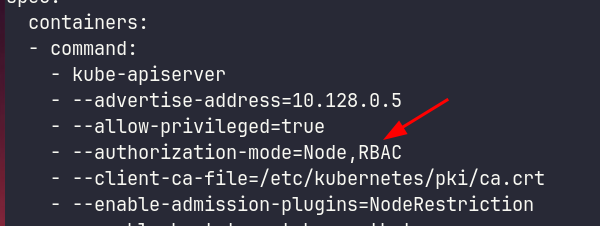
Prevent unauthorized access (RBAC). Ensure authorization-mode with RBAC.
-
Apiserver port should be behind a firewall / Allow only specific IP ranges: This protection is at a level outside the exam scope and outside Kubernetes' competence.
-
Don't expose the ApiServer outside the cluster. I'll show below in Manual Api Query. If necessary, use the item above ↑. There are other ways and services we can expose in the cluster to apply a manifest.
- Run a pod or kubectl job inside the cluster.
- SSH to a bastion within the network that has API access.
- CI/CD solutions.
- VPN.
-
Restrict Node access to the Apiserver (NodeRestriction)
We can send requests in different ways, the most common being using the kubectl CLI, but we can use libs for different languages.
It's necessary to restrict access to the API server since it's the entry point to the cluster.
Manual API Query
If we want to make a call to the API using kubectl passing certificates manually, it's possible.
# This command shows the kubeconfig we're using without exposing certificates
root@cks-master:~# k config view
apiVersion: v1
clusters:
- cluster:
    certificate-authority-data: DATA+OMITTED
    server: https://10.128.0.5:6443
  name: kubernetes
contexts:
- context:
    cluster: kubernetes
    user: david
  name: david
- context:
    cluster: kubernetes
    user: kubernetes-admin
  name: kubernetes-admin@kubernetes
current-context: kubernetes-admin@kubernetes
kind: Config
preferences: {}
users:
- name: david
  user:
    client-certificate-data: DATA+OMITTED
    client-key-data: DATA+OMITTED
- name: kubernetes-admin
  user:
    client-certificate-data: DATA+OMITTED
    client-key-data: DATA+OMITTED
Within the kubeconfig we can point to certificate and key paths instead of using the actual embedded certificate content. For convenience of having only a single file, certificates are included with plaintext in base64 in the kubeconfig. The command below shows the complete file in ~/.kube/config, same as doing a cat ~/.kube/config.
# I'll reduce the output to make it easy to read
root@cks-master:~# k config view --raw
apiVersion: v1
clusters:
- cluster:
    certificate-authority-data: LS0tLS1CRUdJT...RklDQVRFLS0tLS0K
    server: https://10.128.0.5:6443
  name: kubernetes
contexts:
- context:
    cluster: kubernetes
    user: kubernetes-admin
  name: kubernetes-admin@kubernetes
current-context: kubernetes-admin@kubernetes
kind: Config
preferences: {}
users:
- name: kubernetes-admin
  user:
    client-certificate-data: LS0tLS1CRUdJT...RFLS0tLS0K
    client-key-data: LS0tLS1CRUdJT...tLS0tCg==
Let's extract these certificates to files while doing base64 decode.
# I'll remove some base64 characters to make reading easier
root@cks-master:~# echo "LS0tLS1C....FLS0tLS0K" | base64 --decode > ca

root@cks-master:~# cat ca
-----BEGIN CERTIFICATE-----
MIIDBTCCAe2gAwIBAgIIfy9qvG3J3uEwDQYJKoZIhvcNAQELBQAwFTETMBEGA1UE
AxMKa3ViZXJuZXRlczAeFw0yNDA4MTUyMDM2MDJaFw0zNDA4MTMyMDQxMDJaMBUx
EzARBgNVBAMTCmt1YmVybmV0ZXMwggEiMA0GCSqGSIb3DQEBAQUAA4IBDwAwggEK
AoIBAQDxJ40vI2VhF+5F9SFNNfliOdjbi2+Ml+9SFMfd5WDbNEMqp3hmOpJngXGk
# Reduced
JU7NAYRagu7ypyzH9P3F2V6pThYBG0hRtt8UJippp399SDLXXLlOJKEKbY1DGeNa
MIxgD80KO92iey328zS1YxBAPC3D3StC4+14kGUAC1qOXa6uF1YvNgYDMZSz8AXL
SHLMRY9GfN2L5GQAcRQgprQeb83kaV0X7mqsnvMbQlrcZCub7wZ9M44WuQ+Qomjn
mOyo9Yb6q+QU

root@cks-master:~# echo "LS0tLS1...VRFLS0tLS0K" | base64 --decode > crt
-----END CERTIFICATE-----

root@cks-master:~# cat crt
-----BEGIN CERTIFICATE-----
MIIDKTCCAhGgAwIBAgIIHvhZBgu4UWkwDQYJKoZIhvcNAQELBQAwFTETMBEGA1UE
AxMKa3ViZXJuZXRlczAeFw0yNDA4MTUyMDM2MDJaFw0yNTA4MTUyMDQxMDVaMDwx
...
wcfJ3r/K5DpOova1rSprr/2RjbqBE+XH82Q9gXsYGLNs+JFsy1Rl4W4DiiftCKZT
Syh1SuqHG8OWRVUNoV9D7rMV5Ix9hwQJaFOCRx2zDqnTRizNwI2L9NqRtUBz9jB0
YiBtpfXMmEGQJdQBU7YiD2zpD3RY9RIh2r0T9ZtXVU0VJx2QgpbwdXekBb3X
-----END CERTIFICATE-----

root@cks-master:~# echo "LS0tLS...0tLS0tCg==" | base64 --decode > key

root@cks-master:~# cat key
-----BEGIN RSA PRIVATE KEY-----
MIIEowIBAAKCAQEAzcGoyR3lmL/uPCCwnd7dMIOv+JSl+lW7BUOLup57sLZvvPKY
HgUpJ/VEKWek+fYM+uoa1Xr1tVYo70LgfGiDNHRJhsm6nMCQJAJEfe6/FfIcr8v/
SvDP18QnP91UIGfrgpr9RWI1IYn8DxAxExkSGbbiGv+IgXp3p3vzIQPghlzv5E0g
...
HxTs4wKBgCqZmA+9QW52ii63i61YBY3m6rQA8FKd3hiPaC6USaXN53hMqcTfNLmk
sspEI8PVyIs75bD0qyK+WJYUjVlu2+iSXVQC9M26v4P1jfLdHeDuRuWsa/kmunJb
qa6+xdpKHvMAyd6pJg2m/T9afh9L2+0AGyqOiDbUzBB/ClyNef9c
-----END RSA PRIVATE KEY-----
And we can make curl requests passing the certificates.
root@cks-master:~# curl https://10.128.0.5:6443
curl: (60) SSL certificate problem: unable to get local issuer certificate
More details here: https://curl.haxx.se/docs/sslcerts.html

curl failed to verify the legitimacy of the server and therefore could not
establish a secure connection to it. To learn more about this situation and
how to fix it, please visit the web page mentioned above.

# If we don't pass client certificates then we are anonymous
root@cks-master:~# curl https://10.128.0.5:6443 --cacert ca
{
  "kind": "Status",
  "apiVersion": "v1",
  "metadata": {},
  "status": "Failure",
  "message": "forbidden: User \"system:anonymous\" cannot get path \"/\"",
  "reason": "Forbidden",
  "details": {},
  "code": 403
}

root@cks-master:~# curl https://10.128.0.5:6443 --cacert ca --cert crt
curl: (58) unable to set private key file: 'crt' type PEM

root@cks-master:~# curl https://10.128.0.5:6443 --cacert ca --cert crt --key key
{
  "paths": [
    "/.well-known/openid-configuration",
    "/api",
    "/api/v1",
    "/apis",
    "/apis/",
    "/apis/admissionregistration.k8s.io",
    # Removed to reduce study output
    ## ....
    "/readyz/poststarthook/start-system-namespaces-controller",
    "/readyz/poststarthook/storage-object-count-tracker-hook",
    "/readyz/shutdown",
    "/version"
  ]
If we want to access Kubernetes outside the cluster, we need to pay attention to the service that exposes the API.
# Currently the service is a ClusterIP, i.e., only accessed within the cluster. To expose it, we need to change this to NodePort
root@cks-master:~# k get svc kubernetes
NAME         TYPE        CLUSTER-IP   EXTERNAL-IP   PORT(S)   AGE
kubernetes   ClusterIP   10.96.0.1    <none>        443/TCP   6d12h

root@cks-master:~# k edit svc kubernetes
service/kubernetes edited

root@cks-master:~# k get svc kubernetes
NAME         TYPE       CLUSTER-IP   EXTERNAL-IP   PORT(S)         AGE
kubernetes   NodePort   10.96.0.1    <none>        443:31305/TCP   6d12h

# We can get the IP from the graphical interface or use the metadata server in the case of GCP
curl -H "Metadata-Flavor: Google" "http://metadata.google.internal/computeMetadata/v1/instance/network-interfaces/0/access-configs/0/external-ip"
34.30.155.135

# Or even use an external site that returns the information we need
curl ifconfig.me
34.30.155.135
Using the external IP address of any of the nodes on port 31305 we can reach the cluster.
On my local machine.
# And we get there, but we need a configured kubeconfig or to pass certificates.
❯ curl https://34.30.155.135:31305
curl: (60) SSL certificate problem: unable to get local issuer certificate
More details here: https://curl.se/docs/sslcerts.html

curl failed to verify the legitimacy of the server and therefore could not
establish a secure connection to it. To learn more about this situation and
how to fix it, please visit the web page mentioned above.
If we copy the kubeconfig we have on the master node to a file and point to the kubeconfig instead of configuring it also works, but with some adjustments.
# creating the config with our cluster's kubeconfig as it is
❯ vim config

# Doesn't work because the cluster IP in the config is pointing to an internal cluster IP, let's adjust
❯ kubectl --kubeconfig config get pods
  819678 memcache.go:265] couldnt get current server API group list: Get "https://10.128.0.5:6443/api?timeout=32s": dial tcp 10.128.0.5:6443: i/o timeout

# Let's change the line below to our https://34.30.155.135:31305
❯ cat config | grep server
    server: https://10.128.0.5:6443

❯ vim config

❯ cat config | grep server
    server: https://34.30.155.135:31305

kubectl --kubeconfig config get pods
E0822 06:08:03.646491  838578 memcache.go:265] couldnt get current server API group list: Get "https://34.30.155.135:31305/api?timeout=32s": tls: failed to verify certificate: x509: certificate is valid for 10.96.0.1, 10.128.0.5, not 34.30.155.135

# Let's fix it and explain later.
# Let's force the name kubernetes to be translated to the IP using the hosts file
sudo bash -c 'echo "34.30.155.135 kubernetes" >>/etc/hosts'

# Now let's edit the config file again replacing the IP with kubernetes
❯ vim config
                                                      13s
❯ cat config | grep server
    server: https://kubernetes:31305

❯ kubectl --kubeconfig config get pods
NAME                      READY   STATUS      RESTARTS     AGE
app1                      1/1     Running     1 (8h ago)   3d17h
app2                      1/1     Running     1 (8h ago)   3d17h
kube-bench-master-vdsxd   0/1     Completed   0            2d13h
What happened was that this certificate is not valid for this IP we're using. Let's check on the master. If we're hitting the apiserver, we need to check its certificate.
root@cks-master:~# cd /etc/kubernetes/pki/
root@cks-master:/etc/kubernetes/pki# ls
apiserver-etcd-client.crt     apiserver.key       front-proxy-ca.key
apiserver-etcd-client.key     ca.crt              front-proxy-client.crt
apiserver-kubelet-client.crt  ca.key              front-proxy-client.key
apiserver-kubelet-client.key  etcd                sa.key
apiserver.crt                 front-proxy-ca.crt  sa.pub
root@cks-master:/etc/kubernetes/pki#

# Checking the certificate
root@cks-master:/etc/kubernetes/pki# openssl x509 -in apiserver.crt -text
Certificate:
    Data:
        Version: 3 (0x2)
        Serial Number: 7696322783196691690 (0x6aced4cb612f3cea)
        Signature Algorithm: sha256WithRSAEncryption
        Issuer: CN = kubernetes
        Validity
            Not Before: Aug 15 20:36:02 2024 GMT
            Not After : Aug 15 20:41:02 2025 GMT
        Subject: CN = kube-apiserver
        Subject Public Key Info:
            Public Key Algorithm: rsaEncryption
                RSA Public-Key: (2048 bit)
                Modulus:
                    00:c5:fa:73:fd:19:53:b4:b9:8f:22:fe:68:41:9d:
                    28:7d:43:1e:51:10:ca:71:49:84:a9:af:29:59:4a:
                    2a:d4:86:72:d0:bf:a2:57:8d:70:72:ff:97:22:41:
                    f1:2a:8d:b5:db:96:7a:57:8e:d5:6e:10:ed:3e:d6:
                    ba:f4:55:7e:a4:2e:49:4b:df:9b:10:44:6a:e7:86:
                    c4:0b:fa:f0:2e:41:0a:08:f7:e1:6f:48:ae:ea:1a:
                    c2:46:66:77:f3:82:5a:41:82:d7:9f:84:08:ee:6d:
                    6d:92:43:a8:e5:80:b0:90:12:1b:22:3d:f6:c5:e4:
                    ad:55:99:37:44:3f:6a:33:7d:82:95:7f:c1:50:3e:
                    c2:e4:83:4d:8c:2b:3a:12:63:0d:47:42:ef:aa:89:
                    49:06:82:b8:2b:84:5c:24:b0:d0:10:e1:82:69:29:
                    32:ed:ce:74:00:4d:2e:97:5f:db:68:33:61:51:5a:
                    78:d9:14:ad:75:80:d2:87:84:91:e9:99:af:e0:6f:
                    12:44:6e:04:4d:da:95:3e:53:fc:f4:61:57:bc:96:
                    5c:bc:6e:30:05:ab:c6:cb:e9:c6:7e:5d:01:86:99:
                    32:b1:9b:85:b8:be:c5:f8:c1:0b:2d:38:54:06:a4:
                    5e:b4:5b:2b:83:98:ee:e0:99:96:85:5b:82:b2:f7:
                    a6:6d
                Exponent: 65537 (0x10001)
        X509v3 extensions:
            X509v3 Key Usage: critical
                Digital Signature, Key Encipherment
            X509v3 Extended Key Usage:
                TLS Web Server Authentication
            X509v3 Basic Constraints: critical
                CA:FALSE
            X509v3 Authority Key Identifier:
                keyid:BA:A3:CC:43:88:3F:85:E0:68:92:58:7A:6B:22:55:06:74:FA:01:8E
            # Notice these are all the names it accepts
            # The IP 34.30.155.135 is not there.
            # We used kubernetes, but it could be cks-master or any of these DNSs.
            X509v3 Subject Alternative Name:
                DNS:cks-master, DNS:kubernetes, DNS:kubernetes.default, DNS:kubernetes.default.svc, DNS:kubernetes.default.svc.cluster.local, IP Address:10.96.0.1, IP Address:10.128.0.5
    Signature Algorithm: sha256WithRSAEncryption
         d0:9a:bf:c8:c5:87:69:5c:0b:4d:17:ba:38:15:d8:02:6f:f1:
         7d:63:b9:6a:a9:49:1f:ed:f0:6c:4f:84:1a:94:57:40:f0:0c:
         92:a4:c7:45:81:87:6f:bf:f0:8c:64:49:5c:6f:0d:3d:3d:d5:
         c1:bb:ea:46:b7:8d:4f:a6:b3:7d:52:2a:b4:a3:92:de:49:ad:
         42:84:99:7e:26:65:84:a9:0e:2b:de:55:c3:44:aa:ea:3a:08:
         04:2f:97:e6:17:c0:fe:6f:a6:43:4b:8b:ea:e4:43:06:0f:16:
         2e:d2:22:f1:b1:99:31:c7:ef:0b:3a:80:2d:de:e7:ee:f7:2d:
         02:d0:cb:34:5e:0b:a9:23:ba:0a:86:5c:a6:53:51:dc:25:39:
         0f:c5:39:8e:22:c4:6f:8e:69:c0:09:44:d8:00:d0:99:6e:a1:
         40:31:54:11:ee:9d:04:77:ea:d2:86:12:3c:1a:fd:da:88:39:
         0e:c6:77:0c:7c:50:a2:f8:c5:bb:2c:df:83:c0:74:cc:58:92:
         69:58:31:9a:7e:7f:bd:62:d1:84:78:bc:62:21:07:2f:9e:5c:
         d9:3d:23:82:e9:fe:95:01:8c:44:2a:b2:ed:a3:52:63:1e:a6:
         41:11:a9:8e:b4:7d:d5:4b:bb:1e:61:47:6b:5e:c3:e3:98:c6:
         5a:78:43:c5
-----BEGIN CERTIFICATE-----
MIIDiTCCAnGgAwIBAgIIas7Uy2EvPOowDQYJKoZIhvcNAQELBQAwFTETMBEGA1UE
AxMKa3ViZXJuZXRlczAeFw0yNDA4MTUyMDM2MDJaFw0yNTA4MTUyMDQxMDJaMBkx
FzAVBgNVBAMTDmt1YmUtYXBpc2VydmVyMIIBIjANBgkqhkiG9w0BAQEFAAOCAQ8A
MIIBCgKCAQEAxfpz/RlTtLmPIv5oQZ0ofUMeURDKcUmEqa8pWUoq1IZy0L+iV41w
cv+XIkHxKo2125Z6V47VbhDtPta69FV+pC5JS9+bEERq54bEC/rwLkEKCPfhb0iu
6hrCRmZ384JaQYLXn4QI7m1tkkOo5YCwkBIbIj32xeStVZk3RD9qM32ClX/BUD7C
5INNjCs6EmMNR0LvqolJBoK4K4RcJLDQEOGCaSky7c50AE0ul1/baDNhUVp42RSt
dYDSh4SR6Zmv4G8SRG4ETdqVPlP89GFXvJZcvG4wBavGy+nGfl0BhpkysZuFuL7F
+MELLThUBqRetFsrg5ju4JmWhVuCsvembQIDAQABo4HYMIHVMA4GA1UdDwEB/wQE
AwIFoDATBgNVHSUEDDAKBggrBgEFBQcDATAMBgNVHRMBAf8EAjAAMB8GA1UdIwQY
MBaAFLqjzEOIP4XgaJJYemsiVQZ0+gGOMH8GA1UdEQR4MHaCCmNrcy1tYXN0ZXKC
Cmt1YmVybmV0ZXOCEmt1YmVybmV0ZXMuZGVmYXVsdIIWa3ViZXJuZXRlcy5kZWZh
dWx0LnN2Y4Ika3ViZXJuZXRlcy5kZWZhdWx0LnN2Yy5jbHVzdGVyLmxvY2FshwQK
YAABhwQKgAAFMA0GCSqGSIb3DQEBCwUAA4IBAQDQmr/IxYdpXAtNF7o4FdgCb/F9
Y7lqqUkf7fBsT4QalFdA8AySpMdFgYdvv/CMZElcbw09PdXBu+pGt41PprN9Uiq0
o5LeSa1ChJl+JmWEqQ4r3lXDRKrqOggEL5fmF8D+b6ZDS4vq5EMGDxYu0iLxsZkx
x+8LOoAt3ufu9y0C0Ms0XgupI7oKhlymU1HcJTkPxTmOIsRvjmnACUTYANCZbqFA
MVQR7p0Ed+rShhI8Gv3aiDkOxncMfFCi+MW7LN+DwHTMWJJpWDGafn+9YtGEeLxi
IQcvnlzZPSOC6f6VAYxEKrLto1JjHqZBEamOtH3VS7seYUdrXsPjmMZaeEPF
-----END CERTIFICATE-----
NodeRestriction
Looking at this same image we can observe that we have the --enable-admission-plugins parameter.
As we commented, we can create and use plugins to define limits beyond those imposed by RBAC.
Enabling NodeRestriction limits the node labels that the kubelet can modify. Enabling this plugin limits a kubelet on a node to only modify labels on its own node and pods, ensuring workload isolation.
Imagine we have a pod that needs to run on a specific type of node and we use affinities and selectors to make the scheduler send the pod to a specific node where pods run in a sandbox to ensure more security. If you match to schedule the pod to a node with the label group: nodesec (could be anything) that's where it will go.
The kubelet from another node could simply put the label on its own node allowing that pod to be scheduled to it.
However, there's a label it can't change, even on its own node. Every label that starts with node-restriction.kubernetes.io/* not even the kubelet on the node itself can change, as it doesn't have permission to do so. If we did an affinity using these labels (previously defined by the admin), we would ensure the security that an intruder on a node couldn't pull that pod to that node.
Let's test on the worker.
root@cks-worker:~# kubectl get nodes
E0822 12:24:09.174116  166884 memcache.go:265] couldnt get current server API group list: Get "http://localhost:8080/api?timeout=32s": dial tcp 127.0.0.1:8080: connect: connection refused
E0822 12:24:09.174665  166884 memcache.go:265] couldnt get current server API group list: Get "http://localhost:8080/api?timeout=32s": dial tcp 127.0.0.1:8080: connect: connection refused
E0822 12:24:09.175920  166884 memcache.go:265] couldnt get current server API group list: Get "http://localhost:8080/api?timeout=32s": dial tcp 127.0.0.1:8080: connect: connection refused
E0822 12:24:09.176467  166884 memcache.go:265] couldnt get current server API group list: Get "http://localhost:8080/api?timeout=32s": dial tcp 127.0.0.1:8080: connect: connection refused
E0822 12:24:09.178492  166884 memcache.go:265] couldnt get current server API group list: Get "http://localhost:8080/api?timeout=32s": dial tcp 127.0.0.1:8080: connect: connection refused
The connection to the server localhost:8080 was refused - did you specify the right host or port?

# We can't execute because we don't have a config configured in ~/.kube/config on workers
root@cks-worker:~# kubectl config view
apiVersion: v1
clusters: null
contexts: null
current-context: ""
kind: Config
preferences: {}
users: null

# kubectl first looks in this environment variable if it's set, let's set it
root@cks-worker:~# export KUBECONFIG=/etc/kubernetes/kubelet.conf

# The kubelet doesn't have permission for namespaces
root@cks-worker:~# kubectl get ns
Error from server (Forbidden): namespaces is forbidden: User "system:node:cks-worker" cannot list resource "namespaces" in API group "" at the cluster scope

root@cks-worker:~# kubectl get nodes
NAME         STATUS   ROLES           AGE     VERSION
cks-master   Ready    control-plane   6d15h   v1.30.3
cks-worker   Ready    <none>          6d15h   v1.30.3

# We can set labels on the node itself.
root@cks-worker:~# kubectl label node cks-worker cks/test=yes
node/cks-worker labeled

# But not on another node
root@cks-worker:~# kubectl label node cks-master cks/test=yes
Error from server (Forbidden): nodes "cks-master" is forbidden: node "cks-worker" is not allowed to modify node "cks-master"

# And we can't set a label that starts with node-restriction.kubernetes.io/*
root@cks-worker:~# kubectl label node cks-worker node-restriction.kubernetes.io/test=yes
Error from server (Forbidden): nodes "cks-worker" is forbidden: is not allowed to modify labels: node-restriction.kubernetes.io/test

# Be careful because the /* makes a difference
root@cks-worker:~# kubectl label node cks-worker node-restriction.kubernetes.io=yes
node/cks-worker labeled

root@cks-worker:~# k get nodes cks-worker --show-labels
NAME         STATUS   ROLES    AGE     VERSION   LABELS
cks-worker   Ready    <none>   6d15h   v1.30.3   beta.kubernetes.io/arch=amd64,beta.kubernetes.io/os=linux,cks/test=yes,kubernetes.io/arch=amd64,kubernetes.io/hostname=cks-worker,kubernetes.io/os=linux,node-restriction.kubernetes.io=yes
Whenever necessary, make affinity filters using these labels.