Baremetal Local Multi Master Multi ETCD
This project is an update to the multi-master project to increase complexity and high availability of our local Kubernetes by placing ETCD as an external service to the cluster.
Required prerequisites:
sudo apt-get install vagrant
sudo apt-get install virtualbox
In more recent versions of VirtualBox, I needed to adjust the configuration to allow the IP range.
sudo mkdir /etc/vbox
sudo echo "* 10.0.0.0/8 192.168.0.0/16" >> /etc/vbox/networks.conf
sudo echo "* 2001::/64" >> /etc/vbox/networks.conf
The topology proposed here follows this Kubernetes project.
https://kubernetes.io/docs/setup/production-environment/tools/kubeadm/ha-topology/
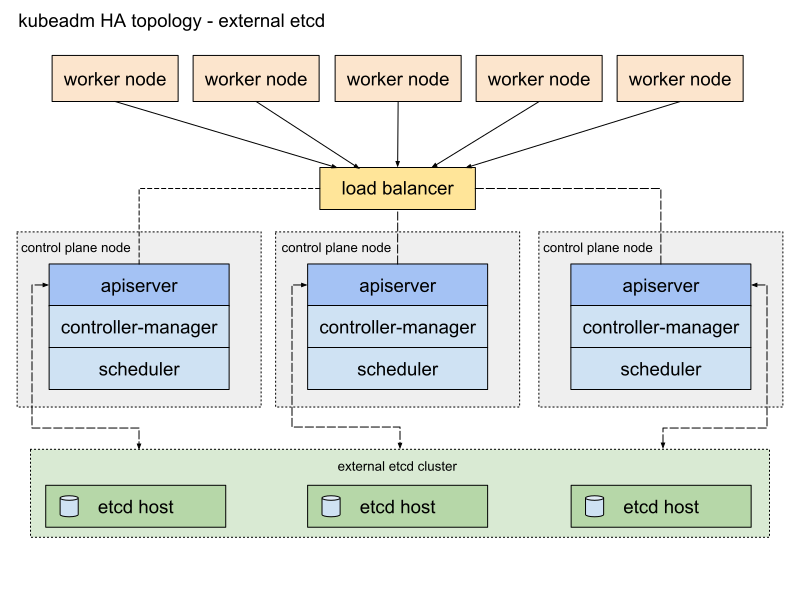
Learn more about etcd at https://etcd.io>
Notice that the ETCD cluster has no connection to the load balancer and the communication with the masters is direct. Only the masters communicate with etcd through the apiserver.
https://kubernetes.io/docs/setup/production-environment/tools/kubeadm/ha-topology/
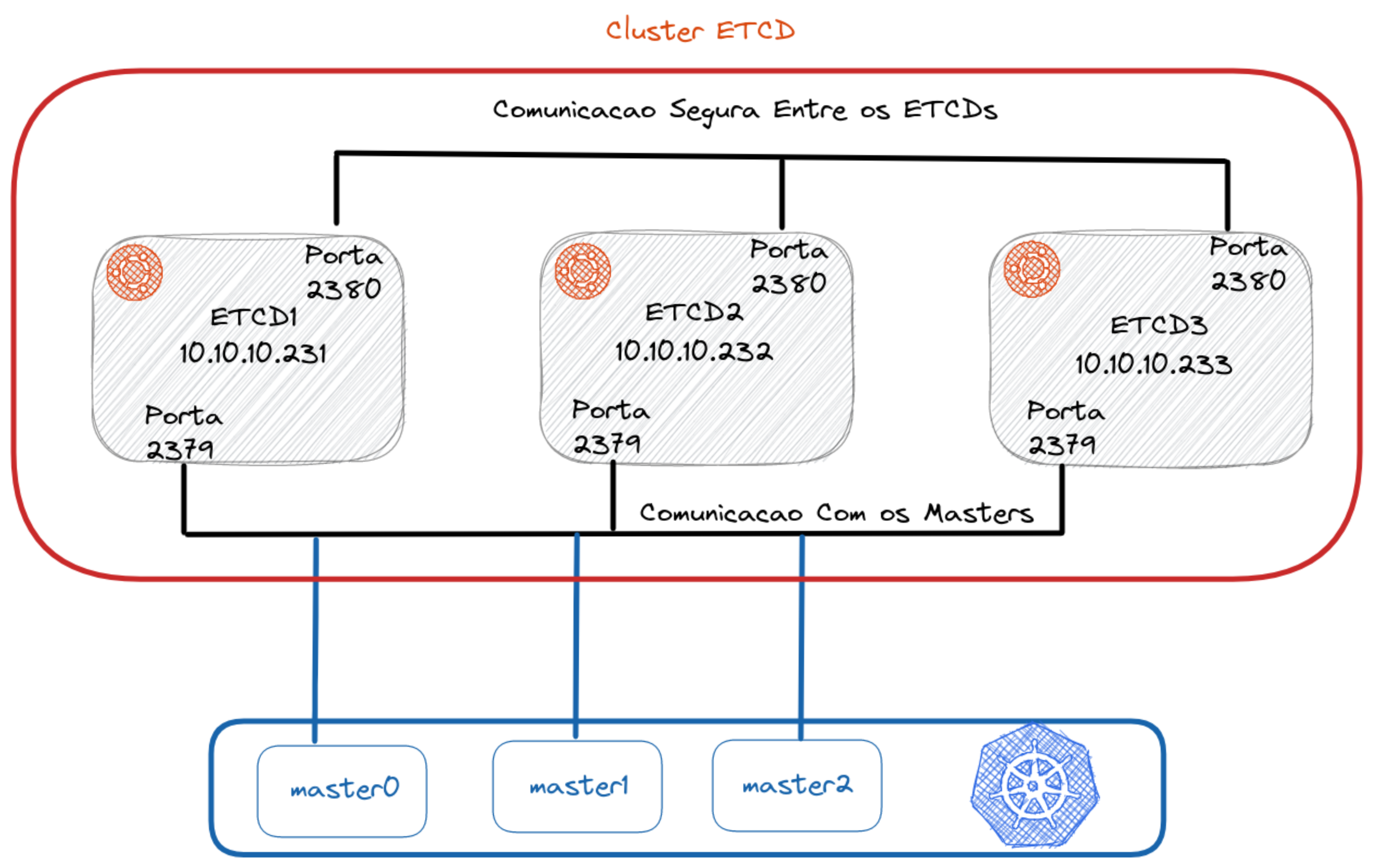
For communication between cluster nodes, port 2380 is used. For communication between nodes and masters, port 2379 is used.
For this installation we will configure 3 master nodes, 2 worker nodes, 2 load balancers, and 3 VMs to form our ETCD cluster.
The focus of the explanation here will be on the ETCD cluster. To understand the multi-master part, check the MultiMaster project.
Generate TLS Certificate
It's necessary to generate a TLS certificate so the masters can communicate with the etcd cluster in an encrypted manner. Is it possible to run without the certificate? Yes, but we'll do things the right way to learn.
The first step is to create the certificates locally so these files are available during the creation of our complete environment.
wget -q --show-progress \
  https://storage.googleapis.com/kubernetes-the-hard-way/cfssl/1.4.1/linux/cfssl \
  https://storage.googleapis.com/kubernetes-the-hard-way/cfssl/1.4.1/linux/cfssljson

chmod +x cfssl cfssljson
sudo mv cfssl cfssljson /usr/local/bin/
Now that we have the binaries, let's create our Certificate Authority (CA).
The certs folder contains the certificate I already created before, but to generate a new one delete the certs folder and create a new one in its place.
rm -rf certs
mkdir certs
cd certs
The command below creates the CA based on the specified JSON
cat > ca-config.json <<EOF
{
    "signing": {
        "default": {
            "expiry": "8760h"
        },
        "profiles": {
            "etcd": {
                "expiry": "8760h",
                "usages": ["signing","key encipherment","server auth","client auth"]
            }
        }
    }
}
EOF

cat > ca-csr.json <<EOF
{
  "CN": "etcd cluster",
  "key": {
    "algo": "rsa",
    "size": 2048
  },
  "names": [
    {
      "C": "BR",
      "L": "Vila Velha",
      "O": "Kubernetes",
      "OU": "ETCD-CA",
      "ST": "Espirito Santo"
    }
  ]
}
EOF

cfssl gencert -initca ca-csr.json | cfssljson -bare ca
Now let's create a TLS certificate. This certificate is being created for the IPs of the etcd machines that are declared in the Vagrantfile. If you change anything there, you'll need to change it here too.
ETCD1_IP="10.10.10.231"
ETCD2_IP="10.10.10.232"
ETCD3_IP="10.10.10.233"

cat > etcd-csr.json <<EOF
{
  "CN": "etcd",
  "hosts": [
    "localhost",
    "127.0.0.1",
    "${ETCD1_IP}",
    "${ETCD2_IP}",
    "${ETCD3_IP}"
  ],
  "key": {
    "algo": "rsa",
    "size": 2048
  },
  "names": [
    {
      "C": "BR",
      "L": "Vila Velha",
      "O": "Kubernetes",
      "OU": "ETCD-CA",
      "ST": "Brazil"
    }
  ]
}
EOF

cfssl gencert -ca=ca.pem -ca-key=ca-key.pem -config=ca-config.json -profile=etcd etcd-csr.json | cfssljson -bare etcd
Now we have all the certificates. These certificates will be copied through scripts into the master and etcd instances.
The Vagrantfile file contains the machine configuration and the necessary script calls for installation.
Explaining the Vagrantfile
First step is to create the etcd cluster so when you initialize the cluster it already points to it. Second step is to bring up the load balancer since it's the link between the master and workers and will be necessary during initialization. Third step is to create the masters, where master1 will initialize the cluster and the others will join. Fourth step is to create the workers and join them to the cluster.
You can execute these steps slowly to follow each one if you want, but if you want to bring everything up, just run vagrant up without passing arguments.
vagrant up etcd1 etcd2 etcd3
vagrant up loadbalancer1 loadbalncer2
vagrant up master1 mnaster2 master3
vagrant up worker1 worker2
Accessing the etcd cluster from your local machine for testing
If you want to bring up only the etcd cluster, you can run
vagrant up etcd1 etcd2 etcd3
Install etcdctl on your machine by choosing the version you want from https://github.com/etcd-io/etcd/releases
# Change the version here if necessary
ETCD_VER=v3.5.4

mkdir -p /tmp/etcd
echo "Downloading and extracting to /tmp/etcd folder and removing the zip"
curl -L "https://github.com/etcd-io/etcd/releases/download/${ETCD_VER}/etcd-${ETCD_VER}-linux-amd64.tar.gz" -o /tmp/etcd-${ETCD_VER}-linux-amd64.tar.gz
tar xzvf /tmp/etcd-${ETCD_VER}-linux-amd64.tar.gz -C /tmp/etcd --strip-components=1
rm -f /tmp/etcd-${ETCD_VER}-linux-amd64.tar.gz

echo "Moving the binaries to /usr/local/bin and granting permissions to users"
sudo mv /tmp/etcd/etcdctl /usr/local/bin
sudo chmod 755 /usr/local/bin/etcdctl

echo "Cleaning up"
rm -rf /tmp/etcd
Enter the certs folder and copy the certificates to your local machine at /etc/etcd/pki with the necessary permissions.
sudo mkdir -p /etc/etcd/pki
sudo cp *.pem /etc/etcd/pki/
sudo chmod 755 /etc/etcd/pki/*
Now just load the environment variables so etcdctl knows where to point and which certificates to use.
export ETCDCTL_API=3
export ETCDCTL_ENDPOINTS=https://10.10.10.231:2379,https://10.10.10.232:2379,https://10.10.10.233:2379
export ETCDCTL_CACERT=/etc/etcd/pki/ca.pem
export ETCDCTL_CERT=/etc/etcd/pki/etcd.pem
export ETCDCTL_KEY=/etc/etcd/pki/etcd-key.pem
Run some commands for testing:
etcdctl member list
etcdctl endpoint status
etcdctl endpoint health

etcdctl put mykey david
etcdctl get mykey
etcdctl del mykey
etcdctl get mykey
Recommendations
I believe the ideal approach is to understand step by step what was done by reading the bootstrap scripts of each of the nodes.