TektonHub
Already knowing how Tekton works and having done hello world we should dive deeper into how to do something more concrete.
Tasks can be reused and perhaps this is the biggest game changer that Tekton offers us.
In the vast majority of pipelines we need to execute git clone in a repository in order to obtain the code to build, test, etc. This is a great example of code that would be reused changing only the input parameters.
If we were to create a task to clone a repository what would we need?
-
The container image would need to have git installed. We could use an image that already has everything available or create one from some.
-
Execute the git clone command on the specific url. At this point the correct credentials will be needed if the repository is private.
Do you think this needs to be developed? No, it doesn't.... Actually it already was. We can use TektonHub to search for ready-made and generic tasks and what we found was git-clone ready to use, documented and maintained!
We can copy the yaml file that is available and do a kubectl apply or use the tkn cli. On the page itself there is an install button that will give the commands.
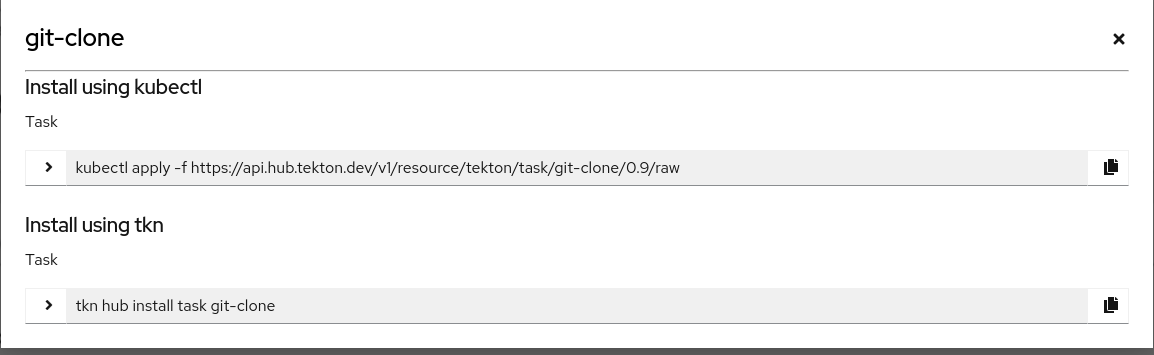
tkn hub install task git-clone
Task git-clone(0.9) installed in default namespace

tkn task list
NAME          DESCRIPTION              AGE
git-clone     These Tasks are Git...   15 seconds ago
hello-task                             5 hours ago
hello-task2                            5 hours ago
Tip: Studying tasks from TektonHub is a great method to learn about Tekton and shell script!
Let's analyze this yaml.
apiVersion: tekton.dev/v1beta1
kind: Task
metadata:
  name: git-clone
  labels:
    app.kubernetes.io/version: "0.9"
  annotations:
    tekton.dev/pipelines.minVersion: "0.38.0"
    tekton.dev/categories: Git
    tekton.dev/tags: git
    tekton.dev/displayName: "git clone"
    tekton.dev/platforms: "linux/amd64,linux/s390x,linux/ppc64le,linux/arm64"
spec:
  # Tip 2: Try to complete the description and labels. See at the end how it looks in the interface.
  description: >-
    These Tasks are Git tasks to work with repositories used by other tasks
    in your Pipeline.

    The git-clone Task will clone a repo from the provided url into the
    output Workspace. By default the repo will be cloned into the root of
    your Workspace. You can clone into a subdirectory by setting this Task's
    subdirectory param. This Task also supports sparse checkouts. To perform
    a sparse checkout, pass a list of comma separated directory patterns to
    this Task's sparseCheckoutDirectories param.

  # Here we already have a new concept WORKSPACE
  # workspaces are volumes mounted inside the pod. We'll see better later on.
  workspaces:
    # Notice the description and see that the script command seems like it will clone here.
    - name: output
      description: The git repo will be cloned onto the volume backing this Workspace.
    - name: ssh-directory
      optional: true # This field is optional, but the one above is not.
      description: |
        A .ssh directory with private key, known_hosts, config, etc. Copied to
        the user's home before git commands are executed. Used to authenticate
        with the git remote when performing the clone. Binding a Secret to this
        Workspace is strongly recommended over other volume types.
    - name: basic-auth
      optional: true
      description: |
        A Workspace containing a .gitconfig and .git-credentials file. These
        will be copied to the user's home before any git commands are run. Any
        other files in this Workspace are ignored. It is strongly recommended
        to use ssh-directory over basic-auth whenever possible and to bind a
        Secret to this Workspace over other volume types.
    - name: ssl-ca-directory
      optional: true
      description: |
        A workspace containing CA certificates, this will be used by Git to
        verify the peer with when fetching or pushing over HTTPS.
  # Input parameters that make this task more generic. These parameters will be used in the script.
  params:
    # We'll use the first two parameters in our example.
    - name: url
      description: Repository URL to clone from.
      type: string
    - name: revision
      description: Revision to checkout. (branch, tag, sha, ref, etc...)
      type: string
      default: ""
    - name: refspec
      description: Refspec to fetch before checking out revision.
      default: ""
    - name: submodules
      description: Initialize and fetch git submodules.
      type: string
      default: "true"
    - name: depth
      description: Perform a shallow clone, fetching only the most recent N commits.
      type: string
      default: "1"
    - name: sslVerify
      description: Set the `http.sslVerify` global git config. Setting this to `false` is not advised unless you are sure that you trust your git remote.
      type: string
      default: "true"
    - name: crtFileName
      description: file name of mounted crt using ssl-ca-directory workspace. default value is ca-bundle.crt.
      type: string
      default: "ca-bundle.crt"
    - name: subdirectory
      description: Subdirectory inside the `output` Workspace to clone the repo into.
      type: string
      default: ""
    - name: sparseCheckoutDirectories
      description: Define the directory patterns to match or exclude when performing a sparse checkout.
      type: string
      default: ""
    - name: deleteExisting
      description: Clean out the contents of the destination directory if it already exists before cloning.
      type: string
      default: "true"
    - name: httpProxy
      description: HTTP proxy server for non-SSL requests.
      type: string
      default: ""
    - name: httpsProxy
      description: HTTPS proxy server for SSL requests.
      type: string
      default: ""
    - name: noProxy
      description: Opt out of proxying HTTP/HTTPS requests.
      type: string
      default: ""
    - name: verbose
      description: Log the commands that are executed during `git-clone`'s operation.
      type: string
      default: "true"
    - name: gitInitImage
      description: The image providing the git-init binary that this Task runs.
      type: string
      # Ready-made git image, we don't even need to create one.
      default: "gcr.io/tekton-releases/github.com/tektoncd/pipeline/cmd/git-init:v0.40.2"
    - name: userHome
      description: |
        Absolute path to the user's home directory.
      type: string
      default: "/home/git"
  # One more new concept we'll talk about later
  results:
    - name: commit
      description: The precise commit SHA that was fetched by this Task.
    - name: url
      description: The precise URL that was fetched by this Task.
    - name: committer-date
      description: The epoch timestamp of the commit that was fetched by this Task.
  steps:
    - name: clone
      # See that here we already have a git image that was defined in the parameters.
      # Here we already see a development pattern. Nothing is passed to steps that aren't defined in params.
      image: "$(params.gitInitImage)"
      env:
      - name: HOME
        value: "$(params.userHome)"
      # Worth noting a pattern in the names. What comes from params starts with PARAM and what comes from workspace starts with WORKSPACE
      - name: PARAM_URL
        value: $(params.url)
      - name: PARAM_REVISION
        value: $(params.revision)
      - name: PARAM_REFSPEC
        value: $(params.refspec)
      - name: PARAM_SUBMODULES
        value: $(params.submodules)
      - name: PARAM_DEPTH
        value: $(params.depth)
      - name: PARAM_SSL_VERIFY
        value: $(params.sslVerify)
      - name: PARAM_CRT_FILENAME
        value: $(params.crtFileName)
      - name: PARAM_SUBDIRECTORY
        value: $(params.subdirectory)
      - name: PARAM_DELETE_EXISTING
        value: $(params.deleteExisting)
      - name: PARAM_HTTP_PROXY
        value: $(params.httpProxy)
      - name: PARAM_HTTPS_PROXY
        value: $(params.httpsProxy)
      - name: PARAM_NO_PROXY
        value: $(params.noProxy)
      - name: PARAM_VERBOSE
        value: $(params.verbose)
      - name: PARAM_SPARSE_CHECKOUT_DIRECTORIES
        value: $(params.sparseCheckoutDirectories)
      - name: PARAM_USER_HOME
        value: $(params.userHome)
      - name: WORKSPACE_OUTPUT_PATH
        value: $(workspaces.output.path)
      - name: WORKSPACE_SSH_DIRECTORY_BOUND
        value: $(workspaces.ssh-directory.bound)
      - name: WORKSPACE_SSH_DIRECTORY_PATH
        value: $(workspaces.ssh-directory.path)
      - name: WORKSPACE_BASIC_AUTH_DIRECTORY_BOUND
        value: $(workspaces.basic-auth.bound)
      - name: WORKSPACE_BASIC_AUTH_DIRECTORY_PATH
        value: $(workspaces.basic-auth.path)
      - name: WORKSPACE_SSL_CA_DIRECTORY_BOUND
        value: $(workspaces.ssl-ca-directory.bound)
      - name: WORKSPACE_SSL_CA_DIRECTORY_PATH
        value: $(workspaces.ssl-ca-directory.path)
      securityContext:
        runAsNonRoot: true
        runAsUser: 65532
      # Another defined pattern... script only references ENVs that are populated by params.
      script: |
        #!/usr/bin/env sh
        set -eu

        if [ "${PARAM_VERBOSE}" = "true" ] ; then
          set -x
        fi

        if [ "${WORKSPACE_BASIC_AUTH_DIRECTORY_BOUND}" = "true" ] ; then
          cp "${WORKSPACE_BASIC_AUTH_DIRECTORY_PATH}/.git-credentials" "${PARAM_USER_HOME}/.git-credentials"
          cp "${WORKSPACE_BASIC_AUTH_DIRECTORY_PATH}/.gitconfig" "${PARAM_USER_HOME}/.gitconfig"
          chmod 400 "${PARAM_USER_HOME}/.git-credentials"
          chmod 400 "${PARAM_USER_HOME}/.gitconfig"
        fi

        if [ "${WORKSPACE_SSH_DIRECTORY_BOUND}" = "true" ] ; then
          cp -R "${WORKSPACE_SSH_DIRECTORY_PATH}" "${PARAM_USER_HOME}"/.ssh
          chmod 700 "${PARAM_USER_HOME}"/.ssh
          chmod -R 400 "${PARAM_USER_HOME}"/.ssh/*
        fi

        if [ "${WORKSPACE_SSL_CA_DIRECTORY_BOUND}" = "true" ] ; then
           export GIT_SSL_CAPATH="${WORKSPACE_SSL_CA_DIRECTORY_PATH}"
           if [ "${PARAM_CRT_FILENAME}" != "" ] ; then
              export GIT_SSL_CAINFO="${WORKSPACE_SSL_CA_DIRECTORY_PATH}/${PARAM_CRT_FILENAME}"
           fi
        fi
        CHECKOUT_DIR="${WORKSPACE_OUTPUT_PATH}/${PARAM_SUBDIRECTORY}"

        cleandir() {
          # Delete any existing contents of the repo directory if it exists.
          #
          # We don't just "rm -rf ${CHECKOUT_DIR}" because ${CHECKOUT_DIR} might be "/"
          # or the root of a mounted volume.
          if [ -d "${CHECKOUT_DIR}" ] ; then
            # Delete non-hidden files and directories
            rm -rf "${CHECKOUT_DIR:?}"/*
            # Delete files and directories starting with . but excluding ..
            rm -rf "${CHECKOUT_DIR}"/.[!.]*
            # Delete files and directories starting with .. plus any other character
            rm -rf "${CHECKOUT_DIR}"/..?*
          fi
        }

        if [ "${PARAM_DELETE_EXISTING}" = "true" ] ; then
          cleandir || true
        fi

        test -z "${PARAM_HTTP_PROXY}" || export HTTP_PROXY="${PARAM_HTTP_PROXY}"
        test -z "${PARAM_HTTPS_PROXY}" || export HTTPS_PROXY="${PARAM_HTTPS_PROXY}"
        test -z "${PARAM_NO_PROXY}" || export NO_PROXY="${PARAM_NO_PROXY}"

        git config --global --add safe.directory "${WORKSPACE_OUTPUT_PATH}"
        /ko-app/git-init \
          -url="${PARAM_URL}" \
          -revision="${PARAM_REVISION}" \
          -refspec="${PARAM_REFSPEC}" \
          -path="${CHECKOUT_DIR}" \
          -sslVerify="${PARAM_SSL_VERIFY}" \
          -submodules="${PARAM_SUBMODULES}" \
          -depth="${PARAM_DEPTH}" \
          -sparseCheckoutDirectories="${PARAM_SPARSE_CHECKOUT_DIRECTORIES}"
        cd "${CHECKOUT_DIR}"
        RESULT_SHA="$(git rev-parse HEAD)"
        EXIT_CODE="$?"
        if [ "${EXIT_CODE}" != 0 ] ; then
          exit "${EXIT_CODE}"
        fi
        RESULT_COMMITTER_DATE="$(git log -1 --pretty=%ct)"
        printf "%s" "${RESULT_COMMITTER_DATE}" > "$(results.committer-date.path)"
        printf "%s" "${RESULT_SHA}" > "$(results.commit.path)"
        printf "%s" "${PARAM_URL}" > "$(results.url.path)"
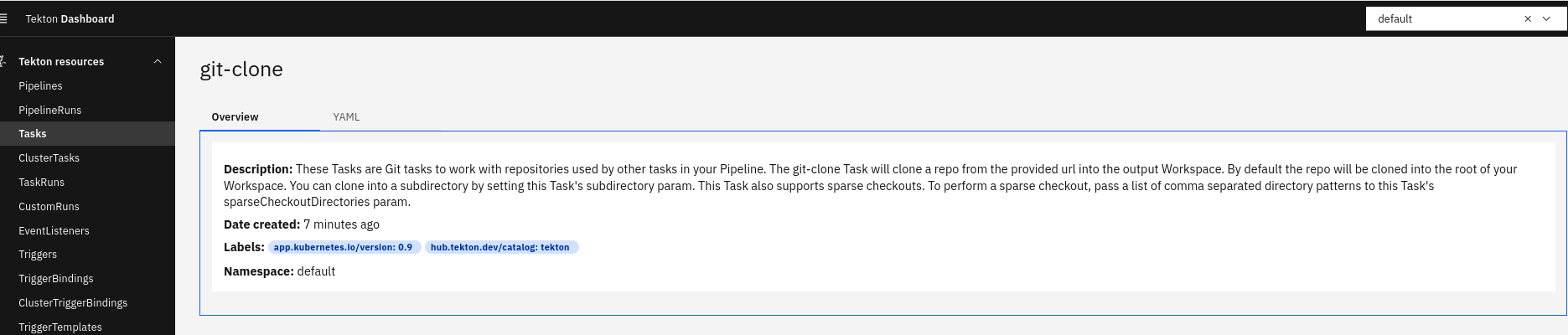
We could change git-clone to the name we want, but let's keep it as is and create another step for some tests.
Let's develop the list-source task to do a simple ls in a folder, in this case we'll do it in the cloned project folder.
cat <<EOF > listsource.yaml
apiVersion: tekton.dev/v1beta1
kind: Task
metadata:
  name: list-source
spec:
  steps:
  - name: ls
    image: alpine
    script: >
      ls
EOF

kubectl create -f listsource.yaml
Now let's create a pipeline cloning a repo and doing the ls command.
cat <<EOF > getrepo.yaml
apiVersion: tekton.dev/v1beta1
kind: Pipeline
metadata:
  name: getrepo
spec:
 # Pipeline input parameters are available to any task of this pipeline
  params:
  - name: repo-url
    type: string
  - name: revision
    type: string
  tasks:
  - name: fetch-source
    taskRef:
      name: git-clone
    # Input parameters of this task using the pipeline's input parameters
    params:
    - name: url
    # It's necessary to skip for the command to work otherwise it will try to find the variable substitution
      value: \$(params.repo-url)
    - name: revision
      value: \$(params.revision)
  - name: list-source
    runAfter: ["fetch-source"] # Ensuring dependency
    taskRef:
      name: list-source
EOF

kubectl apply -f getrepo.yaml
pipeline.tekton.dev/getrepo created
We have a pipeline and we need to run it with the correct inputs, that is, url and revision, where revision can be a branch, tag, sha, ref, etc... as shown in the task documentation. Let's do it in a public repository so we don't need to pass ssh and authentication and make everything simpler for now.
What we're going to try to do will generate an intentional error to show a concept. Let's do it through the dashboard to understand better. We can create a pipelineRun through the dashboard and fill in the values.
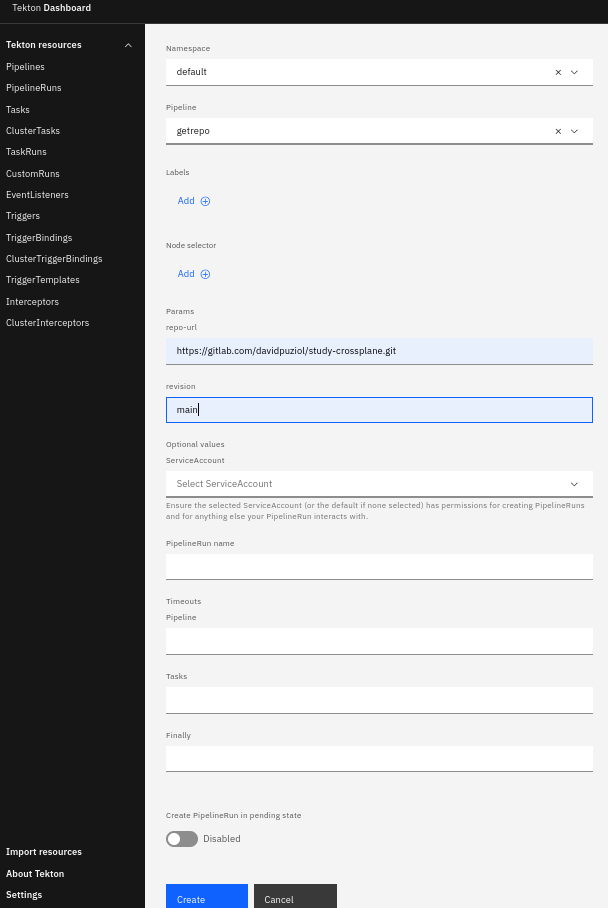
And we already have our first problem.
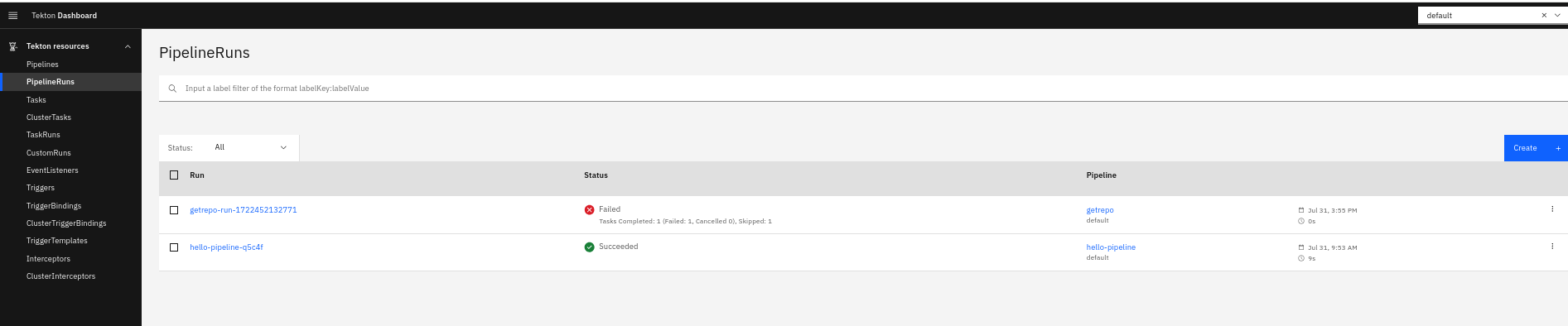
The failure happened because we didn't pass the output workspace which will be the volume where it will clone the repository so it didn't even run.
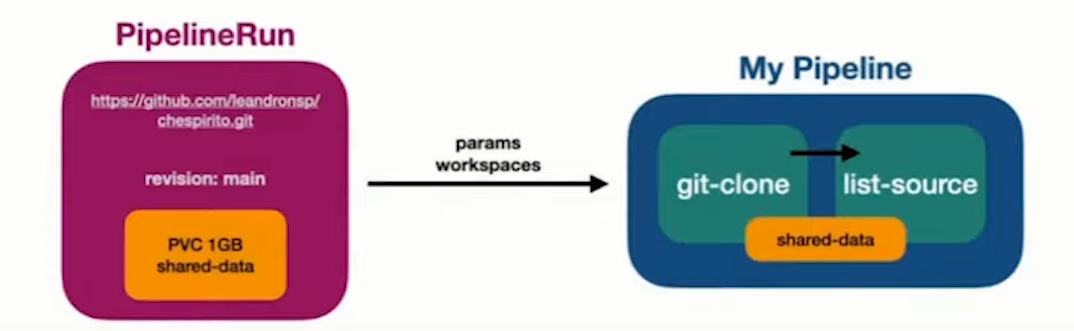
Tasks are pods and pods are independent. It's necessary for them to share the same volumes so that the second task (list-source) can give the LS command in the correct location, otherwise it would give the command in the workdir where the container is running. We can't define these parameters through the dashboard. We can start graphically to fill in some parameters but we'll need to get our hands a little dirty to fill in the workspaces.
Using the dashboard run the list-source task and check what will happen.
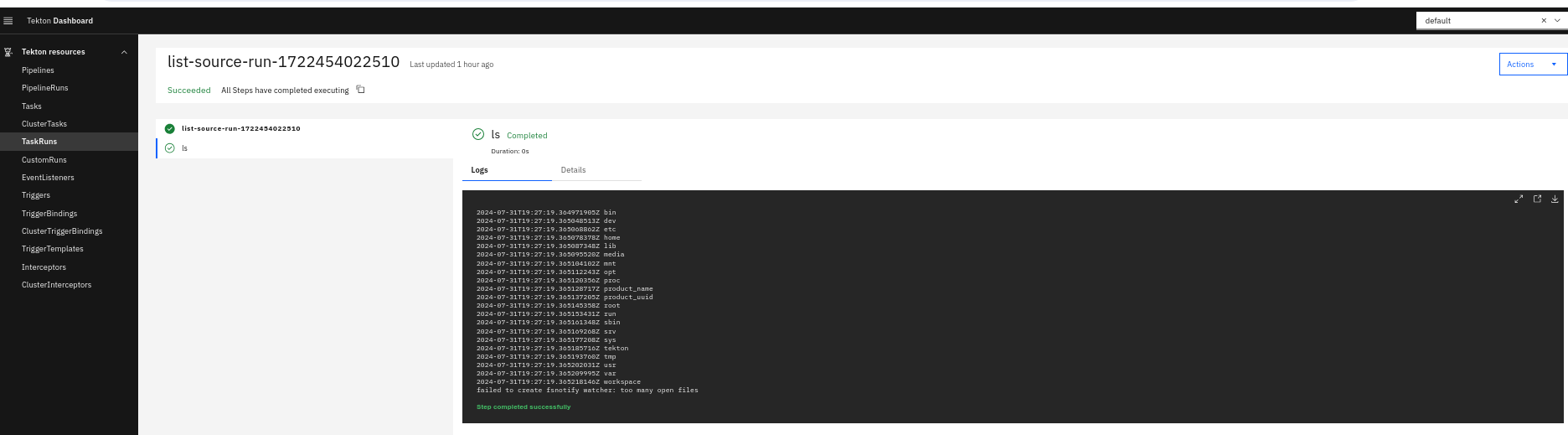
The ls command was applied at the root, but we can see that there is a workspace folder. This is a folder that Tekton uses for mounting inward.
Delete the previous pipeline, the previous list-source, and the pipelinerun and let's start again.
For list-source to be able to give the command in the correct location, let's make this change.
apiVersion: tekton.dev/v1beta1
kind: Task
metadata:
  name: list-source
spec:
  workspaces:
  - name: source # Name I decided to give
  steps:
  - name: ls
    image: alpine
    workingDir: $(workspaces.source.path) # Changing the directory, it's the same as cd to this path
    script: >
      ls
Apply this manifest and try to execute the task again.

Now we need to pass the workspace for it to work. This error is expected.
Now let's recreate the pipeline correctly.
apiVersion: tekton.dev/v1beta1
kind: Pipeline
metadata:
  name: getrepo
spec:
  workspaces:
  - name: shared-workspace
  params:
  - name: repo-url
    type: string
  - name: revision
    type: string
  tasks:
  - name: fetch-source
    taskRef:
      name: git-clone
    params:
    - name: url
      value: $(params.repo-url)
    - name: revision
      value: $(params.revision)
    # Inside the tasks we need we must mount the workspace
    workspaces:
    - name: output # If you check well it has this workspace defined.
      workspace: shared-workspace # Will be mapped into output in the task
  - name: list-source
    runAfter: ["fetch-source"] # What would happen if we didn't have this wait?
    taskRef:
      name: list-source
    workspaces:
    - name: source # This is the workspace name inside the task
      workspace: shared-workspace # Will be mapped into source in the task
Workspace will mount the same volume in both pods, but which volume? Where do we define the volume? In the pipelineRun. We saw that graphically we can't set anything about volume, only variables. So we could start graphically and then continue via yaml switching the viewing mode.
You can apply this manifest or go to the interface, you choose.
apiVersion: tekton.dev/v1
kind: PipelineRun
metadata:
  name: getrepo-run-1722456380429
  namespace: default
  labels: {}
spec:
  pipelineRef:
    name: getrepo
  status: ''
  params:
    - name: repo-url
      value: https://gitlab.com/davidpuziol/study-crossplane.git
    - name: revision
      value: main
  workspaces:
  - name: shared-workspace # Here we will define the volume for the workspace.
    volumeClaimTemplate:
      metadata:
        name: shared-workspace-pvc
      spec:
        accessModes: ["ReadWriteOnce"]
        resources:
          requests:
            storage: 1Gi
The pipelineRun ran beautifully, we have our correct output.
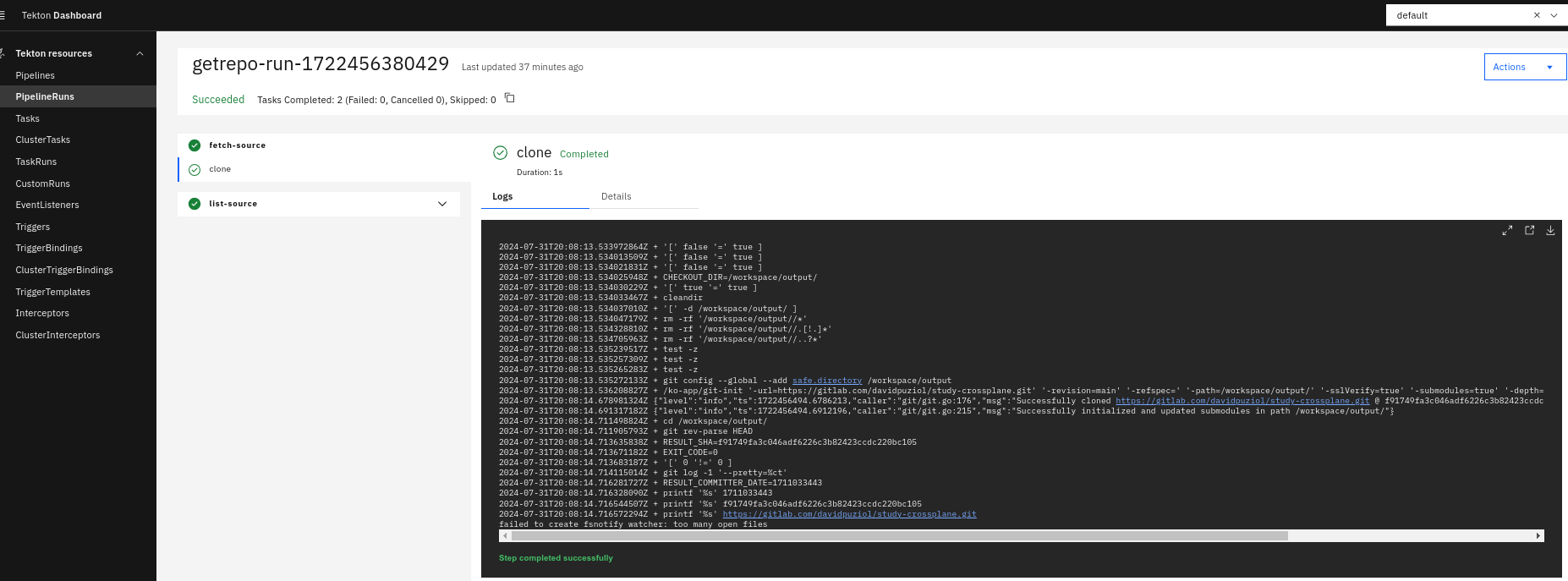
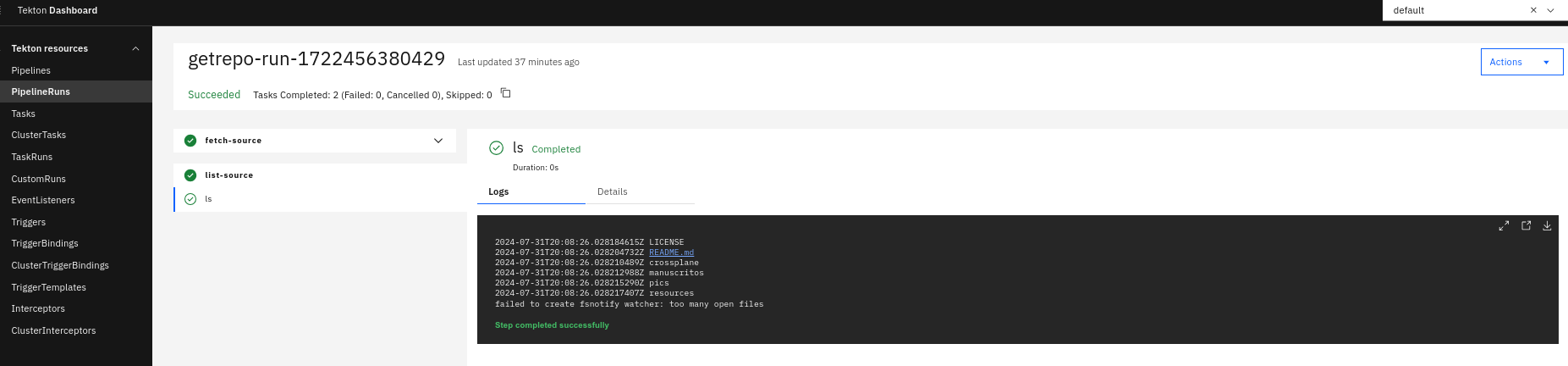
Let's check the mounts...
k get persistentvolumeclaims
NAME                         STATUS   VOLUME                                     CAPACITY   ACCESS MODES   STORAGECLASS   VOLUMEATTRIBUTESCLASS   AGE
shared-data-pvc-31141087b0   Bound    pvc-1ce8a75f-d335-47e7-b3ef-7c10bb753934   1Gi        RWO            standard       <unset>                 36m

k describe persistentvolumeclaims shared-data-pvc-31141087b0
Name:          shared-data-pvc-31141087b0
Namespace:     default
StorageClass:  standard
Status:        Bound
Volume:        pvc-1ce8a75f-d335-47e7-b3ef-7c10bb753934
Labels:        <none>
Annotations:   pv.kubernetes.io/bind-completed: yes
               pv.kubernetes.io/bound-by-controller: yes
               volume.beta.kubernetes.io/storage-provisioner: rancher.io/local-path
               volume.kubernetes.io/selected-node: personal-cluster-worker3
               volume.kubernetes.io/storage-provisioner: rancher.io/local-path
Finalizers:    [kubernetes.io/pvc-protection]
Capacity:      1Gi
Access Modes:  RWO
VolumeMode:    Filesystem
# See that it is being used by two pods
Used By:       getrepo-run-1722456380429-fetch-source-pod
               getrepo-run-1722456380429-list-source-pod
Events:
  Type    Reason                 Age                From                                                                                              Message
  ----    ------                 ----               ----                                                                                              -------
  Normal  WaitForFirstConsumer   33m                persistentvolume-controller                                                                       waiting for first consumer to be created before binding
  Normal  Provisioning           33m                rancher.io/local-path_local-path-provisioner-988d74bc-nlp5h_21abf5e9-a7be-4cee-908c-844d6ae48c0b  External provisioner is provisioning volume for claim "default/shared-data-pvc-31141087b0"
  Normal  ExternalProvisioning   33m (x2 over 33m)  persistentvolume-controller                                                                       Waiting for a volume to be created either by the external provisioner 'rancher.io/local-path' or manually by the system administrator. If volume creation is delayed, please verify that the provisioner is running and correctly registered.
  Normal  ProvisioningSucceeded  33m                rancher.io/local-path_local-path-provisioner-988d74bc-nlp5h_21abf5e9-a7be-4cee-908c-844d6ae48c0b  Successfully provisioned volume pvc-1ce8a75f-d335-47e7-b3ef-7c10bb753934
To illustrate