Red de Docker
La idea aquí es intentar relacionar cómo funciona la red en contenedores con los network namespaces y cómo eso es usado.
Es posible ejecutar sin ninguna conexión con el mundo externo.
docker run --network none nginx
Si ejecutamos un contenedor de esta manera.
docker run --network host nginx
El contenedor no está creando un namespace de red para él. Está utilizando el puerto 80 del host.
curl localhost
<!DOCTYPE html>
<html>
<head>
<title>Welcome to nginx!</title>
<style>
html { color-scheme: light dark; }
body { width: 35em; margin: 0 auto;
font-family: Tahoma, Verdana, Arial, sans-serif; }
</style>
</head>
<body>
<h1>Welcome to nginx!</h1>
<p>If you see this page, the nginx web server is successfully installed and
working. Further configuration is required.</p>

<p>For online documentation and support please refer to
<a href="http://nginx.org/">nginx.org</a>.<br/>
Commercial support is available at
<a href="http://nginx.com/">nginx.com</a>.</p>

<p><em>Thank you for using nginx.</em></p>
</body>
</html>
Si ejecutamos en otro terminal el mismo comando...
docker run --network host nginx
/docker-entrypoint.sh: /docker-entrypoint.d/ is not empty, will attempt to perform configuration
/docker-entrypoint.sh: Looking for shell scripts in /docker-entrypoint.d/
/docker-entrypoint.sh: Launching /docker-entrypoint.d/10-listen-on-ipv6-by-default.sh
10-listen-on-ipv6-by-default.sh: info: Getting the checksum of /etc/nginx/conf.d/default.conf
10-listen-on-ipv6-by-default.sh: info: Enabled listen on IPv6 in /etc/nginx/conf.d/default.conf
/docker-entrypoint.sh: Sourcing /docker-entrypoint.d/15-local-resolvers.envsh
/docker-entrypoint.sh: Launching /docker-entrypoint.d/20-envsubst-on-templates.sh
/docker-entrypoint.sh: Launching /docker-entrypoint.d/30-tune-worker-processes.sh
/docker-entrypoint.sh: Configuration complete; ready for start up
2024/02/28 20:09:41 [emerg] 1#1: bind() to 0.0.0.0:80 failed (98: Address already in use)
nginx: [emerg] bind() to 0.0.0.0:80 failed (98: Address already in use)
2024/02/28 20:09:41 [emerg] 1#1: bind() to [::]:80 failed (98: Address already in use)
nginx: [emerg] bind() to [::]:80 failed (98: Address already in use)
2024/02/28 20:09:41 [notice] 1#1: try again to bind() after 500ms
2024/02/28 20:09:41 [emerg] 1#1: bind() to 0.0.0.0:80 failed (98: Address already in use)
nginx: [emerg] bind() to 0.0.0.0:80 failed (98: Address already in use)
2024/02/28 20:09:41 [emerg] 1#1: bind() to [::]:80 failed (98: Address already in use)
nginx: [emerg] bind() to [::]:80 failed (98: Address already in use)
2024/02/28 20:09:41 [notice] 1#1: try again to bind() after 500ms
2024/02/28 20:09:41 [emerg] 1#1: bind() to 0.0.0.0:80 failed (98: Address already in use)
nginx: [emerg] bind() to 0.0.0.0:80 failed (98: Address already in use)
2024/02/28 20:09:41 [emerg] 1#1: bind() to [::]:80 failed (98: Address already in use)
nginx: [emerg] bind() to [::]:80 failed (98: Address already in use)
2024/02/28 20:09:41 [notice] 1#1: try again to bind() after 500ms
2024/02/28 20:09:41 [emerg] 1#1: bind() to 0.0.0.0:80 failed (98: Address already in use)
nginx: [emerg] bind() to 0.0.0.0:80 failed (98: Address already in use)
2024/02/28 20:09:41 [emerg] 1#1: bind() to [::]:80 failed (98: Address already in use)
nginx: [emerg] bind() to [::]:80 failed (98: Address already in use)
2024/02/28 20:09:41 [notice] 1#1: try again to bind() after 500ms
2024/02/28 20:09:41 [emerg] 1#1: bind() to 0.0.0.0:80 failed (98: Address already in use)
nginx: [emerg] bind() to 0.0.0.0:80 failed (98: Address already in use)
2024/02/28 20:09:41 [emerg] 1#1: bind() to [::]:80 failed (98: Address already in use)
nginx: [emerg] bind() to [::]:80 failed (98: Address already in use)
2024/02/28 20:09:41 [notice] 1#1: try again to bind() after 500ms
2024/02/28 20:09:41 [emerg] 1#1: still could not bind()
nginx: [emerg] still could not bind()
No funciona pues el puerto 80 ya está en uso por otro contenedor.
Una vez instalado Docker en la máquina, crea una interfaz bridge en el sistema llamada docker0 para él que servirá como el switch que mostramos en network namespaces.
Podemos verificar con el comando.
docker network ls

NETWORK ID     NAME              DRIVER    SCOPE
451b0bc3ade0   bridge            bridge    local
2b112d7c6904   host              host      local
def82d997b25   none              null      local

ip link show docker0
8: docker0: <BROADCAST,MULTICAST,UP,LOWER_UP> mtu 1500 qdisc noqueue state UP mode DEFAULT group default
    link/ether 02:42:d1:95:e2:68 brd ff:ff:ff:ff:ff:ff

ip addr show docker0
8: docker0: <BROADCAST,MULTICAST,UP,LOWER_UP> mtu 1500 qdisc noqueue state UP group default
    link/ether 02:42:d1:95:e2:68 brd ff:ff:ff:ff:ff:ff
    inet 172.17.0.1/16 brd 172.17.255.255 scope global docker0
       valid_lft forever preferred_lft forever
    inet6 fe80::42:d1ff:fe95:e268/64 scope link
       valid_lft forever preferred_lft forever
Cuando creamos un contenedor Docker crea un namespace para él, vamos a verificar.
docker run -d nginx
3fd2e7fde3934b0fbcb81e944c9081835e43983bf708e128f8f432dde346b845

docker inspect 3fd2e7fde3934b0fbcb81e944c9081835e43983bf708e128f8f432dde346b845
[
    {
        "Id": "3fd2e7fde3934b0fbcb81e944c9081835e43983bf708e128f8f432dde346b845", # Nuestro ID del contenedor
        "Created": "2024-02-28T22:44:19.502717493Z",
        "Path": "/docker-entrypoint.sh",
        "Args": [
            "nginx",
            "-g",
            "daemon off;"
        ],
        "State": {
            "Status": "running",
            "Running": true,
            "Paused": false,
            "Restarting": false,
            "OOMKilled": false,
            "Dead": false,
            "Pid": 984281, # PID en el host
            "ExitCode": 0,
            "Error": "",
            "StartedAt": "2024-02-28T22:44:19.745925397Z",
            "FinishedAt": "0001-01-01T00:00:00Z"
        },
        "Image": "sha256:e4720093a3c1381245b53a5a51b417963b3c4472d3f47fc301930a4f3b17666a",
        "ResolvConfPath": "/var/lib/docker/containers/3fd2e7fde3934b0fbcb81e944c9081835e43983bf708e128f8f432dde346b845/resolv.conf",
        "HostnamePath": "/var/lib/docker/containers/3fd2e7fde3934b0fbcb81e944c9081835e43983bf708e128f8f432dde346b845/hostname",
        "HostsPath": "/var/lib/docker/containers/3fd2e7fde3934b0fbcb81e944c9081835e43983bf708e128f8f432dde346b845/hosts",
        "LogPath": "/var/lib/docker/containers/3fd2e7fde3934b0fbcb81e944c9081835e43983bf708e128f8f432dde346b845/3fd2e7fde3934b0fbcb81e944c9081835e43983bf708e128f8f432dde346b845-json.log",
        "Name": "/suspicious_noether",
        "RestartCount": 0,
        "Driver": "overlay2",
        "Platform": "linux",
        "MountLabel": "",
        "ProcessLabel": "",
        "AppArmorProfile": "docker-default",
        "ExecIDs": null,
        "HostConfig": {
            # Removido
        },
        "GraphDriver": {
            # Removido
        },
        "Mounts": [],
        "Config": {
            # Removido
        },
        "NetworkSettings": {
            "Bridge": "",
            "SandboxID": "3bea2fdf625aec1eccf7e9344f0c78ced4dcc26dc6b706433f19e9efdd9068ba",
            "SandboxKey": "/var/run/docker/netns/3bea2fdf625a", # Namespace hash creado
            "Ports": {
                "80/tcp": null
            },
            "HairpinMode": false,
            "LinkLocalIPv6Address": "",
            "LinkLocalIPv6PrefixLen": 0,
            "SecondaryIPAddresses": null,
            "SecondaryIPv6Addresses": null,
            "EndpointID": "0c6c81bb2867d2cd759750a547a66b47ee0f9248fb4bb2a06f23e60fd7e1bea9",
            "Gateway": "172.17.0.1", # Gateway es el docker0
            "GlobalIPv6Address": "",
            "GlobalIPv6PrefixLen": 0,
            "IPAddress": "172.17.0.2", # IP del contenedor
            "IPPrefixLen": 16,
            "IPv6Gateway": "",
            "MacAddress": "02:42:ac:11:00:02",
            "Networks": {
                "bridge": {
                    "IPAMConfig": null,
                    "Links": null,
                    "Aliases": null,
                    "MacAddress": "02:42:ac:11:00:02",
                    "NetworkID": "1bbfbd5a3d8dd49b966e719f06bb810aa3cc9542aa36e82c38405bcc8c84693b",
                    "EndpointID": "0c6c81bb2867d2cd759750a547a66b47ee0f9248fb4bb2a06f23e60fd7e1bea9",
                    "Gateway": "172.17.0.1",
                    "IPAddress": "172.17.0.2",
                    "IPPrefixLen": 16,
                    "IPv6Gateway": "",
                    "GlobalIPv6Address": "",
                    "GlobalIPv6PrefixLen": 0,
                    "DriverOpts": null,
                    "DNSNames": null
                }
            }
        }
    }
]

# Si hacemos un curl para esa IP qué tenemos
curl 172.17.0.2
<!DOCTYPE html>
<html>
<head>
<title>Welcome to nginx!</title>
<style>
html { color-scheme: light dark; }
body { width: 35em; margin: 0 auto;
font-family: Tahoma, Verdana, Arial, sans-serif; }
</style>
</head>
<body>
<h1>Welcome to nginx!</h1>
<p>If you see this page, the nginx web server is successfully installed and
working. Further configuration is required.</p>

<p>For online documentation and support please refer to
<a href="http://nginx.org/">nginx.org</a>.<br/>
Commercial support is available at
<a href="http://nginx.com/">nginx.com</a>.</p>

<p><em>Thank you for using nginx.</em></p>
</body>
</html>
¿Y cómo Docker hace el attach de ese contenedor? Del mismo modo que hicimos antes, a través de los peers. Vamos a inspeccionar lo que tenemos en el host.
ip addr | grep docker
8: docker0: <BROADCAST,MULTICAST,UP,LOWER_UP> mtu 1500 qdisc noqueue state UP group default
    inet 172.17.0.1/16 brd 172.17.255.255 scope global docker0
35: veth85a0078@if34: <BROADCAST,MULTICAST,UP,LOWER_UP> mtu 1500 qdisc noqueue master docker0 state UP group default   # Vamos a ver esa interfaz que fue attachada en docker0

# No conseguí ejecutar el ip netns, por lo que tuve que recurrir a otras herramientas para ver ese namespace
# 984281 es el PID del contenedor en el host
sudo nsenter -t 984281 -n ip addr
1: lo: <LOOPBACK,UP,LOWER_UP> mtu 65536 qdisc noqueue state UNKNOWN group default qlen 1000
    link/loopback 00:00:00:00:00:00 brd 00:00:00:00:00:00
    inet 127.0.0.1/8 scope host lo
       valid_lft forever preferred_lft forever
34: eth0@if35: <BROADCAST,MULTICAST,UP,LOWER_UP> mtu 1500 qdisc noqueue state UP group default
    link/ether 02:42:ac:11:00:02 brd ff:ff:ff:ff:ff:ff link-netnsid 0
    inet 172.17.0.2/16 brd 172.17.255.255 scope global eth0
       valid_lft forever preferred_lft forever
Si eliminamos el contenedor, ¿qué va a pasar? ¿La interfaz en el host veth85a0078@if34 va a desaparecer?
docker container rm 3fd2e7fde3934b0fbcb81e944c9081835e43983bf708e128f8f432dde346b845 --force
3fd2e7fde3934b0fbcb81e944c9081835e43983bf708e128f8f432dde346b845

ip addr | grep docker
8: docker0: <NO-CARRIER,BROADCAST,MULTICAST,UP> mtu 1500 qdisc noqueue state DOWN group default
    inet 172.17.0.1/16 brd 172.17.255.255 scope global docker0
Y cada contenedor que va siendo creado irá formando el peer.
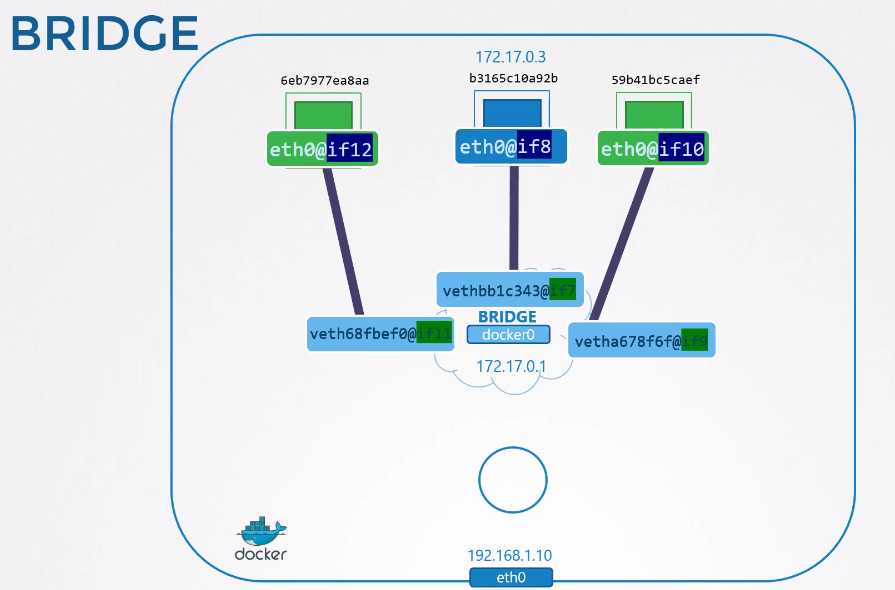
Todos esos contenedores se ven pues hacen parte de la misma network default de Docker.
Vamos a hacer una prueba?
~ docker run -d --name=nginx nginx
785d4f5fc60214c5cea30d9197b5be3da07aa6c49c67d8b5c6cc88635eaa1fef

docker inspect 785d4 | grep "IPAddress"
            "SecondaryIPAddresses": null,
            "IPAddress": "172.17.0.2",
                    "IPAddress": "172.17.0.2",

docker run -it --name ubuntu ubuntu bash
root@f1138371fc83:/# apt update; apt install iputils-ping -y
root@f1138371fc83:/# ping 172.17.0.2
PING 172.17.0.2 (172.17.0.2) 56(84) bytes of data.
64 bytes from 172.17.0.2: icmp_seq=1 ttl=64 time=0.120 ms
64 bytes from 172.17.0.2: icmp_seq=2 ttl=64 time=0.044 ms
...
El host solamente ve si apunta a la IP correcta, pues hace parte de la red 172.17.0.0/16 de Docker. Cualquier otra máquina no verá.
Necesitamos hacer un port mapping a través de iptables para que un puerto del host apunte para el puerto del contenedor. Revise network namespaces.
Para hacer eso de forma fácil usamos el -p para mapear el puerto del host para el puerto del contenedor. Eso generará una regla en iptables.
El -p 8080:80 hará ese comando para nosotros iptables -t nat -A PREROUTING --dport 8080 --to-destination 172.17.0.2:80 -j DNAT
docker run -d -p 8080:80 nginx

curl http://localhost:8080
<!DOCTYPE html>
<html>
<head>
<title>Welcome to nginx!</title>
<style>
html { color-scheme: light dark; }
body { width: 35em; margin: 0 auto;
font-family: Tahoma, Verdana, Arial, sans-serif; }
</style>
</head>
<body>
<h1>Welcome to nginx!</h1>
<p>If you see this page, the nginx web server is successfully installed and
working. Further configuration is required.</p>

<p>For online documentation and support please refer to
<a href="http://nginx.org/">nginx.org</a>.<br/>
Commercial support is available at
<a href="http://nginx.com/">nginx.com</a>.</p>

<p><em>Thank you for using nginx.</em></p>
</body>
</html>

# Verificando el iptables
sudo iptables -nvL -t nat | grep 8080
    0     0 DNAT       tcp  --  !docker0 *       0.0.0.0/0            0.0.0.0/0            tcp dpt:8080 to:172.17.0.2:80