Docker Networking
The idea here is to try to relate how networking works in containers with network namespaces and how this is used.
It's possible to run without any connection to the outside world.
docker run --network none nginx
If we run a container this way.
docker run --network host nginx
The container is not creating a network namespace for itself. It's using port 80 of the host.
curl localhost
<!DOCTYPE html>
<html>
<head>
<title>Welcome to nginx!</title>
<style>
html { color-scheme: light dark; }
body { width: 35em; margin: 0 auto;
font-family: Tahoma, Verdana, Arial, sans-serif; }
</style>
</head>
<body>
<h1>Welcome to nginx!</h1>
<p>If you see this page, the nginx web server is successfully installed and
working. Further configuration is required.</p>

<p>For online documentation and support please refer to
<a href="http://nginx.org/">nginx.org</a>.<br/>
Commercial support is available at
<a href="http://nginx.com/">nginx.com</a>.</p>

<p><em>Thank you for using nginx.</em></p>
</body>
</html>
If we run the same command in another terminal...
docker run --network host nginx
/docker-entrypoint.sh: /docker-entrypoint.d/ is not empty, will attempt to perform configuration
/docker-entrypoint.sh: Looking for shell scripts in /docker-entrypoint.d/
/docker-entrypoint.sh: Launching /docker-entrypoint.d/10-listen-on-ipv6-by-default.sh
10-listen-on-ipv6-by-default.sh: info: Getting the checksum of /etc/nginx/conf.d/default.conf
10-listen-on-ipv6-by-default.sh: info: Enabled listen on IPv6 in /etc/nginx/conf.d/default.conf
/docker-entrypoint.sh: Sourcing /docker-entrypoint.d/15-local-resolvers.envsh
/docker-entrypoint.sh: Launching /docker-entrypoint.d/20-envsubst-on-templates.sh
/docker-entrypoint.sh: Launching /docker-entrypoint.d/30-tune-worker-processes.sh
/docker-entrypoint.sh: Configuration complete; ready for start up
2024/02/28 20:09:41 [emerg] 1#1: bind() to 0.0.0.0:80 failed (98: Address already in use)
nginx: [emerg] bind() to 0.0.0.0:80 failed (98: Address already in use)
2024/02/28 20:09:41 [emerg] 1#1: bind() to [::]:80 failed (98: Address already in use)
nginx: [emerg] bind() to [::]:80 failed (98: Address already in use)
2024/02/28 20:09:41 [notice] 1#1: try again to bind() after 500ms
2024/02/28 20:09:41 [emerg] 1#1: bind() to 0.0.0.0:80 failed (98: Address already in use)
nginx: [emerg] bind() to 0.0.0.0:80 failed (98: Address already in use)
2024/02/28 20:09:41 [emerg] 1#1: bind() to [::]:80 failed (98: Address already in use)
nginx: [emerg] bind() to [::]:80 failed (98: Address already in use)
2024/02/28 20:09:41 [notice] 1#1: try again to bind() after 500ms
2024/02/28 20:09:41 [emerg] 1#1: bind() to 0.0.0.0:80 failed (98: Address already in use)
nginx: [emerg] bind() to 0.0.0.0:80 failed (98: Address already in use)
2024/02/28 20:09:41 [emerg] 1#1: bind() to [::]:80 failed (98: Address already in use)
nginx: [emerg] bind() to [::]:80 failed (98: Address already in use)
2024/02/28 20:09:41 [notice] 1#1: try again to bind() after 500ms
2024/02/28 20:09:41 [emerg] 1#1: bind() to 0.0.0.0:80 failed (98: Address already in use)
nginx: [emerg] bind() to 0.0.0.0:80 failed (98: Address already in use)
2024/02/28 20:09:41 [emerg] 1#1: bind() to [::]:80 failed (98: Address already in use)
nginx: [emerg] bind() to [::]:80 failed (98: Address already in use)
2024/02/28 20:09:41 [notice] 1#1: try again to bind() after 500ms
2024/02/28 20:09:41 [emerg] 1#1: bind() to 0.0.0.0:80 failed (98: Address already in use)
nginx: [emerg] bind() to 0.0.0.0:80 failed (98: Address already in use)
2024/02/28 20:09:41 [emerg] 1#1: bind() to [::]:80 failed (98: Address already in use)
nginx: [emerg] bind() to [::]:80 failed (98: Address already in use)
2024/02/28 20:09:41 [notice] 1#1: try again to bind() after 500ms
2024/02/28 20:09:41 [emerg] 1#1: still could not bind()
nginx: [emerg] still could not bind()
It doesn't work because port 80 is already in use by another container.
Once Docker is installed on the machine, it creates a bridge interface in the system called docker0 that will serve as the switch we showed in network namespaces.
We can check this with the command.
docker network ls

NETWORK ID     NAME              DRIVER    SCOPE
451b0bc3ade0   bridge            bridge    local
2b112d7c6904   host              host      local
def82d997b25   none              null      local

ip link show docker0
8: docker0: <BROADCAST,MULTICAST,UP,LOWER_UP> mtu 1500 qdisc noqueue state UP mode DEFAULT group default
    link/ether 02:42:d1:95:e2:68 brd ff:ff:ff:ff:ff:ff

ip addr show docker0
8: docker0: <BROADCAST,MULTICAST,UP,LOWER_UP> mtu 1500 qdisc noqueue state UP group default
    link/ether 02:42:d1:95:e2:68 brd ff:ff:ff:ff:ff:ff
    inet 172.17.0.1/16 brd 172.17.255.255 scope global docker0
       valid_lft forever preferred_lft forever
    inet6 fe80::42:d1ff:fe95:e268/64 scope link
       valid_lft forever preferred_lft forever
When we create a container, Docker creates a namespace for it, let's check.
docker run -d nginx
3fd2e7fde3934b0fbcb81e944c9081835e43983bf708e128f8f432dde346b845

docker inspect 3fd2e7fde3934b0fbcb81e944c9081835e43983bf708e128f8f432dde346b845
[
    {
        "Id": "3fd2e7fde3934b0fbcb81e944c9081835e43983bf708e128f8f432dde346b845", # Our container ID
        "Created": "2024-02-28T22:44:19.502717493Z",
        "Path": "/docker-entrypoint.sh",
        "Args": [
            "nginx",
            "-g",
            "daemon off;"
        ],
        "State": {
            "Status": "running",
            "Running": true,
            "Paused": false,
            "Restarting": false,
            "OOMKilled": false,
            "Dead": false,
            "Pid": 984281, # PID on the host
            "ExitCode": 0,
            "Error": "",
            "StartedAt": "2024-02-28T22:44:19.745925397Z",
            "FinishedAt": "0001-01-01T00:00:00Z"
        },
        "Image": "sha256:e4720093a3c1381245b53a5a51b417963b3c4472d3f47fc301930a4f3b17666a",
        "ResolvConfPath": "/var/lib/docker/containers/3fd2e7fde3934b0fbcb81e944c9081835e43983bf708e128f8f432dde346b845/resolv.conf",
        "HostnamePath": "/var/lib/docker/containers/3fd2e7fde3934b0fbcb81e944c9081835e43983bf708e128f8f432dde346b845/hostname",
        "HostsPath": "/var/lib/docker/containers/3fd2e7fde3934b0fbcb81e944c9081835e43983bf708e128f8f432dde346b845/hosts",
        "LogPath": "/var/lib/docker/containers/3fd2e7fde3934b0fbcb81e944c9081835e43983bf708e128f8f432dde346b845/3fd2e7fde3934b0fbcb81e944c9081835e43983bf708e128f8f432dde346b845-json.log",
        "Name": "/suspicious_noether",
        "RestartCount": 0,
        "Driver": "overlay2",
        "Platform": "linux",
        "MountLabel": "",
        "ProcessLabel": "",
        "AppArmorProfile": "docker-default",
        "ExecIDs": null,
        "HostConfig": {
            # Removed
        },
        "GraphDriver": {
            # Removed
        },
        "Mounts": [],
        "Config": {
            # Removed
        },
        "NetworkSettings": {
            "Bridge": "",
            "SandboxID": "3bea2fdf625aec1eccf7e9344f0c78ced4dcc26dc6b706433f19e9efdd9068ba",
            "SandboxKey": "/var/run/docker/netns/3bea2fdf625a", # Namespace hash created
            "Ports": {
                "80/tcp": null
            },
            "HairpinMode": false,
            "LinkLocalIPv6Address": "",
            "LinkLocalIPv6PrefixLen": 0,
            "SecondaryIPAddresses": null,
            "SecondaryIPv6Addresses": null,
            "EndpointID": "0c6c81bb2867d2cd759750a547a66b47ee0f9248fb4bb2a06f23e60fd7e1bea9",
            "Gateway": "172.17.0.1", # Gateway is docker0
            "GlobalIPv6Address": "",
            "GlobalIPv6PrefixLen": 0,
            "IPAddress": "172.17.0.2", # Container IP
            "IPPrefixLen": 16,
            "IPv6Gateway": "",
            "MacAddress": "02:42:ac:11:00:02",
            "Networks": {
                "bridge": {
                    "IPAMConfig": null,
                    "Links": null,
                    "Aliases": null,
                    "MacAddress": "02:42:ac:11:00:02",
                    "NetworkID": "1bbfbd5a3d8dd49b966e719f06bb810aa3cc9542aa36e82c38405bcc8c84693b",
                    "EndpointID": "0c6c81bb2867d2cd759750a547a66b47ee0f9248fb4bb2a06f23e60fd7e1bea9",
                    "Gateway": "172.17.0.1",
                    "IPAddress": "172.17.0.2",
                    "IPPrefixLen": 16,
                    "IPv6Gateway": "",
                    "GlobalIPv6Address": "",
                    "GlobalIPv6PrefixLen": 0,
                    "DriverOpts": null,
                    "DNSNames": null
                }
            }
        }
    }
]

# If we curl this IP what do we get
curl 172.17.0.2
<!DOCTYPE html>
<html>
<head>
<title>Welcome to nginx!</title>
<style>
html { color-scheme: light dark; }
body { width: 35em; margin: 0 auto;
font-family: Tahoma, Verdana, Arial, sans-serif; }
</style>
</head>
<body>
<h1>Welcome to nginx!</h1>
<p>If you see this page, the nginx web server is successfully installed and
working. Further configuration is required.</p>

<p>For online documentation and support please refer to
<a href="http://nginx.org/">nginx.org</a>.<br/>
Commercial support is available at
<a href="http://nginx.com/">nginx.com</a>.</p>

<p><em>Thank you for using nginx.</em></p>
</body>
</html>
And how does Docker attach this container? In the same way we did before, through peers. Let's inspect what we have on the host.
ip addr | grep docker
8: docker0: <BROADCAST,MULTICAST,UP,LOWER_UP> mtu 1500 qdisc noqueue state UP group default
    inet 172.17.0.1/16 brd 172.17.255.255 scope global docker0
35: veth85a0078@if34: <BROADCAST,MULTICAST,UP,LOWER_UP> mtu 1500 qdisc noqueue master docker0 state UP group default   # Let's look at this interface that was attached to docker0

# I couldn't run ip netns, so I had to resort to other tools to see this namespace
# 984281 is the container's PID on the host
sudo nsenter -t 984281 -n ip addr
1: lo: <LOOPBACK,UP,LOWER_UP> mtu 65536 qdisc noqueue state UNKNOWN group default qlen 1000
    link/loopback 00:00:00:00:00:00 brd 00:00:00:00:00:00
    inet 127.0.0.1/8 scope host lo
       valid_lft forever preferred_lft forever
34: eth0@if35: <BROADCAST,MULTICAST,UP,LOWER_UP> mtu 1500 qdisc noqueue state UP group default
    link/ether 02:42:ac:11:00:02 brd ff:ff:ff:ff:ff:ff link-netnsid 0
    inet 172.17.0.2/16 brd 172.17.255.255 scope global eth0
       valid_lft forever preferred_lft forever
If we delete the container, what will happen? Will the veth85a0078@if34 interface on the host disappear?
docker container rm 3fd2e7fde3934b0fbcb81e944c9081835e43983bf708e128f8f432dde346b845 --force
3fd2e7fde3934b0fbcb81e944c9081835e43983bf708e128f8f432dde346b845

ip addr | grep docker
8: docker0: <NO-CARRIER,BROADCAST,MULTICAST,UP> mtu 1500 qdisc noqueue state DOWN group default
    inet 172.17.0.1/16 brd 172.17.255.255 scope global docker0
And each container that is created will form the peer.
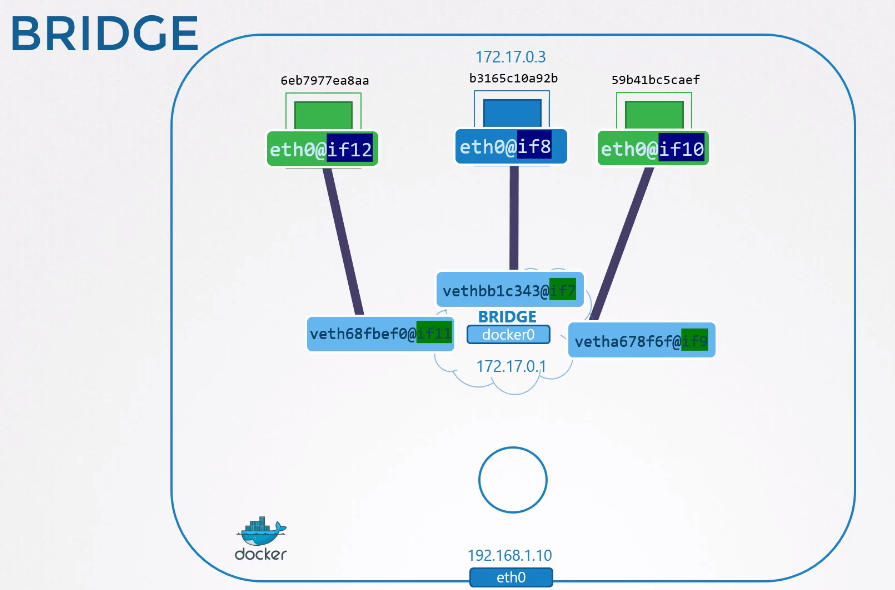
All these containers can see each other because they are part of Docker's default network.
Let's do a test?
~ docker run -d --name=nginx nginx
785d4f5fc60214c5cea30d9197b5be3da07aa6c49c67d8b5c6cc88635eaa1fef

docker inspect 785d4 | grep "IPAddress"
            "SecondaryIPAddresses": null,
            "IPAddress": "172.17.0.2",
                    "IPAddress": "172.17.0.2",

docker run -it --name ubuntu ubuntu bash
root@f1138371fc83:/# apt update; apt install iputils-ping -y
root@f1138371fc83:/# ping 172.17.0.2
PING 172.17.0.2 (172.17.0.2) 56(84) bytes of data.
64 bytes from 172.17.0.2: icmp_seq=1 ttl=64 time=0.120 ms
64 bytes from 172.17.0.2: icmp_seq=2 ttl=64 time=0.044 ms
...
The host can only see if it points to the correct IP, because it is part of Docker's 172.17.0.0/16 network. Any other machine will not be able to see it.
We need to do port mapping through iptables so that a host port points to the container port. Review network namespaces.
To do this easily we use -p to map the host port to the container port. This will generate an iptables rule.
The -p 8080:80 will do this command for us iptables -t nat -A PREROUTING --dport 8080 --to-destination 172.17.0.2:80 -j DNAT
docker run -d -p 8080:80 nginx

curl http://localhost:8080
<!DOCTYPE html>
<html>
<head>
<title>Welcome to nginx!</title>
<style>
html { color-scheme: light dark; }
body { width: 35em; margin: 0 auto;
font-family: Tahoma, Verdana, Arial, sans-serif; }
</style>
</head>
<body>
<h1>Welcome to nginx!</h1>
<p>If you see this page, the nginx web server is successfully installed and
working. Further configuration is required.</p>

<p>For online documentation and support please refer to
<a href="http://nginx.org/">nginx.org</a>.<br/>
Commercial support is available at
<a href="http://nginx.com/">nginx.com</a>.</p>

<p><em>Thank you for using nginx.</em></p>
</body>
</html>

# Checking iptables
sudo iptables -nvL -t nat | grep 8080
    0     0 DNAT       tcp  --  !docker0 *       0.0.0.0/0            0.0.0.0/0            tcp dpt:8080 to:172.17.0.2:80