Pod Networking
We talked about the network connecting nodes, but there's also another layer of networking that is crucial for cluster operation, which is networking at the pod layer.
Our Kubernetes cluster will soon have a large number of pods and services running.
How are pods handled? How do they communicate with each other? How do you access the services running on these pods internally, from within the cluster, and externally, from outside the cluster?
Kubernetes does not come with a built-in solution for this; it expects you to implement a networking solution that solves these challenges. However, Kubernetes has clearly defined the requirements for pod networking. Kubernetes expects that:
- each pod gets its own unique IP address and that each pod can reach all other pods on the same node using that IP address.
- each pod must be able to reach all other pods on other nodes as well using the same IP address. It doesn't matter what the IP address is and what range or subnet it belongs to.
As long as you can implement a solution that takes care of automatic IP address assignment and establishes connectivity between pods on a node, as well as between pods on different nodes, there will be no problem.
So, how would you implement a model that meets these requirements?
There are many networking solutions available that do this, but as this is a study, let's try to use what we've learned to solve this problem ourselves first to help understand how other solutions work.
Let's imagine we have a cluster with three nodes. It doesn't matter if they are master or worker, as all run pods.
The nodes are part of an external network and have addresses.
- master1 (192.168.0.1)
- worker1 (192.168.0.2)
- worker2 (192.168.0.3)
When containers are created, the container runtime used on the Kubernetes nodes creates network namespaces for them. To allow communication between them, we need to attach these namespaces to a bridge network as we saw earlier.
To comply with what CNI defined, we would need to create a bridge interface on each node that must belong to a different network. Containers would need to receive different IPs as well.
We would then have:
- master1 bridge 10.244.1.1 (network is 10.244.1.0/24)
- containers would have IP 10.244.1.2, 10.244.1.3, 10.244.1.4
- node1 bridge 10.244.2.1 (network is 10.244.2.0/24)
- containers would have IP 10.244.2.2, 10.244.2.3, 10.244.2.4
- node2 bridge 10.244.3.1 (network is 10.244.3.0/24)
- containers would have IP 10.244.3.2, 10.244.3.3, 10.244.3.4
We create a bridge network on each node, activate the interface and assign an IP address and set the IP proposed above.
The remaining steps must be performed for each container and whenever a new container is created, so we write a script for this.
In this script, we would have the following steps:
- Create a pipe or virtual network cable. We create this using the ip link add command.
- Connect one end to the container and the other end to the bridge using the ip link set command.
- Assign the IP address using the ip addr command and add a route to the default gateway. But what IP do we add? Do we manage this ourselves or store this information in some kind of database? For now, we'll assume this function picks a free IP on the subnet, taking an IP on the bridge network that is not being used.
- Activate the created interfaces
Containers on the same node can now communicate with each other within the same node.
We copy the script to the other nodes and run the script on them to assign the IP address and connect these containers to their own internal networks. We've solved the first part of the challenge. All pods receive their own unique IP address and can communicate with each other on their own nodes.
The next part is to allow them to reach other pods on other nodes. Let's say, for example, that a pod at 10.244.2.2 on node1 wants to ping pod 10.244.3.2 on node2.
So far, the first one has no idea where address 10.244.3.2 is because it's on a different network from its own.
Therefore, it forwards to the bridge IP, as it is configured as the default gateway. Node one also doesn't know since 10.244.2.2 is a private network on node two.
Add a route to node one's routing table to route traffic to 10.244.2.2 where the second node's IP is 192.168.1.12.
After the route is added, the blue pod can ping.
Instead of configuring routes on each server, a better solution is to do this on a router, if there is one on your network, and point all hosts to use it as the default gateway. This way, you can easily manage the routes for all networks in the router's routing table.
With this, the individual virtual networks we created with address 10.244.1.0/24 on each node now form a single large network with address 10.244.0.0/16.
It's time to bring it all together.
We performed several manual steps to prepare the environment with bridge networks and routing tables.
We then wrote a script that can be run for each container and performs the necessary steps to connect each container to the network. And we run the script manually.
Of course, we don't want to do this in large environments where thousands of pods are created every minute.
So how do we run the script automatically when a pod is created in Kubernetes?
This is where CNI comes in, acting as an intermediary. CNI tells Kubernetes that this is how you should call a script as soon as you create a container.
And CNI tells us: "This is how your script should be. So we need to modify the script a bit to meet CNI standards.
It must have an ADD section that will take care of adding a container to the network and a DELETE section that will take care of removing the container's interfaces from the network and releasing the IP address, etc.
So our script is ready.
The container runtime on each node is responsible for creating containers.
Whenever a container is created, the container runtime examines the CNI configuration passed as a command-line argument when it was executed and identifies the name of our script.
It then looks in the CNI bin directory to find our script and then executes the script with the add command and the name and ID of the container's namespace, and our script takes care of the rest.
The plugins, scripts that do the repetitive work, are located in /opt/cni/bin/
root@kind-cluster-worker:/etc/cni/net.d# ls -lha /opt/cni/bin
total 15M
drwxr-xr-x 2 root root 4.0K Feb  2 00:14 .
drwxr-xr-x 3 root root 4.0K Feb  2 00:14 ..
-rwxr-xr-x 1 root root 3.4M Feb  2 00:12 host-local
-rwxr-xr-x 1 root root 3.4M Feb  2 00:12 loopback
-rwxr-xr-x 1 root root 3.8M Feb  2 00:12 portmap
-rwxr-xr-x 1 root root 4.2M Feb  2 00:12 ptp
And the configuration is in /etc/cni/net.d/. If there was more than one file in this folder, it would pick the first one according to lexicographic order.
root@kind-cluster-worker:/etc/cni/net.d# ls /etc/cni/net.d/
10-kindnet.conflist
Analyzing this 10-kindnet.conflist file which is a CNI configuration file used by kind
{
  "cniVersion":"0.3.1",
  "name":"kindnet",
  "plugins":[
    {
      "type":"ptp",
      "ipMasq":false,
      "ipam":{
        "type":"host-local",
        "dataDir":"/run/cni-ipam-state",
        "routes":[
          {
            "dst":"0.0.0.0/0"
          }
        ],
        "ranges":[
          [
            {
              "subnet":"10.244.2.0/24"
            }
          ]
        ]
      },
      "mtu":1500
    },
    {
      "type":"portmap",
      "capabilities":{
        "portMappings":true
      }
    }
  ]
}
But let's try to find where the configuration that points to this CNI is shown.
Who is responsible for creating containers in Kubernetes? Kubelet, so that's where we need to check.
Kubelet doesn't run as a pod, so let's see the service that defines it.
root@kind-cluster-worker:/etc/systemd/system# cat /etc/systemd/system/kubelet.service

[Unit]
Description=kubelet: The Kubernetes Node Agent
Documentation=http://kubernetes.io/docs/
ConditionPathExists=/var/lib/kubelet/config.yaml
[Service]
ExecStart=/usr/bin/kubelet
Restart=always
StartLimitInterval=0
RestartSec=1s
CPUAccounting=true
MemoryAccounting=true
Slice=kubelet.slice
KillMode=process

[Install]
WantedBy=multi-user.target
root@kind-cluster-worker:/etc/systemd/system#

# Let's look at what we have here ConditionPathExists=/var/lib/kubelet/config.yaml
root@kind-cluster-worker:/etc/systemd/system# cat /var/lib/kubelet/config.yaml
apiVersion: kubelet.config.k8s.io/v1beta1
authentication:
  anonymous:
    enabled: false
  webhook:
    cacheTTL: 0s
    enabled: true
  x509:
    clientCAFile: /etc/kubernetes/pki/ca.crt
authorization:
  mode: Webhook
  webhook:
    cacheAuthorizedTTL: 0s
    cacheUnauthorizedTTL: 0s
cgroupDriver: systemd
cgroupRoot: /kubelet
clusterDNS:
- 10.96.0.10
clusterDomain: cluster.local
containerRuntimeEndpoint: ""
cpuManagerReconcilePeriod: 0s
evictionHard:
  imagefs.available: 0%
  nodefs.available: 0%
  nodefs.inodesFree: 0%
evictionPressureTransitionPeriod: 0s
failSwapOn: false
fileCheckFrequency: 0s
healthzBindAddress: 127.0.0.1
healthzPort: 10248
httpCheckFrequency: 0s
imageGCHighThresholdPercent: 100
imageMaximumGCAge: 0s
imageMinimumGCAge: 0s
kind: KubeletConfiguration
logging:
  flushFrequency: 0
  options:
    json:
      infoBufferSize: "0"
  verbosity: 0
memorySwap: {}
nodeStatusReportFrequency: 0s
nodeStatusUpdateFrequency: 0s
rotateCertificates: true
runtimeRequestTimeout: 0s
shutdownGracePeriod: 0s
shutdownGracePeriodCriticalPods: 0s
staticPodPath: /etc/kubernetes/manifests
streamingConnectionIdleTimeout: 0s
syncFrequency: 0s
volumeStatsAggPeriod: 0s

root@kind-cluster-worker:/etc/systemd/system# ps -aux | grep kubelet
root         216  1.5  0.1 2998920 87512 ?       Ssl  Feb28  15:19 /usr/bin/kubelet --bootstrap-kubeconfig=/etc/kubernetes/bootstrap-kubelet.conf --kubeconfig=/etc/kubernetes/kubelet.conf --config=/var/lib/kubelet/config.yaml --container-runtime-endpoint=unix:///run/containerd/containerd.sock --node-ip=172.18.0.3 --node-labels= --pod-infra-container-image=registry.k8s.io/pause:3.9 --provider-id=kind://docker/kind-cluster/kind-cluster-worker --runtime-cgroups=/system.slice/containerd.service
root       10841  0.0  0.0   3324  1664 pts/1    S+   14:51   0:00 grep kubelet
Since we didn't find anything, let's recreate our kind cluster, but now disabling the default CNI to install another one. Let's take the opportunity to improve some things in the configuration we'll pass to kind.
Uninstall the previous cluster
kind delete cluster
Create a file called kind-config.yaml
kind: Cluster
apiVersion: kind.x-k8s.io/v1alpha4
name: cka-cluster
networking:
  ipFamily: ipv4
  disableDefaultCNI: true
  kubeProxyMode: "ipvs"
  podSubnet: "10.244.0.0/16"
  serviceSubnet: "10.96.0.0/12"
nodes:
- role: control-plane
- role: worker
- role: worker
- role: worker
kind create cluster --config kind-config.yaml
Creating cluster "cka-cluster" ...
 ✓ Ensuring node image (kindest/node:v1.29.1) 🖼
 ✓ Preparing nodes 📦 📦 📦 📦
 ✓ Writing configuration 📜
 ✓ Starting control-plane 🕹️
 ✓ Installing StorageClass 💾
 ✓ Joining worker nodes 🚜
Set kubectl context to "kind-cka-cluster"
You can now use your cluster with:

kubectl cluster-info --context kind-cka-cluster

Thanks for using kind! 😊

# No ready nodes
k get nodes
NAME                        STATUS     ROLES           AGE   VERSION
cka-cluster-control-plane   NotReady   control-plane   34s   v1.29.1
cka-cluster-worker          NotReady   <none>          13s   v1.29.1
cka-cluster-worker2         NotReady   <none>          11s   v1.29.1
cka-cluster-worker3         NotReady   <none>          12s   v1.29.1
And now we'll install the weave CNI.
kubectl apply -f https://github.com/weaveworks/weave/releases/download/v2.8.1/weave-daemonset-k8s.yaml
serviceaccount/weave-net created
clusterrole.rbac.authorization.k8s.io/weave-net created
clusterrolebinding.rbac.authorization.k8s.io/weave-net created
role.rbac.authorization.k8s.io/weave-net created
rolebinding.rbac.authorization.k8s.io/weave-net created
daemonset.apps/weave-net created

kubectl get nodes
NAME                        STATUS   ROLES           AGE    VERSION
cka-cluster-control-plane   Ready    control-plane   110s   v1.29.1
cka-cluster-worker          Ready    <none>          89s    v1.29.1
cka-cluster-worker2         Ready    <none>          87s    v1.29.1
cka-cluster-worker3         Ready    <none>          88s    v1.29.1

kubectl get ds -n kube-system
NAME         DESIRED   CURRENT   READY   UP-TO-DATE   AVAILABLE   NODE SELECTOR            AGE
kube-proxy   4         4         4       4            4           kubernetes.io/os=linux   3m15s
weave-net    4         4         4       4            4           <none>                   103s
Now let's check things again.
root@cka-cluster-worker:/etc/cni/net.d# cat /etc/cni/net.d/10-weave.conflist
{
    "cniVersion": "0.3.0",
    "name": "weave",
    "plugins": [
        {
            "name": "weave",
            "type": "weave-net",
            "hairpinMode": true
        },
        {
            "type": "portmap",
            "capabilities": {"portMappings": true},
            "snat": true
        }
    ]
}

# We have different plugins because we use weavenet instead of kindnet
root@cka-cluster-worker:/etc/cni/net.d# ls /opt/cni/bin/
host-local  loopback  portmap  ptp  weave-ipam  weave-net  weave-plugin-latest

ps -aux | grep kubelet
root         251  2.0  0.1 2998152 84476 ?       Ssl  18:16   0:08 /usr/bin/kubelet --bootstrap-kubeconfig=/etc/kubernetes/bootstrap-kubelet.conf --kubeconfig=/etc/kubernetes/kubelet.conf --config=/var/lib/kubelet/config.yaml --container-runtime-endpoint=unix:///run/containerd/containerd.sock --node-ip=172.18.0.5 --node-labels= --pod-infra-container-image=registry.k8s.io/pause:3.9 --provider-id=kind://docker/cka-cluster/cka-cluster-worker --runtime-cgroups=/system.slice/containerd.service
We still didn't find anything. By analyzing other study materials, we found that in the service we could pass parameters to indicate where the plugin folder is located.
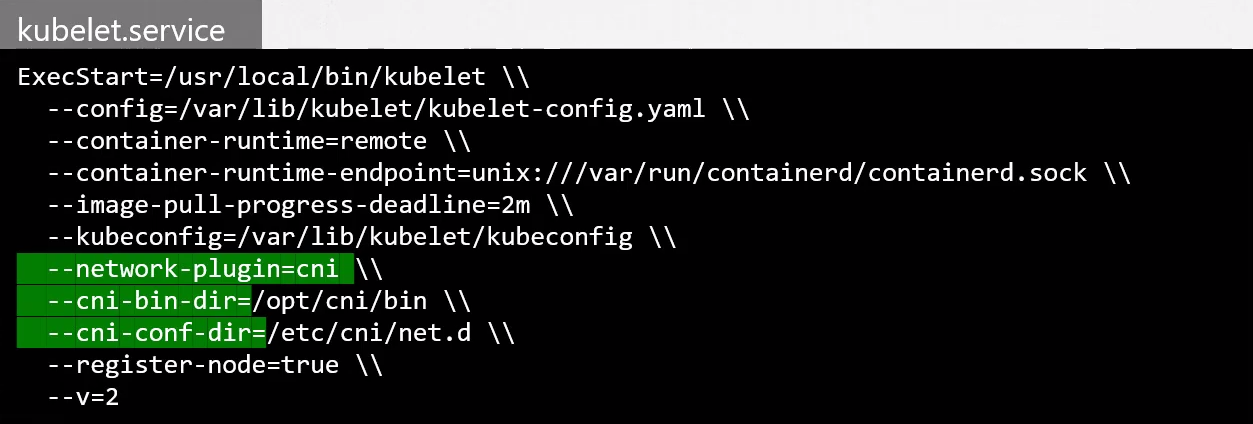
CNI Plugin
Let's dive deeper into a CNI solution and the concepts can be applied to the rest. Let's take Weave as an example.
The solution we used so far mapped which networks are on which hosts, while when a packet was sent from one pod to another, it followed the flow of going to the network, then to the router, then the host and then to another pod. But this solution doesn't work well with thousands of pods and hundreds of nodes. The routing table may not support so many entries and we need to be creative and find new solutions.
Thinking of Kubernetes as a company and the nodes as branches. Within the branches we have different sectors with different departments. If it were within the same city or in a small country, we could create a logistics system and hire a courier who would take documents from one place to another. Nobody needs to know the address of the branches and we would put on the correspondence only:
- Branch name
- Sector name
- Department name
- Recipient name
If the courier goes by car, bus, motorcycle, car or bicycle is their problem. They just need to deliver! The one who needs to know where the branch addresses are is them.
If the company has branches in different countries, one courier is not enough, so we would need to improve our system by outsourcing the delivery service. So we can hire a company that will place an agent responsible for each country or area. Documents would always be delivered between agents and they are responsible for solving the delivery within their responsibility.
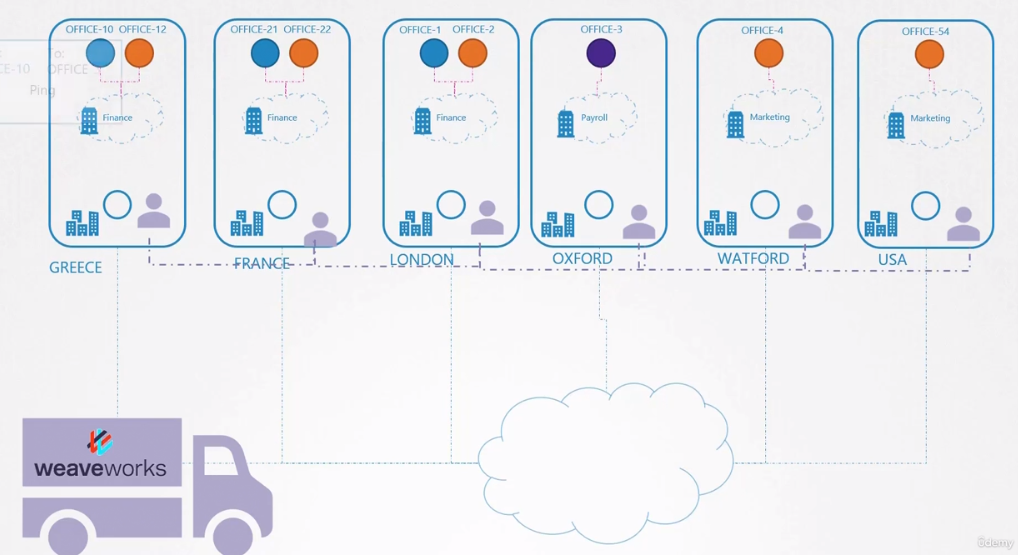
Going back to our CNI, we saw above that Weavenet creates a daemonset, that is, one pod (agent) per node (country). These agents know the topology of the entire network as they communicate with each other. They communicate with each other to exchange information about the nodes, networks and pods within them. Each agent or peer stores a topology of the entire setup. This way, they know the pods and their IPs on the other nodes. Weave creates its own bridge on the nodes with the name weave and assigns an IP address to each network.
# WORKER-1
root@cka-cluster-worker:/# ip link show weave
5: weave: <BROADCAST,MULTICAST,UP,LOWER_UP> mtu 1376 qdisc noqueue state UP mode DEFAULT group default qlen 1000
    link/ether e2:0f:fd:ef:ad:fa brd ff:ff:ff:ff:ff:ff
root@cka-cluster-worker:/# ip addr show weave
5: weave: <BROADCAST,MULTICAST,UP,LOWER_UP> mtu 1376 qdisc noqueue state UP group default qlen 1000
    link/ether e2:0f:fd:ef:ad:fa brd ff:ff:ff:ff:ff:ff
    inet 10.40.0.0/12 brd 10.47.255.255 scope global weave
       valid_lft forever preferred_lft forever

# WORKER-2 See that it starts with 10.32
root@cka-cluster-worker2:/# ip link show weave
5: weave: <BROADCAST,MULTICAST,UP,LOWER_UP> mtu 1376 qdisc noqueue state UP mode DEFAULT group default qlen 1000
    link/ether 5e:56:a8:56:6e:f4 brd ff:ff:ff:ff:ff:ff
root@cka-cluster-worker2:/# ip addr show weave
5: weave: <BROADCAST,MULTICAST,UP,LOWER_UP> mtu 1376 qdisc noqueue state UP group default qlen 1000
    link/ether 5e:56:a8:56:6e:f4 brd ff:ff:ff:ff:ff:ff
    inet 10.34.0.0/12 brd 10.47.255.255 scope global weave
       valid_lft forever preferred_lft forever
root@cka-cluster-worker2:/#
Remember that a single pod can be connected to multiple bridge networks. It all depends on the routes configured in the namespaces. For example, you can have a pod attached to the Weave Bridge as well as the Docker Bridge created by Docker.
The path a packet takes to reach its destination depends on the route configured in the container.
Weave ensures that pods get the correct route configured to reach the agent, and the agent takes care of the other pods. Now, when a packet is sent from one pod to another on another node, Weave intercepts the packet and identifies that it's on a separate network, encapsulating it in a new packet with a new source and destination and sending it over the network. On the other side, the Weave agent retrieves the packet, decapsulates it and forwards it to the correct pod.
Weave and Weave Peers can be deployed as services or daemons on each cluster node manually or, if Kubernetes is already configured, an easier way to do this is to deploy them as pods in the cluster as we did with kubectl apply in kind.
When the basic Kubernetes system is ready, with the nodes and network properly configured between the nodes and the basic control plane components deployed, Weave can be deployed in the cluster with a single kubectl apply command that implements all the necessary components for Weave in the cluster. Most importantly, Weave peers are deployed as a daemon set.
kubectl get pods -A -n kube-system -o wide | grep weave
kube-system          weave-net-29ffl                                     2/2     Running   4 (4h4m ago)   23h    172.18.0.2   cka-cluster-worker          <none>           <none>
kube-system          weave-net-4q8kr                                     2/2     Running   4 (4h4m ago)   23h    172.18.0.4   cka-cluster-worker3         <none>           <none>
kube-system          weave-net-8zxbw                                     2/2     Running   5 (4h4m ago)   23h    172.18.0.3   cka-cluster-worker2         <none>           <none>
kube-system          weave-net-phbz8                                     2/2     Running   4 (4h4m ago)   23h    172.18.0.5   cka-cluster-control-plane   <none>           <none>
An important thing is that when we apply the Weavenet yaml, it's good to check the CIDR in the kube-proxy configmap and apply the same.
kubectl describe cm -n kube-system kube-proxy | grep CIDR
clusterCIDR: 10.244.0.0/16
  excludeCIDRs: null
If we check what comes default in the yaml.
wget https://github.com/weaveworks/weave/releases/download/v2.8.1/weave-daemonset-k8s.yaml

# Let's check the weave container definitions in the daemonset item
cat weave-daemonset-k8s.yaml
# Removed above
 - apiVersion: apps/v1
    kind: DaemonSet
    metadata:
      name: weave-net
      labels:
        name: weave-net
      namespace: kube-system
    spec:
      # Removed this part to make it easy to read here!
          containers:
            - name: weave
              command:
                - /home/weave/launch.sh
              env:
          ##############################################
                # we don't have a variable to define the CIDR we'll use so we can add it
                - name: IPALLOC_RANGE # ADD
                  value: 10.244.0.0/16
          ###############################################
                - name: INIT_CONTAINER
                  value: "true"
                - name: HOSTNAME
                  valueFrom:
                    fieldRef:
                      apiVersion: v1
For troubleshooting purposes, view the logs using the kubectl logs command.