Service Networking
You rarely configure your pods to communicate directly with each other. If you want a pod to access services from another pod, whether hosted on the same host or not, you should always use services.
When a service is created, it can be accessed by all pods in the cluster regardless of which node the pods are on. While a pod is hosted on a node, a service is "hosted" across the entire cluster and not tied to a specific node.
We have 3 types of services:
- ClusterIP: This is the default and only known within the cluster. An example is a database within the cluster for applications.
- NodePort: This is the type of service that exposes the service outside the cluster. A web application would be a great example for using this type. This service creates the SAME port on all cluster nodes and points to the service. A NodePort also has a ClusterIP.
- LoadBalancer:
we'll talk about this later
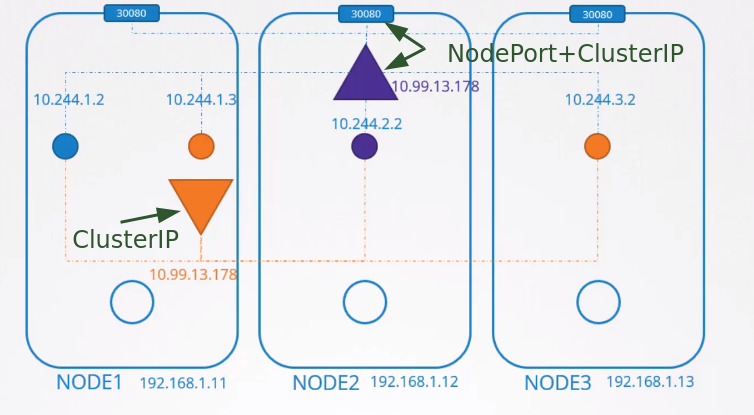
But how does this really work?
Quick summary:
-
The kubelet watches for changes in the kube-apiserver and every time a pod is scheduled to be created on its node, it interacts with the container runtime and creates it.
-
The container runtime does its job of creating the necessary namespaces for the pod and invokes the CNI plugin to create the network for that pod.
On each node we run kube-proxy, which is why it's a DaemonSet:
kubectl get ds -n kube-system
NAME         DESIRED   CURRENT   READY   UP-TO-DATE   AVAILABLE   NODE SELECTOR            AGE
kube-proxy   4         4         4       4            4           kubernetes.io/os=linux   30h
weave-net    4         4         4       4            4           <none>                   30h
Kube-proxy also watches for cluster changes through the kube-apiserver, just like kubelet, and whenever a new service is created, it takes action.
Services are a concept that spans the entire cluster. They are not a resource created on the node like a container, but they exist across all cluster nodes. In fact, they don't exist. There are no processes, interfaces, namespaces, containers, IPs, nothing. Services in Kubernetes are just virtual objects.
So how do they get an IP?
When we create a service, it receives an IP from a predefined range. The kube-proxy components running on each node take that IP address and create forwarding rules on each cluster node saying that all traffic arriving at that service IP should be directed to the pod IP.
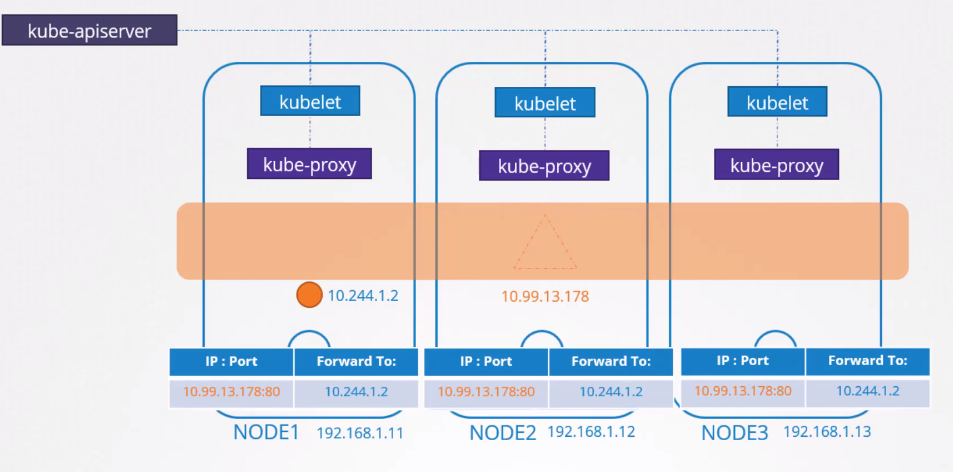
Whenever a pod tries to access a service IP, it will be forwarded to the pod's IP address which can be accessed on any cluster node.
It's not just about the IP but the combination of IP:PORT
Every time a service is created, kube-proxy adds new rules, and every time it's deleted, these rules are removed.
How are these rules created and where?
Kube-proxy supports different modes, such as:
- userspace: Kube-proxy listens on a port for each service and connects them with the pods.
- IPVS: kube-proxy creates IPVS rules.
- iptables: kube-proxy creates iptables rules
In kube-proxy, the proxy-mode can be set using the --proxy-mode [userspace | iptables | ipvs] ... parameter
If this is not set, the default is iptables.
So, we'll see how iptables are configured by kube-proxy and how you can view them on the nodes.
Let's create a deployment, which creates a replicaset, which creates a pod... It could be just a pod, but let's go with the usual method, nobody creates pods without a controller.
kubectl create deployment nginx --image nginx
deployment.apps/nginx created

# WE CAN DO IT THIS WAY OR THE SECOND WAY
kubectl expose deployment nginx --port=8080 --target-port=80 --type=ClusterIP
service/nginx exposed

kubectl delete svc nginx

# AND WE COULD DO IT LIKE THIS
kubectl create service clusterip nginx --tcp=8080:80
What did we define here? A service that will receive on port 8080 and send to nginx on port 80.
The kubectl expose and kubectl create service commands are two different ways to achieve the same result: creating a service in Kubernetes. However, there are some differences between them:
-
kubectl expose:
- Requires you to specify a pre-existing deployment to create the service.
- In addition to creating a service, the expose command can modify or update an existing service
- Allows you to specify additional options, such as service type, service port and other details.
- More complex when used with many parameters.
-
kubectl create service:
- Allows you to create a service without necessarily having a corresponding deployment.
- It creates a service with the specified ports and doesn't offer many additional options.
- Less complex
k get pods -o wide
NAME                     READY   STATUS    RESTARTS   AGE   IP          NODE                  NOMINATED NODE   READINESS GATES
nginx-7854ff8877-wc4dr   1/1     Running   0          13m   10.34.0.1   cka-cluster-worker2   <none>           <none>

k get svc -o wide
NAME         TYPE        CLUSTER-IP      EXTERNAL-IP   PORT(S)    AGE   SELECTOR
kubernetes   ClusterIP   10.96.0.1       <none>        443/TCP    30h   <none>
nginx        ClusterIP   10.101.29.104   <none>        8080/TCP   3s    app=nginx
The real pod IP is 10.34.0.1 The service IP is 10.109.205.172
Why did the service get an IP?
The definition is in the kube-apiserver, it's one of the parameters passed when running the pod.
root@cka-cluster-control-plane:/etc# cat /etc/kubernetes/manifests/kube-apiserver.yaml
apiVersion: v1
kind: Pod
metadata:
  # Removed to reduce output ...
  name: kube-apiserver
  namespace: kube-system
spec:
  containers:
  - command:
    - kube-apiserver
    - --advertise-address=172.18.0.5
    - --allow-privileged=true
    - --authorization-mode=Node,RBAC
    - --client-ca-file=/etc/kubernetes/pki/ca.crt
    - --enable-admission-plugins=NodeRestriction
    - --enable-bootstrap-token-auth=true
    - --etcd-cafile=/etc/kubernetes/pki/etcd/ca.crt
    - --etcd-certfile=/etc/kubernetes/pki/apiserver-etcd-client.crt
    - --etcd-keyfile=/etc/kubernetes/pki/apiserver-etcd-client.key
    - --etcd-servers=https://127.0.0.1:2379
    - --kubelet-client-certificate=/etc/kubernetes/pki/apiserver-kubelet-client.crt
    - --kubelet-client-key=/etc/kubernetes/pki/apiserver-kubelet-client.key
    - --kubelet-preferred-address-types=InternalIP,ExternalIP,Hostname
    - --proxy-client-cert-file=/etc/kubernetes/pki/front-proxy-client.crt
    - --proxy-client-key-file=/etc/kubernetes/pki/front-proxy-client.key
    - --requestheader-allowed-names=front-proxy-client
    - --requestheader-client-ca-file=/etc/kubernetes/pki/front-proxy-ca.crt
    - --requestheader-extra-headers-prefix=X-Remote-Extra-
    - --requestheader-group-headers=X-Remote-Group
    - --requestheader-username-headers=X-Remote-User
    - --runtime-config=
    - --secure-port=6443
    - --service-account-issuer=https://kubernetes.default.svc.cluster.local
    - --service-account-key-file=/etc/kubernetes/pki/sa.pub
    - --service-account-signing-key-file=/etc/kubernetes/pki/sa.key
    - --service-cluster-ip-range=10.96.0.0/12 # <<<<< Here will be the range
    - --tls-cert-file=/etc/kubernetes/pki/apiserver.crt
    - --tls-private-key-file=/etc/kubernetes/pki/apiserver.key
    image: registry.k8s.io/kube-apiserver:v1.29.1
    imagePullPolicy: IfNotPresent
    ## Removed to reduce output

## OR

kubectl get pods -n kube-system kube-apiserver-cka-cluster-control-plane -o=jsonpath='{.spec.containers[*].command}' | jq
[
  "kube-apiserver",
  "--advertise-address=172.18.0.5",
  "--allow-privileged=true",
  "--authorization-mode=Node,RBAC",
  "--client-ca-file=/etc/kubernetes/pki/ca.crt",
  "--enable-admission-plugins=NodeRestriction",
  "--enable-bootstrap-token-auth=true",
  "--etcd-cafile=/etc/kubernetes/pki/etcd/ca.crt",
  "--etcd-certfile=/etc/kubernetes/pki/apiserver-etcd-client.crt",
  "--etcd-keyfile=/etc/kubernetes/pki/apiserver-etcd-client.key",
  "--etcd-servers=https://127.0.0.1:2379",
  "--kubelet-client-certificate=/etc/kubernetes/pki/apiserver-kubelet-client.crt",
  "--kubelet-client-key=/etc/kubernetes/pki/apiserver-kubelet-client.key",
  "--kubelet-preferred-address-types=InternalIP,ExternalIP,Hostname",
  "--proxy-client-cert-file=/etc/kubernetes/pki/front-proxy-client.crt",
  "--proxy-client-key-file=/etc/kubernetes/pki/front-proxy-client.key",
  "--requestheader-allowed-names=front-proxy-client",
  "--requestheader-client-ca-file=/etc/kubernetes/pki/front-proxy-ca.crt",
  "--requestheader-extra-headers-prefix=X-Remote-Extra-",
  "--requestheader-group-headers=X-Remote-Group",
  "--requestheader-username-headers=X-Remote-User",
  "--runtime-config=",
  "--secure-port=6443",
  "--service-account-issuer=https://kubernetes.default.svc.cluster.local",
  "--service-account-key-file=/etc/kubernetes/pki/sa.pub",
  "--service-account-signing-key-file=/etc/kubernetes/pki/sa.key",
  "--service-cluster-ip-range=10.96.0.0/12", ## Here
  "--tls-cert-file=/etc/kubernetes/pki/apiserver.crt",
  "--tls-private-key-file=/etc/kubernetes/pki/apiserver.key"
]
10.96.0.0/12 means that the first 12 bits of the IP address are fixed (10.96) and the remaining 20 bits are variable. This gives an IP address range from 10.96.0.0 to 10.111.255.255. So it's within.
The default is 10.0.0.0/24 which would allow us to create far fewer services.
When we provide our CNI with the IP range that pods will use, we saw that it's 10.244.0.0/16. They cannot overlap. There shouldn't be a case where a pod and a service receive the same IP
And why is the pod address at 10.34.0.1?
NAME                     READY   STATUS    RESTARTS   AGE   IP          NODE                  NOMINATED NODE   READINESS GATES
nginx-7854ff8877-wc4dr   1/1     Running   0          47m   10.34.0.1   cka-cluster-worker2   <none>           <none>
Because that's how Weavenet works. Remember the agents?
Let's check the rules created when this service was executed