Ingress
What's the difference between service and ingress?
Let's imagine the following scenario.
We have an app deployed in the cluster. To access its database it points to the database service which is of type ClusterIP that is only accessible within the cluster.
For the application to be accessible outside the cluster, we need to create a service of type NodePort. A high port between 30000 and 32767 was chosen. Every time a node receives a request on this port, it will forward to the app service.
A NodePort type service creates another ClusterIP type service.
If we remember that a service is rules, then it creates two rules, one for all nodes on the port that must point to the normal service which is of type ClusterIP.
To access the application, we need to type the IP of any of the Kubernetes nodes and the port. It could be the IP of any node.
If traffic increases, we can increase the number of pod replicas and the service will take care of dividing the traffic between the pods.
But we don't want the user to type the address using the IP and port of our nodes. Since we can only use high ports in NodePort, what could we do to have something like http://app.com?
We could create a proxy. A server that listens to that address on port 80 that the user doesn't need to type and forwards to app.com:30080
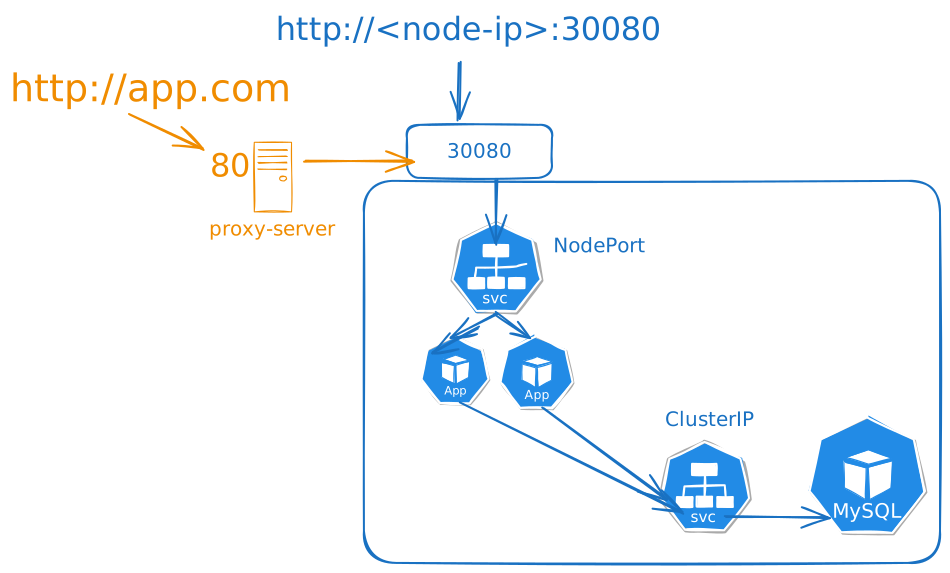
But this scenario is when you have the cluster hosted in your datacenter.
In the case of a cluster hosted in a cloud for example, we could create the service that is of type NodePort as LoadBalancer.
When we do this in a cloud, automatically the cloud services create a load balancer that will be used to route all traffic to your cluster on the nodeport you defined.
If you create another application and again define a service of type LoadBalancer, another load balancer will be created in the cloud pointing to a new nodeport. And in the end you'll pay a lot.
To solve this scenario we could have a single application inside our cluster that acts as a reverse proxy. It analyzes the URL and forwards to the correct service. This way we would only have one load balancer in the cloud.
Instead of manually configuring this application, ingress is an object that configures this for us as a Kubernetes object.
It's necessary to deploy a solution to be the reverse proxy. We can use several, but some are here:
- Nginx (It's the most popular)
- Istio
- Traefik
- HAProxy
These controllers are programmed to monitor Kubernetes for ingress objects to configure their entries.
If you don't have one of these applications in your cluster, an ingress object won't work.
What we're doing is bringing a proxy into Kubernetes and creating objects that configure it easily. Having an entry point that can be filtered and dispatched to which service should respond.
Let's focus on the nginx ingress controller which is the most famous. How to deploy nginx?
Normally we would use helm for this, but let's go the traditional way.
The first thing we need is to have a configmap that will have all the parameters to avoid passing all args in the deployment. It's also easier to make modifications.
A summary of what we would need:
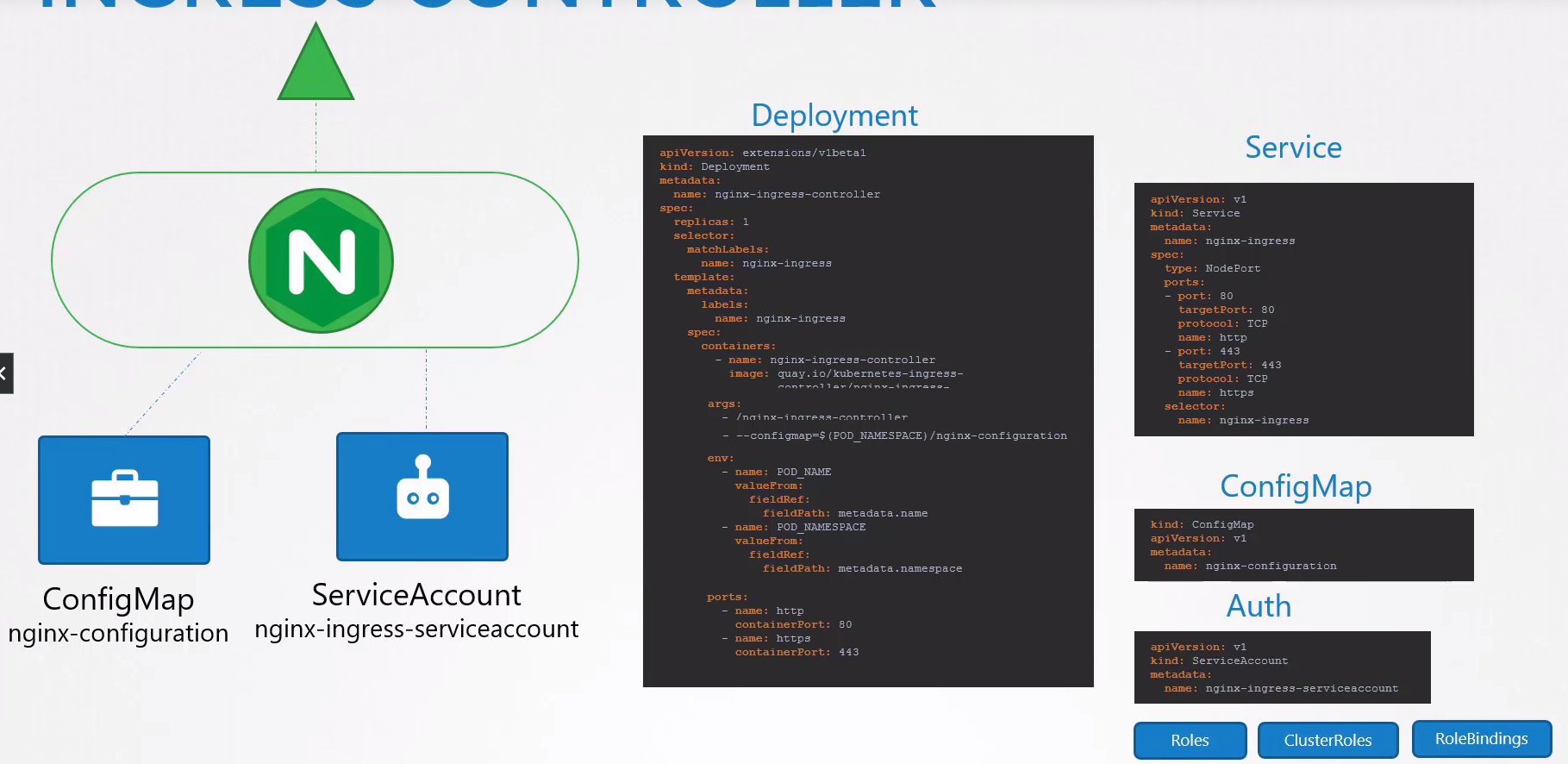
Once configured we need the ingress objects.
The object comes down to something very simple:
apiVersion: networking.k8s.io/v1
kind: Ingress
metadata:
  name: my-ingress
  annotations:
    nginx.ingress.kubernetes.io/rewrite-target: /
spec:
  # The name of the ingress class we'll use
  ingressClassName: nginx
  # The list of rules we'll pass
  rules: []
apiVersion: networking.k8s.io/v1
kind: Ingress
metadata:
  name: ingress-app
spec:
  rules:
  # In this case we're also analyzing the domain.
  - host: "app.mysite.com"
    http:
      paths:
      - pathType: Prefix
        path: "/"
        backend:
          service:
            name: service-app1
            port:
              number: 8080 # Service port that will redirect to the app port.

  # here we're analyzing only the URL path passed without caring about the domain.
  - http:
      paths:
      - pathType: Prefix
        path: "/"
        backend:
          service:
            name: service-app2
            port:
              number: 8080 # Service port that will redirect to the app port.

    # Here would be an idea that if the first rule is not resolved, we move to the second. Great for putting something to respond if the URL doesn't exist like a 404 error.
  - host: "*.foo.com"
    http:
      paths:
      - pathType: Prefix
        path: "/"
        backend:
          service:
            name: service-404
            port:
              number: 8989
The order of the rule matters.
We could also divide this into several separate ingresses, which would be best practice.