DNS in Kubernetes
What names are assigned to which objects? What DNS records are assigned to services? What DNS records are assigned to pods?
Nodes are created before the Kubernetes cluster and probably registered in your organization's DNS and assigned some IP within your organization's network. How they are managed is not a concern within the cluster.
When we set up the cluster, Kubernetes deploys a DNS server called CoreDNS. If you do the setup manually, you'll have to do it yourself.
k get pods -n kube-system -o wide
NAME                                                READY   STATUS      RESTARTS      AGE   IP           NODE                        NOMINATED NODE   READINESS GATES
coredns-76f75df574-7d75t                            1/1     Running     1 (21h ago)   40h   10.40.0.3    cka-cluster-worker          <none>           <none>
coredns-76f75df574-99kmh                            1/1     Running     1 (21h ago)   40h   10.40.0.2    cka-cluster-worker          <none>           <none>
etcd-cka-cluster-control-plane                      1/1     Running     0             21h   172.18.0.5   cka-cluster-control-plane   <none>           <none>
kube-apiserver-cka-cluster-control-plane            1/1     Running     0             21h   172.18.0.5   cka-cluster-control-plane   <none>           <none>
kube-controller-manager-cka-cluster-control-plane   1/1     Running     1 (21h ago)   40h   172.18.0.5   cka-cluster-control-plane   <none>           <none>
kube-proxy-6gk2j                                    1/1     Running     1 (21h ago)   40h   172.18.0.3   cka-cluster-worker2         <none>           <none>
kube-proxy-bgpzr                                    1/1     Running     1 (21h ago)   40h   172.18.0.2   cka-cluster-worker          <none>           <none>
kube-proxy-l8xxj                                    1/1     Running     1 (21h ago)   40h   172.18.0.4   cka-cluster-worker3         <none>           <none>
kube-proxy-vg8mb                                    1/1     Running     1 (21h ago)   40h   172.18.0.5   cka-cluster-control-plane   <none>           <none>
kube-scheduler-cka-cluster-control-plane            1/1     Running     1 (21h ago)   40h   172.18.0.5   cka-cluster-control-plane   <none>           <none>
node-shell-0bdf1591-55c6-47fa-acc6-58c934eb2096     0/1     Completed   0             9h    172.18.0.3   cka-cluster-worker2         <none>           <none>
weave-net-29ffl                                     2/2     Running     4 (21h ago)   40h   172.18.0.2   cka-cluster-worker          <none>           <none>
weave-net-4q8kr                                     2/2     Running     4 (21h ago)   40h   172.18.0.4   cka-cluster-worker3         <none>           <none>
weave-net-8zxbw                                     2/2     Running     5 (21h ago)   40h   172.18.0.3   cka-cluster-worker2         <none>           <none>
weave-net-phbz8                                     2/2     Running     4 (21h ago)   40h   172.18.0.5   cka-cluster-control-plane   <none>           <none>

k get deploy -n kube-system -o wide
NAME      READY   UP-TO-DATE   AVAILABLE   AGE   CONTAINERS   IMAGES                                    SELECTOR
coredns   2/2     2            2           40h   coredns      registry.k8s.io/coredns/coredns:v1.11.1   k8s-app=kube-dns

kubectl get svc -n kube-system
NAME       TYPE        CLUSTER-IP   EXTERNAL-IP   PORT(S)                  AGE
kube-dns   ClusterIP   10.96.0.10   <none>        53/UDP,53/TCP,9153/TCP   40h
Notice that CoreDNS here is a deployment with two replicas and not a DaemonSet. We also have a service created.
In the past, Kubernetes used kube-dns, now it uses coredns. coredns and kube-dns are all the same thing at this point.
Every time a service or pod is created, kube-dns/coredns, depending on the cluster configuration, is responsible for creating an entry in the records table. It does this by monitoring the kube-apiserver.
Since any service and pod is accessible throughout the cluster, just mapping hostname to IP is sufficient.
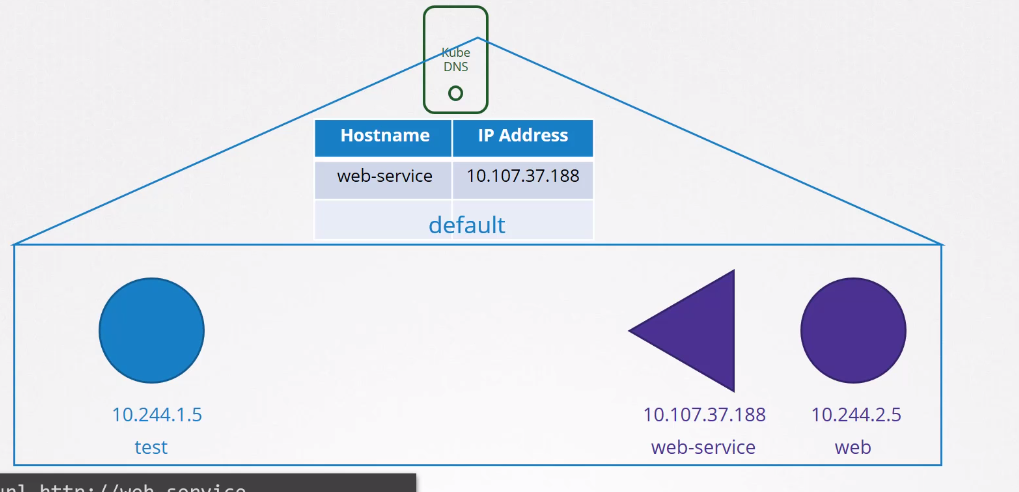
Pods can reference other pods or services in the same namespace only by name. If a pod wants to access another pod in another namespace, it must reference the namespace as well.
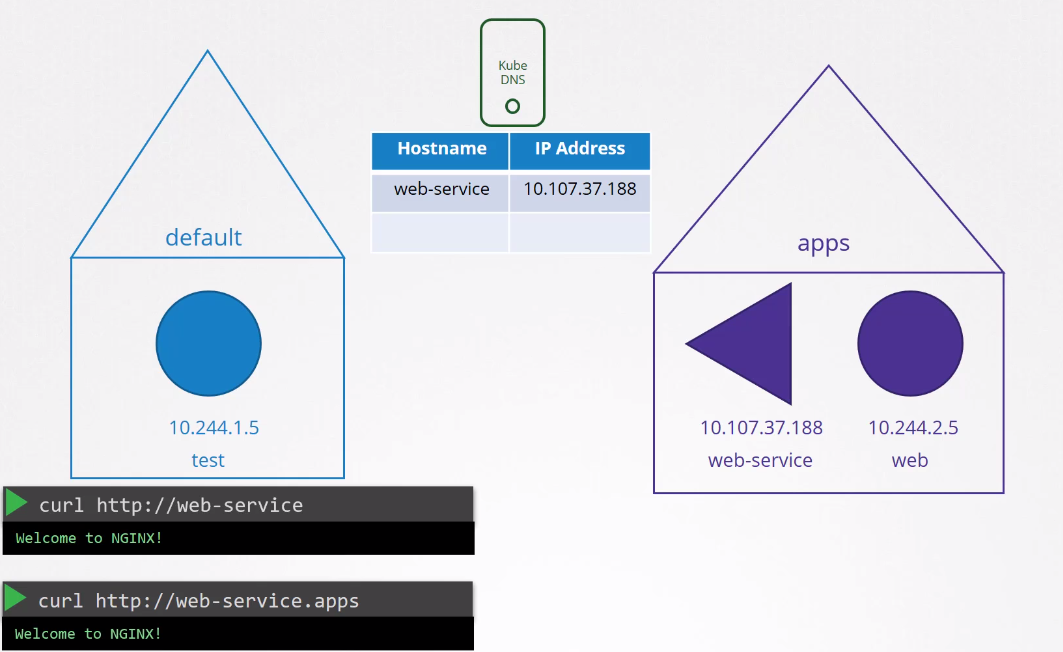
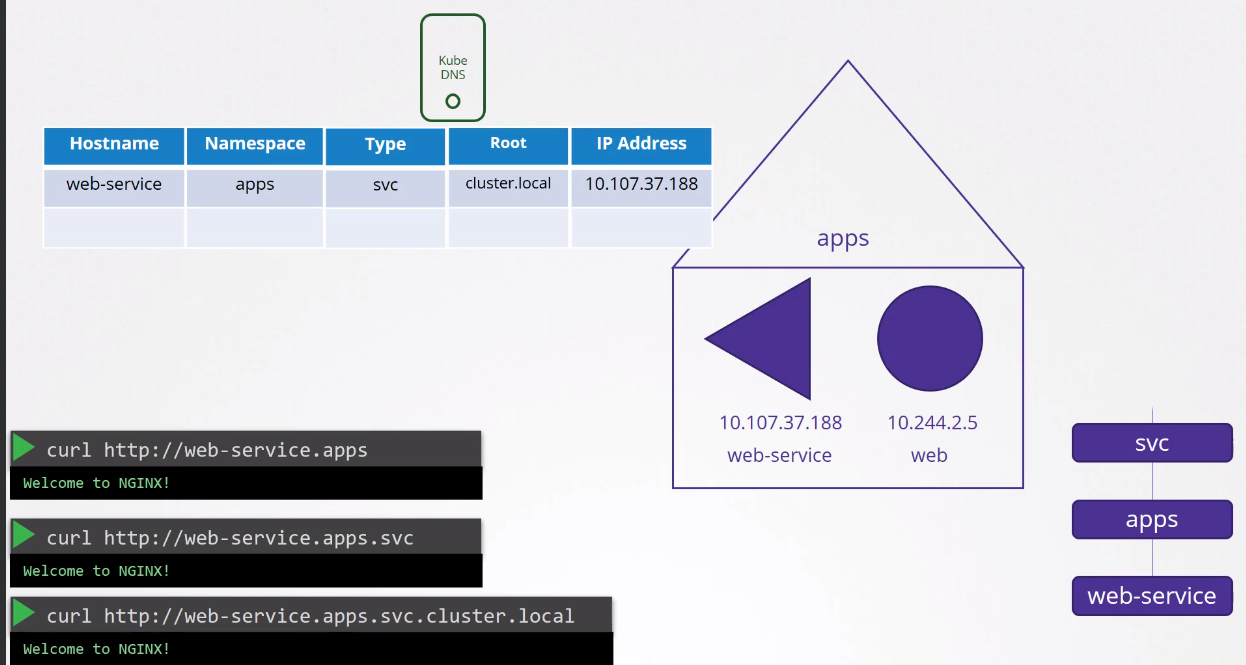
We can still pass the group and domain of the cluster which would work.
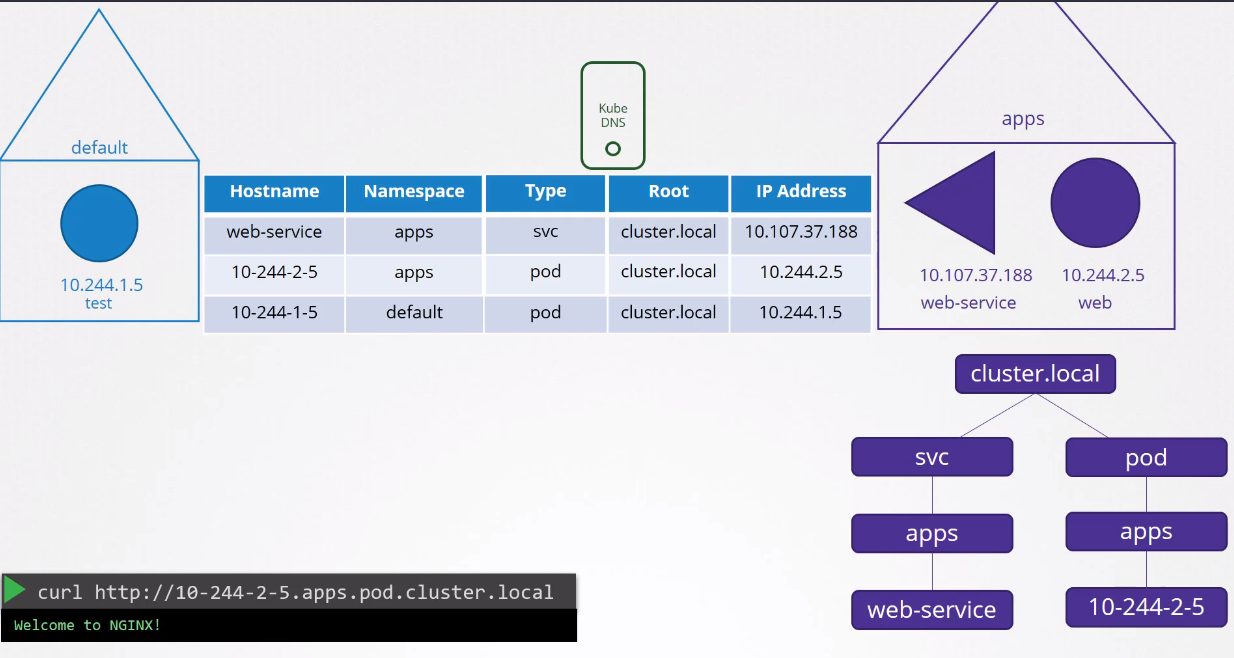
The DNS record for pods is not created by default, but it can be done. The record will use the pod's IP and replace the . with -.
Every time a pod is created, its /etc/resolv.conf uses the nameserver pointing to coredns.
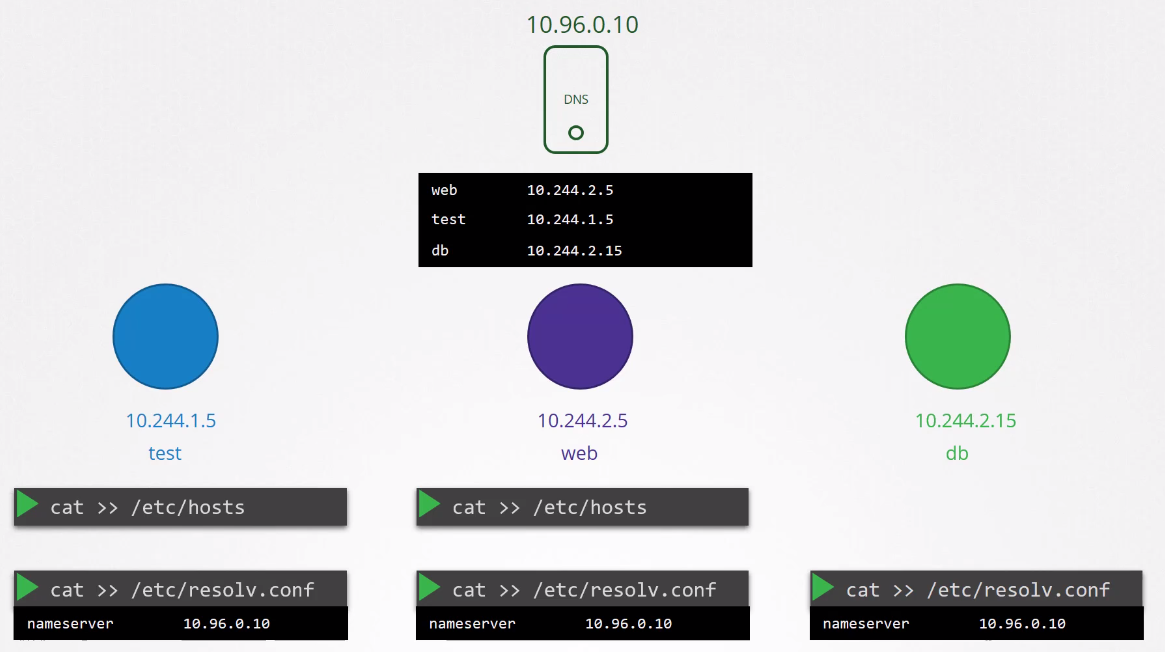
Exploring a bit how coredns is deployed.
kubectl get deploy -n kube-system coredns -o yaml
apiVersion: apps/v1
kind: Deployment
metadata:
  annotations:
    deployment.kubernetes.io/revision: "1"
  creationTimestamp: "2024-02-29T18:15:52Z"
  generation: 1
  labels:
    k8s-app: kube-dns
  name: coredns
  namespace: kube-system
  resourceVersion: "113296"
  uid: 9a958820-df9c-46b6-bbed-2b1858bd1008
spec:
  progressDeadlineSeconds: 600
  # Two replicas for redundancy and strategy so that at least 1 is active
  replicas: 2
  revisionHistoryLimit: 10
  selector:
    matchLabels:
      k8s-app: kube-dns
  strategy:
    rollingUpdate:
      maxSurge: 25%
      maxUnavailable: 1
    type: RollingUpdate
  template:
    metadata:
      creationTimestamp: null
      labels:
        k8s-app: kube-dns
    spec:
      # To avoid being on the same hostname
      affinity:
        podAntiAffinity:
          preferredDuringSchedulingIgnoredDuringExecution:
          - podAffinityTerm:
              labelSelector:
                matchExpressions:
                - key: k8s-app
                  operator: In
                  values:
                  - kube-dns
              topologyKey: kubernetes.io/hostname
            weight: 100

      containers:
      # The entrypoint is the coredns binary and the configuration passed will be in this /etc/core/CoreFile
      - args:
        - -conf
        - /etc/coredns/Corefile
        image: registry.k8s.io/coredns/coredns:v1.11.1
        imagePullPolicy: IfNotPresent
        livenessProbe:
          failureThreshold: 5
          httpGet:
            path: /health
            port: 8080
            scheme: HTTP
          initialDelaySeconds: 60
          periodSeconds: 10
          successThreshold: 1
          timeoutSeconds: 5
        name: coredns
        # USES PORT 53
        ports:
        - containerPort: 53
          name: dns
          protocol: UDP
        - containerPort: 53
          name: dns-tcp
          protocol: TCP
        - containerPort: 9153
          name: metrics
          protocol: TCP
        readinessProbe:
          failureThreshold: 3
          httpGet:
            path: /ready
            port: 8181
            scheme: HTTP
          periodSeconds: 10
          successThreshold: 1
          timeoutSeconds: 1
        resources:
          limits:
            memory: 170Mi
          requests:
            cpu: 100m
            memory: 70Mi
        securityContext:
          allowPrivilegeEscalation: false
          capabilities:
            add:
            - NET_BIND_SERVICE
            drop:
            - ALL
          readOnlyRootFilesystem: true
        terminationMessagePath: /dev/termination-log
        terminationMessagePolicy: File
        volumeMounts:
        - mountPath: /etc/coredns
          name: config-volume
          readOnly: true
      dnsPolicy: Default
      nodeSelector:
        kubernetes.io/os: linux
      priorityClassName: system-cluster-critical
      restartPolicy: Always
      schedulerName: default-scheduler
      securityContext: {}
      serviceAccount: coredns
      serviceAccountName: coredns
      terminationGracePeriodSeconds: 30
      tolerations:
      - key: CriticalAddonsOnly
        operator: Exists
      - effect: NoSchedule
        key: node-role.kubernetes.io/control-plane
      volumes: # We can observe that we use a configmap for the coredns configuration
      - configMap:
          defaultMode: 420
          items:
          - key: Corefile
            path: Corefile
          name: coredns
        name: config-volume
...
If we explore the configmap, we can see that we have several configured plugins:
- errors
- health
- kubernetes (this is the plugin that makes coredns work with kubernetes)
- prometheus
- cache
- reload
These are all plugins and the settings passed to them. If you want to explore more plugins you can visit https://coredns.io/plugins/
kubectl describe cm -n kube-system coredns
Name:         coredns
Namespace:    kube-system
Labels:       <none>
Annotations:  <none>

Data
====
Corefile:
----
.:53 {
    errors
    health {
       lameduck 5s
    }
    ready
    kubernetes cluster.local in-addr.arpa ip6.arpa {
       pods insecure
       fallthrough in-addr.arpa ip6.arpa
       ttl 30
    }
    prometheus :9153
    forward . /etc/resolv.conf {
       max_concurrent 1000
    }
    cache 30
    loop
    reload
    loadbalance
}


BinaryData
====

Events:  <none>
Let's focus on the kubernetes plugin. To enable the DNS record for pods, just add an entry here.
    kubernetes cluster.local in-addr.arpa ip6.arpa {
       pods insecure
       fallthrough in-addr.arpa ip6.arpa
       ttl 30
    }
But how does the pod receive this entry to use coredns to resolve names? Kubelet
If we analyze the kubelet config file we can see:
root@cka-cluster-worker:/var/lib/kubelet# cat /var/lib/kubelet/config.yaml
apiVersion: kubelet.config.k8s.io/v1beta1
authentication:
# Removed to reduce output
clusterDNS: # Here we have a list and the first one already has the entry for the coredns service
- 10.96.0.10
# Removed to reduce output

kubectl get svc -n kube-system -o wide
NAME       TYPE        CLUSTER-IP   EXTERNAL-IP   PORT(S)                  AGE   SELECTOR
kube-dns   ClusterIP   10.96.0.10   <none>        53/UDP,53/TCP,9153/TCP   42h   k8s-app=kube-dns
Let's check the resolv.conf of a pod and see some details...
kubectl exec -it nginx-7854ff8877-wc4dr -c nginx -- bash

root@nginx-7854ff8877-wc4dr:/# cat /etc/resolv.conf
search default.svc.cluster.local svc.cluster.local cluster.local
nameserver 10.96.0.10
options ndots:5
See the configured nameserver and also notice that we have a search that looks for all possibilities. It's also worth noting that we only have the possibility to resolve this for services and for pods we need to pass the full domain.