DNS Fundamentals
We have two computers hostA and hostB on the same network. A wants to reach B.
We can ping using B's IP or give it a name to make it easier. Making a comparison, you can type the number to call someone or go to your contacts and click on the name.
The /etc/hosts file binds an IP to a name in Linux. It's our contact list.
The real hostname of hostB is host-2. But remember I mentioned the contact list? In my contact list I can put whatever name I want to call john. I want to call john "john". That's what hostA just did.
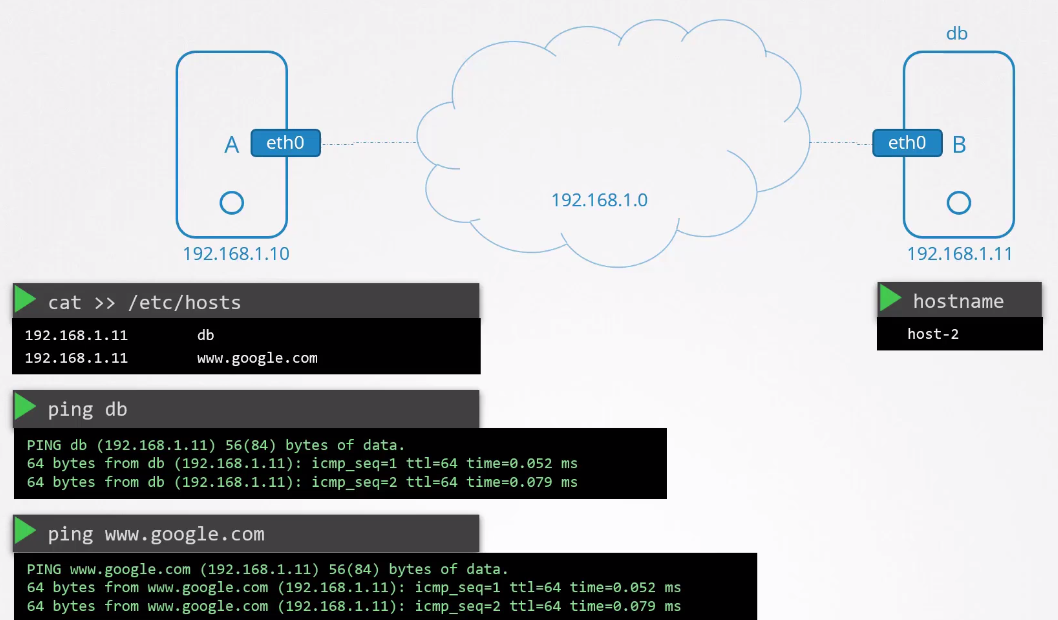
We can define in the hosts file the IP of anything, but that doesn't mean it's true. If you ping www.google.com the server that will respond will be the one whose IP you defined.
We can have as many names as we want even for the same IP.
The advantage of using names is that every time we write that name it will search the file and translate to the IP of where we're going without having to remember the IP of things.
The problem with this is that everyone would need to have all the network entries. If a host changed its IP the name wouldn't translate to the correct IP. Managing this gets complicated as it tends to grow.
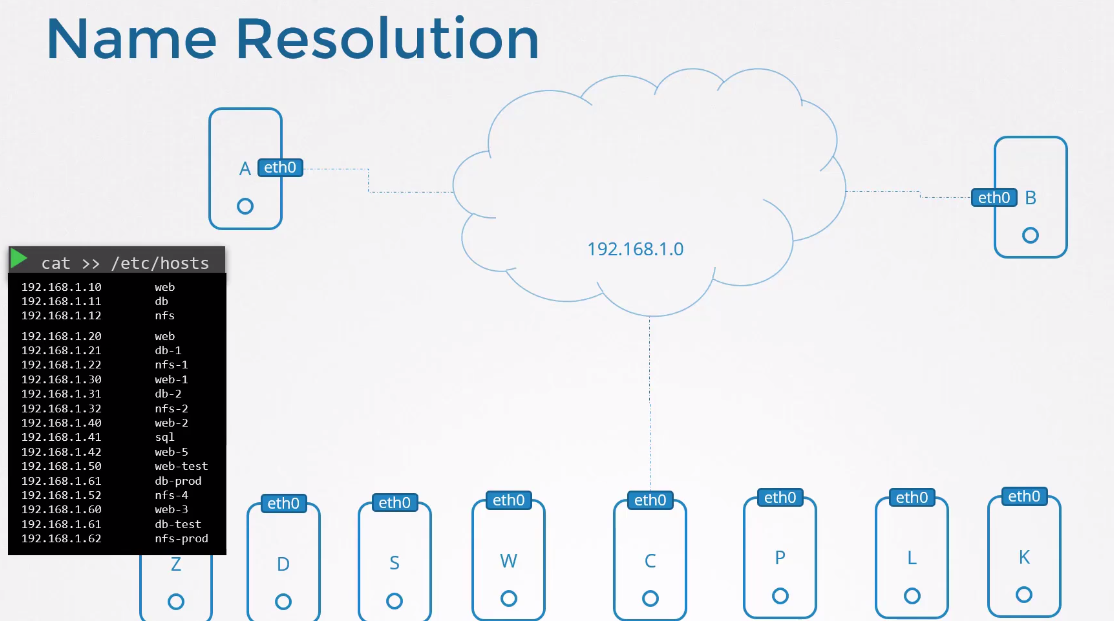
To solve this problem we move all entries to a single server that will manage names centrally and whoever needs to resolve a name goes to it. This server is known as DNS Server.
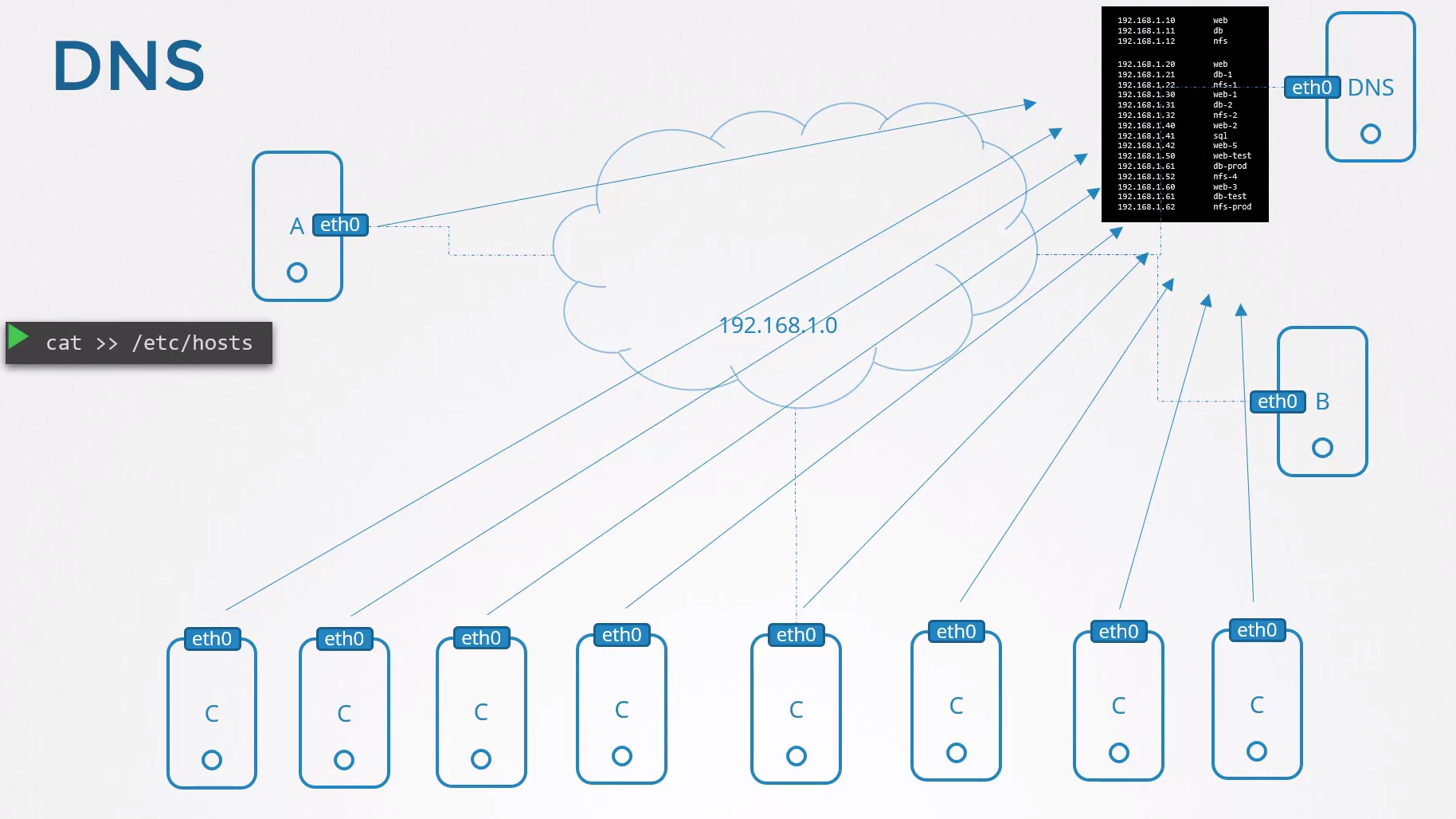
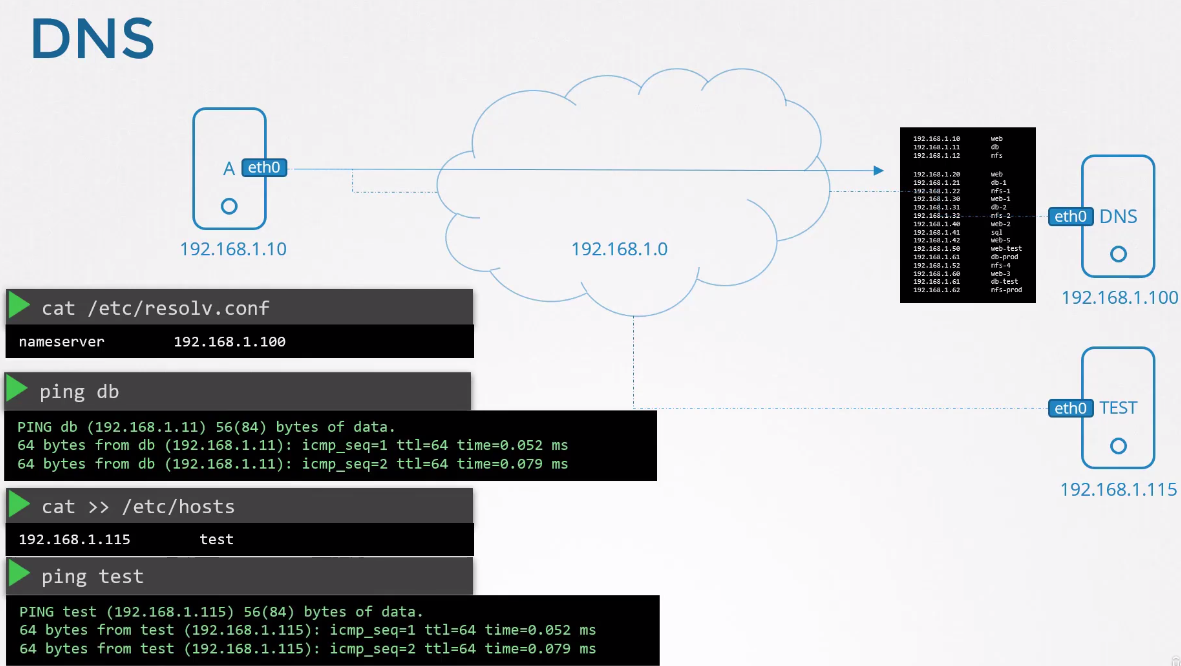
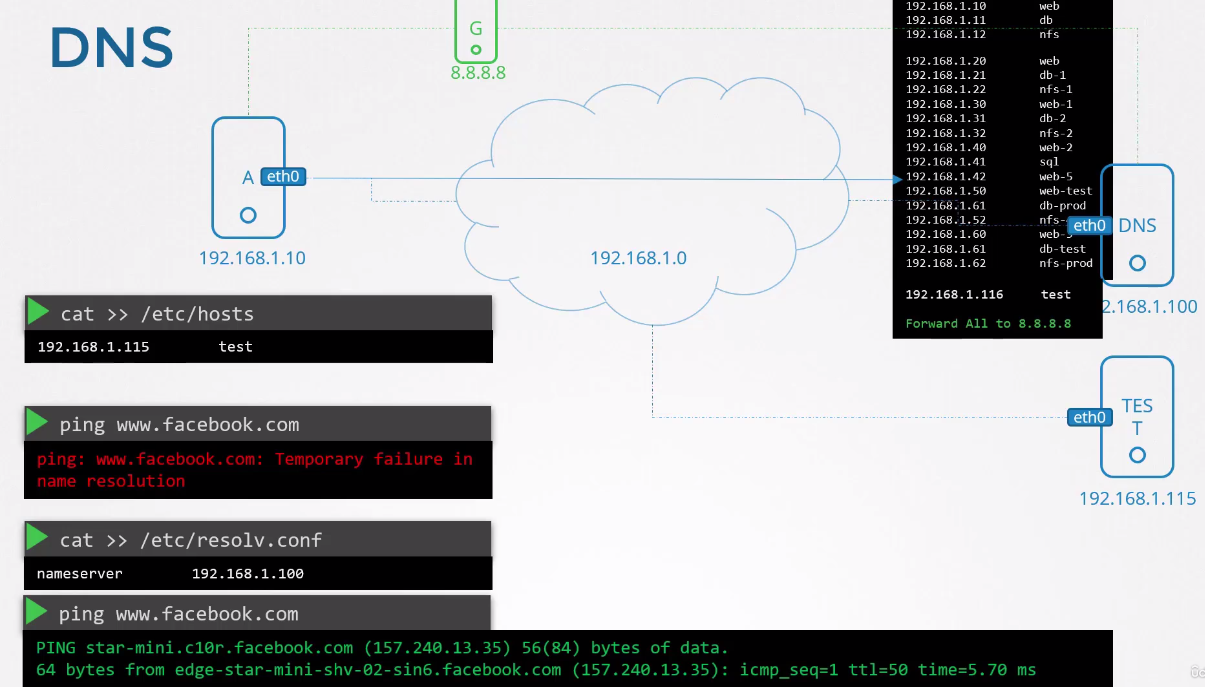
In Linux we configure who will be the DNS Server in the /etc/resolv.conf file avoiding entries in /etc/hosts.
We can still continue making configurations manually in /etc/hosts, it's even the first file that will be consulted and if it doesn't find the name then it will use the DNS server. If it finds in both, /etc/hosts will be the one to translate.
The precedence of which should be used first is found in the /etc/nsswitch.conf file and can be changed.
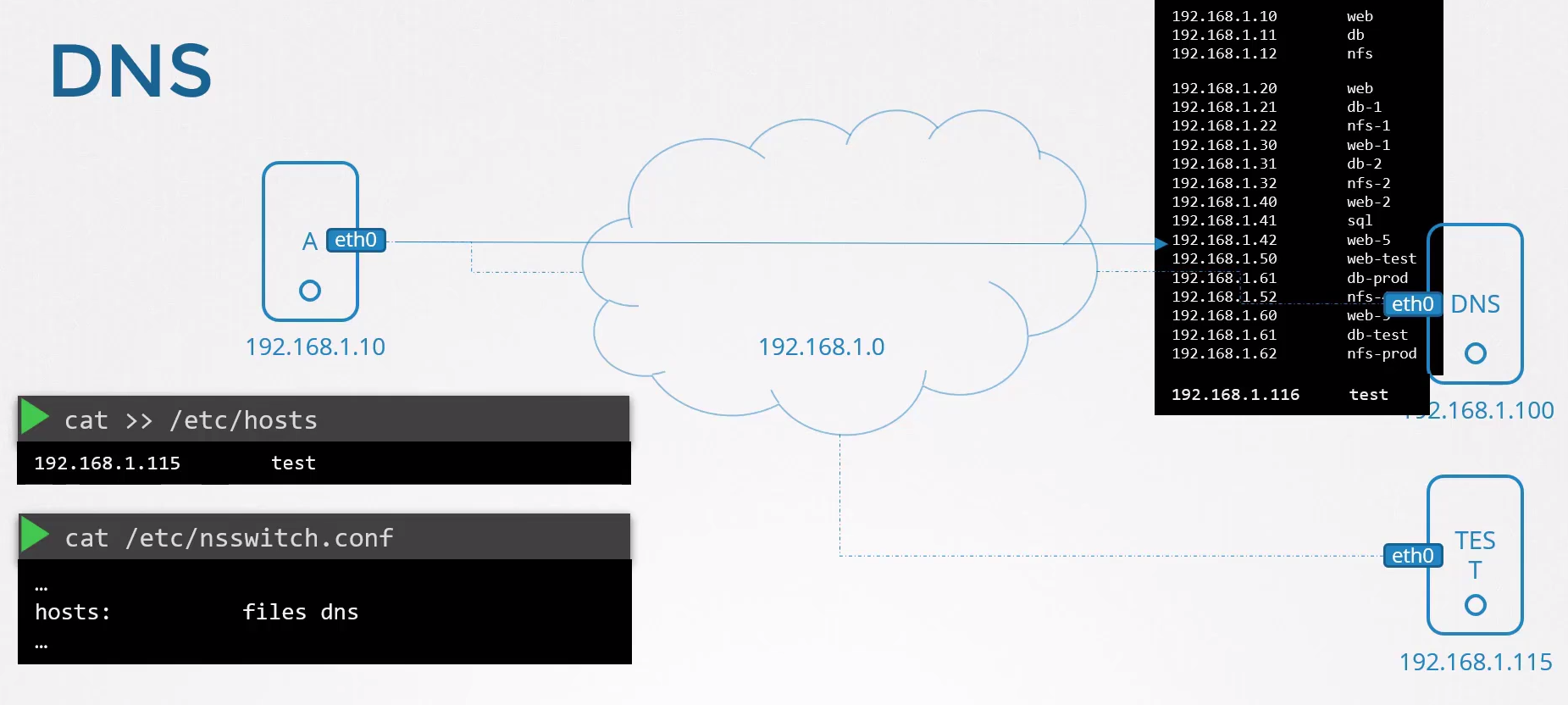
If we can't resolve using /etc/hosts and with the DNS server then it will fail.
It's possible to have several DNS servers configured in /etc/resolv.conf.
It's also possible that if a DNS server fails to resolve the name it calls ANOTHER to help. For example we have there Forward All 8.8.8.8. This means it resolves what it can and what it can't uses Google's DNS which is a public DNS server that knows everything.
The most used are:
- Google Public DNS:
- 8.8.8.8 (Primary)
- 8.8.4.4 (Alternative)
- Developed and maintained by Google, known for its speed and reliability.
- Cloudflare DNS
- 1.1.1.1 (Primary)
- 1.0.0.1 (Alternative)
- Focused on privacy and security, Cloudflare DNS is known for its speed and for not logging DNS query logs
- OpenDNS
- 208.67.222.222 (Primary)
- 208.67.220.220 (Alternative)
- Offers phishing protection and optionally configurable content filters.
Domain
www.google.com
Domains are divided by . to make it easier to remember the name on the Internet and group things according to their intention.
These are the domains known as TLD - (Top-Level Domain). The top level is the last block after dividing the entire domain.

.com– for commercial sites..org– for organizations..net– for networks..xyz– for general use..name– for individuals..biz– for businesses and ventures in general..space– to have your own space on the web..site– to make your own space on the Internet..info– for information platforms..club– for online clubs..tech– for technology portals..online– to establish a presence on the Internet..co– for large corporations and brands..pro– for professionals in any market niche..app– for app creators.dev– for developers..studio– for artists, musicians and culture professionals..agency– for agencies of any kind..life– to show your lifestyle..blog– to reinforce that you are a blogger..cloud– for cloud businesses and companies..link– for the world of connected business.io– for technology companies..tv– for entertainment in general.- MANY OTHERS..
There are many others and the more the Internet grows, the more appear.
We have TLDs for countries.
.br– Brazil..es– Spain..ru– Russia..us– United States..eu– European Union..ca– Canada..nl– Netherlands..de– Germany..fr– France..jp– Japan..ai– Anguilla.cn– China.- OTHERS.
There are sponsored top levels that cannot be sold because they have a specific destination.
- .gov – for government sites.
- .edu – for educational institutions.
- .int – for international organizations based on treaties.
- .mil – for the US military.
- OTHERS.
And in Brazil's case that we have several. .com.br, .net.br, .org.br?
The .br is the top level and the others are known as second-level domains. Generally these domains associated with countries have an organization behind them to control. If you want to have a registration in the .br top level you need to buy at Registro.br. There's no way to buy a domain with only .br at the end like mydomain.br.
Let's go to the simple case.
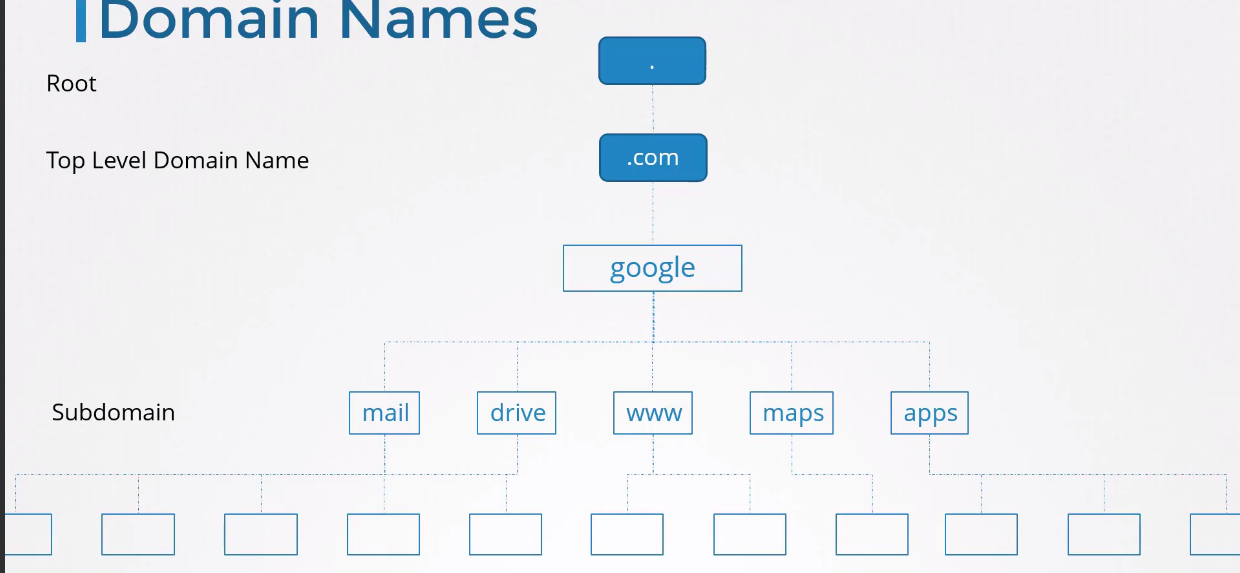
We have the example www.google.com. The .com is the TLD, google is the domain, which is always under some TLD or second-level TDS as we saw in the case of .br and www is the subdomain.
Once we have the domain (google.com) we can create several subdomains to point to different things on the Internet, but everything under the main domain.
If we analyze this as a tree we have:
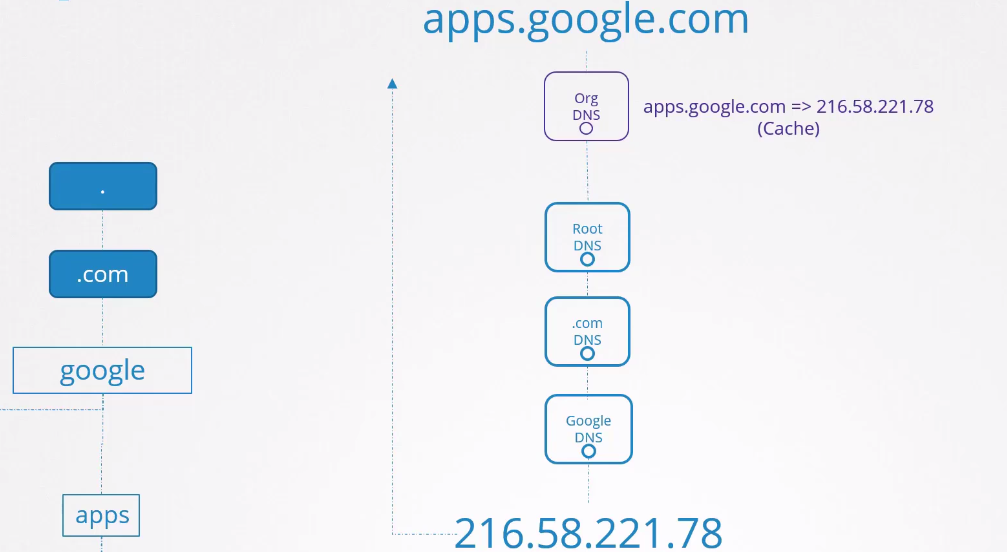
Let's imagine we're in an organization and it has its DNS server.
When we make a request to access app.google.com for example what path is taken to resolve the IP?
-
The organization's DNS Server checks if it can resolve, if it already has it registered then returns the IP.
-
If it doesn't have another DNS (nameserver) it can try to resolve then returns that it doesn't know. Otherwise, tries on other DNS servers and keeps the IP for a
period of timeso the next request is faster.
Append
Records

Tools
Some tools to test name resolution.
nslookup
This tool doesn't consider /etc/hosts, only if the DNS servers in resolv.conf will be able to resolve.
nslookup www.google.com
Server:         8.8.8.8  # Which DNS server I have in my resolv.conf that will be used to resolve
Address:        8.8.8.8#53 # DNS servers use port 53

Non-authoritative answer:
Name:   www.google.com
Address: 142.250.78.228
Name:   www.google.com
Address: 2800:3f0:4004:810::2004

# I can use a specific server to try to resolve
nslookup google.com 1.1.1.1
Server:         1.1.1.1
Address:        1.1.1.1#53

Non-authoritative answer:
Name:   google.com
Address: 142.251.135.110
Name:   google.com
Address: 2800:3f0:4004:80b::200e

nslookup animpossibledomainname.com
Server:         8.8.8.8
Address:        8.8.8.8#53

** server can't find animpossibledomainname.com: NXDOMAIN
dig
This tool is more verbose and returns what's on your DNS server, not just the IP.
dig www.google.com

; <<>> DiG 9.18.18-0ubuntu0.22.04.2-Ubuntu <<>> www.google.com
;; global options: +cmd
;; Got answer:
;; ->>HEADER<<- opcode: QUERY, status: NOERROR, id: 19037
;; flags: qr rd ra; QUERY: 1, ANSWER: 1, AUTHORITY: 0, ADDITIONAL: 1

;; OPT PSEUDOSECTION:
; EDNS: version: 0, flags:; udp: 1232
;; QUESTION SECTION:
;www.google.com.                        IN      A

;; ANSWER SECTION:
www.google.com.         6       IN      A       142.250.79.164

;; Query time: 4 msec
;; SERVER: 8.8.8.8#53(8.8.8.8) (UDP)
;; WHEN: Sat Feb 17 23:17:56 -03 2024
;; MSG SIZE  rcvd: 59