Ingress
Vamos a hablar sobre el Nginx Ingress, pero existen varios ingress diferentes. Vamos a hacer un setup del Nginx y asegurarnos de que use TLS.
Lectura de revisión:
El nodeport abre el mismo puerto en todos los nodos del clúster y redirige ese puerto a un cluster IP específico. Da igual qué IP de nodo vayamos a usar, lo que diferencia es el puerto. Pero en este caso podríamos usar siempre la misma IP del nodo y ahí es donde entra el balanceador de carga, para tener un conjunto de IPs de nodo de modo que puedan balancearse las peticiones con una única dirección IP y dominio.
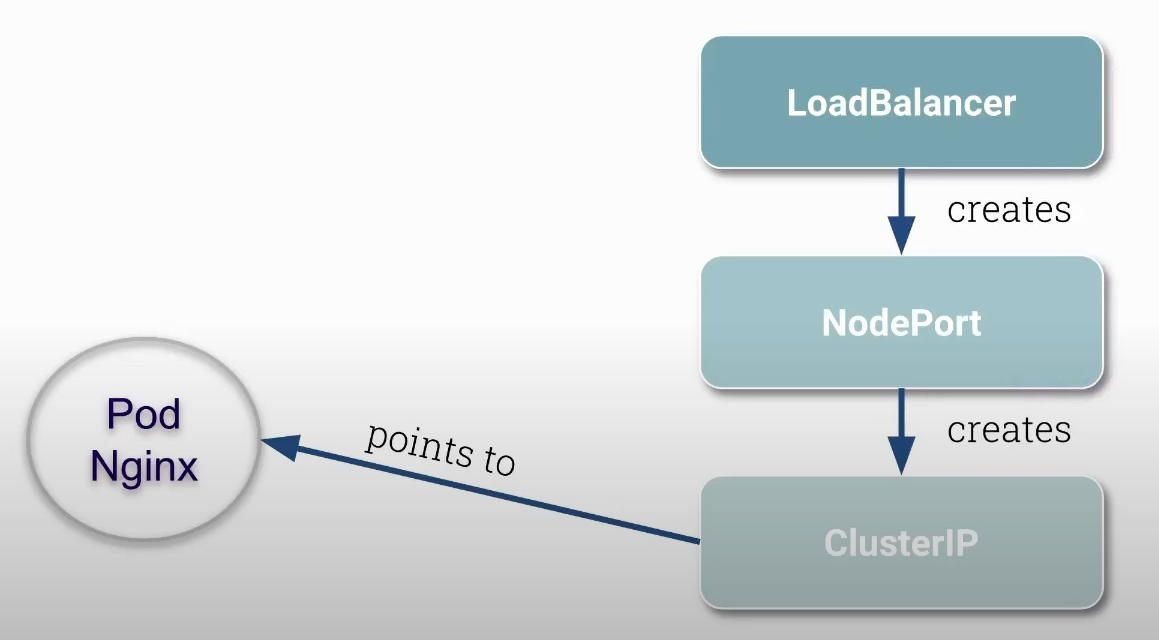
Antes de comenzar elimina todas las network policies creadas anteriormente.
root@cks-master:~# kubectl get networkpolicies
NAME           POD-SELECTOR   AGE
backend        run=backend    21h
default-deny   <none>         21h
frontend       run=frontend   21h
root@cks-master:~# kubectl delete networkpolicies backend default-deny frontend
networkpolicy.networking.k8s.io "backend" deleted
networkpolicy.networking.k8s.io "default-deny" deleted
networkpolicy.networking.k8s.io "frontend" deleted
Vamos a instalar el Nginx Ingress.
root@cks-master:~# kubectl apply -f https://raw.githubusercontent.com/kubernetes/ingress-nginx/controller-v1.11.2/deploy/static/provider/cloud/deploy.yaml

namespace/ingress-nginx created # <<< Namespace creado
serviceaccount/ingress-nginx created
serviceaccount/ingress-nginx-admission created
role.rbac.authorization.k8s.io/ingress-nginx created
role.rbac.authorization.k8s.io/ingress-nginx-admission created
clusterrole.rbac.authorization.k8s.io/ingress-nginx created
clusterrole.rbac.authorization.k8s.io/ingress-nginx-admission created
rolebinding.rbac.authorization.k8s.io/ingress-nginx created
rolebinding.rbac.authorization.k8s.io/ingress-nginx-admission created
clusterrolebinding.rbac.authorization.k8s.io/ingress-nginx created
clusterrolebinding.rbac.authorization.k8s.io/ingress-nginx-admission created
configmap/ingress-nginx-controller created # Config
service/ingress-nginx-controller created
service/ingress-nginx-controller-admission created
deployment.apps/ingress-nginx-controller created # Deployment
job.batch/ingress-nginx-admission-create created
job.batch/ingress-nginx-admission-patch created
ingressclass.networking.k8s.io/nginx created
validatingwebhookconfiguration.admissionregistration.k8s.io/ingress-nginx-admission created

# Si observamos bien, tenemos aquí un servicio del tipo LoadBalancer que está en pending
# Esto sucede porque no tenemos una IP externa aún, pero ya tenemos los nodepods 32383 y 32617
root@cks-master:~# k -n ingress-nginx get svc,pod
NAME                                         TYPE           CLUSTER-IP      EXTERNAL-IP   PORT(S)                      AGE
ingress-nginx-controller                     LoadBalancer   10.101.64.57    <pending>     80:32383/TCP,443:32617/TCP   88s
service/ingress-nginx-controller-admission   ClusterIP      10.102.213.88   <none>        443/TCP                      88s

NAME                                            READY   STATUS      RESTARTS   AGE
pod/ingress-nginx-admission-create-tmn2q        0/1     Completed   0          88s
pod/ingress-nginx-admission-patch-5dv4z         0/1     Completed   0          88s
pod/ingress-nginx-controller-7d4db76476-np7x6   1/1     Running     0          88s # Pod ejecutando el nginx

## Podemos observar en el deployment que tenemos algunas configuraciones de argumentos que pasamos al nginx

root@cks-master:~# k describe deployments.apps -n ingress-nginx ingress-nginx-controller
Name:                   ingress-nginx-controller
Namespace:              ingress-nginx
CreationTimestamp:      Sun, 18 Aug 2024 14:55:41 +0000
Labels:                 app.kubernetes.io/component=controller
                        app.kubernetes.io/instance=ingress-nginx
                        app.kubernetes.io/name=ingress-nginx
                        app.kubernetes.io/part-of=ingress-nginx
                        app.kubernetes.io/version=1.11.2
Annotations:            deployment.kubernetes.io/revision: 1
Selector:               app.kubernetes.io/component=controller,app.kubernetes.io/instance=ingress-nginx,app.kubernetes.io/name=ingress-nginx
Replicas:               1 desired | 1 updated | 1 total | 1 available | 0 unavailable
StrategyType:           RollingUpdate
MinReadySeconds:        0
RollingUpdateStrategy:  1 max unavailable, 25% max surge
Pod Template:
  Labels:           app.kubernetes.io/component=controller
                    app.kubernetes.io/instance=ingress-nginx
                    app.kubernetes.io/name=ingress-nginx
                    app.kubernetes.io/part-of=ingress-nginx
                    app.kubernetes.io/version=1.11.2
  Service Account:  ingress-nginx
  Containers:
   controller:
    Image:           registry.k8s.io/ingress-nginx/controller:v1.11.2@sha256:d5f8217feeac4887cb1ed21f27c2674e58be06bd8f5184cacea2a69abaf78dce
    Ports:           80/TCP, 443/TCP, 8443/TCP
    Host Ports:      0/TCP, 0/TCP, 0/TCP
    SeccompProfile:  RuntimeDefault
    Args:
    ######### Bloque de configuraciones ###############
      /nginx-ingress-controller
      --publish-service=$(POD_NAMESPACE)/ingress-nginx-controller
      --election-id=ingress-nginx-leader
      --controller-class=k8s.io/ingress-nginx
      --ingress-class=nginx
      --configmap=$(POD_NAMESPACE)/ingress-nginx-controller
      --validating-webhook=:8443
      --validating-webhook-certificate=/usr/local/certificates/cert
      --validating-webhook-key=/usr/local/certificates/key
      --enable-metrics=false
    #########################################
    Requests:
      cpu:      100m
      memory:   90Mi
    Liveness:   http-get http://:10254/healthz delay=10s timeout=1s period=10s #success=1 #failure=5
    Readiness:  http-get http://:10254/healthz delay=10s timeout=1s period=10s #success=1 #failure=3
    Environment:
      POD_NAME:        (v1:metadata.name)
      POD_NAMESPACE:   (v1:metadata.namespace)
      LD_PRELOAD:     /usr/local/lib/libmimalloc.so
    Mounts:
      /usr/local/certificates/ from webhook-cert (ro)
  Volumes:
   webhook-cert:
    Type:          Secret (a volume populated by a Secret)
    SecretName:    ingress-nginx-admission
    Optional:      false
  Node-Selectors:  kubernetes.io/os=linux
  Tolerations:     <none>
Conditions:
  Type           Status  Reason
  ----           ------  ------
  Available      True    MinimumReplicasAvailable
  Progressing    True    NewReplicaSetAvailable
OldReplicaSets:  <none>
NewReplicaSet:   ingress-nginx-controller-7d4db76476 (1/1 replicas created)
Events:
  Type    Reason             Age    From                   Message
  ----    ------             ----   ----                   -------
  Normal  ScalingReplicaSet  2m50s  deployment-controller  Scaled up replica set ingress-nginx-controller-7d4db76476 to 1
Coge la IP Pública de cualquiera de tus máquinas en gcloud y vamos a comprobar en los puertos específicos que tenemos.

Llegamos al nginx, pero no sabe qué hacer, no tiene a dónde apuntar.
Vamos a crear dos pods y definir las reglas
root@cks-master:~# kubectl run app1 --image=nginx
pod/app1 created

root@cks-master:~# kubectl run app2 --image=nginx
pod/app2 created

root@cks-master:~# kubectl expose pod/app1 --port 80
service/app1 exposed

root@cks-master:~# kubectl expose pod/app2 --port 80
service/app2 exposed

root@cks-master:~# k get pod
NAME   READY   STATUS    RESTARTS   AGE
app1   1/1     Running   0          6m41s
app2   1/1     Running   0          6m35s
root@cks-master:~# k get svc
NAME         TYPE        CLUSTER-IP     EXTERNAL-IP   PORT(S)   AGE
app1         ClusterIP   10.105.1.235   <none>        80/TCP    5m34s
app2         ClusterIP   10.98.16.26    <none>        80/TCP    5m29s
kubernetes   ClusterIP   10.96.0.1      <none>        443/TCP   2d19h
root@cks-master:~#
Ahora vamos a crear la regla del ingress para apuntar a estos dos servicios.
apiVersion: networking.k8s.io/v1
kind: Ingress
metadata:
  name: secure-ingress
  annotations:
    nginx.ingress.kubernetes.io/rewrite-target: /
spec:
  ingressClassName: nginx
  rules:
  - http:
      paths:
      - path: /app1
        pathType: Prefix
        backend:
          service:
            name: app1
            port:
              number: 80

      - path: /app2
        pathType: Prefix
        backend:
          service:
            name: app2
            port:
              number: 80
Observa que para nosotros el host no importa en este momento.
root@cks-master:~# vim ingress.yaml
root@cks-master:~# k apply -f ingress.yaml
ingress.networking.k8s.io/secure-ingress created
root@cks-master:~# k get ingress
NAME             CLASS   HOSTS   ADDRESS   PORTS   AGE
secure-ingress   nginx   *                 80      21s
root@cks-master:~#
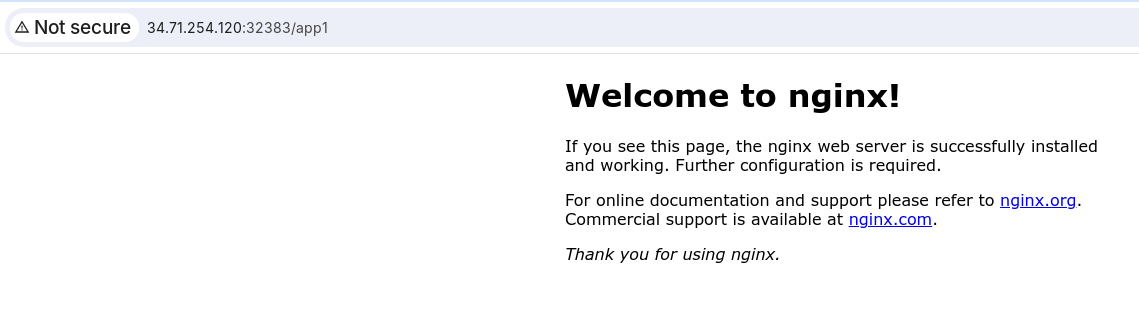
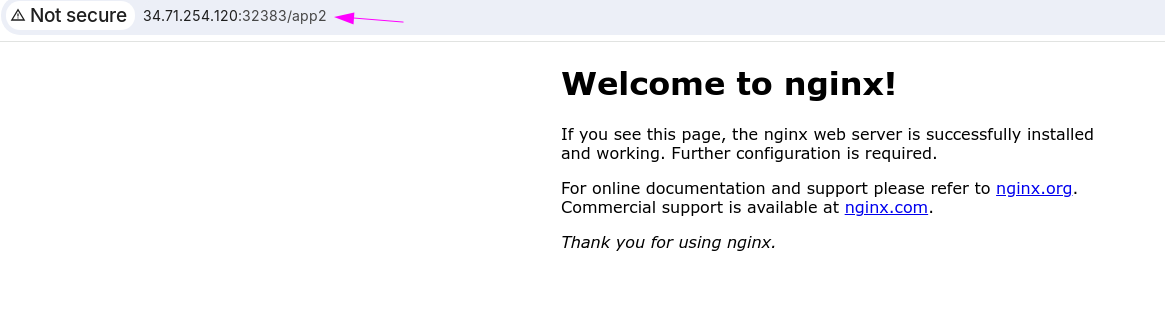
Si cambiamos al puerto HTTPS e intentamos hacer un curl por ejemplo tenemos un problema.
❯ curl https://34.71.254.120:32617/app1
curl: (60) SSL certificate problem: self-signed certificate
More details here: https://curl.se/docs/sslcerts.html

curl failed to verify the legitimacy of the server and therefore could not
establish a secure connection to it. To learn more about this situation and
how to fix it, please visit the web page mentioned above.

# El -k acepta certificados autofirmados.
❯ curl https://34.71.254.120:32617/app1 -k
<!DOCTYPE html>
<html>
<head>
<title>Welcome to nginx!</title>
<style>
html { color-scheme: light dark; }
body { width: 35em; margin: 0 auto;
font-family: Tahoma, Verdana, Arial, sans-serif; }
</style>
</head>
<body>
<h1>Welcome to nginx!</h1>
<p>If you see this page, the nginx web server is successfully installed and
working. Further configuration is required.</p>

<p>For online documentation and support please refer to
<a href="http://nginx.org/">nginx.org</a>.<br/>
Commercial support is available at
<a href="http://nginx.com/">nginx.com</a>.</p>

<p><em>Thank you for using nginx.</em></p>
</body>
</html>

# Vamos a mejorar el verbose para ver lo que sucedió
 ❯ curl https://34.71.254.120:32617/app1 -kv
*   Trying 34.71.254.120:32617...
* Connected to 34.71.254.120 (34.71.254.120) port 32617 (#0)
* ALPN, offering h2
* ALPN, offering http/1.1
* TLSv1.0 (OUT), TLS header, Certificate Status (22):
* TLSv1.3 (OUT), TLS handshake, Client hello (1):
* TLSv1.2 (IN), TLS header, Certificate Status (22):
* TLSv1.3 (IN), TLS handshake, Server hello (2):
* TLSv1.2 (IN), TLS header, Finished (20):
* TLSv1.2 (IN), TLS header, Supplemental data (23):
* TLSv1.3 (IN), TLS handshake, Encrypted Extensions (8):
* TLSv1.2 (IN), TLS header, Supplemental data (23):
* TLSv1.3 (IN), TLS handshake, Certificate (11):
* TLSv1.2 (IN), TLS header, Supplemental data (23):
* TLSv1.3 (IN), TLS handshake, CERT verify (15):
* TLSv1.2 (IN), TLS header, Supplemental data (23):
* TLSv1.3 (IN), TLS handshake, Finished (20):
* TLSv1.2 (OUT), TLS header, Finished (20):
* TLSv1.3 (OUT), TLS change cipher, Change cipher spec (1):
* TLSv1.2 (OUT), TLS header, Supplemental data (23):
* TLSv1.3 (OUT), TLS handshake, Finished (20):
* SSL connection using TLSv1.3 / TLS_AES_256_GCM_SHA384
* ALPN, server accepted to use h2
* Server certificate:
*  subject: O=Acme Co; CN=Kubernetes Ingress Controller Fake Certificate
*  start date: Aug 18 14:55:52 2024 GMT
*  expire date: Aug 18 14:55:52 2025 GMT
## Si no definimos un certificado, nginx usa uno creado por él por defecto.
*  issuer: O=Acme Co; CN=Kubernetes Ingress Controller Fake Certificate
*  SSL certificate verify result: self-signed certificate (18), continuing anyway.
* Using HTTP2, server supports multiplexing
* Connection state changed (HTTP/2 confirmed)
* Copying HTTP/2 data in stream buffer to connection buffer after upgrade: len=0
* TLSv1.2 (OUT), TLS header, Supplemental data (23):
* TLSv1.2 (OUT), TLS header, Supplemental data (23):
* TLSv1.2 (OUT), TLS header, Supplemental data (23):
* Using Stream ID: 1 (easy handle 0x6480f130beb0)
* TLSv1.2 (OUT), TLS header, Supplemental data (23):
> GET /app1 HTTP/2
> Host: 34.71.254.120:32617
> user-agent: curl/7.81.0
> accept: */*
>
* TLSv1.2 (IN), TLS header, Supplemental data (23):
* TLSv1.3 (IN), TLS handshake, Newsession Ticket (4):
* TLSv1.2 (IN), TLS header, Supplemental data (23):
* TLSv1.3 (IN), TLS handshake, Newsession Ticket (4):
* old SSL session ID is stale, removing
* TLSv1.2 (IN), TLS header, Supplemental data (23):
* Connection state changed (MAX_CONCURRENT_STREAMS == 128)!
* TLSv1.2 (OUT), TLS header, Supplemental data (23):
* TLSv1.2 (IN), TLS header, Supplemental data (23):
< HTTP/2 200
< date: Sun, 18 Aug 2024 16:11:36 GMT
< content-type: text/html
< content-length: 615
< last-modified: Mon, 12 Aug 2024 14:21:01 GMT
< etag: "66ba1a4d-267"
< accept-ranges: bytes
< strict-transport-security: max-age=31536000; includeSubDomains
<
<!DOCTYPE html>
<html>
<head>
<title>Welcome to nginx!</title>
<style>
html { color-scheme: light dark; }
body { width: 35em; margin: 0 auto;
font-family: Tahoma, Verdana, Arial, sans-serif; }
</style>
</head>
<body>
<h1>Welcome to nginx!</h1>
<p>If you see this page, the nginx web server is successfully installed and
working. Further configuration is required.</p>

<p>For online documentation and support please refer to
<a href="http://nginx.org/">nginx.org</a>.<br/>
Commercial support is available at
<a href="http://nginx.com/">nginx.com</a>.</p>

<p><em>Thank you for using nginx.</em></p>
</body>
</html>
* TLSv1.2 (IN), TLS header, Supplemental data (23):
* Connection #0 to host 34.71.254.120 left intact
Documentación para crear un certificado TLS.
Vamos a crear un certificado para un dominio y después vamos a usarlo en nuestro nginx y luego extender nuestra regla para usar el TLS correcto.
La opción -nodes en el comando openssl se utiliza para especificar que la clave privada generada por el comando no debe ser cifrada. Cuando creas una clave privada usando openssl, por defecto, puedes optar por protegerla con una contraseña. Esta protección cifra la clave, exigiendo que se proporcione una contraseña siempre que se use la clave.
No necesitamos completar nada, solo el dominio que vamos a usar.
root@cks-master:~# openssl req -x509 -newkey rsa:4096 -keyout key.pem -out cert.pem -days 365 -nodes
Generating a RSA private key
.....................................................................++++
................................................................................................................................................................++++
writing new private key to 'key.pem'
-----
You are about to be asked to enter information that will be incorporated
into your certificate request.
What you are about to enter is what is called a Distinguished Name or a DN.
There are quite a few fields but you can leave some blank
For some fields there will be a default value,
If you enter '.', the field will be left blank.
-----
Country Name (2 letter code) [AU]:
State or Province Name (full name) [Some-State]:
Locality Name (eg, city) []:
Organization Name (eg, company) [Internet Widgits Pty Ltd]:
Organizational Unit Name (eg, section) []:
Common Name (e.g. server FQDN or YOUR name) []:studycks.com ## Aquí
Email Address []:

root@cks-master:~# ls *.pem
cert.pem  key.pem

# Vamos a crear nuestro secret en kubernetes con el TLS.
# Vamos a dejar claro que todo aquí se aplicó en el namespace default, por lo que esta clave y las reglas de ingress default son recursos de namespace.

root@cks-master:~# k create secret tls studycks --cert=cert.pem --key=key.pem
secret/studycks created

root@cks-master:~# k get ingress,secrets
NAME                                       CLASS   HOSTS   ADDRESS   PORTS   AGE
ingress.networking.k8s.io/secure-ingress   nginx   *                 80      30m

NAME              TYPE                DATA   AGE
secret/studycks   kubernetes.io/tls   2      27s
Ahora necesitamos editar nuestro ingress y añadir una sección TLS que dirá cuál es el certificado que vamos a usar.
apiVersion: networking.k8s.io/v1
kind: Ingress
metadata:
  name: secure-ingress
  annotations:
    nginx.ingress.kubernetes.io/rewrite-target: /
spec:
  ingressClassName: nginx
  tls:
  - hosts:
    - studycks.com
    secretName: studycks
  rules:
  # Ahora estamos obligados a especificar el host
  - host: studycks.com
    http:
      paths:
      - path: /app1
        pathType: Prefix
        backend:
          service:
            name: app1
            port:
              number: 80

      - path: /app2
        pathType: Prefix
        backend:
          service:
            name: app2
            port:
              number: 80
root@cks-master:~# vim ingress.yaml
root@cks-master:~# k apply -f ingress.yaml
ingress.networking.k8s.io/secure-ingress configured
Volviendo a nuestro terminal local vamos a rehacer la prueba
❯ curl https://34.71.254.120:32617/app1 -kv
*   Trying 34.71.254.120:32617...
* Connected to 34.71.254.120 (34.71.254.120) port 32617 (#0)
* ALPN, offering h2
* ALPN, offering http/1.1
* TLSv1.0 (OUT), TLS header, Certificate Status (22):
* TLSv1.3 (OUT), TLS handshake, Client hello (1):
* TLSv1.2 (IN), TLS header, Certificate Status (22):
* TLSv1.3 (IN), TLS handshake, Server hello (2):
* TLSv1.2 (IN), TLS header, Finished (20):
* TLSv1.2 (IN), TLS header, Supplemental data (23):
* TLSv1.3 (IN), TLS handshake, Encrypted Extensions (8):
* TLSv1.2 (IN), TLS header, Supplemental data (23):
* TLSv1.3 (IN), TLS handshake, Certificate (11):
* TLSv1.2 (IN), TLS header, Supplemental data (23):
* TLSv1.3 (IN), TLS handshake, CERT verify (15):
* TLSv1.2 (IN), TLS header, Supplemental data (23):
* TLSv1.3 (IN), TLS handshake, Finished (20):
* TLSv1.2 (OUT), TLS header, Finished (20):
* TLSv1.3 (OUT), TLS change cipher, Change cipher spec (1):
* TLSv1.2 (OUT), TLS header, Supplemental data (23):
* TLSv1.3 (OUT), TLS handshake, Finished (20):
* SSL connection using TLSv1.3 / TLS_AES_256_GCM_SHA384
* ALPN, server accepted to use h2
* Server certificate:
# Todavía tenemos el mismo problema, porque no usamos el dominio. El ingress está filtrando por dominio, por lo que si usamos la IP directamente no tenemos una petición iniciada por studycks.com.
*  subject: O=Acme Co; CN=Kubernetes Ingress Controller Fake Certificate
*  start date: Aug 18 14:55:52 2024 GMT
*  expire date: Aug 18 14:55:52 2025 GMT
*  issuer: O=Acme Co; CN=Kubernetes Ingress Controller Fake Certificate
*  SSL certificate verify result: self-signed certificate (18), continuing anyway.
* Using HTTP2, server supports multiplexing
* Connection state changed (HTTP/2 confirmed)
* Copying HTTP/2 data in stream buffer to connection buffer after upgrade: len=0
* TLSv1.2 (OUT), TLS header, Supplemental data (23):
* TLSv1.2 (OUT), TLS header, Supplemental data (23):
* TLSv1.2 (OUT), TLS header, Supplemental data (23):
* Using Stream ID: 1 (easy handle 0x5d5f442d5eb0)
* TLSv1.2 (OUT), TLS header, Supplemental data (23):
> GET /app1 HTTP/2
> Host: 34.71.254.120:32617
> user-agent: curl/7.81.0
> accept: */*
>
* TLSv1.2 (IN), TLS header, Supplemental data (23):
* TLSv1.3 (IN), TLS handshake, Newsession Ticket (4):
* TLSv1.2 (IN), TLS header, Supplemental data (23):
* TLSv1.3 (IN), TLS handshake, Newsession Ticket (4):
* old SSL session ID is stale, removing
* TLSv1.2 (IN), TLS header, Supplemental data (23):
* Connection state changed (MAX_CONCURRENT_STREAMS == 128)!
* TLSv1.2 (OUT), TLS header, Supplemental data (23):
* TLSv1.2 (IN), TLS header, Supplemental data (23):
< HTTP/2 404
< date: Sun, 18 Aug 2024 16:35:29 GMT
< content-type: text/html
< content-length: 146
< strict-transport-security: max-age=31536000; includeSubDomains
<
<html>
<head><title>404 Not Found</title></head>
<body>
<center><h1>404 Not Found</h1></center>
<hr><center>nginx</center>
</body>
</html>
* TLSv1.2 (IN), TLS header, Supplemental data (23):
* Connection #0 to host 34.71.254.120 left intact
Como ese dominio no nos pertenece y no es un dominio que pueda resolverse, vamos a resolverlo dentro de nuestra máquina localmente diciendo que studycks.com:32617 irá a la IP de la máquina.
❯ curl https://studycks.com:32617/app1 -kv --resolve studycks.com:32617:34.71.254.120
* Added studycks.com:32617:34.71.254.120 to DNS cache
* Hostname studycks.com was found in DNS cache
*   Trying 34.71.254.120:32617...
* Connected to studycks.com (34.71.254.120) port 32617 (#0)
* ALPN, offering h2
* ALPN, offering http/1.1
* TLSv1.0 (OUT), TLS header, Certificate Status (22):
* TLSv1.3 (OUT), TLS handshake, Client hello (1):
* TLSv1.2 (IN), TLS header, Certificate Status (22):
* TLSv1.3 (IN), TLS handshake, Server hello (2):
* TLSv1.2 (IN), TLS header, Finished (20):
* TLSv1.2 (IN), TLS header, Supplemental data (23):
* TLSv1.3 (IN), TLS handshake, Encrypted Extensions (8):
* TLSv1.2 (IN), TLS header, Supplemental data (23):
* TLSv1.3 (IN), TLS handshake, Certificate (11):
* TLSv1.2 (IN), TLS header, Supplemental data (23):
* TLSv1.3 (IN), TLS handshake, CERT verify (15):
* TLSv1.2 (IN), TLS header, Supplemental data (23):
* TLSv1.3 (IN), TLS handshake, Finished (20):
* TLSv1.2 (OUT), TLS header, Finished (20):
* TLSv1.3 (OUT), TLS change cipher, Change cipher spec (1):
* TLSv1.2 (OUT), TLS header, Supplemental data (23):
* TLSv1.3 (OUT), TLS handshake, Finished (20):
* SSL connection using TLSv1.3 / TLS_AES_256_GCM_SHA384
* ALPN, server accepted to use h2
* Server certificate:
*  subject: C=AU; ST=Some-State; O=Internet Widgits Pty Ltd; CN=studycks.com # Ahora estamos usando el certificado correcto.
*  start date: Aug 18 16:26:42 2024 GMT
*  expire date: Aug 18 16:26:42 2025 GMT
*  issuer: C=AU; ST=Some-State; O=Internet Widgits Pty Ltd; CN=studycks.com
*  SSL certificate verify result: self-signed certificate (18), continuing anyway.
* Using HTTP2, server supports multiplexing
* Connection state changed (HTTP/2 confirmed)
* Copying HTTP/2 data in stream buffer to connection buffer after upgrade: len=0
* TLSv1.2 (OUT), TLS header, Supplemental data (23):
* TLSv1.2 (OUT), TLS header, Supplemental data (23):
* TLSv1.2 (OUT), TLS header, Supplemental data (23):
* Using Stream ID: 1 (easy handle 0x5c6e3ab84eb0)
* TLSv1.2 (OUT), TLS header, Supplemental data (23):
> GET /app1 HTTP/2
> Host: studycks.com:32617
> user-agent: curl/7.81.0
> accept: */*
>
* TLSv1.2 (IN), TLS header, Supplemental data (23):
* TLSv1.3 (IN), TLS handshake, Newsession Ticket (4):
* TLSv1.2 (IN), TLS header, Supplemental data (23):
* TLSv1.3 (IN), TLS handshake, Newsession Ticket (4):
* old SSL session ID is stale, removing
* TLSv1.2 (IN), TLS header, Supplemental data (23):
* Connection state changed (MAX_CONCURRENT_STREAMS == 128)!
* TLSv1.2 (OUT), TLS header, Supplemental data (23):
* TLSv1.2 (IN), TLS header, Supplemental data (23):
< HTTP/2 200
< date: Sun, 18 Aug 2024 16:42:16 GMT
< content-type: text/html
< content-length: 615
< last-modified: Mon, 12 Aug 2024 14:21:01 GMT
< etag: "66ba1a4d-267"
< accept-ranges: bytes
< strict-transport-security: max-age=31536000; includeSubDomains
<
<!DOCTYPE html>
<html>
<head>
<title>Welcome to nginx!</title>
<style>
html { color-scheme: light dark; }
body { width: 35em; margin: 0 auto;
font-family: Tahoma, Verdana, Arial, sans-serif; }
</style>
</head>
<body>
<h1>Welcome to nginx!</h1>
<p>If you see this page, the nginx web server is successfully installed and
working. Further configuration is required.</p>

<p>For online documentation and support please refer to
<a href="http://nginx.org/">nginx.org</a>.<br/>
Commercial support is available at
<a href="http://nginx.com/">nginx.com</a>.</p>

<p><em>Thank you for using nginx.</em></p>
</body>
</html>
* TLSv1.2 (IN), TLS header, Supplemental data (23):
* Connection #0 to host studycks.com left intact