Composition Concepts
This is the most important part of Crossplane. Composition is the heart of Crossplane and what makes it so powerful for abstracting anything.
Let's understand from now on that managed resources are just pieces we use to build a solution. To use these pieces we use APIs that are created by each provider. What we did before was create piece by piece, without a controller for the solution as a whole. Deleting the solution would involve deleting each of the parts in reverse order.
When we study Kubernetes we learn what a pod is, then a replicaset and then a deployment. We understand that a deployment creates replicasets and these create pods. If we were to create a pod, the pod name is what we define. However, if we create a deployment we'll see that the pod receives some suffixes to the name.
# Creating a pod without controller
❯ kubectl run myapp --image nginx
pod/myapp created

# Creating a deployment that creates a replicaset, which creates a pod
❯ kubectl create deployment myapp --image nginx
deployment.apps/myapp created

❯ kubectl get pods
NAME                     READY   STATUS    RESTARTS   AGE
myapp                    1/1     Running   0          25s
myapp-5b5df85c44-z2795   1/1     Running   0          12s

❯ kubectl get rs
NAME               DESIRED   CURRENT   READY   AGE
myapp-5b5df85c44   1         1         1       12s
We can observe that the number 5b5df85c44 was a random number created by the deployment for the replicaset and the replicaset name starts with the pod name followed also by a random number z2795.
Deleting the deployment involves removing the replicaset and in turn the pod. What we want to show is that there's a controller for this and at the end of the day composition is the controller for all resources we create in its definition.
- Composition works as a high-level controller, similar to Deployment in Kubernetes.
- Hierarchy and automatically generated names that managed resources will receive
- A single resource (Composition) can manage several underlying resources, facilitating the creation and deletion of the entire solution at once.
Just as Deployment abstracts implementation details (like ReplicaSet generation), Composition in Crossplane abstracts infrastructure resource complexity. This allows developers to consume complex resources without needing to understand all underlying details.
Compositions allow us to define what something is and encode our expertise and expose services as abstractions.
Initial Kubernetes API Concepts
We won't go deep into this, it's just a quick overview.
When using a Custom Resource Definition (CRD) in Kubernetes, you're extending the API that kube-api-server can interpret, and this extension is defined using an OpenAPI-based schema (formerly known as Swagger).
When you create a CRD, you define the structure of your new custom resource using a schema that follows OpenAPI v3 specifications to describe:
- The fields your custom resource will have
- The data types of these fields
- Validations that should be applied
- Descriptions for documentation
Kubernetes uses these OpenAPI schema definitions to:
- Validate objects when they are created or updated
- Generate documentation for your extended API
- Provide type information for clients like kubectl
This approach allows you to extend Kubernetes in a standardized way, leveraging the same mechanisms that Kubernetes itself uses for its native APIs.
Here's an example of a Kubernetes CRD. We're creating an API and its parameters and creating something new.
apiVersion: apiextensions.k8s.io/v1 # See that we're extending directly from k8s.
kind: CustomResourceDefinition
metadata:
  name: webapps.example.com
spec:
  group: example.com
  names:
    kind: WebApp
    plural: webapps
    singular: webapp
    shortNames:
      - wa
  scope: Namespaced
  versions:
    - name: v1
      served: true
      storage: true
      schema:
        openAPIV3Schema:
          type: object
          properties:
            spec:
              type: object
              required:
                - image
                - replicas
              properties:
                image:
                  type: string
                  description: "The container image to be used for the web application"
                replicas:
                  type: integer
                  minimum: 1
                  maximum: 10
                  description: "Number of web application replicas"
                port:
                  type: integer
                  default: 80
                  description: "Port that the application exposes"
                env:
                  type: array
                  description: "Environment variables for the container"
                  items:
                    type: object
                    required:
                      - name
                      - value
                    properties:
                      name:
                        type: string
                      value:
                        type: string
      additionalPrinterColumns:
        - name: Replicas
          type: integer
          description: Number of replicas
          jsonPath: .spec.replicas
        - name: Image
          type: string
          description: Container image
          jsonPath: .spec.image
        - name: Age
          type: date
          jsonPath: .metadata.creationTimestamp
With this definition above, we could apply the following manifest.
apiVersion: apps.example.org/v1alpha1
kind: WebApp
metadata:
  name: my-application
  namespace: default
spec:
  appName: my-application
  tier: medium
  region: us-east-1
  public: true
  environment:
    DATABASE_URL: ${.db.connection}
    LOG_LEVEL: info
    DEBUG: "true"
But if we apply the manifest above what will happen?
Nothing happens automatically beyond storing this object in the Kubernetes API. Simply defining a CRD and creating an instance of it doesn't automatically result in the creation of pods, deployments, or any other resource.
For something to happen when you create this WebApp object, you need a custom controller that:
- Observes resources of type WebApp
- Reacts to changes of these resources
- Creates/updates/deletes underlying resources (like Deployments, Services, etc.)
Without a controller, your WebApp resource will just be stored in Kubernetes etcd, but will have no practical effect on the cluster. It's essentially structured data that does nothing by itself. The complete flow would be:
- You define the WebApp CRD (data structure)
- You implement and deploy a custom controller to process WebApp objects
- You create a WebApp instance called "my-webapp"
- The controller detects the new object and creates the underlying resources (Deployment, Service, etc.)
This is exactly how operators work in Kubernetes if you're more familiar with that term.
Crossplane has a CRD called CompositeResourceDefinition that acts as a "Custom Resource definition" within the Crossplane ecosystem. Who will react to this resource will be Crossplane, so we're skipping step 2 of implementing a controller.
CompositeResourceDefinition (XRD)
Crossplane's CompositeResourceDefinition (XRD) is effectively a kind of Custom Resource Definition (CRD), but with extended functionality and a specific purpose within the Crossplane ecosystem.
Crossplane Core that runs in the crossplane pod in the crossplane-system namespace is responsible for managing CompositeResourceDefinitions (XRDs). Specifically, the composition controller (Composition Controller) that is part of Crossplane Core is the component that observes, processes, and manages the lifecycle of composite resources defined through XRDs. This controller is implemented as part of the main Crossplane installation and works independently of specific providers. It monitors the Kubernetes API for events related to XRDs, composite resources (XRs), and claims (XRCs), and implements all necessary logic to translate these high-level resources into managed resources according to Composition definitions.
Unlike provider-specific resources (like AWS, GCP resources, etc.), which are managed by each provider's controllers, composition resources are always managed by this central Crossplane controller.
We could make the following analogy:
- Composition controller ≈ Deployment Controller
- Providers ≈ ReplicaSet Controllers
- Resources managed by providers ≈ Pods
So let's use the composition controller to create everything we need and extend the API in our favor!
After we understand Kubernetes, we rarely create pods except through deployments. When we understand compositions we'll rarely use a managed resource alone.
Let's create our first XRD.
- The group is where the Kind we'll create below will be in the Kubernetes API.
---
apiVersion: apiextensions.crossplane.io/v1 # Extending through Crossplane now
kind: CompositeResourceDefinition
metadata:
  name: hello.devsecops.puziol.com.br
spec:
  group: devsecops.puziol.com.br
  names:
    kind: Hello
    plural: hello
  claimNames:
    kind: HelloClain
    plural: helloclaim
  versions:
  # Follow versions as kubernetes does, v1, v1beta1, v1alpha1, etc.
  # We can declare multiple versions to have backward compatibility and served will make it available or not in the api to be referenced

    - name: v1alpha1
      served: true
      referenceable: true
      schema:
        openAPIV3Schema: {}
We can have multiple versions, but only one of them can be referenceable.
Schema that hasn't been shown yet is based on openapi. What we've done so far is open a space in the api, but there's nothing defined. The schema part expects to receive something in the request that will be made, but for now we leave it blank.
To learn more about this yaml let's go to https://docs.crossplane.io/api.
Let's apply the manifest above.
❯ kubectl apply -f compositiondefinition.yaml
compositeresourcedefinition.apiextensions.crossplane.io/hello.devsecops.puziol.com.br created

# Let's look for the custom resources it generated.
❯ kubectl api-resources| grep hello
hello                                                      devsecops.puziol.com.br/v1alpha1                false        Hello
helloclaim                                                 devsecops.puziol.com.br/v1alpha1                true         HelloClain

# Just to confirm this is indeed a custom resource definition in kubernetes
❯ kubectl get customresourcedefinitions.apiextensions.k8s.io | grep hello
hello.devsecops.puziol.com.br                                 2025-03-19T11:58:19Z
helloclaim.devsecops.puziol.com.br                            2025-03-19T11:58:19Z
Out of curiosity if you want to see this exposed let's do the following command
kubectl proxy
Just a quick spoiler, Hello is a cluster-level resource, and HelloClaim is the same resource at namespace level, but we'll talk about this later.
The kubernetes api will be available at 127.0.0.1:8001 in your browser. The path was created...
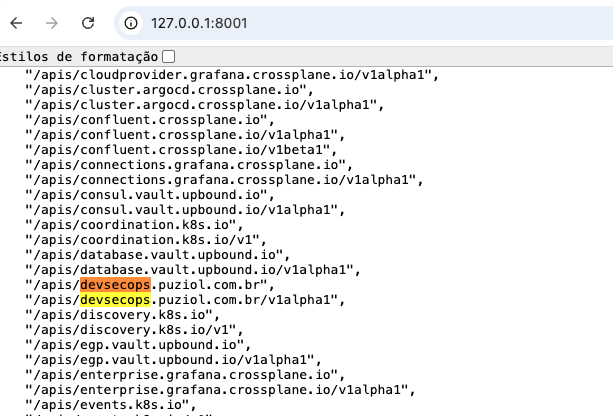
Doing a curl to the available paths..
❯ curl http://127.0.0.1:8001/apis/devsecops.puziol.com.br
{
  "kind": "APIGroup",
  "apiVersion": "v1",
  "name": "devsecops.puziol.com.br",
  "versions": [
    {
      "groupVersion": "devsecops.puziol.com.br/v1alpha1",
      "version": "v1alpha1"
    }
  ],
  "preferredVersion": {
    "groupVersion": "devsecops.puziol.com.br/v1alpha1",
    "version": "v1alpha1"
  }
}%

# Here we can already see the available resources.
❯ curl http://127.0.0.1:8001/apis/devsecops.puziol.com.br/v1alpha1
{
  "kind": "APIResourceList",
  "apiVersion": "v1",
  "groupVersion": "devsecops.puziol.com.br/v1alpha1",
  "resources": [
    {
      "name": "helloclaim",
      "singularName": "helloclain",
      "namespaced": true, ## AT NAMESPACE LEVEL
      "kind": "HelloClain",
      "verbs": [
        "delete",
        "deletecollection",
        "get",
        "list",
        "patch",
        "create",
        "update",
        "watch"
      ],
      "categories": [
        "claim"
      ],
      "storageVersionHash": "KaYrjAdZFTk="
    },
    {
      "name": "helloclaim/status",
      "singularName": "",
      "namespaced": true,
      "kind": "HelloClain",
      "verbs": [
        "get",
        "patch",
        "update"
      ]
    },
    {
      "name": "hello",
      "singularName": "hello",
      "namespaced": false, ## AT CLUSTER LEVEL
      "kind": "Hello",
      "verbs": [
        "delete",
        "deletecollection",
        "get",
        "list",
        "patch",
        "create",
        "update",
        "watch"
      ],
      "categories": [
        "composite"
      ],
      "storageVersionHash": "kBh7PX4F5h4="
    },
    {
      "name": "hello/status",
      "singularName": "",
      "namespaced": false,
      "kind": "Hello",
      "verbs": [
        "get",
        "patch",
        "update"
      ]
    }
  ]
}%
And checking our resource itself we have.
❯ kubectl get compositeresourcedefinitions.apiextensions.crossplane.io
NAME                            ESTABLISHED   OFFERED   AGE
hello.devsecops.puziol.com.br   True          True      9m37s

## xrds or xrd can also be used.
❯ kubectl get xrds
NAME                            ESTABLISHED   OFFERED   AGE
hello.devsecops.puziol.com.br   True          True      9m39s
The definition of these resources is easy to see as they are discoverable and we can use them even in IDPs and many other tools.
❯ kubectl explain hello.devsecops.puziol.com.br --recursive
GROUP:      devsecops.puziol.com.br
KIND:       Hello
VERSION:    v1alpha1

DESCRIPTION:
    <empty>
FIELDS:
  apiVersion    <string>
  kind  <string>
  metadata      <ObjectMeta>
    annotations <map[string]string>
    creationTimestamp   <string>
    deletionGracePeriodSeconds  <integer>
    deletionTimestamp   <string>
    finalizers  <[]string>
    generateName        <string>
    generation  <integer>
    labels      <map[string]string>
    managedFields       <[]ManagedFieldsEntry>
      apiVersion        <string>
      fieldsType        <string>
      fieldsV1  <FieldsV1>
      manager   <string>
      operation <string>
      subresource       <string>
      time      <string>
    name        <string>
    namespace   <string>
    ownerReferences     <[]OwnerReference>
      apiVersion        <string> -required-
      blockOwnerDeletion        <boolean>
      controller        <boolean>
      kind      <string> -required-
      name      <string> -required-
      uid       <string> -required-
    resourceVersion     <string>
    selfLink    <string>
    uid <string>
  spec  <Object> -required-
    claimRef    <Object>
      apiVersion        <string> -required-
      kind      <string> -required-
      name      <string> -required-
      namespace <string> -required-
    compositionRef      <Object>
      name      <string> -required-
    compositionRevisionRef      <Object>
      name      <string> -required-
    compositionRevisionSelector <Object>
      matchLabels       <map[string]string> -required-
    compositionSelector <Object>
      matchLabels       <map[string]string> -required-
    compositionUpdatePolicy     <string>
    enum: Automatic, Manual
    publishConnectionDetailsTo  <Object>
      configRef <Object>
        name    <string>
      metadata  <Object>
        annotations     <map[string]string>
        labels  <map[string]string>
        type    <string>
      name      <string> -required-
    resourceRefs        <[]Object>
      apiVersion        <string> -required-
      kind      <string> -required-
      name      <string>
    writeConnectionSecretToRef  <Object>
      name      <string> -required-
      namespace <string> -required-
  status        <Object>
    claimConditionTypes <[]string>
    conditions  <[]Object>
      lastTransitionTime        <string> -required-
      message   <string>
      reason    <string> -required-
      status    <string> -required-
      type      <string> -required-
    connectionDetails   <Object>
      lastPublishedTime <string>
Let's create a resource of type Hello.
apiVersion: devsecops.puziol.com.br/v1alpha1
kind: Hello
metadata:
  name: hello-test
spec: {} # Let's start empty
❯ kubectl apply -f hellocomposition.yaml
hello.devsecops.puziol.com.br/hello-test created

❯ k get hello.devsecops.puziol.com.br
NAME         SYNCED   READY   COMPOSITION   AGE
hello-test   False                          6s
It's not synchronized because the Crossplane controller couldn't even start working on it, after all we only made declarations that don't inform Crossplane what it should do and that was expected. The missing information is which composition it should trigger, but we haven't made any yet.
apiVersion: devsecops.puziol.com.br/v1alpha1
kind: Hello
metadata:
  name: hello-test
spec: {} # Let's start empty
Let's think about this xrd.
---
apiVersion: apiextensions.crossplane.io/v1
kind: CompositeResourceDefinition
metadata:
  name: sqls.devsecops.puziol.com.br
spec:
  group: devsecops.puziol.com.br
  names:
    kind: SQL
    plural: sqls
  claimNames:
    kind: SQLClaim
    plural: sqlclaims
  versions:
  - name: v1alpha1
    served: true
    referenceable: true
    schema:
      openAPIV3Schema: {}
If we apply the manifest below, of course at this moment we don't have anyone responding to this, but if we did, the composition that was defined to respond will start.
apiVersion: devsecops.puziol.com.br/v1alpha1
kind: SQL
metadata:
  name: database
spec: {}
Below we have the beginning of a composition and we'll show how it knows it needs to respond at the correct endpoint.
---
apiVersion: apiextensions.crossplane.io/v1
kind: Composition
metadata:
  name: postgresql
spec:
  compositeTypeRef: # THIS INDICATES THAT THIS COMPOSITION WILL RESPOND WHEN.
    # THIS IS THE GROUP
    apiVersion: devsecops.puziol.com.br/v1alpha1
    # AND THIS IS THE KIND
    kind: SQL
  resources:
  #.... continues...
However, we could have several compositions responding to the same group/kind (endpoint). Imagine that one composition will create the database in AWS, and the other in GCP.
Composition for GCP.
apiVersion: apiextensions.crossplane.io/v1
kind: Composition
metadata:
  name: gcp-postgresql
  labels: # we put labels to differentiate one from the other.
    provider: gcp
    db: postgresql
spec:
  compositeTypeRef:
    apiVersion: devsecops.puziol.com.br/v1alpha1
    kind: SQL
  resources: # for gcp
  #.... continues...
Composition for AWS.
```yaml
apiVersion: apiextensions.crossplane.io/v1
kind: Composition
metadata:
  name: aws-postgresql
  labels: # we put labels to differentiate one from the other.
    provider: aws
    db: postgresql
spec:
  compositeTypeRef:
    apiVersion: devsecops.puziol.com.br/v1alpha1
    kind: SQL
  resources: # for aws
  #.... continues...
When we define a manifest that we want a PostgreSQL SQL database in GCP we would do like this...
apiVersion: devsecops.puziol.com.br/v1alpha1
kind: SQL
metadata:
  name: my-postgressql
spec:
  #...
  ## FROM THE COMPOSITIONS THAT RESPOND WE'LL SELECT THE ONE THAT HAS THESE TWO LABELS
  compositionSelector:
    matchLabels:
      provider: gcp
      db: postgresql
So the composition gcp-postgresql would start.
It's not possible to talk about composition without talking about XRD, because one thing is connected to the other and one thing calls the other. When making an API call through applying manifests we're making it to the XRD and we can pass many parameters that can be used within compositions.
Notice I said CAN. Of course if we're going to ask for parameters we want to use them, but we wouldn't need to if we didn't want to.
Let's explore XRD a bit more to receive parameters and forward parameters later to compositions. If we're going to create a database we might want to define the version, size, name, and other things.
apiVersion: apiextensions.crossplane.io/v1
kind: CompositeResourceDefinition
metadata:
  name: sqls.devsecops.puziol.com.br
spec:
  group: devsecops.puziol.com.br
  names:
    kind: SQL
    plural: sqls
  claimNames:
    kind: SQLClaim
    plural: sqlclaims
  versions:
  - name: v1alpha1
    served: true
    referenceable: true
    schema: # Here we'll already define the request object
      openAPIV3Schema:
        type: object
        properties:
          spec:
            type: object # could be object, array, string, integer, number, boolean
            # I believe only using object will be the best option in 99% of cases, to be more portable and allow improvements
            # Every object has properties. Inside it we can define anything.
            properties:
              id: # We want to have an ID,
                type: string
                description: Database ID
              parameters:
                type: object # Another object inside this one.
                properties:
                  version:
                    description: The DB version depends on the DB type and versions available in the selected provider.
                    type: string
                  size:
                    description: "Supported sizes: small, medium, large"
                    type: string
                    # We're forcing that only these are the allowed inputs
                    enum:
                      - small
                      - medium
                      - large
                    default: small
                  databases:
                  # Creating a database server doesn't make sense without having databases inside, so let's pass a list.
                    description: The list of databases to create inside the DB server.
                    type: array
                    items:
                      type: string
                  # If you don't want, we can eliminate the schema.
                  schemas:
                  ## Let's pass a schema for each database
                    description: Database schema. Atlas operator (https://atlasgo.io/integrations/kubernetes/operator) needs to be installed in the cluster. Leave empty if schema should NOT be applied.
                    type: array # An array of objects!
                    # We could use it to initialize run sql commands at database initialization
                    # - database1
                    #   sql: a string
                    # - database2
                    #   sql: a string
                    #   ...
                    items:
                      type: object
                      properties:
                        database:
                          description: The name of the database where to apply the schema.
                          type: string
                        sql:
                          description: The SQL to apply.
                          type: string
                required:
                - version
            required:
            - parameters
We might think that it's missing passing a user, but we'll let the composition solve this with a default user and random password.
With this definition above what would the object we're expecting to receive look like?
apiVersion: devsecops.puziol.com.br/v1alpha1
kind: SQLClaim
metadata:
  name: test-db
  annotations:
    organization: DevSecOps
spec:
  id: test-db
  compositionSelector: # We want the composition that responds with these labels to do this.
    matchLabels:
      provider: google
      db: postgresql
  parameters:
    version: "13"
    size: small
    databases:
      - db-01
      - db-02
    schemas:
      - database: db-01
        sql: |
          create table videos (
            id varchar(50) not null,
            description text,
            primary key (id)
          );
          create table comments (
            id serial,
            video_id varchar(50) not null,
            description text not null,
            primary key (id),
            CONSTRAINT fk_videos FOREIGN KEY(video_id) REFERENCES videos(id)
          );
All these values we pass will be forwarded to the correct composition and we can work with them in resource assembly. It's the same thing as passing variables to a Terraform project.
And if we don't pass which composition we want to use?
We can define which composition will be the default by putting this annotation crossplane.io/is-default-composition: "true" on one of them.
If two have this same default label, the one that is found first, that is, the one that comes first alphabetically, will be chosen. The same applies if none is defined as default.
Having a default composition, or only one composition that responds to the XRD we don't need to pass the compositionSelector if we want.
To know which compositions respond to the XRD is to check the status of the XRD itself, which may contain references to Compositions that use it.
kubectl describe xrd sqls.devsecops.puziol.com.br