Provider
Providers allow Crossplane to control a resource using an external API. New providers are always emerging and we can check the official documentation provider list.
Crossplane providers allow:
- Creating managed resources on cloud platforms (like AWS, Azure, GCP) or other services
- Managing the lifecycle of these resources (creation, update, deletion)
- Reconciling the desired state with the current state of resources
The examples available in Crossplane documentation demonstrate its use for creating cloud resources, but we already know that Crossplane is much more than that.
Who provides the providers?
- Upbound
- Community (contrib)
- Other companies
A list of the most used providers:
- provider-family-aws (upbound)
- provider-aws (contrib) is also an AWS provider, but developed by the community.
- provider-family-gcp (upbound) and provider-family-gcp-beta (upbound)
- provider-gcp (contrib) is also a GCP provider, but developed by the community.
- provider-family-azure (upbound)
- provider-azure (contrib) is also an Azure provider, but developed by the community.
- provider-azuread (upbound) in case your company uses Active Directory
- provider-kubernetes (upbound)
- provider-terraform (upbound) and provider-opentofu (upbound)
- provider-vault (upbound)
- provider-helm (upbound) and we also have the community one.
- provider-argocd (contrib)
- provider-confluent (contrib) to work with kafka
- provider-github (coopnorge)
- provider-gitlab (contrib)
- provider-jenkins (ankasoftco)
- provider-okta (contrib)
- provider-keycloack (contrib)
- provider-harbor (contrib)
- provider-grafana (grafana)
- provider-postgresql (tages)
- provider-http (contrib)
We'll install providers according to our needs. That's why I find it interesting not to install anything during Crossplane helm chart installation.
Providers are responsible for all aspects of connecting to non-Kubernetes resources. This includes authentication, making external API calls, and providing Kubernetes Controller logic for any external resources.
As a provider communicates with an external API, it's also necessary to create a configuration that will contain the necessary data for authentication with that API.
See how many providers just for AWS.
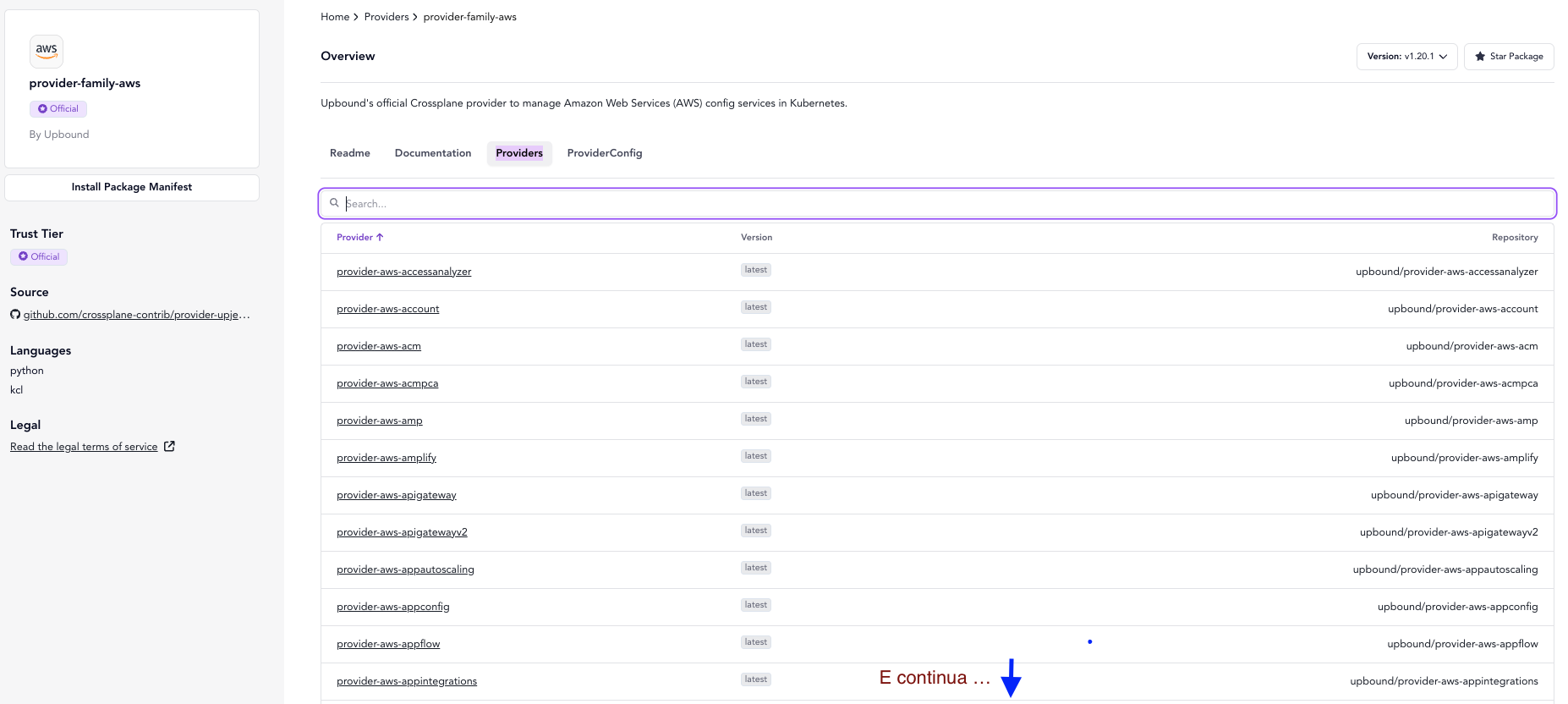
Here is the Upbound repository for the provider aws.
This is the official AWS provider repository maintained by the Upbound team. Upbound is the company that leads Crossplane development and some native providers, like this one for AWS.
Being the official provider, it will likely receive more support and frequent updates.
It follows official Crossplane guidelines and specifications.
The provider-aws community also does the same work but is maintained by the community. Community-maintained providers can be equally useful and reliable, but may have differences in implementations and support compared to the official provider. If there's an official one with a company behind it, use it!
The advantage of community-maintained providers is that they can provide specific resources or features that may not be present in the official provider, but the opposite can also happen.
Each of these providers extends the Kubernetes API differently, so an object from one provider won't work on the other, despite being able to do what's needed with either one.
# upbound
apiVersion: s3.aws.upbound.io/v1
kind: Bucket
...

# community
apiVersion: s3.aws.crossplane.io/v1
kind: Bucket
Let's install the provider for AWS S3.
# Installs ONLY the S3 provider
cat <<EOF | kubectl apply -f -
apiVersion: pkg.crossplane.io/v1
kind: Provider
metadata:
  name: provider-aws-s3
spec:
  package: xpkg.upbound.io/upbound/provider-aws-s3:v1
EOF

❯ k get provider
NAME                          INSTALLED   HEALTHY   PACKAGE                                               AGE
provider-aws-s3               True        True      xpkg.upbound.io/upbound/provider-aws-s3:v1            19s
upbound-provider-family-aws   True        True      xpkg.upbound.io/upbound/provider-family-aws:v1.20.1   14s

❯ k get pods -n crossplane-system
NAME                                                        READY   STATUS    RESTARTS   AGE
crossplane-654d5644f4-mbr7j                                 1/1     Running   0          14h
crossplane-rbac-manager-59d8fcb968-kxrql                    1/1     Running   0          14h
provider-aws-s3-e91dae831b35-5885cbd9b9-5fdhn               1/1     Running   0          19s
upbound-provider-family-aws-49b8fc96b73c-6b6b9d8bb5-t9c2q   1/1     Running   0          25s

# With the installation of this provider we already have the resources we can use to declare resources

❯ k get customresourcedefinitions.apiextensions.k8s.io -n crossplane-system -o custom-columns=NAME:.metadata.name | grep s3.aws.upbound.io
bucketaccelerateconfigurations.s3.aws.upbound.io
bucketacls.s3.aws.upbound.io
bucketanalyticsconfigurations.s3.aws.upbound.io
bucketcorsconfigurations.s3.aws.upbound.io
bucketintelligenttieringconfigurations.s3.aws.upbound.io
bucketinventories.s3.aws.upbound.io
bucketlifecycleconfigurations.s3.aws.upbound.io
bucketloggings.s3.aws.upbound.io
bucketmetrics.s3.aws.upbound.io
bucketnotifications.s3.aws.upbound.io
bucketobjectlockconfigurations.s3.aws.upbound.io
bucketobjects.s3.aws.upbound.io
bucketownershipcontrols.s3.aws.upbound.io
bucketpolicies.s3.aws.upbound.io
bucketpublicaccessblocks.s3.aws.upbound.io
bucketreplicationconfigurations.s3.aws.upbound.io
bucketrequestpaymentconfigurations.s3.aws.upbound.io
buckets.s3.aws.upbound.io
bucketserversideencryptionconfigurations.s3.aws.upbound.io
bucketversionings.s3.aws.upbound.io
bucketwebsiteconfigurations.s3.aws.upbound.io
directorybuckets.s3.aws.upbound.io
objectcopies.s3.aws.upbound.io
objects.s3.aws.upbound.io
The automatic installation of provider-family-aws occurs due to the mandatory dependency defined in Upbound's individual service providers (like S3). This is an intentional behavior of the provider families architecture.
The provider-aws-s3 provider declares in its manifest a hard-coded dependency for provider-family-aws. The Crossplane Package Manager resolves this dependency automatically.
Purpose of the Family Provider is:
- Managing shared configurations (like
ProviderConfig, AWS authentication) - Providing resources common to all family services (e.g.: IAM Roles, security policies)
- Acting as a single update point for multiple services.
If we install provider-aws-ec2, several dependencies are mandatory between custom resources, so it will also install everything that will be necessary.
❯ cat <<EOF | kubectl apply -f -
apiVersion: pkg.crossplane.io/v1
kind: Provider
metadata:
  name: provider-aws-ec2
spec:
  package: xpkg.upbound.io/upbound/provider-aws-ec2:v1
EOF
provider.pkg.crossplane.io/provider-aws-ec2 created

# Didn't create another upbound-provider-family...
❯ k get provider
NAME                          INSTALLED   HEALTHY   PACKAGE                                               AGE
provider-aws-ec2              True        True      xpkg.upbound.io/upbound/provider-aws-ec2:v1           107s
provider-aws-s3               True        True      xpkg.upbound.io/upbound/provider-aws-s3:v1            7m59s
upbound-provider-family-aws   True        True      xpkg.upbound.io/upbound/provider-family-aws:v1.20.1   7m54s

# And now we have these CRDs for ec2.

k get customresourcedefinitions.apiextensions.k8s.io -n crossplane-system -o custom-columns=NAME:.metadata.name | grep ec2.aws.upbound.io
amicopies.ec2.aws.upbound.io
amilaunchpermissions.ec2.aws.upbound.io
amis.ec2.aws.upbound.io
availabilityzonegroups.ec2.aws.upbound.io
capacityreservations.ec2.aws.upbound.io
carriergateways.ec2.aws.upbound.io
customergateways.ec2.aws.upbound.io
defaultnetworkacls.ec2.aws.upbound.io
defaultroutetables.ec2.aws.upbound.io
defaultsecuritygroups.ec2.aws.upbound.io
defaultsubnets.ec2.aws.upbound.io
defaultvpcdhcpoptions.ec2.aws.upbound.io
defaultvpcs.ec2.aws.upbound.io
ebsdefaultkmskeys.ec2.aws.upbound.io
ebsencryptionbydefaults.ec2.aws.upbound.io
ebssnapshotcopies.ec2.aws.upbound.io
ebssnapshotimports.ec2.aws.upbound.io
ebssnapshots.ec2.aws.upbound.io
ebsvolumes.ec2.aws.upbound.io
egressonlyinternetgateways.ec2.aws.upbound.io
eipassociations.ec2.aws.upbound.io
eips.ec2.aws.upbound.io
fleets.ec2.aws.upbound.io
flowlogs.ec2.aws.upbound.io
hosts.ec2.aws.upbound.io
instances.ec2.aws.upbound.io
instancestates.ec2.aws.upbound.io
internetgateways.ec2.aws.upbound.io
keypairs.ec2.aws.upbound.io
launchtemplates.ec2.aws.upbound.io
mainroutetableassociations.ec2.aws.upbound.io
managedprefixlistentries.ec2.aws.upbound.io
managedprefixlists.ec2.aws.upbound.io
natgateways.ec2.aws.upbound.io
networkaclrules.ec2.aws.upbound.io
networkacls.ec2.aws.upbound.io
networkinsightsanalyses.ec2.aws.upbound.io
networkinsightspaths.ec2.aws.upbound.io
networkinterfaceattachments.ec2.aws.upbound.io
networkinterfaces.ec2.aws.upbound.io
networkinterfacesgattachments.ec2.aws.upbound.io
placementgroups.ec2.aws.upbound.io
routes.ec2.aws.upbound.io
routetableassociations.ec2.aws.upbound.io
routetables.ec2.aws.upbound.io
securitygroupegressrules.ec2.aws.upbound.io
securitygroupingressrules.ec2.aws.upbound.io
securitygrouprules.ec2.aws.upbound.io
securitygroups.ec2.aws.upbound.io
serialconsoleaccesses.ec2.aws.upbound.io
snapshotcreatevolumepermissions.ec2.aws.upbound.io
spotdatafeedsubscriptions.ec2.aws.upbound.io
spotfleetrequests.ec2.aws.upbound.io
spotinstancerequests.ec2.aws.upbound.io
subnetcidrreservations.ec2.aws.upbound.io
subnets.ec2.aws.upbound.io
tags.ec2.aws.upbound.io
trafficmirrorfilterrules.ec2.aws.upbound.io
trafficmirrorfilters.ec2.aws.upbound.io
transitgatewayconnectpeers.ec2.aws.upbound.io
transitgatewayconnects.ec2.aws.upbound.io
transitgatewaymulticastdomainassociations.ec2.aws.upbound.io
transitgatewaymulticastdomains.ec2.aws.upbound.io
transitgatewaymulticastgroupmembers.ec2.aws.upbound.io
transitgatewaymulticastgroupsources.ec2.aws.upbound.io
transitgatewaypeeringattachmentaccepters.ec2.aws.upbound.io
transitgatewaypeeringattachments.ec2.aws.upbound.io
transitgatewaypolicytables.ec2.aws.upbound.io
transitgatewayprefixlistreferences.ec2.aws.upbound.io
transitgatewayroutes.ec2.aws.upbound.io
transitgatewayroutetableassociations.ec2.aws.upbound.io
transitgatewayroutetablepropagations.ec2.aws.upbound.io
transitgatewayroutetables.ec2.aws.upbound.io
transitgateways.ec2.aws.upbound.io
transitgatewayvpcattachmentaccepters.ec2.aws.upbound.io
transitgatewayvpcattachments.ec2.aws.upbound.io
volumeattachments.ec2.aws.upbound.io
vpcdhcpoptions.ec2.aws.upbound.io
vpcdhcpoptionsassociations.ec2.aws.upbound.io
vpcendpointconnectionnotifications.ec2.aws.upbound.io
vpcendpointroutetableassociations.ec2.aws.upbound.io
vpcendpoints.ec2.aws.upbound.io
vpcendpointsecuritygroupassociations.ec2.aws.upbound.io
vpcendpointserviceallowedprincipals.ec2.aws.upbound.io
vpcendpointservices.ec2.aws.upbound.io
vpcendpointsubnetassociations.ec2.aws.upbound.io
vpcipampoolcidrallocations.ec2.aws.upbound.io
vpcipampoolcidrs.ec2.aws.upbound.io
vpcipampools.ec2.aws.upbound.io
vpcipams.ec2.aws.upbound.io
vpcipamscopes.ec2.aws.upbound.io
vpcipv4cidrblockassociations.ec2.aws.upbound.io
vpcpeeringconnectionaccepters.ec2.aws.upbound.io
vpcpeeringconnectionoptions.ec2.aws.upbound.io
vpcpeeringconnections.ec2.aws.upbound.io
vpcs.ec2.aws.upbound.io
vpnconnectionroutes.ec2.aws.upbound.io
vpnconnections.ec2.aws.upbound.io
vpngatewayattachments.ec2.aws.upbound.io
vpngatewayroutepropagations.ec2.aws.upbound.io
vpngateways.ec2.aws.upbound.io
During the creation of a resource in AWS, for example an s3, the manifest will ask which provider to use and its configuration, i.e., the authentication it will use. If we were to make a parallel to terraform, environment variables need to be loaded or pointed to. In this case we'll point to a resource called ProviderConfig.
First let's create a secret in kubernetes with the content below, but with valid values. Create an IAM in AWS that will be used by the provider, generate the secret, add the AdministratorAccess permission (only for study, don't do this in production).
Create an aws-creds.txt file with the content below and let's apply it in the crossplane namespace
echo "[default]
aws_access_key_id = XXXXXXXXXXXXXXX
aws_secret_access_key =  YYYYYYYYYYYYYYYYYYYYYYYYYYYYYYYYYYY" > aws-creds.txt

kubectl create secret \
generic aws-secret \
-n crossplane-system \
--from-file=creds=./aws-creds.txt
Now that we have the secret named aws-secret let's make the providerconfig.
cat <<EOF | kubectl apply -f -
apiVersion: aws.upbound.io/v1beta1
kind: ProviderConfig
metadata:
  name: default
spec:
  credentials:
    source: Secret
    secretRef:
      namespace: crossplane-system
      name: aws-secret
      key: creds
EOF
Several different providers can use this configuration, as long as it's pointed to. Think of configuration as an authentication method. It's also possible to authenticate using other methods, like Roles, WebIdentity, OIDC etc, see at https://docs.upbound.io/providers/provider-aws/authentication/.
We already have a provider-aws and we have a config, now let's create some resource to see if it's working.
It's worth remembering that this is an AWS example, but other cloud providers can be used like Azure, GCP and even Kubernetes itself. The trend is for providers to grow for everything that exists, just like Terraform and Ansible. What's valuable in studying is understanding the tool and concepts.
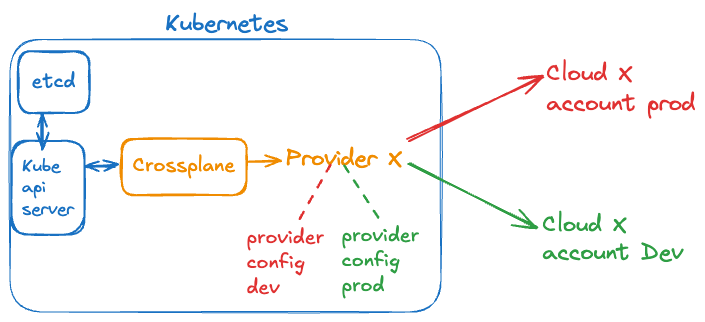
Flow
- When a user applies a Crossplane-related manifest (like a managed resource or a composition), this request first goes to the kube-api-server which validates the resource against the appropriate CRD and stores it in etcd.
- Then, the kube-api-server notifies registered controllers (including Crossplane controllers) about relevant changes.
- Crossplane controllers (both core and providers) continuously query the kube-api-server (using LIST/WATCH) to get information about resources they're managing. When Crossplane needs to update a resource's status or create dependent resources, it makes calls to the kube-api-server. Crossplane also communicates with the kube-api-server to register CRDs, create events, and update resource status.
This model follows the standard Kubernetes controller pattern, where controllers are clients of the kube-api-server and interact with it bidirectionally, obtaining information and sending updates as needed to reconcile the desired state.
Best Practice
The provider is the bridge between Kubernetes and an external resource. It's not necessary to install the same provider twice, just pass to a different provider config is necessary. Like a provider-config-dev and a provider-config-prod.
Installing the same Upbound S3 provider with the same tag (version) twice, even with different names, brings no real advantage and can cause problems.
# Don't Do This
apiVersion: pkg.crossplane.io/v1
kind: Provider
metadata:
  name: provider-aws-ec2-a
spec:
  package: xpkg.upbound.io/upbound/provider-aws-ec2:v1
---
apiVersion: pkg.crossplane.io/v1
kind: Provider
metadata:
  name: provider-aws-ec2-b
spec:
  package: xpkg.upbound.io/upbound/provider-aws-ec2:v1
When you install the same provider with the same version, it will try to register the same Custom Resource Definitions (CRDs), which will result in:
- Resource conflict: Both instances will try to register the same CRDs, resulting in conflicts in the API Server
- Duplicate controllers: Two controllers trying to reconcile the same resources, leading to unpredictable behavior
- Resource waste: Unnecessary consumption of CPU and memory to run redundant controllers
- Possible race condition: Controllers may compete with each other during resource reconciliation
Most of these problems arise because CRDs are global resources in Kubernetes, regardless of namespace or provider instance name. The correct pattern for managing multiple configurations is:
- Install the provider only once
- Create multiple ProviderConfigs that reference different credentials or configurations
- Specify which ProviderConfig should be used with each managed resource through the providerConfigRef reference
This allows managing resources in multiple environments or accounts without the overhead and problems caused by duplicate instances of the same provider.
Important to Understand
Providers create and manage Managed Resources that represent resources on target platforms.
A Composition is a set or template of managed resources that are grouped to form a higher-level abstraction. If you didn't understand, later on you will. If we were to compare it would be like a module in terraform, but it's not exactly like that.
Crossplane Core manages Compositions and Composite Resources (XRs), not the providers. Providers only "see" and interact with individual managed resources, having no direct knowledge of higher-level abstractions like Compositions.
When you define a Composition, Crossplane Core is responsible for decomposing it into corresponding managed resources, and then providers take care of these individual resources. This separation of responsibilities is a fundamental aspect of Crossplane's architecture.
Continue in Managed Resources to better understand this.