Kubernetes Auditing
The kube-apiserver receives all requests for any interaction with the cluster.
It's possible to save all these requests, data, and metadata in a datastore called audit logs. We can use this history for queries, security improvement, analysis, and debugging.
Saving the audit log in a Kubernetes cluster is fundamental to ensure security, compliance, and observability of the environment. The audit log is an audit trail that records all actions performed in the cluster, from API calls to configuration changes.
Importance of Audit Log in Kubernetes
-
Security and Threat Detection: Identify suspicious or malicious activities in the cluster, such as unauthorized access attempts, unplanned changes, or exploitation of vulnerabilities. -
Compliance and Auditing: For many organizations, especially those in regulated sectors (financial, healthcare, etc.), it's necessary to maintain an audit trail of actions performed in the environment. Audit logs are frequently required by compliance standards such as GDPR, HIPAA, PCI-DSS, among others. -
Incident Investigation: In case of failures or unexpected cluster behavior, the audit log provides valuable information to investigate the root cause. It can show specific changes that led to the problem, such as configuration changes, privilege escalations, or modifications to critical resources. -
Monitoring and Analysis: Important data source for continuous monitoring and security analysis. Other tools can consume Kubernetes audit logs to generate real-time alerts and detailed security reports. -
Policy Management: Allows validating whether security and operational policies are being followed. For example, it can be used to monitor whether only authorized users are performing specific actions in the cluster.
How to Configure and Use Audit Log in Kubernetes
We can decide what level of logging we would like to save, just like in various tools.
To save the audit log in Kubernetes, it's necessary to enable the auditing feature in the API Server. This involves configuring a policy file that defines which events should be recorded and the level of detail.
Stages VS Levels
Stages in the audit log represent the different phases of the lifecycle of a request made to the kube-apiserver. They help track how each request is processed, from the moment it's received until it's completed or discarded.
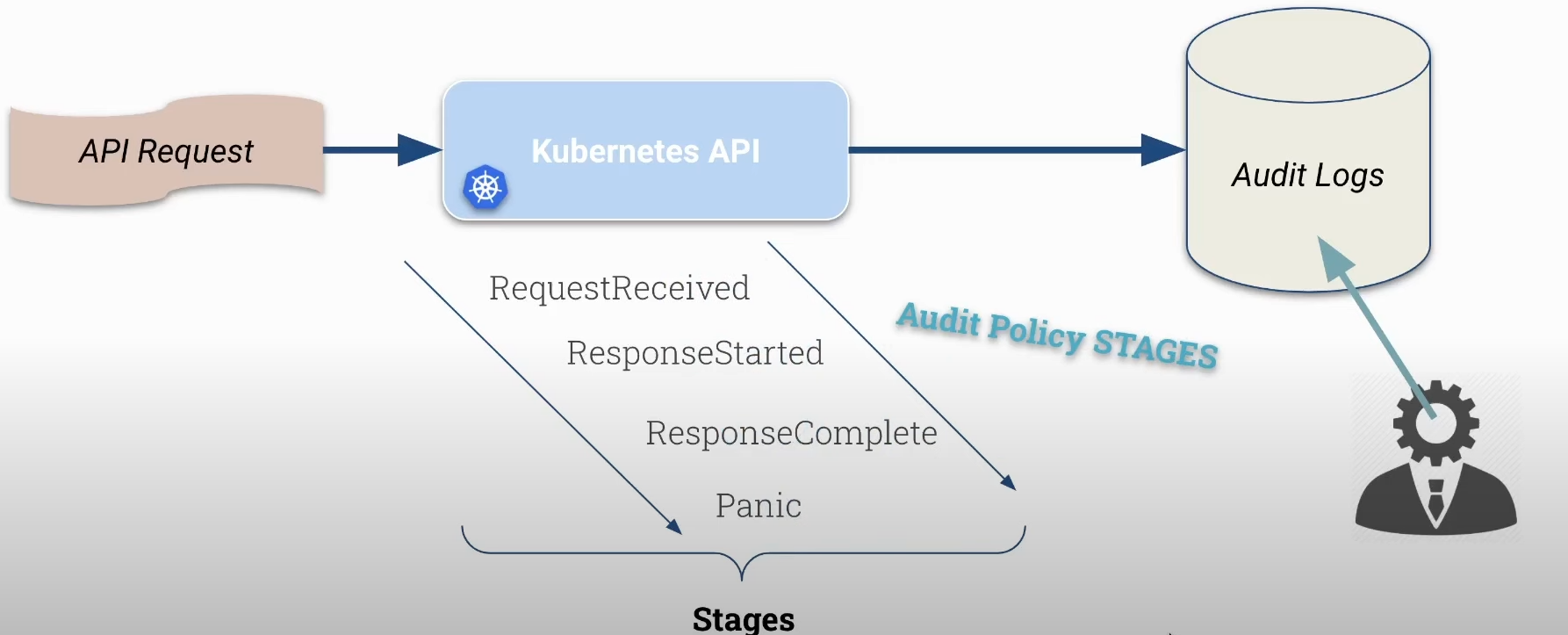
They describe at what point in processing a request is.
The possible stages are:
-
RequestReceived: This is the first stage, indicating that the API server received the request but hasn't processed it yet. At this point, the server has only logged receipt of the request. -
ResponseStarted: Indicates the stage when the API server started sending a response to the client but hasn't completed sending the response. It's useful for monitoring long requests that may take time to complete. -
ResponseComplete: Stage when the API server completed processing the request and sent the complete response back to the client. This is the most common stage for checking whether the request was successful or not. -
Panic: This stage indicates that a critical error or internal panic occurred in the API server during request processing. It's a sign that something failed unexpectedly and is crucial for debugging and auditing purposes.
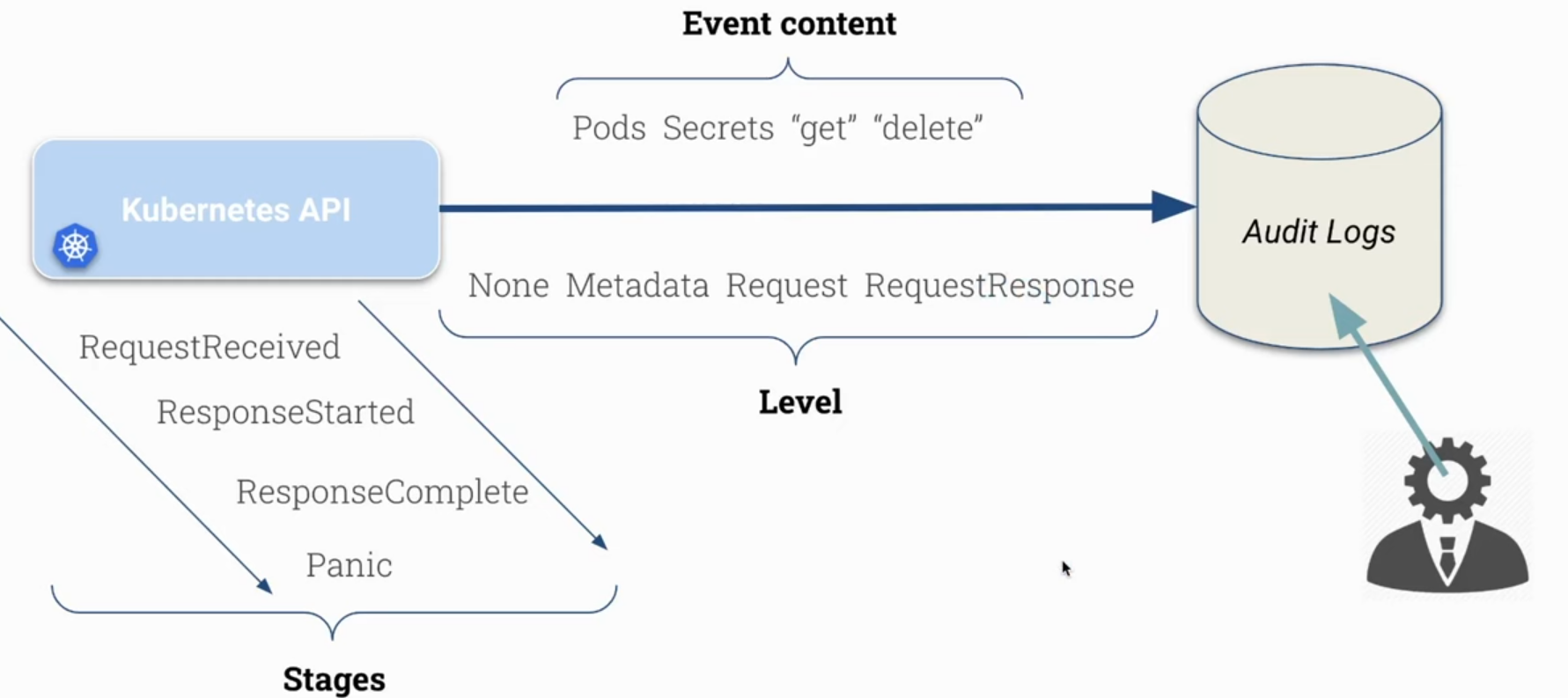
Levels determine the amount of information recorded in the audit log at a stage. It's the depth or granularity of audited information, i.e., verbosity.
-
None: Records no information. Used to completely ignore auditing of a given request. -
Metadata: Records only basic information about the request, such as HTTP method, API path, request time, user, and authentication information. Useful for high-level auditing. -
Request: Includes metadata and the request body content (payload). Used when complete request tracking is needed, including sent and received data, but will consume more storage. -
RequestResponse: Includes Request and the response, but only applies to resource requests.
| Aspect | Stages | Levels |
|---|---|---|
| Definition | Represent phases of a request's lifecycle in the Kubernetes API. | Determine the depth of information to be recorded in audit logs. |
| Objective | Help understand at what point in processing a request is. | Control the quantity and type of information recorded for each request. |
| Types | RequestReceived, ResponseStarted, ResponseComplete, Panic. | None, Metadata, Request, RequestResponse. |
| Use | To identify how and when a request is processed and completed. | To define the level of details needed for auditing. |
| Granularity | Related to the request's chronology (when it's received, responded to, or fails). | Related to the content and detail of the audit (only header, header and body, etc.). |
Obviously, with many API requests we'll have much more data to save which can pollute the log too much or make searching more difficult. Requests are not only generated by us when we execute kubectl commands, but are generated by various Kubernetes components that communicate with it like controller manager, scheduler, kubelet, third-party controllers, etc.
Audit logs can be tracked in different modes, and in CKS we'll use JSON to avoid using third-party tools. It's possible to define rotation, maximum size, etc.
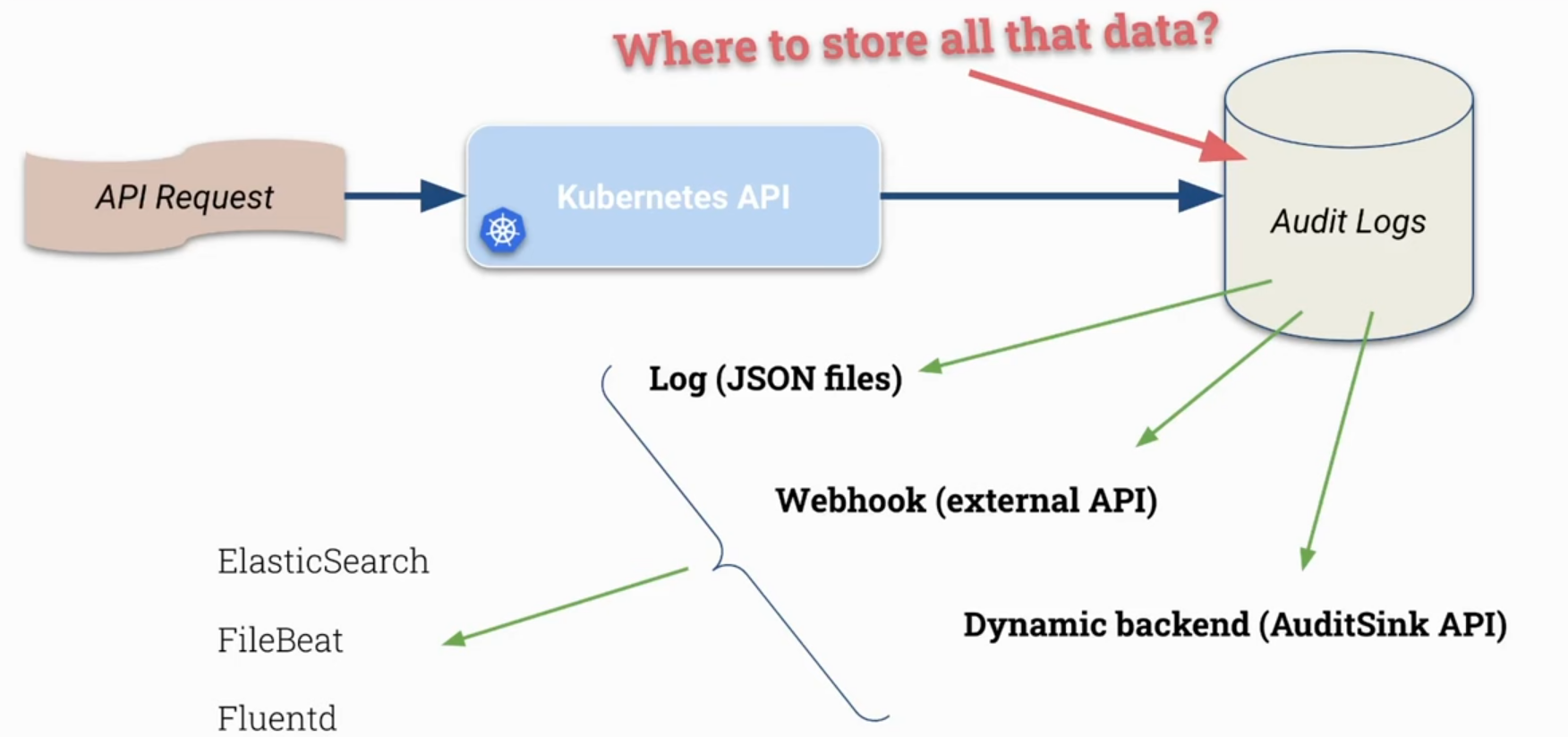
In a production cluster, depending on how much auditing is needed, it's interesting to send these logs to tools that can work with large amounts of data.
Knowing we can use stages and levels, in a policy we can apply each of these concepts to different objects, groups, and even verbs in Kubernetes.
Activating Audit Logs
We need to pass parameters to activate auditing in the kube-apiserver, parameters pointing to where and how it should store the logs that will be generated, and where the policies it should respect are. Let's create a simple policy that will save everything at metadata level, i.e., without saving any message body, only headers.
root@cks-master:~# cd /etc/kubernetes/
root@cks-master:/etc/kubernetes# mkdir audit
root@cks-master:/etc/kubernetes# cd audit/
root@cks-master:/etc/kubernetes# vim policy.yaml
root@cks-master:/etc/kubernetes# cat policy.yaml
apiVersion: audit.k8s.io/v1
kind: Policy
rules:
- level: Metadata

# See below what should be edited
root@cks-master:/etc/kubernetes# vim /etc/kubernetes/manifests/kube-apiserver.yaml
To activate in the kube-apiserver, let's add the following fields:
--audit-log-path: Specifies the path of the log file that the log backend uses to write audit events. Not specifying this flag disables the log backend.--audit-log-maxage: Maximum number of days to keep old audit log files.--audit-log-maxbackup: Maximum number of audit log files to retain.--audit-log-maxsize: Maximum size in megabytes of the audit log file before it's rotated.
spec:
  containers:
  - command:
    - kube-apiserver
    ...
    - --audit-policy-file=/etc/kubernetes/audit/policy.yaml       # add
    - --audit-log-path=/etc/kubernetes/audit/logs/audit.log       # add
    - --audit-log-maxsize=500                                     # add
    - --audit-log-maxbackup=5                                     # add
    ...
    # Remember to mount the volumes
    volumeMounts:
    ...
    - mountPath: /etc/kubernetes/audit      # add
      name: audit                           # add
    ...
  ...
  volumes:
  - hostPath:                               # add
      path: /etc/kubernetes/audit           # add
      type: DirectoryOrCreate               # add
    name: audit                             # add
Now let's check:
root@cks-master:/etc/kubernetes/audit# k get pods

# Of course it will generate a lot of logs, so let's remove and get only what matters which is the last line if we're quick
root@cks-master:/etc/kubernetes/audit# cat logs/audit.log
...
{"kind":"Event","apiVersion":"audit.k8s.io/v1","level":"Metadata","auditID":"b09a0a12-a858-4d62-9851-8ff972a4d90c","stage":"RequestReceived","requestURI":"/readyz","verb":"get","user":{"username":"system:anonymous","groups":["system:unauthenticated"]},"sourceIPs":["10.128.0.6"],"userAgent":"kube-probe/1.30","requestReceivedTimestamp":"2024-09-11T14:16:32.059780Z","stageTimestamp":"2024-09-11T14:16:32.059780Z"}
{"kind":"Event","apiVersion":"audit.k8s.io/v1","level":"Metadata","auditID":"b09a0a12-a858-4d62-9851-8ff972a4d90c","stage":"ResponseComplete","requestURI":"/readyz","verb":"get","user":{"username":"system:anonymous","groups":["system:unauthenticated"]},"sourceIPs":["10.128.0.6"],"userAgent":"kube-probe/1.30","responseStatus":{"metadata":{},"code":200},"requestReceivedTimestamp":"2024-09-11T14:16:32.059780Z","stageTimestamp":"2024-09-11T14:16:32.062798Z","annotations":{"authorization.k8s.io/decision":"allow","authorization.k8s.io/reason":"RBAC: allowed by ClusterRoleBinding \"system:public-info-viewer\" of ClusterRole \"system:public-info-viewer\" to Group \"system:unauthenticated\""}}
...

# Let's create a secret and check what we have
root@cks-master:/etc/kubernetes/audit# k create secret generic verysecure --from-literal=user=admin
secret/verysecure created

root@cks-master:/etc/kubernetes/audit# cat /etc/kubernetes/audit/logs/audit.log | grep verysecure

{"kind":"Event","apiVersion":"audit.k8s.io/v1","level":"Metadata","auditID":"3fca4b1a-4adc-4719-9246-07204a61f6e6","stage":"ResponseComplete","requestURI":"/api/v1/namespaces/default/secrets?fieldManager=kubectl-create\u0026fieldValidation=Strict","verb":"create","user":{"username":"kubernetes-admin","groups":["kubeadm:cluster-admins","system:authenticated"]},"sourceIPs":["10.128.0.6"],"userAgent":"kubectl/v1.30.3 (linux/amd64) kubernetes/6fc0a69","objectRef":{"resource":"secrets","namespace":"default","name":"verysecure","apiVersion":"v1"},"responseStatus":{"metadata":{},"code":201},"requestReceivedTimestamp":"2024-09-11T14:22:39.543130Z","stageTimestamp":"2024-09-11T14:22:39.557212Z","annotations":{"authorization.k8s.io/decision":"allow","authorization.k8s.io/reason":"RBAC: allowed by ClusterRoleBinding \"kubeadm:cluster-admins\" of ClusterRole \"cluster-admin\" to Group \"kubeadm:cluster-admins\""}}
{
   "kind":"Event", // type
   "apiVersion":"audit.k8s.io/v1",
   "level":"Metadata", // Level
   "auditID":"3fca4b1a-4adc-4719-9246-07204a61f6e6",
   "stage":"ResponseComplete",
   "requestURI":"/api/v1/namespaces/default/secrets?fieldManager=kubectl-create\u0026fieldValidation=Strict",
   "verb":"create", // The verb was create
   "user":{
      "username":"kubernetes-admin", // Which user did it
      "groups":[
         "kubeadm:cluster-admins",
         "system:authenticated"
      ]
   },
   "sourceIPs":[
      "10.128.0.6"
   ],
   "userAgent":"kubectl/v1.30.3 (linux/amd64) kubernetes/6fc0a69",
   "objectRef":{
      "resource":"secrets", // What object it refers to
      "namespace":"default", // Resource namespace
      "name":"verysecure", // Name
      "apiVersion":"v1"
   },
   "responseStatus":{
      "metadata":{

      },
      "code":201
   },
   "requestReceivedTimestamp":"2024-09-11T14:22:39.543130Z", // Time received
   "stageTimestamp":"2024-09-11T14:22:39.557212Z",
   "annotations":{
      "authorization.k8s.io/decision":"allow",
      "authorization.k8s.io/reason":"RBAC: allowed by ClusterRoleBinding \"kubeadm:cluster-admins\" of ClusterRole \"cluster-admin\" to Group \"kubeadm:cluster-admins\""
   }
}
Editing this secret and adding the password field we have:
root@cks-master:/etc/kubernetes/audit# k edit secrets verysecure
secret/verysecure edited
root@cks-master:/etc/kubernetes/audit# cat /etc/kubernetes/audit/logs/audit.log | grep verysecure

# This was from the first one, on creation
{"kind":"Event","apiVersion":"audit.k8s.io/v1","level":"Metadata","auditID":"3fca4b1a-4adc-4719-9246-07204a61f6e6","stage":"ResponseComplete","requestURI":"/api/v1/namespaces/default/secrets?fieldManager=kubectl-create\u0026fieldValidation=Strict","verb":"create","user":{"username":"kubernetes-admin","groups":["kubeadm:cluster-admins","system:authenticated"]},"sourceIPs":["10.128.0.6"],"userAgent":"kubectl/v1.30.3 (linux/amd64) kubernetes/6fc0a69","objectRef":{"resource":"secrets","namespace":"default","name":"verysecure","apiVersion":"v1"},"responseStatus":{"metadata":{},"code":201},"requestReceivedTimestamp":"2024-09-11T14:22:39.543130Z","stageTimestamp":"2024-09-11T14:22:39.557212Z","annotations":{"authorization.k8s.io/decision":"allow","authorization.k8s.io/reason":"RBAC: allowed by ClusterRoleBinding \"kubeadm:cluster-admins\" of ClusterRole \"cluster-admin\" to Group \"kubeadm:cluster-admins\""}}

# When editing, the requestReceived event was generated with get, delivering the yaml. Note that we have the request and then the response

{"kind":"Event","apiVersion":"audit.k8s.io/v1","level":"Metadata","auditID":"a3c1a228-f287-4742-9c56-d316b9f0bf3b","stage":"RequestReceived","requestURI":"/api/v1/namespaces/default/secrets/verysecure","verb":"get","user":{"username":"kubernetes-admin","groups":["kubeadm:cluster-admins","system:authenticated"]},"sourceIPs":["10.128.0.6"],"userAgent":"kubectl/v1.30.3 (linux/amd64) kubernetes/6fc0a69","objectRef":{"resource":"secrets","namespace":"default","name":"verysecure","apiVersion":"v1"},"requestReceivedTimestamp":"2024-09-11T15:38:00.424748Z","stageTimestamp":"2024-09-11T15:38:00.424748Z"}

{"kind":"Event","apiVersion":"audit.k8s.io/v1","level":"Metadata","auditID":"a3c1a228-f287-4742-9c56-d316b9f0bf3b","stage":"ResponseComplete","requestURI":"/api/v1/namespaces/default/secrets/verysecure","verb":"get","user":{"username":"kubernetes-admin","groups":["kubeadm:cluster-admins","system:authenticated"]},"sourceIPs":["10.128.0.6"],"userAgent":"kubectl/v1.30.3 (linux/amd64) kubernetes/6fc0a69","objectRef":{"resource":"secrets","namespace":"default","name":"verysecure","apiVersion":"v1"},"responseStatus":{"metadata":{},"code":200},"requestReceivedTimestamp":"2024-09-11T15:38:00.424748Z","stageTimestamp":"2024-09-11T15:38:00.427022Z","annotations":{"authorization.k8s.io/decision":"allow","authorization.k8s.io/reason":"RBAC: allowed by ClusterRoleBinding \"kubeadm:cluster-admins\" of ClusterRole \"cluster-admin\" to Group \"kubeadm:cluster-admins\""}}

# Edit Request
# See the verb used is patch which is used to apply changes
{"kind":"Event","apiVersion":"audit.k8s.io/v1","level":"Metadata","auditID":"dc88feab-4cbf-4643-b1d7-4dc90fe2b59f","stage":"RequestReceived","requestURI":"/api/v1/namespaces/default/secrets/verysecure?fieldManager=kubectl-edit\u0026fieldValidation=Strict","verb":"patch","user":{"username":"kubernetes-admin","groups":["kubeadm:cluster-admins","system:authenticated"]},"sourceIPs":["10.128.0.6"],"userAgent":"kubectl/v1.30.3 (linux/amd64) kubernetes/6fc0a69","objectRef":{"resource":"secrets","namespace":"default","name":"verysecure","apiVersion":"v1"},"requestReceivedTimestamp":"2024-09-11T15:38:23.658311Z","stageTimestamp":"2024-09-11T15:38:23.658311Z"}

# Edit Response
{"kind":"Event","apiVersion":"audit.k8s.io/v1","level":"Metadata","auditID":"dc88feab-4cbf-4643-b1d7-4dc90fe2b59f","stage":"ResponseComplete","requestURI":"/api/v1/namespaces/default/secrets/verysecure?fieldManager=kubectl-edit\u0026fieldValidation=Strict","verb":"patch","user":{"username":"kubernetes-admin","groups":["kubeadm:cluster-admins","system:authenticated"]},"sourceIPs":["10.128.0.6"],"userAgent":"kubectl/v1.30.3 (linux/amd64) kubernetes/6fc0a69","objectRef":{"resource":"secrets","namespace":"default","name":"verysecure","apiVersion":"v1"},"responseStatus":{"metadata":{},"code":200},"requestReceivedTimestamp":"2024-09-11T15:38:23.658311Z","stageTimestamp":"2024-09-11T15:38:23.663667Z","annotations":{"authorization.k8s.io/decision":"allow","authorization.k8s.io/reason":"RBAC: allowed by ClusterRoleBinding \"kubeadm:cluster-admins\" of ClusterRole \"cluster-admin\" to Group \"kubeadm:cluster-admins\""}}
Creating an Audit Policy
To avoid the pollution we have above, we can improve our policy.
For example, let's edit our simple policy.yaml to the following scenario:
- We won't log anything from RequestReceived for any resource
- We won't log anything from get, watch, and list for any resource because this is just querying
- For Secrets we can keep only the metadata to not capture the message body
- Everything else we'll log only the Response which will actually be how the task ended
Editing the file doesn't generate changes in the kube-apiserver manifest file, i.e., it won't take effect because its manifest file wasn't changed. It's necessary to restart the kube-apiserver forcibly.
- Disabling and reactivating the audit log is one option
- Killing the container with crictl
- Removing the kube-apiserver from /etc/kubernetes/manifests and then putting it back (I like this option)
ORDER MATTERS.
apiVersion: audit.k8s.io/v1
kind: Policy
# This could be applied to a single rule. In this case we're applying to all
omitStages:
  - "RequestReceived"
rules:
  # Since we didn't specify the stage, it will be any stage except RequestReceived which we declared above
  - level: None
    verbs: ["watch","list","get"]
  # Since order matters, watch list and get above will be applied here
  - level: Metadata
    resources:
    - group: ""
      resources: ["secrets"]
  # Everything else. Will also be applied in RequestComplete and RequestStarted stage
  - level: RequestResponse
# Removing old logs to refresh our output file
root@cks-master:/etc/kubernetes/audit# rm -rf logs/
root@cks-master:/etc/kubernetes/audit# vim policy.yaml
root@cks-master:/etc/kubernetes/audit# cat policy.yaml
apiVersion: audit.k8s.io/v1
kind: Policy
omitStages:
  - "RequestReceived"
rules:
  - level: None
    verbs: ["watch", "list", "get"]
  - level: Metadata
    resources:
    - group: ""
      resources: ["secrets"]
  - level: RequestResponse

root@cks-master:/etc/kubernetes/audit# cd ../manifests/

root@cks-master:/etc/kubernetes/manifests# mv kube-apiserver.yaml ..
root@cks-master:/etc/kubernetes/manifests# mv ../kube-apiserver.yaml .
root@cks-master:/etc/kubernetes/manifests#

# Wait for kube-apiserver to come up
root@cks-master:/etc/kubernetes/manifests# k get pods
NAME   READY   STATUS    RESTARTS   AGE
pod    1/1     Running   0          43h

root@cks-master:/etc/kubernetes/manifests# cat /etc/kubernetes/audit/logs/audit.log | grep RequestReceived
# Nothing in the output

root@cks-master:/etc/kubernetes/manifests# k delete secrets verysecure
secret "verysecure" deleted
# Only ResponseComplete
root@cks-master:/etc/kubernetes/manifests# cat /etc/kubernetes/audit/logs/audit.log | grep verysecure
{"kind":"Event","apiVersion":"audit.k8s.io/v1","level":"Metadata","auditID":"79e90895-fe8d-4536-9124-0f0ef08ab69b","stage":"ResponseComplete","requestURI":"/api/v1/namespaces/default/secrets/verysecure","verb":"delete","user":{"username":"kubernetes-admin","groups":["kubeadm:cluster-admins","system:authenticated"]},"sourceIPs":["10.128.0.6"],"userAgent":"kubectl/v1.30.3 (linux/amd64) kubernetes/6fc0a69","objectRef":{"resource":"secrets","namespace":"default","name":"verysecure","apiVersion":"v1"},"responseStatus":{"metadata":{},"status":"Success","details":{"name":"verysecure","kind":"secrets","uid":"0848605a-b6b0-4e8d-aced-35a41e26144c"},"code":200},"requestReceivedTimestamp":"2024-09-11T17:21:22.845033Z","stageTimestamp":"2024-09-11T17:21:22.851421Z","annotations":{"authorization.k8s.io/decision":"allow","authorization.k8s.io/reason":"RBAC: allowed by ClusterRoleBinding \"kubeadm:cluster-admins\" of ClusterRole \"cluster-admin\" to Group \"kubeadm:cluster-admins\""}}
More models for study:
apiVersion: audit.k8s.io/v1 # This is required.
kind: Policy
# Don't generate audit events for all requests in RequestReceived stage.
omitStages:
  - "RequestReceived"
rules:
  # Log pod changes at RequestResponse level
  - level: RequestResponse
    resources:
    - group: ""
      # Resource "pods" doesn't match requests to any subresource of pods,
      # which is consistent with the RBAC policy.
      resources: ["pods"]
  # Log "pods/log", "pods/status" at Metadata level
  - level: Metadata
    resources:
    - group: ""
      resources: ["pods/log", "pods/status"]

  # Don't log requests to a configmap called "controller-leader"
  - level: None
    resources:
    - group: ""
      resources: ["configmaps"]
      resourceNames: ["controller-leader"]

  # Don't log watch requests by the "system:kube-proxy" on endpoints or services
  - level: None
    users: ["system:kube-proxy"]
    verbs: ["watch"]
    resources:
    - group: "" # core API group
      resources: ["endpoints", "services"]

  # Don't log authenticated requests to certain non-resource URL paths.
  - level: None
    userGroups: ["system:authenticated"]
    nonResourceURLs:
    - "/api*" # Wildcard matching.
    - "/version"

  # Log the request body of configmap changes in kube-system.
  - level: Request
    resources:
    - group: "" # core API group
      resources: ["configmaps"]
    # This rule only applies to resources in the "kube-system" namespace.
    # The empty string "" can be used to select non-namespaced resources.
    namespaces: ["kube-system"]

  # Log configmap and secret changes in all other namespaces at the Metadata level.
  - level: Metadata
    resources:
    - group: "" # core API group
      resources: ["secrets", "configmaps"]

  # Log all other resources in core and extensions at the Request level.
  - level: Request
    resources:
    - group: "" # core API group
    - group: "extensions" # Version of group should NOT be included.

  # A catch-all rule to log all other requests at the Metadata level.
  - level: Metadata
    # Long-running requests like watches that fall under this rule will not
    # generate an audit event in RequestReceived.
    omitStages:
      - "RequestReceived"