RBAC
Already studied in CKA. Let's just highlight the differences found for CKS.
Recommended reading:
Role-based access control is a method of regulating access to computer or network resources based on the roles of individual users within your organization.
Kubernetes has had this feature since the early versions and it is still used today.
Code block from kube-apiserver.yaml
spec:
  containers:
  - command:
    - kube-apiserver
    - --advertise-address=10.128.0.5
    - --allow-privileged=true
    - --authorization-mode=Node,RBAC #<<<<
    - --client-ca-file=/etc/kubernetes/pki/ca.crt
    - --enable-admission-plugins=NodeRestriction
- Restricts access to resources when accessed by users or service accounts.
- Uses Roles and Bindings
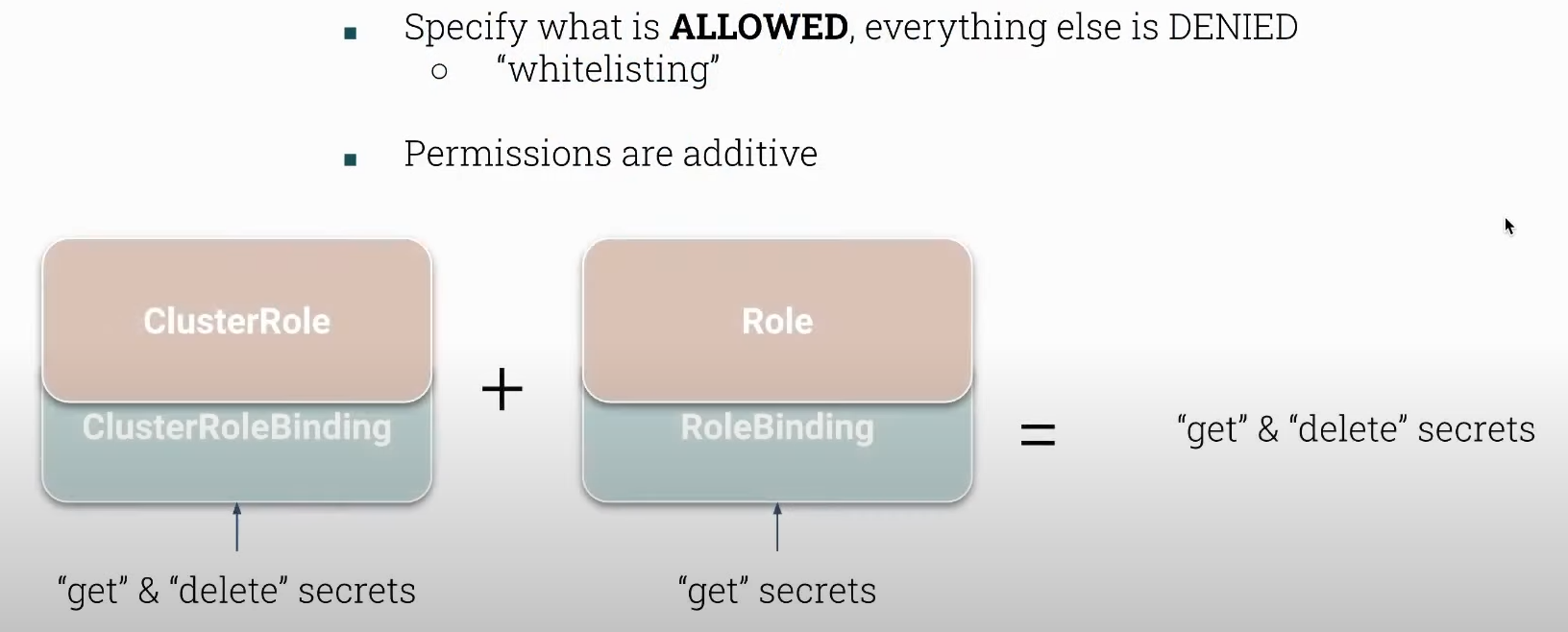
- Only specifies what is ALLOWED, everything else is denied.
- There are no denial rules.
It respects the principle of least privilege which is something we must keep in mind whenever we grant access.
Only access data or information necessary for the legitimate purpose.
Understand what a resource is at namespace level and cluster level. You can read directly from api.
# Shows resources that are namespace level
kubectl api-resources --namespace=true

# Cluster level
kubectl api-resources --namespace=false

# role and rolebindings are at namespace level
# clusterrole and clusterrolebindings are at cluster level
clusterrolebindings                              rbac.authorization.k8s.io/v1        false        ClusterRoleBinding
clusterroles                                     rbac.authorization.k8s.io/v1        false        ClusterRole
rolebindings                                     rbac.authorization.k8s.io/v1        true         RoleBinding
roles                                            rbac.authorization.k8s.io/v1        true         Role
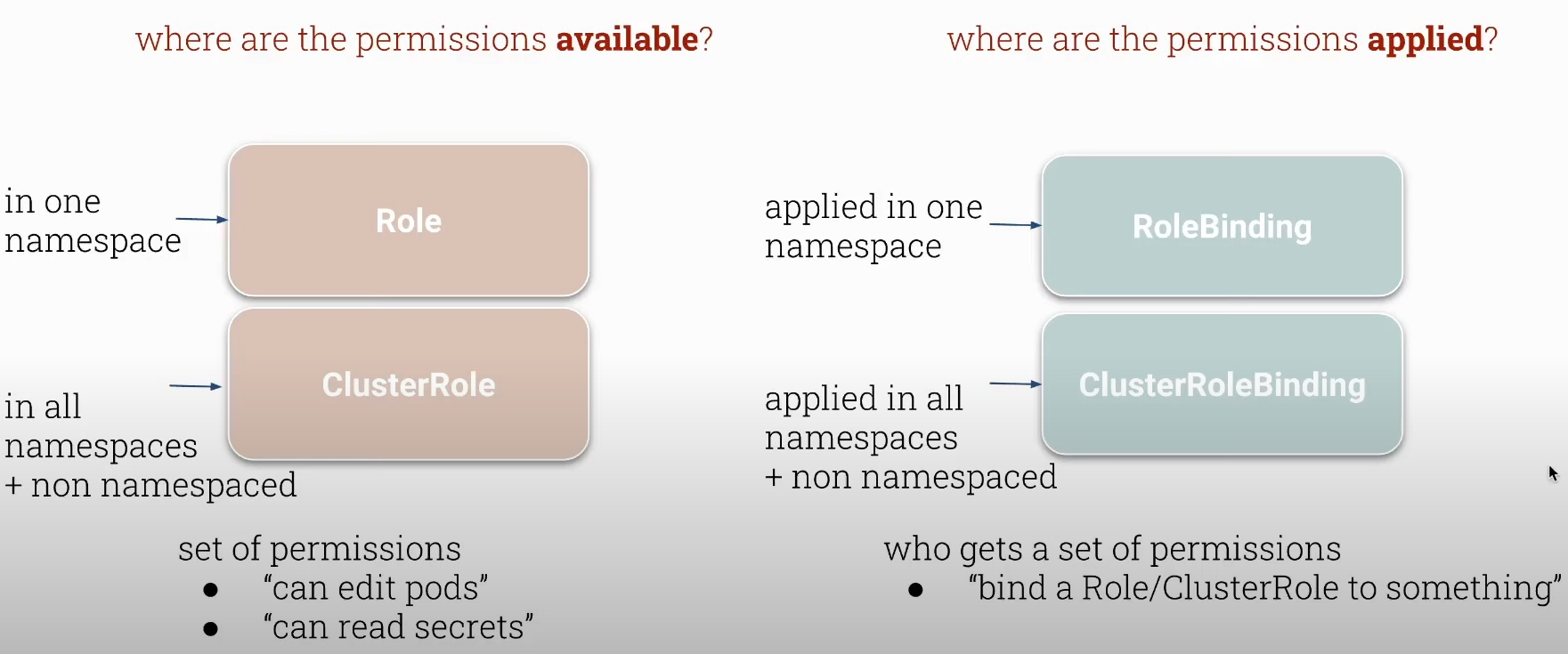
- Bindings are used to define who can act with roles and clusterroles.
- Roles are sets of permissions that play a role.
A role that is at namespace level will define permissions for a namespace.
A clusterrole that is at cluster level will define permissions at the level of all namespaces and resources outside the namespace scope, such as persistent volumes, nodes, etc.
We must be careful with cluster roles because any new namespace created will fall under the cluster role permissions.
A role can be defined with the same name in several different namespaces.
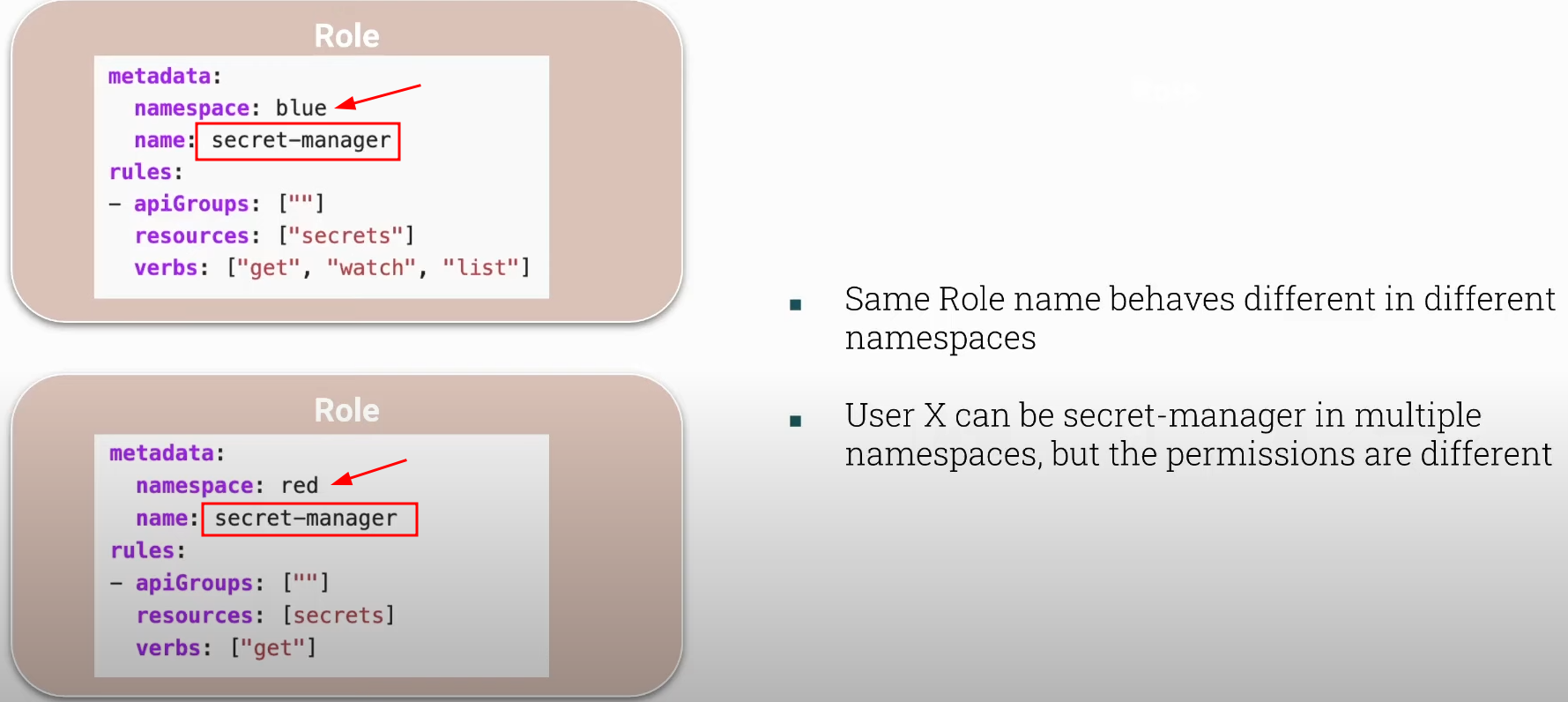
This does not mean that a user or service account that will act with a role named secret-manager that has permission in the blue namespace will also have it in red. It is necessary to create the binding with both namespaces. Bindings are what connect a role with a user or service account.
Cluster roles do not have namespaces in their definition, but the permissions are the same across all namespaces.
We can have the following combinations:
- role
+rolebinding (completely namespace level) - clusterrole
+clusterrolebinding (cluster level) - clusterrole
+rolebinding (limits the namespaces of action for the clusterrole) - role
+clusterrolebinding (NOT POSSIBLE)-
WE CANNOT CONVERT SOMETHING FROM NAMESPACE LEVEL TO CLUSTER LEVEL.
-
If we grant these permissions to a user they will be added together.
Always test permissions with
kubectl auth can-i.
root@cks-master:/etc/kubernetes/manifests# k create namespace red
namespace/red created
root@cks-master:/etc/kubernetes/manifests# k create namespace blue
namespace/blue created
root@cks-master:/etc/kubernetes/manifests# k create role  -n red secret-manager --verb get --resource secrets
role.rbac.authorization.k8s.io/secret-manager created
root@cks-master:/etc/kubernetes/manifests# k create rolebinding -n red secret-manager --role=secret-manager --user=jane
rolebinding.rbac.authorization.k8s.io/secret-manager created
root@cks-master:/etc/kubernetes/manifests# k create role  -n blue secret-manager --verb=get,list --resource secrets
role.rbac.authorization.k8s.io/secret-manager created
root@cks-master:/etc/kubernetes/manifests# k create rolebinding -n blue secret-manager --role=secret-manager --user=jane
rolebinding.rbac.authorization.k8s.io/secret-manager created
root@cks-master:/etc/kubernetes/manifests# k -n red auth can-i get secrets --as jane
yes
root@cks-master:/etc/kubernetes/manifests# k -n red auth can-i get secrets --as john
no
root@cks-master:/etc/kubernetes/manifests# k -n red auth can-i list secrets --as jane
no
root@cks-master:/etc/kubernetes/manifests# k -n red auth can-i list pods --as jane
no
root@cks-master:/etc/kubernetes/manifests# k -n blue auth can-i list secrets --as jane
yes
root@cks-master:/etc/kubernetes/manifests# k -n blue auth can-i get secrets --as jane
yes
root@cks-master:/etc/kubernetes/manifests# k create clusterrole deploy-deleter --verb=delete --resource=deployments
clusterrole.rbac.authorization.k8s.io/deploy-deleter created
root@cks-master:/etc/kubernetes/manifests# k create clusterrolebinding deploy-deleter --user jane --clusterrole deploy-deleter
clusterrolebinding.rbac.authorization.k8s.io/deploy-deleter created
root@cks-master:/etc/kubernetes/manifests# k -n red create rolebinding deploy-deleter --user jim --clusterrole deploy-deleter
rolebinding.rbac.authorization.k8s.io/deploy-deleter created
root@cks-master:/etc/kubernetes/manifests# k auth can-i delete deployment --as jane
yes
root@cks-master:/etc/kubernetes/manifests# k -n red auth can-i delete deployment --as jane
yes
root@cks-master:/etc/kubernetes/manifests# k auth can-i delete deployment --as jim
no
root@cks-master:/etc/kubernetes/manifests# k auth can-i delete deployment --as jim -A
no
root@cks-master:/etc/kubernetes/manifests# k auth can-i delete deployment --as jim -n red
yes
root@cks-master:/etc/kubernetes/manifests# k auth can-i create deployment --as jane -n red
no
root@cks-master:/etc/kubernetes/manifests# k auth can-i create deployment --as jane
no
root@cks-master:/etc/kubernetes/manifests# k auth can-i create deployment --as jim -n red
no