Authorization
We have already seen that the kube-apiserver has the function of authenticating a user through certificates, but what can they do in the cluster?
As administrators, we can do anything in the cluster, but we don't want other users to be able to modify configurations, approve certificates, work in kube-system namespaces, delete secrets, etc.
We can allow them to view, but not modify for example.
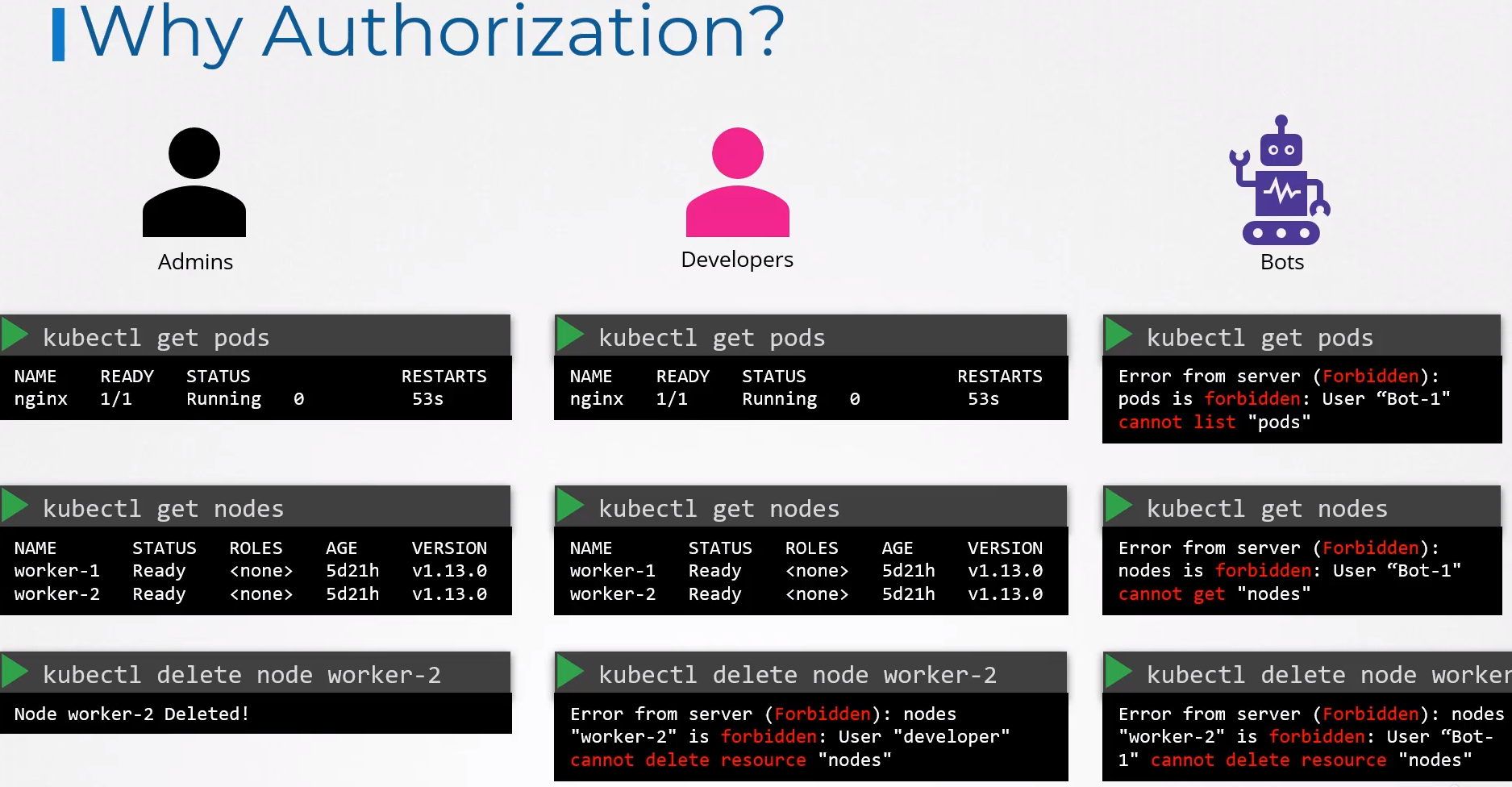
A very interesting scenario is that a cluster can be divided among different organizations or teams and each one must work in their respective namespaces. This is where authorization can also help within the cluster.
There are different authorization mechanisms:
- Node
- ABAC
- RBAC
- Webhook
- AlwaysAllow (Not recommended)
- AlwaysDeny (Not recommended)
Node
We know that users can access the kube-apiserver, but the Kubelet within the worker nodes also accesses it. When the Kubelet certificate was created, it was also specified that it should belong to the system:nodes group, remember?
The system:nodes group already contains specific permissions for nodes in Kubernetes. The Kubelet needs to create pods on the node, update the kube-apiserver, update the node status, access storage, access other services, etc.
What could a node do?
kubectl get clusterroles system:node -o yaml

# To make it easier, I separated the pieces
apiVersion: rbac.authorization.k8s.io/v1
kind: ClusterRole
metadata:
  annotations:
    rbac.authorization.kubernetes.io/autoupdate: "true"
  creationTimestamp: "2024-02-08T23:02:26Z"
  labels:
    kubernetes.io/bootstrapping: rbac-defaults
  name: system:node
  resourceVersion: "84"
  uid: 923e2cc5-fd5e-47e5-b4ce-69f57431c2ba
rules:

##################
- apiGroups:
  - authentication.k8s.io
  resources:
  - tokenreviews
  verbs:
  - create

##################
- apiGroups:
  - authorization.k8s.io
  resources:
  - localsubjectaccessreviews
  - subjectaccessreviews
  verbs:
  - create

################## SERVICES
- apiGroups:
  - ""
  resources:
  - services #<<<
  verbs:
  - get
  - list
  - watch

##################
- apiGroups:
  - ""
  resources:
  - nodes     <------------------------|
  verbs:                               |
  - create                             |
  - get                                |
  - list                               |
  - watch                              |
                                       |
##################                     ^
- apiGroups:                           |
  - ""                                 |
  resources:                           |
  - nodes/status                       |
  verbs:                               |
  - patch                              |
  - update                             |
                                       |
##################                     ^
- apiGroups:                           |
  - ""                                 |
  resources:                           |
  - nodes # SAME AS TWO GROUPS ABOVE
  verbs:
  - patch
  - update

################## CREATE AND UPDATE EVENTS
- apiGroups:
  - ""
  resources:
  - events
  verbs:
  - create
  - patch
  - update

################## NOTICE HERE. WE HAVE TWO GROUPS FOR THE SAME RESOURCE PODS
# IF COMBINED IT WOULD BE THE SAME, BUT IT WAS SIMPLY SEPARATED PERMISSIONS FOR READING AND WRITING AS A FORM OF ORGANIZATION
- apiGroups:
  - ""
  resources:
  - pods
  verbs:
  - get
  - list
  - watch

- apiGroups:
  - ""
  resources:
  - pods   #<< SAME GROUP AS ABOVE
  verbs:
  - create
  - delete

##################
- apiGroups:
  - ""
  resources:
  - pods/status
  verbs:
  - patch
  - update

##################
- apiGroups:
  - ""
  resources:
  - pods/eviction
  verbs:
  - create

##################
- apiGroups:
  - ""
  resources:
  - configmaps
  - secrets
  verbs:
  - get
  - list
  - watch

##################
- apiGroups:
  - ""
  resources:
  - persistentvolumeclaims
  - persistentvolumes
  verbs:
  - get

##################
- apiGroups:
  - ""
  resources:
  - endpoints
  verbs:
  - get

##################
- apiGroups:
  - certificates.k8s.io
  resources:
  - certificatesigningrequests
  verbs:
  - create
  - get
  - list
  - watch

##################
- apiGroups:
  - coordination.k8s.io
  resources:
  - leases
  verbs:
  - create
  - delete
  - get
  - patch
  - update

##################
- apiGroups:
  - storage.k8s.io
  resources:
  - volumeattachments
  verbs:
  - get

##################
- apiGroups:
  - ""
  resources:
  - serviceaccounts/token
  verbs:
  - create

##################
- apiGroups:
  - ""
  resources:
  - persistentvolumeclaims/status
  verbs:
  - get
  - patch
  - update

##################
- apiGroups:
  - storage.k8s.io
  resources:
  - csidrivers
  verbs:
  - get
  - list
  - watch

##################
- apiGroups:
  - storage.k8s.io
  resources:
  - csinodes
  verbs:
  - create
  - delete
  - get
  - patch
  - update

##################
- apiGroups:
  - node.k8s.io
  resources:
  - runtimeclasses
  verbs:
  - get
  - list
  - watch
Looking at the output above, we could make this smaller, but it's a matter of organization.
ABAC (Attribute-Based Access Control) - DEPRECATED
The study here is valuable for understanding Kubernetes history as it was removed from version 1.25 onwards.
In this method, we associate a user or group of users with permissions on certain resources and the permissions over each resource.
It is not possible to create a YAML file to define this. It is necessary to pass a JSON file as a parameter to the kube-apiserver in its manifest or service, depending on how the cluster was created.
For example, in the kube-apiserver manifest we would have:
...
spec:
  containers:
  - command:
    - kube-apiserver
    - --advertise-address=172.18.0.4
    - --allow-privileged=true
    - --authorization-mode=Node,RBAC,ABAC ## added ABAC
    - --abac-file=/my/path/to/abac.json ## the JSON file
    - --client-ca-file=/etc/kubernetes/pki/ca.crt
    ...
The AlwaysAllow mode is set by default if no --authorization-mode is defined. In this case, all users have unrestricted access to all cluster resources. AlwaysDeny would create a completely restricted cluster, even for administrative tasks. It would be used for security testing when everything is denied.
In this JSON file we would have:
{
  "apiVersion": "abac.authorization.kubernetes.io/v1beta1",
  "kind": "Policy",
  "spec": {
    "policies": [
      {
        "apiVersion": "abac.authorization.kubernetes.io/v1beta1",
        "kind": "Policy",
        "spec": {
          "user": "david",
          "namespace": "default",
          "resource": "*", # EVERYTHING ALLOWED
          "readonly": false
        }
      }
      {
        "apiVersion": "abac.authorization.kubernetes.io/v1beta1",
        "kind": "Policy",
        "spec": {
          "user": "joao",
          "namespace": "default",
          "resource": "daemonset", # ONLY ACCEPTS ONE RESOURCE AT A TIME
          "verbs": ["get", "list", "watch"]
        }
      }
      {
        "apiVersion": "abac.authorization.kubernetes.io/v1beta1",
        "kind": "Policy",
        "spec": {
          "user": "joao",
          "namespace": "default",
          "resource": "deployments",
          "verbs": "verbs": ["get", "list", "watch", "create", "update", "delete"]
        }
      }
    ]
  }
}
And to take effect, we would need to restart the kube-apiserver. Each policy only accepts one name at a time; in the case of * it is acceptable for all, but we cannot put only 2 or 3. Another block is required as you can see above.
This is no longer used and will not be on the exam, but it's good to know how laborious it was to configure.
Webhook
What if we want to outsource all authorization mechanisms instead of using RBAC?
Here are some tools for this purpose:
- Open Policy Agent (OPA) is a broader tool that covers Kubernetes and other scenarios
- Gatekeeper uses OPA but is exclusive to Kubernetes
- kyverno
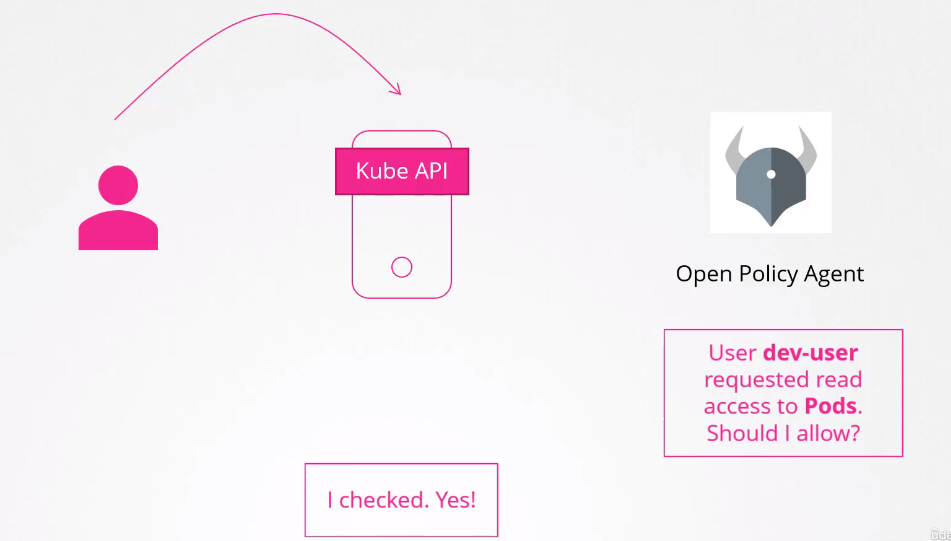
It is necessary to enable the Webhook in the kube-apiserver as an authorization mode. It tries to authorize following the established order when many modes are used.
--authorization-mode=Node,RBAC,Webhook
Node > RBAC > Webhook
--authorization-mode=Node,Webhook,RBAC
Node > Webhook > RBAC
RBAC (Role-Based Access Control)
This is the built-in method of Kubernetes.
We define a role (function in the cluster) and associate users with that role.
For example, the developer role can do certain things in the cluster and users who are developers act using this role. Administrators use administrator roles, and so on.
Once we change the permissions of a role, all users who assume that role are affected at once. It is one of the ways we have to group things.
Remember that david user we created for the cluster?
Let's create a role that he can use.
First, we need to understand that there are two types of role:
- Role: Used to give permissions at the namespace level.
- ClusterRole: Used to give permissions at the cluster level.
For example, get nodes is at what level? Cluster.
If we want to create an admin role for example, we will give permissions at the cluster level.
First, we need to create the role and then allow a user to assume this role using a binding. Let's create two in the same file so it's easy to understand.
Roles and RoleBindings
Let's start with a normal role with namespace scope.
cat <<EOF | kubectl apply -f -
apiVersion: rbac.authorization.k8s.io/v1
kind: Role
metadata:
  name: dev-role
rules:
- apiGroups:
  - ""
  resources:
  - deployments # <<< Pay attention to this
  - pods
  - services
  # THESE VERBS ARE APPLIED TO ALL RESOURCES ABOVE
  verbs:
  - create
  - list
  - get
  - update
  - delete
  - watch
- apiGroups: [""]
  resources: ["ConfigMap"]
  verbs: ["create"]

---
apiVersion: rbac.authorization.k8s.io/v1
kind: RoleBinding
metadata:
  name: david-binding-dev-role
subjects:
- kind: User
  name: david
  apiGroup: rbac.authorization.k8s.io
roleRef:
  kind: Role
  name: dev-role
  apiGroup: rbac.authorization.k8s.io
EOF

role.rbac.authorization.k8s.io/dev-role created
rolebinding.rbac.authorization.k8s.io/david-binding-role created
So we created a role that has permission to work with pods and deployments, but we didn't specify a namespace. Let's check.
kubectl get role
NAME       CREATED AT
dev-role   2024-02-11T09:32:38Z

kubectl describe role dev-role
Name:         dev-role
Labels:       <none>
Annotations:  <none>
PolicyRule:
  Resources    Non-Resource URLs  Resource Names  Verbs
  ---------    -----------------  --------------  -----
  deployments  []                 []              [create list get update delete watch]
  pods         []                 []              [create list get update delete watch]
  services     []                 []              [create list get update delete watch]
  configmaps   []                 []              [create]

kubectl get rolebindings
NAME                     ROLE            AGE
david-binding-dev-role   Role/dev-role   25s

kubectl describe rolebindings david-binding-dev-role
Name:         david-binding-dev-role
Labels:       <none>
Annotations:  <none>
Role:
  Kind:  Role
  Name:  dev-role
Subjects:
  Kind  Name   Namespace
  ----  ----   ---------
  User  david
Let's then check what a user could do
## In this case I'm checking for the user I'm currently logged in as
kubectl auth can-i create deployments
yes

## Checking for another user
kubectl auth can-i create deployments --as david
no # WHY?

kubectl auth can-i get pods --as david
yes

kubectl auth can-i create configmaps --as david
yes

kubectl auth can-i delete configmaps --as david
no
Why can't david create deployments but can create pods? Why did one work and the other didn't?
Because deployments are from a different apigroup, remember? When we don't define an apigroup it will automatically understand that it's the core, meaning api, so deployment is in another group.
In the core we have:
- bindings
- componentstatuses
- configmaps
- endpoints
- events
- limitranges
- namespaces
- nodes
- persistentvolumeclaims
- persistentvolumes
- pods
- podtemplates
- replicationcontrollers
- resourcequotas
- secrets
- serviceaccounts
- services
And in apis we have? Take a look there to remember!
For deployment to work, it's necessary to add this to the role, separating the deployment.
- apiGroups: ["apps"]
  resources: ["deployments"]
  verbs: ["create", "list", "get", "update", "delete", "watch"]
cat <<EOF | kubectl apply -f -
apiVersion: rbac.authorization.k8s.io/v1
kind: Role
metadata:
  name: dev-role
rules:
- apiGroups: [""]
  resources: ["pods", "services"] # Removed deployments from here
  verbs: ["create", "list", "get", "update", "delete", "watch"]
- apiGroups: [""]
  resources: ["configmaps"]
  verbs: ["create"]
- apiGroups: ["apps"]
  resources: ["deployments"]
  verbs: ["create", "list", "get", "update", "delete", "watch"]
EOF

kubectl describe role dev-role
Name:         dev-role
Labels:       <none>
Annotations:  <none>
PolicyRule:
  Resources         Non-Resource URLs  Resource Names  Verbs
  ---------         -----------------  --------------  -----
  pods              []                 []              [create list get update delete watch]
  services          []                 []              [create list get update delete watch]
  deployments.apps  []                 []              [create list get update delete watch]
  configmaps        []                 []              [create]

kubectl auth can-i create deployments --as david
yes

kubectl auth can-i create deployments --as david --namespace test
no
When we don't specify the namespace we want, it assumes default because Role has a namespace scope. It's a best practice to always specify the namespace, even though I didn't do it here.
If you don't know apigroups, you won't understand RBAC. The reason resources are plural is exactly because within apigroups they are plural. Another observation we can make is that the second time we didn't change the binding, only the role, and everything worked.
We can also give permission to a resource with a specific name, such as a pod called nginx, using resourceNames.
Creating a role can also be done using the kubectl command
## verbs resources and resource-name are lists
create role new-role --verb=list,get,create,delete --resource=pods --resource-name=nginx
role.rbac.authorization.k8s.io/new-role created

kubectl describe role new-role
Name:         new-role
Labels:       <none>
Annotations:  <none>
PolicyRule:
  Resources  Non-Resource URLs  Resource Names  Verbs
  ---------  -----------------  --------------  -----
  pods       []                 [nginx]         [list get create delete]


kubectl create rolebinding new-role-binding --user=david --role=new-role
rolebinding.rbac.authorization.k8s.io/new-role-binding created

kubectl describe rolebindings new-role-binding
Name:         new-role-binding
Labels:       <none>
Annotations:  <none>
Role:
  Kind:  Role
  Name:  new-role
Subjects:
  Kind  Name   Namespace
  ----  ----   ---------
  User  david
ClusterRoles and ClusterRoleBindings
Looking inside a resource, we can see if a resource is at the namespace level or not.
If you look again at /api/v1 we have the resources there, I took two examples:
{
  ...
    {
      "name": "nodes",
      "singularName": "node",
      "namespaced": false, # Cluster level
      "kind": "Node",
      "verbs": [
        "create",
        "delete",
        "deletecollection",
        "get",
        "list",
        "patch",
        "update",
        "watch"
      ],
      "shortNames": [
        "no"
      ],
      "storageVersionHash": "XwShjMxG9Fs="
    },
    ...
    {
      "name": "pods",
      "singularName": "pod",
      "namespaced": true, # Namespace level
      "kind": "Pod",
      "verbs": [
        "create",
        "delete",
        "deletecollection",
        "get",
        "list",
        "patch",
        "update",
        "watch"
      ],
      "shortNames": [
        "po"
      ],
      "categories": [
        "all"
      ],
      "s
    ...
}
...
Since cluster-scoped resources don't need a namespace, we don't need to specify them.
To get all cluster-level resources we can do:
kubectl api-resources --namespaced=false

NAME                              SHORTNAMES   APIVERSION                        NAMESPACED   KIND
componentstatuses                 cs           v1                                false        ComponentStatus
namespaces                        ns           v1                                false        Namespace
nodes                             no           v1                                false        Node
persistentvolumes                 pv           v1                                false        PersistentVolume
mutatingwebhookconfigurations                  admissionregistration.k8s.io/v1   false        MutatingWebhookConfiguration
validatingwebhookconfigurations                admissionregistration.k8s.io/v1   false        ValidatingWebhookConfiguration
customresourcedefinitions         crd,crds     apiextensions.k8s.io/v1           false        CustomResourceDefinition
apiservices                                    apiregistration.k8s.io/v1         false        APIService
selfsubjectreviews                             authentication.k8s.io/v1          false        SelfSubjectReview
tokenreviews                                   authentication.k8s.io/v1          false        TokenReview
selfsubjectaccessreviews                       authorization.k8s.io/v1           false        SelfSubjectAccessReview
selfsubjectrulesreviews                        authorization.k8s.io/v1           false        SelfSubjectRulesReview
subjectaccessreviews                           authorization.k8s.io/v1           false        SubjectAccessReview
certificatesigningrequests        csr          certificates.k8s.io/v1            false        CertificateSigningRequest
flowschemas                                    flowcontrol.apiserver.k8s.io/v1   false        FlowSchema
prioritylevelconfigurations                    flowcontrol.apiserver.k8s.io/v1   false        PriorityLevelConfiguration
ingressclasses                                 networking.k8s.io/v1              false        IngressClass
runtimeclasses                                 node.k8s.io/v1                    false        RuntimeClass
clusterrolebindings                            rbac.authorization.k8s.io/v1      false        ClusterRoleBinding
clusterroles                                   rbac.authorization.k8s.io/v1      false        ClusterRole
priorityclasses                   pc           scheduling.k8s.io/v1              false        PriorityClass
csidrivers                                     storage.k8s.io/v1                 false        CSIDriver
csinodes                                       storage.k8s.io/v1                 false        CSINode
storageclasses                    sc           storage.k8s.io/v1                 false        StorageClass
volumeattachments                              storage.k8s.io/v1                 false        VolumeAttachment
The process is the same for Roles and RoleBindings but changing Role to ClusterRole and Binding to ClusterRoleBinding.
Several clusterroles are created when a cluster is created for the first time.
Here would be a role that could do anything.
cat <<EOF | kubectl apply -f -
# DEFINE A ROLE ALLOWING EVERYTHING
apiVersion: rbac.authorization.k8s.io/v1
kind: ClusterRole
metadata:
  name: admin-role
rules:
- apiGroups: ["*"] # FOR ALL APIGROUPS
  resources: ["*"] # FOR ALL RESOURCES
  verbs: ["*"] # ALL VERBS
---

# NOW WE BIND THIS ROLE WITH THE USER DAVID
apiVersion: rbac.authorization.k8s.io/v1
kind: ClusterRoleBinding
metadata:
  name: david-binding-role
subjects:
- kind: User
  name: david
  apiGroup: rbac.authorization.k8s.io
roleRef:
  kind: ClusterRole
  name: admin-role
  apiGroup: rbac.authorization.k8s.io
EOF
An important thing to mention is that we can put namespace resources inside a ClusterRole normally, but not the opposite. The difference is that we are allowing ALL NAMESPACES.