TLS Fundamentals
A certificate is used to ensure trust between two parties during a transaction.
When a user tries to access a web server, TLS certificates ensure that communication between the user and server is encrypted and that the server and user are who they claim to be.
If a user sent their credentials without encryption, a hacker with a simple sniffer would be able to recover the credentials by sniffing network traffic and invade the user's account.
Once data is encrypted, it will be scrambled and only those who have the key will be able to decipher it; if someone sniffs the network, this data won't make any sense.
If the key to decrypt needs to be sent to the server over the same network, then it wouldn't make sense, because this key could also be intercepted along the way and used to decrypt the data.
The system in which both sides know the decryption key is called symmetric encryption. The same key used to encrypt is used to decrypt.
Asymmetric encryption is when you have a key pair, a PUBLIC key that encrypts data (known to everyone) and another PRIVATE key (known only to the recipient) that will decrypt the data. When we want to send something to someone, we must encrypt the content with their PUBLIC key and only the recipient will be able to decrypt it using their PRIVATE key.
We already do this whole process on GitHub, GitLab, SSH, etc.
If you don't have a key pair for SSH, it's time to have one.
ssh-keygen
The command above will generate a key pair for SSH purposes.
- id_rsa: is the private key that only you should know
- id_rsa.pub: is your public key that you can put on GitHub, GitLab, on servers you access via SSH, etc.
Knowing this scenario, when we access a server via HTTPS in the browser for example, the server automatically sends its public key to the user's browser. The browser creates a symmetric encryption key (it already knows which one it is) encrypts it with the server's public key and sends it back to it. Only the server is capable of decrypting this with its private key. Therefore, both will know a symmetric key without anyone else knowing and from that moment it's possible to encrypt everything using only the symmetric key.
It's crucial to understand how the asymmetric key pair works: when encrypting something with the public key, only the corresponding private key can decrypt it. It's not possible to decrypt something encrypted with the same public key. On the other hand, if something is encrypted with your private key, it can be decrypted with your public key, which is publicly known. Therefore, it's essential to encrypt everything destined for you with your public key, while what is destined for others must be encrypted with their respective public keys.
To generate a key pair for SSL purposes, the command is a bit different.
openssl genrsa -out mysite.key 1024

cat mysite.key
-----BEGIN PRIVATE KEY-----
MIICdwIBADANBgkqhkiG9w0BAQEFAASCAmEwggJdAgEAAoGBAM7KqoAHnpP91ix8
O33/HIKxAmm1vIludtZ0YdWoEBlLZ2DMmq7e8MbP6QEkPuElu6g9eZLqb0zVNDsP
UETlYe2nJ+oLJWH0M6WIwIgoITzyIJRjwK9QVTW7AqAOePtlugeEE/JyrlZGzuog
M2xMHUr4JIx19DsUNoXhpt++2mTlAgMBAAECgYAYvOXoqwCtc5BLghEb4YjnmYVQ
YA1N44kT3phVluVWIU8cpV1bzg+/uN+G428iQAFS/wesK59k8Zxt9EcF9urf7C5c
gnS4RTD7FpYyTn8sGPe5CvAort89kFSeYEoAzfPaIjpxGWg5mBMz2OBU+gPLC+3e
8RZT80WIQvR9MuGrgQJBAOvIcMf/bCH/0mdhGtXlP/lFXF+WEMK7jsb+DWbTYAXu
sYwan3/TfsZPvMEqQHLeWmDXvA+rpATT8NaIOuaj9uMCQQDghdnjf/5hDSeFHlpc
HNFX0ToE6THqVl9kRevVWUsuAnOMuPRCfC43+yF7olGmSC26A1D0vXRD18GyaNOf
0zeXAkEAilikBFXU5uYqWMpbaqIHNYYDO3rb/sb6cbxjtK/WKeTyfJiqeeBpBIeI
43adNklNkoFDMZauuL57FAX/OZF/rQJAV81geSxLsW5wfwlwssb+QwZqVxNO1uJy
KYeCg4uI7/Q7ddO6iemANZo67Nt8bLebUjwLw7n3JrTQZdHCuKTj/wJBAMW+rymx
DrgwtfuIZwRCWIH7xSQmLNa/DWkFc+zMtbBiMIFFXRVKm8/zJyQOVY1PCqcd50vc
FrcqB+7CxSbRlYQ=
-----END PRIVATE KEY-----

openssl rsa -in mysite.key -pubout > mysite.pem

 cat mysite.pem
-----BEGIN PUBLIC KEY-----
MIGfMA0GCSqGSIb3DQEBAQUAA4GNADCBiQKBgQDOyqqAB56T/dYsfDt9/xyCsQJp
tbyJbnbWdGHVqBAZS2dgzJqu3vDGz+kBJD7hJbuoPXmS6m9M1TQ7D1BE5WHtpyfq
CyVh9DOliMCIKCE88iCUY8CvUFU1uwKgDnj7ZboHhBPycq5WRs7qIDNsTB1K+CSM
dfQ7FDaF4abfvtpk5QIDAQAB
-----END PUBLIC KEY-----
The OpenSSL command can generate keys with different algorithms and sizes. For example, we could have generated one with 2048. Notice that the private key size changed quite a bit.
openssl genrsa -out mysite.key 2048

cat mysite.key
-----BEGIN PRIVATE KEY-----
MIIEvQIBADANBgkqhkiG9w0BAQEFAASCBKcwggSjAgEAAoIBAQDb7sWrKNtNMfkl
mFwiK9OikyKbaHzzSFiQldgr4FFwmLonbFyqWBDGfIlZFr7yKPEVs7YWtghkDNDx
qgbAuMm3+Q5C4zuiu0t2biP6zVz6c4PsYPZ+HRrkeSfDbMo2WMMa5KGf2rh/Bzsm
90+qItbcJMCg1l+/CMWK4TQFsSdt8YAKf4ZU6XV3xtFTtWnt59lfy/syYjWf2eAH
ATATXAqEi3qlUkpHf0qODQY8MoVPrD+HSRlQCCaBl2pMq+J18x3UPwMWPCKsF2FU
ihGgTbUSHdagYs8Mqy/7i5iKRoKsxu4znD15TF/4GuS/uJ7W3wwRodHOFGh/lYZq
FDA6i/yJAgMBAAECggEAAjAh7038wIvaurEFWaGt/VQRaBJmC9WQa//Ror4ckU4z
q+i8E0XFBPSAOU6sn6QgoeKj0R4Gf1hRS9YxMwGjoBzuM2QnV7sdSRRXb0tTvXog
ud1NFnwbpGJALwWKDXhcmIvlv71hUII16HFVbY/jK1WCRRdc5H2l2XfcGKJmjgVw
UXjVOL7643WKoJl62OfIg/aqcvMs4fA/VqQ9UWBzpsRibE6yfSzVvjKMFrJo3oN7
wN3RyYNtzS98cjLB0BTN0qEPVaKLQuA8VYEOq4/qwOC5LXLamJJCfQVxbvGqX/ew
vZKqOH7/slV4G5O0NE36OM7p3IWAWybkOfkCsm8KMQKBgQD9KpC1XBgOAzJHmqGz
eKMOinx/jZyWiCCPNH/Wy3Rg+Nu+XDtoE/KbL+NZQqKbxQZOg+bBYIE0gZjw6Txb
uwpo8dLrMSIaMokn6aFfks6BxbrQFoziwJP9q1L+omE7WXPmpkiqGGskWuok/XIa
YM3qEVjAdIXSrbFEqZK/00V2EwKBgQDeZPpStTR+DlNTe8iLHdsB5uhzKA+A0Jr5
Tr6dwCSClqqOd8Qd7rXxtf/xlzT9mKUNJVGYlxlGkYzA+PNyxOAbMWN4NghnuJM/
BEbcNuLOeJFVyKU36M9SAbhsNTTb4wEVMOW31J8xqt4fJt1gVcybaREM3Cm5r6KJ
qHYuqI6GcwKBgQC8Jx1jXG2YRHHi256f5uGwleYPWmztR4CDTe5Q8eath2axZJTW
NjURdxbNqQN3J4gXZFpkj9eW8VZ8fatZNXp4InmySFLjC3n6Ct3fTRljQ1QjAQ92
GtAiMGk/S+ldlY7Y9e59VCaU32izUxWxWw7OjlPavP8UY/iiYjDplhhCtwKBgHu8
00qRZ9N7RQF+Lea5hdFZGJx5/aY+avurxIMhFS9ThTIfkQ7WcoU6Ll3NM76l36+g
w/WSnI2XDimQWmPRBqAaqq2H4sVS/Rpi1spP/4HBs5t3N/YTosaODn6mW/K8Ky4P
NsFBnBGWcGAEz8d59Y3Ct6ngFZcrEdRl1tu/DQ3hAoGANdDNsZ6OJT0lD3UJb8UN
Jy0NPk5VgXFUDkMzdeAyepCfX3Q2WSw+jsutapqrO5DWP17eTgonqNsUHbCUxxCO
PQZaFTBKlQSI5+mMum3fl9DfDmcyjF7d6SEflrVIsnA5AKOj2bvf9O/y110yNMIq
JwDuCja1Pwfa12NARLsI+6A=
-----END PRIVATE KEY----

openssl rsa -in mysite.key -pubout > mysite.pem

cat mysite.pem
-----BEGIN PUBLIC KEY-----
MIIBIjANBgkqhkiG9w0BAQEFAAOCAQ8AMIIBCgKCAQEA2+7FqyjbTTH5JZhcIivT
opMim2h880hYkJXYK+BRcJi6J2xcqlgQxnyJWRa+8ijxFbO2FrYIZAzQ8aoGwLjJ
t/kOQuM7ortLdm4j+s1c+nOD7GD2fh0a5Hknw2zKNljDGuShn9q4fwc7JvdPqiLW
3CTAoNZfvwjFiuE0BbEnbfGACn+GVOl1d8bRU7Vp7efZX8v7MmI1n9ngBwEwE1wK
hIt6pVJKR39Kjg0GPDKFT6w/h0kZUAgmgZdqTKvidfMd1D8DFjwirBdhVIoRoE21
Eh3WoGLPDKsv+4uYikaCrMbuM5w9eUxf+Brkv7ie1t8MEaHRzhRof5WGahQwOov8
iQIDAQAB
-----END PUBLIC KEY-----
But none of this guarantees that the server we're trying to access is actually the correct server. A hacker could have a server and host an identical website pretending to be the real server and send their public key to you, and you would encrypt data for them with their public key.
Let's imagine that the hacker is someone who administers a network and simply changed the network's DNS server to point the address https://server.com to the IP with the website they created.
This is where the need to know if the public key you received is legitimate or not comes in.
When we receive the public key, we don't just receive the public key; we receive a certificate that contains the public key. The certificate has some information that will be needed for validation.
In the previous examples we generated the private key and then the public key using the private key. With this command we can use the private key to generate a certificate and it will contain the public key.
openssl req -x509 -new -key mysite.key -out certificado.pem

You are about to be asked to enter information that will be incorporated
into your certificate request.
What you are about to enter is what is called a Distinguished Name or a DN.
There are quite a few fields but you can leave some blank
For some fields there will be a default value,
If you enter '.', the field will be left blank.
-----
Country Name (2 letter code) [AU]:BR
State or Province Name (full name) [Some-State]:ES
Locality Name (eg, city) []:Vila Velha
Organization Name (eg, company) [Internet Widgits Pty Ltd]:devsecops
Organizational Unit Name (eg, section) []:personal
Common Name (e.g. server FQDN or YOUR name) []:devsecops
Email Address []:[email protected]

cat certificado.pem
-----BEGIN CERTIFICATE-----
MIID9zCCAt+gAwIBAgIUfYH2ViX4fsY2IrO7fLfkNTp7uv0wDQYJKoZIhvcNAQEL
BQAwgYoxCzAJBgNVBAYTAkJSMQswCQYDVQQIDAJFUzETMBEGA1UEBwwKVmlsYSBW
ZWxoYTESMBAGA1UECgwJZGV2c2Vjb3BzMREwDwYDVQQLDAhwZXJzb25hbDESMBAG
A1UEAwwJZGV2c2Vjb3BzMR4wHAYJKoZIhvcNAQkBFg9kYXZpZEBnbWFpbC5jb20w
HhcNMjQwMjA0MTgxNzAzWhcNMjQwMzA1MTgxNzAzWjCBijELMAkGA1UEBhMCQlIx
CzAJBgNVBAgMAkVTMRMwEQYDVQQHDApWaWxhIFZlbGhhMRIwEAYDVQQKDAlkZXZz
ZWNvcHMxETAPBgNVBAsMCHBlcnNvbmFsMRIwEAYDVQQDDAlkZXZzZWNvcHMxHjAc
BgkqhkiG9w0BCQEWD2RhdmlkQGdtYWlsLmNvbTCCASIwDQYJKoZIhvcNAQEBBQAD
ggEPADCCAQoCggEBAKyVjzmLJsbi0zmon1NFYqzCn5gMSL6q5OfhtlBUxE8iDu4B
H+9eP6c8FK6rLuA5nNCTbUQj37d7rwekIjF1KN6+B+W/av/xkRi3mbBzIR73Iwhv
OatNz+XXJPDH9hxSa7VKKmJ/TG4GvkbForBrVCsMbcvlh1EN87HIT3nYUzB8QRX+
NDeiv4o3sEB8NwrWcO8cRwSLxUMr1iQSEQcpdBv4OH6paQkqyJM9KxoR7u0IYXSt
O61NBPfrHRXoGwJvkkVEay6acWj4CO+J+Ft9piy5wG/BlvKV9X3aGF72qS2Hipoe
qC+L/ICpviMZANW0lstNbgV6FbUS2/pGUNjzpqkCAwEAAaNTMFEwHQYDVR0OBBYE
FCdy2zrMEzzK3W6X9Bbbi1saMQowMB8GA1UdIwQYMBaAFCdy2zrMEzzK3W6X9Bbb
i1saMQowMA8GA1UdEwEB/wQFMAMBAf8wDQYJKoZIhvcNAQELBQADggEBAImSI9i1
Rr8BeDuPuPa4SxNROyR9mXO+UqAPnb1Omrtp8+4tfrs2lXLFYwcTMub4dHLeV30f
k9BJtpcbGvDyDy2yC/S4Nqn+wB1uKmjQFW8XBe4RCTRWUvWqC9CARUNGF5ABveN7
ZU+w7hg1hZI1AQiP/cz2Z/yPDZ+sgyrctmMrN2YJB47cErXNw2bcDd9TUBgdoI6A
ZtkvAmbRdKkc0yU7Q6aUDby5nunpV1B72hkX6dpg4WT8APem1KGG4h2ZXZlSKgC1
qzJaMqWLom47xcRSMM0CTCQDh37OPQlUNsOPyVcrVrSBhuXuqcDQ1NtoUfNGa/VU
oZY5Zwj/v1JYpak=
-----END CERTIFICATE-----
Opening this file in the system we can see this and more things that didn't fit in the screenshot.
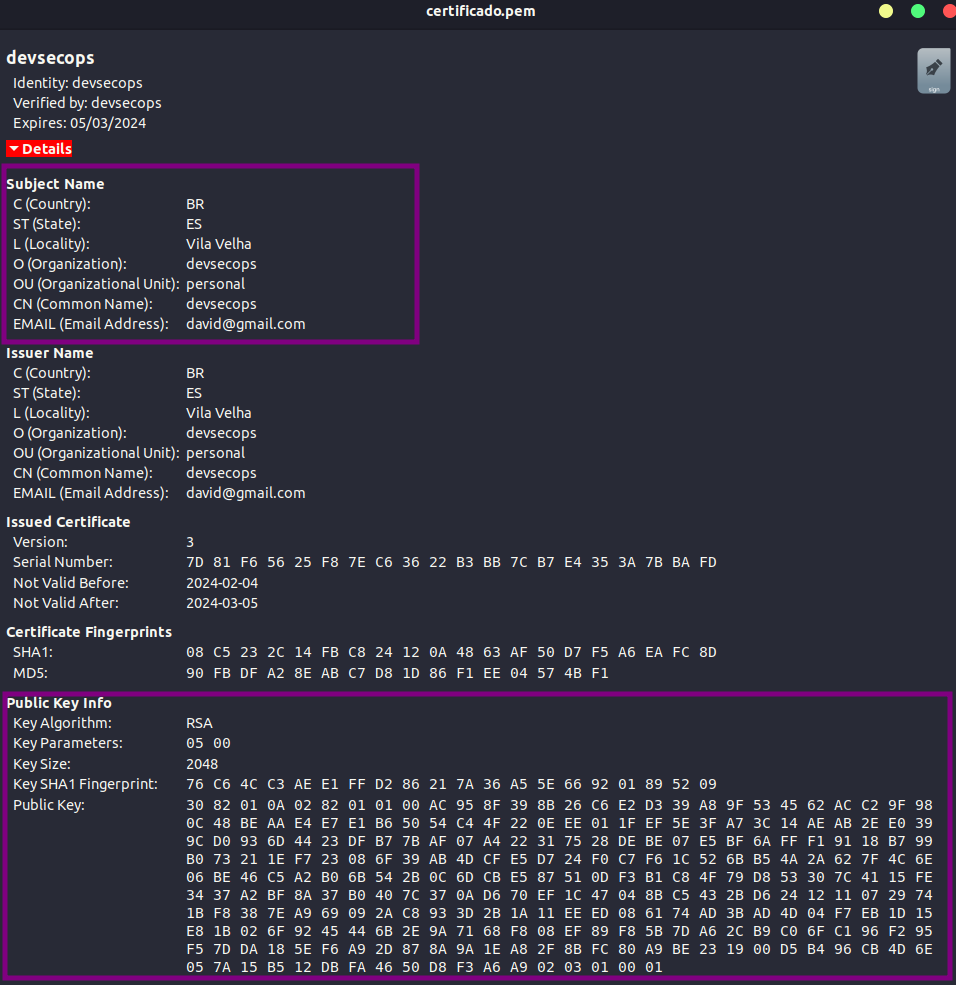
This is a self-signed certificate. Notice the Verified by: devsecops field.
If you generated the certificate you'll have to sign it yourself and nobody trusts you, therefore, this is not considered a secure certificate.
We could generate a certificate saying we're Amazon, passing all the necessary data on its behalf.
What proves that a site is who it claims to be?
Looking more closely at an amazon.com certificate for example we have:
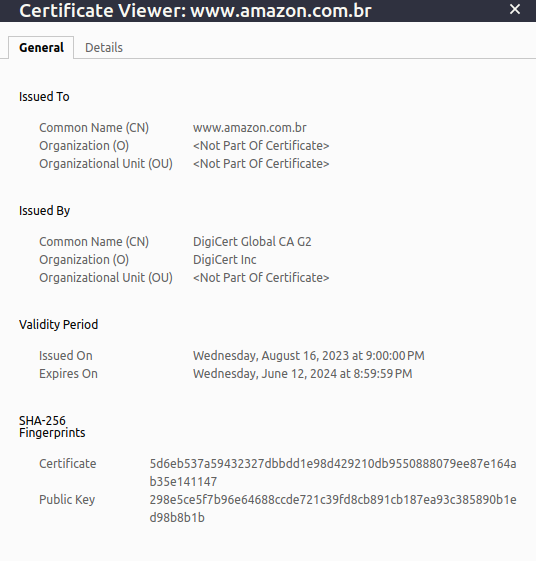
Now a certificate like Amazon's we have Issued By DigiCert Global CA G2. In other words, someone who isn't Amazon verified that this certificate is legitimate.
This is where the most important part of all comes in: who signed and issued the certificate?
The browser already does this work for you. It verifies who signed and issued the certificate and, if it's not a recognized Certificate Authority (CA), it will say that this certificate is not valid, therefore the page won't be secure.
Several CAs exist and can sign a certificate.
And many others...
To generate a legitimate certificate and pay for it, you need to create a CSR (Certificate Signing Request), which is an encoded data block that is generated by an entity requesting a digital certificate. A CSR contains the public information associated with a public key for which the certificate will be issued.
When you want to obtain a digital certificate, you need to generate a CSR and send it to a trusted Certificate Authority (CA) for signing. The CA uses the information in the CSR to create a digital certificate that links the public key provided in the CSR to a particular holder (such as a domain or organization).
To generate a CSR, the command is as follows:
openssl req -new -key mysite.key -out mysite.csr

# We answer some questions...
You are about to be asked to enter information that will be incorporated
into your certificate request.
What you are about to enter is what is called a Distinguished Name or a DN.
There are quite a few fields but you can leave some blank
For some fields there will be a default value,
If you enter '.', the field will be left blank.
-----
Country Name (2 letter code) [AU]:BR
State or Province Name (full name) [Some-State]:ES
Locality Name (eg, city) []:Vila Velha
Organization Name (eg, company) [Internet Widgits Pty Ltd]:devsecops.puziol.com.br
Organizational Unit Name (eg, section) []:devsecops
Common Name (e.g. server FQDN or YOUR name) []:devsecops.puziol.com.br
Email Address []:[email protected]

Please enter the following 'extra' attributes
to be sent with your certificate request
A challenge password []:mypass
An optional company name []:devsecops

cat mysite.csr
-----BEGIN CERTIFICATE REQUEST-----
MIIDHjCCAgYCAQAwgacxCzAJBgNVBAYTAkJSMQswCQYDVQQIDAJFUzETMBEGA1UE
BwwKVmlsYSBWZWxoYTEgMB4GA1UECgwXZGV2c2Vjb3BzLnB1emlvbC5jb20uYnIx
EjAQBgNVBAsMCWRldnNlY29wczEgMB4GA1UEAwwXZGV2c2Vjb3BzLnB1emlvbC5j
b20uYnIxHjAcBgkqhkiG9w0BCQEWD2RhdmlkQGdtYWlsLmNvbTCCASIwDQYJKoZI
hvcNAQEBBQADggEPADCCAQoCggEBAKyVjzmLJsbi0zmon1NFYqzCn5gMSL6q5Ofh
tlBUxE8iDu4BH+9eP6c8FK6rLuA5nNCTbUQj37d7rwekIjF1KN6+B+W/av/xkRi3
mbBzIR73IwhvOatNz+XXJPDH9hxSa7VKKmJ/TG4GvkbForBrVCsMbcvlh1EN87HI
T3nYUzB8QRX+NDeiv4o3sEB8NwrWcO8cRwSLxUMr1iQSEQcpdBv4OH6paQkqyJM9
KxoR7u0IYXStO61NBPfrHRXoGwJvkkVEay6acWj4CO+J+Ft9piy5wG/BlvKV9X3a
GF72qS2HipoeqC+L/ICpviMZANW0lstNbgV6FbUS2/pGUNjzpqkCAwEAAaAxMBUG
CSqGSIb3DQEJBzEIDAZteXBhc3MwGAYJKoZIhvcNAQkCMQsMCWRldnNlY29wczAN
BgkqhkiG9w0BAQsFAAOCAQEAqdM/RmCkIuMAIFcqK6nb4+dJfNXtmggv+0yLZu0K
ccN1STg4XgttfvR1ZJAS38IUEWSEUIJ7K4nkxdUDZnxoXFEFpzN5PKpdp6/i3Sv2
o6xp7uWQhIs08zeg5MA4wuKjcNMev58zv7w4YTQNlhZzJj6mtWIWTkb2y5XYwLeV
1vHz6vqbb2TE+UFNmBteX0q+QOK63ymoODVNBTss36c05Hs6pr8WYAN6nNIK3HcK
/b015LP6J6AdZGx3CXDxc+UDRMn1W0vG86/yduRqMZmeUTE/BD7l5PoFxZwnUJqX
j+PtE66Cj5z6duvO4qa/hdQmT/R+DR7QOTEbsDMrdSKKUg==
-----END CERTIFICATE REQUEST-----

# We can also pass all parameters in the command
# C = Country
# ST = State
# O = Organization
# CN = Common Name
openssl req -new -key mysite.key -out mysite.csr -subj "/C=BR/ST=ES/O=devsecops/CN=devsecops.puziol.com.br"
This generated .csr file must be sent to the certificate authority for signing. The CA has its own public and private keys. An interesting fact is that this type of signing server needs to be kept with maximum security because if its private key is exposed, all certificates must be automatically invalidated.
The CA will check the data and send back the issued certificate signed with its private key. Now we'll have a certificate that the browser will trust.
But how does the browser know it was signed by a legitimate CA and not a fake CA?
Inside browsers we have several built-in public keys from legitimate CAs.
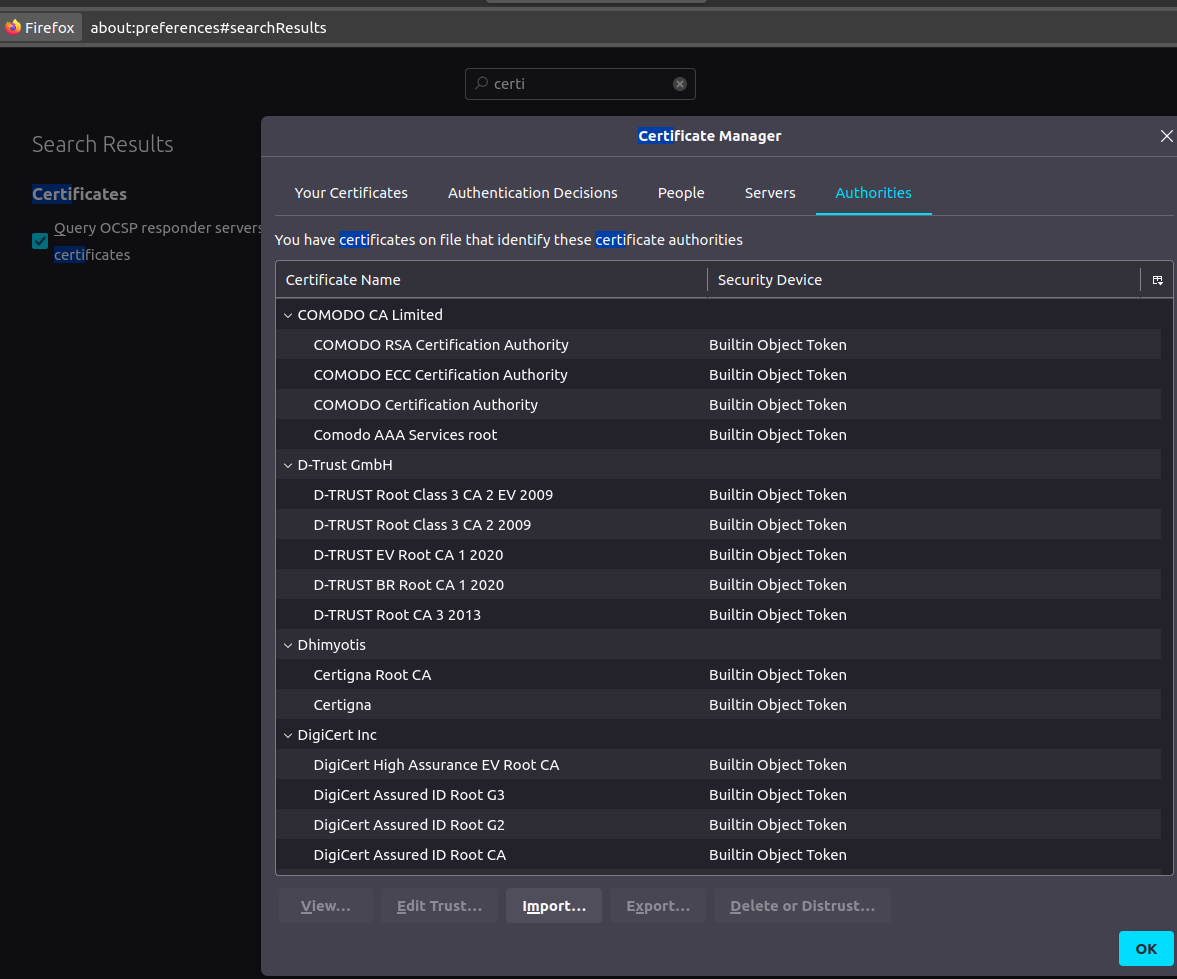
It's worth remembering that these are public CAs that help us validate public sites. These authorities can't validate a site that is on a private organization network.
Most CAs have services that can be deployed internally as a CA Server internally within the company. However, we can create our own CA to sign internal certificates and install it in browsers.
Finally, but not least, there's the question of how the server can guarantee the authenticity of the user. It's essential to protect against possible attacks from hackers who might impersonate someone else by intercepting data traffic.
Several government tax services require companies to have their certificates to prove their identity when communicating with their servers. The server requests the client's certificate to know that they are in fact who they claim to be. That's why it's also necessary to install these certificates on the client machine.
All this infrastructure created is known as PKI (Public Key Infrastructure).
Generally, certificates with public keys have the following names.
Certificate with public key:
- server.crt
- server.pem
- client.crt
- client.pem
Private keys usually have the word key as an extension or part of the name:
- server.key
- server-key.pem
- client.key
- client-key.pem
But if you check what we have inside, you can see the difference right at the beginning of the file:
-
-----BEGIN PRIVATE KEY-----
-
-----BEGIN PUBLIC KEY-----
-
-----BEGIN CERTIFICATE-----