Kubernetes TLS
Now that we understand how certificates, CA, and private keys work, we can move forward.
An important detail is that I was using a local k3d cluster to study, and it doesn't follow some guidelines we need to know here. I recommend installing a Kind cluster.
All communication between Kubernetes nodes, whether masters or workers, needs to be secure and encrypted. All interactions between all services and clients need to be secure.
An admin who interacts with the cluster through the API or kubectl needs to establish security to secure the connection.
Similarly, all communication between all components that exist in Kubernetes needs to be protected. It's necessary to know who talks to whom to understand who needs a certificate.
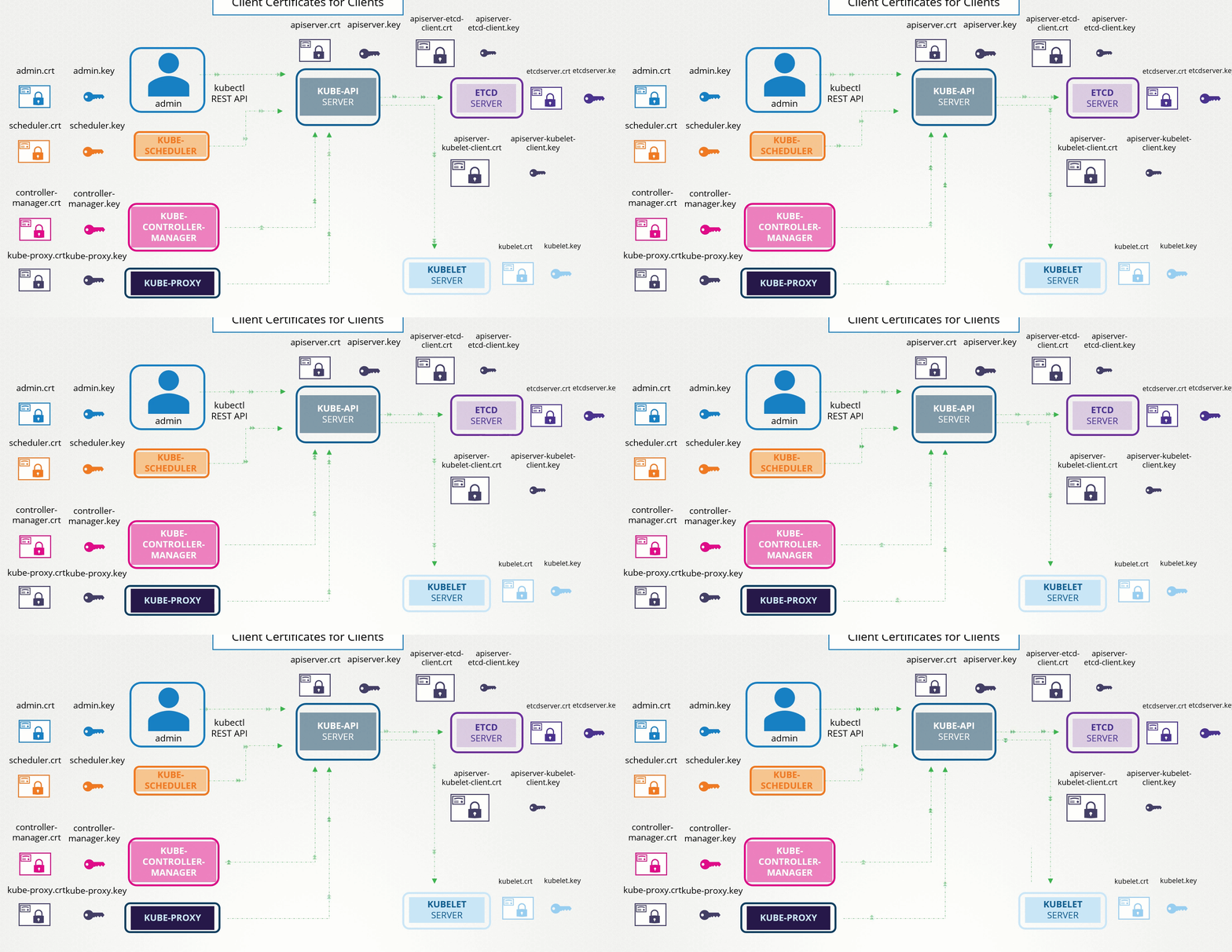
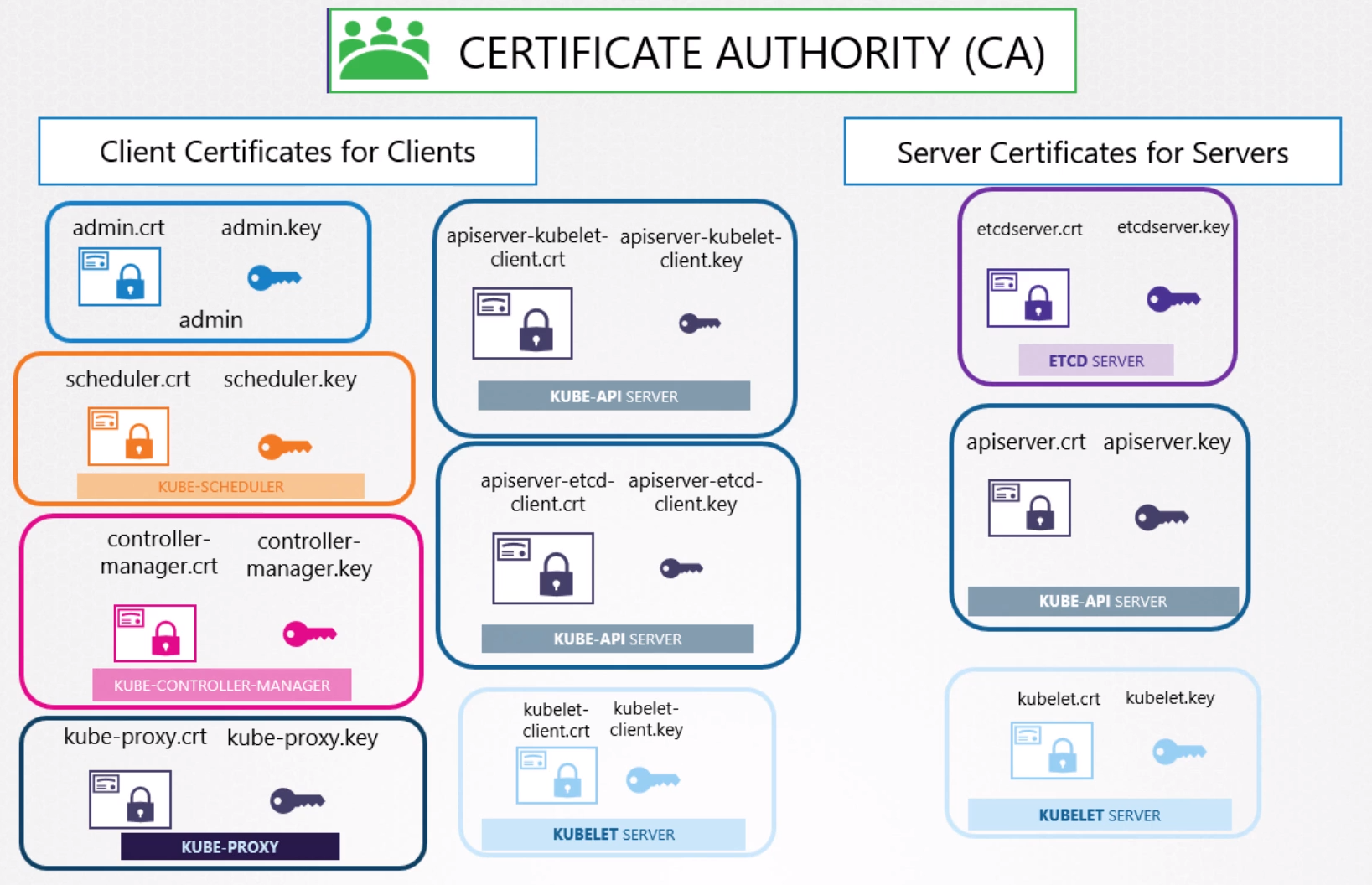
Several certificates exist here.
We can observe that we can call client-only:
- Scheduler
- Controller Manager
- Kube Proxy
- Admin (but it's not a component)
Server-only:
- Etcd
Client and Server:
- kube-apiserver
- Kubelet
In the case of kube-apiserver and Kubelet, it's possible to use the same certificate as both client and server, there would be no problem, but nothing prevents creating a client certificate for each of the communications it makes.
In this case, we would have in kube-api:
- pair as server
- pair as client for etcd
- pair as client for Kubelet
In Kubelet:
- Pair as server
- pair as client for kube-apiserver
And finally, we need to have AT LEAST one certificate authority that signs all these certificates.
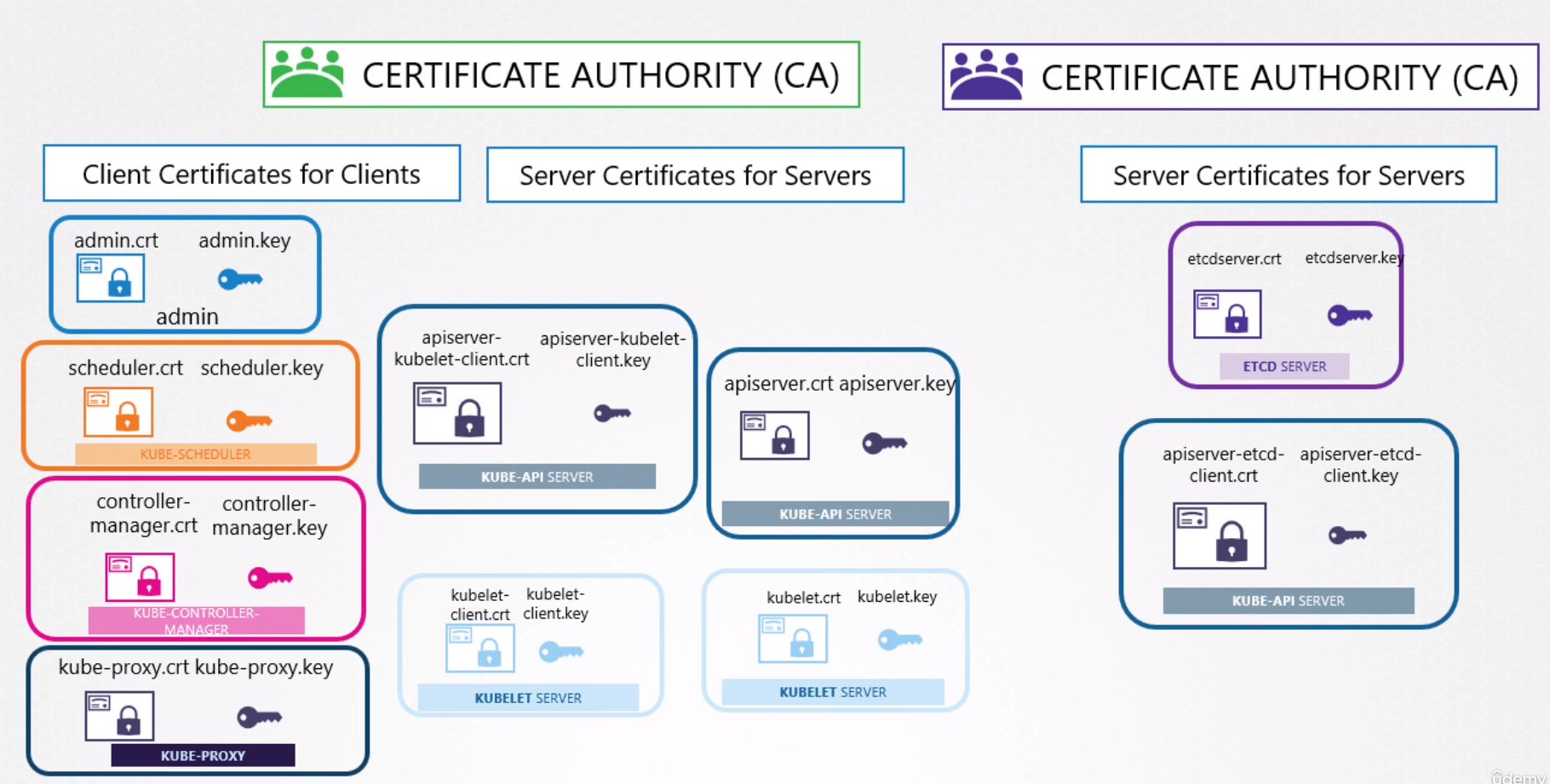
For example, if we had two certificate authorities, one for ETCD.
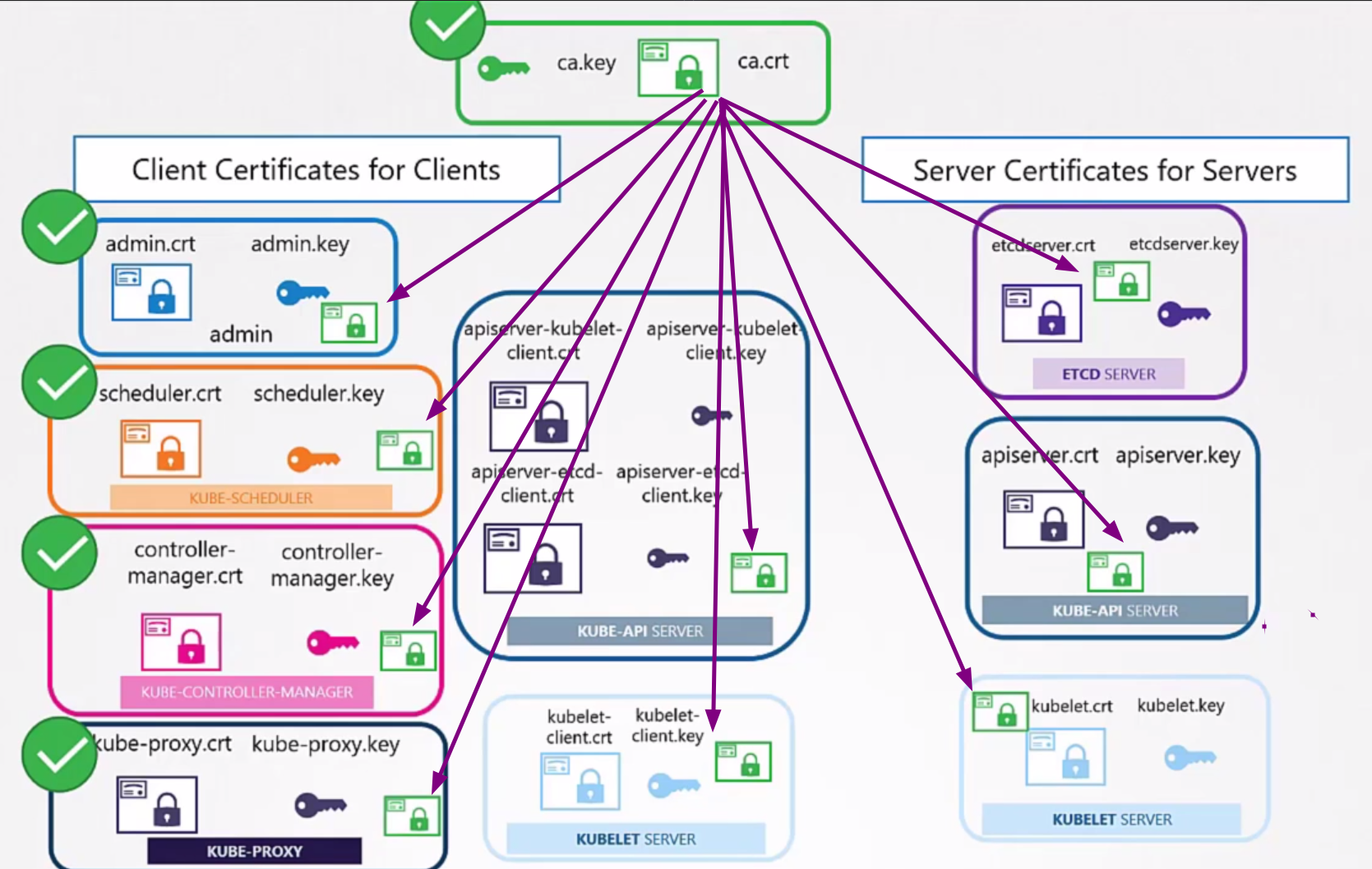
Remember that each CA has its own public and private key.
Generating Certificates
There are different tools available to help with this certificate generation work.
- easyrsa
- openssl
- cfssl
CA Certificate
The first thing we need is to resolve the CA that will sign all other certificates. Then generate a CSR which will be the certificate but without the signature and then sign it with the generated private key itself.
genrsa -out ca.key 2048
openssl req -new -key ca.key  -out ca.csr -subj "/CN=KUBERNETES-CA"
openssl x509 -req -in ca.csr -signkey ca.key -out ca.crt
Certificate request self-signature ok
subject=CN = KUBERNETES-CA

cat ca.key
-----BEGIN PRIVATE KEY-----
MIIEvQIBADANBgkqhkiG9w0BAQEFAASCBKcwggSjAgEAAoIBAQDS8msBzUP5PK78
R5YcmrnJmNQX3fomyEYeOcER5k6JViKDhrqWr7kQVXFGfmgwRh7kBIQGHg1eujkf
ZqQci0NGGDJQ+6idUhW4BIITKcs4OGVfoH5W8U1Ulf4RxQmqzVK23mE+sWWM/gKW
b+uBnANfsbA7uMWmjJUlVdqdCkrsAS1JEXPE6RNoz9akOvQXxLsfFSopd+9/GRtC
hopGY2XCniNlievOeiT4u+nWZ9xnQmNt8WIK1hB+lIsCQ0lsv+BOjjObOz/NtACC
c2pUhXWAX8xvp0dYBML7ClpV34IehCMtpVuergKU4WAypE17fC5HeUcCEjslYXer
h9dRWWmNAgMBAAECggEACidN/EO3kl8X4x/E+3J9H9WB2/Y8zLIWIe1QvD5UKGsj
dSY+g/NIWp9qOOTrueseIIaRHkRDC3y2NCs6Gf+gCNcwUNKULqJdVkKtSiPYWsfo
JT6x5hhuSvR/SrarvPNuGExC7QQX6b3uPPR9Jvtt9CS24WEG7nnU0fu8bpOowIxF
iloJDemwd+N5uJrpYQLDw7xNl4JtZ3JiIAM1CZ+WcCWaNTbFJPYc+35LWurKDuPx
yoMq0aJj4RAnWQGoPaZK3okFYLxsx5s357kRIdaRloesvS6Gsll0GI1Pkso61diP
0LlO1q9yXhF9n2pOnCSyUztwc3TWOkLsh/aPJqaaEQKBgQDafBplPJFmpy5mArN4
LYohs75dsIqwThEG0QTSgMjwaBNifrH2U4c8bH7/ulDWf+37QcAnxhAubY90MFVU
YS24lXx+fjWgVj16XobK9AkcAyGnofeLxwIQ4w6lnxTqVENXtlvtUnUaqv1iAZ7x
rfrnacNu2ReJ1ZSr0e4oc8TmhQKBgQD3KvnIddw1dCx9ABp0fuQl5Y0lMFVAqZpa
nAEgG+Z+oHPrpOhncTCCPqHh2v4mwaItn6MZqS8ZF7ZgiQ2L7Q3p0QS62rw3yj14
y5ct5A980uEem1l514VmAu5tVLucICmxg5y68roZQQVU6X1NUiBM6vUhKp6bzEcc
sD69qLp5aQKBgEZgL0hoyBUeyM1HFXQihxnwAeO/2AyOOOHPNhRwM0ls3MGfOce0
hB0sfYP2Cc/uCUQjm7e0DsZFuC2e2/2AB/ArBpzgHnn1DXx7MkPxc3W4dIDApTI6
+iliWfdzVJNebQq1zMqXAu2CIngNOZtzhRxBbxgniXN2fpsR1frlv4jZAoGBALZI
xpB1g6MUe57wjZIu5vmf8tljbOxUaNa8SQQyL2ph0TwPkaqASsMzh9X22QsiMQYu
vm21XVvHJiTJzujMOj+ffDqGCNuoVm+YznT0xgtLxuT4syNttB8IuGh/XiGFgto8
80DYtDDdyB3YWSXGFLZFbeU49mJ2ZFefD5Z2MphJAoGAe2qARSSS7HLZbCFyE2a9
S5WmTUy8mJKRRnI1Ziml0ES0HBLisZ9mwyp/Px+KAyz4oGwtGvNNPXtlh3g9KI/0
BcVa1qSDgC0mwk+mPZFVYpql/U4qCSX6ndIserseLMXzEY/PDt4acmquAp/poTVt
4U9H8I+IFvYBpSeu7BydEtk=
-----END PRIVATE KEY-----

cat ca.csr
-----BEGIN CERTIFICATE REQUEST-----
MIICXTCCAUUCAQAwGDEWMBQGA1UEAwwNS1VCRVJORVRFUy1DQTCCASIwDQYJKoZI
hvcNAQEBBQADggEPADCCAQoCggEBANLyawHNQ/k8rvxHlhyaucmY1Bfd+ibIRh45
wRHmTolWIoOGupavuRBVcUZ+aDBGHuQEhAYeDV66OR9mpByLQ0YYMlD7qJ1SFbgE
ghMpyzg4ZV+gflbxTVSV/hHFCarNUrbeYT6xZYz+ApZv64GcA1+xsDu4xaaMlSVV
2p0KSuwBLUkRc8TpE2jP1qQ69BfEux8VKil3738ZG0KGikZjZcKeI2WJ6856JPi7
6dZn3GdCY23xYgrWEH6UiwJDSWy/4E6OM5s7P820AIJzalSFdYBfzG+nR1gEwvsK
WlXfgh6EIy2lW56uApThYDKkTXt8Lkd5RwISOyVhd6uH11FZaY0CAwEAAaAAMA0G
CSqGSIb3DQEBCwUAA4IBAQC6Ra53Au+cfLfHAp81P5OShqkMzVFGeS8I+JIX2P69
v+h2+J/gMkYI6AyGV6Nj5Y/FVRNrHSDC4DjZ7VlbJ4QYNSOiZejCZrj6GykusYmC
9clJkL1cw1RdI+nETjm6CPV2zFsN7BtPb560z3FgGcVWrAhltqguNZvCPRkom8Xo
LAYPC2+IAN0uQbSDlEhSu5Uty7aaAO+Q74NHVHk4RuiZYk7fUsOUdb43pK3dBLcp
oP1a3XrEpzJozV+n/KKntnAEZ7P2LCYNtSsVr4kbXODCGcdhtxjpKNby81O8aC9K
WsfHqUszqKcxOOHSnb4cP6us0hDzJjmN4nszoa2wFOUm
-----END CERTIFICATE REQUEST-----

cat ca.crt
-----BEGIN CERTIFICATE-----
MIICtzCCAZ8CFAWTsi01pUIDnIam8zmGDzTRMpfIMA0GCSqGSIb3DQEBCwUAMBgx
FjAUBgNVBAMMDUtVQkVSTkVURVMtQ0EwHhcNMjQwMjA1MDM1NjAzWhcNMjQwMzA2
MDM1NjAzWjAYMRYwFAYDVQQDDA1LVUJFUk5FVEVTLUNBMIIBIjANBgkqhkiG9w0B
AQEFAAOCAQ8AMIIBCgKCAQEA0vJrAc1D+Tyu/EeWHJq5yZjUF936JshGHjnBEeZO
iVYig4a6lq+5EFVxRn5oMEYe5ASEBh4NXro5H2akHItDRhgyUPuonVIVuASCEynL
ODhlX6B+VvFNVJX+EcUJqs1Stt5hPrFljP4Clm/rgZwDX7GwO7jFpoyVJVXanQpK
7AEtSRFzxOkTaM/WpDr0F8S7HxUqKXfvfxkbQoaKRmNlwp4jZYnrznok+Lvp1mfc
Z0JjbfFiCtYQfpSLAkNJbL/gTo4zmzs/zbQAgnNqVIV1gF/Mb6dHWATC+wpaVd+C
HoQjLaVbnq4ClOFgMqRNe3wuR3lHAhI7JWF3q4fXUVlpjQIDAQABMA0GCSqGSIb3
DQEBCwUAA4IBAQAVdpOPie+f7E2jDiubID0l/iPbvp//y/tQ6JRy5lOUbzsS6hEI
bodZwMnjpl6+YXTU9hp/hOWBavN5l3FfESnC3zJIWmzwug+FVpTHCEdLCJtFrnOX
KC4GoZA3NU899tuWguIxe6gc4J5wODCEhCWFq9C709tMCAbovrM5SRPNRb6B+5/s
R2Cl6z+1IzbM6ngp0+Qyv+o3WosaxVLDodoGFhPWTrYwoHR6v8ezz7uRB1jAEewO
kyv2ip/iKEe9RnOLsPllgiPPOOHr93wCHQo1t4L64oQ54oXChZcdD06QDHOzZMJY
CwhCDdMm1hTef6UvZiGHU3s6yxrwiiraBOX0
-----END CERTIFICATE-----
Client Certificates
From here on, what are we going to do? Create all private keys, certificates, and sign them with the CA's private key.
# admin in this case we need to pass the group that will be used later with /O We'll see more later
openssl genrsa -out admin.key 2048
openssl req -new -key admin.key  -out admin.csr -subj "/CN=kube-admin/O=system:masters"
openssl x509 -req -in admin.csr -signkey ca.key -out admin.crt

# All system components need to receive the system prefix
openssl genrsa -out scheduler.key 2048
openssl req -new -key scheduler.key  -out scheduler.csr -subj "/CN=system:kube-scheduler"
openssl x509 -req -in scheduler.csr -signkey ca.key -out scheduler.crt

openssl genrsa -out controller-manager.key 2048
openssl req -new -key controller-manager.key  -out controller-manager.csr -subj "/CN=system:kube-controller-manager"
openssl x509 -req -in controller-manager.csr -signkey ca.key -out controller-manager.crt

openssl genrsa -out kube-proxy.key 2048
openssl req -new -key kube-proxy.key  -out kube-proxy.csr -subj "/CN=system:kube-proxy"
openssl x509 -req -in kube-proxy.csr -signkey ca.key -out kube-proxy.crt
Great, and what do we use these certificates for?
For example, admin can be used to access the cluster through the API.
For example, this kubeconfig here.
apiVersion: v1
clusters:
- cluster:
    # this is our ca
    certificate-authority-data: LS0tLS1CRUdJTiBDRVJUSUZJQ0FURS0tLS0tCk1JSUJlRENDQVIyZ0F3SUJBZ0lCQURBS0JnZ3Foa2pPUFFRREFqQWpNU0V3SHdZRFZRUUREQmhyTTNNdGMyVnkKZG1WeUxXTmhRREUzTURRNE1qZzJORGt3SGhjTk1qUXdNVEE1TVRrek1EUTVXaGNOTXpRd01UQTJNVGt6TURRNQpXakFqTVNFd0h3WURWUVFEREJock0zTXRjMlZ5ZG1WeUxXTmhRREUzTURRNE1qZzJORGt3V1RBVEJnY3Foa2pPClBRSUJCZ2dxaGtqT1BRTUJCd05DQUFUMnFnUTR6b3JjeWVLc2xwRWFOREtyMDdtVmdVcDVieEFNUHgreHRjUlUKYUg3c1Q2YnBKTHdIVG15RERtc3VhM1JZdmgzOU9Zc29Dbk9qd0JrdStuUExvMEl3UURBT0JnTlZIUThCQWY4RQpCQU1DQXFRd0R3WURWUjBUQVFIL0JBVXdBd0VCL3pBZEJnTlZIUTRFRmdRVThqUHhlTm5nSGZpR2FwVmwyc09DCk1ucmRoQUF3Q2dZSUtvWkl6ajBFQXdJRFNRQXdSZ0loQUlXUnVMbS93d2R0SVBmcUZ5ZjMxN2ZKbVliU3cvRisKaThydDFDaHQvUDhnQWlFQXc2Q0tSS1RMR3Zic084aEp4LzY2R1RHc2ZwdGZicUg4bE1iTjVuUWlJVjA9Ci0tLS0tRU5EIENFUlRJRklDQVRFLS0tLS0K
    server: https://0.0.0.0:42861
  name: k3d-k3s-default
contexts:
- context:
    cluster: k3d-k3s-default
    user: admin@k3d-k3s-default
  name: k3d-k3s-default
current-context: k3d-k3s-default
kind: Config
preferences: {}
users:
- name: admin@k3d-k3s-default
  user:
    # Certificate
    client-certificate-data: LS0tLS1CRUdJTiBDRVJUSUZJQ0FURS0tLS0tCk1JSUJrRENDQVRlZ0F3SUJBZ0lJTFZYS2lBbDBjd1l3Q2dZSUtvWkl6ajBFQXdJd0l6RWhNQjhHQTFVRUF3d1kKYXpOekxXTnNhV1Z1ZEMxallVQXhOekEwT0RJNE5qUTVNQjRYRFRJME1ERXdPVEU1TXpBME9Wb1hEVEkxTURFdwpPREU1TXpBME9Wb3dNREVYTUJVR0ExVUVDaE1PYzNsemRHVnRPbTFoYzNSbGNuTXhGVEFUQmdOVkJBTVRESE41CmMzUmxiVHBoWkcxcGJqQlpNQk1HQnlxR1NNNDlBZ0VHQ0NxR1NNNDlBd0VIQTBJQUJJeGlJYitxTGh0T2k2WmYKYUVpb2gyaklvZDFUUHJBUlhvQUFFMEFiVE9TUDF6R3U5RkNoMXFPWk5uL0VCclpMeVNCenN6QUpvM0dMcTJJUwpDMkowdlFTalNEQkdNQTRHQTFVZER3RUIvd1FFQXdJRm9EQVRCZ05WSFNVRUREQUtCZ2dyQmdFRkJRY0RBakFmCkJnTlZIU01FR0RBV2dCVHF5RkZyS21jcGVLanVid2ZBKzliZTk5WlZ6REFLQmdncWhrak9QUVFEQWdOSEFEQkUKQWlCUnVIQXNTVmFlOFJkbUd1K2QxVFNjUkdnSlk4VEo1V3IwYXJLcWoweFY5Z0lnVHI0c3dHb2p3UXh5dUNBTQpDZ01RM1EyNFZGcVY0UHpXYk9sQ2hDVDdkU2c9Ci0tLS0tRU5EIENFUlRJRklDQVRFLS0tLS0KLS0tLS1CRUdJTiBDRVJUSUZJQ0FURS0tLS0tCk1JSUJkekNDQVIyZ0F3SUJBZ0lCQURBS0JnZ3Foa2pPUFFRREFqQWpNU0V3SHdZRFZRUUREQmhyTTNNdFkyeHAKWlc1MExXTmhRREUzTURRNE1qZzJORGt3SGhjTk1qUXdNVEE1TVRrek1EUTVXaGNOTXpRd01UQTJNVGt6TURRNQpXakFqTVNFd0h3WURWUVFEREJock0zTXRZMnhwWlc1MExXTmhRREUzTURRNE1qZzJORGt3V1RBVEJnY3Foa2pPClBRSUJCZ2dxaGtqT1BRTUJCd05DQUFSc3pLZ2xRSE9veUZpZk1KWlV2SlVCeHRKSHdiQmN6L3N1YWk0aTQycnYKTVNDZ0JHeDRNVmNRTWIycVhQeERjRjBDRjdLMXZVRGYwbFRaZVRQSnBleUJvMEl3UURBT0JnTlZIUThCQWY4RQpCQU1DQXFRd0R3WURWUjBUQVFIL0JBVXdBd0VCL3pBZEJnTlZIUTRFRmdRVTZzaFJheXBuS1hpbzdtOEh3UHZXCjN2ZldWY3d3Q2dZSUtvWkl6ajBFQXdJRFNBQXdSUUloQUpkajdaaUsvMzB2dG9JQU1VL1JPeTdmMXNGUVFrWWIKbUw4a1J2V05vK1h5QWlBVjlkdWh2OWdibWs2aWtsQUVNU2t6dnkwQU9Mb2t4bk5acG1PVFB4Y1kvZz09Ci0tLS0tRU5EIENFUlRJRklDQVRFLS0tLS0K
    # Private key
    client-key-data: LS0tLS1CRUdJTiBFQyBQUklWQVRFIEtFWS0tLS0tCk1IY0NBUUVFSUZ2TU0wZG5kUk5XeDFVZU4zZVREMWdjMVAvYkxLYXZkc2ZXcExjRWpZaFpvQW9HQ0NxR1NNNDkKQXdFSG9VUURRZ0FFakdJaHY2b3VHMDZMcGw5b1NLaUhhTWloM1ZNK3NCRmVnQUFUUUJ0TTVJL1hNYTcwVUtIVwpvNWsyZjhRR3RrdkpJSE96TUFtamNZdXJZaElMWW5TOUJBPT0KLS0tLS1FTkQgRUMgUFJJVkFURSBLRVktLS0tLQo=
In the kubeconfig, these values are encrypted in base64, let's decode them and put them in a file to use.
echo "LS0tLS1CRUdJTiBDRVJUSUZJQ0FURS0tLS0tCk1JSUJlRENDQVIyZ0F3SUJBZ0lCQURBS0JnZ3Foa2pPUFFRREFqQWpNU0V3SHdZRFZRUUREQmhyTTNNdGMyVnkKZG1WeUxXTmhRREUzTURRNE1qZzJORGt3SGhjTk1qUXdNVEE1TVRrek1EUTVXaGNOTXpRd01UQTJNVGt6TURRNQpXakFqTVNFd0h3WURWUVFEREJock0zTXRjMlZ5ZG1WeUxXTmhRREUzTURRNE1qZzJORGt3V1RBVEJnY3Foa2pPClBRSUJCZ2dxaGtqT1BRTUJCd05DQUFUMnFnUTR6b3JjeWVLc2xwRWFOREtyMDdtVmdVcDVieEFNUHgreHRjUlUKYUg3c1Q2YnBKTHdIVG15RERtc3VhM1JZdmgzOU9Zc29Dbk9qd0JrdStuUExvMEl3UURBT0JnTlZIUThCQWY4RQpCQU1DQXFRd0R3WURWUjBUQVFIL0JBVXdBd0VCL3pBZEJnTlZIUTRFRmdRVThqUHhlTm5nSGZpR2FwVmwyc09DCk1ucmRoQUF3Q2dZSUtvWkl6ajBFQXdJRFNRQXdSZ0loQUlXUnVMbS93d2R0SVBmcUZ5ZjMxN2ZKbVliU3cvRisKaThydDFDaHQvUDhnQWlFQXc2Q0tSS1RMR3Zic084aEp4LzY2R1RHc2ZwdGZicUg4bE1iTjVuUWlJVjA9Ci0tLS0tRU5EIENFUlRJRklDQVRFLS0tLS0K" | base64 --decode > ca.crt

cat ca.crt
-----BEGIN CERTIFICATE-----
MIIBeDCCAR2gAwIBAgIBADAKBggqhkjOPQQDAjAjMSEwHwYDVQQDDBhrM3Mtc2Vy
dmVyLWNhQDE3MDQ4Mjg2NDkwHhcNMjQwMTA5MTkzMDQ5WhcNMzQwMTA2MTkzMDQ5
WjAjMSEwHwYDVQQDDBhrM3Mtc2VydmVyLWNhQDE3MDQ4Mjg2NDkwWTATBgcqhkjO
PQIBBggqhkjOPQMBBwNCAAT2qgQ4zorcyeKslpEaNDKr07mVgUp5bxAMPx+xtcRU
aH7sT6bpJLwHTmyDDmsua3RYvh39OYsoCnOjwBku+nPLo0IwQDAOBgNVHQ8BAf8E
BAMCAqQwDwYDVR0TAQH/BAUwAwEB/zAdBgNVHQ4EFgQU8jPxeNngHfiGapVl2sOC
MnrdhAAwCgYIKoZIzj0EAwIDSQAwRgIhAIWRuLm/wwdtIPfqFyf317fJmYbSw/F+
i8rt1Cht/P8gAiEAw6CKRKTLGvbsO8hJx/66GTGsfptfbqH8lMbN5nQiIV0=
-----END CERTIFICATE-----

echo "LS0tLS1CRUdJTiBDRVJUSUZJQ0FURS0tLS0tCk1JSUJrRENDQVRlZ0F3SUJBZ0lJTFZYS2lBbDBjd1l3Q2dZSUtvWkl6ajBFQXdJd0l6RWhNQjhHQTFVRUF3d1kKYXpOekxXTnNhV1Z1ZEMxallVQXhOekEwT0RJNE5qUTVNQjRYRFRJME1ERXdPVEU1TXpBME9Wb1hEVEkxTURFdwpPREU1TXpBME9Wb3dNREVYTUJVR0ExVUVDaE1PYzNsemRHVnRPbTFoYzNSbGNuTXhGVEFUQmdOVkJBTVRESE41CmMzUmxiVHBoWkcxcGJqQlpNQk1HQnlxR1NNNDlBZ0VHQ0NxR1NNNDlBd0VIQTBJQUJJeGlJYitxTGh0T2k2WmYKYUVpb2gyaklvZDFUUHJBUlhvQUFFMEFiVE9TUDF6R3U5RkNoMXFPWk5uL0VCclpMeVNCenN6QUpvM0dMcTJJUwpDMkowdlFTalNEQkdNQTRHQTFVZER3RUIvd1FFQXdJRm9EQVRCZ05WSFNVRUREQUtCZ2dyQmdFRkJRY0RBakFmCkJnTlZIU01FR0RBV2dCVHF5RkZyS21jcGVLanVid2ZBKzliZTk5WlZ6REFLQmdncWhrak9QUVFEQWdOSEFEQkUKQWlCUnVIQXNTVmFlOFJkbUd1K2QxVFNjUkdnSlk4VEo1V3IwYXJLcWoweFY5Z0lnVHI0c3dHb2p3UXh5dUNBTQpDZ01RM1EyNFZGcVY0UHpXYk9sQ2hDVDdkU2c9Ci0tLS0tRU5EIENFUlRJRklDQVRFLS0tLS0KLS0tLS1CRUdJTiBDRVJUSUZJQ0FURS0tLS0tCk1JSUJkekNDQVIyZ0F3SUJBZ0lCQURBS0JnZ3Foa2pPUFFRREFqQWpNU0V3SHdZRFZRUUREQmhyTTNNdFkyeHAKWlc1MExXTmhRREUzTURRNE1qZzJORGt3SGhjTk1qUXdNVEE1TVRrek1EUTVXaGNOTXpRd01UQTJNVGt6TURRNQpXakFqTVNFd0h3WURWUVFEREJock0zTXRZMnhwWlc1MExXTmhRREUzTURRNE1qZzJORGt3V1RBVEJnY3Foa2pPClBRSUJCZ2dxaGtqT1BRTUJCd05DQUFSc3pLZ2xRSE9veUZpZk1KWlV2SlVCeHRKSHdiQmN6L3N1YWk0aTQycnYKTVNDZ0JHeDRNVmNRTWIycVhQeERjRjBDRjdLMXZVRGYwbFRaZVRQSnBleUJvMEl3UURBT0JnTlZIUThCQWY4RQpCQU1DQXFRd0R3WURWUjBUQVFIL0JBVXdBd0VCL3pBZEJnTlZIUTRFRmdRVTZzaFJheXBuS1hpbzdtOEh3UHZXCjN2ZldWY3d3Q2dZSUtvWkl6ajBFQXdJRFNBQXdSUUloQUpkajdaaUsvMzB2dG9JQU1VL1JPeTdmMXNGUVFrWWIKbUw4a1J2V05vK1h5QWlBVjlkdWh2OWdibWs2aWtsQUVNU2t6dnkwQU9Mb2t4bk5acG1PVFB4Y1kvZz09Ci0tLS0tRU5EIENFUlRJRklDQVRFLS0tLS0K" | base64 --decode > admin.crt

cat admin.crt
-----BEGIN CERTIFICATE-----
MIIBkDCCATegAwIBAgIILVXKiAl0cwYwCgYIKoZIzj0EAwIwIzEhMB8GA1UEAwwY
azNzLWNsaWVudC1jYUAxNzA0ODI4NjQ5MB4XDTI0MDEwOTE5MzA0OVoXDTI1MDEw
ODE5MzA0OVowMDEXMBUGA1UEChMOc3lzdGVtOm1hc3RlcnMxFTATBgNVBAMTDHN5
c3RlbTphZG1pbjBZMBMGByqGSM49AgEGCCqGSM49AwEHA0IABIxiIb+qLhtOi6Zf
aEioh2jIod1TPrARXoAAE0AbTOSP1zGu9FCh1qOZNn/EBrZLySBzszAJo3GLq2IS
C2J0vQSjSDBGMA4GA1UdDwEB/wQEAwIFoDATBgNVHSUEDDAKBggrBgEFBQcDAjAf
BgNVHSMEGDAWgBTqyFFrKmcpeKjubwfA+9be99ZVzDAKBggqhkjOPQQDAgNHADBE
AiBRuHAsSVae8RdmGu+d1TScRGgJY8TJ5Wr0arKqj0xV9gIgTr4swGojwQxyuCAM
CgMQ3Q24VFqV4PzWbOlChCT7dSg=
-----END CERTIFICATE-----

echo "LS0tLS1CRUdJTiBFQyBQUklWQVRFIEtFWS0tLS0tCk1IY0NBUUVFSUZ2TU0wZG5kUk5XeDFVZU4zZVREMWdjMVAvYkxLYXZkc2ZXcExjRWpZaFpvQW9HQ0NxR1NNNDkKQXdFSG9VUURRZ0FFakdJaHY2b3VHMDZMcGw5b1NLaUhhTWloM1ZNK3NCRmVnQUFUUUJ0TTVJL1hNYTcwVUtIVwpvNWsyZjhRR3RrdkpJSE96TUFtamNZdXJZaElMWW5TOUJBPT0KLS0tLS1FTkQgRUMgUFJJVkFURSBLRVktLS0tLQo=" | base64 --decode > admin.key

cat admin.key
-----BEGIN EC PRIVATE KEY-----
MHcCAQEEIFvMM0dndRNWx1UeN3eTD1gc1P/bLKavdsfWpLcEjYhZoAoGCCqGSM49
AwEHoUQDQgAEjGIhv6ouG06Lpl9oSKiHaMih3VM+sBFegAATQBtM5I/XMa70UKHW
o5k2f8QGtkvJIHOzMAmjcYurYhILYnS9BA==
-----END EC PRIVATE KEY-----
Now with the command curl https://0.0.0.0:42861/api/v1/pods --key admin.key --cert admin.crt --cacert ca.crt we can get information about pods using only the API.
kubectl uses the certificates as we can observe, but directly in the file. It would be as if we had.
apiVersion: v1
clusters:
- cluster:
    # this is our ca
    certificate-authority-data: ca.crt
    server: https://0.0.0.0:42861
  name: k3d-k3s-default
contexts:
- context:
    cluster: k3d-k3s-default
    user: admin@k3d-k3s-default
  name: k3d-k3s-default
current-context: k3d-k3s-default
kind: Config
preferences: {}
users:
- name: admin@k3d-k3s-default
  user:
    # Certificate
    client-certificate-data: admin.crt
    # Private key
    client-key-data: admin.key
A copy of ca.crt needs to be in all components because they need to trust this authority. We are signing with the CA's private key, which doesn't need to be inside each component, but the certificate containing the information and public key is necessary.
Server Certificates
Now let's move on to server certificates.
In the case of ETCD we have.
openssl genrsa -out etcdserver.key 2048
openssl req -new -key etcdserver.key  -out etcdserver.csr -subj "/CN=etcd-server"
openssl x509 -req -in etcdserver.csr -signkey ca.key -out etcdserver.crt
But etcd is also a cluster, deployed inside the masters or outside, so we have the certificates of each of its members. We don't need to show this here now, but we'll study it later when creating a cluster from scratch.
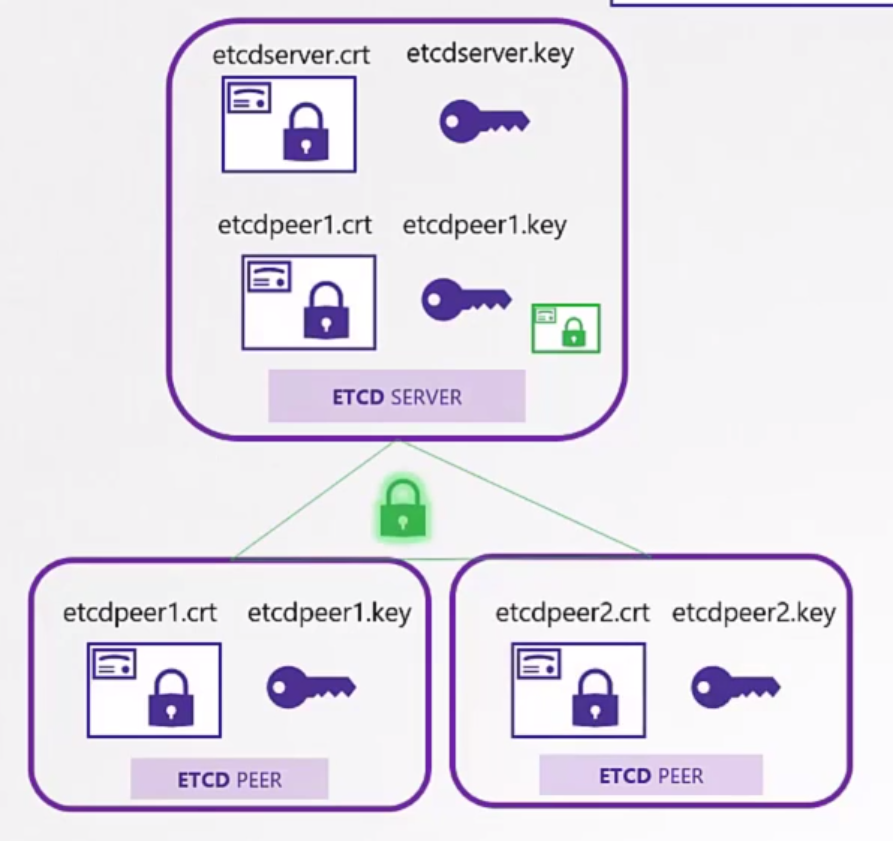
These certificates are necessary in the configuration of each etcd member.
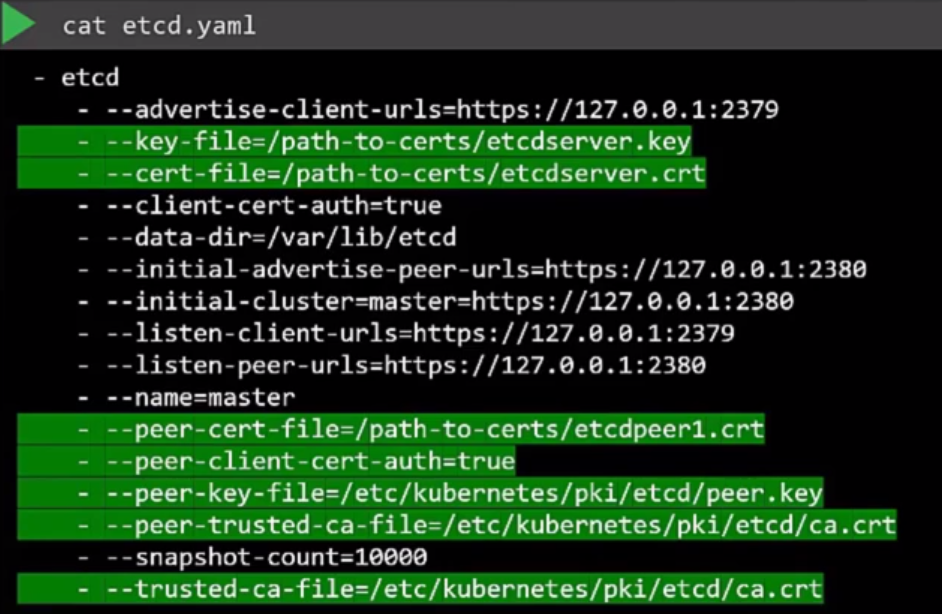
The kube-apiserver is the central point of Kubernetes since it will be the entry point for the cluster and some additional parameters are needed. The kube-apiserver is called by several names so we need to pass more aliases for it. Those unfamiliar with Kubernetes might not know this.
In the certificate it's necessary to have:
- All aliases and only through these names can we make a valid connection
- kubernetes
- kubernetes.default
- kubernetes.default.svc
- kubernetes.default.svc.cluster.local
- Pod IP
- Host IP
openssl genrsa -out apiserver.key 2048
# Creating a configuration file to make the next command easier
echo "
[req]
req_extensions = v3_req
distinguished_name = req_distinguished_name

[ v3_req ]
basicConstraints = CA:FALSE
keyUsage = nonRepudiation
subjectAltName = @alt_names

[alt_names]
DNS.1 = kubernetes
DNS.2 = kubernetes.default
DNS.3 = kubernetes.default.svc
DNS.4 = kubernetes.default.svc.cluster.local
IP.1 = 10.96.0.1
IP.2 = 172.17.0.87

[req_distinguished_name]" > openssl.cnf


openssl req -new -key apiserver.key  -out apiserver.csr -subj "/CN=kube-apiserver" --config openssl.cnf
openssl x509 -req -in apiserver.csr -signkey ca.key -out apiserver.crt
In the kube-apiserver configuration we have the following parameters to pass, remembering that kube-apiserver needs to communicate with etcd and with Kubelet on the hosts. It wasn't shown here yet, but it would be necessary to generate more certificates, but the same certificate could also be used, it's a matter of configuration when setting up the cluster.
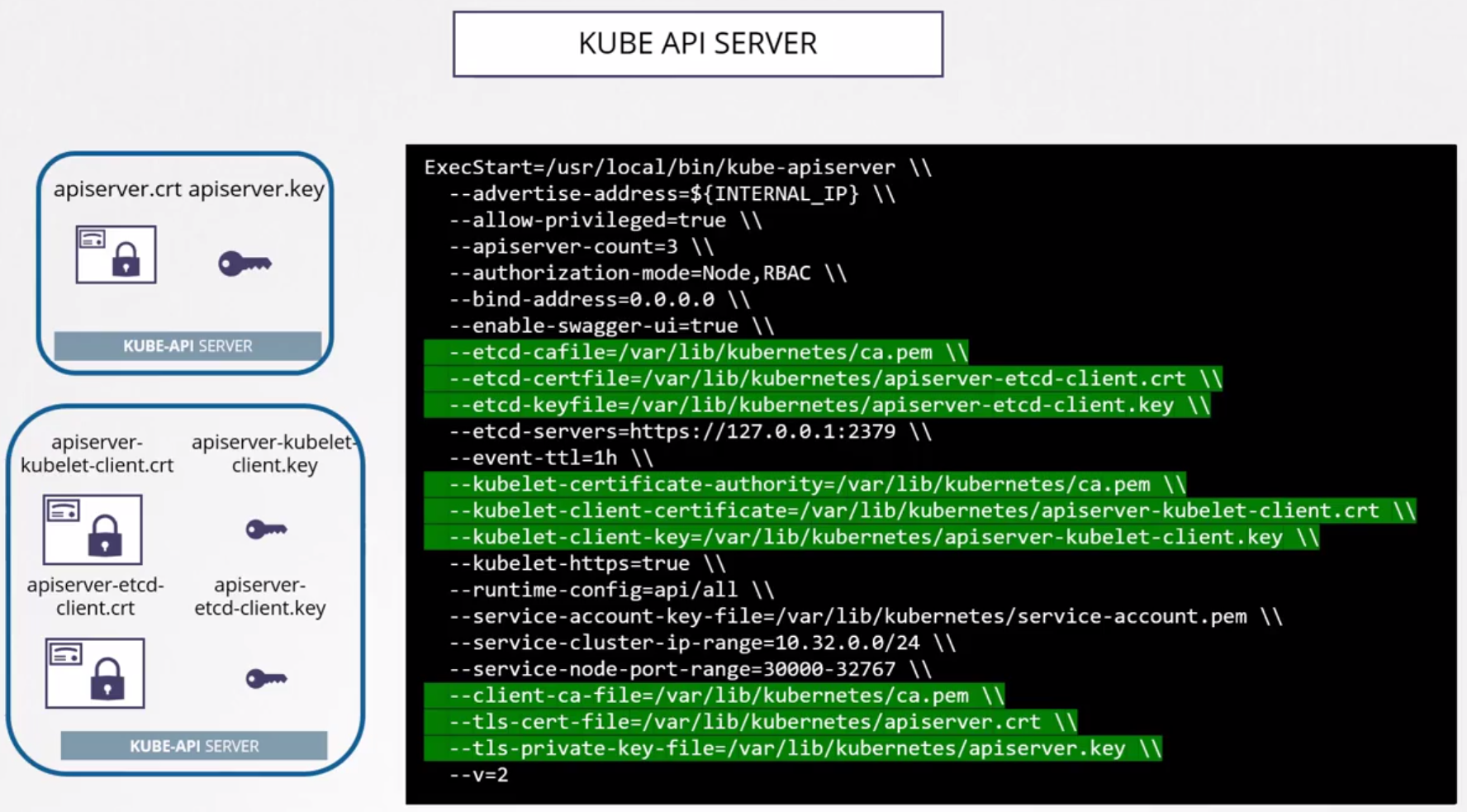
Finally, we have Kubelet which runs on each of the worker nodes.
Each Kubelet inside each node has its own certificate, imagine each node as a user of the system. The difference is that the CN will have the worker's name and which group:role kube-apiserver will give to this node. It needs to be in the system:node group.
The names below could all be worker.key worker.csr worker.crt, so that the Kubelet configuration inside each node is the same and makes automation easier. I put it differently just for illustration.
# Used on node 1
openssl genrsa -out worker1.key 2048
openssl req -new -key worker1.key  -out worker1.csr -subj "/CN=system:node:worker-1"
openssl x509 -req -in worker1.csr -signkey ca.key -out worker1.crt

# Used on node 2
openssl genrsa -out worker2.key 2048
openssl req -new -key worker2.key  -out worker2.csr -subj "/CN=system:node:worker-2"
openssl x509 -req -in worker2.csr -signkey ca.key -out worker2.crt

# Used on node 3
openssl genrsa -out worker3.key 2048
openssl req -new -key worker3.key  -out worker3.csr -subj "/CN=system:node:worker-3"
openssl x509 -req -in worker3.csr -signkey ca.key -out worker3.crt
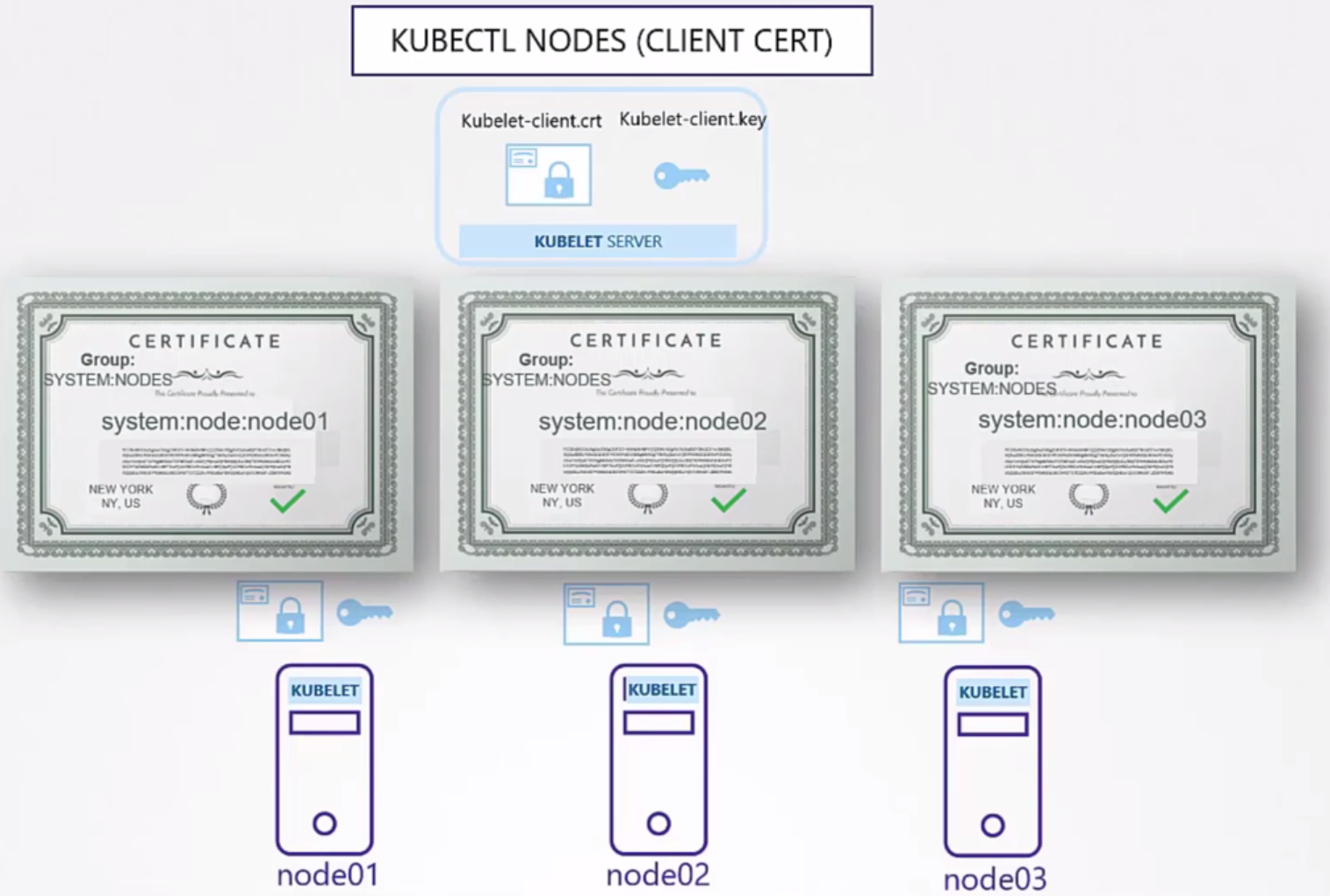
The good news is that we don't need to generate these certificates automatically. Using kubeadm it takes care of generating these certificates. Of course, if we want to install the hard way doing everything manually you'll have this work. We'll do this later to learn, but it's not usual in day-to-day work.
kubeadm creates components as pods in Kubernetes. The manifests are in /etc/kubernetes/manifests on any of the nodes.
The kube-apiserver file is in kube-apiserver.yaml. In the pod specification we'll have this:
cat /etc/kubernetes/manifests/kube-apiserver.yaml
apiVersion: v1
kind: Pod
metadata:
  annotations:
    kubeadm.kubernetes.io/kube-apiserver.advertise-address.endpoint: 172.18.0.4:6443
  creationTimestamp: null
  labels:
    component: kube-apiserver
    tier: control-plane
  name: kube-apiserver
  namespace: kube-system
spec:
  containers:
  - command:
    - kube-apiserver
    - --advertise-address=172.18.0.4
    - --allow-privileged=true
    - --authorization-mode=Node,RBAC
    - --client-ca-file=/etc/kubernetes/pki/ca.crt #<<<<< CA Certification that needs to be present in all components
    - --enable-admission-plugins=NodeRestriction
    - --enable-bootstrap-token-auth=true
    - --etcd-cafile=/etc/kubernetes/pki/etcd/ca.crt #<<<<< In this case etcd has its own CA
    - --etcd-certfile=/etc/kubernetes/pki/apiserver-etcd-client.crt #<<<<<
    - --etcd-keyfile=/etc/kubernetes/pki/apiserver-etcd-client.key #<<<<<
    - --etcd-servers=https://127.0.0.1:2379
    - --kubelet-client-certificate=/etc/kubernetes/pki/apiserver-kubelet-client.crt #<<<<< certificates for kubelet
    - --kubelet-client-key=/etc/kubernetes/pki/apiserver-kubelet-client.key #<<<<<
    - --kubelet-preferred-address-types=InternalIP,ExternalIP,Hostname
    - --proxy-client-cert-file=/etc/kubernetes/pki/front-proxy-client.crt
    - --proxy-client-key-file=/etc/kubernetes/pki/front-proxy-client.key
    - --requestheader-allowed-names=front-proxy-client
    - --requestheader-client-ca-file=/etc/kubernetes/pki/front-proxy-ca.crt
    - --requestheader-extra-headers-prefix=X-Remote-Extra-
    - --requestheader-group-headers=X-Remote-Group
    - --requestheader-username-headers=X-Remote-User
    - --runtime-config=
    - --secure-port=6443
    - --service-account-issuer=https://kubernetes.default.svc.cluster.local
    - --service-account-key-file=/etc/kubernetes/pki/sa.pub
    - --service-account-signing-key-file=/etc/kubernetes/pki/sa.key
    - --service-cluster-ip-range=10.96.0.0/16
    - --tls-cert-file=/etc/kubernetes/pki/apiserver.crt #<<<<< kube-apiserver certificates
    - --tls-private-key-file=/etc/kubernetes/pki/apiserver.key #<<<<<
    image: registry.k8s.io/kube-apiserver:v1.29.1
    imagePullPolicy: IfNotPresent
    livenessProbe:
      failureThreshold: 8
      httpGet:
        host: 172.18.0.4
        path: /livez
        port: 6443
        scheme: HTTPS
      initialDelaySeconds: 10
      periodSeconds: 10
      timeoutSeconds: 15
    name: kube-apiserver
    readinessProbe:
      failureThreshold: 3
      httpGet:
        host: 172.18.0.4
        path: /readyz
        port: 6443
        scheme: HTTPS
      periodSeconds: 1
      timeoutSeconds: 15
    resources:
      requests:
        cpu: 250m
    startupProbe:
      failureThreshold: 24
      httpGet:
        host: 172.18.0.4
        path: /livez
        port: 6443
        scheme: HTTPS
      initialDelaySeconds: 10
      periodSeconds: 10
      timeoutSeconds: 15
    volumeMounts:
    - mountPath: /etc/ssl/certs
      name: ca-certs
      readOnly: true
    - mountPath: /etc/ca-certificates
      name: etc-ca-certificates
      readOnly: true
    - mountPath: /etc/kubernetes/pki
      name: k8s-certs
      readOnly: true
    - mountPath: /usr/local/share/ca-certificates
      name: usr-local-share-ca-certificates
      readOnly: true
    - mountPath: /usr/share/ca-certificates
      name: usr-share-ca-certificates
      readOnly: true
  hostNetwork: true
  priority: 2000001000
  priorityClassName: system-node-critical
  securityContext:
    seccompProfile:
      type: RuntimeDefault
  volumes:
  - hostPath:
      path: /etc/ssl/certs
      type: DirectoryOrCreate
    name: ca-certs
  - hostPath:
      path: /etc/ca-certificates
      type: DirectoryOrCreate
    name: etc-ca-certificates
  - hostPath:
      path: /etc/kubernetes/pki
      type: DirectoryOrCreate
    name: k8s-certs
  - hostPath:
      path: /usr/local/share/ca-certificates
      type: DirectoryOrCreate
    name: usr-local-share-ca-certificates
  - hostPath:
      path: /usr/share/ca-certificates
      type: DirectoryOrCreate
    name: usr-share-ca-certificates
status: {}
root@kind-cluster-control-plane:/etc/kubernetes/manifests#
Note that we also have mount points, ports, etc., but let's focus on the certificates.
To analyze a certificate, we can do.
openssl x509 -in /etc/kubernetes/pki/apiserver.crt -text -noout

Certificate:
    Data:
        Version: 3 (0x2)
        Serial Number: 4509957295476951933 (0x3e969643f515cb7d)
        Signature Algorithm: sha256WithRSAEncryption
        Issuer: CN = kubernetes #<<<< Who was the issuer, in this case the CA.
        Validity
            Not Before: Feb  8 22:57:18 2024 GMT
            Not After : Feb  7 23:02:18 2025 GMT #<<<< Validity
        Subject: CN = kube-apiserver #<<< See the CN as mentioned earlier
        Subject Public Key Info
            Public Key Algorithm: rsaEncryption
                Public-Key: (2048 bit)
                Modulus:
                    00:b8:ed:ae:9e:e4:8b:c8:32:47:42:10:32:8f:68:
                    48:98:3d:da:5f:82:73:58:52:d7:ab:75:c6:1f:d2:
                    f6:35:5a:ee:d5:54:10:b2:7b:bf:27:26:ad:bb:e5:
                    55:34:a6:85:2e:76:37:75:d6:08:36:7f:05:80:66:
                    d5:c4:0a:f3:c5:e6:fd:6b:c9:c8:aa:80:b3:3a:06:
                    83:3a:b1:bd:04:4e:0a:5c:f2:f2:61:a6:ea:3f:94:
                    71:e0:98:4d:33:ba:9c:23:5b:cb:e3:32:75:a4:ad:
                    0a:bf:f8:ba:d0:68:44:d9:91:5a:db:f5:07:0a:77:
                    7e:09:e9:0b:2f:ad:1a:68:a6:95:b8:51:95:8e:68:
                    b3:22:2e:73:1a:6c:c3:3d:4e:ed:f7:95:4d:94:07:
                    5d:d7:86:ad:00:69:77:97:ee:aa:0c:68:08:ad:12:
                    21:ac:ed:e0:ac:74:d0:7e:43:50:ea:81:e6:61:a1:
                    39:12:5f:e9:2e:09:3d:9a:3c:80:14:71:85:66:eb:
                    5a:55:35:68:17:d1:62:93:f5:54:f8:af:08:2c:0f:
                    66:f8:a1:a0:0d:9a:f9:29:ef:7e:46:7d:2f:89:39:
                    87:55:0f:d5:72:70:19:29:57:24:e8:90:4f:c0:e7:
                    d9:36:25:be:85:3d:b4:00:e4:c0:68:b1:fb:4d:c6:
                    83:5d
                Exponent: 65537 (0x10001)
        X509v3 extensions:
            X509v3 Key Usage: critical
                Digital Signature, Key Encipherment
            X509v3 Extended Key Usage:
                TLS Web Server Authentication
            X509v3 Basic Constraints: critical
                CA:FALSE
            X509v3 Authority Key Identifier:
                1A:11:08:4F:C0:1C:F6:C1:63:A6:EB:A1:44:23:B1:E2:13:E5:75:26
            X509v3 Subject Alternative Name: #<<<< See the alternative names
                DNS:kind-cluster-control-plane, DNS:kubernetes, DNS:kubernetes.default, DNS:kubernetes.default.svc, DNS:kubernetes.default.svc.cluster.local, DNS:localhost, IP Address:10.96.0.1, IP Address:172.18.0.4, IP Address:127.0.0.1
    Signature Algorithm: sha256WithRSAEncryption
    Signature Value:
        86:20:1a:1c:66:3e:71:61:b3:b7:fa:2a:81:2c:97:0d:ed:e8:
        80:5b:85:9a:09:5f:e7:b5:bc:c8:14:0f:48:7f:48:bb:bf:76:
        69:f9:b7:90:65:e8:60:42:ab:b6:d4:11:e0:b3:31:da:a8:be:
        c0:8a:c9:68:80:35:47:a0:4f:7a:9f:55:d9:47:4d:f6:08:14:
        15:30:97:74:e5:84:b8:2e:95:8e:a9:4a:db:28:6f:b6:38:11:
        66:69:2a:7d:df:51:83:e6:ea:31:ef:51:f9:8a:9d:3a:08:05:
        e4:57:6d:e0:9a:bc:e3:b5:64:e2:60:32:b1:14:db:79:bf:57:
        14:4d:17:b0:ff:20:41:ae:af:0e:fe:dc:b9:7e:6f:cf:a6:f9:
        d5:5c:22:01:84:85:f7:8e:25:f9:f7:43:8d:ae:8f:e0:3f:08:
        02:a1:b6:63:d2:ce:f7:09:01:47:3d:ac:13:95:0f:35:e3:81:
        75:7b:dc:72:2b:83:f7:1c:b2:bd:00:c7:19:6d:b6:c4:f6:65:
        5e:f7:2e:ad:35:1e:a3:75:23:40:b0:12:33:66:f7:e5:cd:1e:
        6d:ba:71:b2:34:b2:fe:f7:f9:04:8c:92:f3:e5:9b:a3:d2:fc:
        cd:35:60:8f:1f:ec:1b:ee:4f:85:67:b9:b1:b5:d4:c9:45:1d:
        ff:4c:0c:42
To evaluate certificates and look for issuers we can follow this criterion. Try to make a table to understand each thing.
This cluster was set up using Kind and here's what we have. In this case, we have two issuers, one CA for Kubernetes and one CA for ETCD.
| Component | Type | Certification Path | CN name | Alt Names | Organization | Issuer | Expiration |
|---|---|---|---|---|---|---|---|
| kube-apiserver | server | /etc/kubernetes/pki/apiserver.crt | kube-apiserver | DNS:kind-cluster-control-plane, DNS:kubernetes, DNS:kubernetes.default, DNS:kubernetes.default.svc, DNS:kubernetes.default.svc.cluster.local, DNS:localhost, IP Address:10.96.0.1, IP Address:172.18.0.4, IP Address:127.0.0.1 | kubernetes | Feb 7 23:02:18 2025 | |
| kube-apiserver | server | /etc/kubernetes/pki/apiserver.key | |||||
| kube-apiserver | server | /etc/kubernetes/pki/ca.crt | kubernetes | kubernetes | kubernetes | Feb 5 23:02:18 2034 | |
| kube-apiserver | Client (Kubelet) | /etc/kubernetes/pki/apiserver-kubelet-client.crt | kube-apiserver-kubelet-client | kubeadm:cluster-admins | kubernetes | Feb 7 23:02:18 2025 | |
| kube-apiserver | Client (Kubelet) | /etc/kubernetes/pki/apiserver-kubelet-client.key | |||||
| kube-apiserver | Client (ETCD) | /etc/kubernetes/pki/etcd/ca.crt | etcd-ca | etcd-ca | Feb 5 23:02:19 2034 | ||
| kube-apiserver | Client (ETCD) | /etc/kubernetes/pki/apiserver-etcd-client.crt | kube-apiserver-etcd-client | etcd-ca | Feb 7 23:02:19 2025 | ||
| kube-apiserver | Client (ETCD) | /etc/kubernetes/pki/apiserver-etcd-client.key |
Some things will be better understood a bit further on.
Troubleshooting
To analyze some problem with certificates.
If the components are running as services we can use journalctl -u etcd.service -l or the name of another service.
If kubeadm was used we can look at the pod logs kubectl logs etcd-master -n kube-system or some other component. In the case of Kind that I'm using here it would be kubectl logs -n kube-system etcd-kind-cluster-control-plane
There is no rule, it's about understanding the concepts.
Sometimes it's still necessary to go down a level when kube-apiserver or etcd is down or when the kubectl command isn't working.
Since the pods are running as containers, we can get the container logs directly.
We can use crictl commands inside the node.
crictl ps -a
CONTAINER           IMAGE               CREATED             STATE               NAME                      ATTEMPT             POD ID              POD
6dae0c6c57fa0       6b5c5e00213a4       About an hour ago   Running             shell                     0                   34919e32c8e1b       node-shell-a9109e34-e137-45fa-951b-39727baa2b0a
036608ed6eb85       0500518ebaa68       About an hour ago   Running             local-path-provisioner    0                   8cd8d56c7d9b8       local-path-provisioner-7577fdbbfb-5dd24
7900ba6877662       cbb01a7bd410d       About an hour ago   Running             coredns                   0                   bc0e982a65273       coredns-76f75df574-jtn5f
8805e425edefe       cbb01a7bd410d       About an hour ago   Running             coredns                   0                   e773b051ffab2       coredns-76f75df574-v4rrs
154a74a2bbed1       4950bb10b3f87       About an hour ago   Running             kindnet-cni               0                   e746cf8ee60e0       kindnet-b2jf6
ee0dde4c1f9b4       790e70e8e9faa       About an hour ago   Running             kube-proxy                0                   00fa8ba24b9df       kube-proxy-v5xpk
3007ff5ee0c46       a0eed15eed449       About an hour ago   Running             etcd                      0                   c967bb98832b0       etcd-kind-cluster-control-plane
1fc6b9b833366       cb68e1e8c9a5e       About an hour ago   Running             kube-apiserver            0                   3be3cf5c10d16       kube-apiserver-kind-cluster-control-plane
f43291957b1d0       b685d6e28315d       About an hour ago   Running             kube-controller-manager   0                   fb16d56656241       kube-controller-manager-kind-cluster-control-plane
ec25b5a7dace6       6cffb863e51bc       About an hour ago   Running             kube-scheduler            0                   93cf8d8cff768       kube-scheduler-kind-cluster-control-plane

crictl logs 3007ff5ee0c46
{"level":"warn","ts":"2024-02-08T23:02:23.651875Z","caller":"embed/config.go:676","msg":"Running http and grpc server on single port. This is not recommended for production."}
{"level":"info","ts":"2024-02-08T23:02:23.652008Z","caller":"etcdmain/etcd.go:73","msg":"Running: ","args":["etcd","--advertise-client-urls=https://172.18.0.4:2379","--cert-file=/etc/kubernetes/pki/etcd/server.crt","--client-cert-auth=true","--data-dir=/var/lib/etcd","--experimental-initial-corrupt-check=true","--experimental-watch-progress-notify-interval=5s","--initial-advertise-peer-urls=https://172.18.0.4:2380","--initial-cluster=kind-cluster-control-plane=https://172.18.0.4:2380","--key-file=/etc/kubernetes/pki/etcd/server.key","--listen-client-urls=https://127.0.0.1:2379,https://172.18.0.4:2379","--listen-metrics-urls=http://127.0.0.1:2381","--listen-peer-urls=https://172.18.0.4:2380","--name=kind-cluster-control-plane","--peer-cert-file=/etc/kubernetes/pki/etcd/peer.crt","--peer-client-cert-auth=true","--peer-key-file=/etc/kubernetes/pki/etcd/peer.key","--peer-trusted-ca-file=/etc/kubernetes/pki/etcd/ca.crt","--snapshot-count=10000","--trusted-ca-file=/etc/kubernetes/pki/etcd/ca.crt"]}
{"level":"warn","ts":"2024-02-08T23:02:23.652232Z","caller":"embed/config.go:676","msg":"Running http and grpc server on single port. This is not recommended for production."}
...