Sandboxes
Kubernetes is only as secure as the container runtime is secure.
A container runs as a process in the Linux kernel just like any other process on the host itself. The difference is that this process is limited in a kernel group through namespaces as we saw earlier in review container. If a container manages to escape its kernel group and directly manage the kernel, it could have access to all other processes running on the host. Unlike containers, in a VM we have complete isolation between kernels.
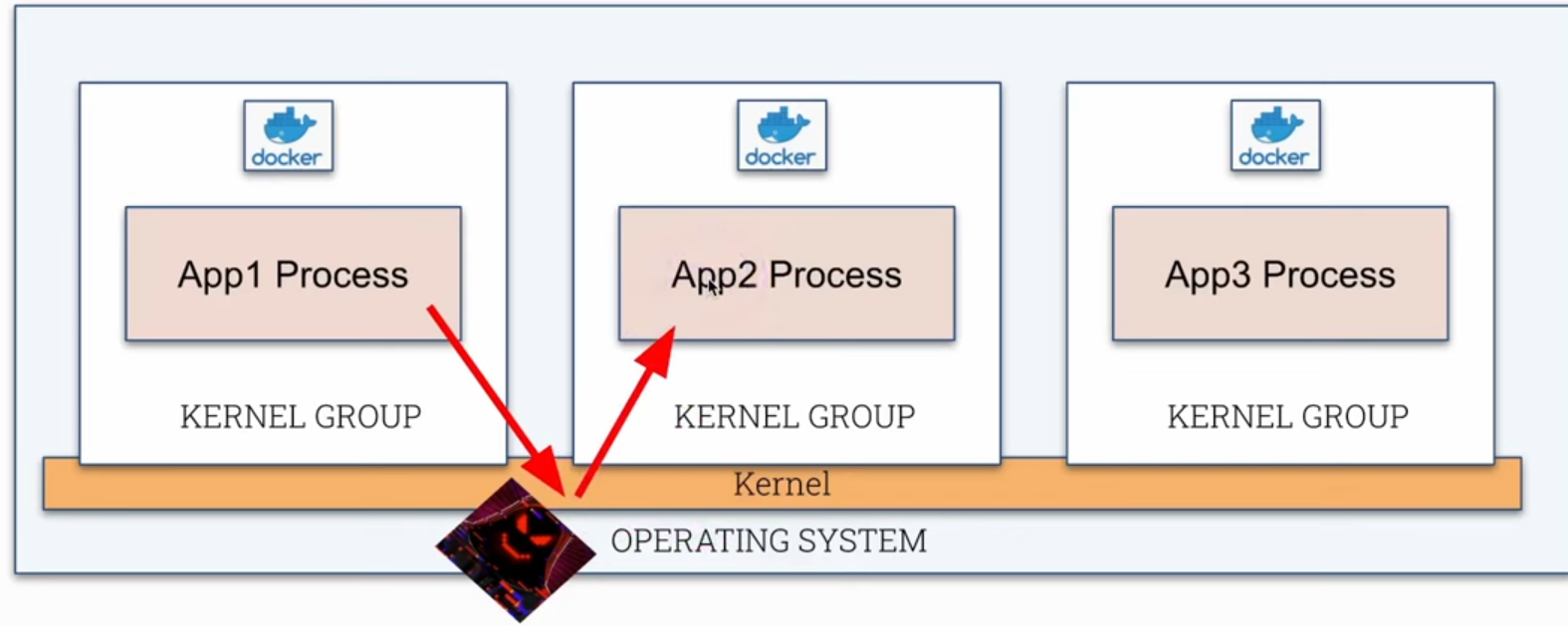
What is a sandbox? We've heard this term before in different contexts, but in the case of containers we're talking about running a container with an extra layer of security to reduce attacks.
- Kernel Space
- We have the hardware at the bottom layer.
- In a layer above controlling the hardware we have the kernel.
- The kernel provides an API layer or interfaces (syscall or system call) for processes to communicate with it. Some examples:
psto see processes.ip linkto list network interfaces.reboot
We can do this through command line or using libraries in any language. We'll see more about this later in the course.
- User Space
- Any type of process that can use syscalls.
- What doesn't run in kernel space runs in user space.
What we're going to do is include a new security layer to control system calls. The container (process) will make a call to the sandbox and it will make the syscall acting as a proxy where we can create restrictions.
| Normal | Sandbox |
|---|---|
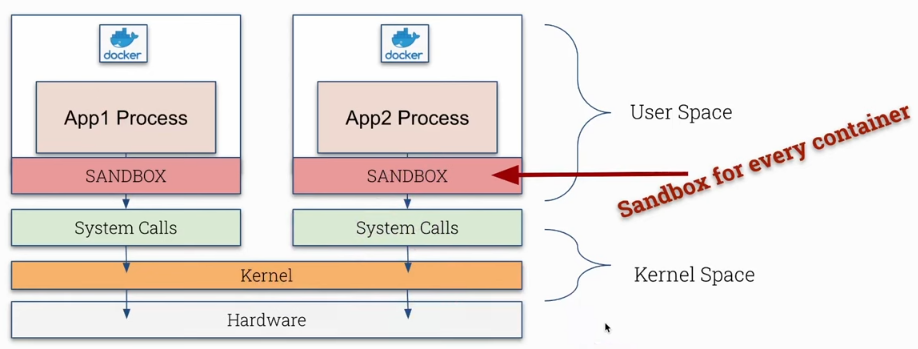 |
Obviously we'll have a performance and resource cost because we're adding an extra logical layer in the path.
Sandboxes are not useful for every type of application.
- Best used in smaller containers. In large containers it can cause overhead.
- Not good for workloads with many syscalls as it would generate too much delay.
- No direct access to hardware.
It's useful for most applications, not all.
Let's show a simple syscall which is uname.
root@cks-master:~# k get pods
NAME    READY   STATUS    RESTARTS   AGE
nginx   1/1     Running   0          11h
root@cks-master:~# k exec nginx -it -- bash
# Inside the container returned the kernel used
root@nginx:/# uname -r
5.15.0-1067-gcp
root@nginx:/# exit
exit
# Inside the host returned the kernel
root@cks-master:~# uname -r
5.15.0-1067-gcp

# Using strace we can see which syscalls were used.
# I'll reduce the output to make it easier to read
root@cks-master:~# strace uname -r
execve("/usr/bin/uname", ["uname", "-r"], 0x7ffd0d749d98 /* 29 vars */) = 0
brk(NULL)                               = 0x5636fe7ac000
arch_prctl(0x3001 /* ARCH_??? */, 0x7ffc99764540) = -1 EINVAL (Invalid argument)
access("/etc/ld.so.preload", R_OK)      = -1 ENOENT (No such file or directory)
openat(AT_FDCWD, "/etc/ld.so.cache", O_RDONLY|O_CLOEXEC) = 3
fstat(3, {st_mode=S_IFREG|0644, st_size=23857, ...}) = 0
mmap(NULL, 23857, PROT_READ, MAP_PRIVATE, 3, 0) = 0x7f5d304d2000
close(3)                                = 0
...
close(3)                                = 0
openat(AT_FDCWD, "/usr/lib/locale/C.UTF-8/LC_CTYPE", O_RDONLY|O_CLOEXEC) = 3
fstat(3, {st_mode=S_IFREG|0644, st_size=201272, ...}) = 0
mmap(NULL, 201272, PROT_READ, MAP_PRIVATE, 3, 0) = 0x7f5d2fe49000
close(3)                                = 0
uname({sysname="Linux", nodename="cks-master", ...}) = 0 # <<<<
fstat(1, {st_mode=S_IFCHR|0600, st_rdev=makedev(0x88, 0), ...}) = 0
write(1, "5.15.0-1067-gcp\n", 165.15.0-1067-gcp
)       = 16
close(1)                                = 0
close(2)                                = 0
exit_group(0)                           = ?
+++ exited with 0 +++
Several system calls were used including close, write, etc.
Dirt Cow was a critical Linux vulnerability for privilege escalation in the kernel, a bug related to the copy-on-write (COW) process. This vulnerability allowed local unprivileged users to gain write access to parts of memory that should be read-only and was exploited to obtain root access. All this done using syscall.
Open Container Initiative (OCI)
OCI is a Linux Foundation project to design standards for container virtualization.
-
Specification: Creates and maintains a specification for container runtimes, defining what a runtime is, an image, a distribution, and because of this we have different container runtimes that follow the same standard and can run the same container images. The kubelet accepts different container runtimes as long as they follow OCI specifications. -
Runtime: runc is the container runtime maintained by OCI that implements the defined specifications.
Docker doesn't create containers directly. It communicates in different layers, one of them being containerd which communicates with runc. runc implements OCI specifications and creates containers by communicating with libcontainer which interacts with Linux kernel resources like namespaces, cgroups, chroot, to manage containers without depending on external processes like LXC.
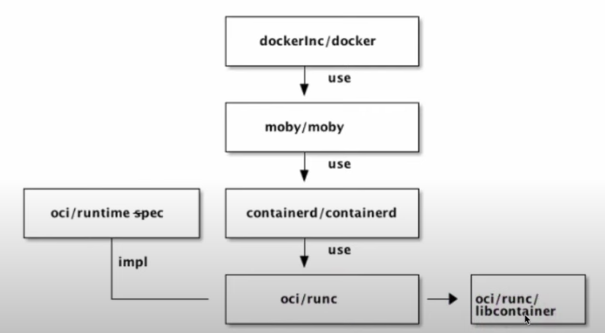
The CRI, Container Runtime Interface allows kubelet communication with different runtimes. The default container runtime configuration can be defined in the kubelet configuration file at /var/lib/kubelet/config.yaml.
cat /var/lib/kubelet/config.yaml | grep container
containerRuntimeEndpoint: ""

root@cks-master:~# ps -aux | grep kubelet
root         939  2.4  1.6 2119304 66152 ?       Ssl  Aug27  18:00 /usr/bin/kubelet --bootstrap-kubeconfig=/etc/kubernetes/bootstrap-kubelet.conf --kubeconfig=/etc/kubernetes/kubelet.conf --config=/var/lib/kubelet/config.yaml --container-runtime-endpoint=unix:///var/run/containerd/containerd.sock --pod-infra-container-image=registry.k8s.io/pause:3.9 --container-runtime-endpoint unix:///run/containerd/containerd.sock
...

root@cks-master:~# cat /usr/lib/systemd/system/kubelet.service
[Unit]
Description=kubelet: The Kubernetes Node Agent
Documentation=https://kubernetes.io/docs/
Wants=network-online.target
After=network-online.target

[Service]
ExecStart=/usr/bin/kubelet
Restart=always
StartLimitInterval=0
RestartSec=10

[Install]
WantedBy=multi-user.target

root@cks-master:~# cat /etc/default/kubelet
KUBELET_EXTRA_ARGS="--container-runtime-endpoint unix:///run/containerd/containerd.sock"
Sandboxes Comparison
Here we have an image showing some container runtimes we can use.
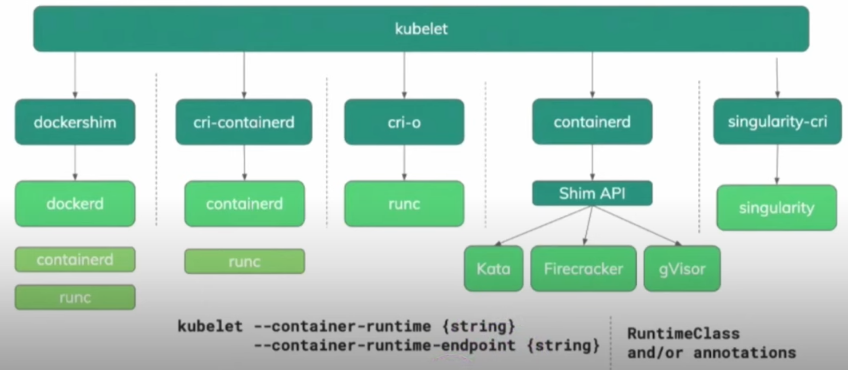
As we mentioned before, container sandboxes offer an additional layer of isolation and security for containers, being especially useful in multi-tenant environments or when there's a need for stronger isolation than what is offered by traditional containers. Some options:
Kata Containers

Developed by the OpenStack Foundation, Kata Containers combines the speed of containers with the isolation of virtual machines. It runs each container inside a lightweight VM, using virtualization technologies to isolate the container from the host system, without sacrificing performance.
- Strong layer of separation.
- Easy to manage these VMs as they are created automatically.
- Each container runs in a private virtual machine, but the host needs to have a hypervisor.
- QEMU is the default and needs virtualization, the same used in cloud.
- The problem is that in the cloud, virtualizing on top of another virtualization is a bit more complicated, requiring enabling this feature and not being so easy to configure.
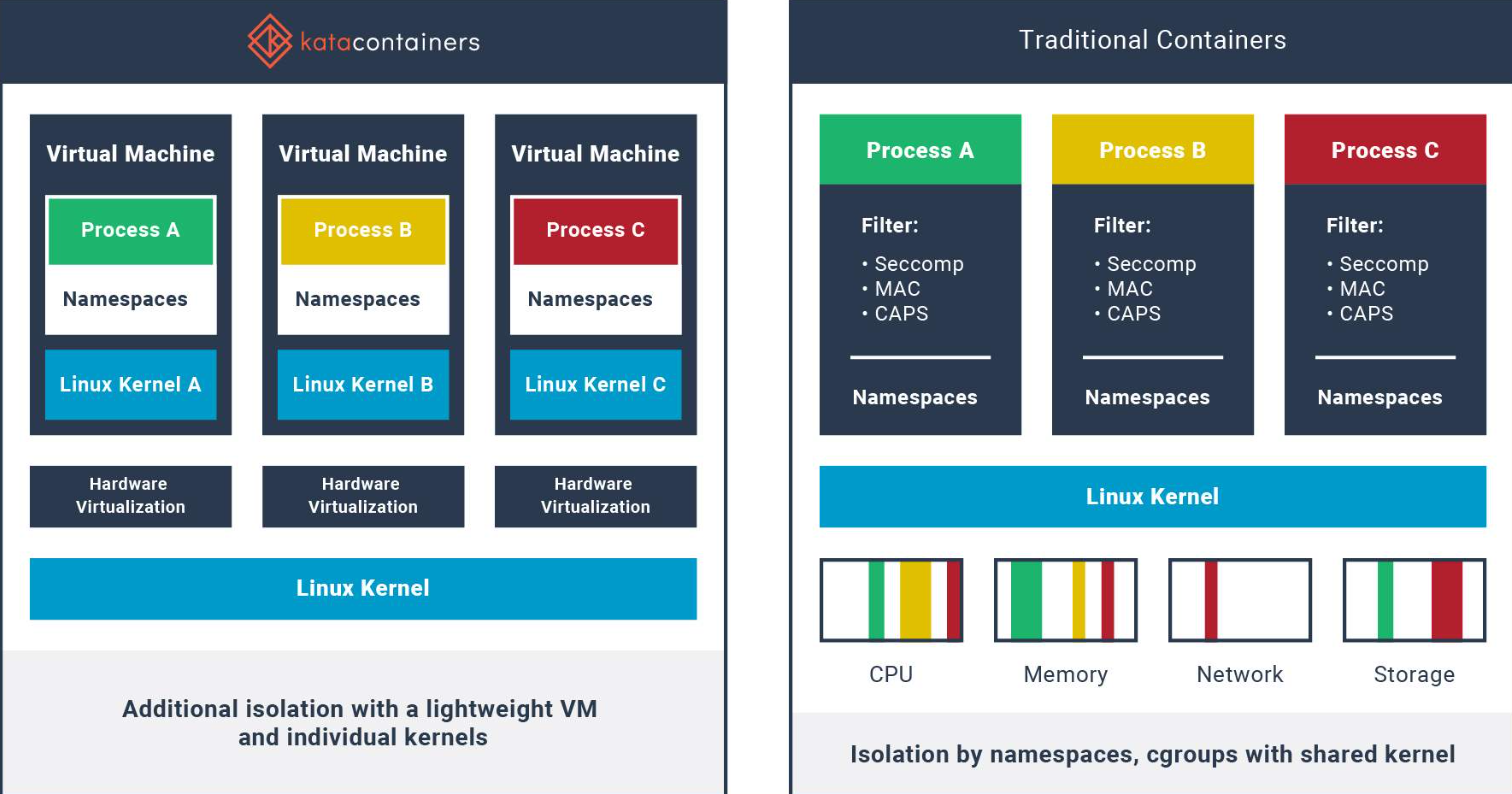
Perfect for workloads that require stronger isolation, like critical cloud services and multi-tenant environments. Not highly recommended for Kubernetes.
gVisor

Developed by Google, gVisor is a container runtime that provides an extra layer of isolation between the container and the host system kernel, implementing a user-space kernel that intercepts and manipulates system calls.
- Another layer of separation.
- Doesn't need a hypervisor.
- Simulates kernel syscalls with limited functionality. Actually gVisor implements its own Kernel in golang that accepts calls and manipulates (transforms and ignores) making the real call to the kernel on the host.
- Runs in user space separate from the Linux kernel.
- Runtime is called runsc.
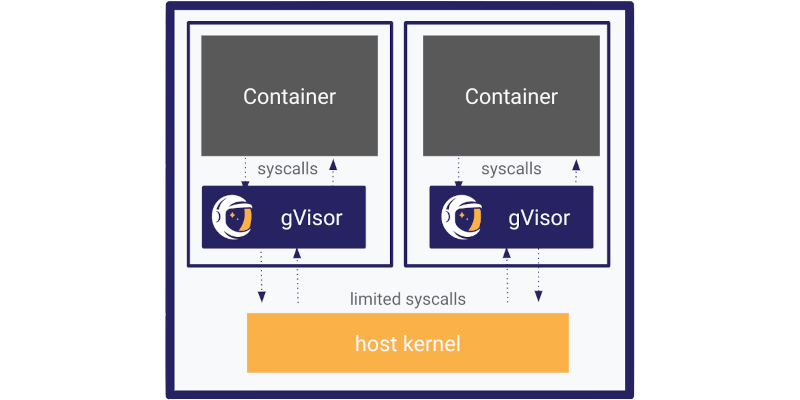
Perfect for workloads where compatibility with Kubernetes and Docker is important, as it doesn't sacrifice much performance. It's lightweight, easy to integrate into existing infrastructures and offers an extra layer of isolation without needing to run complete VMs like Kata.
Nabla Containers

Nabla Containers, developed by IBM, uses a unikernel-like approach, where the container is executed with an extremely reduced set of system calls. This minimizes the attack surface, as the container has access to much less kernel functionality. With fewer system calls exposed, the chance of vulnerability exploitation is reduced. This makes Nabla a very secure option, especially in scenarios where minimal attack surface is essential.
The extremely restrictive approach can be limiting for many workloads. Applications that need more interactions with the operating system may not work well on Nabla. Its use is more specialized and may require modifications to images and libraries used by the application.
Recommended for environments where minimal attack surface is desired. A Kubernetes host using Nabla would be very limited in compatibility, it would need to be something very specific.
SCONE

Just for curiosity, in case you need it someday, but it's a paid technology.
SCONE (Secure Computing Node Environment) offers secure containers that use Intel SGX enclaves to ensure data is protected even in memory. It's a robust solution for protecting sensitive data and applications.
Data is encrypted inside enclaves (protected memory areas that are isolated from the rest of the system, even if the kernel or hypervisor are compromised), ensuring that even system administrators or Kubernetes operators cannot access the data without authorization.
- The image needs to be sconetized right after build.
- The node needs to have SGX support generating extra cost.
- Specific knowledge for application configuration and development.
Specific use for applications that handle highly sensitive data or that require confidential security because everything is encrypted making it difficult even for the administrators themselves. It's not a free solution and its use is extremely restricted.
Analyzing what we have above, what offers the best performance/compatibility without needing much intervention is gVisor. Of course we're talking about a generic situation.