Review Containers
Let's just review important container concepts.
In summary...
- Dockerfile is the file that describes an image.
- An image is a series of layers where only the last one is writable, the rest are read-only.
- A container is an image being executed.
- An image can be stored in a repository with push, and pull downloads this image.
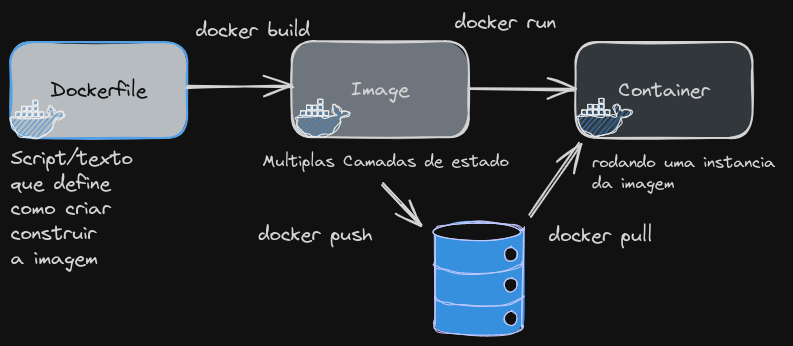
A container differs from a VM because it makes syscall calls directly to the Linux kernel.
A container is:
- A collection of one or multiple applications that are grouped and include all their dependencies so they can execute.
- It's a process that runs on the Linux kernel with some restrictions so they are encapsulated and isolated from the host base system.
This is how a system call (syscall) from an application works, whether using a container or directly on the host system.
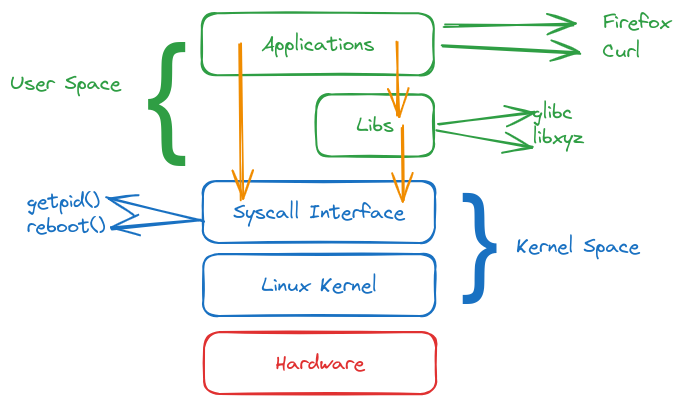
In the case of a virtual machine, there is no interaction with the host system as with containers.
If we have several containers running on a host, we have the following scenario.
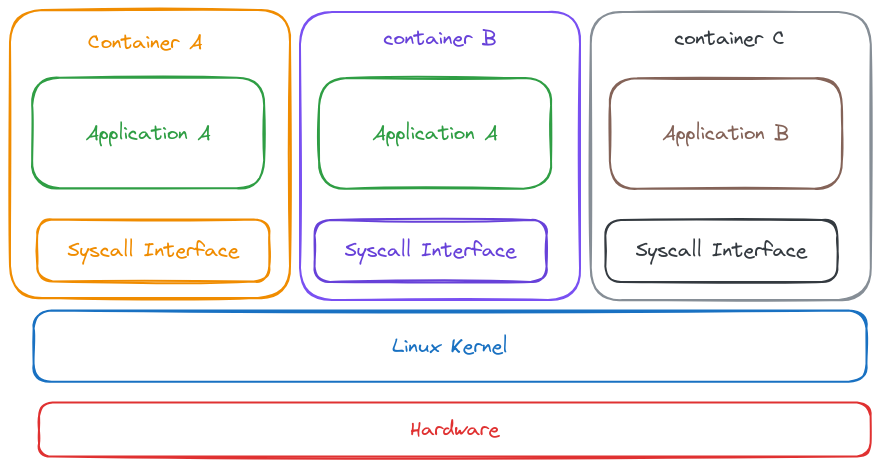
If all these containers make system calls to the same kernel, they need isolation, and the way Linux does this is through namespaces. If they weren't isolated, they could exploit kernel security problems in the host.
The Linux kernel divides containers by namespaces and manages them separately, restricting what a process can or cannot see at the process, user, and filesystem level. Cgroups restrict the resource usage of the process (RAM, Disk, CPU).
- PID
- Isolates the processes of each container from other processes.
- A process ID can exist multiple times, once in each namespace.
- Namespace processes cannot see other processes from other namespaces.
- Mount
- In a namespace, we can restrict access to mount points or to the root filesystem.
- Network
- Access only certain network devices.
- Firewall rules, sockets, and independent ports.
- Cannot see all traffic or reach all endpoints.
- User
- Different set of user IDs used.
- User 0 inside a namespace can be different from the same user 0 in another namespace.
- User 0 inside the host (root) is not the same root inside the container.
Container Runtime
We have different container runtimes, but let's review the difference.
Docker: Container Runtime + container and image management tool.Containerd: Container Runtime without management tools.crictl: Generic and interactive CLI compatible with all container runtimes that implement CRI standards. Can run with Docker, containerd, and other compatible ones.Podman: Tool to manage containers and images. When we install podman, it installs runc as container runtime, just like Buildah.
Just to illustrate, let's create a simple Dockerfile.
Dockerfile
FROM bash
CMD ["ping", "devsecops.puziol.com.br"]
Let's build an image and run using Docker.
root@cks-master:~# vim Dockerfile
root@cks-master:~# docker build -t ping . # ping is the image name and . is the directory containing the dockerfile
DEPRECATED: The legacy builder is deprecated and will be removed in a future release.
            Install the buildx component to build images with BuildKit:
            https://docs.docker.com/go/buildx/

Sending build context to Docker daemon  2.693MB
Step 1/2 : FROM bash
latest: Pulling from library/bash
c6a83fedfae6: Pull complete
70acf8f93de9: Pull complete
7621ec80326e: Pull complete
Digest: sha256:05de6634ac35e4ac2edcb1af21889cec8afcc3798b11a9d538a6f0c315608c48
Status: Downloaded newer image for bash:latest
 ---> bd4206c5bc03
Step 2/2 : CMD ["ping", "devsecops.puziol.com.br"]
 ---> Running in 9bb4eae80da0
Removing intermediate container 9bb4eae80da0
 ---> 80a23eb00c36
Successfully built 80a23eb00c36
Successfully tagged ping:latest

# The images we have available below are bash which was the base for ping
root@cks-master:~# docker image ls
REPOSITORY   TAG       IMAGE ID       CREATED          SIZE
ping         latest    80a23eb00c36   10 seconds ago   14.4MB
bash         latest    bd4206c5bc03   2 weeks ago      14.4MB

# Note they have the same size because nothing was included in the image, only a command, and this doesn't generate a layer

root@cks-master:~# docker run ping
PING devsecops.puziol.com.br (172.67.129.115): 56 data bytes
64 bytes from 172.67.129.115: seq=0 ttl=60 time=13.352 ms
64 bytes from 172.67.129.115: seq=1 ttl=60 time=11.807 ms
64 bytes from 172.67.129.115: seq=2 ttl=60 time=11.821 ms
64 bytes from 172.67.129.115: seq=3 ttl=60 time=11.761 ms
64 bytes from 172.67.129.115: seq=4 ttl=60 time=11.839 ms
We can do the same thing with podman but I want to show a curiosity first.
root@cks-master:~# podman image ls
REPOSITORY  TAG         IMAGE ID    CREATED     SIZE
This happens because Docker and Podman manage their images in different storage. When we create an image with Docker, it's stored in Docker's specific storage directory, while Podman uses its own directory to store images.
Even though the images are compatible between Docker and Podman, they are not automatically visible in both managers due to this storage separation.
If we wanted to use the same image without having to build a new one with podman, we could export through docker and import through podman.
root@cks-master:~# docker save -o ping.tar ping
root@cks-master:~# ls
Dockerfile  common.sh  initclustr.sh  ping.tar  snap

root@cks-master:~# podman load -i ping.tar
Getting image source signatures
Copying blob 8005df329219 done
Copying blob 78561cef0761 done
Copying blob 09db3fa8d4c8 done
Copying config 80a23eb00c done
Writing manifest to image destination
Storing signatures
Loaded image(s): localhost/ping:latest
root@cks-master:~# podman image ls

# Note that the bash image is not here because it was only downloaded to build. If we had done the build using podman it would be here too.
REPOSITORY      TAG         IMAGE ID      CREATED        SIZE
localhost/ping  latest      80a23eb00c36  9 minutes ago  14.9 MB

root@cks-master:~# podman run ping
PING devsecops.puziol.com.br (104.21.1.153): 56 data bytes
64 bytes from 104.21.1.153: seq=0 ttl=42 time=12.717 ms
64 bytes from 104.21.1.153: seq=1 ttl=42 time=11.135 ms
64 bytes from 104.21.1.153: seq=2 ttl=42 time=11.133 ms
64 bytes from 104.21.1.153: seq=3 ttl=42 time=11.307 ms
64 bytes from 104.21.1.153: seq=4 ttl=42 time=11.104 ms
The podman and docker commands are practically the same. Just swap docker for podman and generally everything works. Let's include the same command with crictl to show something.
root@cks-master:~# docker ps
CONTAINER ID   IMAGE     COMMAND   CREATED   STATUS    PORTS     NAMES

# Practically the same output
root@cks-master:~# podman ps
CONTAINER ID  IMAGE       COMMAND     CREATED     STATUS      PORTS       NAMES

root@cks-master:~# crictl ps
CONTAINER           IMAGE               CREATED             STATE               NAME                      ATTEMPT             POD ID              POD
5ce963ae949f7       f9c3c1813269c       17 minutes ago      Running             calico-kube-controllers   1                   bfe586b33ea68       calico-kube-controllers-75bdb5b75d-d2tl9
696b9c6f4a078       cbb01a7bd410d       17 minutes ago      Running             coredns                   1                   7f43504bc7b48       coredns-7db6d8ff4d-kdb4t
4811a65d42dd3       cbb01a7bd410d       17 minutes ago      Running             coredns                   1                   35875876bef79       coredns-7db6d8ff4d-cmcff
b675aa0276e5f       e6ea68648f0cd       18 minutes ago      Running             kube-flannel              1                   abc1904b21596       canal-8nn2f
734effffec2f5       75392e3500e36       18 minutes ago      Running             calico-node               1                   abc1904b21596       canal-8nn2f
971577d43a681       55bb025d2cfa5       18 minutes ago      Running             kube-proxy                1                   d0f7a3832ae63       kube-proxy-c2qx6
2cfff390a9c72       3edc18e7b7672       18 minutes ago      Running             kube-scheduler            1                   4a28794d2940a       kube-scheduler-cks-master
8b6c080830c3c       76932a3b37d7e       18 minutes ago      Running             kube-controller-manager   1                   a01c11a1a974b       kube-controller-manager-cks-master
667821ced3ab2       1f6d574d502f3       18 minutes ago      Running             kube-apiserver            1                   d9132c59e74ef       kube-apiserver-cks-master
9870d8a0847ee       3861cfcd7c04c       18 minutes ago      Running             etcd                      1                   3598be3a95b48       etcd-cks-master
Podman didn't find containers nor did docker, but crictl did.
This happens because podman is using crun as container runtime, docker uses runc, and crictl uses containerd.
root@cks-master:~# docker info | grep Runtime
 Runtimes: io.containerd.runc.v2 runc
 Default Runtime: runc #<<<<<

 root@cks-master:~# podman info | grep ociRuntime -A 5
  ociRuntime:
    name: crun
    package: 'crun: /usr/bin/crun'
    path: /usr/bin/crun
    version: |-
      crun version UNKNOWN

root@cks-master:~# cat /etc/crictl.yaml
runtime-endpoint: unix:///run/containerd/containerd.sock
To confirm namespace isolation, we can run two containers using the same image and verify that they have different process managers with the same PID for processes. This wouldn't be possible if they were running on the same host.
# Creating containers c1 and c2 with different commands
root@cks-master:~# docker run --name c1 -d ubuntu sh -c 'sleep 1d'
1d4f888a9c7c123d4fbf37156f0843066ae10579c95620debe45b5742632125b
root@cks-master:~# docker run --name c2 -d ubuntu sh -c 'sleep 10d'
43f842e87efe4059c8bbab6c3487cb3d95917c14e7c5fd5a3193820489da34d2

# Running ps inside c1
root@cks-master:~# docker exec c1 ps aux
USER         PID %CPU %MEM    VSZ   RSS TTY      STAT START   TIME COMMAND
root           1  0.1  0.0   2800  1176 ?        Ss   14:26   0:00 sh -c sleep 1d
root           7  0.0  0.0   2696  1064 ?        S    14:26   0:00 sleep 1d
root           8 50.0  0.1   7888  4036 ?        Rs   14:27   0:00 ps aux

# Running ps inside c2
root@cks-master:~# docker exec c2 ps aux
USER         PID %CPU %MEM    VSZ   RSS TTY      STAT START   TIME COMMAND
root           1  0.1  0.0   2800  1052 ?        Ss   14:27   0:00 sh -c sleep 10d
root           7  0.0  0.0   2696  1096 ?        S    14:27   0:00 sleep 10d
root           8 60.0  0.0   7888  3992 ?        Rs   14:27   0:00 ps aux

# Running inside the host we can see they have different PIDs
root@cks-master:~# ps aux | grep sleep
root       20380  0.0  0.0   2800  1176 ?        Ss   14:26   0:00 sh -c sleep 1d
root       20405  0.0  0.0   2696  1064 ?        S    14:26   0:00 sleep 1d
root       20555  0.0  0.0   2800  1052 ?        Ss   14:27   0:00 sh -c sleep 10d
root       20578  0.0  0.0   2696  1096 ?        S    14:27   0:00 sleep 10d
root       28565  0.0  0.0   8168   656 pts/0    S+   14:43   0:00 grep --color=auto sleep
Now let's do a second test which will be to remove container 2 and start it in the same namespace as container1.
root@cks-master:~# docker rm c2 --force
c2

root@cks-master:~# docker run --name c2 --pid=container:c1 -d ubuntu sh -c 'sleep 10d'
ad5ff9d45ed9f9e44a2aee586fa47dab3184bb7daf1d0949b250968bff4afe8d

# We can see the processes in both containers
root@cks-master:~# docker exec c2 ps aux
USER         PID %CPU %MEM    VSZ   RSS TTY      STAT START   TIME COMMAND
root           1  0.0  0.0   2800  1176 ?        Ss   14:26   0:00 sh -c sleep 1d
root           7  0.0  0.0   2696  1064 ?        S    14:26   0:00 sleep 1d
root          14  0.1  0.0   2800  1064 ?        Ss   14:45   0:00 sh -c sleep 10d
root          20  0.0  0.0   2696  1088 ?        S    14:45   0:00 sleep 10d
root          21 50.0  0.1   7888  4036 ?        Rs   14:45   0:00 ps aux

root@cks-master:~# docker exec c1 ps aux
USER         PID %CPU %MEM    VSZ   RSS TTY      STAT START   TIME COMMAND
root           1  0.0  0.0   2800  1176 ?        Ss   14:26   0:00 sh -c sleep 1d
root           7  0.0  0.0   2696  1064 ?        S    14:26   0:00 sleep 1d
root          14  0.0  0.0   2800  1064 ?        Ss   14:45   0:00 sh -c sleep 10d
root          20  0.0  0.0   2696  1088 ?        S    14:45   0:00 sleep 10d
root          28 75.0  0.1   7888  4028 ?        Rs   14:46   0:00 ps aux

# Remove the containers after the test
docker rm c1 c2 --force
When we use the --pid=container:<container> option when running a docker run command, we're configuring the new container to share the PID namespace (process management) with another container. This means both containers have access to the same processes, as if they were running in the same PID namespace. However, this doesn't affect other namespaces like network, mount, or IPC (Inter-Process Communication).