Docker Concepts
Open-source platform written in Golang. Like many others, Golang is a high-performance programming language. Most applications that work with containers are written in Go. It serves to create and manage isolated environments.
We can ensure that production, staging, and development environments have the same components or application versions. This minimizes impacts on software delivery, ending that problem of "it works on my machine".
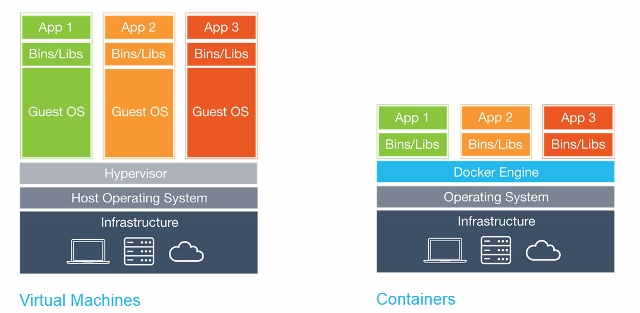
- Infrastructure is our hardware or simply the base
- Hypervisor is our infrastructure virtualizer
Vertical scaling is when we increase machine resources: more CPU, more memory, more disk, etc. This way we stay with fewer machines but more resources.
Horizontal scaling is when instead of increasing resources, we increase nodes, meaning the number of machines. Smaller machines, but in greater quantity.
Architecture
Docker uses some Linux Kernel resources for container management and delivers an easier way for users to interact with containers.
It's worth remembering that containers are not a Docker resource, but a Linux one. Docker needs to run on top of a Linux kernel. That's why it's also possible to run a container without using Docker directly.
Can Docker run on Windows? Not directly. But installing Docker on Windows creates a virtual machine with Linux and creates a client on Windows referencing this machine.
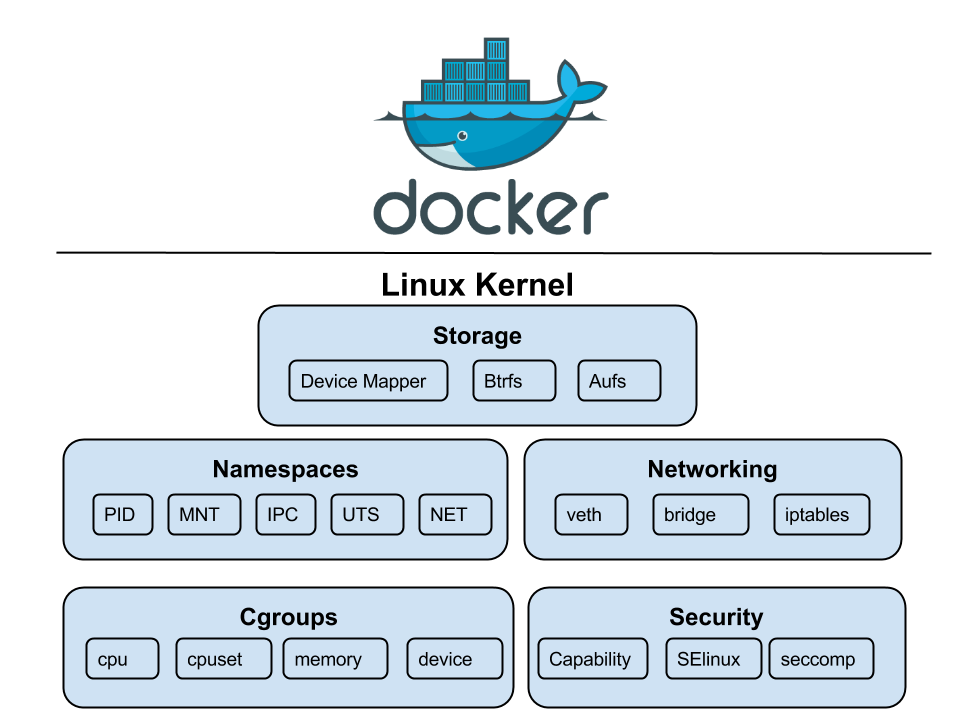
Some resources that Docker uses from Linux for container separation:
-
Namespaces: Used to separate container spaces, providing isolation for containers, limiting access to system resources and other namespaces. This means that the root user inside a container is different from the root user inside another container or even your host machine. This way each container has its own process tree, filesystem, network connections, etc.
- PID: Process Identifier. Allows a container to have its own process tree.
- MNT: Mount. Ensures each container has its own filesystem and how they share these files.
- Controls mount points
- IPC: Inter Process Communication. Isolates communication between processes, preventing processes in different namespaces from using the same memory range.
- NET: Network. Allows virtualizing the network stack, each container can have network interfaces, its own routing table, private IP set, firewall, etc.
- UTS: UNIX Time Sharing. Allows a single system to appear to have different hostnames and domains for its different processes.
-
Cgroups: Control groups that isolate physical resources of a machine. Because of this resource you can limit CPU, memory, disk, device resources.
-
CPU: Allows limiting CPU reservation for a container.
-
CPUSET. Limits thread limits for a container.
-
Memory: Allows limiting memory between containers.
-
Device: Allows a container to have access to a machine device, for example, bluetooth, USB drive, etc.
-
Networking: Communication resources that Docker uses for container communication with each other and with an external environment.
-
bridge: Docker's ability to create a bridge with the host's network card.
-
veth. Virtual Ethernet is the ability to create virtual network cards.
-
iptables: Allows creating network isolation rules, it's the firewall that Docker uses.
-
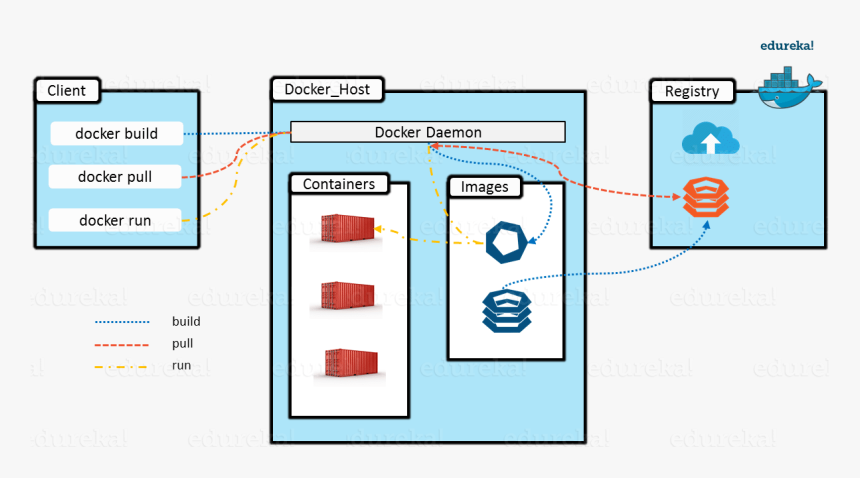
Docker containers aim to execute their function and die, that's why container names are usually random, don't get attached.
/var/lib/docker is where all Docker data is stored
Versions
Docker basically has two versions, the community version and the enterprise version.
- Community Edition
- Free and also open source
- Only for development environments
- Enterprise Edition
- Enterprise
- US$750 per node
- UCP (Universal Control Plane)
- DTR (Docker Trusted Registry)
- Docker Inc. support
- Minimum recommendation:
- 8GB RAM for Manager nodes
- 4GB RAM for Worker nodes
- 2vCPUs for Manager nodes
- 10GB
/varon Manager nodes (Minimum 6GB Recommended) - 500MB
/varon Worker nodes
- The recommendation for Docker EE production environments is:
- 16GB RAM for Manager nodes
- 4vCPUs for Manager nodes
- 25 to 100GB of free disk space