Docker Swarm - Part 2
https://docs.docker.com/engine/swarm/key-concepts/
Let's first understand some concepts, and to work with swarm we will only use the master node, as it is responsible for managing the cluster.
Service
The service is the desired state or declarative state. It is our deployment. A service instantiates a scheduler to take care of its tasks. Let's imagine we want 40 nginx instances.
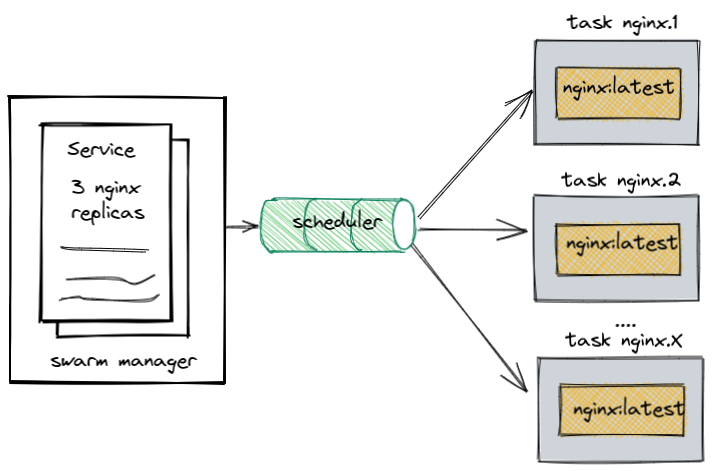
It is possible to have two types of services:
- Replicas: Guarantees X number of tasks but doesn't define which nodes they run on.
- global: Guarantees one and only one task for each of the nodes, including masters. Generally used for agents or monitoring services for each host.
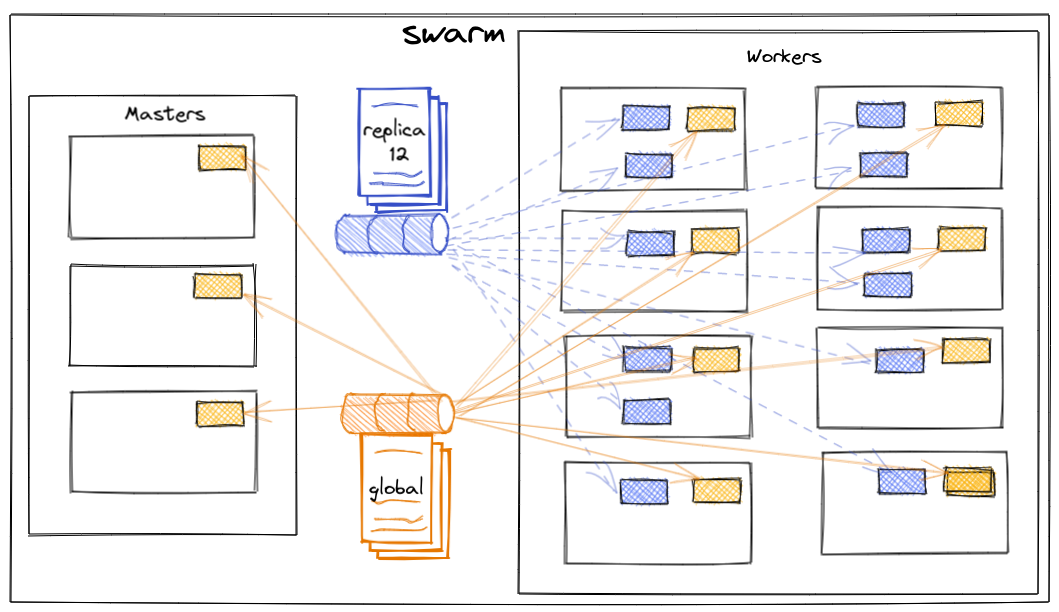
The command for service is docker service.
Run
docker service --helpand check it out.
Output...
vagrant@master:~$ docker service --help

Usage:  docker service COMMAND

Manage services

Commands:
create      Create a new service
inspect     Display detailed information on one or more services
logs        Fetch the logs of a service or task
ls          List services
ps          List the tasks of one or more services
rm          Remove one or more services
rollback    Revert changes to a service's configuration
scale       Scale one or multiple replicated services
update      Update a service

Run 'docker service COMMAND --help' for more information on a command.
Scheduler
It takes care and monitors the tasks to reach the desired state, if possible. Let's imagine you want 40 nginx containers, so it will create 40 tasks to replicate the service. If a task stops, it is responsible for starting it again.
Who defines which task goes to which node is the swarm, not the scheduler
Task
Tasks are the units scheduled by the scheduler to achieve the service. If you defined a service for 40 nginx instances for example, it will create 40 tasks.
A task can contain more than one container, but it's not recommended. Generally, when this occurs, it's when you have a sidecar alongside your main container.
A task can be in several states, but there are 3 main ones:
- assigned (delivered to a node)
- prepared (docker is starting to run the task)
- running (executing and ready)
If a task fails, the orchestrator removes the task and then creates a new task to replace it according to the desired state specified by the service
| State | Description |
|---|---|
NEW | Task has been initialized |
PENDING | Resources are being allocated |
ASIGNED | Task has been assigned to a node |
ACCEPTED | Task accepted by a worker node |
PREPARING | Docker is preparing the task |
STARTING | Docker is starting the task |
RUNNING | Task is running |
COMPLETE | Task finished without error code |
FAILED | Task finished with error code |
SHUTDOWN | Docker requested the task to shut down |
REJECTED | The worker node rejected the task |
ORPHANED | The node has been down for too long |
REMOVE | The task didn't finish but the associated resource was removed or reduced |
The diagram below shows a service with three replicas in yellow and a global service in gray
Creating the first service
https://docs.docker.com/engine/swarm/services/
Remember that this command only works on a master node. If you run a command on the worker, look at the error.
vagrant@worker1:~$ docker service create --name webserver registry.docker-dca.example:5000/nginx
Error response from daemon: This node is not a swarm manager. Worker nodes can't be used to view or modify cluster state. Please run this command on a manager node or promote the current node to a manager.
vagrant@worker1:~$
# Already pulling the image from our registry.
vagrant@master:~$ docker service create --name webserver registry.docker-dca.example:5000/nginx
image registry.docker-dca.example:5000/nginx:latest could not be accessed on a registry to record
its digest. Each node will access registry.docker-dca.example:5000/nginx:latest independently,
possibly leading to different nodes running different
versions of the image.
# See the importance of defining a version.

hzzekzrenlgheyycesni914n3
overall progress: 1 out of 1 tasks
1/1: running   [==================================================>]
verify: Service converged
vagrant@master:~$
We can list the services through the ls subcommand and list the tasks through the ps command
# Checking
# ls will list the services
vagrant@master:~$ docker service ls
ID             NAME        MODE         REPLICAS   IMAGE                                           PORTS
hzzekzrenlgh   webserver   replicated   1/1        registry.docker-dca.example:5000/nginx:latest

# ps will list the tasks in a service
vagrant@master:~$ docker service ps webserver
ID             NAME          IMAGE                                           NODE                         DESIRED STATE   CURRENT STATE           ERROR     PORTS
x03ce6x9pqqn   webserver.1   registry.docker-dca.example:5000/nginx:latest   worker2.docker-dca.example   Running         Running 9 minutes ago
docker service pschecks the task state, task id, which node the task is running on, errors if they exist, and published port.
Swarm creates an overlay network, as studied previously, so when you publish an external port to the service, it maps that port on all hosts. Any IP address or DNS of our hosts point to the service exposed on it.
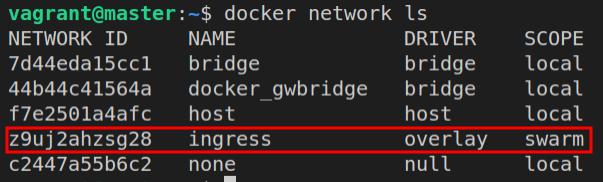
Let's check this network
vagrant@master:~$ docker network inspect ingress
[
    {
        "Name": "ingress",
        "Id": "z9uj2ahzsg2827bmo7jm0ownm",
        "Created": "2022-07-04T05:08:09.208854476Z",
        # see here scope and driver
        "Scope": "swarm",
        "Driver": "overlay",
        "EnableIPv6": false,
        "IPAM": {
            "Driver": "default",
            "Options": null,
            "Config": [
                {
                    "Subnet": "10.0.0.0/24",
                    "Gateway": "10.0.0.1"
                }
            ]
        },
        "Internal": false,
        "Attachable": false,
        "Ingress": true,
        "ConfigFrom": {
            "Network": ""
        },
        "ConfigOnly": false,
        "Containers": {
            "ingress-sbox": {
                "Name": "ingress-endpoint",
                "EndpointID": "183a3618a258b927bf1a5be4b640ba197a57daef432b1d90c6c14708858f2c0d",
                "MacAddress": "02:42:0a:00:00:02",
                "IPv4Address": "10.0.0.2/24",
                "IPv6Address": ""
            }
        },
        "Options": {
            "com.docker.network.driver.overlay.vxlanid_list": "4096"
        },
        "Labels": {},
        # See our nodes
        "Peers": [
            {
                "Name": "e159ab980457",
                "IP": "10.10.10.100"
            },
            {
                "Name": "9dd602f5ced3",
                "IP": "10.10.10.200"
            },
            {
                "Name": "2f3ccb6467d2",
                "IP": "10.10.10.110"
            },
            {
                "Name": "ac8c20da3b2b",
                "IP": "10.10.10.120"
            }
        ]
    }
]
Swarm, like Kubernetes, uses high ports between 30000-32767, and if you don't specify the port it assigns one automatically. Generally it's sequential, but on the exam it's random.
Removing the service
vagrant@master:~$ docker service rm webserver
webserver

vagrant@master:~$ docker service rm webserver
webserver
vagrant@master:~$ docker service ls
ID        NAME      MODE      REPLICAS   IMAGE     PORTS
Publishing the port
To publish the port, we can simply pass the port directly in the command or do an update if it wasn't passed.
vagrant@master:~$ docker service create --name webserver --publish 80  registry.docker-dca.example:5000/nginx
t4jwpwmcb6ds74f06xhf7mblf
overall progress: 1 out of 1 tasks
1/1: running   [==================================================>]
verify: Service converged
# notice that it pointed to 30000, which is the first available and never used.
vagrant@master:~$ docker service ls
ID             NAME        MODE         REPLICAS   IMAGE                                           PORTS
t4jwpwmcb6ds   webserver   replicated   1/1        registry.docker-dca.example:5000/nginx:latest   *:30000->80/tcp
# creating without the port
vagrant@master:~$ docker service create --name webserver2 registry.
3ly198hikj8xmq67wnbduq8ty
overall progress: 1 out of 1 tasks
1/1: running   [==================================================>]
verify: Service converged
vagrant@master:~$ docker service ls
ID             NAME         MODE         REPLICAS   IMAGE                                           PORTS
t4jwpwmcb6ds   webserver    replicated   1/1        registry.docker-dca.example:5000/nginx:latest   *:30000->80/tcp
3ly198hikj8x   webserver2   replicated   1/1        registry.docker-dca.example:5000/nginx:latest
vagrant@master:~$ docker service
create    inspect   logs      ls        ps        rm        rollback  scale     update
# doing an update of the service to add the port
vagrant@master:~$ docker service update webserver2 --publish-add 80
webserver2
overall progress: 1 out of 1 tasks
1/1: running   [==================================================>]
verify: Service converged
# checking if it got the port
vagrant@master:~$ docker service ls
ID             NAME         MODE         REPLICAS   IMAGE                                           PORTS
t4jwpwmcb6ds   webserver    replicated   1/1        registry.docker-dca.example:5000/nginx:latest   *:30000->80/tcp
3ly198hikj8x   webserver2   replicated   1/1        registry.docker-dca.example:5000/nginx:latest   *:30002->80/tcp
# adding one more
vagrant@master:~$ docker service create --name webserver3  registry.docker-dca.example:5000/nginx
4o3zs0turlfdmrks79a37s9o4
overall progress: 1 out of 1 tasks
1/1: running   [==================================================>]
verify: Service converged
vagrant@master:~$ docker service update webserver3 --publish-add 80
webserver3
overall progress: 1 out of 1 tasks
1/1: running   [==================================================>]
verify: Service converged
# checking
vagrant@master:~$ docker service ls
ID             NAME         MODE         REPLICAS   IMAGE                                           PORTS
t4jwpwmcb6ds   webserver    replicated   1/1        registry.docker-dca.example:5000/nginx:latest   *:30000->80/tcp
3ly198hikj8x   webserver2   replicated   1/1        registry.docker-dca.example:5000/nginx:latest   *:30002->80/tcp
4o3zs0turlfd   webserver3   replicated   1/1        registry.docker-dca.example:5000/nginx:latest   *:30003->80/tcp
Fun fact: in the middle of the process I added and removed a service, that's why it skipped 30001, because even though it had been used before and the service used was already down, the increment had already passed and that's why we should mark random on the exam.
I removed the webserver2 and webserver3 services and let's see...
vagrant@master:~$ docker service create --name webserver2 --publish 80

bjp25u6lhxqdy9odrc5vjfejb
overall progress: 1 out of 1 tasks
1/1: running   [==================================================>]
verify: Service converged
# even though 30001 is available, it got 30004
vagrant@master:~$ docker service ls
ID             NAME         MODE         REPLICAS   IMAGE                                           PORTS
t4jwpwmcb6ds   webserver    replicated   1/1        registry.docker-dca.example:5000/nginx:latest   *:30000->80/tcp
bjp25u6lhxqd   webserver2   replicated   1/1        registry.docker-dca.example:5000/nginx:latest   *:30004->80/tcp
vagrant@master:~$
Let's do an inspect of the service. The --pretty flag brings it in a more readable format, but it could be passed without.
vagrant@master:~$ docker service inspect webserver --pretty

ID:             t4jwpwmcb6ds74f06xhf7mblf
Name:           webserver
# desired number of replicas
Service Mode:   Replicated
 Replicas:      1
Placement:
UpdateConfig:
 Parallelism:   1
 On failure:    pause
 Monitoring Period: 5s
 Max failure ratio: 0
 Update order:      stop-first
 # default rollback configurations
RollbackConfig:
 Parallelism:   1
 On failure:    pause
 Monitoring Period: 5s
 Max failure ratio: 0
 Rollback order:    stop-first
ContainerSpec:
 Image:         registry.docker-dca.example:5000/nginx:latest
 Init:          false
Resources:
# vip = virtual ip
Endpoint Mode:  vip
Ports:
# external port
 PublishedPort = 30000
  Protocol = tcp
  # internal port
  TargetPort = 80
  # ingress network is the one created by swarm
  PublishMode = ingress
# hitting nginx through the registry
vvagrant@master:~$ curl http://registry.docker-dca.example:30000
<!DOCTYPE html>
<html>
<head>
<title>Welcome to nginx!</title>
<style>
html { color-scheme: light dark; }
body { width: 35em; margin: 0 auto;
font-family: Tahoma, Verdana, Arial, sans-serif; }
</style>
</head>
<body>
<h1>Welcome to nginx!</h1>
<p>If you see this page, the nginx web server is successfully installed and
working. Further configuration is required.</p>

<p>For online documentation and support please refer to
<a href="http://nginx.org/">nginx.org</a>.<br/>
Commercial support is available at
<a href="http://nginx.com/">nginx.com</a>.</p>

<p><em>Thank you for using nginx.</em></p>
</body>
</html>

# hitting nginx through the master
vagrant@master:~$ curl http://master.docker-dca.example:30000
<!DOCTYPE html>
<html>
<head>
<title>Welcome to nginx!</title>
<style>
html { color-scheme: light dark; }
body { width: 35em; margin: 0 auto;
font-family: Tahoma, Verdana, Arial, sans-serif; }
</style>
</head>
<body>
<h1>Welcome to nginx!</h1>
<p>If you see this page, the nginx web server is successfully installed and
working. Further configuration is required.</p>

<p>For online documentation and support please refer to
<a href="http://nginx.org/">nginx.org</a>.<br/>
Commercial support is available at
<a href="http://nginx.com/">nginx.com</a>.</p>

<p><em>Thank you for using nginx.</em></p>
</body>
</html>
vagrant@master:~$
Scaling the service and viewing logs
https://docs.docker.com/engine/swarm/swarm-tutorial/scale-service/
Let's create and scale containers to ping google
vagrant@master:~$ docker service rm webserver
webserver
vagrant@master:~$ docker service create --name pinger registry.docker-dca.example:5000/alpine ping google.com
image registry.docker-dca.example:5000/alpine:latest could not be accessed on a registry to record
its digest. Each node will access registry.docker-dca.example:5000/alpine:latest independently,
possibly leading to different nodes running different
versions of the image.

c4lfq7i30zl5axkws9h4s5znr
overall progress: 1 out of 1 tasks
1/1: running   [==================================================>]
verify: Service converged
vagrant@master:~$ docker service ls
## 1/1 means you want 1 and have 1 running
ID             NAME      MODE         REPLICAS   IMAGE                                            PORTS
c4lfq7i30zl5   pinger    replicated   1/1        registry.docker-dca.example:5000/alpine:latest
vagrant@master:~$ docker service ps pinger
ID             NAME       IMAGE                                            NODE                         DESIRED STATE   CURRENT STATE            ERROR     PORTS
o3l22j6jm6tv   pinger.1   registry.docker-dca.example:5000/alpine:latest   worker2.docker-dca.example   Running         Running 22 seconds ago
# the -f flag at the end can show real time
vagrant@master:~$ docker service logs pinger
[email protected]    | PING google.com (142.251.129.238): 56 data bytes
[email protected]    | 64 bytes from 142.251.129.238: seq=0 ttl=61 time=20.254 ms
[email protected]    | 64 bytes from 142.251.129.238: seq=1 ttl=61 time=20.299 ms
[email protected]    | 64 bytes from 142.251.129.238: seq=2 ttl=61 time=18.974 ms
[email protected]    | 64 bytes from 142.251.129.238: seq=3 ttl=61 time=19.248 ms
# removed
Now let's scale horizontally!
Let's go straight to 50
vagrant@master:~$ docker service ls
ID             NAME      MODE         REPLICAS   IMAGE                                            PORTS
obrf27hmw0jl   pinger    replicated   1/1        registry.docker-dca.example:5000/alpine:latest
vagrant@master:~$ docker service scale pinger=50
pinger scaled to 50
overall progress: 50 out of 50 tasks
verify: Service converged
vagrant@master:~$ docker service ls
ID             NAME      MODE         REPLICAS   IMAGE                                            PORTS
obrf27hmw0jl   pinger    replicated   50/50      registry.docker-dca.example:5000/alpine:latest
vagrant@master:~$

# let's scale down using another command that also works

vagrant@master:~$ docker service update --replicas 10 pinger
pinger
overall progress: 10 out of 10 tasks
1/10: No such image: registry.docker-dca.example:5000/alpine:latest
2/10: No such image: registry.docker-dca.example:5000/alpine:latest
3/10: No such image: registry.docker-dca.example:5000/alpine:latest
4/10: No such image: registry.docker-dca.example:5000/alpine:latest
5/10: No such image: registry.docker-dca.example:5000/alpine:latest
6/10: running   [==================================================>]
7/10: No such image: registry.docker-dca.example:5000/alpine:latest
8/10: running   [==================================================>]
9/10: running   [==================================================>]
10/10: running   [==================================================>]
verify: Service converged
vagrant@master:~$ docker service ls
ID             NAME      MODE         REPLICAS   IMAGE                                            PORTS
obrf27hmw0jl   pinger    replicated   10/10      registry.docker-dca.example:5000/alpine:latest
# a filter was used because if you do a ps it will bring all 50 containers that were used before with shutdown status
vagrant@master:~$ docker service ps pinger --filter desired-state=running
ID             NAME        IMAGE                                            NODE                          DESIRED STATE   CURRENT STATE           ERROR     PORTS
z1tqamnptnh4   pinger.1    registry.docker-dca.example:5000/alpine:latest   registry.docker-dca.example   Running         Running 5 minutes ago
at4yz7zx5pce   pinger.2    registry.docker-dca.example:5000/alpine:latest   registry.docker-dca.example   Running         Running 4 minutes ago
wvzc9p7mcmn4   pinger.3    registry.docker-dca.example:5000/alpine:latest   registry.docker-dca.example   Running         Running 4 minutes ago
vdk7zibnlg3o   pinger.4    registry.docker-dca.example:5000/alpine:latest   worker2.docker-dca.example    Running         Running 4 minutes ago
qgzzwntz07h5   pinger.5    registry.docker-dca.example:5000/alpine:latest   worker2.docker-dca.example    Running         Running 4 minutes ago
yhbm84y11b87   pinger.6    registry.docker-dca.example:5000/alpine:latest   registry.docker-dca.example   Running         Running 4 minutes ago
ie3ddfuo1hby   pinger.7    registry.docker-dca.example:5000/alpine:latest   registry.docker-dca.example   Running         Running 4 minutes ago
4wguhskm9kh8   pinger.8    registry.docker-dca.example:5000/alpine:latest   worker2.docker-dca.example    Running         Running 4 minutes ago
ivb6e4hax9ig   pinger.9    registry.docker-dca.example:5000/alpine:latest   worker2.docker-dca.example    Running         Running 4 minutes ago
ol60tyle5vp0   pinger.10   registry.docker-dca.example:5000/alpine:latest   worker2.docker-dca.example    Running         Running 4 minutes ago
vagrant@master:~$
Checking the log
vagrant@master:~$ docker service logs pinger -f

# removed the top part as there would be too much, but I took a snippet

# log from task8
[email protected]     | 64 bytes from 142.251.128.78: seq=449 ttl=61 time=18.690 ms
# log from task5
[email protected]     | 64 bytes from 142.251.128.78: seq=448 ttl=61 time=18.027 ms
# log from task10
[email protected]    | 64 bytes from 142.251.128.78: seq=449 ttl=61 time=18.068 ms
Remove the service.
vagrant@master:~$ docker service rm pinger
pinger