Docker Swarm - Part 3
Node Availability
What happens when one of our nodes becomes inactive? Where do the containers running on it go?
For this, we'll use the ping service again that we used to scale, and we'll scale it to 5.
vagrant@master:~$ docker service create --name pinger  --replicas 5  registry.docker-dca.example:5000/alpine ping google.com
#...

vagrant@master:~$ docker service ls
ID             NAME      MODE         REPLICAS   IMAGE                                            PORTS
dd0grakiu2ow   pinger    replicated   5/5        registry.docker-dca.example:5000/alpine:latest
vagrant@master:~$

vagrant@master:~$ docker service ps pinger --filter desired-state=running
ID             NAME       IMAGE                                            NODE                          DESIRED STATE   CURRENT STATE           ERROR     PORTS
slkn7snmuo4l   pinger.1   registry.docker-dca.example:5000/alpine:latest   registry.docker-dca.example   Running         Running 2 minutes ago
rwk8i4r1wsvb   pinger.2   registry.docker-dca.example:5000/alpine:latest   worker1.docker-dca.example    Running         Running 2 minutes ago
6qhufz7xf5kf   pinger.3   registry.docker-dca.example:5000/alpine:latest   worker2.docker-dca.example    Running         Running 2 minutes ago
697qkomicb6w   pinger.4   registry.docker-dca.example:5000/alpine:latest   registry.docker-dca.example   Running         Running 2 minutes ago
puca1zg6l61n   pinger.5   registry.docker-dca.example:5000/alpine:latest   worker2.docker-dca.example    Running         Running 2 minutes ago
Now let's imagine that worker2 has a problem and stopped. Swarm itself will reallocate the container to other nodes. Let's test it.
❯ vagrant halt worker2
==> worker2: Attempting graceful shutdown of VM...
Now let's check
vagrant@master:~$ docker service ls
ID             NAME      MODE         REPLICAS   IMAGE                                            PORTS
dd0grakiu2ow   pinger    replicated   7/5        registry.docker-dca.example:5000/alpine:latest
vagrant@master:~$ docker service ps pinger
ID             NAME           IMAGE                                            NODE                          DESIRED STATE   CURRENT STATE             ERROR                              PORTS
slkn7snmuo4l   pinger.1       registry.docker-dca.example:5000/alpine:latest   registry.docker-dca.example   Running         Running 5 minutes ago
uqbq7n4x61fd    \_ pinger.1   registry.docker-dca.example:5000/alpine:latest   master.docker-dca.example     Shutdown        Rejected 5 minutes ago    "No such image: registry.docke…"
xw7wspjvl6c2    \_ pinger.1   registry.docker-dca.example:5000/alpine:latest   master.docker-dca.example     Shutdown        Rejected 6 minutes ago    "No such image: registry.docke…"
ivgkwsejvm1n    \_ pinger.1   registry.docker-dca.example:5000/alpine:latest   master.docker-dca.example     Shutdown        Rejected 6 minutes ago    "No such image: registry.docke…"
rwk8i4r1wsvb   pinger.2       registry.docker-dca.example:5000/alpine:latest   worker1.docker-dca.example    Running         Running 6 minutes ago
neu2uugr2cag   pinger.3       registry.docker-dca.example:5000/alpine:latest   worker1.docker-dca.example    Running         Running 17 seconds ago
rfy2lisfrz06    \_ pinger.3   registry.docker-dca.example:5000/alpine:latest   master.docker-dca.example     Shutdown        Rejected 28 seconds ago   "No such image: registry.docke…"
gag78grl9krw    \_ pinger.3   registry.docker-dca.example:5000/alpine:latest   master.docker-dca.example     Shutdown        Rejected 33 seconds ago   "No such image: registry.docke…"
476xl49hc75k    \_ pinger.3   registry.docker-dca.example:5000/alpine:latest   master.docker-dca.example     Shutdown        Rejected 38 seconds ago   "No such image: registry.docke…"
6qhufz7xf5kf    \_ pinger.3   registry.docker-dca.example:5000/alpine:latest   worker2.docker-dca.example    Shutdown        Running 5 minutes ago
697qkomicb6w   pinger.4       registry.docker-dca.example:5000/alpine:latest   registry.docker-dca.example   Running         Running 6 minutes ago
h5ogmu03mth5   pinger.5       registry.docker-dca.example:5000/alpine:latest   worker1.docker-dca.example    Running         Running 17 seconds ago
pnmp0cf22mb4    \_ pinger.5   registry.docker-dca.example:5000/alpine:latest   master.docker-dca.example     Shutdown        Rejected 28 seconds ago   "No such image: registry.docke…"
p4cmg1dntadm    \_ pinger.5   registry.docker-dca.example:5000/alpine:latest   master.docker-dca.example     Shutdown        Rejected 33 seconds ago   "No such image: registry.docke…"
qmb5ch04n1si    \_ pinger.5   registry.docker-dca.example:5000/alpine:latest   master.docker-dca.example     Shutdown        Rejected 38 seconds ago   "No such image: registry.docke…"
puca1zg6l61n    \_ pinger.5   registry.docker-dca.example:5000/alpine:latest   worker2.docker-dca.example    Shutdown        Running 6 minutes ago
Observing what happened, it simply now shows 7/5 because it started two new ones, but the previous ones remained in the history. Let's start worker2 again.
❯ vagrant up worker2
And checking
vagrant@master:~$ docker service ls
ID             NAME      MODE         REPLICAS   IMAGE                                            PORTS
dd0grakiu2ow   pinger    replicated   5/5        registry.docker-dca.example:5000/alpine:latest
vagrant@master:~$

ID             NAME           IMAGE                                            NODE                          DESIRED STATE   CURRENT STATE                 ERROR                              PORTS
1ppd0q97wdcx   pinger.1       registry.docker-dca.example:5000/alpine:latest   worker1.docker-dca.example    Running         Running 4 minutes ago
slkn7snmuo4l    \_ pinger.1   registry.docker-dca.example:5000/alpine:latest   registry.docker-dca.example   Shutdown        Shutdown 4 minutes ago
uqbq7n4x61fd    \_ pinger.1   registry.docker-dca.example:5000/alpine:latest   master.docker-dca.example     Shutdown        Rejected 12 minutes ago       "No such image: registry.docke…"
xw7wspjvl6c2    \_ pinger.1   registry.docker-dca.example:5000/alpine:latest   master.docker-dca.example     Shutdown        Rejected 12 minutes ago       "No such image: registry.docke…"
ivgkwsejvm1n    \_ pinger.1   registry.docker-dca.example:5000/alpine:latest   master.docker-dca.example     Shutdown        Rejected 12 minutes ago       "No such image: registry.docke…"
rwk8i4r1wsvb   pinger.2       registry.docker-dca.example:5000/alpine:latest   worker1.docker-dca.example    Running         Running 12 minutes ago
neu2uugr2cag   pinger.3       registry.docker-dca.example:5000/alpine:latest   worker1.docker-dca.example    Running         Running 7 minutes ago
rfy2lisfrz06    \_ pinger.3   registry.docker-dca.example:5000/alpine:latest   master.docker-dca.example     Shutdown        Rejected 7 minutes ago        "No such image: registry.docke…"
gag78grl9krw    \_ pinger.3   registry.docker-dca.example:5000/alpine:latest   master.docker-dca.example     Shutdown        Rejected 7 minutes ago        "No such image: registry.docke…"
476xl49hc75k    \_ pinger.3   registry.docker-dca.example:5000/alpine:latest   master.docker-dca.example     Shutdown        Rejected 7 minutes ago        "No such image: registry.docke…"
6qhufz7xf5kf    \_ pinger.3   registry.docker-dca.example:5000/alpine:latest   worker2.docker-dca.example    Shutdown        Shutdown about a minute ago
92yxi5wjb3xn   pinger.4       registry.docker-dca.example:5000/alpine:latest   worker1.docker-dca.example    Running         Running 4 minutes ago
697qkomicb6w    \_ pinger.4   registry.docker-dca.example:5000/alpine:latest   registry.docker-dca.example   Shutdown        Shutdown 4 minutes ago
h5ogmu03mth5   pinger.5       registry.docker-dca.example:5000/alpine:latest   worker1.docker-dca.example    Running         Running 7 minutes ago
pnmp0cf22mb4    \_ pinger.5   registry.docker-dca.example:5000/alpine:latest   master.docker-dca.example     Shutdown        Rejected 7 minutes ago        "No such image: registry.docke…"
p4cmg1dntadm    \_ pinger.5   registry.docker-dca.example:5000/alpine:latest   master.docker-dca.example     Shutdown        Rejected 7 minutes ago        "No such image: registry.docke…"
qmb5ch04n1si    \_ pinger.5   registry.docker-dca.example:5000/alpine:latest   master.docker-dca.example     Shutdown        Rejected 7 minutes ago        "No such image: registry.docke…"
puca1zg6l61n    \_ pinger.5   registry.docker-dca.example:5000/alpine:latest   worker2.docker-dca.example    Shutdown        Shutdown about a minute ago
vagrant@master:~$
This is not the right way to perform maintenance. For that, we need to drain, meaning remove everything running on it, and Docker Swarm will automatically reallocate to an available node.
Let's drain everything on worker2 now and see what happens
vagrant@master:~$ docker node ls
# everyone is active, let's drain the registry and worker2
ID                            HOSTNAME                      STATUS    AVAILABILITY   MANAGER STATUS   ENGINE VERSION
jdmwyhbti8s3fnmd17lw79rhw *   master.docker-dca.example     Ready     Active         Leader           20.10.17
qvp6um8mstrgrlhhfpjj6khdc     registry.docker-dca.example   Ready     Active                          20.10.17
rxgmhpjtky4s6mktwis2jyr99     worker1.docker-dca.example    Ready     Active                          20.10.17
7980uc978wk928ncb6esv3jy3     worker2.docker-dca.example    Ready     Active                          20.10.17


vagrant@master:~$ docker node update worker2.docker-dca.example --availability drain
worker2.docker-dca.example
vagrant@master:~$ docker node update registry.docker-dca.example --availability drain
registry.docker-dca.example

# notice that the nodes are in drain
vagrant@master:~$ docker node ls
ID                            HOSTNAME                      STATUS    AVAILABILITY   MANAGER STATUS   ENGINE VERSION
jdmwyhbti8s3fnmd17lw79rhw *   master.docker-dca.example     Ready     Active         Leader           20.10.17
qvp6um8mstrgrlhhfpjj6khdc     registry.docker-dca.example   Ready     Drain                           20.10.17
rxgmhpjtky4s6mktwis2jyr99     worker1.docker-dca.example    Ready     Active                          20.10.17
7980uc978wk928ncb6esv3jy3     worker2.docker-dca.example    Ready     Drain                           20.10.17
Did our image registry container that was running on that node go down?
Details
Answer
No, because it was not a Docker Swarm service, it was an independently created container.vagrant@registry:~$ docker container ls
CONTAINER ID IMAGE COMMAND CREATED STATUS PORTS NAMES
06159f4f1e53 registry:2 "/entrypoint.sh /etc…" 36 hours ago Up 36 hours 0.0.0.0:5000->5000/tcp, :::5000->5000/tcp registry
And what happened to the ping containers? They all moved to run on worker1 as we can see.
vagrant@master:~$ docker service ps pinger --filter desired-state=running
ID             NAME       IMAGE                                            NODE                         DESIRED STATE   CURRENT STATE            ERROR     PORTS
1ppd0q97wdcx   pinger.1   registry.docker-dca.example:5000/alpine:latest   worker1.docker-dca.example   Running         Running 21 minutes ago
rwk8i4r1wsvb   pinger.2   registry.docker-dca.example:5000/alpine:latest   worker1.docker-dca.example   Running         Running 29 minutes ago
neu2uugr2cag   pinger.3   registry.docker-dca.example:5000/alpine:latest   worker1.docker-dca.example   Running         Running 23 minutes ago
92yxi5wjb3xn   pinger.4   registry.docker-dca.example:5000/alpine:latest   worker1.docker-dca.example   Running         Running 21 minutes ago
h5ogmu03mth5   pinger.5   registry.docker-dca.example:5000/alpine:latest   worker1.docker-dca.example   Running         Running 23 minutes ago
Inspect the node that is in drain
vagrant@master:~$ docker node inspect worker2.docker-dca.example --pretty | grep Availability
 Availability:          Drain
Let's reactivate the nodes
vagrant@master:~$ docker node update worker2.docker-dca.example --availability active
worker2.docker-dca.example
vagrant@master:~$ docker node update registry.docker-dca.example --availability active
registry.docker-dca.example

vagrant@master:~$ docker node ls
ID                            HOSTNAME                      STATUS    AVAILABILITY   MANAGER STATUS   ENGINE VERSION
jdmwyhbti8s3fnmd17lw79rhw *   master.docker-dca.example     Ready     Active         Leader           20.10.17
qvp6um8mstrgrlhhfpjj6khdc     registry.docker-dca.example   Ready     Active                          20.10.17
rxgmhpjtky4s6mktwis2jyr99     worker1.docker-dca.example    Ready     Active                          20.10.17
7980uc978wk928ncb6esv3jy3     worker2.docker-dca.example    Ready     Active                          20.10.17
Does swarm rebalance the service on nodes?
Details
Answer
No. The desired state of the service has been achieved. Only in the next container deployments will these active nodes be considered.vagrant@master:~$ docker service ps pinger --filter desired-state=running
ID NAME IMAGE NODE DESIRED STATE CURRENT STATE ERROR PORTS
1ppd0q97wdcx pinger.1 registry.docker-dca.example:5000/alpine:latest worker1.docker-dca.example Running Running 30 minutes ago
rwk8i4r1wsvb pinger.2 registry.docker-dca.example:5000/alpine:latest worker1.docker-dca.example Running Running 38 minutes ago
neu2uugr2cag pinger.3 registry.docker-dca.example:5000/alpine:latest worker1.docker-dca.example Running Running 32 minutes ago
92yxi5wjb3xn pinger.4 registry.docker-dca.example:5000/alpine:latest worker1.docker-dca.example Running Running 30 minutes ago
h5ogmu03mth5 pinger.5 registry.docker-dca.example:5000/alpine:latest worker1.docker-dca.example Running Running 32 minutes ago
Scale to 10 and see that now it will take the active nodes into consideration
vagrant@master:~$ docker service scale pinger=10
pinger scaled to 10
overall progress: 10 out of 10 tasks
1/10: running   [==================================================>]
2/10: running   [==================================================>]
3/10: running   [==================================================>]
4/10: running   [==================================================>]
5/10: running   [==================================================>]
6/10: running   [==================================================>]
7/10: running   [==================================================>]
8/10: running   [==================================================>]
9/10: running   [==================================================>]
10/10: running   [==================================================>]
verify: Service converged
vagrant@master:~$ docker service ps pinger --filter desired-state=running
ID             NAME        IMAGE                                            NODE                          DESIRED STATE   CURRENT STATE            ERROR     PORTS
1ppd0q97wdcx   pinger.1    registry.docker-dca.example:5000/alpine:latest   worker1.docker-dca.example    Running         Running 32 minutes ago
rwk8i4r1wsvb   pinger.2    registry.docker-dca.example:5000/alpine:latest   worker1.docker-dca.example    Running         Running 40 minutes ago
neu2uugr2cag   pinger.3    registry.docker-dca.example:5000/alpine:latest   worker1.docker-dca.example    Running         Running 34 minutes ago
92yxi5wjb3xn   pinger.4    registry.docker-dca.example:5000/alpine:latest   worker1.docker-dca.example    Running         Running 32 minutes ago
h5ogmu03mth5   pinger.5    registry.docker-dca.example:5000/alpine:latest   worker1.docker-dca.example    Running         Running 34 minutes ago
y73mw5vgyg16   pinger.6    registry.docker-dca.example:5000/alpine:latest   registry.docker-dca.example   Running         Running 19 seconds ago
4jvjg82n23p7   pinger.7    registry.docker-dca.example:5000/alpine:latest   registry.docker-dca.example   Running         Running 9 seconds ago
y41hd554jn8d   pinger.8    registry.docker-dca.example:5000/alpine:latest   worker2.docker-dca.example    Running         Running 19 seconds ago
8juifuow9gdl   pinger.9    registry.docker-dca.example:5000/alpine:latest   worker2.docker-dca.example    Running         Running 14 seconds ago
v1671qo296zd   pinger.10   registry.docker-dca.example:5000/alpine:latest   registry.docker-dca.example   Running         Running 9 seconds ago
vagrant@master:~$
Also notice that swarm didn't deploy anything to worker1, because it tries to balance resources during scaling.
Remove the service for the next labs
vagrant@master:~$ docker service rm pinger
pinger
Attention - Forcibly shutting down a machine without draining can result in data loss during a transaction
Docker swarm tends to balance resources and not tasks by nodes.
Secrets
Secrets are used to store sensitive (confidential) resources, such as passwords, private keys, SSL certificates or any other resource that should not be transmitted over the network without encryption.
They are stored in blobs (Binary Large Object) which is a collection of binary data stored as a single entity.
To manage secrets we use the docker secret command.
The
docker secret createcommand does not accept text input on the console, only via STDIN or through a file.
vagrant@master:~$ echo "senha123" | docker secret create senha_db -
asfnakvaj9uyfzj4dld3pob6g
# notice that you cannot see the password content
vagrant@master:~$ docker secret inspect senha_db --pretty
ID:              asfnakvaj9uyfzj4dld3pob6g
Name:              senha_db
Driver:
Created at:        2022-07-05 16:18:21.940056803 +0000 utc
Updated at:        2022-07-05 16:18:21.940056803 +0000 utc
vagrant@master:~$
The secret must be passed as a parameter to the container which is stored in the
/run/secrets/<secret_name>file of the container.
Let's run a mysql container passing the password as a secret
vagrant@master:~$ docker service create --name mysql_database \
> --publish 3306:3306/tcp \
> --secret senha_db \
> -e MYSQL_ROOT_PASSWORD_FILE=/run/secrets/senha_db \
> registry.docker-dca.example:5000/mysql:5.7
image registry.docker-dca.example:5000/mysql:5.7 could not be accessed on a registry to record
its digest. Each node will access registry.docker-dca.example:5000/mysql:5.7 independently,
possibly leading to different nodes running different
versions of the image.

4i4v1sqgy78w2ekzdscychojc
overall progress: 1 out of 1 tasks
1/1: running   [==================================================>]
verify: Service converged
We can access the database by installing a client. For this, let's install a mariadb client and try to enter the server with the password to check.
vagrant@master:~$ sudo apt-get install mariadb-client -y

# since we published the port, any of the hostnames would respond to the request even if it was on another node
vagrant@master:~$ mysql -h master.docker-dca.example -u root -p
Enter password:
Welcome to the MariaDB monitor.  Commands end with ; or \g.
Your MySQL connection id is 4
Server version: 5.7.38 MySQL Community Server (GPL)

Copyright (c) 2000, 2018, Oracle, MariaDB Corporation Ab and others.

Type 'help;' or '\h' for help. Type '\c' to clear the current input statement.

MySQL [(none)]> CREATE DATABASE testedb
    -> ;
Query OK, 1 row affected (0.002 sec)

MySQL [(none)]> SHOW DATABASES
    -> ;
+--------------------+
| Database           |
+--------------------+
| information_schema |
| mysql              |
| performance_schema |
| sys                |
| testedb            |
+--------------------+
5 rows in set (0.002 sec)

MySQL [(none)]> EXIT
Bye
Destroy the service
vagrant@master:~$ docker service rm mysql_database
Network
By default, as mentioned earlier, when swarm is initialized it creates an overlay network called ingress, but we can also create another network for the swarm scope.
vagrant@master:~$ docker network create -d overlay dca
vcql6ccw3n11fixhyh687ng6r
vagrant@master:~$ docker network ls
NETWORK ID     NAME              DRIVER    SCOPE
7d44eda15cc1   bridge            bridge    local
# Notice that when you pass overlay it already picks up the swarm scope
vcql6ccw3n11   dca               overlay   swarm
44b44c41564a   docker_gwbridge   bridge    local
f7e2501a4afc   host              host      local
z9uj2ahzsg28   ingress           overlay   swarm
c2447a55b6c2   none              null      local
Did this network go up on all swarm nodes?
Let's start a service on this network.
# publish can specify which target and published port if you want it to be defined. If not exposed it will publish the same expose port that the image defines.
vagrant@master:~$ docker service create --name webserver --publish target=80,published=80 --network dca registry.docker-dca.example:5000/nginx
image registry.docker-dca.example:5000/nginx:latest could not be accessed on a registry to record
its digest. Each node will access registry.docker-dca.example:5000/nginx:latest independently,
possibly leading to different nodes running different
versions of the image.

z071ovcmnnhwpja74insryi0c
overall progress: 1 out of 1 tasks
1/1: running   [==================================================>]
verify: Service converged

# notice that it started on worker2 but we created the overlay network on master
vagrant@master:~$ docker service ps webserver
ID             NAME          IMAGE                                           NODE                         DESIRED STATE   CURRENT STATE            ERROR     PORTS
azpyvzjvfb2r   webserver.1   registry.docker-dca.example:5000/nginx:latest   worker2.docker-dca.example   Running         Running 30 seconds ago
vagrant@master:~$
Is the dca overlay network we created present on other nodes? Yes, when we create an overlay network, swarm automatically creates this network on all nodes. Let's check!
❯
[vagrant@worker2 ~]$ docker network ls
NETWORK ID     NAME              DRIVER    SCOPE
9dc63665ea48   bridge            bridge    local
# it's here
vcql6ccw3n11   dca               overlay   swarm
258d442717bf   docker_gwbridge   bridge    local
f988e2b4b3d5   host              host      local
z9uj2ahzsg28   ingress           overlay   swarm
8c368d1f1a41   none              null      local
# and is the container running?
[vagrant@worker2 ~]$ docker container ls
CONTAINER ID   IMAGE                                           COMMAND                  CREATED         STATUS         PORTS     NAMES
4cf386c682fc   registry.docker-dca.example:5000/nginx:latest   "/docker-entrypoint.…"   3 minutes ago   Up 3 minutes   80/tcp    webserver.1.azpyvzjvfb2r2tzexu24pjhn3
[vagrant@worker2 ~]$
If we scale the container we can see that it can.
vagrant@master:~$ docker service ps webserver --filter desired-state=running
ID             NAME          IMAGE                                           NODE                          DESIRED STATE   CURRENT STATE            ERROR     PORTS
azpyvzjvfb2r   webserver.1   registry.docker-dca.example:5000/nginx:latest   worker2.docker-dca.example    Running         Running 10 minutes ago
n3f6egq78zeq   webserver.2   registry.docker-dca.example:5000/nginx:latest   worker1.docker-dca.example    Running         Running 25 seconds ago
ijvv9lbzb6xg   webserver.3   registry.docker-dca.example:5000/nginx:latest   registry.docker-dca.example   Running         Running 45 seconds ago
vagrant@master:~$
Could we create an overlay network on worker2 which is not a cluster manager?
Details
Answer
No, overlay network needs to be created only on one of the masters.[vagrant@worker2 ~]$ docker network ls
NETWORK ID NAME DRIVER SCOPE
[vagrant@worker2 ~]$ docker network create -d overlay dcateste
Error response from daemon: Cannot create a multi-host network from a worker node. Please create the network from a manager node.
And how does communication between networks work? Even though there is more than one overlay network, it can resolve just by pointing to the hostnames.
Volumes
If we create a volume, where will it be if a container is scaled? Going back to the study of volumes let's install the nfs plugin, as we destroyed the machines previously.
Is it necessary to install the plugin on all machines?
Stack
Stack is swarm's compose. With it we can automate the creation of several services at the same time with a single manifest. A curiosity is that there is no way to create a build inside the stack as we do in compose, because there is no build parameter, only the image. You need to pass an image.
In a production environment, deploying services one by one is not the ideal way. The best practice is to have a file with the entire environment defined.
When we run Docker in swarm mode, we can use the docker stack deploy command
Use the docker stack deploy command to deploy a complete application on swarm. You need to pass the compose file in the deploy command. This file doesn't need to have a specific name, but it needs to be a yaml file.
To work with stacks, we need to use the compose file with version 3 or higher.
Let's deploy the webserver we used earlier, but with stack.
First create a folder to store stack files and the webserver.yml file where we will define our compose.
vagrant@master:~$ mkdir -p stack
vagrant@master:~$ cd stack/
vagrant@master:~/stack$ cat << EOF > webserver.yaml
version: '3.9'

services:
  webserver:
    image: registry.docker-dca.example:5000/nginx
    hostname: webserver
    ports:
      - 80:80
EOF

# Notice that just like in compose it created a network
# --compose-file could be -c
vagrant@master:~/stack$ docker stack deploy --compose-file webserver.yaml myproject
Creating network myproject_default
Creating service myproject_webserver
# Also notice that it puts the project name followed by the service name
vagrant@master:~/stack$ docker service ls
ID             NAME                  MODE         REPLICAS   IMAGE                                           PORTS
7c47dz1amos0   myproject_webserver   replicated   1/1        registry.docker-dca.example:5000/nginx:latest   *:80->80/tcp
vagrant@master:~/stack$
Let's check the stack subcommands
# To list deployments
vagrant@master:~/stack$ docker stack ls
NAME        SERVICES   ORCHESTRATOR
myproject   1          Swarm
vagrant@master:~/stack$

# To check the services of a deployment
vagrant@master:~/stack$ docker stack services myproject
ID             NAME                  MODE         REPLICAS   IMAGE                                           PORTS
7c47dz1amos0   myproject_webserver   replicated   1/1        registry.docker-dca.example:5000/nginx:latest   *:80->80/tcp
vagrant@master:~/stack$

# Or a ps to show the containers that are running
vagrant@master:~/stack$ docker stack ps myproject
ID             NAME                        IMAGE                                           NODE                         DESIRED STATE   CURRENT STATE            ERROR                              PORTS
zmroxabl08o0   myproject_webserver.1       registry.docker-dca.example:5000/nginx:latest   worker2.docker-dca.example   Running         Running 4 minutes ago
p17l8q2q1kiu    \_ myproject_webserver.1   registry.docker-dca.example:5000/nginx:latest   master.docker-dca.example    Shutdown        Rejected 4 minutes ago   "No such image: registry.docke…"
vagrant@master:~/stack$
Now let's modify the file with some stack parameters.
It's not necessary to remove a deploy to upload another, it simply updates the existing one.
The deployment field defines the strategies of our deploy, such as replicas, policies, etc.
vagrant@master:~/stack$
cat << EOF > webserver.yaml
version: '3.9'

services:
  webserver:
    image: registry.docker-dca.example:5000/nginx
    hostname: webserver
    ports:
      - 80:80
    deploy:
      replicas: 5
      restart_policy:
        condition: on-failure
EOF

vagrant@master:~/stack$ docker stack deploy --compose-file webserver.yaml myproject

# checking if replicas worked
vagrant@master:~/stack$ docker stack services myproject
ID             NAME                  MODE         REPLICAS   IMAGE                                           PORTS
7c47dz1amos0   myproject_webserver   replicated   5/5        registry.docker-dca.example:5000/nginx:latest   *:80->80/tcp
vagrant@master:~/stack$

# Notice that it doesn't deploy on master by default.
vagrant@master:~/stack$ docker stack ps myproject --filter desired-state=running
ID             NAME                    IMAGE                                           NODE                          DESIRED STATE   CURRENT STATE           ERROR     PORTS
v2934l9iqick   myproject_webserver.1   registry.docker-dca.example:5000/nginx:latest   registry.docker-dca.example   Running         Running 2 minutes ago
ycj0gyhmder6   myproject_webserver.2   registry.docker-dca.example:5000/nginx:latest   registry.docker-dca.example   Running         Running 2 minutes ago
md31kkccla2d   myproject_webserver.3   registry.docker-dca.example:5000/nginx:latest   worker1.docker-dca.example    Running         Running 2 minutes ago
22wwst0ohbv5   myproject_webserver.4   registry.docker-dca.example:5000/nginx:latest   worker2.docker-dca.example    Running         Running 2 minutes ago
vzdo661usdf6   myproject_webserver.5   registry.docker-dca.example:5000/nginx:latest   worker2.docker-dca.example    Running         Running 2 minutes ago
vagrant@master:~/stack$
Test again removing replicas for global and see how this deploy method works
vagrant@master:~/stack$ cat << EOF > webserver.yaml
version: '3.9'

services:
  webserver:
    image: registry.docker-dca.example:5000/nginx
    hostname: webserver
    ports:
      - 80:80
    deploy:
      mode: global
      restart_policy:
        condition: on-failure
EOF

# I left this to show that it is not possible to change the service type on the fly. You need to remove the service and do the deploy again.
vagrant@master:~/stack$ docker stack deploy --compose-file webserver.yaml myproject
Updating service myproject_webserver (id: 7c47dz1amos0u01bxik141yrx)
failed to update service myproject_webserver: Error response from daemon: rpc error: code = Unimplemented desc = service mode change is not allowed
vagrant@master:~/stack$

vagrant@master:~/stack$ docker stack rm myproject

vagrant@master:~/stack$ docker stack services myproject
ID             NAME                  MODE      REPLICAS   IMAGE                                           PORTS
286ebe59na9g   myproject_webserver   global    4/4        registry.docker-dca.example:5000/nginx:latest   *:80->80/tcp

# Notice that it created one on each node including master
vagrant@master:~/stack$ docker service ps myproject_webserver
ID             NAME                                            IMAGE                                           NODE                          DESIRED STATE   CURRENT STATE                ERROR     PORTS
mby8i5ycafmo   myproject_webserver.7980uc978wk928ncb6esv3jy3   registry.docker-dca.example:5000/nginx:latest   worker2.docker-dca.example    Running         Running about a minute ago
qgz3s92kyd46   myproject_webserver.jdmwyhbti8s3fnmd17lw79rhw   registry.docker-dca.example:5000/nginx:latest   master.docker-dca.example     Running         Running about a minute ago
zay6j3qxum2y   myproject_webserver.qvp6um8mstrgrlhhfpjj6khdc   registry.docker-dca.example:5000/nginx:latest   registry.docker-dca.example   Running         Running about a minute ago
q04akpyw6jzh   myproject_webserver.rxgmhpjtky4s6mktwis2jyr99   registry.docker-dca.example:5000/nginx:latest   worker1.docker-dca.example    Running         Running about a minute ago
Removing...
vagrant@master:~/stack$ docker stack rm myproject
Removing service myproject_webserver
Removing network myproject_default
Constraints and Labels
https://docs.docker.com/engine/swarm/services/#placement-constraints
Constraints are restrictions for which nodes our tasks should be deployed. They should generally be inside the placement block.
https://docs.docker.com/config/labels-custom-metadata/
Label is a label metadata that we can use to match in order to group when filtering, but also used by constraints.
Not the subject, but LABEL can be added to images, directly to a container, to a volume, to network, to nodes and to services. To match, only
== or !=can be used. It either is or it isn't.
In this example we'll ask for only manager nodes.
vagrant@master:~/stack$ cat << EOF > webserver.yaml
version: '3.9'

services:
  webserver:
    image: registry.docker-dca.example:5000/nginx
    hostname: webserver
    ports:
      - 80:80
    deploy:
      mode: replicated
      replicas: 5
      placement:
        constraints:
          - node.role==manager # is it manager or worker
## other examples: node.id  node.hostname
      restart_policy:
        condition: on-failure
EOF

vagrant@master:~/stack$ docker stack deploy --compose-file webserver.yaml myproject
Updating service myproject_webserver (id: acjc23mh4gsz8r54gn3a7bvzg)
vagrant@master:~/stack$

# notice that it only went to master
vagrant@master:~/stack$ docker stack ps myproject --filter desired-state=running
ID             NAME                    IMAGE                                           NODE                        DESIRED STATE   CURRENT STATE            ERROR     PORTS
6gm3u7nwm24m   myproject_webserver.1   registry.docker-dca.example:5000/nginx:latest   master.docker-dca.example   Running         Running 46 seconds ago
u45vc7u41dxn   myproject_webserver.2   registry.docker-dca.example:5000/nginx:latest   master.docker-dca.example   Running         Running 45 seconds ago
0qywj4djqfxs   myproject_webserver.3   registry.docker-dca.example:5000/nginx:latest   master.docker-dca.example   Running         Running 44 seconds ago
p9848shciu3m   myproject_webserver.4   registry.docker-dca.example:5000/nginx:latest   master.docker-dca.example   Running         Running 43 seconds ago
i1s5wkozo2uy   myproject_webserver.5   registry.docker-dca.example:5000/nginx:latest   master.docker-dca.example   Running         Running 42 seconds ago
vagrant@master:~/stack$
Let's add some disk type, region and operational system labels to the nodes
vagrant@master:~/stack$ docker node update --label-add disk=ssd worker1.docker-dca.example
worker1.docker-dca.example
vagrant@master:~/stack$ docker node update --label-add region=us-east-1 worker1.docker-dca.example
worker1.docker-dca.example
vagrant@master:~/stack$ docker node update --label-add disk=hdd worker2.docker-dca.example
worker2.docker-dca.example
vagrant@master:~/stack$ docker node update --label-add region=us-east-1 worker2.docker-dca.example
worker2.docker-dca.example
vagrant@master:~/stack$ docker node update --label-add region=us-east-2 registry.docker-dca.example
registry.docker-dca.example
vagrant@master:~/stack$ docker node update --label-add os=ubuntu worker1.docker-dca.example
worker1.docker-dca.example
vagrant@master:~/stack$ docker node update --label-add os=centos worker2.docker-dca.example
worker2.docker-dca.example

# or save time by doing this
vagrant@master:~/stack$ docker node update --label-add os=ubuntu --label-add disk=ssd --label-add region=us-east-1 master.docker-dca.example
master.docker-dca.example
Inspecting one of these containers to see the label we can see labels there.
vagrant@master:~/stack$ docker node inspect master.docker-dca.example --pretty
ID:                     jdmwyhbti8s3fnmd17lw79rhw
Labels:
 - disk=ssd
 - os=ubuntu
 - region=us-east-1
Hostname:               master.docker-dca.example
Joined at:              2022-07-01 01:56:16.645464567 +0000 utc
Status:
 State:                 Ready
 Availability:          Active
 Address:               10.10.10.100
Manager Status:
 Address:               10.10.10.100:2377
 Raft Status:           Reachable
 Leader:                Yes
Platform:
 Operating System:      linux
 Architecture:          x86_64
Resources:
 CPUs:                  2
 Memory:                1.937GiB
Plugins:
 Log:           awslogs, fluentd, gcplogs, gelf, journald, json-file, local, logentries, splunk, syslog
 Network:               bridge, host, ipvlan, macvlan, null, overlay
 Volume:                local, trajano/nfs-volume-plugin:latest
Engine Version:         20.10.17
TLS Info:
 TrustRoot:
-----BEGIN CERTIFICATE-----
MIIBaTCCARCgAwIBAgIUG+odVPoSYT2+BmLkq3wInnasx9owCgYIKoZIzj0EAwIw
EzERMA8GA1UEAxMIc3dhcm0tY2EwHhcNMjIwNzAxMDE1MTAwWhcNNDIwNjI2MDE1
MTAwWjATMREwDwYDVQQDEwhzd2FybS1jYTBZMBMGByqGSM49AgEGCCqGSM49AwEH
A0IABMYd+K9Z9i7NLOBRzUOYL4vKJ/jaJascVXJYKSafMbBwhr/WOgcZ6NlPBIMG
zsdcxTP9zIYggeiSGYmA7WIMZ3ujQjBAMA4GA1UdDwEB/wQEAwIBBjAPBgNVHRMB
Af8EBTADAQH/MB0GA1UdDgQWBBQbh3AGVtxzbeT6zxp0QghuuotPcjAKBggqhkjO
PQQDAgNHADBEAiAVHH83vBU5qb/sFbF8DBvFyWDHjFsV649/BAVWcAyncQIgFKcU
/M/pAK7YI5bdgKz1RA57XzUdVMVvD+ErJGSgnT0=
-----END CERTIFICATE-----

 Issuer Subject:        MBMxETAPBgNVBAMTCHN3YXJtLWNh
 Issuer Public Key:     MFkwEwYHKoZIzj0CAQYIKoZIzj0DAQcDQgAExh34r1n2Ls0s4FHNQ5gvi8on+NolqxxVclgpJp8xsHCGv9Y6Bxno2U8EgwbOx1zFM/3MhiCB6JIZiYDtYgxnew==
Now using these labels let's redo our stack.
vagrant@master:~/stack$ cat << EOF > webserver.yaml
version: '3.9'

services:
  webserver:
    image: registry.docker-dca.example:5000/nginx
    hostname: webserver
    ports:
      - 80:80
    deploy:
      mode: replicated
      replicas: 5
      placement:
        constraints:
          - node.labels.disk==ssd
          - node.labels.os==ubuntu
          - node.labels.region==us-east-1
          - node.role==worker
      restart_policy:
        condition: on-failure
EOF
If we apply this stack again, will it replace what's already there? No. Remember that the service's desired state has been achieved, so if it has 5 containers running, it will only apply to new tasks. For it to work, let's remove what's there.
See that it created everything on worker1 because it's the only one that met all the constraints.
agrant@master:~/stack$ docker stack rm myproject
Removing service myproject_webserver
Removing network myproject_default
vagrant@master:~/stack$ docker stack deploy --compose-file webserver.yaml myproject
Creating network myproject_default
Creating service myproject_webserver
vagrant@master:~/stack$ docker stack ps myproject --filter desired-state=running
ID             NAME                    IMAGE                                           NODE                         DESIRED STATE   CURRENT STATE                    ERROR     PORTS
usyfq0koorpe   myproject_webserver.1   registry.docker-dca.example:5000/nginx:latest   worker1.docker-dca.example   Running         Running less than a second ago
s5myway7hhwl   myproject_webserver.2   registry.docker-dca.example:5000/nginx:latest   worker1.docker-dca.example   Running         Running less than a second ago
ivabd1hijfxs   myproject_webserver.3   registry.docker-dca.example:5000/nginx:latest   worker1.docker-dca.example   Running         Running less than a second ago
ifn1imn3d3ip   myproject_webserver.4   registry.docker-dca.example:5000/nginx:latest   worker1.docker-dca.example   Running         Running less than a second ago
knyi5l2xmery   myproject_webserver.5   registry.docker-dca.example:5000/nginx:latest   worker1.docker-dca.example   Running         Running less than a second ago
vagrant@master:~/stack$
Remove the stack
vagrant@master:~/stack$ docker stack rm myproject
Removing service myproject_webserver
Removing network myproject_default
Now let's go deeper by creating a bigger stack
vagrant@master:~/stack$ cat << EOF > webserver.yaml
version: '3.9'

volumes:
  mysql_db:

networks:
  wordpress_net:

# This secret was already declared earlier and was reused here to show the functionality
secrets:
  senha_db:
    external: true # external means it was not created here

services:
  wordpress:
    image: registry.docker-dca.example:5000/wordpress
    ports:
      - 8080:80

    environment:
      WORDPRESS_DB_HOST: db
      WORDPRESS_DB_USER: wpuser
      WORDPRESS_DB_PASSWORD_FILE: /run/secrets/senha_db
      WORDPRESS_DB_NAME: wordpress

    networks:
      - wordpress_net

    secrets:
      - senha_db

    deploy:
      mode: replicated
      replicas: 5
      placement:
        constraints:
          - node.role==worker
      restart_policy:
        condition: on-failure

    depends_on:
      - db

  db:
    image: registry.docker-dca.example:5000/mysql:5.7
    volumes:
      - mysql_db:/var/lib/mysql

    secrets:
      - senha_db

    networks:
      - wordpress_net

    environment:
      MYSQL_DATABASE: wordpress
      MYSQL_USER: wpuser
      MYSQL_PASSWORD_FILE: /run/secrets/senha_db
      MYSQL_RANDOM_ROOT_PASSWORD: '1'

    deploy:
      replicas: 1
      placement:
        constraints:
          - node.role==manager
      restart_policy:
        condition: on-failure
EOF
docker stack deploy wordpress --compose-file webserver.yaml
Let's deploy the stack and see that it did the update.
vagrant@master:~/stack$ docker stack deploy wordpress --compose-file webserver.yaml
Updating service wordpress_db (id: z91i4piqiua4mufapobni2x3d)
Updating service wordpress_wordpress (id: lsp4152rvzpwxbvzyoq7k3g2g)

docker stack services wordpress
docker stack ps wordpress
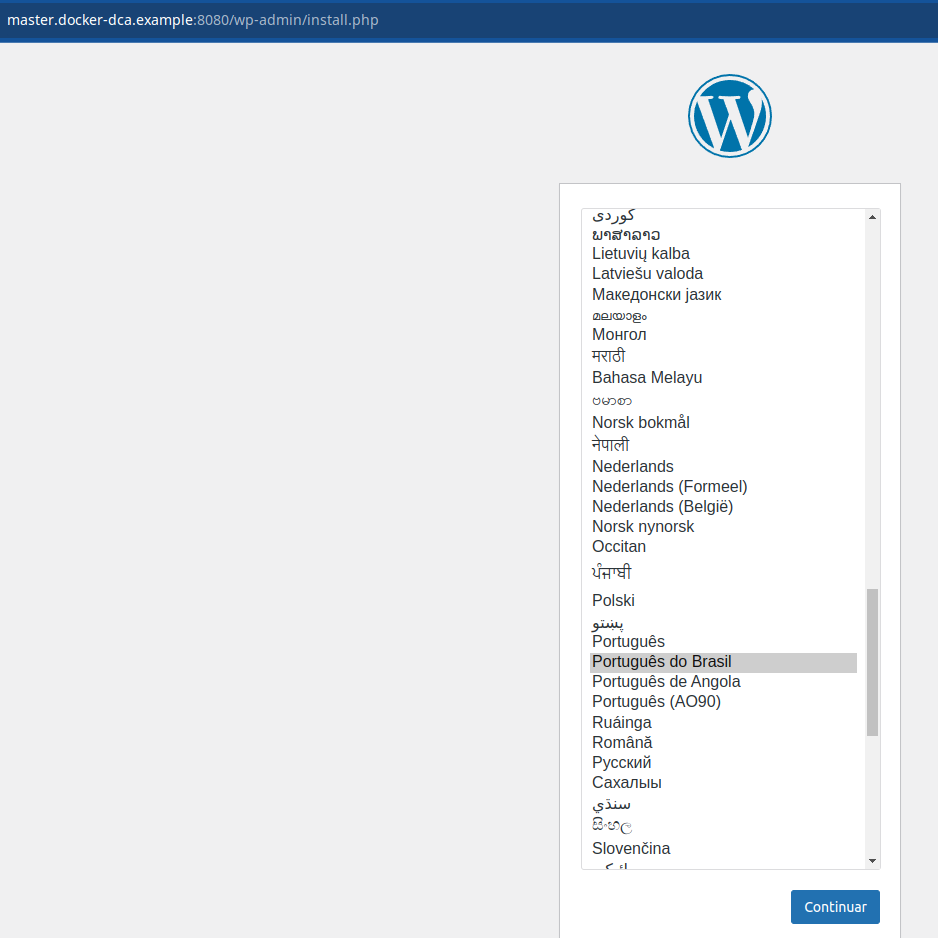
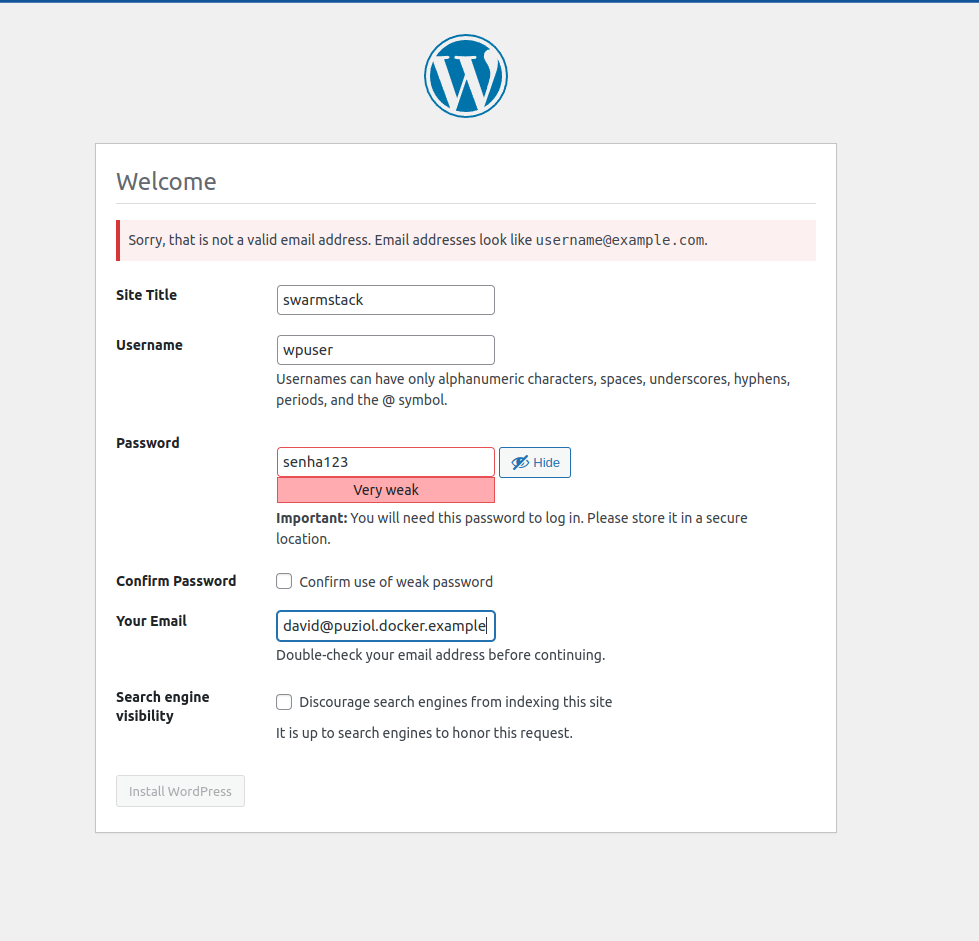
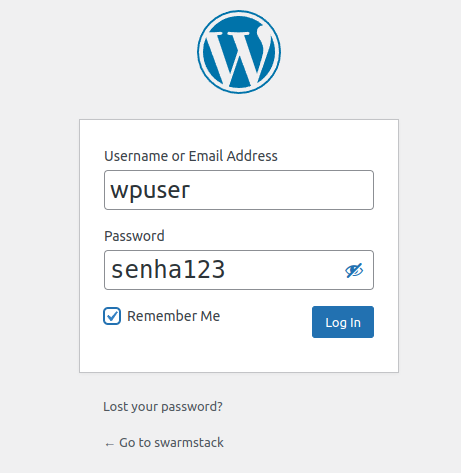
Access the browser and configure the webpage
Note that we can access the site from any cluster address, since we have a VIP configured.
http://master.docker-dca.example:8080/

Managing Resources
We can also manage a resource limit/reservation for the container through the resources parameter in compose. In the wordpress deploy block (this is just a slice of the block) we could include some more parameters.
vagrant@master:~/stack$ cat << EOF > webserver.yaml
version: '3.9'

volumes:
  mysql_db:

networks:
  wordpress_net:

# This secret was already declared earlier and was reused here to show the functionality
secrets:
  senha_db:
    external: true # external means it was not created here

services:
  wordpress:
    image: registry.docker-dca.example:5000/wordpress
    ports:
      - 8080:80

    environment:
      WORDPRESS_DB_HOST: db
      WORDPRESS_DB_USER: wpuser
      WORDPRESS_DB_PASSWORD_FILE: /run/secrets/senha_db
      WORDPRESS_DB_NAME: wordpress

    networks:
      - wordpress_net

    secrets:
      - senha_db

    deploy:
      mode: replicated
      replicas: 5
      placement:
        constraints:
          - node.role==worker
      restart_policy:
        condition: on-failure
########## New Parameters ##########
      resources:
        limits: # (Maximum Values)
          cpus: "1"
          memory: 60M # in megas
        reservations: # (Guaranteed Values)
          cpus: "0.5" # this is 50% of a cpu
          memory: 30M
######################################
    depends_on:
      - db

  db:
    image: registry.docker-dca.example:5000/mysql:5.7
    volumes:
      - mysql_db:/var/lib/mysql

    secrets:
      - senha_db

    networks:
      - wordpress_net

    environment:
      MYSQL_DATABASE: wordpress
      MYSQL_USER: wpuser
      MYSQL_PASSWORD_FILE: /run/secrets/senha_db
      MYSQL_RANDOM_ROOT_PASSWORD: '1'

    deploy:
      replicas: 1
      placement:
        constraints:
          - node.role==manager
      restart_policy:
        condition: on-failure
EOF
This means that it will guarantee 0.5 cpu and 30M of ram, meaning the container always has this available to it. If it needs to increase, it will reach a maximum of 1 cpu and 60M of ram.
If all containers reach the maximum but only have the minimum guaranteed, what happens?
Let's do the deploy again
vagrant@master:~/stack$ docker stack services wordpress
ID             NAME                  MODE         REPLICAS   IMAGE                                               PORTS
z91i4piqiua4   wordpress_db          replicated   1/1        registry.docker-dca.example:5000/mysql:5.7
lsp4152rvzpw   wordpress_wordpress   replicated   5/5        registry.docker-dca.example:5000/wordpress:latest   *:8080->80/tcp
vagrant@master:~/stack$ docker stack ps wordpress --filter desired-state=running
ID             NAME                    IMAGE                                               NODE                          DESIRED STATE   CURRENT STATE                ERROR     PORTS
kk1j0x76zo8d   wordpress_db.1          registry.docker-dca.example:5000/mysql:5.7          master.docker-dca.example     Running         Running 31 hours ago
odd02cbzelvj   wordpress_wordpress.1   registry.docker-dca.example:5000/wordpress:latest   worker2.docker-dca.example    Running         Running about a minute ago
wzaop3wrnrk6   wordpress_wordpress.2   registry.docker-dca.example:5000/wordpress:latest   worker1.docker-dca.example    Running         Running about a minute ago
k6mjvcote05s   wordpress_wordpress.3   registry.docker-dca.example:5000/wordpress:latest   worker2.docker-dca.example    Running         Running about a minute ago
muvxhf3dzyxl   wordpress_wordpress.4   registry.docker-dca.example:5000/wordpress:latest   worker1.docker-dca.example    Running         Running about a minute ago
u2je2a8euo7s   wordpress_wordpress.5   registry.docker-dca.example:5000/wordpress:latest   registry.docker-dca.example   Running         Running about a minute ago
vagrant@master:~/stack$

# Checking the service...
vagrant@master:~/stack$ docker service inspect wordpress_wordpress --pretty

ID:  lsp4152rvzpwxbvzyoq7k3g2g
Name:  wordpress_wordpress
Labels:
 com.docker.stack.image=registry.docker-dca.example:5000/wordpress
 com.docker.stack.namespace=wordpress
Service Mode: Replicated
 Replicas: 5
UpdateStatus:
 State:  completed
 Started: 3 minutes ago
 Completed: 3 minutes ago
 Message: update completed
Placement:
 Constraints: [node.role==worker]
UpdateConfig:
 Parallelism: 1
 On failure: pause
 Monitoring Period: 5s
 Max failure ratio: 0
 Update order:      stop-first
RollbackConfig:
 Parallelism: 1
 On failure: pause
 Monitoring Period: 5s
 Max failure ratio: 0
 Rollback order:    stop-first
ContainerSpec:
 Image:  registry.docker-dca.example:5000/wordpress:latest@sha256:b57bf41505b6eb494a59034820f5bd3517bbedcddb35c3ad1be950bfc96c2164
 Env:  WORDPRESS_DB_HOST=db WORDPRESS_DB_NAME=wordpress WORDPRESS_DB_PASSWORD_FILE=/run/secrets/senha_db WORDPRESS_DB_USER=wpuser
Secrets:
 Target: senha_db
  Source: senha_db
Resources:
## here are the resources we defined
 Reservations:
  CPU:  0.5
  Memory: 30MiB
 Limits:
  CPU:  1
  Memory: 60MiB
Networks: wordpress_wordpress_net
Endpoint Mode: vip
Ports:
 PublishedPort = 8080
  Protocol = tcp
  TargetPort = 80
  PublishMode = ingress
A command to check the memory usage of a container is docker stats.
Docker stats should be used on each of the nodes to check their containers. With this command we cannot directly know this from the master.
Do a docker stats on each of the nodes and check
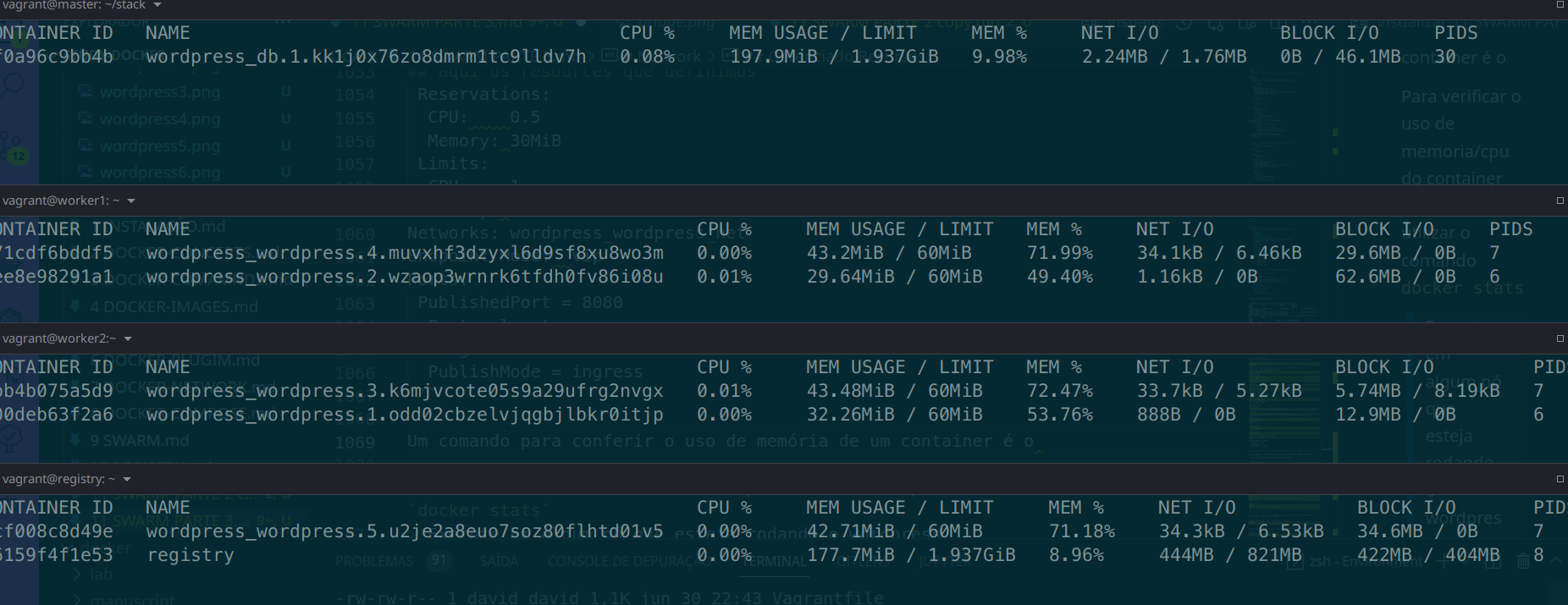
Is it possible to know the memory usage of each container from other nodes? Not directly through swarm. For this, other resources are used as we will see later on. Remember global?
Let's install a stresser on the master machine that doesn't have wordpress and stress the others.
Let's install apache benchmark on the master machine to do a stress test on the container.
sudo apt-get install apache2-utils -y
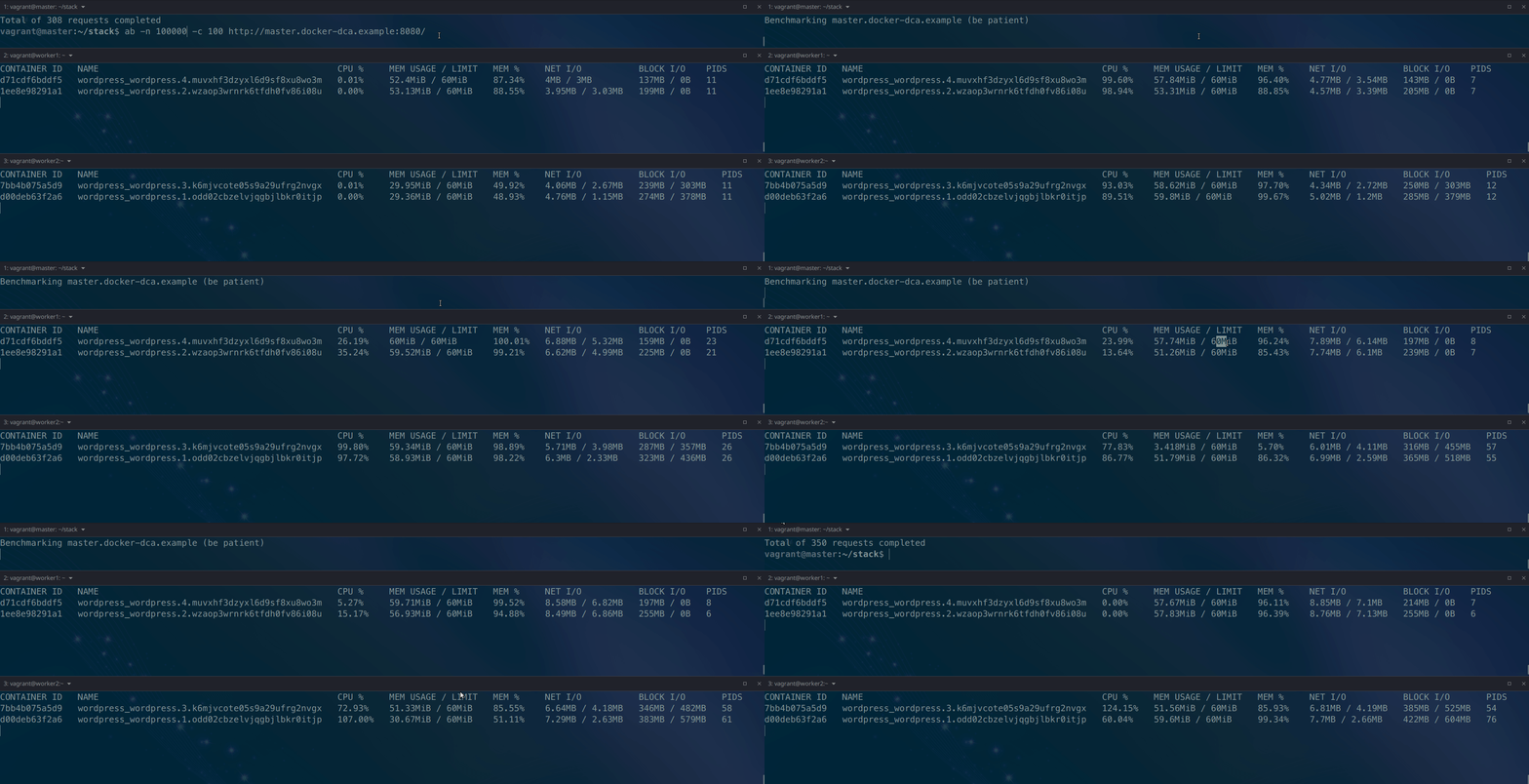
Run apache benchmark and monitor the cpu/memory usage of the container on the containers that are running wordpress, because we passed port 8080 so it goes to worker1 and 2.
ab -n 10000 -c 100 http://master.docker-dca.example:8080/
Let's scale to 10 and increase the concurrency number to 1000 and see the containers working.
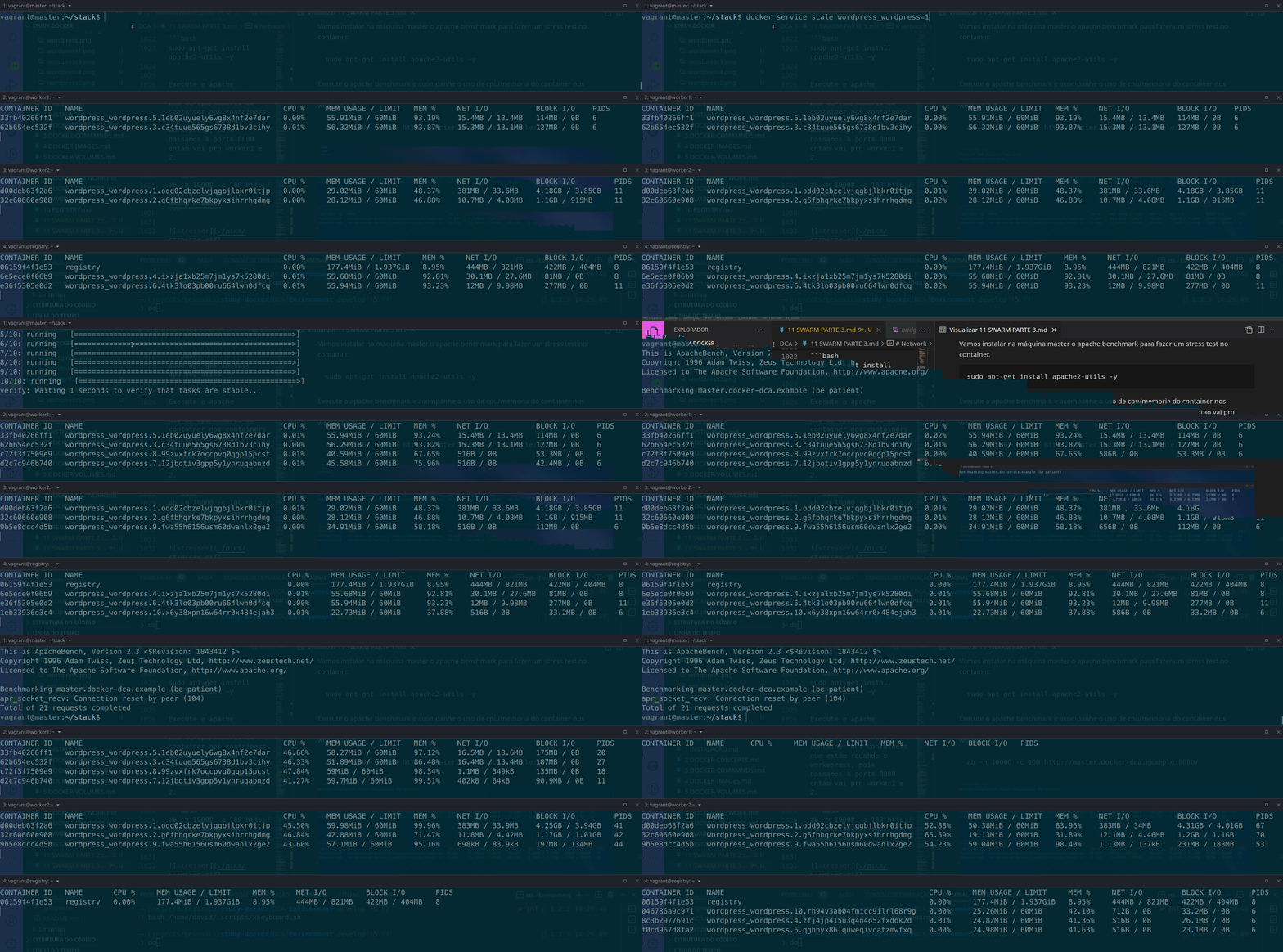
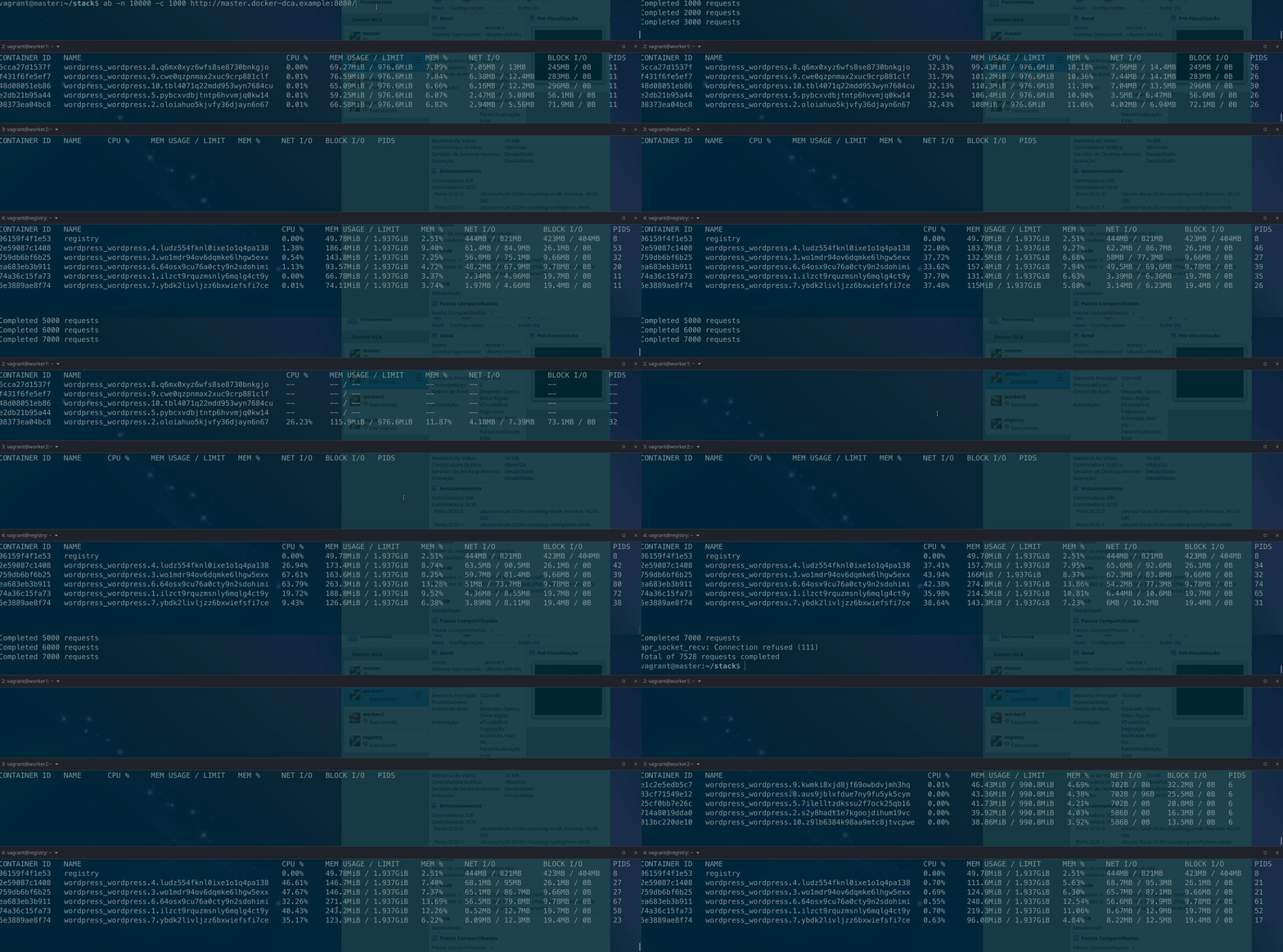
Notice that the containers crashed, they didn't have enough memory to guarantee the input and crashed. However, the scheduler raised them again to achieve our service goal.
It's not mandatory, but it's necessary to configure limits for your containers. If a container runs without limits it invades all the cpu and memory of the machine and can bring down all other containers. See the gif below.
Remove the stack
docker stack rm wordpress-stack
Q1 = Option 3 Q2 = Option 1 Q3 = Option 1 Q4 = A Q5 = B Q6 = A Q7 = Option 3 Q8 = C Q9 = C