Docker Networks
https://docs.docker.com/network/
One of Docker's most powerful features is precisely the utilization of network resources and how easily it connects containers.
- We can connect containers from different machines
- We can create an overlay network between multiple servers
Linux resources that Docker uses
- veth
- is a virtual ethernet to create container network interfaces.
- bridge
- routing bridge from host to container
- iptables
- Linux system firewall
Docker creates some default networks
vagrant@worker1:~$ docker network ls
NETWORK ID     NAME      DRIVER    SCOPE
d0d374d6bfc8   bridge    bridge    local
51533d503c46   host      host      local
4a528ce35bc2   none      null      local
vagrant@worker1:~$
Note that the scope of this network only belongs to the host, that's why it's local. We'll talk about global scope when working with clusters and overlay network.
By default, Docker doesn't expose container ports, so if we run an nginx for example, it will be isolated and won't be able to provide the service.
vagrant@worker1:~$ docker container run -dit --name webserver nginx
d874bd76de6ba12e12defdd98560c871b89556a2b9f95b456a14c5a4f4508f3a
vagrant@worker1:~$ docker container ls
CONTAINER ID   IMAGE     COMMAND                  CREATED         STATUS         PORTS     NAMES
d874bd76de6b   nginx     "/docker-entrypoint.…"   5 seconds ago   Up 4 seconds   80/tcp    webserver
In this case, you could only reach this container from within another container on the same NAT network that Docker creates. From outside the NAT it wouldn't be possible.
The -p or --publish parameter is when Docker publishes an external port that maps to the internal port of the container.
The correct way would be
# host port:container port or source:destination
vagrant@worker1:~$ docker container run -dit -p 80:80 --name webserver nginx
51321d90ecee55960a0e965efb4c57cdbf1d4e78eb0aef7caf9f1b844d273ddc
vagrant@worker1:~$ docker container ls
# observe now that in ports it's making a mapping
CONTAINER ID   IMAGE     COMMAND                  CREATED         STATUS         PORTS                                   NAMES
51321d90ecee   nginx     "/docker-entrypoint.…"   2 minutes ago   Up 2 minutes   0.0.0.0:80->80/tcp, :::8000->80/tcp   webserver
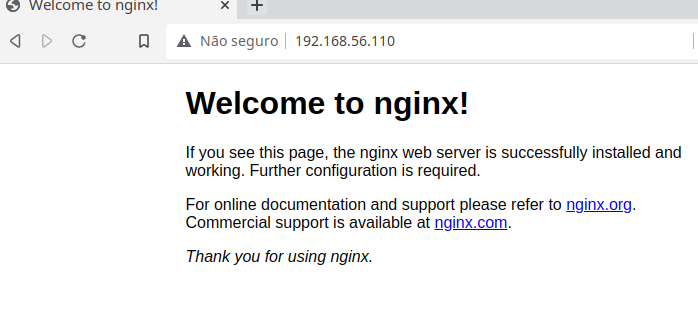
If you access this machine's IP, it will now return the nginx page
Network drivers
These are the resources that translate Docker to the host network. There are several drivers.
Bridge
It's Docker's default network if no driver is specified. A network interface is created in Linux called dockerX where X is a number, and one interface is created for each bridge network. Don't confuse this with container creation that uses this network. Docker creates a veth for each container to communicate with this interface. It's a NAT network and already has internal DNS capability.
To verify the dockerX interface creation, we can see that we have a docker0 on the host machine. This interface is DOWN because no container is using it yet, but it will be up as soon as we run the first container using the bridge.
vagrant@worker1:~$ ip -c -br a
lo               UNKNOWN        127.0.0.1/8 ::1/128
enp0s3           UP             10.0.2.15/24 fe80::cd:65ff:fe0c:9769/64
enp0s8           UP             192.168.56.110/24 fe80::a00:27ff:fe4e:ae9f/64
docker0          DOWN           172.17.0.1/16 fe80::42:77ff:fe88:14cd/64
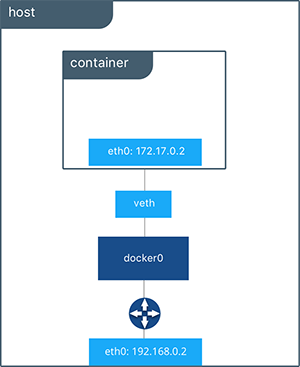 The switch (docker-proxy), docker0 interface, and veth provide an isolation layer for the container in this figure. This way it's possible for multiple containers to use their specific ports, with each container able to use port 80, for example.
The parameter we need to pass is --network bridge in the docker container run command
docker container run -dit --name webserver --network bridge -p 80:80 nginx
Now check that the interface is UP.
vagrant@worker1:~$ ip -c -br a | grep docker
docker0          UP             172.17.0.1/16 fe80::42:77ff:fe88:14cd/64
Check the service on host port 80
vagrant@worker1:~$ sudo ss -ntpl | grep 80
LISTEN    0         4096               0.0.0.0:80               0.0.0.0:*        users:(("docker-proxy",pid=2227,fd=4))
LISTEN    0         4096                  [::]:80                  [::]:*        users:(("docker-proxy",pid=2233,fd=4))
Docker runs a process for each bridge network called docker-proxy. Docker creates iptables rules for network process isolation.
We can verify this through the command
vagrant@worker1:~$ sudo iptables -nL
Chain INPUT (policy ACCEPT)
target     prot opt source               destination


Chain FORWARD (policy DROP)
target     prot opt source               destination
# ISOLATION
DOCKER-USER  all  --  0.0.0.0/0            0.0.0.0/0
DOCKER-ISOLATION-STAGE-1  all  --  0.0.0.0/0            0.0.0.0/0
ACCEPT     all  --  0.0.0.0/0            0.0.0.0/0            ctstate RELATED,ESTABLISHED
DOCKER     all  --  0.0.0.0/0            0.0.0.0/0
ACCEPT     all  --  0.0.0.0/0            0.0.0.0/0
ACCEPT     all  --  0.0.0.0/0            0.0.0.0/0

Chain OUTPUT (policy ACCEPT)
target     prot opt source               destination

# see this rule
Chain DOCKER (1 references)
target     prot opt source               destination
ACCEPT     tcp  --  0.0.0.0/0            172.17.0.2           tcp dpt:80

Chain DOCKER-ISOLATION-STAGE-1 (1 references)
target     prot opt source
               destination
# ISOLATION
DOCKER-ISOLATION-STAGE-2  all  --  0.0.0.0/0            0.0.0.0/0
RETURN     all  --  0.0.0.0/0            0.0.0.0/0

Chain DOCKER-ISOLATION-STAGE-2 (1 references)
target     prot opt source               destination
DROP       all  --  0.0.0.0/0            0.0.0.0/0
RETURN     all  --  0.0.0.0/0            0.0.0.0/0

Chain DOCKER-USER (1 references)
target     prot opt source               destination
RETURN     all  --  0.0.0.0/0            0.0.0.0/0
Remove the container for the next step.
Let's create 2 containers and communicate between them through a bridge.
vagrant@worker1:~$ docker container run -dit --network bridge --name container1 --hostname servidor alpine
vagrant@worker1:~$ docker container run -dit --network bridge --name container2 --hostname cliente alpine
# CONTAINER1 with ip 172.17.0.2
vagrant@worker1:~$ docker container exec container1 ip a show eth0
21: eth0@if22: <BROADCAST,MULTICAST,UP,LOWER_UP,M-DOWN> mtu 1500 qdisc noqueue state UP
    link/ether 02:42:ac:11:00:02 brd ff:ff:ff:ff:ff:ff
    inet 172.17.0.2/16 brd 172.17.255.255 scope global eth0
       valid_lft forever preferred_lft forever
# CONTAINER2 with ip 172.17.0.3
vagrant@worker1:~$ docker container exec container2 ip a show eth0
23: eth0@if24: <BROADCAST,MULTICAST,UP,LOWER_UP,M-DOWN> mtu 1500 qdisc noqueue state UP
    link/ether 02:42:ac:11:00:03 brd ff:ff:ff:ff:ff:ff
    inet 172.17.0.3/16 brd 172.17.255.255 scope global eth0
       valid_lft forever preferred_lft forever
# Pinging container1 from container2
vagrant@worker1:~$ docker container exec container1 ping -c2 172.17.0.3
PING 172.17.0.3 (172.17.0.3): 56 data bytes
64 bytes from 172.17.0.3: seq=0 ttl=64 time=0.122 ms
64 bytes from 172.17.0.3: seq=1 ttl=64 time=0.120 ms

# Pinging container 2 from container 1
vagrant@worker1:~$ docker container exec container2 ping -c2 172.17.0.2
PING 172.17.0.2 (172.17.0.2): 56 data bytes
64 bytes from 172.17.0.2: seq=0 ttl=64 time=0.064 ms
64 bytes from 172.17.0.2: seq=1 ttl=64 time=0.082 ms
Everything working, now let's ping by hostname
vagrant@worker1:~$ docker container exec container1 ping -c2 cliente
ping: bad address 'cliente'
vagrant@worker1:~$ docker container exec container2 ping -c2 servidor
ping: bad address 'servidor'
vagrant@worker1:~$
This shows that the default bridge created by Docker doesn't have DNS resolution through the network. This feature is not enabled.
Remove the containers.
For this to work we need to define a user defined network. Advantages:
- Automatic DNS
- Isolation
- Connect and disconnect on the fly
- Custom configuration
vagrant@worker1:~$ docker network create --driver bridge --subnet 172.100.0.0/16 dockernet
8108970bf72615dcdbbe099d9419b6ac811595ee3f535e2280a18b833fb11747
vagrant@worker1:~$ docker network ls
NETWORK ID     NAME        DRIVER    SCOPE
9efd4a6f72a7   bridge      bridge    local
8108970bf726   dockernet   bridge    local
51533d503c46   host        host      local
4a528ce35bc2   none        null      local

vagrant@worker1:~$ docker network inspect dockernet | jq
[
  {
    "Name": "dockernet",
    "Id": "8108970bf72615dcdbbe099d9419b6ac811595ee3f535e2280a18b833fb11747",
    "Created": "2022-06-28T19:55:55.045867514Z",
    "Scope": "local",
    "Driver": "bridge",
    "EnableIPv6": false,
    "IPAM": {
      "Driver": "default",
      "Options": {},
      "Config": [
        {
          "Subnet": "172.100.0.0/16"
        }
      ]
    },
    "Internal": false,
    "Attachable": false,
    "Ingress": false,
    "ConfigFrom": {
      "Network": ""
    },
    "ConfigOnly": false,
    # every container that starts will appear here.
    "Containers": {},
    "Options": {},
    "Labels": {}
  }
]
Now let's create the machines again and ping between them by hostname and verify.
vagrant@worker1:~$ docker container run -dit --network dockernet --name container1 --hostname server alpine
vagrant@worker1:~$ docker container run -dit --network dockernet --name container2 --hostname cliente alpine
# let's check the network
vagrant@worker1:~$ docker network inspect dockernet | jq
[
  {
    "Name": "dockernet",
    "Id": "8108970bf72615dcdbbe099d9419b6ac811595ee3f535e2280a18b833fb11747",
    "Created": "2022-06-28T19:55:55.045867514Z",
    "Scope": "local",
    "Driver": "bridge",
    "EnableIPv6": false,
    "IPAM": {
      "Driver": "default",
      "Options": {},
      "Config": [
        {
          "Subnet": "172.100.0.0/16"
        }
      ]
    },
    "Internal": false,
    "Attachable": false,
    "Ingress": false,
    "ConfigFrom": {
      "Network": ""
    },
    "ConfigOnly": false,
    # Observe that the containers are here
    "Containers": {
      "2f9b7e7b2bb80f8b1966785ddb865f858cd1e30d232410dfb212c5d798cd7a42": {
        "Name": "container1",
        "EndpointID": "d73ed0c87ff7370963ca166e851ebb39e96380fe0b39e1009192409728fb3b3a",
        "MacAddress": "02:42:ac:64:00:02",
        "IPv4Address": "172.100.0.2/16",
        "IPv6Address": ""
      },
      "da6ac7aeb79d6c68f540588c92b585772adfb0fe04e835ef92d22d92c3a03b88": {
        "Name": "container2",
        "EndpointID": "2071f2e0478d8a2291c443a5be837e5150832e588f4e0fa4856dac762d7967fc",
        "MacAddress": "02:42:ac:64:00:03",
        "IPv4Address": "172.100.0.3/16",
        "IPv6Address": ""
      }
    },
    "Options": {},
    "Labels": {}
  }
]
vagrant@worker1:~$ docker container exec container1 ping -c2 cliente
PING cliente (172.100.0.3): 56 data bytes
64 bytes from 172.100.0.3: seq=0 ttl=64 time=0.114 ms
64 bytes from 172.100.0.3: seq=1 ttl=64 time=0.090 ms
vagrant@worker1:~$ docker container exec container2 ping -c2 server
PING server (172.100.0.2): 56 data bytes
64 bytes from 172.100.0.2: seq=0 ttl=64 time=0.060 ms
64 bytes from 172.100.0.2: seq=1 ttl=64 time=0.097 ms
Now let's disconnect a container and connect it with another IP.
# Disconnecting container 2
vagrant@worker1:~$ docker network disconnect dockernet container2
# trying to ping and seeing it doesn't respond
vagrant@worker1:~$ docker container exec container1 ping -c2 cliente
ping: bad address 'cliente'
# connecting container 2 with ip .10
vagrant@worker1:~$ docker network connect --ip 172.100.0.10 dockernet container2
# checking the change
vagrant@worker1:~$ docker network inspect dockernet | jq
[
  {
    "Name": "dockernet",
    "Id": "8108970bf72615dcdbbe099d9419b6ac811595ee3f535e2280a18b833fb11747",
    "Created": "2022-06-28T19:55:55.045867514Z",
    "Scope": "local",
    "Driver": "bridge",
    "EnableIPv6": false,
    "IPAM": {
      "Driver": "default",
      "Options": {},
      "Config": [
        {
          "Subnet": "172.100.0.0/16"
        }
      ]
    },
    "Internal": false,
    "Attachable": false,
    "Ingress": false,
    "ConfigFrom": {
      "Network": ""
    },
    "ConfigOnly": false,
    "Containers": {
      "2f9b7e7b2bb80f8b1966785ddb865f858cd1e30d232410dfb212c5d798cd7a42": {
        "Name": "container1",
        "EndpointID": "d73ed0c87ff7370963ca166e851ebb39e96380fe0b39e1009192409728fb3b3a",
        "MacAddress": "02:42:ac:64:00:02",
        "IPv4Address": "172.100.0.2/16",
        "IPv6Address": ""
      },
      "da6ac7aeb79d6c68f540588c92b585772adfb0fe04e835ef92d22d92c3a03b88": {
        "Name": "container2",
        "EndpointID": "2e98ca2dde0473e31014dd776d32c413fcd601b495197f0a1e0d769dbfd9b842",
        "MacAddress": "02:42:ac:64:00:0a",
        # with ip 10 as we defined
        "IPv4Address": "172.100.0.10/16",
        "IPv6Address": ""
      }
    },
    "Options": {},
    "Labels": {}
  }
]
If we start a container and cat the resolv.conf to check who is the container's resolver
vagrant@worker1:~$ docker container run -dit --name container1 alpine
vagrant@worker1:~$ docker container exec container1 cat /etc/resolv.conf
# observe it got the machine's dns
nameserver 10.0.2.3
search localdomain
vagrant@worker1:~$ docker container rm -f container1
container1
vagrant@worker1:~$ docker container run -dit --name container1 --dns 1.1.1.1 alpine
43bc80a0e5ccbf5102816bfb6d08f002bb00045532db703f60a95a9b3b288f4e
vagrant@worker1:~$ docker container exec container1 --dns 1.1.1.1 cat /etc/resolv.conf
OCI runtime exec failed: exec failed: unable to start container process: exec: "--dns": executable file not found in $PATH: unknown
vagrant@worker1:~$ docker container exec container1  cat /etc/resolv.conf
search localdomain
# now it got the dns we passed
nameserver 1.1.1.1
vagrant@worker1:~$
To change so the DNS is always defined without passing it, just modify the daemon.json and restart the docker service.
vagrant@worker1:~$ sudo vi /etc/docker/daemon.json
vagrant@worker1:~$ sudo systemctl restart docker.service -f
vagrant@worker1:~$ cat /etc/docker/daemon.json
{
    "storage-driver": "overlay2",
    "dns": ["8.8.8.8", "1.1.1.1"]
}
vagrant@worker1:~$ docker container run -dit --name container1  alpine
vagrant@worker1:~$ docker container exec container1  cat /etc/resolv.conf
search localdomain
nameserver 8.8.8.8
nameserver 1.1.1.1
vagrant@worker1:~$
Host
This is the network where the machine's IP is shared with the container. In this network, it's not possible to have two containers using the same network port. The isolation layer is removed here and containers have the same IP as the host.
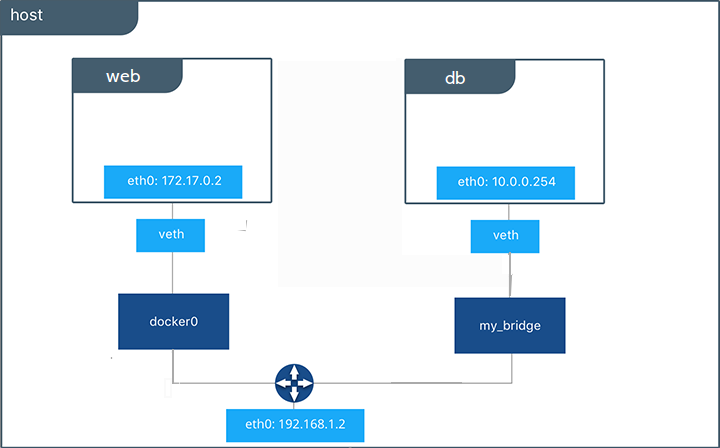
The parameter we need to pass is --network host in the docker container run command and it's not necessary to pass the port. It will know which port according to the image you're running. In the image's dockerfile, the EXPOSE parameter will tell which port the container needs to listen on.
vagrant@worker1:~$ docker container run -dit --name webserver --network host  nginx
vagrant@worker1:~$ docker container ls
# observe there's no port
CONTAINER ID   IMAGE     COMMAND                  CREATED         STATUS         PORTS     NAMES
71c8dc8650ba   nginx     "/docker-entrypoint.…"   8 seconds ago   Up 8 seconds             webserver
# hitting localhost we have the nginx page
vagrant@worker1:~$ curl localhost
# removed...
<title>Welcome to nginx!</title>
# removed...

# Checking the service we see that port 80 goes directly to nginx and not to docker-proxy
vagrant@worker1:~$ sudo ss -ntpl | grep 80
LISTEN    0         511                0.0.0.0:80               0.0.0.0:*        users:(("nginx",pid=5029,fd=7),("nginx",pid=5028,fd=7),("nginx",pid=4981,fd=7))
LISTEN    0         511                   [::]:80                  [::]:*        users:(("nginx",pid=5029,fd=8),("nginx",pid=5028,fd=8),("nginx",pid=4981,fd=8))
# And we also see it didn't use docker0 that's why it's DOWN
vagrant@worker1:~$ ip -c -br a
lo               UNKNOWN        127.0.0.1/8 ::1/128
enp0s3           UP             10.0.2.15/24 fe80::cd:65ff:fe0c:9769/64
enp0s8           UP             192.168.56.110/24 fe80::a00:27ff:fe4e:ae9f/64
docker0          DOWN           172.17.0.1/16 fe80::42:77ff:fe88:14cd/64
vagrant@worker1:~$
Remove the webserver container
None
With this parameter the container will start without network, that is, completely isolated.
The parameter we need to pass is --network host in the docker container run command
vagrant@worker1:~$ docker container run -dit --name nonet --network none alpine ash
1e8730a7bde13e7cd4fcd1ec8dd3bc2c03397c887b4b5414745d781b41bf67f7
vagrant@worker1:~$ docker container exec nonet ip link show
1: lo: <LOOPBACK,UP,LOWER_UP> mtu 65536 qdisc noqueue state UNKNOWN qlen 1000
    link/loopback 00:00:00:00:00:00 brd 00:00:00:00:00:00
vagrant@worker1:~$
Check the container's network stack by running some network verification command.
vagrant@worker1:~$ docker container run -dit --name nonet --network none alpine ash
vagrant@worker1:~$ docker container exec nonet ip a
1: lo: <LOOPBACK,UP,LOWER_UP> mtu 65536 qdisc noqueue state UNKNOWN qlen 1000
    link/loopback 00:00:00:00:00:00 brd 00:00:00:00:00:00
    inet 127.0.0.1/8 scope host lo
       valid_lft forever preferred_lft forever
Remove the container
Macvlan
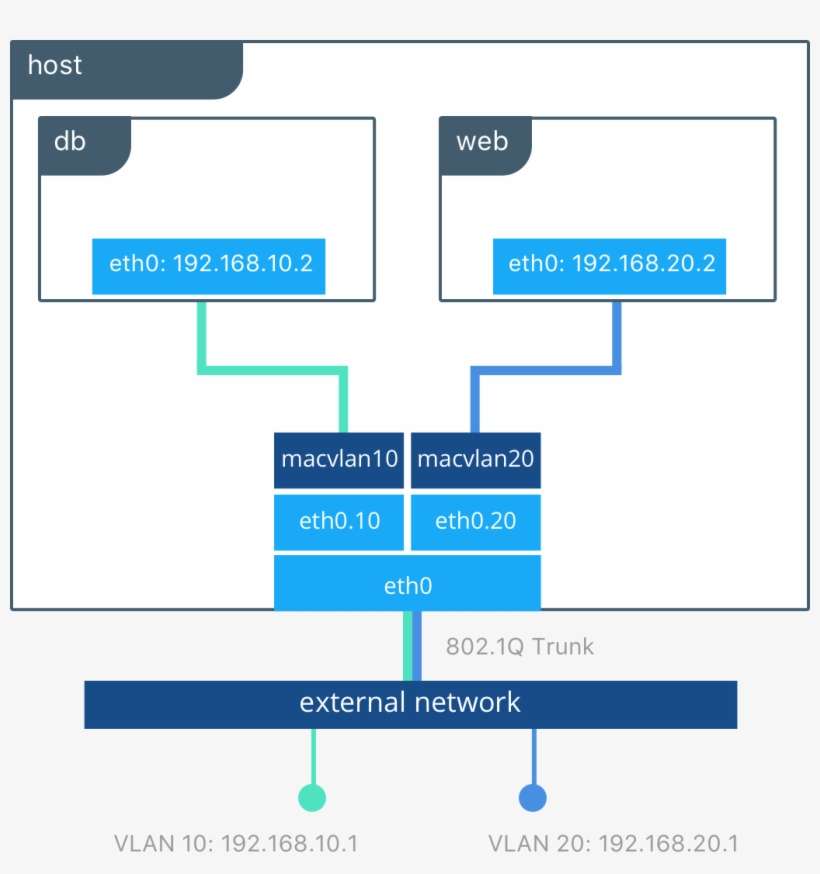
This is the network where we use VLAN resources to create logical network separation. Through it we can provide IP addresses to containers that will be routable to the physical network. It's also used to give a container an IP different from the host but on the same host network. Let's imagine that the host has an IP 10.0.0.10 and you want to start a container with IP 10.0.0.20. You will deliver to your container a virtual network card, but with a unique MAC address. It's one of the solutions for a container not to go through the host.
Overlay
It's an overlay network in which a logical network is created where multiple host networks are supported. This type of resource is used when working with clusters as is the case with Docker Swarm and Kubernetes.

Basically Docker creates a tunnel outside the external network and is called overlay network. With this, all containers from all hosts are accessible through any of the host IPs. In simple terms, any IP you point to will be like a single cluster IP.