Review Kubernetes
Since CKS requires CKA, I recommend we do a brief review to refresh our memory.
Architecture
It's important to review Kubernetes architecture from a security perspective.
Review the following items:
In summary...
We run containers on nodes, and these containers need a container engine to function. Docker is just one of the existing container runtimes; we can use podman, containerd, etc. Other components are necessary to keep our containers running (kubelet), schedule our pods (kube-scheduler), check the health of our containers (kube-controller-manager), allow communication between containers (kube-proxy), and many other things that are Kubernetes extensions for deployment tactics, replication, volumes, etc.
Communication with Kubernetes happens through the api-server in various ways, with the most common being kubectl, which does the work of translating what we want into golang and sending the request to the api-server with the necessary authentication.
The api-server is quite extensible and reusable, which makes Kubernetes so popular.
The kubelet runs on each node and is responsible for running pods and communicating with the api-server to provide information about them. Pods are a logical grouping for us; in the end, what we have are containers running with a series of resources grouped together to make it easier to understand. The kubelet translates our logical intention of pods into containers.
In a cloud, when we run Kubernetes as a solution, the controller manager also has other controllers in addition to the main ones, working to interact with cloud resources.
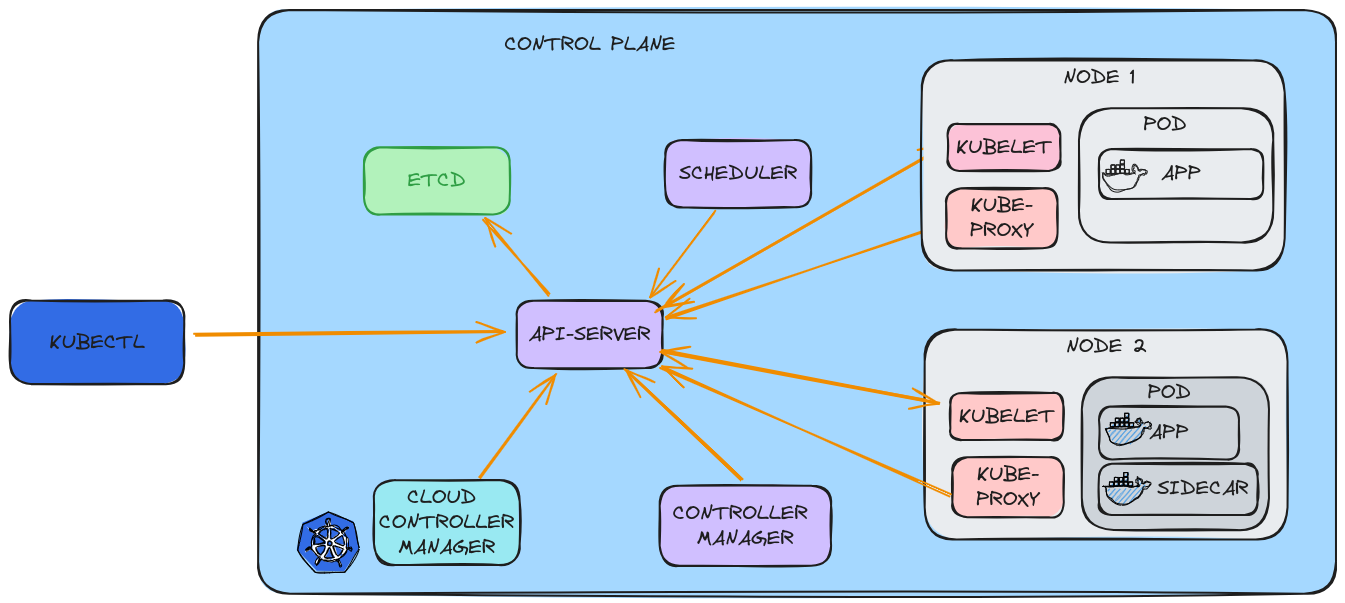
We also have the CNI that enables pod-to-pod communication throughout the cluster, creating an internal network surface so that each pod can communicate with others even on different nodes. It's worth remembering that even in different namespaces, a pod can reach another pod by default.
Certificates
PKI (Public Key Infrastructure) is not specific to Kubernetes; it's actually very common in the Internet world and is one of the main secure communication resources that was implemented in Kubernetes.
Items to review:
Summary...
-
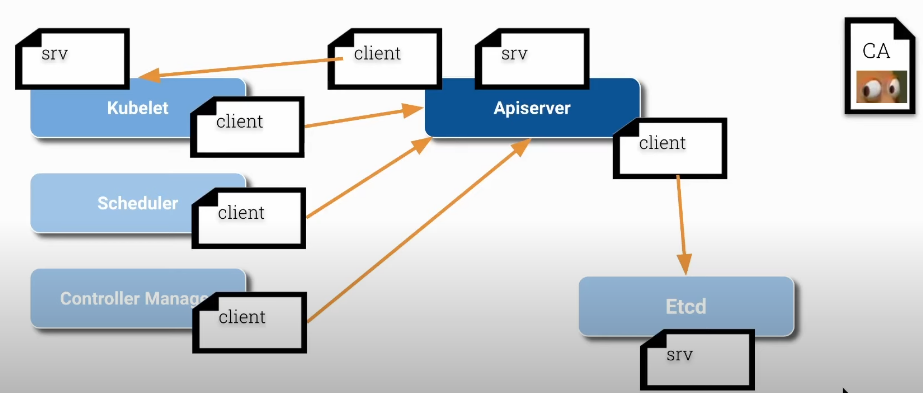
CA (Certification Authority) is the root that will trust the certificates. Every certificate within the cluster used by Kubernetes components must be signed by this entity. This will allow each component to validate each other and be sure they are communicating with the correct identifier.
-
All components that are servers have their server certificates, but if they are clients, they also have client certificates. We can see below that the kubelet and api-server are both clients and servers at the same time.
-
We can find the certificates inside /etc/kubernetes/pki on each of the nodes
- Master
david@cks-master:~$ ls -lh /etc/kubernetes/pki/
total 68
# We can observe the api-server client certificates
-rw-r--r-- 1 root root 1123 Aug 15 20:41 apiserver-etcd-client.crt
-rw------- 1 root root 1679 Aug 15 20:41 apiserver-etcd-client.key
-rw-r--r-- 1 root root 1176 Aug 15 20:41 apiserver-kubelet-client.crt
-rw------- 1 root root 1675 Aug 15 20:41 apiserver-kubelet-client.key
# and the certificate as server
-rw-r--r-- 1 root root 1285 Aug 15 20:41 apiserver.crt
-rw------- 1 root root 1679 Aug 15 20:41 apiserver.key
-rw-r--r-- 1 root root 1107 Aug 15 20:41 ca.crt
-rw------- 1 root root 1679 Aug 15 20:41 ca.key
# We have a folder here just with the ETCD server certificates
drwxr-xr-x 2 root root 4096 Aug 15 20:41 etcd
-rw-r--r-- 1 root root 1123 Aug 15 20:41 front-proxy-ca.crt
-rw------- 1 root root 1675 Aug 15 20:41 front-proxy-ca.key
-rw-r--r-- 1 root root 1119 Aug 15 20:41 front-proxy-client.crt
-rw------- 1 root root 1679 Aug 15 20:41 front-proxy-client.key
-rw------- 1 root root 1679 Aug 15 20:41 sa.key
-rw------- 1 root root  451 Aug 15 20:41 sa.pub
The certificates that are not in files are hardcoded inside each of the component .conf files.
david@cks-master:~$ ls -la /etc/kubernetes/*.conf
-rw------- 1 root root 5650 Aug 15 20:41 /etc/kubernetes/admin.conf
-rw------- 1 root root 5674 Aug 15 20:41 /etc/kubernetes/controller-manager.conf
-rw------- 1 root root 1982 Aug 15 20:41 /etc/kubernetes/kubelet.conf
-rw------- 1 root root 5622 Aug 15 20:41 /etc/kubernetes/scheduler.conf
-rw------- 1 root root 5678 Aug 15 20:41 /etc/kubernetes/super-admin.conf- Worker
root@cks-worker:/etc/kubernetes# ls -lh /etc/kubernetes/pki/
total 4.0K
-rw-r--r-- 1 root root 1.1K Aug 15 20:43 ca.crt
# The kubelet certificate is in another location
root@cks-worker:/etc/kubernetes# cat kubelet.conf
apiVersion: v1
clusters:
- cluster:
    certificate-authority-data: LS0tLS1CRUdJTiBDRVJUSUZJQ0FURS0tLS0tCk1JSURCVENDQWUyZ0F3SUJBZ0lJZnk5cXZHM0ozdUV3RFFZSktvWklodmNOQVFFTEJRQXdGVEVUTUJFR0ExVUUKQXhNS2EzVmlaWEp1WlhSbGN6QWVGdzB5TkRBNE1UVXlNRE0yTURKYUZ3MHpOREE0TVRNeU1EUXhNREphTUJVeApFekFSQmdOVkJBTVRDbXQxWW1WeWJtVjBaWE13Z2dFaU1BMEdDU3FHU0li...
    0K
    server: https://10.128.0.5:6443
  name: default-cluster
contexts:
- context:
    cluster: default-cluster
    namespace: default
    user: default-auth
  name: default-context
current-context: default-context
kind: Config
preferences: {}
users:
- name: default-auth
  user:
    # Let's look here
    client-certificate: /var/lib/kubelet/pki/kubelet-client-current.pem
    client-key: /var/lib/kubelet/pki/kubelet-client-current.pem

# Here we have the certificate as client and as server that the kubelet needs to function.
root@cks-worker:/etc/kubernetes# ls -lh /var/lib/kubelet/pki/
total 12K
-rw------- 1 root root 1.1K Aug 15 20:43 kubelet-client-2024-08-15-20-43-23.pem
lrwxrwxrwx 1 root root   59 Aug 15 20:43 kubelet-client-current.pem -> /var/lib/kubelet/pki/kubelet-client-2024-08-15-20-43-23.pem
-rw-r--r-- 1 root root 2.3K Aug 15 20:43 kubelet.crt
-rw------- 1 root root 1.7K Aug 15 20:43 kubelet.key