Linux Distributions
Before diving into the details below, it's crucial to understand what the Linux Kernel is and the concept of a Linux distribution.
The Kernel is essentially the core of Linux, responsible for various vital operations, such as:
- Memory management
- System initialization (boot)
- Disk management
- Process control
- Driver management (modules)
- And other fundamental functions.
In turn, a Linux distribution consists of the combination of a Kernel with a specific set of software, Kernel optimizations, and customizations, which can be developed by the community or by companies. Each distribution may contain different software sets. To illustrate, it's similar to the Android system: there's Samsung's Android (One UI), with Samsung's customizations, and Xiaomi's Android (MIUI), with Xiaomi's distinctive characteristics.
The Linux ecosystem houses a wide variety of distributions, each with its specific purposes.
A user who frequently switches between distributions is commonly called a "distro hopper". Although I personally haven't experienced this situation, it's quite common among those who are exploring this universe in search of the ideal distribution. Knowing various distributions, their ideas, architectures, and environments can be enriching, but there comes a time when you seek stability and consistency.
Take a look at the image below to get an idea of the diversity of distributions:
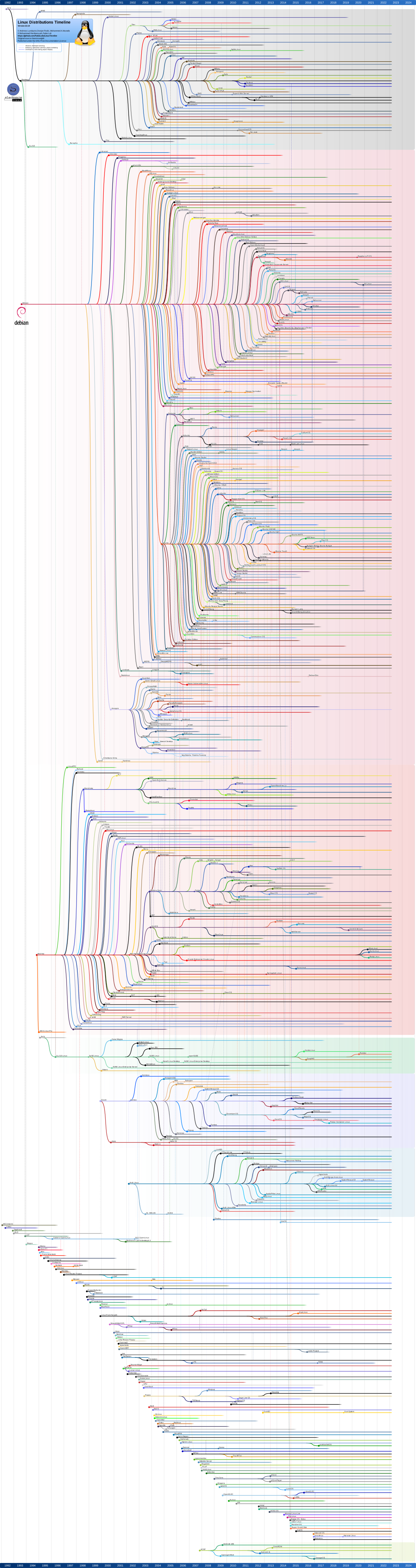
It's important to note that many of these lines (i.e., distributions) didn't move forward and became abandoned projects. Therefore, we should focus our attention on the distributions that continued to the end, thus eliminating some options. It's worth noting that there are still countless other distributions not represented in this image.
Analyzing the history, we realize that many distributions have origins in fundamental projects, such as Debian, Slackware, Arch, and Red Hat, some being derived from these. There are also independent ones, born as completely new projects. Root distributions tend to remain active, demonstrating their solidity and reputation.
Ubuntu, for example, emerged from Debian, and from it many other distributions were developed, which evidences its importance and influence in the Linux scenario.
Besides derivatives, there are independent distributions, created with specific purposes. For example, Alpine is an extremely lean distribution, focused on minimalism and widely used in containers to install only the necessary components for an application. NixOS prioritizes immutability, while OpenWRT is designed for network devices.
When choosing a distribution, it's essential to consider the solidity of the project. Opting for distributions with solid bases, supported by companies or active communities, is fundamental. Among them are ZorinOS, Pop OS, Manjaro, Fedora, and Ubuntu, which have reliable support.
Sometimes, even without the backing of a company, a dedicated community can maintain the distribution, as is the case with Arch, Mint, MX Linux, and Void.
Main aspects to consider when choosing a distribution:
- Stability
- Community or maintainer activity and support
- Documentation quality
- Software repository availability and quality
- Update policy and support time
- Suitability for the usage environment (desktop, server, containers, etc.)
Desktop
When it comes to our workstation for professional purposes, there are a series of additional considerations to be made, such as choosing the graphical environment. Popular options include GNOME, KDE, Cinnamon, XFCE, Mate, Deepin, among others. In my case, I prefer GNOME, as I'm accustomed to it and feel more productive. With this preference, I can eliminate several distributions or their "flavors", although I recognize this is a personal choice.
The term "flavors" is commonly used to refer to distributions that share the same base and essential packages, but have different graphical environments. For example, Fedora uses the term "skins" to describe this variety. Standard Ubuntu adopts GNOME, while Kubuntu brings KDE Plasma, Xubuntu uses XFCE, and Ubuntu Budgie brings Budgie, and so on. In the end, they are all Ubuntu variants, offering different desktop experiences.
I consider it important to note that I don't believe the readers of this text are using a machine with less than 8GB of RAM for development and operations (DevOps) tasks. Therefore, we will not consider hardware limitations when choosing a Linux distribution as an operating system.
The preference for package manager may be a personal matter. In practice, the way to install a package may not make much difference, as there is extensive documentation available on the Internet for any of the managers.
Now, let's go to my personal experiences.
The opinions below take into account a professional and study environment. Environment for those who develop or will work with Linux. The best distribution is the one that works on your Hardware!
Ubuntu
Ubuntu, maintained by Canonical, is the basis for many distributions and has a variety of "flavors". Every two years, in April, an LTS (Long-Term Support) version is released that receives support and security updates for five years, providing long-term stability and avoiding the constant need to reinstall the operating system.
For those who prefer to be more up-to-date, every six months there is a new release, in April and October.
Particularly, I appreciate using Ubuntu and customizing it with GNOME extensions. Additionally, most cloud servers use Ubuntu Server, making it crucial to be familiar with this distribution or one based on it.
It's worth noting that when searching the Internet for questions about Linux, such as "How to install VSCode on Linux", the most common tutorials are for Ubuntu. Ubuntu's folder and directory structure is familiar and is an excellent foundation for studying for certification exams.
LTS versions offer extended support, which can be even longer for up to 10 years through Ubuntu Pro. These versions are rigorously tested, ensuring a highly stable system on your machine until the next LTS release.
Ubuntu repositories are comprehensive and well maintained, making it the second largest package repository, behind only Arch Linux, and offering a wide range of available software.
From a professional perspective, I consider Ubuntu as the most important distribution, especially the original version. Canonical has several partnerships with other companies, further strengthening the project. An example of this is when we install WSL on Windows. Which Linux will come? Ubuntu.
Like other distributions, Ubuntu customizes the GNOME environment with its characteristic visual identity, generally associated with the color orange. However, this customization is flexible, especially when using the GNOME extensions mentioned earlier.
I think the phrase that summarizes LTS versions is: Let the pawns go ahead.
Pop! OS and ZorinOS
I have a great affinity with these distributions. Pop!_OS, maintained by System76, and Zorin OS, by Zorin Group, are examples of solid Linux distros, backed by dedicated companies. Both are based on the latest Ubuntu LTS version, ensuring stability and long-term support.
It's interesting to note that the tutorials developed for Ubuntu are equally applicable to any distribution based on it, facilitating the user experience.
These distros are carefully customized to offer a modern and welcoming desktop experience, ideal for work environments. Although they come ready to use, they allow additional customizations, if desired.
Zorin OS, in particular, stands out as an excellent option for those migrating from Windows to Linux, due to its familiar interface. Similarly, Linux Mint is frequently cited for this transition, although I have no personal experience with this distribution.
Fedora
For those who prefer a distribution based on Red Hat (RHEL), Fedora is an excellent option for use in desktop environments. One of the advantages of using a Linux system based on RHEL is familiarity with various distributions used by large companies, such as Amazon Linux, Rocky Linux, Oracle Linux, among others.
Fedora stands out for being considered Red Hat's "playground", with releases every six months. Unlike Ubuntu, it doesn't have an LTS version, and support for each version is 13 months.
A striking feature of Fedora is the default activation of Flatpak support, instead of the Snap format, encouraged by Ubuntu. This means that in the app store, software will be installed in Flatpak format, known for its speed. However, both Flatpaks can be activated on Ubuntu and Snaps on Fedora.
Fedora generally adopts more recent kernels, making it a great choice for modern machines.
It would be interesting to dedicate at least one year to using an RHEL-based distribution on a daily basis, as a way to improve learning and deepen knowledge in Linux systems.
Arch Linux
Arch Linux is a notable distribution and, personally, one of my favorites. It stands out for its excellent performance and the rolling release model, which means continuous updates. It's a fantastic choice for personal machines, but it may not be the best option for work environments, where stability is crucial to maintain productivity.
Although it's highly customizable and allows users to build their systems according to their preferences, Arch Linux comes with the bare minimum installed. This requires a bit more knowledge in Linux to configure the system according to individual needs.
Arch Linux has the Arch User Repository (AUR), the largest repository of all, which contains a vast collection of community-maintained packages. Although it offers access to a wide variety of software, there is a risk of downloading packages with untested bugs. This occurs due to the speed of package releases.
The Arch Linux community is incredibly engaged and offers extensive documentation, perhaps one of the largest currently. This makes it an excellent choice for learning more about Linux, although installation may have been considered complicated in the past, today we have installation scripts that facilitate this process.
For those who appreciate the features of Arch Linux, but want a slightly more conservative approach for the work environment, Manjaro is an excellent alternative. Based on Arch, Manjaro offers a more stable version of packages, usually a bit behind the latest version, ensuring a more solid and tested experience.
Kali
Kali Linux is a distribution focused on penetration testing and security, offering a variety of pre-installed resources for these specific purposes. However, personally, I don't recommend using this distribution on day-to-day workstations. I prefer to install it on a virtual machine for specific purposes, when necessary, thus maintaining a smaller number of packages installed on my main workstation.
This approach allows me to keep my workstation cleaner and focused on daily tasks, while still having access to the advanced security resources offered by Kali Linux when necessary, through a dedicated virtual machine.
Servers
What I have experience with and can recommend are:
- Ubuntu Server when you want a Debian-based distro
- Debian Extremely stable and very good for servers that don't undergo many upgrades to newer hardware.
- Rocky Linux when you need a Red Hat-based distro but don't want to use RHEL directly and don't need support.
- BottleRocket: Distribution focused on running containers, very good for Kubernetes nodes.
- Proxmox: Focused on level 1 virtualization.
- RaspberryPI OS: Distro used for Raspberry Pi.
- Alpine: Minimalist distro widely used as a base for containers.
Based on my experience, I can recommend the following distributions for different purposes:
- Ubuntu Server: Excellent choice when you want a Debian-based distribution for servers. It offers a wide range of features and is well supported by the community.
- Debian: Recognized for its extreme stability, Debian is a great option for servers that don't require frequent updates for newer hardware. It's a solid and reliable choice for critical infrastructures.
- Rocky Linux: If you need a Red Hat Enterprise Linux (RHEL)-based distribution, but prefer to avoid direct use of RHEL and don't need commercial support, Rocky Linux is an excellent alternative. It offers compatibility and stability similar to RHEL.
- BottleRocket: Focused on running containers, BottleRocket is an ideal choice for Kubernetes nodes. Its optimization for container environments offers performance and efficiency.
- Proxmox: Proxmox is a level 1 virtualization solution that offers an open and powerful platform for virtualization and management of virtual machines and containers. It's a robust option for virtualization environments.
- RaspberryPI OS: Designed specifically for use with Raspberry Pi, this distribution offers an operating system optimized for Raspberry Pi hardware. It's ideal for IoT projects and low-cost computing.
- Alpine: Known for its minimalism and security, Alpine Linux is widely used as a base for containers due to its compact size and efficiency. It's a popular choice for container environments that prioritize security and resource efficiency.
There is no better or worse distro, it depends on the purpose.
It's worth following the DistroWatch website which offers a wide variety of resources, including reviews, rankings, and trends of the most popular and also the newest Linux distributions.
Through DistroWatch, it's possible to discover interesting new projects, follow updates of existing distributions, and understand the preferences and trends of the Linux community.
It's important not to be swayed only by the popularity of a distribution. Each distribution has its own characteristics, community, and workflow, and may not be the best option for all use cases. Exploring distributions is a great way to expand your knowledge and understand different approaches and philosophies.