Kube Bench

Kube-bench é uma ferramenta usada para verificar se as configurações de um cluster Kubernetes estão em conformidade com as melhores práticas de segurança recomendadas pelo CIS Kubernetes Benchmark. Esse benchmark fornece diretrizes específicas sobre como configurar e operar um cluster Kubernetes de maneira segura.
O download do pdf com as diretrizes pode ser baixado no site da CIS gratuitamente, mas vou tentar manter a última versão aqui.
Principais Funcionalidades do kube-bench
-
Verificação de Conformidade: O kube-bench avalia o cluster Kubernetes contra o CIS Kubernetes Benchmark, verificando várias configurações e práticas recomendadas. Ele gera um relatório detalhado indicando quais controles estão em conformidade e quais precisam de atenção.
-
Suporte a Diferentes Versões de Kubernetes: A ferramenta é capaz de executar verificações para diferentes versões do Kubernetes, garantindo que as verificações sejam relevantes para a versão específica do cluster. A CIS possui diferentes diretrizes de acordo com a versão do kubernetes. Por exemplo o PDF acima esta para a versão 1.27 até 1.29.
-
Relatórios Detalhados: O kube-bench produz relatórios que detalham quais testes foram executados, quais passaram, quais falharam e quais não são aplicáveis. Esses relatórios são valiosos para auditorias e para rastrear o progresso de melhorias de segurança.
-
Configuração Personalizável: Embora o kube-bench siga as diretrizes do CIS Benchmark por padrão, ele permite personalizar os testes para atender a necessidades específicas da organização ou para se alinhar com políticas de segurança internas.
-
Facilidade de Execução: O kube-bench pode ser executado como um contêiner, o que facilita sua integração em pipelines de CI/CD ou em verificações periódicas de segurança em um cronjob por exemplo.
Por Que Usar kube-bench?
-
Conformidade e Segurança: Manter a conformidade com o CIS Kubernetes Benchmark é essencial para garantir que o cluster Kubernetes esteja protegido contra ameaças comuns.
-
Auditorias de Segurança: kube-bench é uma ferramenta útil durante auditorias de segurança, ajudando a demonstrar que as melhores práticas de segurança estão sendo seguidas.
-
Detecção Precoce de Problemas: Ao executar regularmente o kube-bench, é possível identificar e corrigir problemas de configuração antes que eles sejam explorados por atacantes.
Como Usar?
O kube bench precisa ser executado dentro de um node do kubernetes, logo kubernetes gerenciados pela cloud não dão acesso aos masters, mas eles são responsáveis pela segurança destes e é para isso usamos a cloud. Quando o temos um cluster self-managed precisamos fazer a varredura tantos nos masters quando nos workers.
- Rodando em um container dentro do node que queremos verificar. Não é possível rodar esse comando localmente pois precisamos mapear os volumes para o container verificar e ter acesso a os processos rodando no host. Os testes exigem o binário do kubelet ou kubectl para verificar a versão do kubernetes. Também é necessário passar as credenciais do kubeconfig. A vantagem rodar como container é que não precisamos instalar o binário do kube-bench dentro do nossos nodes.
O entrypoint é comando kube-bench e podemos verificar o que queremos fazer. Quando executamos o usando a cli o
kube-bench runsem específicar os targets, o kube-bench determinará os alvos apropriados com base na versão do CIS Benchmark e nos componentes detectados no node. A detecção é feita verificando quais componentes estão em execução. Não achei que deixar no automático é bom por enquanto, então é melhor passar os targets corretos.
Para encontrar as targets podemos conferir em kube-bench cis.1.9.
- master
- node
- controlplane
- etcd
- policies
Outro detalhe é que podemos fazer o skip se necessário para passar em alguma pipeline ou até fazer o skip de grupos inteiros.
Observe que os itens que ele verifica são exatamente as mesmas diretrizes do pdf da CSI.
Cenário
Foi criado dois nodes cks-master e cks-worker seguindo a documentação do kubernetes ser por e sem tirar nada. O cluster foi montado com o kubeadm. A proposta é mostrar que mesmo em um setup simples sem nada demais já temos problemas para corrigir.
Testes
Primeiro vamos executar em um nó master que roda o controlplane.
# O parâmetro --pid=host no comando docker run permite que o container Docker compartilhe o namespace de PID (Process ID) com o host. Isso significa que os processos dentro do container poderão ver e interagir com os processos que estão rodando diretamente no host.

# Logo após o container estamos esperando o comando e as flags. Vamos executar no padrão no master.

# Esse comando terá uma saída enorme mostrando as remediações direto no console o que facilita não ter que ir até a documentação.
root@cks-master:~/default# docker run --rm --pid=host -v /etc:/etc:ro -v /var:/var:ro -v $(which kubectl):/usr/local/mount-from-host/bin/kubectl -v ~/.kube:/.kube -e KUBECONFIG=/.kube/config -t docker.io/aquasec/kube-bench:latest run --targets master,controlplane,etcd,policies

# Para diminuir um pouco a saída podemos retirar as remediações para ir direto ao ponto.

root@cks-master:~/default# docker run --rm --pid=host -v /etc:/etc:ro -v /var:/var:ro -v $(which kubectl):/usr/local/mount-from-host/bin/kubectl -v ~/.kube:/.kube -e KUBECONFIG=/.kube/config -t docker.io/aquasec/kube-bench:latest run --targets master,controlplane,etcd,policies --noremediations
[INFO] 1 Master Node Security Configuration
[INFO] 1.1 Master Node Configuration Files
[PASS] 1.1.1 Ensure that the API server pod specification file permissions are set to 644 or more restrictive (Automated)
[PASS] 1.1.2 Ensure that the API server pod specification file ownership is set to root:root (Automated)
[PASS] 1.1.3 Ensure that the controller manager pod specification file permissions are set to 644 or more restrictive (Automated)
[PASS] 1.1.4 Ensure that the controller manager pod specification file ownership is set to root:root (Automated)
[PASS] 1.1.5 Ensure that the scheduler pod specification file permissions are set to 644 or more restrictive (Automated)
[PASS] 1.1.6 Ensure that the scheduler pod specification file ownership is set to root:root (Automated)
[PASS] 1.1.7 Ensure that the etcd pod specification file permissions are set to 644 or more restrictive (Automated)
[PASS] 1.1.8 Ensure that the etcd pod specification file ownership is set to root:root (Automated)
[WARN] 1.1.9 Ensure that the Container Network Interface file permissions are set to 644 or more restrictive (Manual)
[PASS] 1.1.10 Ensure that the Container Network Interface file ownership is set to root:root (Manual)
[PASS] 1.1.11 Ensure that the etcd data directory permissions are set to 700 or more restrictive (Automated)
[FAIL] 1.1.12 Ensure that the etcd data directory ownership is set to etcd:etcd (Automated)
[PASS] 1.1.13 Ensure that the admin.conf file permissions are set to 644 or more restrictive (Automated)
[PASS] 1.1.14 Ensure that the admin.conf file ownership is set to root:root (Automated)
[PASS] 1.1.15 Ensure that the scheduler.conf file permissions are set to 644 or more restrictive (Automated)
[PASS] 1.1.16 Ensure that the scheduler.conf file ownership is set to root:root (Automated)
[PASS] 1.1.17 Ensure that the controller-manager.conf file permissions are set to 644 or more restrictive (Automated)
[PASS] 1.1.18 Ensure that the controller-manager.conf file ownership is set to root:root (Automated)
[PASS] 1.1.19 Ensure that the Kubernetes PKI directory and file ownership is set to root:root (Automated)
[PASS] 1.1.20 Ensure that the Kubernetes PKI certificate file permissions are set to 644 or more restrictive (Manual)
[PASS] 1.1.21 Ensure that the Kubernetes PKI key file permissions are set to 600 (Manual)
[INFO] 1.2 API Server
[WARN] 1.2.1 Ensure that the --anonymous-auth argument is set to false (Manual)
[PASS] 1.2.2 Ensure that the --basic-auth-file argument is not set (Automated)
[PASS] 1.2.3 Ensure that the --token-auth-file parameter is not set (Automated)
[PASS] 1.2.4 Ensure that the --kubelet-https argument is set to true (Automated)
[PASS] 1.2.5 Ensure that the --kubelet-client-certificate and --kubelet-client-key arguments are set as appropriate (Automated)
[FAIL] 1.2.6 Ensure that the --kubelet-certificate-authority argument is set as appropriate (Automated)
[PASS] 1.2.7 Ensure that the --authorization-mode argument is not set to AlwaysAllow (Automated)
[PASS] 1.2.8 Ensure that the --authorization-mode argument includes Node (Automated)
[PASS] 1.2.9 Ensure that the --authorization-mode argument includes RBAC (Automated)
[WARN] 1.2.10 Ensure that the admission control plugin EventRateLimit is set (Manual)
[PASS] 1.2.11 Ensure that the admission control plugin AlwaysAdmit is not set (Automated)
[WARN] 1.2.12 Ensure that the admission control plugin AlwaysPullImages is set (Manual)
[WARN] 1.2.13 Ensure that the admission control plugin SecurityContextDeny is set if PodSecurityPolicy is not used (Manual)
[PASS] 1.2.14 Ensure that the admission control plugin ServiceAccount is set (Automated)
[PASS] 1.2.15 Ensure that the admission control plugin NamespaceLifecycle is set (Automated)
[FAIL] 1.2.16 Ensure that the admission control plugin PodSecurityPolicy is set (Automated)
[PASS] 1.2.17 Ensure that the admission control plugin NodeRestriction is set (Automated)
[PASS] 1.2.18 Ensure that the --insecure-bind-address argument is not set (Automated)
[FAIL] 1.2.19 Ensure that the --insecure-port argument is set to 0 (Automated)
[PASS] 1.2.20 Ensure that the --secure-port argument is not set to 0 (Automated)
[FAIL] 1.2.21 Ensure that the --profiling argument is set to false (Automated)
[FAIL] 1.2.22 Ensure that the --audit-log-path argument is set (Automated)
[FAIL] 1.2.23 Ensure that the --audit-log-maxage argument is set to 30 or as appropriate (Automated)
[FAIL] 1.2.24 Ensure that the --audit-log-maxbackup argument is set to 10 or as appropriate (Automated)
[FAIL] 1.2.25 Ensure that the --audit-log-maxsize argument is set to 100 or as appropriate (Automated)
[WARN] 1.2.26 Ensure that the --request-timeout argument is set as appropriate (Automated)
[PASS] 1.2.27 Ensure that the --service-account-lookup argument is set to true (Automated)
[PASS] 1.2.28 Ensure that the --service-account-key-file argument is set as appropriate (Automated)
[PASS] 1.2.29 Ensure that the --etcd-certfile and --etcd-keyfile arguments are set as appropriate (Automated)
[PASS] 1.2.30 Ensure that the --tls-cert-file and --tls-private-key-file arguments are set as appropriate (Automated)
[PASS] 1.2.31 Ensure that the --client-ca-file argument is set as appropriate (Automated)
[PASS] 1.2.32 Ensure that the --etcd-cafile argument is set as appropriate (Automated)
[WARN] 1.2.33 Ensure that the --encryption-provider-config argument is set as appropriate (Manual)
[WARN] 1.2.34 Ensure that encryption providers are appropriately configured (Manual)
[WARN] 1.2.35 Ensure that the API Server only makes use of Strong Cryptographic Ciphers (Manual)
[INFO] 1.3 Controller Manager
[WARN] 1.3.1 Ensure that the --terminated-pod-gc-threshold argument is set as appropriate (Manual)
[FAIL] 1.3.2 Ensure that the --profiling argument is set to false (Automated)
[PASS] 1.3.3 Ensure that the --use-service-account-credentials argument is set to true (Automated)
[PASS] 1.3.4 Ensure that the --service-account-private-key-file argument is set as appropriate (Automated)
[PASS] 1.3.5 Ensure that the --root-ca-file argument is set as appropriate (Automated)
[PASS] 1.3.6 Ensure that the RotateKubeletServerCertificate argument is set to true (Automated)
[PASS] 1.3.7 Ensure that the --bind-address argument is set to 127.0.0.1 (Automated)
[INFO] 1.4 Scheduler
[FAIL] 1.4.1 Ensure that the --profiling argument is set to false (Automated)
[PASS] 1.4.2 Ensure that the --bind-address argument is set to 127.0.0.1 (Automated)

== Summary master ==
44 checks PASS
11 checks FAIL
10 checks WARN
0 checks INFO

[INFO] 2 Etcd Node Configuration
[INFO] 2 Etcd Node Configuration Files
[PASS] 2.1 Ensure that the --cert-file and --key-file arguments are set as appropriate (Automated)
[PASS] 2.2 Ensure that the --client-cert-auth argument is set to true (Automated)
[PASS] 2.3 Ensure that the --auto-tls argument is not set to true (Automated)
[PASS] 2.4 Ensure that the --peer-cert-file and --peer-key-file arguments are set as appropriate (Automated)
[PASS] 2.5 Ensure that the --peer-client-cert-auth argument is set to true (Automated)
[PASS] 2.6 Ensure that the --peer-auto-tls argument is not set to true (Automated)
[PASS] 2.7 Ensure that a unique Certificate Authority is used for etcd (Manual)

== Summary etcd ==
7 checks PASS
0 checks FAIL
0 checks WARN
0 checks INFO

[INFO] 3 Control Plane Configuration
[INFO] 3.1 Authentication and Authorization
[WARN] 3.1.1 Client certificate authentication should not be used for users (Manual)
[INFO] 3.2 Logging
[WARN] 3.2.1 Ensure that a minimal audit policy is created (Manual)
[WARN] 3.2.2 Ensure that the audit policy covers key security concerns (Manual)

== Summary controlplane ==
0 checks PASS
0 checks FAIL
3 checks WARN
0 checks INFO

[INFO] 5 Kubernetes Policies
[INFO] 5.1 RBAC and Service Accounts
[WARN] 5.1.1 Ensure that the cluster-admin role is only used where required (Manual)
[WARN] 5.1.2 Minimize access to secrets (Manual)
[WARN] 5.1.3 Minimize wildcard use in Roles and ClusterRoles (Manual)
[WARN] 5.1.4 Minimize access to create pods (Manual)
[WARN] 5.1.5 Ensure that default service accounts are not actively used. (Manual)
[WARN] 5.1.6 Ensure that Service Account Tokens are only mounted where necessary (Manual)
[INFO] 5.2 Pod Security Policies
[WARN] 5.2.1 Minimize the admission of privileged containers (Manual)
[WARN] 5.2.2 Minimize the admission of containers wishing to share the host process ID namespace (Manual)
[WARN] 5.2.3 Minimize the admission of containers wishing to share the host IPC namespace (Manual)
[WARN] 5.2.4 Minimize the admission of containers wishing to share the host network namespace (Manual)
[WARN] 5.2.5 Minimize the admission of containers with allowPrivilegeEscalation (Manual)
[WARN] 5.2.6 Minimize the admission of root containers (Manual)
[WARN] 5.2.7 Minimize the admission of containers with the NET_RAW capability (Manual)
[WARN] 5.2.8 Minimize the admission of containers with added capabilities (Manual)
[WARN] 5.2.9 Minimize the admission of containers with capabilities assigned (Manual)
[INFO] 5.3 Network Policies and CNI
[WARN] 5.3.1 Ensure that the CNI in use supports Network Policies (Manual)
[WARN] 5.3.2 Ensure that all Namespaces have Network Policies defined (Manual)
[INFO] 5.4 Secrets Management
[WARN] 5.4.1 Prefer using secrets as files over secrets as environment variables (Manual)
[WARN] 5.4.2 Consider external secret storage (Manual)
[INFO] 5.5 Extensible Admission Control
[WARN] 5.5.1 Configure Image Provenance using ImagePolicyWebhook admission controller (Manual)
[INFO] 5.7 General Policies
[WARN] 5.7.1 Create administrative boundaries between resources using namespaces (Manual)
[WARN] 5.7.2 Ensure that the seccomp profile is set to docker/default in your pod definitions (Manual)
[WARN] 5.7.3 Apply Security Context to Your Pods and Containers (Manual)
[WARN] 5.7.4 The default namespace should not be used (Manual)

== Summary policies ==
0 checks PASS
0 checks FAIL
24 checks WARN
0 checks INFO

== Summary total ==
51 checks PASS
11 checks FAIL
37 checks WARN
0 checks INFO
Ainda não vamos consertar nada, já já...
Em um nó worker podemos fazer a mesma coisa, mas o config que podemso utilizar para se conectar ao cluster pode ser o mesmo utilizado pelo kubelet, pois não temos o ~/.kube/config.
root@cks-worker:/etc/kubernetes# docker run --rm --pid=host   -v /etc:/etc:ro   -v /var:/var:ro   -v $(which kubectl):/usr/local/mount-from-host/bin/kubectl   -v /etc/kubernetes/kubelet.conf:/.kube   -e KUBECONFIG=/.kube/config   docker.io/aquasec/kube-bench:latest run --version 1.30 --targets node --noremediations

[INFO] 4 Worker Node Security Configuration
[INFO] 4.1 Worker Node Configuration Files
# Vamos tentar corrigir esse Fail.
[FAIL] 4.1.1 Ensure that the kubelet service file permissions are set to 600 or more restrictive (Automated)
[PASS] 4.1.2 Ensure that the kubelet service file ownership is set to root:root (Automated)
[WARN] 4.1.3 If proxy kubeconfig file exists ensure permissions are set to 600 or more restrictive (Manual)
[WARN] 4.1.4 If proxy kubeconfig file exists ensure ownership is set to root:root (Manual)
[PASS] 4.1.5 Ensure that the --kubeconfig kubelet.conf file permissions are set to 600 or more restrictive (Automated)
[PASS] 4.1.6 Ensure that the --kubeconfig kubelet.conf file ownership is set to root:root (Automated)
[WARN] 4.1.7 Ensure that the certificate authorities file permissions are set to 600 or more restrictive (Manual)
[PASS] 4.1.8 Ensure that the client certificate authorities file ownership is set to root:root (Manual)
[FAIL] 4.1.9 If the kubelet config.yaml configuration file is being used validate permissions set to 600 or more restrictive (Automated)
[PASS] 4.1.10 If the kubelet config.yaml configuration file is being used validate file ownership is set to root:root (Automated)
[INFO] 4.2 Kubelet
[PASS] 4.2.1 Ensure that the --anonymous-auth argument is set to false (Automated)
[PASS] 4.2.2 Ensure that the --authorization-mode argument is not set to AlwaysAllow (Automated)
[PASS] 4.2.3 Ensure that the --client-ca-file argument is set as appropriate (Automated)
[PASS] 4.2.4 Verify that the --read-only-port argument is set to 0 (Manual)
[PASS] 4.2.5 Ensure that the --streaming-connection-idle-timeout argument is not set to 0 (Manual)
[PASS] 4.2.6 Ensure that the --make-iptables-util-chains argument is set to true (Automated)
[PASS] 4.2.7 Ensure that the --hostname-override argument is not set (Manual)
[PASS] 4.2.8 Ensure that the eventRecordQPS argument is set to a level which ensures appropriate event capture (Manual)
[WARN] 4.2.9 Ensure that the --tls-cert-file and --tls-private-key-file arguments are set as appropriate (Manual)
[PASS] 4.2.10 Ensure that the --rotate-certificates argument is not set to false (Automated)
[PASS] 4.2.11 Verify that the RotateKubeletServerCertificate argument is set to true (Manual)
[WARN] 4.2.12 Ensure that the Kubelet only makes use of Strong Cryptographic Ciphers (Manual)
[WARN] 4.2.13 Ensure that a limit is set on pod PIDs (Manual)
[INFO] 4.3 kube-proxy
[PASS] 4.3.1 Ensure that the kube-proxy metrics service is bound to localhost (Automated)

== Summary node ==
16 checks PASS
2 checks FAIL
6 checks WARN
0 checks INFO

== Summary total ==
16 checks PASS
2 checks FAIL
6 checks WARN
0 checks INFO
Se fossemos tentar consertar o item 4.1.1 o que faríamos?
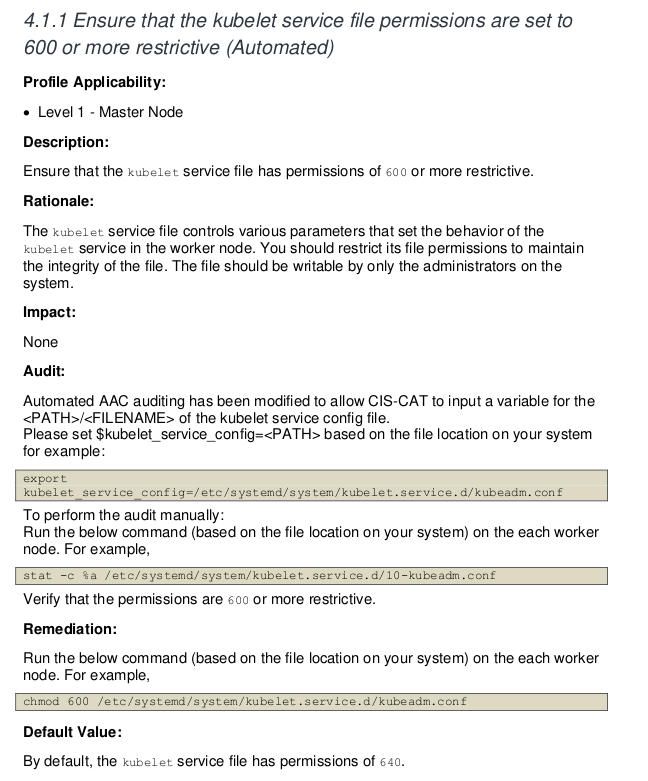
Porém esse é um exemplo que temos que ter bom senso. Este cluster foi configurado com o kubeadm e o kubelet não roda como serviço e sim como container, logo não temos esse arquivo no systemd que seriam as configurações do serviço. Toda configuração é passada para o container como argumentos. Nesse caso poderemos fazer o skip dessa regra.
Se olharmos na documentação em 4.1.9 temos o problema e como remediá-lo. Rodando sem o --noremediations já seria mostrado no console como fazer.
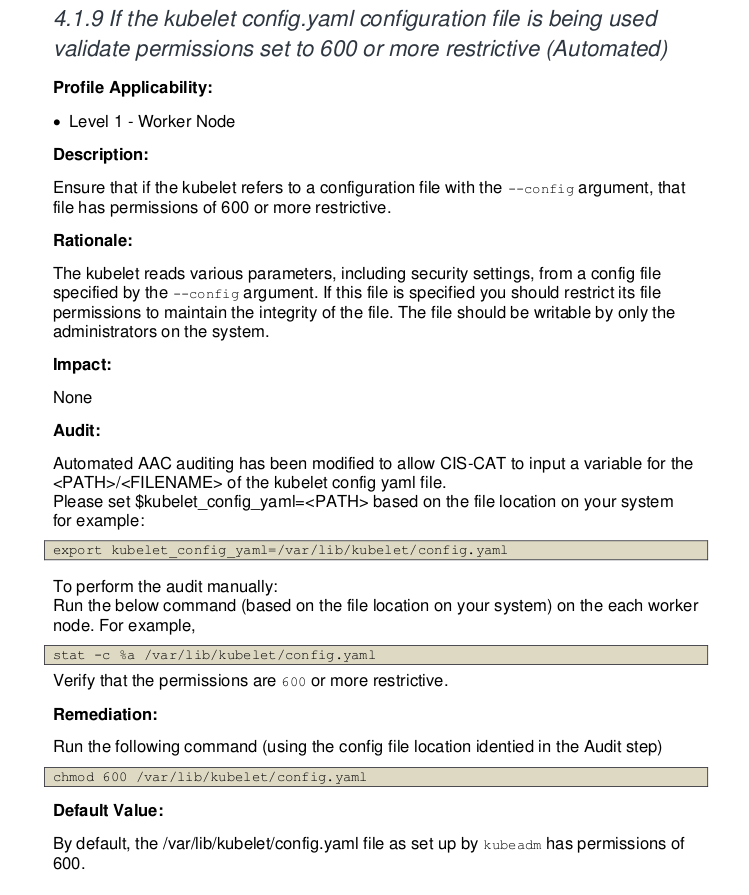
root@cks-worker:/etc/systemd/system# chmod 600 /var/lib/kubelet/config.yaml
# E como vamos fazer o skip do 4.1.1

root@cks-worker:/etc/systemd/system# docker run --rm --pid=host   -v /etc:/etc:ro   -v /var:/var:ro   -v $(which kubectl):/usr/local/mount-from-host/bin/kubectl   -v /etc/kubernetes/kubelet.conf:/.kube   -e KUBECONFIG=/.kube/config   docker.io/aquasec/kube-bench:latest run --version 1.30 --targets node --skip="4.1.1" --noremediations
[INFO] 4 Worker Node Security Configuration
[INFO] 4.1 Worker Node Configuration Files
[INFO] 4.1.1 Ensure that the kubelet service file permissions are set to 600 or more restrictive (Automated)
[PASS] 4.1.2 Ensure that the kubelet service file ownership is set to root:root (Automated)
[WARN] 4.1.3 If proxy kubeconfig file exists ensure permissions are set to 600 or more restrictive (Manual)
[WARN] 4.1.4 If proxy kubeconfig file exists ensure ownership is set to root:root (Manual)
[PASS] 4.1.5 Ensure that the --kubeconfig kubelet.conf file permissions are set to 600 or more restrictive (Automated)
[PASS] 4.1.6 Ensure that the --kubeconfig kubelet.conf file ownership is set to root:root (Automated)
[WARN] 4.1.7 Ensure that the certificate authorities file permissions are set to 600 or more restrictive (Manual)
[PASS] 4.1.8 Ensure that the client certificate authorities file ownership is set to root:root (Manual)
[PASS] 4.1.9 If the kubelet config.yaml configuration file is being used validate permissions set to 600 or more restrictive (Automated)
[PASS] 4.1.10 If the kubelet config.yaml configuration file is being used validate file ownership is set to root:root (Automated)
[INFO] 4.2 Kubelet
[PASS] 4.2.1 Ensure that the --anonymous-auth argument is set to false (Automated)
[PASS] 4.2.2 Ensure that the --authorization-mode argument is not set to AlwaysAllow (Automated)
[PASS] 4.2.3 Ensure that the --client-ca-file argument is set as appropriate (Automated)
[PASS] 4.2.4 Verify that the --read-only-port argument is set to 0 (Manual)
[PASS] 4.2.5 Ensure that the --streaming-connection-idle-timeout argument is not set to 0 (Manual)
[PASS] 4.2.6 Ensure that the --make-iptables-util-chains argument is set to true (Automated)
[PASS] 4.2.7 Ensure that the --hostname-override argument is not set (Manual)
[PASS] 4.2.8 Ensure that the eventRecordQPS argument is set to a level which ensures appropriate event capture (Manual)
[WARN] 4.2.9 Ensure that the --tls-cert-file and --tls-private-key-file arguments are set as appropriate (Manual)
[PASS] 4.2.10 Ensure that the --rotate-certificates argument is not set to false (Automated)
[PASS] 4.2.11 Verify that the RotateKubeletServerCertificate argument is set to true (Manual)
[WARN] 4.2.12 Ensure that the Kubelet only makes use of Strong Cryptographic Ciphers (Manual)
[WARN] 4.2.13 Ensure that a limit is set on pod PIDs (Manual)
[INFO] 4.3 kube-proxy
[PASS] 4.3.1 Ensure that the kube-proxy metrics service is bound to localhost (Automated)

== Summary node ==
17 checks PASS
0 checks FAIL
6 checks WARN
1 checks INFO

== Summary total ==
17 checks PASS
0 checks FAIL # <<<<
6 checks WARN
1 checks INFO
Mas não precisamos entrar em um node para fazer isso. Podemos criar um job que rode nos nodes e outro que rode nos masters.
Se temos um cluster que executa um auto scaler para o mesmo tipo de nó o problema que teremos em um teremos em todos do mesmo tipo, então só precisamos executar uma vez para identificar os problemas.
Job para o node. Temos esse jobs lá no github do kube bench.
---
apiVersion: batch/v1
kind: Job
metadata:
  name: kube-bench-node
spec:
  template:
    spec:
      hostPID: true
      containers:
        - name: kube-bench
          image: docker.io/aquasec/kube-bench:latest
          command: ["kube-bench", "run", "--targets", "node", "--skip=4.1.1"]
          volumeMounts:
            - name: var-lib-cni
              mountPath: /var/lib/cni
              readOnly: true
            - name: var-lib-etcd
              mountPath: /var/lib/etcd
              readOnly: true
            - name: var-lib-kubelet
              mountPath: /var/lib/kubelet
              readOnly: true
            - name: var-lib-kube-scheduler
              mountPath: /var/lib/kube-scheduler
              readOnly: true
            - name: var-lib-kube-controller-manager
              mountPath: /var/lib/kube-controller-manager
              readOnly: true
            - name: etc-systemd
              mountPath: /etc/systemd
              readOnly: true
            - name: lib-systemd
              mountPath: /lib/systemd/
              readOnly: true
            - name: srv-kubernetes
              mountPath: /srv/kubernetes/
              readOnly: true
            - name: etc-kubernetes
              mountPath: /etc/kubernetes
              readOnly: true
              # /usr/local/mount-from-host/bin is mounted to access kubectl / kubelet, for auto-detecting the Kubernetes version.
              # You can omit this mount if you specify --version as part of the command.
            - name: usr-bin
              mountPath: /usr/local/mount-from-host/bin
              readOnly: true
            - name: etc-cni-netd
              mountPath: /etc/cni/net.d/
              readOnly: true
            - name: opt-cni-bin
              mountPath: /opt/cni/bin/
              readOnly: true
      restartPolicy: Never
      volumes:
        - name: var-lib-cni
          hostPath:
            path: "/var/lib/cni"
        - name: var-lib-etcd
          hostPath:
            path: "/var/lib/etcd"
        - name: var-lib-kubelet
          hostPath:
            path: "/var/lib/kubelet"
        - name: var-lib-kube-scheduler
          hostPath:
            path: "/var/lib/kube-scheduler"
        - name: var-lib-kube-controller-manager
          hostPath:
            path: "/var/lib/kube-controller-manager"
        - name: etc-systemd
          hostPath:
            path: "/etc/systemd"
        - name: lib-systemd
          hostPath:
            path: "/lib/systemd"
        - name: srv-kubernetes
          hostPath:
            path: "/srv/kubernetes"
        - name: etc-kubernetes
          hostPath:
            path: "/etc/kubernetes"
        - name: usr-bin
          hostPath:
            path: "/usr/bin"
        - name: etc-cni-netd
          hostPath:
            path: "/etc/cni/net.d/"
        - name: opt-cni-bin
          hostPath:
            path: "/opt/cni/bin/"
root@cks-master:~/default# k apply -f job.yaml
job.batch/kube-bench-node created

# Não forçamos a ida para um node específico pois o master não rodará nenhum novo pod sem a toleration correta.

root@cks-master:~/default# k describe pod kube-bench-node-dllwt | grep node
Name:             kube-bench-node-dllwt
                  batch.kubernetes.io/job-name=kube-bench-node
                  job-name=kube-bench-node
Controlled By:  Job/kube-bench-node
      node
Tolerations:                 node.kubernetes.io/not-ready:NoExecute op=Exists for 300s
                             node.kubernetes.io/unreachable:NoExecute op=Exists for 300s
  Normal  Scheduled  5m11s  default-scheduler  Successfully assigned default/kube-bench-node-dllwt to cks-worker ### <<<<< no worker


root@cks-master:~/default# k logs jobs/kube-bench-node
[INFO] 4 Worker Node Security Configuration
[INFO] 4.1 Worker Node Configuration Files
[INFO] 4.1.1 Ensure that the kubelet service file permissions are set to 600 or more restrictive (Automated)
[PASS] 4.1.2 Ensure that the kubelet service file ownership is set to root:root (Automated)
[WARN] 4.1.3 If proxy kubeconfig file exists ensure permissions are set to 600 or more restrictive (Manual)
[WARN] 4.1.4 If proxy kubeconfig file exists ensure ownership is set to root:root (Manual)
[PASS] 4.1.5 Ensure that the --kubeconfig kubelet.conf file permissions are set to 600 or more restrictive (Automated)
[PASS] 4.1.6 Ensure that the --kubeconfig kubelet.conf file ownership is set to root:root (Automated)
[WARN] 4.1.7 Ensure that the certificate authorities file permissions are set to 600 or more restrictive (Manual)
[PASS] 4.1.8 Ensure that the client certificate authorities file ownership is set to root:root (Manual)
[PASS] 4.1.9 If the kubelet config.yaml configuration file is being used validate permissions set to 600 or more restrictive (Automated)
[PASS] 4.1.10 If the kubelet config.yaml configuration file is being used validate file ownership is set to root:root (Automated)
[INFO] 4.2 Kubelet
[PASS] 4.2.1 Ensure that the --anonymous-auth argument is set to false (Automated)
[PASS] 4.2.2 Ensure that the --authorization-mode argument is not set to AlwaysAllow (Automated)
[PASS] 4.2.3 Ensure that the --client-ca-file argument is set as appropriate (Automated)
[PASS] 4.2.4 Verify that the --read-only-port argument is set to 0 (Manual)
[PASS] 4.2.5 Ensure that the --streaming-connection-idle-timeout argument is not set to 0 (Manual)
[PASS] 4.2.6 Ensure that the --make-iptables-util-chains argument is set to true (Automated)
[PASS] 4.2.7 Ensure that the --hostname-override argument is not set (Manual)
[PASS] 4.2.8 Ensure that the eventRecordQPS argument is set to a level which ensures appropriate event capture (Manual)
[WARN] 4.2.9 Ensure that the --tls-cert-file and --tls-private-key-file arguments are set as appropriate (Manual)
[PASS] 4.2.10 Ensure that the --rotate-certificates argument is not set to false (Automated)
[PASS] 4.2.11 Verify that the RotateKubeletServerCertificate argument is set to true (Manual)
[WARN] 4.2.12 Ensure that the Kubelet only makes use of Strong Cryptographic Ciphers (Manual)
[WARN] 4.2.13 Ensure that a limit is set on pod PIDs (Manual)
[INFO] 4.3 kube-proxy
[PASS] 4.3.1 Ensure that the kube-proxy metrics service is bound to localhost (Automated)

== Remediations node ==
4.1.3 Run the below command (based on the file location on your system) on the each worker node.
For example,
chmod 600 /etc/kubernetes/proxy.conf

4.1.4 Run the below command (based on the file location on your system) on the each worker node.
For example, chown root:root /etc/kubernetes/proxy.conf

4.1.7 Run the following command to modify the file permissions of the
--client-ca-file chmod 600 <filename>

4.2.9 If using a Kubelet config file, edit the file to set `tlsCertFile` to the location
of the certificate file to use to identify this Kubelet, and `tlsPrivateKeyFile`
to the location of the corresponding private key file.
If using command line arguments, edit the kubelet service file
/lib/systemd/system/kubelet.service on each worker node and
set the below parameters in KUBELET_CERTIFICATE_ARGS variable.
--tls-cert-file=<path/to/tls-certificate-file>
--tls-private-key-file=<path/to/tls-key-file>
Based on your system, restart the kubelet service. For example,
systemctl daemon-reload
systemctl restart kubelet.service

4.2.12 If using a Kubelet config file, edit the file to set `TLSCipherSuites` to
TLS_ECDHE_ECDSA_WITH_AES_128_GCM_SHA256,TLS_ECDHE_RSA_WITH_AES_128_GCM_SHA256,TLS_ECDHE_ECDSA_WITH_CHACHA20_POLY1305,TLS_ECDHE_RSA_WITH_AES_256_GCM_SHA384,TLS_ECDHE_RSA_WITH_CHACHA20_POLY1305,TLS_ECDHE_ECDSA_WITH_AES_256_GCM_SHA384,TLS_RSA_WITH_AES_256_GCM_SHA384,TLS_RSA_WITH_AES_128_GCM_SHA256
or to a subset of these values.
If using executable arguments, edit the kubelet service file
/lib/systemd/system/kubelet.service on each worker node and
set the --tls-cipher-suites parameter as follows, or to a subset of these values.
--tls-cipher-suites=TLS_ECDHE_ECDSA_WITH_AES_128_GCM_SHA256,TLS_ECDHE_RSA_WITH_AES_128_GCM_SHA256,TLS_ECDHE_ECDSA_WITH_CHACHA20_POLY1305,TLS_ECDHE_RSA_WITH_AES_256_GCM_SHA384,TLS_ECDHE_RSA_WITH_CHACHA20_POLY1305,TLS_ECDHE_ECDSA_WITH_AES_256_GCM_SHA384,TLS_RSA_WITH_AES_256_GCM_SHA384,TLS_RSA_WITH_AES_128_GCM_SHA256
Based on your system, restart the kubelet service. For example:
systemctl daemon-reload
systemctl restart kubelet.service

4.2.13 Decide on an appropriate level for this parameter and set it,
either via the --pod-max-pids command line parameter or the PodPidsLimit configuration file setting.


== Summary node ==
17 checks PASS
0 checks FAIL
6 checks WARN
1 checks INFO

== Summary total ==
17 checks PASS
0 checks FAIL
6 checks WARN
1 checks INFO
Da mesma forma podemos fazer isso para o master, mas desta vez precisamos que este pode rode no master, passando o afinity e a toleration correta.
Nem precisou fazer o skip do 4.1.1 pois ele nem vai rodar a parte de worker que seriam os itens 4.x.x.
apiVersion: batch/v1
kind: Job
metadata:
  name: kube-bench-master
spec:
  template:
    spec:
      hostPID: true
      ## forçando ir para o master
      affinity:
        nodeAffinity:
          requiredDuringSchedulingIgnoredDuringExecution:
            nodeSelectorTerms:
              - matchExpressions:
                  - key: node-role.kubernetes.io/control-plane
                    operator: Exists
              - matchExpressions:
                  - key: node-role.kubernetes.io/master
                    operator: Exists
      tolerations:
        - key: node-role.kubernetes.io/master
          operator: Exists
          effect: NoSchedule
        - key: node-role.kubernetes.io/control-plane
          operator: Exists
          effect: NoSchedule
      containers:
        - name: kube-bench
          image: docker.io/aquasec/kube-bench:latest
          command: ["kube-bench", "run", "--targets", "master"]
          volumeMounts:
            - name: var-lib-cni
              mountPath: /var/lib/cni
              readOnly: true
            - name: var-lib-etcd
              mountPath: /var/lib/etcd
              readOnly: true
            - name: var-lib-kubelet
              mountPath: /var/lib/kubelet
              readOnly: true
            - name: var-lib-kube-scheduler
              mountPath: /var/lib/kube-scheduler
              readOnly: true
            - name: var-lib-kube-controller-manager
              mountPath: /var/lib/kube-controller-manager
              readOnly: true
            - name: etc-systemd
              mountPath: /etc/systemd
              readOnly: true
            - name: lib-systemd
              mountPath: /lib/systemd/
              readOnly: true
            - name: srv-kubernetes
              mountPath: /srv/kubernetes/
              readOnly: true
            - name: etc-kubernetes
              mountPath: /etc/kubernetes
              readOnly: true
              # /usr/local/mount-from-host/bin is mounted to access kubectl / kubelet, for auto-detecting the Kubernetes version.
              # You can omit this mount if you specify --version as part of the command.
            - name: usr-bin
              mountPath: /usr/local/mount-from-host/bin
              readOnly: true
            - name: etc-cni-netd
              mountPath: /etc/cni/net.d/
              readOnly: true
            - name: opt-cni-bin
              mountPath: /opt/cni/bin/
              readOnly: true
            - name: etc-passwd
              mountPath: /etc/passwd
              readOnly: true
            - name: etc-group
              mountPath: /etc/group
              readOnly: true
      restartPolicy: Never
      volumes:
        - name: var-lib-cni
          hostPath:
            path: "/var/lib/cni"
        - name: var-lib-etcd
          hostPath:
            path: "/var/lib/etcd"
        - name: var-lib-kubelet
          hostPath:
            path: "/var/lib/kubelet"
        - name: var-lib-kube-scheduler
          hostPath:
            path: "/var/lib/kube-scheduler"
        - name: var-lib-kube-controller-manager
          hostPath:
            path: "/var/lib/kube-controller-manager"
        - name: etc-systemd
          hostPath:
            path: "/etc/systemd"
        - name: lib-systemd
          hostPath:
            path: "/lib/systemd"
        - name: srv-kubernetes
          hostPath:
            path: "/srv/kubernetes"
        - name: etc-kubernetes
          hostPath:
            path: "/etc/kubernetes"
        - name: usr-bin
          hostPath:
            path: "/usr/bin"
        - name: etc-cni-netd
          hostPath:
            path: "/etc/cni/net.d/"
        - name: opt-cni-bin
          hostPath:
            path: "/opt/cni/bin/"
        - name: etc-passwd
          hostPath:
            path: "/etc/passwd"
        - name: etc-group
          hostPath:
            path: "/etc/group"
root@cks-master:~/default# k apply -f kube-bench-master.yaml
job.batch/kube-bench-master created

root@cks-master:~/default# k describe pod kube-bench-master-cz7g5 | grep Node
Node:             cks-master/10.128.0.5
Node-Selectors:              <none>

root@cks-master:~/default# k logs jobs/kube-bench-master
[INFO] 1 Control Plane Security Configuration
[INFO] 1.1 Control Plane Node Configuration Files
[PASS] 1.1.1 Ensure that the API server pod specification file permissions are set to 600 or more restrictive (Automated)
[PASS] 1.1.2 Ensure that the API server pod specification file ownership is set to root:root (Automated)
[PASS] 1.1.3 Ensure that the controller manager pod specification file permissions are set to 600 or more restrictive (Automated)
[PASS] 1.1.4 Ensure that the controller manager pod specification file ownership is set to root:root (Automated)
[PASS] 1.1.5 Ensure that the scheduler pod specification file permissions are set to 600 or more restrictive (Automated)
[PASS] 1.1.6 Ensure that the scheduler pod specification file ownership is set to root:root (Automated)
[PASS] 1.1.7 Ensure that the etcd pod specification file permissions are set to 600 or more restrictive (Automated)
[PASS] 1.1.8 Ensure that the etcd pod specification file ownership is set to root:root (Automated)
[WARN] 1.1.9 Ensure that the Container Network Interface file permissions are set to 600 or more restrictive (Manual)
[PASS] 1.1.10 Ensure that the Container Network Interface file ownership is set to root:root (Manual)
[PASS] 1.1.11 Ensure that the etcd data directory permissions are set to 700 or more restrictive (Automated)
[FAIL] 1.1.12 Ensure that the etcd data directory ownership is set to etcd:etcd (Automated)
[FAIL] 1.1.13 Ensure that the default administrative credential file permissions are set to 600 (Automated)
[FAIL] 1.1.14 Ensure that the default administrative credential file ownership is set to root:root (Automated)
[PASS] 1.1.15 Ensure that the scheduler.conf file permissions are set to 600 or more restrictive (Automated)
[PASS] 1.1.16 Ensure that the scheduler.conf file ownership is set to root:root (Automated)
[PASS] 1.1.17 Ensure that the controller-manager.conf file permissions are set to 600 or more restrictive (Automated)
[PASS] 1.1.18 Ensure that the controller-manager.conf file ownership is set to root:root (Automated)
[PASS] 1.1.19 Ensure that the Kubernetes PKI directory and file ownership is set to root:root (Automated)
[WARN] 1.1.20 Ensure that the Kubernetes PKI certificate file permissions are set to 600 or more restrictive (Manual)
[PASS] 1.1.21 Ensure that the Kubernetes PKI key file permissions are set to 600 (Manual)
[INFO] 1.2 API Server
[WARN] 1.2.1 Ensure that the --anonymous-auth argument is set to false (Manual)
[PASS] 1.2.2 Ensure that the --token-auth-file parameter is not set (Automated)
[WARN] 1.2.3 Ensure that the --DenyServiceExternalIPs is set (Manual)
[PASS] 1.2.4 Ensure that the --kubelet-client-certificate and --kubelet-client-key arguments are set as appropriate (Automated)
[FAIL] 1.2.5 Ensure that the --kubelet-certificate-authority argument is set as appropriate (Automated)
[PASS] 1.2.6 Ensure that the --authorization-mode argument is not set to AlwaysAllow (Automated)
[PASS] 1.2.7 Ensure that the --authorization-mode argument includes Node (Automated)
[PASS] 1.2.8 Ensure that the --authorization-mode argument includes RBAC (Automated)
[WARN] 1.2.9 Ensure that the admission control plugin EventRateLimit is set (Manual)
[PASS] 1.2.10 Ensure that the admission control plugin AlwaysAdmit is not set (Automated)
[WARN] 1.2.11 Ensure that the admission control plugin AlwaysPullImages is set (Manual)
[PASS] 1.2.12 Ensure that the admission control plugin ServiceAccount is set (Automated)
[PASS] 1.2.13 Ensure that the admission control plugin NamespaceLifecycle is set (Automated)
[PASS] 1.2.14 Ensure that the admission control plugin NodeRestriction is set (Automated)
[FAIL] 1.2.15 Ensure that the --profiling argument is set to false (Automated)
[FAIL] 1.2.16 Ensure that the --audit-log-path argument is set (Automated)
[FAIL] 1.2.17 Ensure that the --audit-log-maxage argument is set to 30 or as appropriate (Automated)
[FAIL] 1.2.18 Ensure that the --audit-log-maxbackup argument is set to 10 or as appropriate (Automated)
[FAIL] 1.2.19 Ensure that the --audit-log-maxsize argument is set to 100 or as appropriate (Automated)
[WARN] 1.2.20 Ensure that the --request-timeout argument is set as appropriate (Manual)
[PASS] 1.2.21 Ensure that the --service-account-lookup argument is set to true (Automated)
[PASS] 1.2.22 Ensure that the --service-account-key-file argument is set as appropriate (Automated)
[PASS] 1.2.23 Ensure that the --etcd-certfile and --etcd-keyfile arguments are set as appropriate (Automated)
[PASS] 1.2.24 Ensure that the --tls-cert-file and --tls-private-key-file arguments are set as appropriate (Automated)
[PASS] 1.2.25 Ensure that the --client-ca-file argument is set as appropriate (Automated)
[PASS] 1.2.26 Ensure that the --etcd-cafile argument is set as appropriate (Automated)
[WARN] 1.2.27 Ensure that the --encryption-provider-config argument is set as appropriate (Manual)
[WARN] 1.2.28 Ensure that encryption providers are appropriately configured (Manual)
[WARN] 1.2.29 Ensure that the API Server only makes use of Strong Cryptographic Ciphers (Manual)
[INFO] 1.3 Controller Manager
[WARN] 1.3.1 Ensure that the --terminated-pod-gc-threshold argument is set as appropriate (Manual)
[FAIL] 1.3.2 Ensure that the --profiling argument is set to false (Automated)
[PASS] 1.3.3 Ensure that the --use-service-account-credentials argument is set to true (Automated)
[PASS] 1.3.4 Ensure that the --service-account-private-key-file argument is set as appropriate (Automated)
[PASS] 1.3.5 Ensure that the --root-ca-file argument is set as appropriate (Automated)
[PASS] 1.3.6 Ensure that the RotateKubeletServerCertificate argument is set to true (Automated)
[PASS] 1.3.7 Ensure that the --bind-address argument is set to 127.0.0.1 (Automated)
[INFO] 1.4 Scheduler
[FAIL] 1.4.1 Ensure that the --profiling argument is set to false (Automated)
[PASS] 1.4.2 Ensure that the --bind-address argument is set to 127.0.0.1 (Automated)

== Remediations master ==
1.1.9 Run the below command (based on the file location on your system) on the control plane node.
For example, chmod 600 <path/to/cni/files>

1.1.12 On the etcd server node, get the etcd data directory, passed as an argument --data-dir,
from the command 'ps -ef | grep etcd'.
Run the below command (based on the etcd data directory found above).
For example, chown etcd:etcd /var/lib/etcd

1.1.13 Run the below command (based on the file location on your system) on the control plane node.
For example, chmod 600 /etc/kubernetes/admin.conf
On Kubernetes 1.29+ the super-admin.conf file should also be modified, if present.
For example, chmod 600 /etc/kubernetes/super-admin.conf

1.1.14 Run the below command (based on the file location on your system) on the control plane node.
For example, chown root:root /etc/kubernetes/admin.conf
On Kubernetes 1.29+ the super-admin.conf file should also be modified, if present.
For example, chmod 600 /etc/kubernetes/super-admin.conf

1.1.20 Run the below command (based on the file location on your system) on the control plane node.
For example,
chmod -R 600 /etc/kubernetes/pki/*.crt

1.2.1 Edit the API server pod specification file /etc/kubernetes/manifests/kube-apiserver.yaml
on the control plane node and set the below parameter.
--anonymous-auth=false

1.2.3 Edit the API server pod specification file /etc/kubernetes/manifests/kube-apiserver.yaml
on the control plane node and remove the `DenyServiceExternalIPs`
from enabled admission plugins.

1.2.5 Follow the Kubernetes documentation and setup the TLS connection between
the apiserver and kubelets. Then, edit the API server pod specification file
/etc/kubernetes/manifests/kube-apiserver.yaml on the control plane node and set the
--kubelet-certificate-authority parameter to the path to the cert file for the certificate authority.
--kubelet-certificate-authority=<ca-string>

1.2.9 Follow the Kubernetes documentation and set the desired limits in a configuration file.
Then, edit the API server pod specification file /etc/kubernetes/manifests/kube-apiserver.yaml
and set the below parameters.
--enable-admission-plugins=...,EventRateLimit,...
--admission-control-config-file=<path/to/configuration/file>

1.2.11 Edit the API server pod specification file /etc/kubernetes/manifests/kube-apiserver.yaml
on the control plane node and set the --enable-admission-plugins parameter to include
AlwaysPullImages.
--enable-admission-plugins=...,AlwaysPullImages,...

1.2.15 Edit the API server pod specification file /etc/kubernetes/manifests/kube-apiserver.yaml
on the control plane node and set the below parameter.
--profiling=false

1.2.16 Edit the API server pod specification file /etc/kubernetes/manifests/kube-apiserver.yaml
on the control plane node and set the --audit-log-path parameter to a suitable path and
file where you would like audit logs to be written, for example,
--audit-log-path=/var/log/apiserver/audit.log

1.2.17 Edit the API server pod specification file /etc/kubernetes/manifests/kube-apiserver.yaml
on the control plane node and set the --audit-log-maxage parameter to 30
or as an appropriate number of days, for example,
--audit-log-maxage=30

1.2.18 Edit the API server pod specification file /etc/kubernetes/manifests/kube-apiserver.yaml
on the control plane node and set the --audit-log-maxbackup parameter to 10 or to an appropriate
value. For example,
--audit-log-maxbackup=10

1.2.19 Edit the API server pod specification file /etc/kubernetes/manifests/kube-apiserver.yaml
on the control plane node and set the --audit-log-maxsize parameter to an appropriate size in MB.
For example, to set it as 100 MB, --audit-log-maxsize=100

1.2.20 Edit the API server pod specification file /etc/kubernetes/manifests/kube-apiserver.yaml
and set the below parameter as appropriate and if needed.
For example, --request-timeout=300s

1.2.27 Follow the Kubernetes documentation and configure a EncryptionConfig file.
Then, edit the API server pod specification file /etc/kubernetes/manifests/kube-apiserver.yaml
on the control plane node and set the --encryption-provider-config parameter to the path of that file.
For example, --encryption-provider-config=</path/to/EncryptionConfig/File>

1.2.28 Follow the Kubernetes documentation and configure a EncryptionConfig file.
In this file, choose aescbc, kms or secretbox as the encryption provider.

1.2.29 Edit the API server pod specification file /etc/kubernetes/manifests/kube-apiserver.yaml
on the control plane node and set the below parameter.
--tls-cipher-suites=TLS_AES_128_GCM_SHA256,TLS_AES_256_GCM_SHA384,TLS_CHACHA20_POLY1305_SHA256,
TLS_ECDHE_ECDSA_WITH_AES_128_CBC_SHA,TLS_ECDHE_ECDSA_WITH_AES_128_GCM_SHA256,
TLS_ECDHE_ECDSA_WITH_AES_256_CBC_SHA,TLS_ECDHE_ECDSA_WITH_AES_256_GCM_SHA384,
TLS_ECDHE_ECDSA_WITH_CHACHA20_POLY1305,TLS_ECDHE_ECDSA_WITH_CHACHA20_POLY1305_SHA256,
TLS_ECDHE_RSA_WITH_3DES_EDE_CBC_SHA,TLS_ECDHE_RSA_WITH_AES_128_CBC_SHA,TLS_ECDHE_RSA_WITH_AES_128_GCM_SHA256,
TLS_ECDHE_RSA_WITH_AES_256_CBC_SHA,TLS_ECDHE_RSA_WITH_AES_256_GCM_SHA384,TLS_ECDHE_RSA_WITH_CHACHA20_POLY1305,
TLS_ECDHE_RSA_WITH_CHACHA20_POLY1305_SHA256,TLS_RSA_WITH_3DES_EDE_CBC_SHA,TLS_RSA_WITH_AES_128_CBC_SHA,
TLS_RSA_WITH_AES_128_GCM_SHA256,TLS_RSA_WITH_AES_256_CBC_SHA,TLS_RSA_WITH_AES_256_GCM_SHA384

1.3.1 Edit the Controller Manager pod specification file /etc/kubernetes/manifests/kube-controller-manager.yaml
on the control plane node and set the --terminated-pod-gc-threshold to an appropriate threshold,
for example, --terminated-pod-gc-threshold=10

1.3.2 Edit the Controller Manager pod specification file /etc/kubernetes/manifests/kube-controller-manager.yaml
on the control plane node and set the below parameter.
--profiling=false

1.4.1 Edit the Scheduler pod specification file /etc/kubernetes/manifests/kube-scheduler.yaml file
on the control plane node and set the below parameter.
--profiling=false


== Summary master ==
37 checks PASS
11 checks FAIL
11 checks WARN
0 checks INFO

== Summary total ==
37 checks PASS
11 checks FAIL
11 checks WARN
0 checks INFO
Agora é corrigir isso ai tudo, vai fundo 😃!
Existem outros jobs prontinho para serviços de kubernetes gerenciados pela cloud, vale a pena conferir no github.
O kube-bench é também é utilizado pelo Trivy, outra ferramenta de varredura de segurança nativo para clouds.