Kube Bench

Kube-bench is a tool used to verify if Kubernetes cluster configurations comply with security best practices recommended by the CIS Kubernetes Benchmark. This benchmark provides specific guidelines on how to configure and operate a Kubernetes cluster securely.
The PDF download with the guidelines can be downloaded for free from the CIS website, but I'll try to keep the latest version here.
Main Features of kube-bench
-
Compliance Verification: Kube-bench evaluates the Kubernetes cluster against the CIS Kubernetes Benchmark, checking various configurations and recommended practices. It generates a detailed report indicating which controls are compliant and which need attention.
-
Support for Different Kubernetes Versions: The tool can run checks for different Kubernetes versions, ensuring that the checks are relevant to the specific cluster version. CIS has different guidelines according to the Kubernetes version. For example, the PDF above is for versions 1.27 to 1.29.
-
Detailed Reports: Kube-bench produces reports that detail which tests were run, which passed, which failed, and which are not applicable. These reports are valuable for audits and for tracking security improvement progress.
-
Customizable Configuration: Although kube-bench follows the CIS Benchmark guidelines by default, it allows customizing tests to meet specific organizational needs or to align with internal security policies.
-
Ease of Execution: Kube-bench can be run as a container, which facilitates its integration into CI/CD pipelines or periodic security checks in a cronjob, for example.
Why Use kube-bench?
-
Compliance and Security: Maintaining compliance with the CIS Kubernetes Benchmark is essential to ensure the Kubernetes cluster is protected against common threats.
-
Security Audits: kube-bench is a useful tool during security audits, helping to demonstrate that security best practices are being followed.
-
Early Problem Detection: By running kube-bench regularly, it's possible to identify and fix configuration issues before they are exploited by attackers.
How to Use?
Kube bench needs to be run inside a Kubernetes node, so cloud-managed Kubernetes doesn't give access to masters, but they are responsible for their security and that's why we use the cloud. When we have a self-managed cluster we need to scan both masters and workers.
- Running in a container inside the node we want to check. It's not possible to run this command locally because we need to map the volumes for the container to check and have access to the processes running on the host. The tests require the kubelet or kubectl binary to check the Kubernetes version. It's also necessary to pass the kubeconfig credentials. The advantage of running as a container is that we don't need to install the kube-bench binary inside our nodes.
The entrypoint is the kube-bench command and we can verify what we want to do. When we run it using the cli
kube-bench runwithout specifying targets, kube-bench will determine the appropriate targets based on the CIS Benchmark version and components detected on the node. Detection is done by checking which components are running. I didn't find that leaving it on automatic is good for now, so it's better to pass the correct targets.
To find the targets we can check at kube-bench cis.1.9.
- master
- node
- controlplane
- etcd
- policies
Another detail is that we can skip if necessary to pass in some pipeline or even skip entire groups.
Note that the items it checks are exactly the same guidelines as the CIS PDF.
Scenario
Two nodes were created cks-master and cks-worker following the Kubernetes documentation as is and without removing anything. The cluster was set up with kubeadm. The proposal is to show that even in a simple setup with nothing special we already have problems to fix.
Tests
First let's run on a master node running the controlplane.
# The --pid=host parameter in the docker run command allows the Docker container to share the PID (Process ID) namespace with the host. This means that processes inside the container will be able to see and interact with processes running directly on the host.

# Right after the container we are expecting the command and flags. Let's run on the standard master.

# This command will have a huge output showing remediations directly in the console which makes it easy not to have to go to the documentation.
root@cks-master:~/default# docker run --rm --pid=host -v /etc:/etc:ro -v /var:/var:ro -v $(which kubectl):/usr/local/mount-from-host/bin/kubectl -v ~/.kube:/.kube -e KUBECONFIG=/.kube/config -t docker.io/aquasec/kube-bench:latest run --targets master,controlplane,etcd,policies

# To reduce the output a bit we can remove the remediations to go straight to the point.

root@cks-master:~/default# docker run --rm --pid=host -v /etc:/etc:ro -v /var:/var:ro -v $(which kubectl):/usr/local/mount-from-host/bin/kubectl -v ~/.kube:/.kube -e KUBECONFIG=/.kube/config -t docker.io/aquasec/kube-bench:latest run --targets master,controlplane,etcd,policies --noremediations
[INFO] 1 Master Node Security Configuration
[INFO] 1.1 Master Node Configuration Files
[PASS] 1.1.1 Ensure that the API server pod specification file permissions are set to 644 or more restrictive (Automated)
[PASS] 1.1.2 Ensure that the API server pod specification file ownership is set to root:root (Automated)
[PASS] 1.1.3 Ensure that the controller manager pod specification file permissions are set to 644 or more restrictive (Automated)
[PASS] 1.1.4 Ensure that the controller manager pod specification file ownership is set to root:root (Automated)
[PASS] 1.1.5 Ensure that the scheduler pod specification file permissions are set to 644 or more restrictive (Automated)
[PASS] 1.1.6 Ensure that the scheduler pod specification file ownership is set to root:root (Automated)
[PASS] 1.1.7 Ensure that the etcd pod specification file permissions are set to 644 or more restrictive (Automated)
[PASS] 1.1.8 Ensure that the etcd pod specification file ownership is set to root:root (Automated)
[WARN] 1.1.9 Ensure that the Container Network Interface file permissions are set to 644 or more restrictive (Manual)
[PASS] 1.1.10 Ensure that the Container Network Interface file ownership is set to root:root (Manual)
[PASS] 1.1.11 Ensure that the etcd data directory permissions are set to 700 or more restrictive (Automated)
[FAIL] 1.1.12 Ensure that the etcd data directory ownership is set to etcd:etcd (Automated)
[PASS] 1.1.13 Ensure that the admin.conf file permissions are set to 644 or more restrictive (Automated)
[PASS] 1.1.14 Ensure that the admin.conf file ownership is set to root:root (Automated)
[PASS] 1.1.15 Ensure that the scheduler.conf file permissions are set to 644 or more restrictive (Automated)
[PASS] 1.1.16 Ensure that the scheduler.conf file ownership is set to root:root (Automated)
[PASS] 1.1.17 Ensure that the controller-manager.conf file permissions are set to 644 or more restrictive (Automated)
[PASS] 1.1.18 Ensure that the controller-manager.conf file ownership is set to root:root (Automated)
[PASS] 1.1.19 Ensure that the Kubernetes PKI directory and file ownership is set to root:root (Automated)
[PASS] 1.1.20 Ensure that the Kubernetes PKI certificate file permissions are set to 644 or more restrictive (Manual)
[PASS] 1.1.21 Ensure that the Kubernetes PKI key file permissions are set to 600 (Manual)
[INFO] 1.2 API Server
[WARN] 1.2.1 Ensure that the --anonymous-auth argument is set to false (Manual)
[PASS] 1.2.2 Ensure that the --basic-auth-file argument is not set (Automated)
[PASS] 1.2.3 Ensure that the --token-auth-file parameter is not set (Automated)
[PASS] 1.2.4 Ensure that the --kubelet-https argument is set to true (Automated)
[PASS] 1.2.5 Ensure that the --kubelet-client-certificate and --kubelet-client-key arguments are set as appropriate (Automated)
[FAIL] 1.2.6 Ensure that the --kubelet-certificate-authority argument is set as appropriate (Automated)
[PASS] 1.2.7 Ensure that the --authorization-mode argument is not set to AlwaysAllow (Automated)
[PASS] 1.2.8 Ensure that the --authorization-mode argument includes Node (Automated)
[PASS] 1.2.9 Ensure that the --authorization-mode argument includes RBAC (Automated)
[WARN] 1.2.10 Ensure that the admission control plugin EventRateLimit is set (Manual)
[PASS] 1.2.11 Ensure that the admission control plugin AlwaysAdmit is not set (Automated)
[WARN] 1.2.12 Ensure that the admission control plugin AlwaysPullImages is set (Manual)
[WARN] 1.2.13 Ensure that the admission control plugin SecurityContextDeny is set if PodSecurityPolicy is not used (Manual)
[PASS] 1.2.14 Ensure that the admission control plugin ServiceAccount is set (Automated)
[PASS] 1.2.15 Ensure that the admission control plugin NamespaceLifecycle is set (Automated)
[FAIL] 1.2.16 Ensure that the admission control plugin PodSecurityPolicy is set (Automated)
[PASS] 1.2.17 Ensure that the admission control plugin NodeRestriction is set (Automated)
[PASS] 1.2.18 Ensure that the --insecure-bind-address argument is not set (Automated)
[FAIL] 1.2.19 Ensure that the --insecure-port argument is set to 0 (Automated)
[PASS] 1.2.20 Ensure that the --secure-port argument is not set to 0 (Automated)
[FAIL] 1.2.21 Ensure that the --profiling argument is set to false (Automated)
[FAIL] 1.2.22 Ensure that the --audit-log-path argument is set (Automated)
[FAIL] 1.2.23 Ensure that the --audit-log-maxage argument is set to 30 or as appropriate (Automated)
[FAIL] 1.2.24 Ensure that the --audit-log-maxbackup argument is set to 10 or as appropriate (Automated)
[FAIL] 1.2.25 Ensure that the --audit-log-maxsize argument is set to 100 or as appropriate (Automated)
[WARN] 1.2.26 Ensure that the --request-timeout argument is set as appropriate (Automated)
[PASS] 1.2.27 Ensure that the --service-account-lookup argument is set to true (Automated)
[PASS] 1.2.28 Ensure that the --service-account-key-file argument is set as appropriate (Automated)
[PASS] 1.2.29 Ensure that the --etcd-certfile and --etcd-keyfile arguments are set as appropriate (Automated)
[PASS] 1.2.30 Ensure that the --tls-cert-file and --tls-private-key-file arguments are set as appropriate (Automated)
[PASS] 1.2.31 Ensure that the --client-ca-file argument is set as appropriate (Automated)
[PASS] 1.2.32 Ensure that the --etcd-cafile argument is set as appropriate (Automated)
[WARN] 1.2.33 Ensure that the --encryption-provider-config argument is set as appropriate (Manual)
[WARN] 1.2.34 Ensure that encryption providers are appropriately configured (Manual)
[WARN] 1.2.35 Ensure that the API Server only makes use of Strong Cryptographic Ciphers (Manual)
[INFO] 1.3 Controller Manager
[WARN] 1.3.1 Ensure that the --terminated-pod-gc-threshold argument is set as appropriate (Manual)
[FAIL] 1.3.2 Ensure that the --profiling argument is set to false (Automated)
[PASS] 1.3.3 Ensure that the --use-service-account-credentials argument is set to true (Automated)
[PASS] 1.3.4 Ensure that the --service-account-private-key-file argument is set as appropriate (Automated)
[PASS] 1.3.5 Ensure that the --root-ca-file argument is set as appropriate (Automated)
[PASS] 1.3.6 Ensure that the RotateKubeletServerCertificate argument is set to true (Automated)
[PASS] 1.3.7 Ensure that the --bind-address argument is set to 127.0.0.1 (Automated)
[INFO] 1.4 Scheduler
[FAIL] 1.4.1 Ensure that the --profiling argument is set to false (Automated)
[PASS] 1.4.2 Ensure that the --bind-address argument is set to 127.0.0.1 (Automated)

== Summary master ==
44 checks PASS
11 checks FAIL
10 checks WARN
0 checks INFO

[INFO] 2 Etcd Node Configuration
[INFO] 2 Etcd Node Configuration Files
[PASS] 2.1 Ensure that the --cert-file and --key-file arguments are set as appropriate (Automated)
[PASS] 2.2 Ensure that the --client-cert-auth argument is set to true (Automated)
[PASS] 2.3 Ensure that the --auto-tls argument is not set to true (Automated)
[PASS] 2.4 Ensure that the --peer-cert-file and --peer-key-file arguments are set as appropriate (Automated)
[PASS] 2.5 Ensure that the --peer-client-cert-auth argument is set to true (Automated)
[PASS] 2.6 Ensure that the --peer-auto-tls argument is not set to true (Automated)
[PASS] 2.7 Ensure that a unique Certificate Authority is used for etcd (Manual)

== Summary etcd ==
7 checks PASS
0 checks FAIL
0 checks WARN
0 checks INFO

[INFO] 3 Control Plane Configuration
[INFO] 3.1 Authentication and Authorization
[WARN] 3.1.1 Client certificate authentication should not be used for users (Manual)
[INFO] 3.2 Logging
[WARN] 3.2.1 Ensure that a minimal audit policy is created (Manual)
[WARN] 3.2.2 Ensure that the audit policy covers key security concerns (Manual)

== Summary controlplane ==
0 checks PASS
0 checks FAIL
3 checks WARN
0 checks INFO

[INFO] 5 Kubernetes Policies
[INFO] 5.1 RBAC and Service Accounts
[WARN] 5.1.1 Ensure that the cluster-admin role is only used where required (Manual)
[WARN] 5.1.2 Minimize access to secrets (Manual)
[WARN] 5.1.3 Minimize wildcard use in Roles and ClusterRoles (Manual)
[WARN] 5.1.4 Minimize access to create pods (Manual)
[WARN] 5.1.5 Ensure that default service accounts are not actively used. (Manual)
[WARN] 5.1.6 Ensure that Service Account Tokens are only mounted where necessary (Manual)
[INFO] 5.2 Pod Security Policies
[WARN] 5.2.1 Minimize the admission of privileged containers (Manual)
[WARN] 5.2.2 Minimize the admission of containers wishing to share the host process ID namespace (Manual)
[WARN] 5.2.3 Minimize the admission of containers wishing to share the host IPC namespace (Manual)
[WARN] 5.2.4 Minimize the admission of containers wishing to share the host network namespace (Manual)
[WARN] 5.2.5 Minimize the admission of containers with allowPrivilegeEscalation (Manual)
[WARN] 5.2.6 Minimize the admission of root containers (Manual)
[WARN] 5.2.7 Minimize the admission of containers with the NET_RAW capability (Manual)
[WARN] 5.2.8 Minimize the admission of containers with added capabilities (Manual)
[WARN] 5.2.9 Minimize the admission of containers with capabilities assigned (Manual)
[INFO] 5.3 Network Policies and CNI
[WARN] 5.3.1 Ensure that the CNI in use supports Network Policies (Manual)
[WARN] 5.3.2 Ensure that all Namespaces have Network Policies defined (Manual)
[INFO] 5.4 Secrets Management
[WARN] 5.4.1 Prefer using secrets as files over secrets as environment variables (Manual)
[WARN] 5.4.2 Consider external secret storage (Manual)
[INFO] 5.5 Extensible Admission Control
[WARN] 5.5.1 Configure Image Provenance using ImagePolicyWebhook admission controller (Manual)
[INFO] 5.7 General Policies
[WARN] 5.7.1 Create administrative boundaries between resources using namespaces (Manual)
[WARN] 5.7.2 Ensure that the seccomp profile is set to docker/default in your pod definitions (Manual)
[WARN] 5.7.3 Apply Security Context to Your Pods and Containers (Manual)
[WARN] 5.7.4 The default namespace should not be used (Manual)

== Summary policies ==
0 checks PASS
0 checks FAIL
24 checks WARN
0 checks INFO

== Summary total ==
51 checks PASS
11 checks FAIL
37 checks WARN
0 checks INFO
We're not going to fix anything yet, soon enough...
On a worker node we can do the same thing, but the config we can use to connect to the cluster can be the same one used by the kubelet, since we don't have ~/.kube/config.
root@cks-worker:/etc/kubernetes# docker run --rm --pid=host   -v /etc:/etc:ro   -v /var:/var:ro   -v $(which kubectl):/usr/local/mount-from-host/bin/kubectl   -v /etc/kubernetes/kubelet.conf:/.kube   -e KUBECONFIG=/.kube/config   docker.io/aquasec/kube-bench:latest run --version 1.30 --targets node --noremediations

[INFO] 4 Worker Node Security Configuration
[INFO] 4.1 Worker Node Configuration Files
# Let's try to fix this Fail.
[FAIL] 4.1.1 Ensure that the kubelet service file permissions are set to 600 or more restrictive (Automated)
[PASS] 4.1.2 Ensure that the kubelet service file ownership is set to root:root (Automated)
[WARN] 4.1.3 If proxy kubeconfig file exists ensure permissions are set to 600 or more restrictive (Manual)
[WARN] 4.1.4 If proxy kubeconfig file exists ensure ownership is set to root:root (Manual)
[PASS] 4.1.5 Ensure that the --kubeconfig kubelet.conf file permissions are set to 600 or more restrictive (Automated)
[PASS] 4.1.6 Ensure that the --kubeconfig kubelet.conf file ownership is set to root:root (Automated)
[WARN] 4.1.7 Ensure that the certificate authorities file permissions are set to 600 or more restrictive (Manual)
[PASS] 4.1.8 Ensure that the client certificate authorities file ownership is set to root:root (Manual)
[FAIL] 4.1.9 If the kubelet config.yaml configuration file is being used validate permissions set to 600 or more restrictive (Automated)
[PASS] 4.1.10 If the kubelet config.yaml configuration file is being used validate file ownership is set to root:root (Automated)
[INFO] 4.2 Kubelet
[PASS] 4.2.1 Ensure that the --anonymous-auth argument is set to false (Automated)
[PASS] 4.2.2 Ensure that the --authorization-mode argument is not set to AlwaysAllow (Automated)
[PASS] 4.2.3 Ensure that the --client-ca-file argument is set as appropriate (Automated)
[PASS] 4.2.4 Verify that the --read-only-port argument is set to 0 (Manual)
[PASS] 4.2.5 Ensure that the --streaming-connection-idle-timeout argument is not set to 0 (Manual)
[PASS] 4.2.6 Ensure that the --make-iptables-util-chains argument is set to true (Automated)
[PASS] 4.2.7 Ensure that the --hostname-override argument is not set (Manual)
[PASS] 4.2.8 Ensure that the eventRecordQPS argument is set to a level which ensures appropriate event capture (Manual)
[WARN] 4.2.9 Ensure that the --tls-cert-file and --tls-private-key-file arguments are set as appropriate (Manual)
[PASS] 4.2.10 Ensure that the --rotate-certificates argument is not set to false (Automated)
[PASS] 4.2.11 Verify that the RotateKubeletServerCertificate argument is set to true (Manual)
[WARN] 4.2.12 Ensure that the Kubelet only makes use of Strong Cryptographic Ciphers (Manual)
[WARN] 4.2.13 Ensure that a limit is set on pod PIDs (Manual)
[INFO] 4.3 kube-proxy
[PASS] 4.3.1 Ensure that the kube-proxy metrics service is bound to localhost (Automated)

== Summary node ==
16 checks PASS
2 checks FAIL
6 checks WARN
0 checks INFO

== Summary total ==
16 checks PASS
2 checks FAIL
6 checks WARN
0 checks INFO
If we were to try to fix item 4.1.1 what would we do?
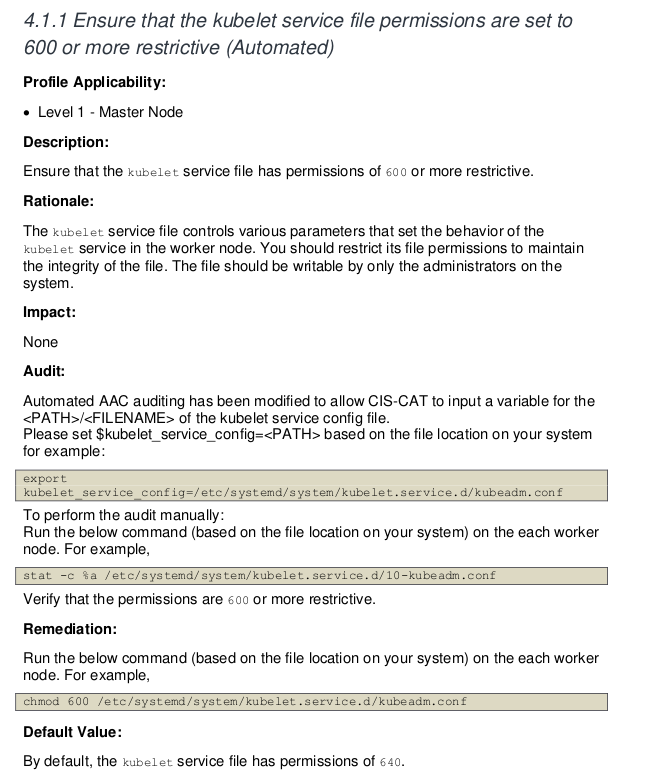
However, this is an example where we need to use common sense. This cluster was configured with kubeadm and kubelet doesn't run as a service but as a container, so we don't have this file in systemd which would be the service configurations. All configuration is passed to the container as arguments. In this case, we can skip this rule.
If we look at the documentation at 4.1.9 we have the problem and how to remediate it. Running without --noremediations would already show in the console how to do it.
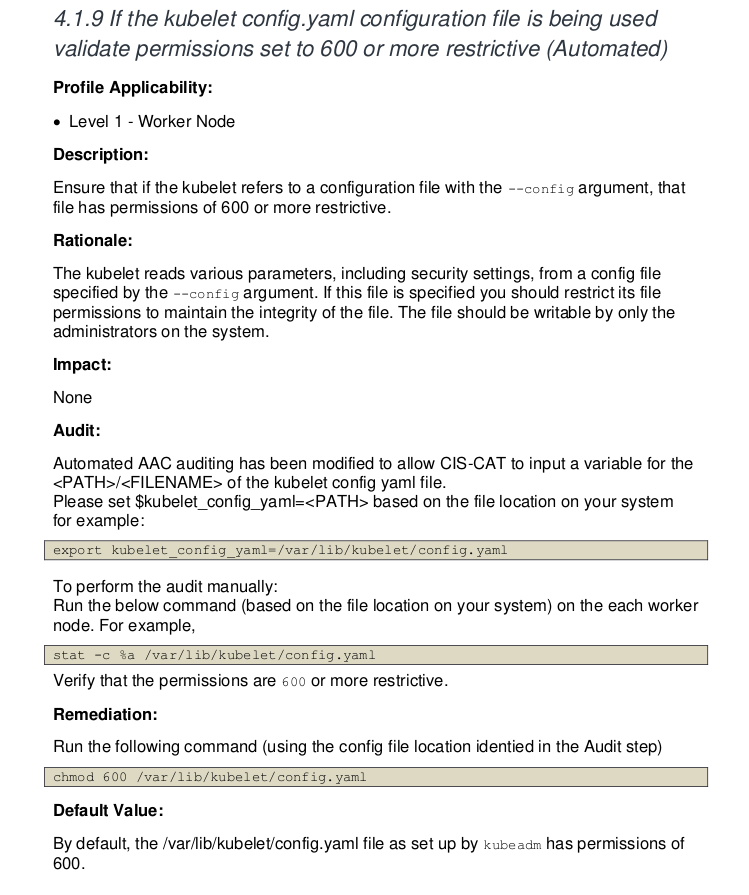
root@cks-worker:/etc/systemd/system# chmod 600 /var/lib/kubelet/config.yaml
# And how we'll skip 4.1.1

root@cks-worker:/etc/systemd/system# docker run --rm --pid=host   -v /etc:/etc:ro   -v /var:/var:ro   -v $(which kubectl):/usr/local/mount-from-host/bin/kubectl   -v /etc/kubernetes/kubelet.conf:/.kube   -e KUBECONFIG=/.kube/config   docker.io/aquasec/kube-bench:latest run --version 1.30 --targets node --skip="4.1.1" --noremediations
[INFO] 4 Worker Node Security Configuration
[INFO] 4.1 Worker Node Configuration Files
[INFO] 4.1.1 Ensure that the kubelet service file permissions are set to 600 or more restrictive (Automated)
[PASS] 4.1.2 Ensure that the kubelet service file ownership is set to root:root (Automated)
[WARN] 4.1.3 If proxy kubeconfig file exists ensure permissions are set to 600 or more restrictive (Manual)
[WARN] 4.1.4 If proxy kubeconfig file exists ensure ownership is set to root:root (Manual)
[PASS] 4.1.5 Ensure that the --kubeconfig kubelet.conf file permissions are set to 600 or more restrictive (Automated)
[PASS] 4.1.6 Ensure that the --kubeconfig kubelet.conf file ownership is set to root:root (Automated)
[WARN] 4.1.7 Ensure that the certificate authorities file permissions are set to 600 or more restrictive (Manual)
[PASS] 4.1.8 Ensure that the client certificate authorities file ownership is set to root:root (Manual)
[PASS] 4.1.9 If the kubelet config.yaml configuration file is being used validate permissions set to 600 or more restrictive (Automated)
[PASS] 4.1.10 If the kubelet config.yaml configuration file is being used validate file ownership is set to root:root (Automated)
[INFO] 4.2 Kubelet
[PASS] 4.2.1 Ensure that the --anonymous-auth argument is set to false (Automated)
[PASS] 4.2.2 Ensure that the --authorization-mode argument is not set to AlwaysAllow (Automated)
[PASS] 4.2.3 Ensure that the --client-ca-file argument is set as appropriate (Automated)
[PASS] 4.2.4 Verify that the --read-only-port argument is set to 0 (Manual)
[PASS] 4.2.5 Ensure that the --streaming-connection-idle-timeout argument is not set to 0 (Manual)
[PASS] 4.2.6 Ensure that the --make-iptables-util-chains argument is set to true (Automated)
[PASS] 4.2.7 Ensure that the --hostname-override argument is not set (Manual)
[PASS] 4.2.8 Ensure that the eventRecordQPS argument is set to a level which ensures appropriate event capture (Manual)
[WARN] 4.2.9 Ensure that the --tls-cert-file and --tls-private-key-file arguments are set as appropriate (Manual)
[PASS] 4.2.10 Ensure that the --rotate-certificates argument is not set to false (Automated)
[PASS] 4.2.11 Verify that the RotateKubeletServerCertificate argument is set to true (Manual)
[WARN] 4.2.12 Ensure that the Kubelet only makes use of Strong Cryptographic Ciphers (Manual)
[WARN] 4.2.13 Ensure that a limit is set on pod PIDs (Manual)
[INFO] 4.3 kube-proxy
[PASS] 4.3.1 Ensure that the kube-proxy metrics service is bound to localhost (Automated)

== Summary node ==
17 checks PASS
0 checks FAIL # <<<<
6 checks WARN
1 checks INFO

== Summary total ==
17 checks PASS
0 checks FAIL # <<<<
6 checks WARN
1 checks INFO
But we don't need to enter a node to do this. We can create a job that runs on nodes and another that runs on masters.
If we have a cluster that runs an auto scaler for the same type of node, the problem we have in one we'll have in all of the same type, so we only need to run once to identify the problems.
Job for the node. We have these jobs on the kube bench github.
---
apiVersion: batch/v1
kind: Job
metadata:
  name: kube-bench-node
spec:
  template:
    spec:
      hostPID: true
      containers:
        - name: kube-bench
          image: docker.io/aquasec/kube-bench:latest
          command: ["kube-bench", "run", "--targets", "node", "--skip=4.1.1"]
          volumeMounts:
            - name: var-lib-cni
              mountPath: /var/lib/cni
              readOnly: true
            - name: var-lib-etcd
              mountPath: /var/lib/etcd
              readOnly: true
            - name: var-lib-kubelet
              mountPath: /var/lib/kubelet
              readOnly: true
            - name: var-lib-kube-scheduler
              mountPath: /var/lib/kube-scheduler
              readOnly: true
            - name: var-lib-kube-controller-manager
              mountPath: /var/lib/kube-controller-manager
              readOnly: true
            - name: etc-systemd
              mountPath: /etc/systemd
              readOnly: true
            - name: lib-systemd
              mountPath: /lib/systemd/
              readOnly: true
            - name: srv-kubernetes
              mountPath: /srv/kubernetes/
              readOnly: true
            - name: etc-kubernetes
              mountPath: /etc/kubernetes
              readOnly: true
              # /usr/local/mount-from-host/bin is mounted to access kubectl / kubelet, for auto-detecting the Kubernetes version.
              # You can omit this mount if you specify --version as part of the command.
            - name: usr-bin
              mountPath: /usr/local/mount-from-host/bin
              readOnly: true
            - name: etc-cni-netd
              mountPath: /etc/cni/net.d/
              readOnly: true
            - name: opt-cni-bin
              mountPath: /opt/cni/bin/
              readOnly: true
      restartPolicy: Never
      volumes:
        - name: var-lib-cni
          hostPath:
            path: "/var/lib/cni"
        - name: var-lib-etcd
          hostPath:
            path: "/var/lib/etcd"
        - name: var-lib-kubelet
          hostPath:
            path: "/var/lib/kubelet"
        - name: var-lib-kube-scheduler
          hostPath:
            path: "/var/lib/kube-scheduler"
        - name: var-lib-kube-controller-manager
          hostPath:
            path: "/var/lib/kube-controller-manager"
        - name: etc-systemd
          hostPath:
            path: "/etc/systemd"
        - name: lib-systemd
          hostPath:
            path: "/lib/systemd"
        - name: srv-kubernetes
          hostPath:
            path: "/srv/kubernetes"
        - name: etc-kubernetes
          hostPath:
            path: "/etc/kubernetes"
        - name: usr-bin
          hostPath:
            path: "/usr/bin"
        - name: etc-cni-netd
          hostPath:
            path: "/etc/cni/net.d/"
        - name: opt-cni-bin
          hostPath:
            path: "/opt/cni/bin/"
root@cks-master:~/default# k apply -f job.yaml
job.batch/kube-bench-node created

# We didn't force going to a specific node because the master won't run any new pod without the correct toleration.

root@cks-master:~/default# k describe pod kube-bench-node-dllwt | grep node
Name:             kube-bench-node-dllwt
                  batch.kubernetes.io/job-name=kube-bench-node
                  job-name=kube-bench-node
Controlled By:  Job/kube-bench-node
      node
Tolerations:                 node.kubernetes.io/not-ready:NoExecute op=Exists for 300s
                             node.kubernetes.io/unreachable:NoExecute op=Exists for 300s
  Normal  Scheduled  5m11s  default-scheduler  Successfully assigned default/kube-bench-node-dllwt to cks-worker ### <<<<< on worker


root@cks-master:~/default# k logs jobs/kube-bench-node
[INFO] 4 Worker Node Security Configuration
[INFO] 4.1 Worker Node Configuration Files
[INFO] 4.1.1 Ensure that the kubelet service file permissions are set to 600 or more restrictive (Automated)
[PASS] 4.1.2 Ensure that the kubelet service file ownership is set to root:root (Automated)
[WARN] 4.1.3 If proxy kubeconfig file exists ensure permissions are set to 600 or more restrictive (Manual)
[WARN] 4.1.4 If proxy kubeconfig file exists ensure ownership is set to root:root (Manual)
[PASS] 4.1.5 Ensure that the --kubeconfig kubelet.conf file permissions are set to 600 or more restrictive (Automated)
[PASS] 4.1.6 Ensure that the --kubeconfig kubelet.conf file ownership is set to root:root (Automated)
[WARN] 4.1.7 Ensure that the certificate authorities file permissions are set to 600 or more restrictive (Manual)
[PASS] 4.1.8 Ensure that the client certificate authorities file ownership is set to root:root (Manual)
[PASS] 4.1.9 If the kubelet config.yaml configuration file is being used validate permissions set to 600 or more restrictive (Automated)
[PASS] 4.1.10 If the kubelet config.yaml configuration file is being used validate file ownership is set to root:root (Automated)
[INFO] 4.2 Kubelet
[PASS] 4.2.1 Ensure that the --anonymous-auth argument is set to false (Automated)
[PASS] 4.2.2 Ensure that the --authorization-mode argument is not set to AlwaysAllow (Automated)
[PASS] 4.2.3 Ensure that the --client-ca-file argument is set as appropriate (Automated)
[PASS] 4.2.4 Verify that the --read-only-port argument is set to 0 (Manual)
[PASS] 4.2.5 Ensure that the --streaming-connection-idle-timeout argument is not set to 0 (Manual)
[PASS] 4.2.6 Ensure that the --make-iptables-util-chains argument is set to true (Automated)
[PASS] 4.2.7 Ensure that the --hostname-override argument is not set (Manual)
[PASS] 4.2.8 Ensure that the eventRecordQPS argument is set to a level which ensures appropriate event capture (Manual)
[WARN] 4.2.9 Ensure that the --tls-cert-file and --tls-private-key-file arguments are set as appropriate (Manual)
[PASS] 4.2.10 Ensure that the --rotate-certificates argument is not set to false (Automated)
[PASS] 4.2.11 Verify that the RotateKubeletServerCertificate argument is set to true (Manual)
[WARN] 4.2.12 Ensure that the Kubelet only makes use of Strong Cryptographic Ciphers (Manual)
[WARN] 4.2.13 Ensure that a limit is set on pod PIDs (Manual)
[INFO] 4.3 kube-proxy
[PASS] 4.3.1 Ensure that the kube-proxy metrics service is bound to localhost (Automated)

== Remediations node ==
4.1.3 Run the below command (based on the file location on your system) on the each worker node.
For example,
chmod 600 /etc/kubernetes/proxy.conf

4.1.4 Run the below command (based on the file location on your system) on the each worker node.
For example, chown root:root /etc/kubernetes/proxy.conf

4.1.7 Run the following command to modify the file permissions of the
--client-ca-file chmod 600 <filename>

4.2.9 If using a Kubelet config file, edit the file to set `tlsCertFile` to the location
of the certificate file to use to identify this Kubelet, and `tlsPrivateKeyFile`
to the location of the corresponding private key file.
If using command line arguments, edit the kubelet service file
/lib/systemd/system/kubelet.service on each worker node and
set the below parameters in KUBELET_CERTIFICATE_ARGS variable.
--tls-cert-file=<path/to/tls-certificate-file>
--tls-private-key-file=<path/to/tls-key-file>
Based on your system, restart the kubelet service. For example,
systemctl daemon-reload
systemctl restart kubelet.service

4.2.12 If using a Kubelet config file, edit the file to set `TLSCipherSuites` to
TLS_ECDHE_ECDSA_WITH_AES_128_GCM_SHA256,TLS_ECDHE_RSA_WITH_AES_128_GCM_SHA256,TLS_ECDHE_ECDSA_WITH_CHACHA20_POLY1305,TLS_ECDHE_RSA_WITH_AES_256_GCM_SHA384,TLS_ECDHE_RSA_WITH_CHACHA20_POLY1305,TLS_ECDHE_ECDSA_WITH_AES_256_GCM_SHA384,TLS_RSA_WITH_AES_256_GCM_SHA384,TLS_RSA_WITH_AES_128_GCM_SHA256
or to a subset of these values.
If using executable arguments, edit the kubelet service file
/lib/systemd/system/kubelet.service on each worker node and
set the --tls-cipher-suites parameter as follows, or to a subset of these values.
--tls-cipher-suites=TLS_ECDHE_ECDSA_WITH_AES_128_GCM_SHA256,TLS_ECDHE_RSA_WITH_AES_128_GCM_SHA256,TLS_ECDHE_ECDSA_WITH_CHACHA20_POLY1305,TLS_ECDHE_RSA_WITH_AES_256_GCM_SHA384,TLS_ECDHE_RSA_WITH_CHACHA20_POLY1305,TLS_ECDHE_ECDSA_WITH_AES_256_GCM_SHA384,TLS_RSA_WITH_AES_256_GCM_SHA384,TLS_RSA_WITH_AES_128_GCM_SHA256
Based on your system, restart the kubelet service. For example:
systemctl daemon-reload
systemctl restart kubelet.service

4.2.13 Decide on an appropriate level for this parameter and set it,
either via the --pod-max-pids command line parameter or the PodPidsLimit configuration file setting.


== Summary node ==
17 checks PASS
0 checks FAIL
6 checks WARN
1 checks INFO

== Summary total ==
17 checks PASS
0 checks FAIL
6 checks WARN
1 checks INFO
Likewise, we can do this for the master, but this time we need this pod to run on the master, passing the correct affinity and toleration.
We didn't even need to skip 4.1.1 because it won't even run the worker part which would be items 4.x.x.
apiVersion: batch/v1
kind: Job
metadata:
  name: kube-bench-master
spec:
  template:
    spec:
      hostPID: true
      ## forcing to go to the master
      affinity:
        nodeAffinity:
          requiredDuringSchedulingIgnoredDuringExecution:
            nodeSelectorTerms:
              - matchExpressions:
                  - key: node-role.kubernetes.io/control-plane
                    operator: Exists
              - matchExpressions:
                  - key: node-role.kubernetes.io/master
                    operator: Exists
      tolerations:
        - key: node-role.kubernetes.io/master
          operator: Exists
          effect: NoSchedule
        - key: node-role.kubernetes.io/control-plane
          operator: Exists
          effect: NoSchedule
      containers:
        - name: kube-bench
          image: docker.io/aquasec/kube-bench:latest
          command: ["kube-bench", "run", "--targets", "master"]
          volumeMounts:
            - name: var-lib-cni
              mountPath: /var/lib/cni
              readOnly: true
            - name: var-lib-etcd
              mountPath: /var/lib/etcd
              readOnly: true
            - name: var-lib-kubelet
              mountPath: /var/lib/kubelet
              readOnly: true
            - name: var-lib-kube-scheduler
              mountPath: /var/lib/kube-scheduler
              readOnly: true
            - name: var-lib-kube-controller-manager
              mountPath: /var/lib/kube-controller-manager
              readOnly: true
            - name: etc-systemd
              mountPath: /etc/systemd
              readOnly: true
            - name: lib-systemd
              mountPath: /lib/systemd/
              readOnly: true
            - name: srv-kubernetes
              mountPath: /srv/kubernetes/
              readOnly: true
            - name: etc-kubernetes
              mountPath: /etc/kubernetes
              readOnly: true
              # /usr/local/mount-from-host/bin is mounted to access kubectl / kubelet, for auto-detecting the Kubernetes version.
              # You can omit this mount if you specify --version as part of the command.
            - name: usr-bin
              mountPath: /usr/local/mount-from-host/bin
              readOnly: true
            - name: etc-cni-netd
              mountPath: /etc/cni/net.d/
              readOnly: true
            - name: opt-cni-bin
              mountPath: /opt/cni/bin/
              readOnly: true
            - name: etc-passwd
              mountPath: /etc/passwd
              readOnly: true
            - name: etc-group
              mountPath: /etc/group
              readOnly: true
      restartPolicy: Never
      volumes:
        - name: var-lib-cni
          hostPath:
            path: "/var/lib/cni"
        - name: var-lib-etcd
          hostPath:
            path: "/var/lib/etcd"
        - name: var-lib-kubelet
          hostPath:
            path: "/var/lib/kubelet"
        - name: var-lib-kube-scheduler
          hostPath:
            path: "/var/lib/kube-scheduler"
        - name: var-lib-kube-controller-manager
          hostPath:
            path: "/var/lib/kube-controller-manager"
        - name: etc-systemd
          hostPath:
            path: "/etc/systemd"
        - name: lib-systemd
          hostPath:
            path: "/lib/systemd"
        - name: srv-kubernetes
          hostPath:
            path: "/srv/kubernetes"
        - name: etc-kubernetes
          hostPath:
            path: "/etc/kubernetes"
        - name: usr-bin
          hostPath:
            path: "/usr/bin"
        - name: etc-cni-netd
          hostPath:
            path: "/etc/cni/net.d/"
        - name: opt-cni-bin
          hostPath:
            path: "/opt/cni/bin/"
        - name: etc-passwd
          hostPath:
            path: "/etc/passwd"
        - name: etc-group
          hostPath:
            path: "/etc/group"
root@cks-master:~/default# k apply -f kube-bench-master.yaml
job.batch/kube-bench-master created

root@cks-master:~/default# k describe pod kube-bench-master-cz7g5 | grep Node
Node:             cks-master/10.128.0.5
Node-Selectors:              <none>

root@cks-master:~/default# k logs jobs/kube-bench-master
[INFO] 1 Control Plane Security Configuration
[INFO] 1.1 Control Plane Node Configuration Files
[PASS] 1.1.1 Ensure that the API server pod specification file permissions are set to 600 or more restrictive (Automated)
[PASS] 1.1.2 Ensure that the API server pod specification file ownership is set to root:root (Automated)
[PASS] 1.1.3 Ensure that the controller manager pod specification file permissions are set to 600 or more restrictive (Automated)
[PASS] 1.1.4 Ensure that the controller manager pod specification file ownership is set to root:root (Automated)
[PASS] 1.1.5 Ensure that the scheduler pod specification file permissions are set to 600 or more restrictive (Automated)
[PASS] 1.1.6 Ensure that the scheduler pod specification file ownership is set to root:root (Automated)
[PASS] 1.1.7 Ensure that the etcd pod specification file permissions are set to 600 or more restrictive (Automated)
[PASS] 1.1.8 Ensure that the etcd pod specification file ownership is set to root:root (Automated)
[WARN] 1.1.9 Ensure that the Container Network Interface file permissions are set to 600 or more restrictive (Manual)
[PASS] 1.1.10 Ensure that the Container Network Interface file ownership is set to root:root (Manual)
[PASS] 1.1.11 Ensure that the etcd data directory permissions are set to 700 or more restrictive (Automated)
[FAIL] 1.1.12 Ensure that the etcd data directory ownership is set to etcd:etcd (Automated)
[FAIL] 1.1.13 Ensure that the default administrative credential file permissions are set to 600 (Automated)
[FAIL] 1.1.14 Ensure that the default administrative credential file ownership is set to root:root (Automated)
[PASS] 1.1.15 Ensure that the scheduler.conf file permissions are set to 600 or more restrictive (Automated)
[PASS] 1.1.16 Ensure that the scheduler.conf file ownership is set to root:root (Automated)
[PASS] 1.1.17 Ensure that the controller-manager.conf file permissions are set to 600 or more restrictive (Automated)
[PASS] 1.1.18 Ensure that the controller-manager.conf file ownership is set to root:root (Automated)
[PASS] 1.1.19 Ensure that the Kubernetes PKI directory and file ownership is set to root:root (Automated)
[WARN] 1.1.20 Ensure that the Kubernetes PKI certificate file permissions are set to 600 or more restrictive (Manual)
[PASS] 1.1.21 Ensure that the Kubernetes PKI key file permissions are set to 600 (Manual)
[INFO] 1.2 API Server
[WARN] 1.2.1 Ensure that the --anonymous-auth argument is set to false (Manual)
[PASS] 1.2.2 Ensure that the --token-auth-file parameter is not set (Automated)
[WARN] 1.2.3 Ensure that the --DenyServiceExternalIPs is set (Manual)
[PASS] 1.2.4 Ensure that the --kubelet-client-certificate and --kubelet-client-key arguments are set as appropriate (Automated)
[FAIL] 1.2.5 Ensure that the --kubelet-certificate-authority argument is set as appropriate (Automated)
[PASS] 1.2.6 Ensure that the --authorization-mode argument is not set to AlwaysAllow (Automated)
[PASS] 1.2.7 Ensure that the --authorization-mode argument includes Node (Automated)
[PASS] 1.2.8 Ensure that the --authorization-mode argument includes RBAC (Automated)
[WARN] 1.2.9 Ensure that the admission control plugin EventRateLimit is set (Manual)
[PASS] 1.2.10 Ensure that the admission control plugin AlwaysAdmit is not set (Automated)
[WARN] 1.2.11 Ensure that the admission control plugin AlwaysPullImages is set (Manual)
[PASS] 1.2.12 Ensure that the admission control plugin ServiceAccount is set (Automated)
[PASS] 1.2.13 Ensure that the admission control plugin NamespaceLifecycle is set (Automated)
[PASS] 1.2.14 Ensure that the admission control plugin NodeRestriction is set (Automated)
[FAIL] 1.2.15 Ensure that the --profiling argument is set to false (Automated)
[FAIL] 1.2.16 Ensure that the --audit-log-path argument is set (Automated)
[FAIL] 1.2.17 Ensure that the --audit-log-maxage argument is set to 30 or as appropriate (Automated)
[FAIL] 1.2.18 Ensure that the --audit-log-maxbackup argument is set to 10 or as appropriate (Automated)
[FAIL] 1.2.19 Ensure that the --audit-log-maxsize argument is set to 100 or as appropriate (Automated)
[WARN] 1.2.20 Ensure that the --request-timeout argument is set as appropriate (Manual)
[PASS] 1.2.21 Ensure that the --service-account-lookup argument is set to true (Automated)
[PASS] 1.2.22 Ensure that the --service-account-key-file argument is set as appropriate (Automated)
[PASS] 1.2.23 Ensure that the --etcd-certfile and --etcd-keyfile arguments are set as appropriate (Automated)
[PASS] 1.2.24 Ensure that the --tls-cert-file and --tls-private-key-file arguments are set as appropriate (Automated)
[PASS] 1.2.25 Ensure that the --client-ca-file argument is set as appropriate (Automated)
[PASS] 1.2.26 Ensure that the --etcd-cafile argument is set as appropriate (Automated)
[WARN] 1.2.27 Ensure that the --encryption-provider-config argument is set as appropriate (Manual)
[WARN] 1.2.28 Ensure that encryption providers are appropriately configured (Manual)
[WARN] 1.2.29 Ensure that the API Server only makes use of Strong Cryptographic Ciphers (Manual)
[INFO] 1.3 Controller Manager
[WARN] 1.3.1 Ensure that the --terminated-pod-gc-threshold argument is set as appropriate (Manual)
[FAIL] 1.3.2 Ensure that the --profiling argument is set to false (Automated)
[PASS] 1.3.3 Ensure that the --use-service-account-credentials argument is set to true (Automated)
[PASS] 1.3.4 Ensure that the --service-account-private-key-file argument is set as appropriate (Automated)
[PASS] 1.3.5 Ensure that the --root-ca-file argument is set as appropriate (Automated)
[PASS] 1.3.6 Ensure that the RotateKubeletServerCertificate argument is set to true (Automated)
[PASS] 1.3.7 Ensure that the --bind-address argument is set to 127.0.0.1 (Automated)
[INFO] 1.4 Scheduler
[FAIL] 1.4.1 Ensure that the --profiling argument is set to false (Automated)
[PASS] 1.4.2 Ensure that the --bind-address argument is set to 127.0.0.1 (Automated)

== Remediations master ==
1.1.9 Run the below command (based on the file location on your system) on the control plane node.
For example, chmod 600 <path/to/cni/files>

1.1.12 On the etcd server node, get the etcd data directory, passed as an argument --data-dir,
from the command 'ps -ef | grep etcd'.
Run the below command (based on the etcd data directory found above).
For example, chown etcd:etcd /var/lib/etcd

1.1.13 Run the below command (based on the file location on your system) on the control plane node.
For example, chmod 600 /etc/kubernetes/admin.conf
On Kubernetes 1.29+ the super-admin.conf file should also be modified, if present.
For example, chmod 600 /etc/kubernetes/super-admin.conf

1.1.14 Run the below command (based on the file location on your system) on the control plane node.
For example, chown root:root /etc/kubernetes/admin.conf
On Kubernetes 1.29+ the super-admin.conf file should also be modified, if present.
For example, chmod 600 /etc/kubernetes/super-admin.conf

1.1.20 Run the below command (based on the file location on your system) on the control plane node.
For example,
chmod -R 600 /etc/kubernetes/pki/*.crt

1.2.1 Edit the API server pod specification file /etc/kubernetes/manifests/kube-apiserver.yaml
on the control plane node and set the below parameter.
--anonymous-auth=false

1.2.3 Edit the API server pod specification file /etc/kubernetes/manifests/kube-apiserver.yaml
on the control plane node and remove the `DenyServiceExternalIPs`
from enabled admission plugins.

1.2.5 Follow the Kubernetes documentation and setup the TLS connection between
the apiserver and kubelets. Then, edit the API server pod specification file
/etc/kubernetes/manifests/kube-apiserver.yaml on the control plane node and set the
--kubelet-certificate-authority parameter to the path to the cert file for the certificate authority.
--kubelet-certificate-authority=<ca-string>

1.2.9 Follow the Kubernetes documentation and set the desired limits in a configuration file.
Then, edit the API server pod specification file /etc/kubernetes/manifests/kube-apiserver.yaml
and set the below parameters.
--enable-admission-plugins=...,EventRateLimit,...
--admission-control-config-file=<path/to/configuration/file>

1.2.11 Edit the API server pod specification file /etc/kubernetes/manifests/kube-apiserver.yaml
on the control plane node and set the --enable-admission-plugins parameter to include
AlwaysPullImages.
--enable-admission-plugins=...,AlwaysPullImages,...

1.2.15 Edit the API server pod specification file /etc/kubernetes/manifests/kube-apiserver.yaml
on the control plane node and set the below parameter.
--profiling=false

1.2.16 Edit the API server pod specification file /etc/kubernetes/manifests/kube-apiserver.yaml
on the control plane node and set the --audit-log-path parameter to a suitable path and
file where you would like audit logs to be written, for example,
--audit-log-path=/var/log/apiserver/audit.log

1.2.17 Edit the API server pod specification file /etc/kubernetes/manifests/kube-apiserver.yaml
on the control plane node and set the --audit-log-maxage parameter to 30
or as an appropriate number of days, for example,
--audit-log-maxage=30

1.2.18 Edit the API server pod specification file /etc/kubernetes/manifests/kube-apiserver.yaml
on the control plane node and set the --audit-log-maxbackup parameter to 10 or to an appropriate
value. For example,
--audit-log-maxbackup=10

1.2.19 Edit the API server pod specification file /etc/kubernetes/manifests/kube-apiserver.yaml
on the control plane node and set the --audit-log-maxsize parameter to an appropriate size in MB.
For example, to set it as 100 MB, --audit-log-maxsize=100

1.2.20 Edit the API server pod specification file /etc/kubernetes/manifests/kube-apiserver.yaml
and set the below parameter as appropriate and if needed.
For example, --request-timeout=300s

1.2.27 Follow the Kubernetes documentation and configure a EncryptionConfig file.
Then, edit the API server pod specification file /etc/kubernetes/manifests/kube-apiserver.yaml
on the control plane node and set the --encryption-provider-config parameter to the path of that file.
For example, --encryption-provider-config=</path/to/EncryptionConfig/File>

1.2.28 Follow the Kubernetes documentation and configure a EncryptionConfig file.
In this file, choose aescbc, kms or secretbox as the encryption provider.

1.2.29 Edit the API server pod specification file /etc/kubernetes/manifests/kube-apiserver.yaml
on the control plane node and set the below parameter.
--tls-cipher-suites=TLS_AES_128_GCM_SHA256,TLS_AES_256_GCM_SHA384,TLS_CHACHA20_POLY1305_SHA256,
TLS_ECDHE_ECDSA_WITH_AES_128_CBC_SHA,TLS_ECDHE_ECDSA_WITH_AES_128_GCM_SHA256,
TLS_ECDHE_ECDSA_WITH_AES_256_CBC_SHA,TLS_ECDHE_ECDSA_WITH_AES_256_GCM_SHA384,
TLS_ECDHE_ECDSA_WITH_CHACHA20_POLY1305,TLS_ECDHE_ECDSA_WITH_CHACHA20_POLY1305_SHA256,
TLS_ECDHE_RSA_WITH_3DES_EDE_CBC_SHA,TLS_ECDHE_RSA_WITH_AES_128_CBC_SHA,TLS_ECDHE_RSA_WITH_AES_128_GCM_SHA256,
TLS_ECDHE_RSA_WITH_AES_256_CBC_SHA,TLS_ECDHE_RSA_WITH_AES_256_GCM_SHA384,TLS_ECDHE_RSA_WITH_CHACHA20_POLY1305,
TLS_ECDHE_RSA_WITH_CHACHA20_POLY1305_SHA256,TLS_RSA_WITH_3DES_EDE_CBC_SHA,TLS_RSA_WITH_AES_128_CBC_SHA,
TLS_RSA_WITH_AES_128_GCM_SHA256,TLS_RSA_WITH_AES_256_CBC_SHA,TLS_RSA_WITH_AES_256_GCM_SHA384

1.3.1 Edit the Controller Manager pod specification file /etc/kubernetes/manifests/kube-controller-manager.yaml
on the control plane node and set the --terminated-pod-gc-threshold to an appropriate threshold,
for example, --terminated-pod-gc-threshold=10

1.3.2 Edit the Controller Manager pod specification file /etc/kubernetes/manifests/kube-controller-manager.yaml
on the control plane node and set the below parameter.
--profiling=false

1.4.1 Edit the Scheduler pod specification file /etc/kubernetes/manifests/kube-scheduler.yaml file
on the control plane node and set the below parameter.
--profiling=false


== Summary master ==
37 checks PASS
11 checks FAIL
11 checks WARN
0 checks INFO

== Summary total ==
37 checks PASS
11 checks FAIL
11 checks WARN
0 checks INFO
Now it's time to fix all of that, go for it!
There are other jobs ready for cloud-managed Kubernetes services, worth checking out on github.
Kube-bench is also used by Trivy, another cloud-native security scanning tool.