AppArmor: Policy-Based Access Control

It is a security module for the Linux kernel that provides policy-based access control. Included in the kernel since version 2.6.36, it has been maintained by Canonical.
It proactively protects the operating system and apps against external or internal threats by preventing failures from being exploited.
It allows the system administrator to define a set of permissions for specific applications, limiting what these applications can do, such as accessing files, using network resources, or interacting with other processes.
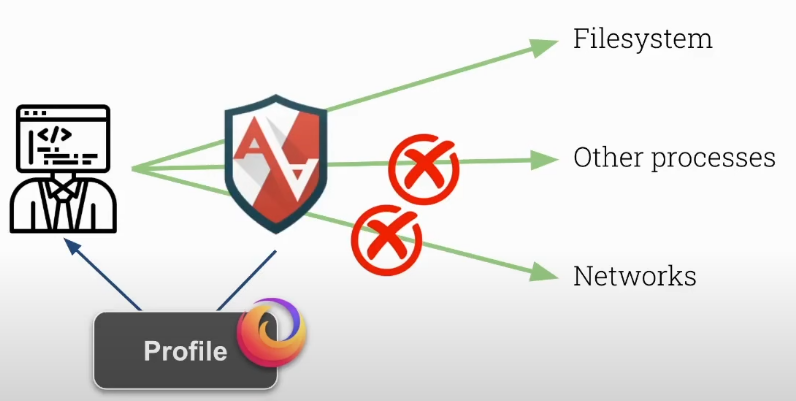
This module comes pre-loaded with the chosen distribution (especially Debian and Ubuntu-based ones) preventing the user from having to install it. It is enabled all the time just waiting to be configured. Other distributions may opt for other alternatives such as SELinux.
To see if your distribution has AppArmor available just run.
root@cks-master:~# systemctl status apparmor.service
● apparmor.service - Load AppArmor profiles
     Loaded: loaded (/lib/systemd/system/apparmor.service; enabled; vendor preset: enabled)
     Active: active (exited) since Tue 2024-09-10 06:45:55 UTC; 1 day 13h ago
       Docs: man:apparmor(7)
             https://gitlab.com/apparmor/apparmor/wikis/home/
   Main PID: 627499 (code=exited, status=0/SUCCESS)
      Tasks: 0 (limit: 4680)
     Memory: 0B
     CGroup: /system.slice/apparmor.service
...
Running the command below we can see if it is loaded and the existing profiles.
root@cks-worker:~# aa-status
apparmor module is loaded.
##### PROFILE BLOCK ####
48 profiles are loaded. # TOTAL
42 profiles are in enforce mode. # List of those in enforce mode
   /snap/snapd/21759/usr/lib/snapd/snap-confine
   /snap/snapd/21759/usr/lib/snapd/snap-confine//mount-namespace-capture-helper
   /usr/bin/man
   /usr/lib/NetworkManager/nm-dhcp-client.action
   /usr/lib/NetworkManager/nm-dhcp-helper
   /usr/lib/connman/scripts/dhclient-script
   /usr/lib/snapd/snap-confine
   /usr/lib/snapd/snap-confine//mount-namespace-capture-helper
   /usr/sbin/chronyd
   /usr/sbin/tcpdump
   /{,usr/}sbin/dhclient
   cri-containerd.apparmor.d
   docker-default
   lsb_release
   man_filter
   man_groff
   nvidia_modprobe
   nvidia_modprobe//kmod
   snap-update-ns.google-cloud-cli
   snap-update-ns.lxd
   snap.lxd.activate
   snap.lxd.benchmark
   snap.lxd.buginfo
   snap.lxd.check-kernel
   snap.lxd.daemon
   snap.lxd.hook.configure
   snap.lxd.hook.install
   snap.lxd.hook.remove
   snap.lxd.lxc
   snap.lxd.lxc-to-lxd
   snap.lxd.lxd
   snap.lxd.migrate
   ubuntu_pro_apt_news
   ubuntu_pro_esm_cache
   ubuntu_pro_esm_cache//apt_methods
   ubuntu_pro_esm_cache//apt_methods_gpgv
   ubuntu_pro_esm_cache//cloud_id
   ubuntu_pro_esm_cache//dpkg
   ubuntu_pro_esm_cache//ps
   ubuntu_pro_esm_cache//ubuntu_distro_info
   ubuntu_pro_esm_cache_systemctl
   ubuntu_pro_esm_cache_systemd_detect_virt
6 profiles are in complain mode. # List of those in complain mode
   snap.google-cloud-cli.anthoscli
   snap.google-cloud-cli.bq
   snap.google-cloud-cli.docker-credential-gcloud
   snap.google-cloud-cli.gcloud
   snap.google-cloud-cli.gsutil
   snap.google-cloud-cli.kubectl
###############################

##### PROCESS BLOCK ####
6 processes have profiles defined. # Processes in the system that have profiles
6 processes are in enforce mode. # Of these 6 processes we have 6 in enforce mode
   /usr/sbin/chronyd (1371)
   /usr/sbin/chronyd (1372)
   /usr/local/apache2/bin/httpd (194962) cri-containerd.apparmor.d
   /usr/local/apache2/bin/httpd (194975) cri-containerd.apparmor.d
   /usr/local/apache2/bin/httpd (194976) cri-containerd.apparmor.d
   /usr/local/apache2/bin/httpd (194977) cri-containerd.apparmor.d
0 processes are in complain mode. # Nothing in complain
0 processes are unconfined but have a profile defined. # Nothing in unconfined
Each app has its profile, actually a profile can be linked to an executable binary.
Each profile, if loaded, can be in one of 3 modes:

Unconfined: allows the process to exit the policy associated with it.Complain: allows the process to exit, but a log will be created.Enforce: The process will only do what it is allowed to do.
For more commands with AppArmor we can install apparmor-utils.
root@cks-worker:~# apt-get install apparmor-utils -y

## Possible commands
root@cks-worker:~# aa-
aa-audit           aa-cleanprof       aa-decode          aa-enabled         aa-exec            aa-logprof         aa-remove-unknown  aa-teardown        aa-update-browser
aa-autodep         aa-complain        aa-disable         aa-enforce         aa-genprof         aa-mergeprof       aa-status          aa-unconfined
- aa-complain: to put a profile in complain mode.
- aa-enforce: to put a profile in enforce mode.
- aa-unconfined: to put a profile in unconfined mode.
- aa-genprof and aa-genprof: to create and delete a profile for an executable.
- aa-logprof: Processes log entries to include rules in the profile.
A bit more about AppArmor can be found at https://debian-handbook.info/browse/stable/sect.apparmor.html.
Profiles are stored in /etc/apparmor.d/.
root@cks-worker:~# ls -l /etc/apparmor.d/
total 104
drwxr-xr-x 2 root root  4096 Sep 10 06:46 abi
drwxr-xr-x 4 root root 12288 Sep 10 06:46 abstractions
drwxr-xr-x 2 root root  4096 Aug 30 21:40 disable
drwxr-xr-x 2 root root  4096 Feb 11  2020 force-complain
drwxr-xr-x 2 root root  4096 Sep 10 06:46 local
-rw-r--r-- 1 root root  1313 Oct 10  2023 lsb_release
-rw-r--r-- 1 root root  1108 Oct 10  2023 nvidia_modprobe
-rw-r--r-- 1 root root  3500 Jan 31  2023 sbin.dhclient # <<<<
drwxr-xr-x 5 root root  4096 Sep 10 06:46 tunables
-rw-r--r-- 1 root root  1724 Jul 18 15:20 ubuntu_pro_apt_news
-rw-r--r-- 1 root root  6853 Jul 18 15:20 ubuntu_pro_esm_cache
-rw-r--r-- 1 root root  3202 Feb 25  2020 usr.bin.man # <<<<
-rw-r--r-- 1 root root 29450 Jul 26 02:58 usr.lib.snapd.snap-confine.real # <<<<
-rw-r--r-- 1 root root  1881 Apr 20  2020 usr.sbin.chronyd # <<<<
-rw-r--r-- 1 root root  1575 Feb 11  2020 usr.sbin.rsyslogd # <<<<
-rw-r--r-- 1 root root  1674 Feb  8  2024 usr.sbin.tcpdump # <<<<
Note that profile names, when not defined, are the binary paths replacing / with ..
Within the /etc/apparmor.d/ directory, we can also find subdirectories.
-
abstractions/: Contains common rules, such as basic file access or network permissions, that can be reused in multiple profiles. -
tunables/: Defines configurable variables, such as standard directories that may vary from system to system (for example, the home directory). -
disable/: This directory stores symbolic links to profiles that have been explicitly disabled. When a link to a profile exists in this directory, AppArmor ignores it during loading.root@cks-worker:/etc/apparmor.d/disable# ls -lha
total 8.0K
drwxr-xr-x 2 root root 4.0K Aug 30 21:40 .
drwxr-xr-x 8 root root 4.0K Sep 10 06:46 ..
lrwxrwxrwx 1 root root 33 Aug 30 21:40 usr.sbin.rsyslogd -> /etc/apparmor.d/usr.sbin.rsyslogd -
force-complain/: Contains symbolic links to profiles that are in "complain" mode. -
local/: Stores local configurations and adjustments for profiles. This directory is used to override or add specific rules to default profiles without modifying the profile file itself. If we look at this directory we have practically files with the same names as the profiles.root@cks-worker:/etc/apparmor.d/local# ls -l
total 4
-rw-r--r-- 1 root root 1111 Oct 10 2023 README
-rw-r--r-- 1 root root 0 Aug 30 21:41 lsb_release
-rw-r--r-- 1 root root 0 Aug 30 21:41 nvidia_modprobe
-rw-r--r-- 1 root root 0 Aug 30 21:40 sbin.dhclient
-rw-r--r-- 1 root root 0 Aug 30 21:40 ubuntu_pro_apt_news
-rw-r--r-- 1 root root 0 Aug 30 21:40 ubuntu_pro_esm_cache
-rw-r--r-- 1 root root 0 Aug 30 21:41 usr.bin.man
-rw-r--r-- 1 root root 0 Aug 30 21:41 usr.lib.snapd.snap-confine.real
-rw-r--r-- 1 root root 0 Aug 30 21:44 usr.sbin.chronyd
-rw-r--r-- 1 root root 0 Aug 30 21:40 usr.sbin.rsyslogd
-rw-r--r-- 1 root root 0 Aug 30 21:41 usr.sbin.tcpdump
Creating a Profile for a Binary
Let's create a profile for curl and test it.
# Testing initially
david@cks-worker:~$ curl devsecops.puziol.com.br
<html>
<head><title>301 Moved Permanently</title></head>
<body>
<center><h1>301 Moved Permanently</h1></center>
<hr><center>cloudflare</center>
</body>
</html>
* Connection #0 to host devsecops.puziol.com.br left intact

# Creating the profile
# At the end it will ask if we should scan the logs to apply possible permissions.
# I will finish without applying anything.
root@cks-worker:~# aa-genprof curl
Writing updated profile for /usr/bin/curl.
Setting /usr/bin/curl to complain mode.

Before you begin, you may wish to check if a
profile already exists for the application you
wish to confine. See the following wiki page for
more information:
https://gitlab.com/apparmor/apparmor/wikis/Profiles

Profiling: /usr/bin/curl

Please start the application to be profiled in
another window and exercise its functionality now.

Once completed, select the "Scan" option below in
order to scan the system logs for AppArmor events.

For each AppArmor event, you will be given the
opportunity to choose whether the access should be
allowed or denied.

[(S)can system log for AppArmor events] / (F)inish
Setting /usr/bin/curl to enforce mode.

Reloaded AppArmor profiles in enforce mode.

Please consider contributing your new profile!
See the following wiki page for more information:
https://gitlab.com/apparmor/apparmor/wikis/Profiles

Finished generating profile for /usr/bin/curl.

# Testing
root@cks-worker:~# curl devsecops.puziol.com.br -v
* Could not resolve host: devsecops.puziol.com.br
* Closing connection 0
curl: (6) Could not resolve host: devsecops.puziol.com.br
curl has no permissions and the default rule is to deny. Once the profile is created it is automatically put into enforce mode.
Let's do some analysis.
root@cks-worker:~# aa-status
apparmor module is loaded.
49 profiles are loaded. # We have one more
43 profiles are in enforce mode.
   /snap/snapd/21759/usr/lib/snapd/snap-confine
   /snap/snapd/21759/usr/lib/snapd/snap-confine//mount-namespace-capture-helper
   /usr/bin/curl #<<<<
   /usr/bin/man
...

# Now let's check the files created.
# In the root it was created
root@cks-worker:~# ls -l /etc/apparmor.d/ | grep curl
-rw------- 1 root root   141 Sep 12 13:15 usr.bin.curl

# But not in local/, meaning it is not automatically created in this directory.
root@cks-worker:~# ls -l /etc/apparmor.d/local/ | grep curl

# And we have our initial profile very limited.
root@cks-worker:~# cat /etc/apparmor.d/usr.bin.curl
# Last Modified: Thu Sep 12 13:14:48 2024
#include <tunables/global>

/usr/bin/curl {
  #include <abstractions/base>

  /usr/bin/curl mr,

}
AppArmor denials are logged in /var/log/syslog (or /var/log/audit/audit.log for non-DBus policy violations if auditd is installed).
The kernel will rate-limit AppArmor denials, which can cause problems during profile creation. You can avoid this by installing auditd or adjusting the rate limit in the kernel:
sysctl -w kernel.printk_ratelimit=0
Let's use AppArmor's own log to include rules in curl. Later we will check these logs to create a profile manually.
# AppArmor will check syslog entries and offer to add permissions
root@cks-worker:/etc/apparmor.d# aa-logprof
Reading log entries from /var/log/syslog.
Updating AppArmor profiles in /etc/apparmor.d.
Enforce-mode changes:

Profile:  /usr/bin/curl
Path:     /etc/ssl/openssl.cnf
New Mode: owner r
Severity: 2

# IT'S OFFERING TO PUT ENTRY 1 OPENSSL IN THE PROFILE AND I WILL ACCEPT BECAUSE IT SEEMS TO MAKE SENSE.

 [1 - #include <abstractions/openssl>]
  2 - #include <abstractions/ssl_keys>
  3 - owner /etc/ssl/openssl.cnf r,
(A)llow / [(D)eny] / (I)gnore / (G)lob / Glob with (E)xtension / (N)ew / Audi(t) / (O)wner permissions off / Abo(r)t / (F)inish
Adding #include <abstractions/openssl> to profile.

Profile:  /usr/bin/curl
Path:     /etc/host.conf
New Mode: owner r
Severity: unknown

# IT WILL CONTINUE ASKING IF I SHOULD PUT NAMESERVICE TOO, THIS TIME I WILL NOT ACCEPT TO TEST.
# FROM HERE ON I WILL DENY EVERYTHING

 [1 - #include <abstractions/nameservice>]
  2 - owner /etc/host.conf r,
(A)llow / [(D)eny] / (I)gnore / (G)lob / Glob with (E)xtension / (N)ew / Audi(t) / (O)wner permissions off / Abo(r)t / (F)inish

Denying via an include file isnt supported by the AppArmor tools

Profile:  /usr/bin/curl
Path:     /etc/host.conf
New Mode: owner r
Severity: unknown

 [1 - #include <abstractions/nameservice>]
  2 - owner /etc/host.conf r,
(A)llow / [(D)eny] / (I)gnore / (G)lob / Glob with (E)xtension / (N)ew / Audi(t) / (O)wner permissions off / Abo(r)t / (F)inish

Denying via an include file isnt supported by the AppArmor tools

Profile:  /usr/bin/curl
Path:     /etc/host.conf
New Mode: owner r
Severity: unknown

 [1 - #include <abstractions/nameservice>]
  2 - owner /etc/host.conf r,
(A)llow / [(D)eny] / (I)gnore / (G)lob / Glob with (E)xtension / (N)ew / Audi(t) / (O)wner permissions off / Abo(r)t / (F)inish

= Changed Local Profiles =

The following local profiles were changed. Would you like to save them?

 [1 - /usr/bin/curl]
(S)ave Changes / Save Selec(t)ed Profile / [(V)iew Changes] / View Changes b/w (C)lean profiles / Abo(r)t
Writing updated profile for /usr/bin/curl.

# Let's check what it put which was openssl
root@cks-worker:/etc/apparmor.d# cat usr.bin.curl
# Last Modified: Thu Sep 12 13:46:48 2024
#include <tunables/global>

/usr/bin/curl {
  #include <abstractions/base>
  #include <abstractions/openssl>

  /usr/bin/curl mr,

}

# It still wasn't enough, because without resolving the names it won't get there,
root@cks-worker:/etc/apparmor.d# curl devsecops.puziol.com.br
curl: (6) Could not resolve host: devsecops.puziol.com.br

# Let's allow the rest

root@cks-worker:/etc/apparmor.d# aa-logprof

root@cks-worker:/etc/apparmor.d# cat usr.bin.curl
# Last Modified: Thu Sep 12 13:52:25 2024
#include <tunables/global>

/usr/bin/curl {
  #include <abstractions/base>
  #include <abstractions/nameservice>
  #include <abstractions/openssl>

  /usr/bin/curl mr,

}

# We got it
root@cks-worker:/etc/apparmor.d# curl devsecops.puziol.com.br
<html>
<head><title>301 Moved Permanently</title></head>
<body>
<center><h1>301 Moved Permanently</h1></center>
<hr><center>cloudflare</center>
</body>
</html>
Enabling and Disabling a Profile
root@cks-worker:# aa-disable curl
Disabling /usr/bin/curl.

# A symbolic link was created
root@cks-worker:/etc/apparmor.d# ls -l /etc/apparmor.d/disable/
total 0
lrwxrwxrwx 1 root root 28 Sep 12 13:53 usr.bin.curl -> /etc/apparmor.d/usr.bin.curl
lrwxrwxrwx 1 root root 33 Aug 30 21:40 usr.sbin.rsyslogd -> /etc/apparmor.d/usr.sbin.rsyslogd
To activate you need to put the profile in one of the modes.
root@cks-worker:/etc/apparmor.d# aa-enforce curl
Setting /usr/bin/curl to enforce mode.

# And the link will no longer exist in disable
root@cks-worker:/etc/apparmor.d# ls -l /etc/apparmor.d/disable/
total 0
lrwxrwxrwx 1 root root 33 Aug 30 21:40 usr.sbin.rsyslogd -> /etc/apparmor.d/usr.sbin.rsyslogd
Completely removing a profile involves deleting the file.
root@cks-worker:/etc/apparmor.d# rm -rf usr.bin.curl

## the aa-remove-unknown command removes all profiles that are not in use.
Extra
AppArmor profiles are simple text files. Absolute paths, as well as file globbing, can be used when specifying file access.
Most file access rules specify the type of access that is allowed:
'r'(read)'w'(write)'x'(execute)'m'(memory map as executable)'k'(file locking)'l'(hard link creation)'ix'to execute another program with the new program inheritance policy.'Px'(execute in another profile, after cleaning the environment)'Cx'(execute in a child profile, after cleaning the environment)'Ux'(execute unconfined, after cleaning the environment).
AppArmor supports access controls for:
- files
- Linux capabilities
- network
- mount, remount and umount
- root_pivot
- ptrace
- signal
- DBus
- unix domain sockets
Variables (e.g., @{HOME}) can be defined and manipulated outside the profile (#include <tunables/global> for @{PROC} and @{HOME})
Explicit denial rules are supported to override permission rules, for example, access to @{HOME}/bin/bad.sh is denied with audit due to, audit deny @{HOME}/bin/** mrwkl, although general access to @{HOME} is allowed with @{HOME}/** rw.
Taking advantage of this hook let's explain this /usr/bin/curl mr.
usr.bin/curl
/usr/bin/curl {
  #include <abstractions/base>

  /usr/bin/curl mr,

}
This means the file can be mapped to memory (m) and in read mode (r).
We still have more command line utilities to help us create profiles.
root@cks-worker:/etc/apparmor.d# apt install apparmor-easyprof apparmor-notify apparmor-utils -y
Using easyprof we can create an initial template, nothing too out of scope of genprof but it can be used if necessary to maintain a standard.
# This command only generates output, you need to create the file.
root@cks-worker:/etc/apparmor.d# aa-easyprof /usr/bin/curl
# vim:syntax=apparmor
# AppArmor policy for curl
# ###AUTHOR###
# ###COPYRIGHT###
# ###COMMENT###

#include <tunables/global>

# No template variables specified

"/usr/bin/curl" {
  #include <abstractions/base>

  # No abstractions specified

  # No policy groups specified

  # No read paths specified

  # No write paths specified
}
root@cks-worker:/etc/apparmor.d# aa-easyprof /usr/bin/curl > /etc/apparmor.d/usr.bin.curl
Unlike aa-genprof, aa-easyprof does not load the profile into AppArmor, requiring manual loading. Check with aa-status before applying the command below and you will see that the profile will not be available.
root@cks-worker:/etc/apparmor.d# apparmor_parser /etc/apparmor.d/usr.bin.curl
Another way to create a profile is using the aa-autodep command. If it were for curl we would have aa-autodep curl.
A tool that will help us see the logs produced by AppArmor is aa-notify.
# -s number of days
root@cks-worker:/etc/apparmor.d# aa-notify -s 1
AppArmor denials: 33 (since Wed Sep 11 15:27:25 2024)

# Making it more verbose we have a sample of all the denials we have already had by the curl profile previously.

root@cks-worker:/etc/apparmor.d#
root@cks-worker:/etc/apparmor.d# aa-notify -s 1 -v
Profile: /usr/bin/curl
Operation: open
Name: /etc/ssl/openssl.cnf
Denied: r
Logfile: /var/log/kern.log
(3 found, most recent from 'Thu Sep 12 13:43:28 2024')

Profile: /usr/bin/curl
Operation: create
Denied: create
Family: inet6
Socket type: dgram
Logfile: /var/log/kern.log
(6 found, most recent from 'Thu Sep 12 13:51:13 2024')

Profile: /usr/bin/curl
Operation: open
Name: /etc/host.conf
Denied: r
Logfile: /var/log/kern.log
(6 found, most recent from 'Thu Sep 12 13:51:13 2024')

Profile: /usr/bin/curl
Operation: open
Name: /run/systemd/resolve/stub-resolv.conf
Denied: r
Logfile: /var/log/kern.log
(6 found, most recent from 'Thu Sep 12 13:51:13 2024')

Profile: /usr/bin/curl
Operation: open
Name: /etc/nsswitch.conf
Denied: r
Logfile: /var/log/kern.log
(6 found, most recent from 'Thu Sep 12 13:51:13 2024')

Profile: /usr/bin/curl
Operation: create
Denied: create
Family: inet
Socket type: dgram
Logfile: /var/log/kern.log
(6 found, most recent from 'Thu Sep 12 13:51:13 2024')

AppArmor denials: 33 (since Wed Sep 11 15:27:36 2024)
For more information, please see: https://wiki.ubuntu.com/DebuggingApparmor
The easiest way to start creating a profile is to put it in complain mode. Allow it to do everything, but generate logs so we can allow it along the way. We can also always use aa-logprof for this as mentioned earlier.
Although AppArmor profiles are default-deny by default, adding explicit denial rules can protect against errors.
AppArmor with Docker and Kubernetes
Since containerization is booming today, I think it's worth delving deeper into this subject.
Let's create a profile without using aa-genprof. We are not putting any specific binary for this profile, just permissions.
Let's make some comments in uppercase to differentiate from the #includes.
#include <tunables/global>

# THIS NAME WILL BE USED TO REFERENCE THE PROFILE WHEN WE WANT TO USE IT
profile docker-nginx flags=(attach_disconnected,mediate_deleted) {
  #include <abstractions/base>

  network inet tcp,
  network inet udp,
  network inet icmp,

  deny network raw,

  deny network packet,

  file,
  umount,

  # REMOVING WRITE AND LINK CREATION ACCESS TO THE DIRECTORIES BELOW
  deny /bin/** wl,
  deny /boot/** wl,
  deny /dev/** wl,
  deny /etc/** wl,
  deny /home/** wl,
  deny /lib/** wl,
  deny /lib64/** wl,
  deny /media/** wl,
  deny /mnt/** wl,
  deny /opt/** wl,
  deny /proc/** wl,
  deny /root/** wl,
  deny /sbin/** wl,
  deny /srv/** wl,
  deny /tmp/** wl,
  deny /sys/** wl,
  deny /usr/** wl,

  audit /** w,

  /var/run/nginx.pid w,

  /usr/sbin/nginx ix,

  # REMOVING ACCESS TO SHELLS
  deny /bin/dash mrwklx,
  deny /bin/sh mrwklx,
  deny /usr/bin/top mrwklx,

  # ADDING SOME CAPABILITIES
  capability chown,
  capability dac_override,
  capability setuid,
  capability setgid,
  capability net_bind_service,

  # REMOVING WRITE PERMISSION ON ALL FILES IN /proc, BUT NOT IN SUBDIRECTORIES
  deny @{PROC}/* w,
  # REMOVING WRITE PERMISSION ON ALL DIRECTORIES /proc/<number>/
  deny @{PROC}/{[^1-9],[^1-9][^0-9],[^1-9s][^0-9y][^0-9s],[^1-9][^0-9][^0-9][^0-9]*}/** w,
  # REMOVING WRITE PERMISSION ON ALL DIRECTORIES /proc/sys/** EXCEPT /proc/sys/kernel
  deny @{PROC}/sys/[^k]** w,
  # REMOVING WRITE PERMISSION EXCEPT IN shm** AND /proc/sys/kernel
  deny @{PROC}/sys/kernel/{?,??,[^s][^h][^m]**} w,
  # REMOVING WRITE, LOCK, LINK CREATION AND EXECUTION PERMISSIONS ON /proc/mem,kmem,kcore,sysrg-trigger
  deny @{PROC}/sysrq-trigger rwklx,
  deny @{PROC}/mem rwklx,
  deny @{PROC}/kmem rwklx,
  deny @{PROC}/kcore rwklx,

  # DO NOT ALLOW THE MOUNT COMMAND
  deny mount,

  # REMOVING WRITE, LOCK, LINK CREATION AND EXECUTION PERMISSIONS ON /sys/
  deny /sys/[^f]*/** wklx,
  deny /sys/f[^s]*/** wklx,
  # ONLY WITHIN /sys/fs
  deny /sys/fs/[^c]*/** wklx,
  deny /sys/fs/c[^g]*/** wklx,
  deny /sys/fs/cg[^r]*/** wklx,
  # REMOVING READ, WRITE, LOCK, LINK CREATION, AND EXECUTION PERMISSIONS
  deny /sys/firmware/** rwklx,
  deny /sys/kernel/security/** rwklx,
}
Let's create this profile and make it available.
root@cks-worker:~# vim /etc/apparmor.d/docker-nginx
# Load the profile
root@cks-worker:~# apparmor_parser /etc/apparmor.d/docker-nginx
Let's run nginx in different ways and observe.
# Here we are not passing any profile
root@cks-worker:~# docker run nginx

# Here we will use the security option to pass a profile that doesn't even exist.
# See that it is not possible to start passing a non-existent profile.

root@cks-worker:~# docker run --security-opt apparmor=test nginx
docker: Error response from daemon: failed to create task for container: failed to create shim task: OCI runtime create failed: runc create failed: unable to start container process: error during container init: unable to apply apparmor profile: apparmor failed to apply profile: write /proc/self/attr/apparmor/exec: no such file or directory: unknown.
ERRO[0000] error waiting for container:

# There is the docker profile which is docker-default in addition to the one we loaded docker-nginx.
root@cks-worker:~# aa-status | grep docker
   docker-default
   docker-nginx

# Running with docker-default in detached mode to release the container and perform analysis.
root@cks-worker:~# docker run --security-opt apparmor=docker-default -d nginx
cf92415f4a8f7f1a233a3c80f49efb4e90d863f898149cf5ede7cefb76bd0127

root@cks-worker:~# docker exec -it cf92415f4a8f7f1a233a3c80f49efb4e90d863f898149cf5ede7cefb76bd0127 bash
root@cf92415f4a8f:/# touch test # It was possible to create a file in /root
root@cf92415f4a8f:/# cat /proc/kcore
cat: /proc/kcore: Permission denied
root@cf92415f4a8f:/#

# Testing with docker-nginx. Let's first without detached to see the output.
# We get a permission denied, but the container still remains alive.

root@cks-worker:~# docker run --security-opt apparmor=docker-nginx nginx
/docker-entrypoint.sh: No files found in /docker-entrypoint.d/, skipping configuration
/docker-entrypoint.sh: 13: cannot create /dev/null: Permission denied
2024/09/12 18:49:21 [notice] 1#1: using the "epoll" event method
2024/09/12 18:49:21 [notice] 1#1: nginx/1.27.1
2024/09/12 18:49:21 [notice] 1#1: built by gcc 12.2.0 (Debian 12.2.0-14)
2024/09/12 18:49:21 [notice] 1#1: OS: Linux 5.15.0-1067-gcp
2024/09/12 18:49:21 [notice] 1#1: getrlimit(RLIMIT_NOFILE): 1048576:1048576
2024/09/12 18:49:21 [notice] 1#1: start worker processes
2024/09/12 18:49:21 [notice] 1#1: start worker process 9
2024/09/12 18:49:21 [notice] 1#1: start worker process 10

# Let's run again, but in detached mode and enter the container to test.
root@cks-worker:~# docker run --security-opt apparmor=docker-nginx -d nginx
c8d38a06828b6cfef268e044489f11fe528f7b85a820a3efc8a6915eff8d4b53

root@cks-worker:~# docker exec -it c8d38a06828b6cfef268e044489f11fe528f7b85a820a3efc8a6915eff8d4b53 bash

root@c8d38a06828b:~# touch test
touch: cannot touch 'test': Permission denied # It was not possible to create in /root
root@c8d38a06828b:~# touch /tmp/test # nor in tmp
touch: cannot touch '/tmp/test': Permission denied
root@c8d38a06828b:~# mkdir /test
root@c8d38a06828b:~# cd /test/
root@c8d38a06828b:/test# touch test # But in a folder that was not blocked yes.
root@c8d38a06828b:/test# cat /proc/kcore
cat: /proc/kcore: Permission denied
Understanding how it works in Docker we can move to Kubernetes. If we want to use this in kubernetes, it is necessary that:
- The container runtime supports AppArmor.
- AppArmor is installed on each of the nodes.
- The profile to use is available on each of the nodes.
- AppArmor profile is specified at the container level or at the pod level.
Let's test.
root@cks-master:~# cat nginx.yaml
apiVersion: v1
kind: Pod
metadata:
  creationTimestamp: null
  labels:
    run: nginx
  name: nginx
spec:
  # Pod level.
  # securityContext:
  #   appArmorProfile:
  #     type: Localhost
  #     localhostProfile: docker-nginx
  containers:
  - image: nginx
    name: nginx
    resources: {}
    # Container level
    securityContext:
      appArmorProfile:
        type: Localhost
        localhostProfile: docker-nginx
  dnsPolicy: ClusterFirst
  restartPolicy: Always
status: {}

root@cks-master:~# k apply -f nginx.yaml
pod/nginx created

root@cks-master:~# k exec -it pods/nginx -- bash
# Inside the pod container
root@nginx:/# touch /root/test
touch: cannot touch '/root/test': Permission denied
root@nginx:/# touch /tmp/test
touch: cannot touch '/tmp/test': Permission denied
root@nginx:/#
If a profile that does not exist is specified, the pod will have the status Blocked waiting for the profile to become available.