Clair: An Alternative to Trivy

Clair is a container vulnerability scanner.
Let's get straight to the point and compare Clair with Trivy.
-
Scanning capabilities: Both can scan vulnerabilities in container images, but Clair has a more extensive vulnerability database and can scan a wider range of vulnerabilities.
-
Ease of use: Clair is somewhat more complex to configure and use than Trivy.
-
Integration: Both can be integrated into CI/CD pipelines and DevOps workflows, but Trivy has more integrations with other tools and platforms, such as Kubernetes and Helm.
-
Performance: Trivy is generally faster and lighter than Clair, making it a better choice for organizations with large container environments or those needing fast scanning.
So why use Clair? Each tool uses different approaches to check for vulnerabilities, so using more than one will reduce the chances of missing vulnerabilities. As the saying goes, "better safe than sorry."
But all of this depends on use cases and which tool is best suited to your needs.
Architecture
The easiest way to run Clair is in a local environment.
Clair uses a Postgres database for:
- Vulnerability Storage: Clair maintains a local vulnerability database, obtained from various sources like NVD, Ubuntu, Alpine, Red Hat, etc.
- Image Layer Indexing: When a container image is scanned, each layer is analyzed and the resulting metadata (such as software packages and their versions) is stored in the database.
- Quick Comparison: Using a database, Clair can quickly compare packages detected in an image with known vulnerabilities.

This is one of the differences with Trivy, in terms of ease of use.
It is possible to deploy Clair in a distributed manner, but this is a more advanced feature that should be studied when you better understand the tool's architecture and it is being heavily used. For now, we will use just one database for everything, but it's worth knowing how it really works.
Clair can be deployed in different modes, where COMBO mode is the all-in-one mode, meaning it is not distributed. We can point all components (indexer, matcher, and notifier) to the same database or separate the databases.
With the same database, the configuration would look like this, which is exactly what we are going to do.
...
indexer:
    connstring: "host=clairdb user=clair dbname=clair sslmode=verify-full"
matcher:
    connstring: "host=clairdb user=clair dbname=clair sslmode=verify-full"
    ...
notifier:
    connstring: "host=clairdb user=clair dbname=clair sslmode=verify-full"
...
For separate databases it would look like this.
...
indexer:
    connstring: "host=indexer-clairdb user=clair dbname=clair sslmode=verify-full"
matcher:
    connstring: "host=matcher-clairdb user=clair dbname=clair sslmode=verify-full"
    ...
notifier:
    connstring: "host=notifier-clairdb user=clair dbname=clair sslmode=verify-full"
    ...
Then the architecture would look like this.

If the demand is high enough to require a distributed deployment for each of the processes, indexer, matcher, and notifier could be separated and each with its own database or to a single database, but this would be a bottleneck we wouldn't want.
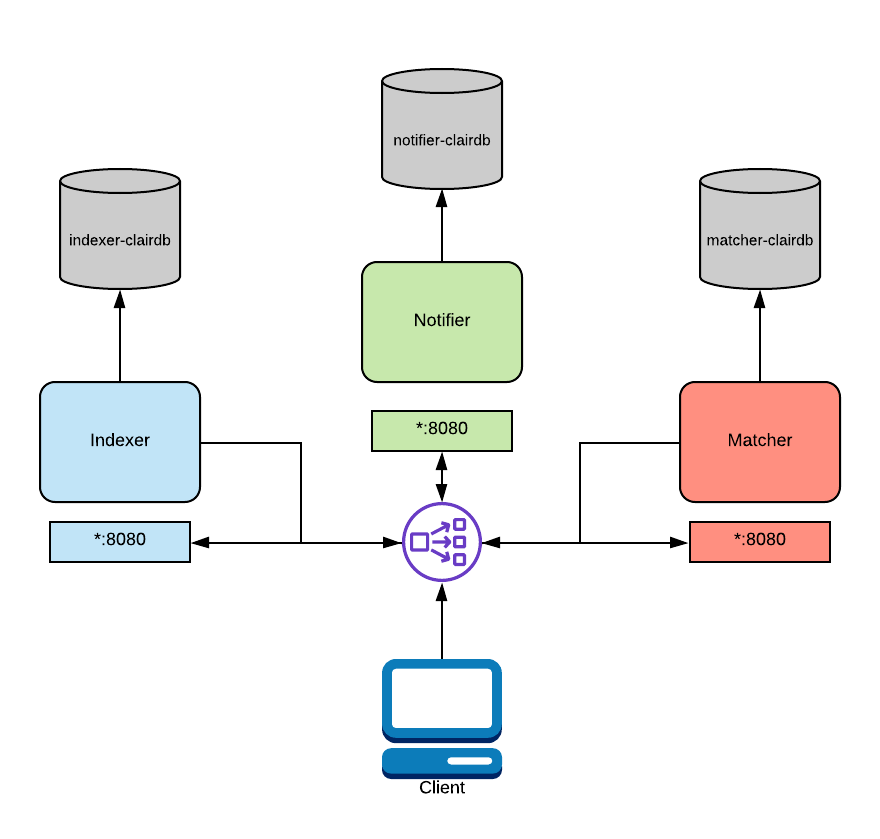
In the diagram above, a load balancer is configured to route traffic from the client to the correct service. This routing is path-based and requires a layer 7 load balancer. Traefik, Nginx, and HAProxy are all capable of this. As mentioned above, this functionality is native to OpenShift and Kubernetes.
Indexer: Indexing involves taking a manifest representing a container image and computing its constituent parts. The indexer is trying to figure out which packages exist in the image, which distribution the image is derived from, and which package repositories are used within the image. Once this information is computed, it is persisted in an IndexReport.Matcher: Runs a set of Updaters that periodically poll their data sources for new content, storing new vulnerabilities in the database when discovered. This service is queried frequently and will provide the most up-to-date VulnerabilityReport when queried. This VulnerabilityReport summarizes both the contents of a manifest and any vulnerabilities affecting the content.Notifier: The notification service will track new updates to the security database and inform an interested client if new or removed vulnerabilities affect an indexed manifest.
In summary, if an image has been computed, the layer data will be saved. If a CVE appears for it in the future, you will be able to know without reanalyzing the images.
Trivy works within the cluster periodically analyzing images, meaning the scan is constant. Clair scans and persists the data, and with the data from each container layer it can know whether it will have the CVE or not.
Deploy
In combo mode, which runs everything in one place, let's create a docker compose to bring up the environment.
version: "3.7"
# This is just to hold a bunch of yaml anchors and try to consolidate parts of
# the config.
x-anchors:
  postgres: &postgres-image docker.io/library/postgres:12
  clair: &clair-image quay.io/projectquay/clair:4.7.4

services:
  combo:
    image: *clair-image
    depends_on:
      clair-database:
        condition: service_healthy
    volumes:
      - "./docker-compose-data/clair-config/:/config/:ro"
      - "./docker-compose-data/clair-tmp/:/tmp/:rw"
    command: ["-conf", "/config/config.yaml"]
    restart: unless-stopped
    environment:
      CLAIR_MODE: "combo"
    networks:
      - clair-network

  clair-database:
    container_name: clair-database
    image: *postgres-image
    environment:
      POSTGRES_DB: clair
      POSTGRES_USER: clair
      POSTGRES_PASSWORD: clair_password
    healthcheck:
      test:
        - CMD-SHELL
        - "pg_isready -U postgres"
      interval: 5s
      timeout: 4s
      retries: 12
      start_period: 10s
    volumes:
      - ./docker-compose-data/postgres-data/:/var/lib/postgresql/data:rw
    networks:
      - clair-network
    restart: unless-stopped
networks:
  clair-network:
    driver: bridge


version: '3'

services:
  clair:
    image: quay.io/projectquay/clair:4.7.4
    restart: unless-stopped
    command: [-config, /config/config.yaml]
    ports:
      - "6060:6060" # Indexer API port
      - "6061:6061" # Matcher API port
    environment:
      - CLAIR_MODE=combo # All services enabled
      - CLAIR_DATABASE_HOST=postgres
      - CLAIR_DATABASE_USER=clair
      - CLAIR_DATABASE_PASSWORD=clair_password
      - CLAIR_DATABASE_NAME=clair
    volumes:
      - ./docker-compose-data/clair-config/:/config/:ro
      - ./docker-compose-data/clair-tmp/:/tmp/:rw
    depends_on:
      postgres:
        condition: service_started
    networks:
      - clair-network

networks:
  clair-network:
    driver: bridge
If you want to install postgres, download clairctl and point the database in the calls and configuration file it works too, but it's much more laborious.
Note that we need a configuration file that we are going to create called clair-config. It's just a key-value file for settings. This file does nothing more than use these keys and values for environment variables.