Authentication

Initial Security Concepts
First, we need to understand some initial concepts about authentication security. Passwords are used for authentication. In a high-security policy, we talk about having at least 3 factors.
- Something you know. In this case, your password.
- Something you have. Something in your possession. If it were a car, it would be the key, but a second password like 2FA, a token, or a hardware device like YubiKey, which we'll discuss later.
- Something you are. This is a characteristic that belongs to you, such as biometrics, retina, face, etc.
I think it's valuable to understand what a hash is before moving forward. A hash should always be used to encode a password and not store it as plain text in a database.
The more security factors we apply in authentication, the more secure it will be.
What to Consider When Creating Passwords?
A brute force attack to discover passwords is very common. It is necessary to follow some security policies both in business and personal contexts.
When you create an account somewhere, have you stopped to think if they use hashes? We don't know. If your password was stored in plain text, anyone with database access will know the password. Even if it's a very strong password, it doesn't matter if someone can read it.
Every year, dozens of sites have their infrastructure compromised, resulting in massive data breaches. Therefore, the first rule we'll outline is the priorities in policy rules.
1- Each password should be used for a single purpose
If the password leaks, you will know exactly where it came from and it won't impact other places.
The site https://haveibeenpwned.com/ records the main leaks on the most important sites. Check if your account appears anywhere.
2 Strong passwords
What is a truly strong password?
- The longer, the better. Fill in as many characters as possible in the password field. A password field today needs to have at least 12 characters for you to "take a risk". Any password below that, when subjected to a brute force attack, can be found in milliseconds. If you thought your bank password only has 6 or 4 digits and find it insecure, what increases security is that sometimes we only have 3 attempts and then it is automatically blocked.
If you read about the hashes part, you'll see that in the case of passwords, well-made sites use derivation algorithms that are slower. To gain speed in the process, hackers collaborate to generate pre-computed tables. They start by taking a large dictionary of English words, generate bcrypt for all of them and save them in a database, and then take each word, concatenate it with millions of different combinations of numbers and special characters before and after, and regenerate the bcrypt for all of them, saving them in the database to increase the base. In addition, they take advantage of leaked databases they find on the dark web to sell, and so on. All this facilitates and speeds up processing the data only once. Knowing this, to make it even more difficult, we can:
-
Use random passwords. Completely random passwords escape the word derivations from the dictionaries mentioned above, forcing the hacker to find it via brute force for the possible combination. We should mix:
- Uppercase letters (26 options in the alphabet)
- Lowercase letters (26 more)
- Numbers (10 more options from 0 to 9)
- Special symbols (a little more than 30 options)
All this generates a total of 92 possible characters. A 12-character password would have 92¹² combinations for it to calculate the hash, and each additional character increases it 92 times.
-
You should not be able to memorize this password. If you can memorize it, then the password is easy.
Add More Layers of Protection
Whenever possible, use 2FA (Two Factor Authentication) together with the password, applying the Something you have factor. A 2FA is a counter-password valid for a short period of 30 seconds. Every time a hacker tries to access any of your accounts protected by 2FA, they will have a second barrier that will have to guess six more random numbers, making it 999,999 times more difficult. Apart from this, there will be a delay in processing for this second barrier, making it unfeasible to continue.
It is important to mention that it is not good to receive the 2FA code via SMS because the cell phone can be stolen and the person can receive the code using your chip in another cell phone until they can recover the number.
There are several apps to generate 2FA, the most common being Google Authenticator, Auth, and Microsoft Authenticator.
A YubiKey is a physical security device manufactured by Yubico, used for 2FA authentication, multi-factor authentication (MFA), and other forms of digital security. It looks like a small flash drive and is designed to protect access to systems, online accounts, and confidential data. It can be used in USB ports, NFC, and even with USB-C connector, depending on the model. It works with various services and platforms, such as Google, Microsoft, GitHub, etc. It supports various protocols such as U2F (Universal 2nd Factor), FIDO2, OTP (One Time Password), and other security standards.
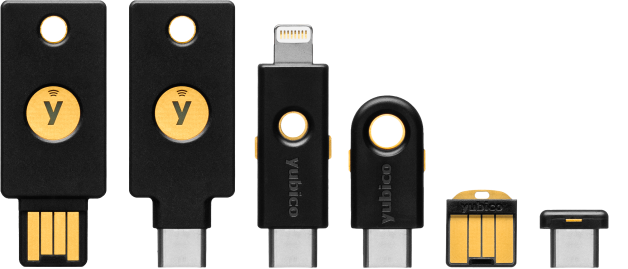
The first and second models differ in USB and USB-C connections but have the same functionality. One of the advantages is that the Y in the middle is used for fingerprint. Using the fingerprint, we allow the device to use MFA, implementing one more security factor: Something you are. Not all places support hardware keys and the usability is not the simplest, requiring a better understanding of this subject.
4 Use a password manager
You must be wondering how to memorize these impossible-to-remember random passwords. I recommend using a good password manager. The browsers themselves have this functionality, but you will need to always use the same browser everywhere due to synchronization.
The ideal is not to have your passwords on anyone's server, but since not everyone has the knowledge for that, then just use what you have.
I usually use Bitwarden as a self-hosted server in my infrastructure. Bitwarden is the open-source password manager. They have a free service on their infrastructure for you to use, but also allow you to have your own in isolation as I do.
Bitwarden can be installed
Locally on the machine...
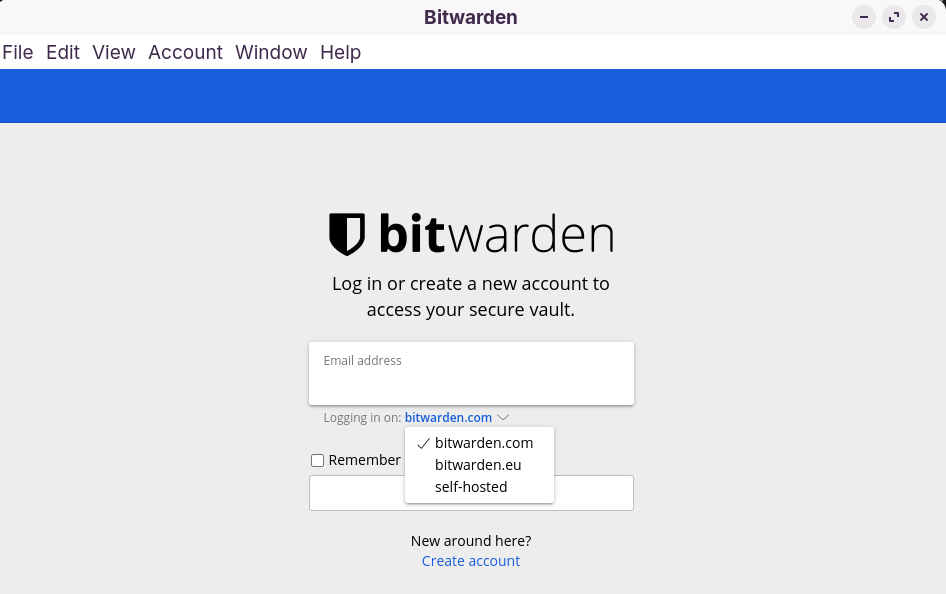
As a browser plugin...

And on your smartphone bitwarden playstore. We can even use the fingerprint to log into the server with this method.
Bitwarden itself can generate the random passwords we mentioned above.

Bitwarden already has support for 2FA in the Authenticator Key (TOTP) field where you put the initial password generated by 2FA and then it keeps generating the counter-password right there.
The only password you need to memorize is the Bitwarden master password, the one that opens the vault for the rest to access the rest of the passwords. In this case, it is always good to use a very long passphrase.
A passphrase is a huge phrase. The longer the better, e.g.: MyFavoriteSeriesIsBreakingBad!
Both Bitwarden and password managers in browsers do auto-fill of password fields, making our lives easier.
There are several free solutions, it doesn't have to be Bitwarden. Even antivirus software like Kaspersky has a password manager, but it's a paid solution.
LastPass and 1Password are very well-known password managers, but they have already suffered breaches. When choosing one, do at least some research on reliability, because if they can't even guarantee their own security, let alone yours.