Workspace Environment
Everyone has their quirks, but here are some tips on what I believe to be MY ideal environment for remote work that has been working well.
One of the great advantages of remote work is personalizing your own workspace.
It's common practice for companies to provide a home office allowance for Internet costs, energy, improvements, etc. This isn't mandatory, but if you can choose a company with this benefit, it would be great.
You would have Internet whether working for the company or not. Pool the money and seek to improve your work environment.
Dedicated Physical Space
Not everyone has the opportunity to reserve an exclusive area at home for work, but if possible, this should be the priority. A place where you can close the door, maintain silence during meetings, and customize everything according to your needs.
It's not essential to invest in acoustic insulation or other amenities, just have a space, even if modest, where it's possible to close the door.
A ceiling fan or air conditioning would be a great addition!
If not feasible, opt for a less busy area of the house, as long as it's possible to close the door and has the items mentioned below, when possible.
Choosing a location with good lighting is essential. Personally, I appreciate a well-lit environment for work.
Chair
When it comes to setting up the ideal space for the home office, choosing the chair is the first priority. A suitable chair not only promotes comfort but also contributes to long-term health and productivity.
Sitting in a good chair will boost your motivation to work!
Items that are essential for ergonomics:
- High backrest.
- Height adjustment.
- Lumbar support adjustment.
- Backrest adjustment for proper back positioning.
- Height and positioning adjustment for armrests.
Secondary items:
- Neck support.
- Reclining feature, rarely used, but good for thinking. Usually a small space won't even allow its use.
- Mesh fabric that prevents sweat buildup and keeps the chair fresher.
Look for chairs with long warranties. Usually, to offer a long warranty, the material needs to be high quality and durable.
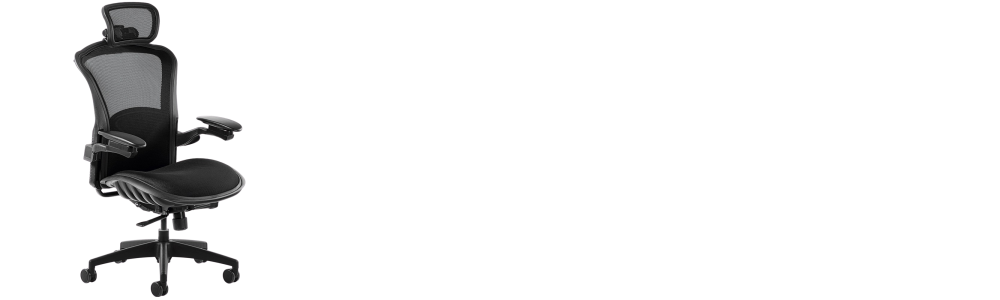
Here's an example of a chair with all the requirements. Does it need to be this one? No, but it serves as a reference.
Computer vs Laptop
Usually, companies provide laptops for work, so there isn't much choice in this regard.
However, if I had to choose a machine to work with, I would still opt for the laptop.
In this profession, I believe we need to always be ready to intervene if a system fails and the team needs immediate help. I usually take my laptop anywhere that's a bit far from my house.
Sometimes, it's good to change environments, and with the laptop, everything becomes easier.
A laptop has a battery, and in case of a power outage, you don't lose your work, staying available to work even using mobile internet. This avoids having to invest in equipment like UPS systems.
A laptop has much fewer ports than a desktop. I strongly recommend expanding the ports with a dock station.
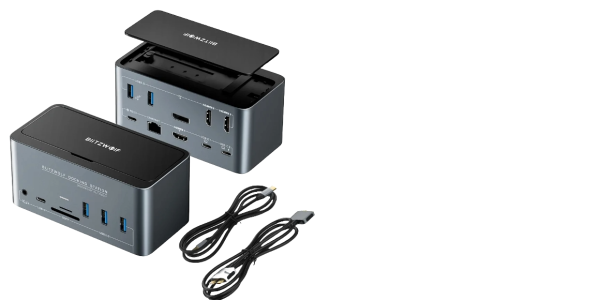
I really like the idea of having all equipment ready, plugging in just one cable. An advantage of this dock station is the possibility of connecting an external hard drive to always keep backups.
Laptop Configuration
This is very personal, but I believe that for running local labs, a machine with at least 32GB of RAM would be most appropriate.
Regarding the processor, choose the best one within your budget.
As for the graphics card, if you want to have one, that's great, but it's not a fundamental item for performing the work.
Monitors
Having an external monitor is crucial for increasing productivity. Working on a larger screen, especially from 24 inches in full HD resolution, provides a significantly better experience.
Personally, I prefer to have two additional monitors besides the laptop display. I usually reserve the laptop screen to keep chat tools and emails open constantly. Using two monitors is valuable for following tutorials, studying, and comparing different projects.
It's important to note that monitors don't need to be gaming type, with high refresh rates or minimal response times. In my case, I have a preference for IPS monitors, but the choice is flexible.
The crucial aspect for a work monitor is its positioning. Opting for monitors with height and tilt angle adjustment is ideal. I personally use monitors with articulated arms, which provides exceptional flexibility and meets my needs very well.
Desk
The key to an efficient work environment is keeping a clean and organized desk, with only essential items: keyboard, mouse, headphones, water bottle, and coffee cup.
What I consider ideal for a work desk:
Dimensions:
- 60cm depth.
- 150cm width.
Organization:
- An integrated cable organizer under the desk.
- A quality power strip attached to the desk. I recommend an 8-port strip clamped to the desk.
Height-adjustable desks, in my opinion, are more marketing-oriented and are more functional for content creators who need to film standing up.
Although a footrest is useful, I believe it's a valuable addition when there's no more room for improvements. The main focus should be on maintaining simplicity and efficiency in arranging essential items for a productive work environment.
Peripherals
Keyboard and mouse are personal items. I prefer to invest in a good mouse and a mechanical keyboard.
I particularly opt for full-size keyboards with a numpad, as they facilitate password typing, especially those related to two-factor authentication (2FA). Keyboard lighting is always welcome. Regarding the choice between wired or wireless, either works. I prefer wired to avoid having another device to charge.
A bad experience I had was trying to use a keyboard with only 68 keys. Some shortcuts I use became harder to access.
When choosing a mouse, it's important to consider the ideal size for your hand. Regarding mice, I prefer wireless models to reduce the amount of cables on the desk. I keep the dongle connected directly to the laptop, instead of using the dock station, so that when removing the laptop, I can easily take the mouse. Opting for a mouse with a sensor that works on any surface is useful, avoiding the need to carry a mousepad.
Regarding headphones, I consider:
- Lightness, but with durability.
- Bluetooth connectivity to continue in a meeting when stepping away from the computer.
- Good quality microphone with noise reduction.
- Long battery life.
The sound quality of the headphones is a personal choice.
I've faced problems with headphones incompatible with Linux. I recommend checking compatibility before purchase, especially if you're using Linux.