Git Flow Workflow
Gitflow is a Git extension. It's a software development workflow for Git.
Any team can have its specific workflow as long as everyone knows it. Gitflow is a workflow proposal already established in large teams that works well, so let's not reinvent the wheel.
It would be a branching methodology to offer a robust structure and management of larger projects.
You can apply gitflow without any extension as long as you know the sequence, but the extension's functionalities make the job easier.
Specific functions are assigned to different branches and it defines when they should interact. In addition to feature branches, it uses individual branches to prepare, maintain, and record releases.
Gitflow is a Git workflow idea. This means it dictates what types of branches to set up and how to do the merging.
Installation
On Windows install git normally as flow is already included.
# Linux ubuntu
sudo apt-get install git-flow
# Mac
brew install git-flow
Auto complete
To use with bash you only need:
sudo apt-get install git bash-completion -y
For zsh and oh my zsh:
wget -O https://sourceforge.net/p/zsh/code/ci/master/tree/Completion/Unix/Command/_git\?format\=raw > _gitflow.zsh
mv _gitflow.zsh ~/.oh-my-zsh/completions/_gitflow.zsh
source ~/.zshrc
Flow Init Command
git flow init
It's an extension of the standard command to initialize a local git repository git init. It doesn't change anything in the repository, except create the branches for you.
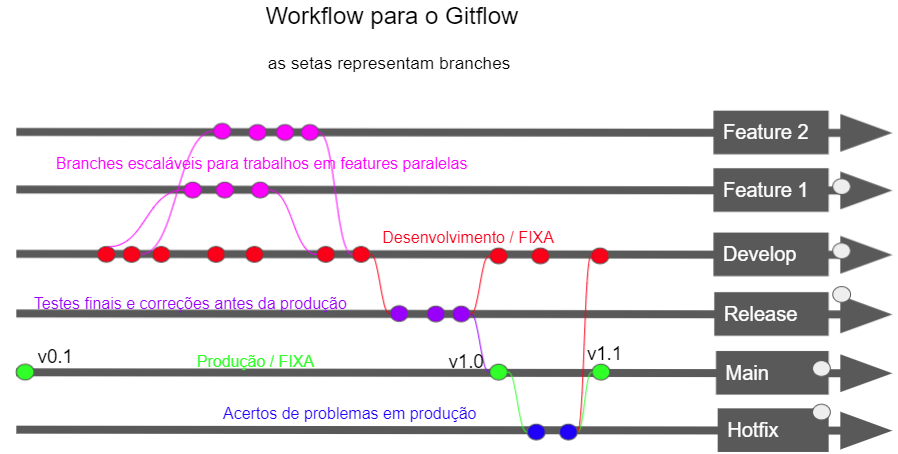
Main branch (main) and development (develop) Instead of a single main branch, this workflow uses two branches to record the project history. The main branch stores the official release history, and the develop branch serves as an integration branch for features. It's also convenient to tag all commits on the main branch with a version number using a tag.
The first thing is to create a develop branch with the commands:
# creates the branch locally
git branch develop
# pushes the branch
git push -u origin develop
If a project was already created with a develop branch in the repository, the above command is not necessary.
A good practice in every project is to create a develop branch in all projects.
This develop branch will contain the complete project history, while the main branch will contain an abbreviated version. Other developers will now need to clone the repository and create a tracking branch for develop.
When using the git-flow extension library, running git flow init in the existing repository will create a development branch:
git flow init
Initialized empty Git repository in ~/project/.git/

No branches exist yet. Base branches must be created now.

Branch name for production releases: [master] main

Branch name for "next release" development: [develop]

How to name your supporting branch prefixes?

Feature branches? [feature/]

Release branches? [release/]

Hotfix branches? [hotfix/]

Support branches? [support/]

Version tag prefix? []
See the output:
git branch

develop

 main
Feature Branches
Each new feature should reside in its own branch, which can be pushed to the project repository. However, instead of being branches from the main branch, feature branches use the most recent develop branch as parent branch. When a feature is completed, it is merged back into the develop branch. Features should never interact directly with the main branch.
To start a new feature it would be:
Without git-flow extensions:
git checkout develop

git checkout -b feature_branch
When using the git-flow extension:
git flow feature start feature_branch
And to finish: Without git-flow extensions:
git checkout develop
git merge feature_branch
When using the git-flow extension:
git flow feature finish feature_branch
Release Branch
When the develop branch has acquired enough features for a release or the release date is approaching, you fork a release branch from development. At this point no new features should be added, only bug fixes and tests, documentation generation and other tasks. When this release is ready, the release branch is merged with the main branch and tagged with a version number. In addition, it should be merged back with the develop branch, which may have progressed since the release was started.
Without git-flow extensions:
git checkout develop

git checkout -b release/0.1.0
When using git-flow extensions:
git flow release start 0.1.0
After ready, the release will be merged into the main branch and develop, and then the release branch will be deleted. The process of merging back with the develop branch is important because important updates may have been added to the release branch and they should be accessible to new features. It's the ideal point for a pull.
To finish the release branch:
Without git-flow extensions:
git checkout main

git merge release/0.1.0
Or, with the git-flow extension:
git flow release finish '0.1.0'
Hotfix Branches
Maintenance or "hotfix" branches are used to quickly fix production releases. Hotfix branches look like release and feature branches, with the difference that they are based from the main branch instead of develop. This is the only branch that should be forked objectively from the main branch. As soon as the fix is completed, it should be merged into both the main branch and the develop branch (or the current release branch) and the main branch should be tagged with an updated version number.
Without git-flow extensions:
git checkout master
git checkout -b hotfix_branch
When using git-flow extensions:
git flow hotfix start hotfix_branch
Just like in finishing the release branch, the hotfix branch is merged into both the main branch and the develop branch.
Without git-flow extensions:
git checkout master
git merge hotfix_branch
git checkout develop
git merge hotfix_branch
git branch -D hotfix_branch
With git-flow:
git flow hotfix finish hotfix_branch
git flow is just a workflow, but the extension makes life easier!