Control Structures
An algorithm is a recipe, your source code. A process is an algorithm in execution. During the processing of the algorithm, many paths (branches) need to happen.
A graphic example of a really crazy algorithm!
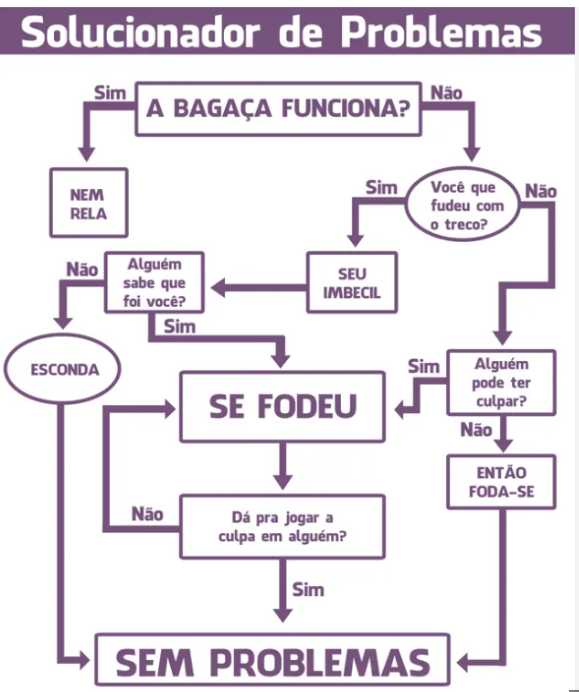
This is a clear example that various paths can be taken.
So let's learn about some conditionals. These conditionals are the same for all languages; what changes is how to declare them.
Code Blocks
A large part of languages use braces { } to delimit blocks and at the end of each line a ; or some other delimiter to notify that the line has ended, looking more or less like this:
statement (condition) {
    first line of block;
    second line of block;
    third line (condition) {
        first line of sub-block;
    }
}
But Python's creator preferred to simplify using only indentation without the and without delimiters.
statement (condition):
    first line of block
    second line of block
    third line (condition):
        first line of sub-block
About indentation, the ideal is to separate with a tab or 4 spaces which is the standard convention used. Most code editors will help with this.
IF (If)
If a condition is true, execute the block below, otherwise execute the other.
It's the most used conditional in any language
Let's make the program above with the first question... Does it work? If it's yes, it will be true, if it's no it will be false. An if only executes the block below if a condition is true and this happens when some return is boolean, true or false.
# Will expect True or false
works = bool(input("Does it work? "))
if works == True:
  print("NO PROBLEM")
else: # Will continue the False (no) block
  ... will continue the program from here
If works is True then it will print NO PROBLEM. Otherwise, continue the program.
We need to understand before continuing how comparators work.
==Will compare if one is equal to the other. It's different from=which assigns the value into a variable.!=Will compare if they're different.>Greater than>=Greater than or equal to<Less than<=Less than or equal toinIs inside. We use more for strings and listsisUsed to check if it is or isn't. Used in strings.
See the example and observe the indentation (alignment) of the block below the if and else. Python needs this indentation to be correct with a tab for example. At the end of the if and else we need to have the :. For Python, it's the notice that the expression that will form the condition has ended.
age = 18

if age >= 18:
### block ####   See that there's a TAB ahead of everything that will be inside this block
    print("You are of legal age.")
    print("Welcome!")
else:
### block ####
    print("You are a minor.")
    print("Sorry, restricted access.")
Now let's imagine in the same example above, if age is less than 10, tell them to go to sleep.
if age >= 18:
### block ####
    print("You are of legal age.")
    print("Welcome!")
else:
### block ####
    if age < 10:
    ### block ####
        print("Go to sleep.")
    else:
    ### block ####
        print("You are a minor.")
        print("Sorry, restricted access.")

print("Continuing...")
There's also the nested conditional structure. It's the idea of if, else if, else if, else if, else if, else, so that the first condition that satisfies will be executed and the rest skipped.
age = 25

if age < 18:
    print("You are a minor.")
elif age >= 18 and age < 21:
    print("You are of legal age, but still cannot drink in the United States.")
elif age >= 21 and age < 65:
    print("You are of legal age and can drink in the United States.")
elif age >= 65:
    print("You are a senior.")
While (While)
Repetition structures we call loops
The while control structure creates a loop in block execution while the condition is true. In our graphic algorithm, the question Can you blame someone else? creates a repetition while they answer No
This time let's create a condition for example comparing a string. While it's not "yes" it won't exit the loop.
# Defining the input value
condition = "no"
while condition != "yes":
    ### Block
    print("YOU'RE SCREWED")
    condition = input("Can you blame someone else? ")
### Outside the block, will execute as soon as while exits
print("NO PROBLEM")
See the example below. It will print a count from 0 to 4, because 5 wouldn't satisfy the condition anymore.
counter = 0
while counter < 5:
    print("Count:", counter)
    # adding 1 to counter
    counter += 1
    # same as counter = counter + 1
print("End of loop!")
If you need to enter the while block to execute at least once, like first do and then ask, it's possible to define a while block as True, i.e., an infinite loop and then check the condition inside the block using if. The magic word that will stop execution is break.
The elif is an "else if" type option. You can have as many elif as you want, but for this scenario with many options we have other control structures. There's no rule, but best practices say that at most 2 elif is enough, above that we'll move to a structure called case that we'll see later.
In the example below we can verify:
- if it's s, stop.
- else, if, it's c, continue.
- else, try again
See the example:
answer = ""
while True:
    answer = input("Type 's' to exit or 'c' to continue: ")
    if answer == 's':
        break
    elif answer == 'c':
        print("Continuing...")
    else:
        print("Invalid option. Try again.")

print("End of loop!")
Exercise 1
Implement all the logic of our graphic algorithm. In this exercise you only need the if else and while controls. The code is in solucionador.py.
Exercise 2
Write a Python program to approve loans for buying a house.
Ask:
- The value of the house
- The buyer's income
- How many years they want to pay for the house
Program output:
- The monthly payment
- Whether they can buy this house or not, being that the payment needs to be less than or equal to 30% of the buyer's salary.
The code is in compra_casa.py.
Exercise 3
Write a program that reads an integer number and asks the user to enter 1, 2, or 3. If they type:
- Convert to binary
- Convert to octal
- Convert to hexadecimal
The code is in converte.py.
Exercise 4
Write a program that enters two numbers and compares which is greater or if they're equal.
The code is in compare.py.
Exercise 5
Read a swimming student's birth date and say which category they belong to:
- up to 9 years is peewee
- up to 14 is child
- up to 19 is junior
- up to 25 is senior
- above 25 is master
The code is in categoria.py.
Another code categoriav2.py takes into account even the day of birth to make the calculation.
Exercise 6
Create a program that plays rock, paper, scissors with you.
The code is in jokenpo.py.
Structure
For (For)
Unlike the while rule, the for loop structure doesn't need something to be true to execute, but a predefined number of executions.
The for loop structure in Python is used to iterate over a sequence of elements, like a list, a string, a range, among others. It executes a code block repeatedly for each element in the sequence.
for element in sequence:
    # code to be executed
Let's analyze each part of this structure:
- The keyword
forstarts the for loop declaration. elementis a variable (could be any other) that will receive the value of each element in the sequence in each iteration.- The keyword in separates the variable from the sequence that will be iterated.
- sequence is a sequence of elements over which the for loop will iterate. It can be a list, a string, a range, a tuple, among others.
It will be done for all items in the list or until it finds a break.
names = ["David", "Maria", "Pedro", "João"]
for name in names:
     print(name)
...
David
Maria
Pedro
João
For example with break:
names = ["David", "Maria", "Pedro", "João"]
for name in names:
     if name == "Pedro":
       break
     else:
        print(name)
...
David
Maria
....
If you want to guarantee the iteration of a list for some predefined times you'll use range.
# what is the range from 0 to 10?
print(list(range(0,10)))
for c in range(0,10):
    print(f"c equals {c}")
...
[0, 1, 2, 3, 4, 5, 6, 7, 8, 9]
c equals 0
c equals 1
c equals 2
c equals 3
c equals 4
c equals 5
c equals 6
c equals 7
c equals 8
c equals 9
....
If you want to print in reverse?
print(list(range(10,0,-1)))
for c in range(10,0,-1):
    print(f"c equals {c}")
...
[10, 9, 8, 7, 6, 5, 4, 3, 2, 1]
c equals 10
c equals 9
c equals 8
c equals 7
c equals 6
c equals 5
c equals 4
c equals 3
c equals 2
c equals 1
...
If you want to skip by 2's still...
print(list(range(10,0,-2)))
for c in range(10,0,-2):
    print(f"c equals {c}")
[10, 8, 6, 4, 2]
c equals 10
c equals 8
c equals 6
c equals 4
c equals 2
Notice one thing, you need to deliver to the for the list you want it to iterate, so always test the list, because if you notice the reversed list I showed doesn't have the same values as the ordered list. One went from 0 to 9 and the other from 0 to 10. Be careful and always do the necessary tests.
Exercise 7
Make a 10-second countdown. The code is in regressiva.py.
Exercise 8
Print only the even numbers and then only the odd numbers from an initial number given by the user to another final number.
The code is in par_impar.py.
This is a very important exercise about performance. The solution above works, but demands more from the processor than the solution below.
The code is in par_imparv2.py.
The difference is that the first attempt executes many more ifs than the second, occupying your processor. If you execute an if inside a loop it will execute EVERY time. In the second example, the ready-made list was already given to for to make the loop.
Another detail is that the first list without range is executed entirely twice, while the second has only half the list.
This is the difference between a beginner and an expert. This type of detail makes a program "light" and run on machines with less processing power. Besides programming experience, the programmer's mathematical maturity makes a difference in this type of thing.
Exercise 9
Add all values that are divisible by 3 and are odd from zero to the input the user chooses.
Pay attention to performance!
The code is in div3_impar.py.
Exercise 10
Check if a number is prime.
Pay attention to performance!
The code is in div3_impar.py.
Exercise 11
In this exercise we'll use lists and tuples. Print the list of children grouped by classroom who attend each of the activities.
Data:
room1 = ["Erik", "Maia", "Gustavo", "Manuel", "Sofia", "Joana"] room2 = ["Joao", "Antonio", "Carlos", "Maria", "Isolda"]
english_class = ["Erik", "Maia", "Joana", "Carlos", "Antonio"] music_class = ["Erik", "Carlos", "Maria"] dance_class = ["Gustavo", "Sofia", "Joana", "Antonio"]
The code is in div3_impar.py.
Now do the same exercise using set and dict.
The code is in div3_impar.py. The code is in div3_impar.py.