Primitive Variables
https://docs.python.org/3/tutorial/introduction.html
Getting straight to the point, let's open a Python console and start understanding how Python recognizes something as a string "text" or if it's a number.
Do various tests in the Python console to learn.
Intentionally, I didn't create any Python scripts so you won't run the script and see the output, but instead execute the commands within the console and get familiar with Python first. This knowledge base should be solidified with lots of practice.
-
Everything that is in double or single quotes is text.
- "Hi, I am text"
-
Like in mathematics
x + y = z, x is a variable just like in the language, and a variable can be anything, from a number with a value, a string (which represents "text"), a boolean that represents True or False, or even a collection of elements. To define a variable:- x = 5
- y = 5.8
- text_test = "Hi, I am text"
- j = True
-
When we reference a variable, we're already getting its value, but if we want to print it to the console, we can use the print() function passing between () what we should print.
-
>>> text_test = "Hi, I am text"
>>> print(text_test)
Hi, I am text
>>>
>>> print("7" + "4")
74 <---- string concatenation, doesn't do the calculation
>>> print(7 + 4)
>>> print("7" + 4)
Traceback (most recent call last):
File "<stdin>", line 1, in <module>
TypeError: can only concatenate str (not "int") to str
# Error because it's trying to add a string with a number
>>> print(int("7") + 4)
11 <---- the int() function transformed 7 string to 7 integer to do the addition
>>> x = 5
>>> y = 4
>>> print (x + y)
9
>>>
-
Dynamically Typed Variables
In Python, variables are dynamically typed, which means you don't need to explicitly declare the type of a variable when defining it. Assigning a value to a variable automatically creates the variable and determines its type based on the assigned value. Additionally, a variable's type can be changed during program execution by simply assigning a value of a different type to it.
What Are Python's Primitive Variable Types?
All information we'll use during programming is represented in the computer's memory through a data type. You'll also hear the terms class or category to refer to the same thing.
All objects in Python are formed by these 3 properties:
- value
"1000010" or "B" - type or class
str, int, float, ... - memory position
the number returned by the id() function
Understand the concept and focus at this moment on understanding int, float, and string. Collection variables will only be used later. The idea of arriving with this knowledge already is to open your mind about what a variable can represent.
In Python, we don't need to declare what data type to use because Python does type inference dynamically. The interpreter first checks what the value looks like and then decides on its own which class to use. You can, if you wish, force the data type explicitly, but this is considered redundant, not wrong.
Integer Numbers (int)
This part of the explanation will be longer, as everything here applies to most other types.
Represent integer values, like 1, 2, -3, etc.
>>> age = 25
>>> type(age)
<class 'int'>
>>> quantity = int(3) # Forces the type, but it's redundant
>>> type(quantity)
<class 'int'>
We can perform a variety of operations with this value. These operations are part of what we call the object's Protocol, and who defines the protocols that the object implements is the int class. If it were another class, as we'll see later, there would be other protocols.
Each class has different protocols, i.e., functions that serve to manipulate its value.
To check everything we can do with an int type object, we can do dir(<type>).
Everything between __ are the class's special attributes and what doesn't have them are public attributes.
>>> dir(int)
['__abs__', '__add__', '__and__', '__bool__', '__ceil__', '__class__', '__delattr__', '__dir__', '__divmod__', '__doc__', '__eq__', '__float__', '__floor__', '__floordiv__', '__format__', '__ge__', '__getattribute__', '__getnewargs__', '__getstate__', '__gt__', '__hash__', '__index__', '__init__', '__init_subclass__', '__int__', '__invert__', '__le__', '__lshift__', '__lt__', '__mod__', '__mul__', '__ne__', '__neg__', '__new__', '__or__', '__pos__', '__pow__', '__radd__', '__rand__', '__rdivmod__', '__reduce__', '__reduce_ex__', '__repr__', '__rfloordiv__', '__rlshift__', '__rmod__', '__rmul__', '__ror__', '__round__', '__rpow__', '__rrshift__', '__rshift__', '__rsub__', '__rtruediv__', '__rxor__', '__setattr__', '__sizeof__', '__str__', '__sub__', '__subclasshook__', '__truediv__', '__trunc__', '__xor__', 'as_integer_ratio', 'bit_count', 'bit_length', 'conjugate', 'denominator', 'from_bytes', 'imag', 'numerator', 'real', 'to_bytes']
The list above displays the names of all attributes of objects stored with the int class. Everything that starts with __ and ends with __ we call dunder methods and they are special attributes of Python's data model. We don't need to use these attributes directly in our code, but it's important to know how this is implemented by Python because through a list of attributes you'll be able to determine what operations that object supports. We will use abstractions that under the hood will make the call to these dunder methods. For example, if you find __add__ it means you can add using +.
>>> price = 10
>>> tax = 2
>>> total = price + tax
>>> total2 = price.__add__(tax)
>>> print(total)
12
>>> print(total2)
12
>>>
At this moment, we won't talk about all of them because there are many and the idea is that gradually you'll understand as you use them, but let's explore a simple example that we'll probably always use.
Floating Point Numbers (float)
Represent decimal values, like 3.14, -0.5, etc. If the number has its decimal part, it must be separated by a . and it will be a float by inference.
>>> value = 5/2
>>> type(value)
<class 'float'>
>>> print(value)
2.5
Character (chr)
To store a character we use chr. A string is a set of characters, so the string "abc" is formed by the characters a b and c.
There are several character tables used in computing, but in this training, we'll stick to just two: ascii and utf8. Each character has its code in the ascii table. You don't need to memorize the table, visit it when needed.

As for the unicode - utf8 table, it includes all characters from all languages including emojis.
chr(65) 'A' chr(66) 'B' chr(67) 'C' fruit = "🍉" fruit.encode("utf-8") b'\xf0\x9f\x8d\x89'
Booleans (bool)
Represent logical values True or False, with the first letter capitalized. By default, True equals 1, False equals 0. An addition will sum their values resulting in a new value, but an and or or operation will generate a boolean result.
  >>> x = True
  >>> y = False
  >>> x + y
  1
  >>> x and y
  False
  >>> x or y
  True
  >>> #--------------------
  >>> x = 1
  >>> y = 0
  >>> x and y
  0
  >>> x or y
  1
  >>>
NoneType
This is a special type used when we don't have a value but need the variable defined because at some point during the program we'll reassign that variable.
>>> name = None
>>> print(name)
None
>>> type(name)
<class 'NoneType'>
>>>
Bytes (bytes)
Represent immutable sequences of bytes, like binary data. A bytes type variable can be used to store binary data, like image files, audio files, encoded messages, among others. They're useful when you need to manipulate data at the byte level, rather than characters. Bytes are individual elements of information that can represent characters, numeric values, or other binary data. A bytes type variable is defined using the b'' notation, where bytes are specified inside single or double quotes. The interpretation of bytes depends on the encoding being used. To convert a byte sequence into a readable string, it's necessary to decode the bytes using an appropriate encoding, like UTF-8, ASCII, UTF-16, among others.
>>># Here we have data in utf-8 binary
>>> data = b'\x48\x65\x6c\x6c\x6f'
>>> print(data)
b'Hello' # See the notation
>>> print(data[0])
72
>>> print(data[1])
101
>>>># I'll try to print something beyond the data chain
>>> print(data[100])
Traceback (most recent call last):
  File "<stdin>", line 1, in <module>
IndexError: index out of range # Out of range
>>># Decoding the bytes and saving in the text variable
>>> text = data.decode('utf-8')
>>> print(text)
Hello
>>># Encoding to utf-16 and seeing what happens
>>> new_data = text.encode('utf-16')
>>> print(new_data)
b'\xff\xfeH\x00e\x00l\x00l\x00o\x00'
>>> text = new_data.decode('utf-16')
>>> print(text)
Hello
>>># Encoding to utf-8 and seeing what happens
>>> new_data = text.encode('utf-8')
>>> print(new_data)
b'Hello'
>>>
- Generally we always work with utf-8 in most cases.
These are Python's primitive types, but you can create your own as we'll see later.
The foundation to start the rest is to understand exactly what Python's variables are. Follow the official documentation and do several tests.
For example, you can do the following in Python:
>>> x = 10  # x is an integer
>>> print(type(x))
<class 'int'>
>>> x = "hello"  # x is now a string
>>> print(type(x))
<class 'str'>
>>> x = 3.14  # x is now a float
>>> print(type(x))
<class 'float'>
>>> x = True  # x is now a bool
>>> print(type(x))
<class 'bool'>
This is different from statically typed languages, where you must explicitly declare a variable's type. This type of approach requires some care.
>>> x: int = 3
>>> y = 3
>>> x + y
6
>>> x = True
>>> x + y
4 # Even though x is now a bool where true means 1, it accepted the addition and I had indicated that variable x should be an integer.
>>> x = "any text"
>>> x + y
Traceback (most recent call last):
  File "<stdin>", line 1, in <module>
TypeError: can only concatenate str (not "int") to str
These are the types of limits you need to know in a language. Being a language that defines variables as dynamically typed gives more power to the programmer, both to solve problems or to make mistakes.
Strings, or Character Chain (str)
Up to here we've talked about isolated characters like A, B, 🍉 but when programming we'll also need to join these characters to form words and sentences. When we create a text type variable in Python, through the presence of quotes, whether single ' or double ", it stores this value in a class of type str and this data type can store one or more characters.
>>> name = "David"
>>> type(name)
<class 'str'>
And as you may have already imagined, here we're storing each of the letters D, a, v, i, d with their respective bytes and positional sequence in a single object (the word string means chain or string).
The word "David" is a list containing in each position a character from the utf8 table.
>>> list(bytes(name, "utf-8"))
[68, 97, 118, 105, 100]
- 68 is
D - 97 is
a - 118 is
v - 105 is
i - 100 is lowercase
d
Well, to store the name "Bruno" once again you don't need to worry about all these details, just do name = "David" and use this text to perform
the operations you want.
Exercises
First try to do it yourself by searching the official documentation for how to do it. If you can't, go to Examples/1-variaveis/ and see the code.
To start off right, it's necessary to have Pylint installed in your VSCode. This will help and enforce the use of best practices.
Exercise 1 - Hello World
- It's good practice for every Python script to end with a blank line.
- It's good practice for literal variables (constants) to be declared as uppercase (UPPER_CASE).
- It's also good practice for every Python script to explain its existence.
- It's good practice that file names don't use
-but_, nor numbers, so hello_world.py should be created and not hello-world.py
Create a script, hello_world.py, with a variable called MSG containing "Hello world!" and print the content of MSG.
Would it work without best practices? Yes... But do you want to learn it right or not?
And besides the documentation comment, called DocString, it's also common to include metadata variables that start and end with 2 underscores __. The word we use to designate these variables is Dunder, therefore Dunder version refers to __version__.
Exercise 2 - Inputs
Create a script, inputs.py, ask for the user's name and show a welcome message.
Details
Pass through lint
In the first exercise, the variable is defined as UPPER_CASE (uppercase) because it's a variable considered to have a constant value, i.e., final, that won't undergo changes. In this exercise, the variable that will receive the person's name should be lower case, i.e., lowercase. Does it work without this? Yes... But you want to learn it right, right?Exercise 3 - Formatting Strings
Copy inputs.py from the previous exercise to format.py and make the name appear in the middle of the string without adding several strings, adding at the end "It's a pleasure to have you here!".
Details
Look for f-string
Both format and f-string solve our problem. The lint already shows to do it with f-string but both codes below work.print(f"Welcome {name} it's a pleasure to have you here!")
print("Welcome {} it's a pleasure to have you here!".format(name))
So yes, something like done below would work, although it's not well done:
name = "David"
age = "37"
email = "[email protected]"
## example 1
print("The email of " + name + " aged " + age + " is " +  email )
## example 2
print("The email of",name,"aged",age,"is",email )
About Inputs
When we read a variable typed by the user using input, if we don't force it to have a type, it will be considered a string. Run the inputs_explain and see the code.
Enter your name: David
Enter your age: 37
name has type <class 'str'>
age has type <class 'str'>
Exercise 4 - Inputs with Integers
Based on the inputs_explain code, create inputs_inteiro.py ensuring that age is an integer, as in the output below.
Enter your name: David
Enter your age: 37
name has type <class 'str'>
age has type <class 'int'> #<-----
Do some tests typing anything other than an integer number in age and see the error.
Exercise 5 - Integer Adder
Create the file inputs_int.py Read two integer type inputs, add the values and store in another variable and print a text showing the input values and the result using f-string in the print() function as done previously in other exercises Do a test typing non-integer values and see the error.
Object
Everything in Python is an object. When a variable is of type string, it's an object of string type class.
When we force an input to be of type int, it's an object of int type class.
Each class has its own methods for manipulating values. With integers, we can do things we can't do with strings and vice versa.
An object contains attributes and methods that manipulate the attribute values.
In the case of a string type variable, which is a string class object, we have the attribute which is the real value of the string and several methods (functions) that work on top of this value.
If you start a Python script in the IDE with the script name already having the .py at the end, the IDE will understand that this is already a Python file and will help you.
When declaring X of string type, when we press the period (.) several possible methods we can use with this value will appear in the IDE. This is one of the advantages of having an IDE prepared to work with a language.
We might want to know if the values of this string are numeric, alphanumeric, if it's uppercase, lowercase, etc. See what an IDE brings us.
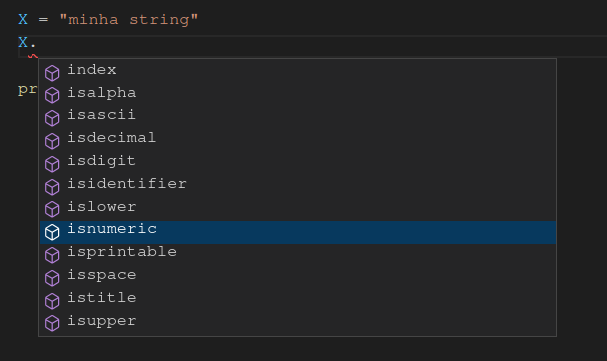
For example, can this X string I declared be transformed into an integer?
See the Python script objetos_string with several tests and execute it.
Exercise 6 - Object
Using an IDE to help you, check the different methods we have when we declare a variable of other types.